先看效果:
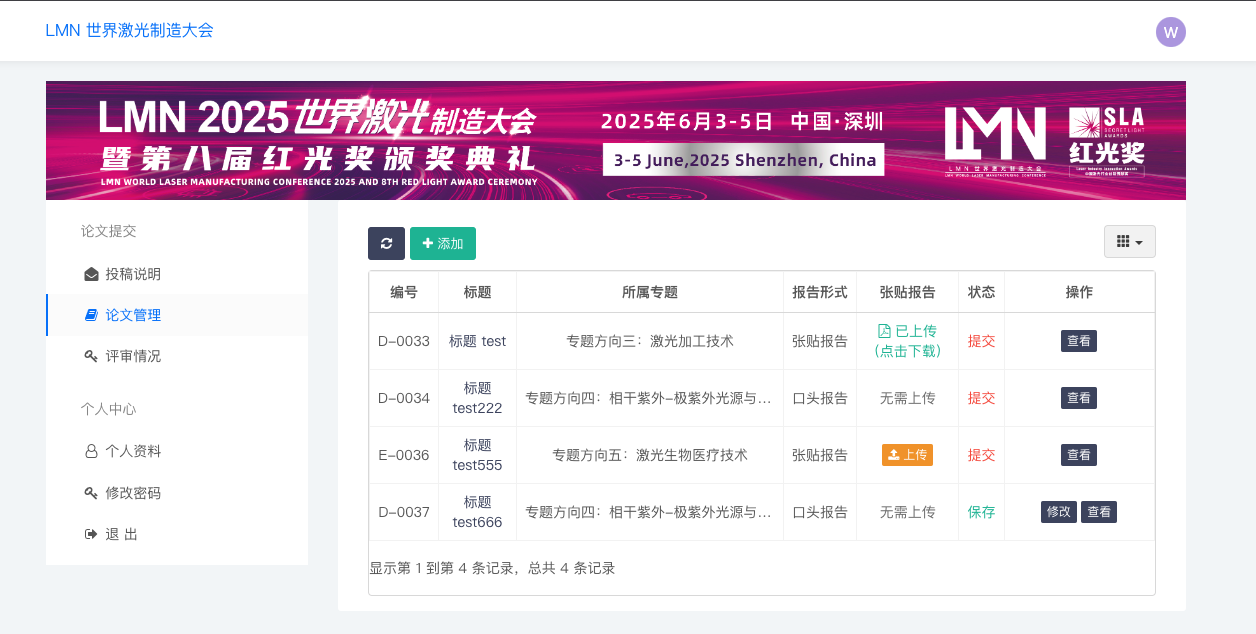
1、前端页面中引入了表格
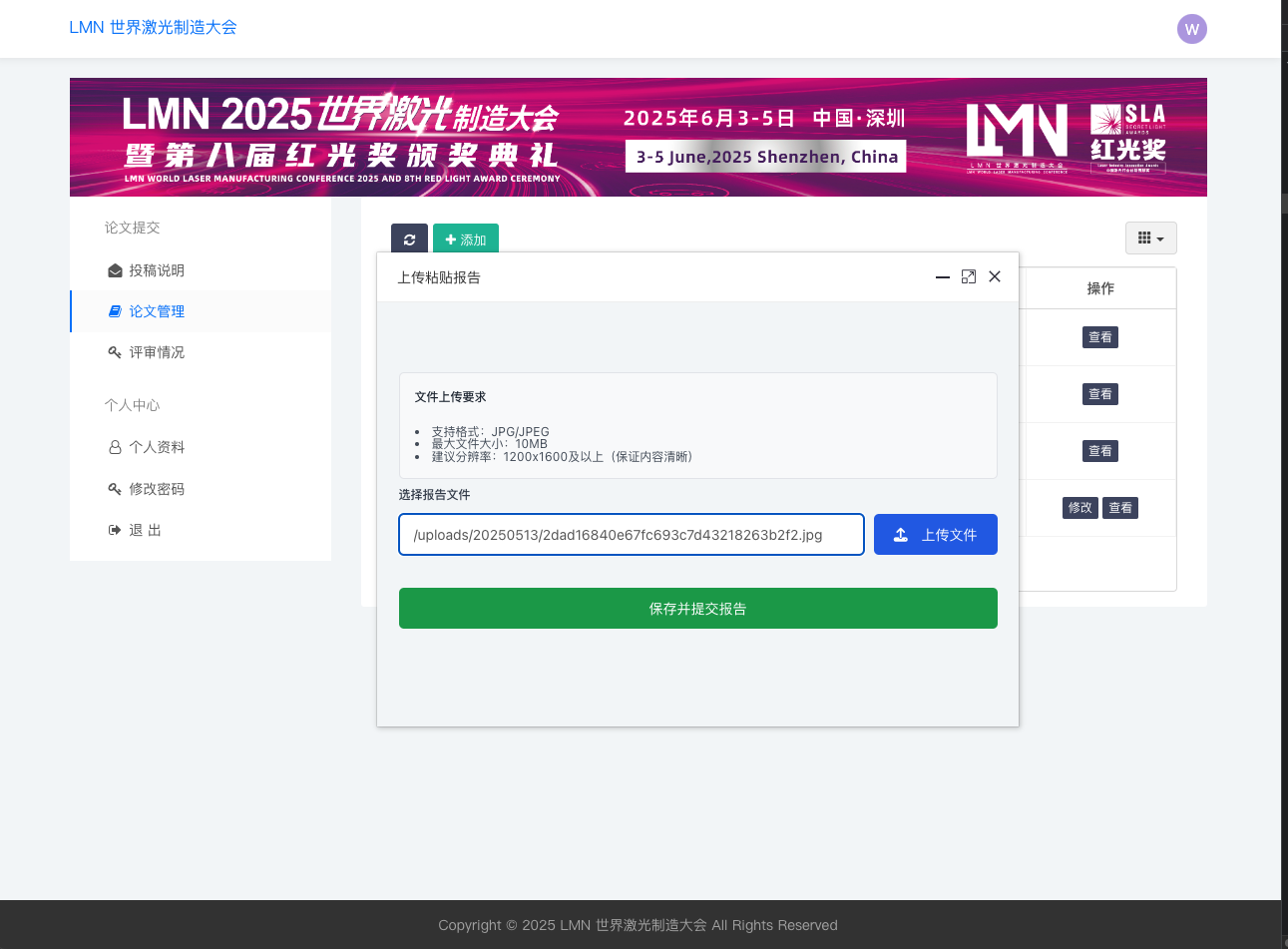
2、表格中实现文件上传
3、增加截止时间页面

难点在哪呢?
1、这是前端页面,并不支持直接使用btn-dialog的类属性实现弹窗;
2、前端页面一般绑定了layout模板,如何实现某个页面不调用公共模板的情况下,保留Form.api.bindevent的核心调用,确保表单验证功能正常;
图1的index引入table
 index:function(){
            require(['table'], function (Table) {

                // 初始化表格参数配置
                Table.api.init({
                    extend: {
                        index_url: 'lunwen/index' + location.search,
                        add_url: '/DAZoRKUuEW.php/lunwen/index/add?user_id='+Config.userinfo.id,
                        edit_url: '/DAZoRKUuEW.php/lunwen/index/xiugai',
                        table: 'lunwen_author',
                    }
                });
                var urlArr = [];
                var multiple = Fast.api.query('multiple');
                multiple = multiple == 'true' ? true : false;

                var table = $("#table");

                // 远程数据加载成功时触发成功。
                table.on('load-success.bs.table', function (e, data) {
                    $('[name="author_ids"]').val(data.rows.map(row=>row.id).join(','));
                });

                // 初始化表格
                table.bootstrapTable({
                    url: $.fn.bootstrapTable.defaults.extend.index_url,
                    sortName: 'id',
                    pk: 'id',
                    uniqueId: 'id', // 指定唯一标识字段为 id
                    showToggle: false,
                    showExport: false,
                    search:false,
                    commonSearch:false,
                    columns: [
                        [
                            {checkbox: true,visible:false},
                            {field: 'id', title: __('Id'),visible:false},
                            {field: 'bianhao', title: __('论文编号'), operate: 'LIKE', table: table, class: 'autocontent', formatter: Table.api.formatter.content},
                            {field: 'zhuti', title: __('论文标题'), searchList: {"male":__('男'),"female":__('女')}, formatter: Table.api.formatter.normal,operate:false},
                            {field: 'zhuanti_text', title: __('所属专题'), operate: 'LIKE', table: table, class: 'autocontent', formatter: Table.api.formatter.content},
                            {field: 'baogao_type', title: __('报告形式'), operate: 'LIKE', table: table, class: 'autocontent', formatter: Table.api.formatter.content},
                            {
                                field: 'upload_poster',
                                title: __('张贴报告'),
                                formatter: function (value, row, index) {
                                    // 1. 口头报告:显示「无需上传」
                                    if (row.baogao_type === '口头报告') {
                                        return `<span class="text-muted">无需上传</span>`;
                                    }
                                    // 2. 张贴报告且已有附件:显示下载链接
                                    if (value) {
                                        return `<a href="${value}" target="_blank" class="text-success">
                                            <i class="fa fa-file-pdf-o"></i> 已上传(点击下载)
                                        </a>`;
                                    }
                                    // 3. 张贴报告且无附件:显示上传按钮
                                    return `<button class="btn btn-xs btn-warning btn-upload-poster faupload"   data-mimetype="jpg,jpeg" data-id="${row.id}">
                                        <i class="fa fa-upload"></i> 上传
                                    </button>`;
                                },
                                operate: false // 禁用搜索和排序
                            },
                            {field: 'status', title: __('Status'), searchList: {"0":__('草稿'),"save":__('保存'),"submit":__('提交')}, formatter: Table.api.formatter.normal},
                            {
                                field: 'buttons',
                                width: "150px",
                                title: __('操作'),
                                table: table,
                                events: Table.api.events.operate,
                                buttons: [
                                    {
                                        name: 'detail',
                                        text: __('修改'),
                                        title: __('修改论文'),
                                        classname: 'btn btn-xs btn-primary btn-dialog',
                                        extend:' target="_blank"',
                                        // icon: 'fa fa-list',
                                        url: '/DAZoRKUuEW.php/lunwen/index/add',
                                        callback: function (data) {
                                            Layer.alert("接收到回传数据:" + JSON.stringify(data), {title: "回传数据"});
                                        },
                                        visible: function (row) {
                                            if(row.status=='submit') return false;
                                            //返回true时按钮显示,返回false隐藏
                                            return true;
                                        }
                                    },
                                    {
                                        name: 'detail',
                                        text: __('查看'),
                                        title: __('查看论文'),
                                        classname: 'btn btn-xs btn-primary btn-dialog',
                                        // icon: 'fa fa-list',
                                        url: '/DAZoRKUuEW.php/lunwen/index/chakan',
                                        extend:' target="_blank"',
                                        callback: function (data) {
                                            Layer.alert("接收到回传数据:" + JSON.stringify(data), {title: "回传数据"});
                                        },
                                        visible: function (row) {
                                            //返回true时按钮显示,返回false隐藏
                                            return true;
                                        }
                                    },
                                ],
                                formatter: Table.api.formatter.buttons
                            }
                        ]
                    ],
                    queryParams:function(params){
                        // var place_id = Fast.api.query('ids');
                        var filter = typeof params.filter == "undefined" ? {} : JSON.parse(params.filter);
                        var op = typeof params.op == "undefined" ? {} : JSON.parse(params.op);
                        filter.user_id = Config.userinfo.id;
                        op.place_id = '=';
                        params.filter = JSON.stringify(filter);
                        params.op = JSON.stringify(op);

                        return params;
                    }
                });


                // 为表格绑定事件
                Table.api.bindevent(table);
            });
        },
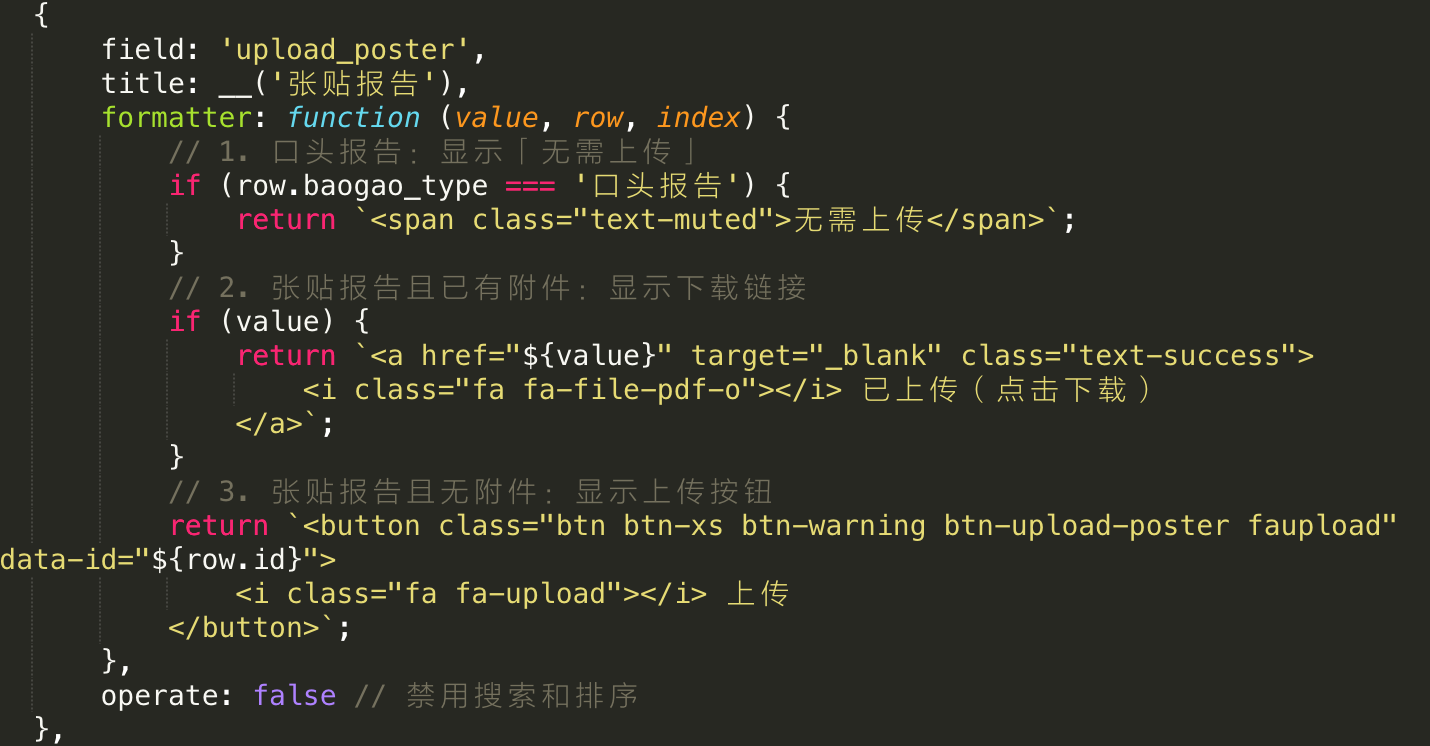
难点1的解决:用表格的formatter方法,根据状态渲染不同的内容,如果是需要上传的,渲染上传按钮
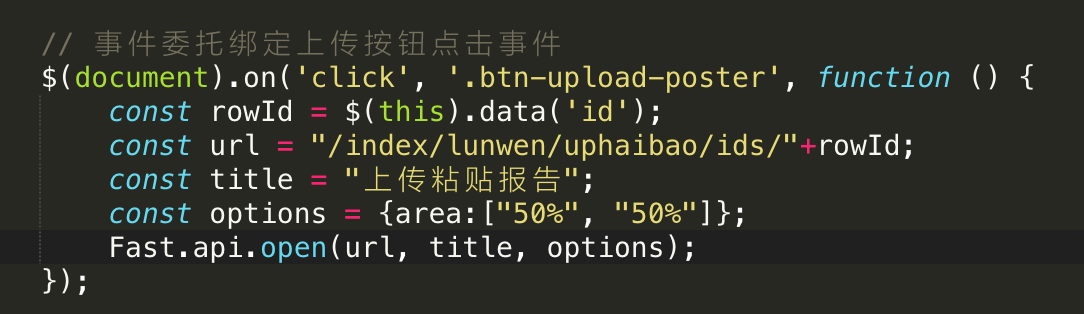
我显示尝试了直接在class里面加入faupload方法,但实际点击没反应。改用事件监听,用Fast.api.open方法打开弹窗:
后端写法:
php
public function uphaibao($ids){
        // 定义截止日期(2025年5月22日23:59:59)
        $deadline = strtotime('2025-05-22 23:59:59');
        $currentTime = time();

        // 统一时间校验逻辑
        if ($currentTime > $deadline) {
            if ($this->request->isGet()) {
                // GET请求时返回提示页面
                $this->view->engine->layout(false);
                return $this->view->fetch('common/deadline', [
                    'message' => '论文海报上传已截止(截止时间:2025年5月22日)'
                ]);
            } else {
                // POST请求时返回错误提示
                $this->error('上传已截止(截止时间:2025年5月22日)');
            }
        }

        $params = $this->request->param();
        if($this->request->isGet()){
            $this->view->engine->layout(false);    // 不使用layout模版
            $this->view->assign('params',$params);
            return $this->view->fetch('uploadposter');
        }
        if($this->request->isPost()){
             $row = LunwenModel::get($params['ids']);
            if(!$row) $this->error('没有找到论文记录');
            $row->upload_poster = $params['upload_file'];
            if($row->save()){
                 $this->success('上传成功');
            }else{
                $this->error('上传失败');
            }
        }
    }
相对应的js文件中加入
php
uphaibao:function(){
            Form.api.bindevent($("#lunwenform"));
        }
重点来了(难点2)
uploadposter.html的模板页,把去头掐尾的内容给补回来!
php
<!DOCTYPE html>
<html>
    <head>
        {include file="common/meta" /}
        <link href="__CDN__/assets/css/user.css?v={$Think.config.site.version|htmlentities}" rel="stylesheet">
        <script src="https://cdn.jsdelivr.net/npm/jquery@3.7.0/dist/jquery.min.js"></script>
        <!--<script src="https://cdn.tailwindcss.com"></script>-->
        <script src="__CDN__/assets/js/tailwindcss.js"></script>
        <link href="https://cdnjs.cloudflare.com/ajax/libs/font-awesome/6.7.2/css/all.min.css" rel="stylesheet">
    </head>

    <body>
        <main class="container mx-auto px-4 py-8">
            <form id="lunwenform" method="POST" action="" enctype="multipart/form-data">
                    <!-- 隐藏业务字段 -->
                    <input type="hidden" name="ids" id="ids" value="{$params.ids ?? ''}">

                    <!-- 上传文件区域 -->
                    <div class="space-y-4">
                        <div class="border border-gray-200 rounded-lg p-6 bg-gray-50">
                            <h3 class="text-lg font-medium text-gray-800 mb-4">文件上传要求</h3>
                            <ul class="list-disc list-inside text-sm text-gray-600">
                                <li>支持格式:JPG/JPEG</li>
                                <li>最大文件大小:10MB</li>
                                <li>建议分辨率:1200x1600及以上(保证内容清晰)</li>
                            </ul>
                        </div>

                        <!-- 上传组件 -->
                        <div class="flex flex-col gap-3">
                            <label class="block text-sm font-medium text-gray-700">选择报告文件</label>
                            <div class="flex items-center gap-4">
                                <input readonly id="c-rowupload" name="upload_file"
                                       class="border-gray-300 rounded-lg shadow-sm flex-1 px-3 py-2"
                                       type="text" placeholder="点击上传按钮选择文件">

                                <button id="faupload-rowupload" class="px-4 py-2 bg-blue-600 text-white rounded-lg hover:bg-blue-700 transition-colors faupload"  data-mimetype="png,jpg,jpeg,gif" data-input-id="c-rowupload"
                                        type="button">
                                    <i class="fa fa-upload mr-2"></i> 上传文件
                                </button>
                            </div>
                            <div id="p-rowupload" class="mt-2 flex gap-3 flex-wrap"></div>
                        </div>
                    </div>

                    <!-- 提交按钮 -->
                    <div class="mt-6">
                        <button type="submit" class="w-full bg-green-600 text-white px-4 py-2 rounded-lg hover:bg-green-700 transition-colors">
                            保存并提交报告
                        </button>
                    </div>
                </form>
            </main>

        {include file="common/script" /}

    </body>

</html>