效果如图所示:
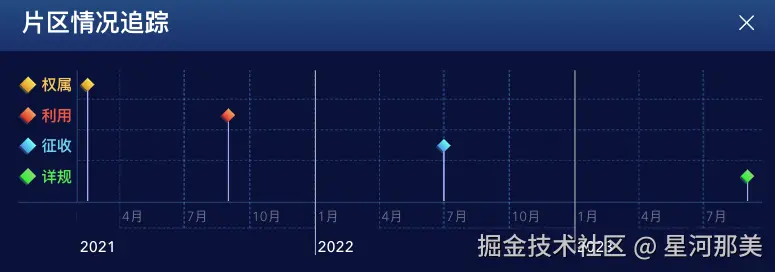
首先是装包
csharp
pnpm add vis-timeline moment引入
javascript
import { DataSet, Timeline } from 'vis-timeline/standalone'
import moment from 'moment'

import 'moment/dist/locale/zh-cn.js'
import 'vis-timeline/styles/vis-timeline-graph2d.min.css'
这里赘述一下 moment的作用是将语言国际化处理
紧接着是option的配置
yaml
  const options = {
    start: new Date(2021, 1, 1),
    orientation: 'bottom',
    showCurrentTime: true,
    zoomable: false,
    moveable: true,
    stack: false,
    margin: {
      item: 20,
      axis: 20,
    },
    type: 'box',
    showMajorLabels: true,
    dataAttributes: 'all',
    locale: 'zh-cn',
    moment (date) {
      return moment(date).utc() // 国际化处理
    },
  }
接着配置 groups items
arduino
  const items = new DataSet(itemsData)
  const groups = new DataSet(groupsData)
数据配置预备好之后 创建实例
arduino
const timeline = new Timeline(timelineContainer.value, items, groups, options)我们这里的需求还要求有点击图标展示弹框 所以还加了弹框的逻辑
javascript
  timeline.on('select', (props) => {
    if (props.items.includes('qs')) {
      return pdfVisible.value = true
    }
    if (props.items.length > 0) {
      visible.value = true
    }
  })
最后为了还原UI图效果 修改了一系列的样式;这里学到一个小tips:在scss里面可以用@extend来继承样式;ok到最后贴下整个文件的代码!
xml
<script setup>
import { Close } from '@element-plus/icons-vue'

import moment from 'moment'
import { DataSet, Timeline } from 'vis-timeline/standalone'
import { onMounted, ref } from 'vue'
import 'moment/dist/locale/zh-cn.js'
import 'vis-timeline/styles/vis-timeline-graph2d.min.css'

const timelineContainer = ref(null)
const visible = ref(false)
const pdfVisible = ref(false)

onMounted(() => {
  // 事件
  const itemsData = [
    { id: 'qs', content: '', start: '2021-2-15', group: '权属', className: 'diamond-qs' },
    { id: 'ly', content: '', start: '2021-09-01', group: '利用', className: 'diamond-ly' },
    { id: 'zs', content: '', start: '2022-07-01', group: '征收', className: 'diamond-zs' },
    { id: 'xg', content: '', start: '2023-09-01', group: '详规', className: 'diamond-xg' },
  ]

  // 分组
  const groupsData = [
    { id: '权属', content: '权属', className: 'group-diamond' },
    { id: '利用', content: '利用', className: 'group-diamond' },
    { id: '征收', content: '征收', className: 'group-diamond' },
    { id: '详规', content: '详规', className: 'group-diamond' },
  ]

  const items = new DataSet(itemsData)
  const groups = new DataSet(groupsData)

  const options = {
    start: new Date(2021, 1, 1),
    orientation: 'bottom',
    showCurrentTime: true,
    zoomable: false,
    moveable: true,
    stack: false,
    margin: {
      item: 20,
      axis: 20,
    },
    type: 'box',
    showMajorLabels: true,
    dataAttributes: 'all',
    locale: 'zh-cn',
    moment (date) {
      return moment(date).utc()
    },
  }

  const timeline = new Timeline(timelineContainer.value, items, groups, options)

  timeline.on('select', (props) => {
    if (props.items.includes('qs')) {
      return pdfVisible.value = true
    }
    if (props.items.length > 0) {
      visible.value = true
    }
  })
})
</script>

<template>
  <div
    ref="timelineContainer"
    class="timeline-container"
  />
  <!-- 详情弹框 -->
  <div
    v-if="visible"
    class="timeline-popup"
  >
    <div class="timeline-popup-header">
      <div>详情</div>
      <el-icon
        class="cursor-pointer"
        @click="visible = false"
      >
        <Close />
      </el-icon>
    </div>
    <div class="timeline-popup-content">
      <div>农转用批文号:浙土字</div>
      <div>农转用总面积:133.56公顷</div>
      <div>重叠面积:22.13公顷</div>
    </div>
  </div>
  <!-- pdf预览弹框 -->
  <Teleport to=".box-content">
    <ElDialog
      v-model="pdfVisible"
      title="PDF预览"
    >
      <iframe
        src="path/to/your/file.pdf"
        width="100%"
        height="600px"
      />
    </ElDialog>
  </Teleport>
</template>

<style scoped lang="scss">
.diamond-common-yellow {
  background-image: linear-gradient(180deg, #FFE05E 0%, #E69319 100%);
  box-shadow: 0 2px 1px 0 rgba(255, 224, 94, 0.3);
  transform: rotate(45deg);
}
.diamond-common-red {
  background-image: linear-gradient(180deg, #FFA35E 0%, #E63C19 100%);
  box-shadow: 0 2px 1px 0 rgba(255, 131, 94, 0.3);
  transform: rotate(45deg);
}
.diamond-common-blue {
  background-image: linear-gradient(180deg, #5EFFF6 0%, #199CE6 100%);
  box-shadow: 0 2px 1px 0 rgba(94, 182, 255, 0.3);
  transform: rotate(45deg);
}
.diamond-common-green {
  background-image: linear-gradient(180deg, #81D87C 0%, #19E638 100%);
  box-shadow: 0 2px 1px 0 rgba(94, 255, 200, 0.3);
  transform: rotate(45deg);
}

.timeline-container {
  padding: 20px;
  position: relative;
}
:deep(.vis-timeline){
  border:none;
}
:deep(.vis-panel.vis-center){
  border-top:none;
  border-right:none;
  border-bottom:1px solid rgba(0, 176, 255, 0.34);
  border-left:1px solid rgba(0, 176, 255, 0.34);
}
:deep(.vis-labelset .vis-label){
  border:none;
}
:deep(.vis-panel.vis-bottom){
  border-right: none;
  border-left: none;
}
:deep(.vis-panel.vis-left){
  border-bottom:1px solid rgba(0, 176, 255, 0.34);
  border-top:none;
}
:deep(.vis-foreground .vis-group){
  border-bottom:dashed rgba(0, 176, 255, 0.3) 0.5px;
}
:deep(.vis-time-axis .vis-grid.vis-minor){
  border:dashed rgba(0, 176, 255, 0.3) 0.5px;
}
:deep(.vis-time-axis .vis-text){
  color:rgba(255, 255, 255, 0.4);
}
:deep(.vis-time-axis .vis-text.vis-major){
  font-weight: 500;
  font-size: 16px;
  color: #FFFFFF;
}
:deep(.vis-labelset .vis-label .vis-inner){
  font-family: AlibabaPuHuiTi_3_75_SemiBold;
  font-weight: 600;
  font-size: 16px;
  color: #FFC557;
  &::before{
    content: '';
    display: inline-block;
    width: 12px;
    height: 12px;
    margin-right: 8px;
    @extend .diamond-common-yellow;
  }
}
:deep(.vis-labelset .vis-label:nth-of-type(2) .vis-inner){
  color:rgba(247, 96, 62, 1);
  &::before{
   @extend .diamond-common-red;
  }
}
:deep(.vis-labelset .vis-label:nth-of-type(3) .vis-inner){
  color:rgba(86, 210, 241, 1);
  &::before{
   @extend .diamond-common-blue;
  }
}
:deep(.vis-labelset .vis-label:nth-of-type(4) .vis-inner){
  color:rgba(75, 223, 89, 1);
  &::before{
    @extend .diamond-common-green;
  }
}
:deep(.vis-item.vis-dot),:deep(.vis-item.vis-box){
  background-color: transparent;
  border-color: transparent;
  width: 12px;
  height: 12px;
  cursor: pointer;
}
:deep(.vis-item.vis-point.vis-selected){
 background-color: transparent;
}
:deep(.diamond-qs .vis-item-content){
   @extend .diamond-common-yellow;
}
:deep(.diamond-ly .vis-item-content){
   @extend .diamond-common-red;
}
:deep(.diamond-zs .vis-item-content){
   @extend .diamond-common-blue;
}
:deep(.diamond-xg .vis-item-content){
   @extend .diamond-common-green;
}
.timeline-popup{
  position: absolute;
  top: 50%;
  left: 50%;
  transform: translate(-50%, -50%);
  width: 258px;
  height: 128px;
  background-image: linear-gradient(180deg, rgba(33, 171, 243, 0.4) 0%, rgba(0, 100, 182, 0.4) 100%);
  border: 1px solid rgba(156, 241, 255, 0.27);
  border-radius: 4px;
  color: white;
  .timeline-popup-header{
    border-bottom:solid 1px rgba(33, 171, 243, 1);
    font-weight: 400;
    font-size: 16px;
    color: #FFFFFF;
    padding: 0 16px;
    display: flex;
    justify-content: space-between;
    align-items: center;
  }
  .timeline-popup-content{
    padding: 10px 15px;
  }
}
.pdf-popup{

}
</style>贴下网上找的中文文档blog.csdn.net/weixin_3830...