天地图应用篇:增加全屏、图层选择功能
本节说明:
目的:
- 实现地图的图层切换
- 全屏显示 / 退出全屏
案例截图
- 示下:
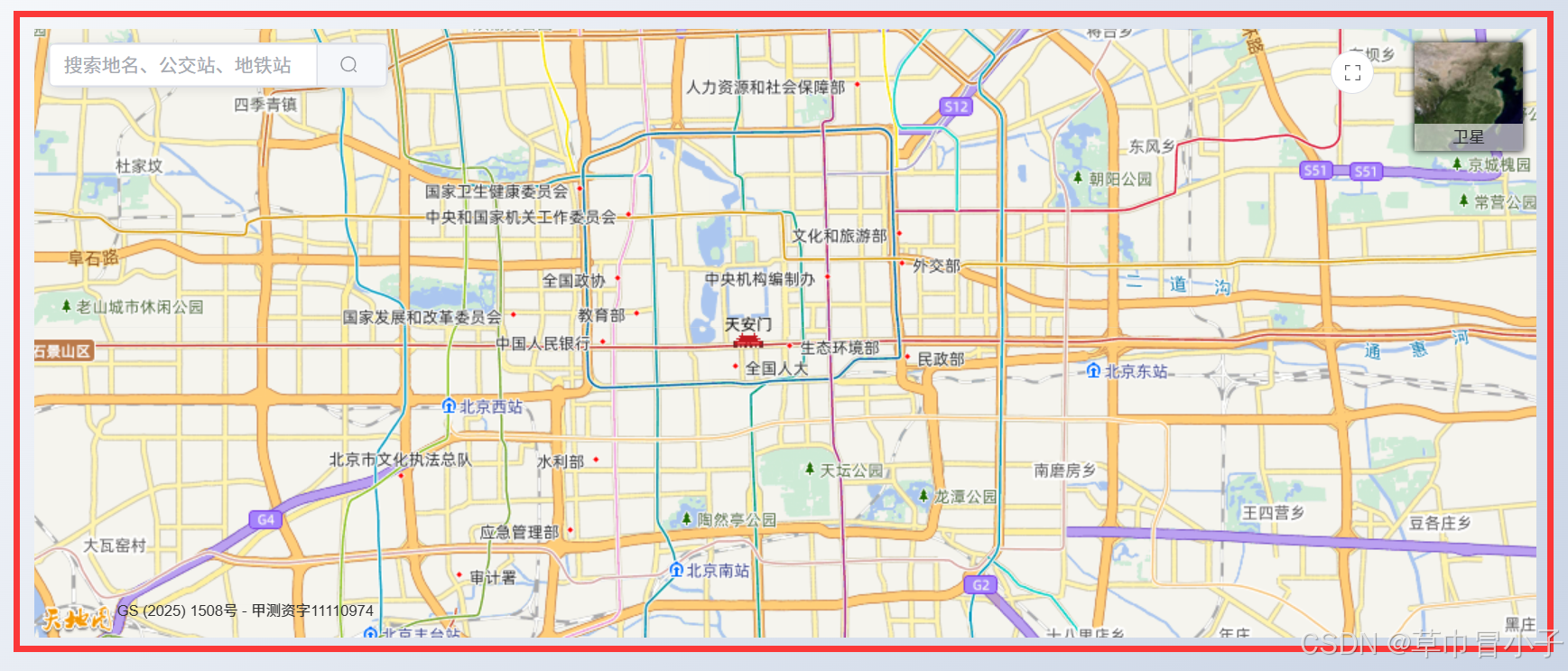
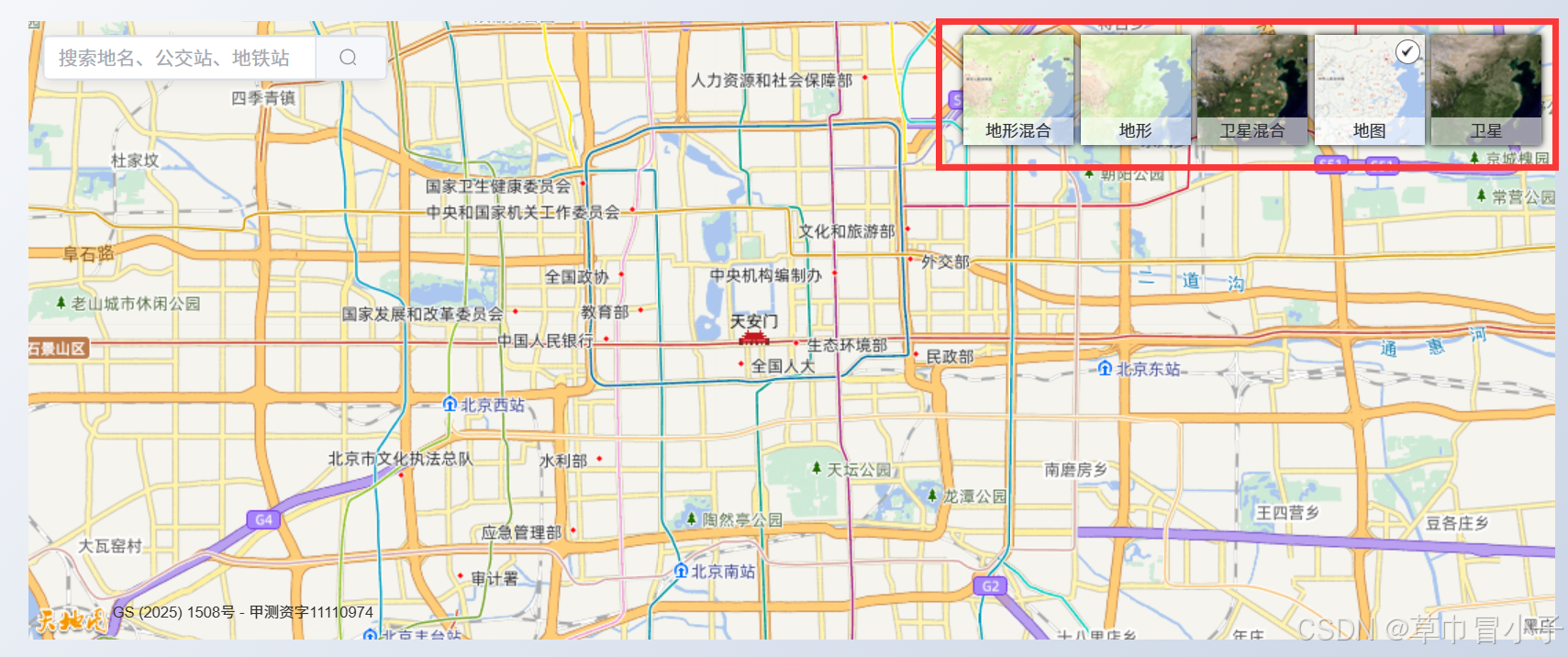
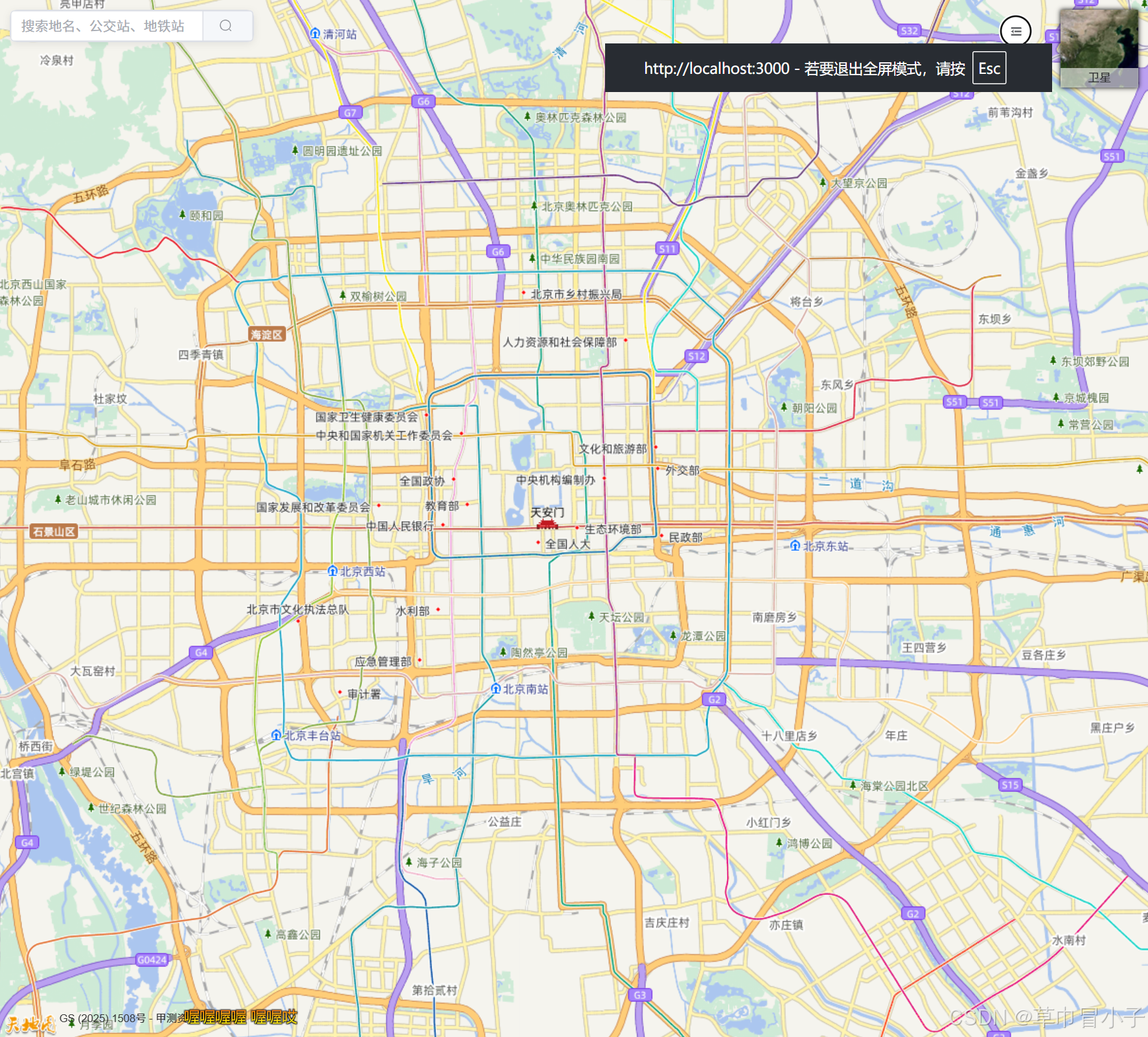
案例代码
-
示例代码:
html<template> <div class="tianditu-map-container"> <!-- 顶部搜索和天气栏 --> <div class="map-top-bar"> <div class="search-weather-box search-box-official"> <el-autocomplete v-if="mapOptions.showSearch" v-model="searchKeyword" :fetch-suggestions="fetchSearchSuggestions" placeholder="搜索地名、公交站、地铁站" class="search-input" @select="handleSelectSuggestion" clearable > <template #default="{ item, query, highlighted }"> <div class="search-suggestion-item" :class="{ 'is-active': highlighted }"> <span class="search-suggestion-icon">{{ getPoiIcon(item.catalog) }}</span> <span class="search-suggestion-title" v-html="highlightKeyword(item.value, query)"></span> <span class="search-suggestion-type">{{ item.catalog }}</span> <span class="search-suggestion-meta">{{ item.address }}</span> </div> </template> <template #append> <el-button :icon="Search" @click="searchLocation" :loading="searchLoading"> <!-- 搜索 --> </el-button> </template> </el-autocomplete> </div> </div> <!-- 右上角按钮组 --> <div class="map-toolbar-top-right"> <el-tooltip content="全屏" placement="left"><el-button v-if="mapOptions.showFullscreen" :icon="isFullscreen ? Fold : FullScreen" @click="toggleFullscreen" circle /></el-tooltip> </div> <!-- 地图容器 --> <div id="tianditu-map" class="map-container"></div> <!-- 标记管理和表单 --> <div class="marker-form" v-if="showMarkerForm"> <el-form :model="markerForm" label-width="100px"> <el-form-item label="名称" prop="name"> <el-input v-model="markerForm.name" placeholder="请输入标记名称" /> </el-form-item> <el-form-item label="纬度" prop="lat"> <el-input v-model="markerForm.lat" type="number" placeholder="请输入纬度" /> </el-form-item> <el-form-item label="经度" prop="lng"> <el-input v-model="markerForm.lng" type="number" placeholder="请输入经度" /> </el-form-item> <el-form-item label="描述" prop="description"> <el-input v-model="markerForm.description" type="textarea" :rows="2" placeholder="请输入描述" /> </el-form-item> <el-form-item> <el-button type="primary" @click="saveMarker">保存</el-button> <el-button @click="cancelMarker">取消</el-button> </el-form-item> </el-form> </div> <div class="markers-list" v-if="markers.length > 0"> <h4>已保存的标记</h4> <el-table :data="markers" style="width: 100%"> <el-table-column prop="name" label="名称" /> <el-table-column prop="description" label="描述" /> <el-table-column label="坐标" width="200"> <template #default="scope"> {{ scope.row.lat.toFixed(6) }}, {{ scope.row.lng.toFixed(6) }} </template> </el-table-column> <el-table-column label="操作" width="250"> <template #default="scope"> <el-button size="small" @click="centerOnMarker(scope.row)" :icon="Location">定位</el-button> <el-button size="small" type="primary" @click="navigateToMarker(scope.row)" :icon="Position">导航</el-button> <el-button size="small" type="danger" @click="removeMarker(scope.$index)" :icon="Delete">删除</el-button> </template> </el-table-column> </el-table> </div> </div> </template> <script setup> import { ref, reactive, onMounted, onUnmounted, nextTick } from 'vue' import { ElMessage, ElMessageBox } from 'element-plus' import { Location, Position, Search, FullScreen, Fold, Promotion, Guide, Place, School, Delete } from '@element-plus/icons-vue' import { h } from 'vue' // 天地图API密钥 const TIANDITU_KEY = '08pfngl6ytjjs8sjgjeef7ac2lsiissc' // 响应式数据 const markers = ref([]) const showMarkerForm = ref(false) const markerForm = ref({ name: '', lat: '', lng: '', description: '' }) // 地图相关变量 let markerObjs = [] let mapObj = null let mapTypeControl = null // 功能开关参数 const mapOptions = reactive({ showSearch: true, showLayerSwitch: true, showFullscreen: true }) // 其他状态 const isFullscreen = ref(false) const searchKeyword = ref('') const searchLoading = ref(false) // 全屏切换 function toggleFullscreen() { const el = document.getElementById('tianditu-map')?.parentElement if (!el) return if (!isFullscreen.value) { if (el.requestFullscreen) el.requestFullscreen() else if (el.webkitRequestFullscreen) el.webkitRequestFullscreen() else if (el.mozRequestFullScreen) el.mozRequestFullScreen() else if (el.msRequestFullscreen) el.msRequestFullscreen() isFullscreen.value = true } else { if (document.exitFullscreen) document.exitFullscreen() else if (document.webkitExitFullscreen) document.webkitExitFullscreen() else if (document.mozCancelFullScreen) document.mozCancelFullScreen() else if (document.msExitFullscreen) document.msExitFullscreen() isFullscreen.value = false } } // 监听全屏状态变化 document.addEventListener('fullscreenchange', () => { isFullscreen.value = !!document.fullscreenElement }) // 搜索相关函数 function highlightKeyword(text, keyword) { if (!keyword) return text const reg = new RegExp(`(${keyword})`, 'gi') return text.replace(reg, '<span class="search-highlight">$1</span>') } function getPoiIcon(catalog) { if (!catalog) return h(Location) if (catalog.includes('地铁')) return h(Promotion) if (catalog.includes('公交')) return h(Guide) if (catalog.includes('火车站') || catalog.includes('高铁')) return h(Place) if (catalog.includes('学校')) return h(School) return h(Location) } async function fetchSearchSuggestions(query, cb) { if (!query) { cb([]); return } const url = `https://api.tianditu.gov.cn/search?postStr={\"keyWord\":\"${encodeURIComponent(query)}\",\"level\":\"9\",\"queryType\":\"1\",\"start\":0,\"count\":10}&type=query&tk=${TIANDITU_KEY}` try { const res = await fetch(url) const data = await res.json() if (data && data.pois && Array.isArray(data.pois)) { cb(data.pois.map(item => ({ value: item.name, address: item.address, catalog: item.catalog, lon: item.lonlat.split(' ')[0], lat: item.lonlat.split(' ')[1] }))) } else { cb([]) } } catch { cb([]) } } function handleSelectSuggestion(item) { if (item.lon && item.lat && mapObj) { mapObj.centerAndZoom(new window.T.LngLat(item.lon, item.lat), 16) // 添加高亮marker const marker = new window.T.Marker(new window.T.LngLat(item.lon, item.lat)) mapObj.addOverLay(marker) // 弹窗显示详细信息 const popupContent = ` <div style='min-width:180px;'> <h4 style='margin:0 0 8px 0;'>${item.value}</h4> <div style='font-size:13px;color:#666;margin-bottom:6px;'>${item.catalog || ''}</div> <div style='font-size:12px;color:#999;margin-bottom:8px;'>${item.address || ''}</div> <div style='font-size:12px;color:#999;'>坐标: ${item.lat}, ${item.lon}</div> </div> ` const infoWin = new window.T.InfoWindow(popupContent, { offset: new window.T.Pixel(0, -20) }) mapObj.openInfoWindow(infoWin, new window.T.LngLat(item.lon, item.lat)) ElMessage.success('已定位到:' + item.value) } } // 动态加载天地图API function loadTiandituScript() { return new Promise((resolve, reject) => { if (window.T) { resolve() return } const script = document.createElement('script') script.src = `https://api.tianditu.gov.cn/api?v=4.0&tk=${TIANDITU_KEY}` script.onload = resolve script.onerror = reject document.head.appendChild(script) }) } // 初始化地图 async function initMap() { await loadTiandituScript() await nextTick() if (!window.T) { ElMessage.error('天地图API加载失败') return } mapObj = new window.T.Map('tianditu-map') mapObj.centerAndZoom(new window.T.LngLat(116.4074, 39.9042), 12) mapObj.enableScrollWheelZoom() mapObj.enableDoubleClickZoom() mapObj.enableKeyboard() // 添加控件 (图层切换) if (mapOptions.showLayerSwitch) { mapTypeControl = new window.T.Control.MapType() mapObj.addControl(mapTypeControl) } // 地图点击事件 mapObj.addEventListener('click', onMapClick) } // 地图点击事件 function onMapClick(e) { markerForm.value.lat = e.latlng.getLat().toFixed(6) markerForm.value.lng = e.latlng.getLng().toFixed(6) showMarkerForm.value = true } // 标记相关函数 function saveMarker() { if (!markerForm.value.name || !markerForm.value.lat || !markerForm.value.lng) { ElMessage.warning('请填写完整信息') return } const markerData = { id: Date.now(), name: markerForm.value.name, lat: parseFloat(markerForm.value.lat), lng: parseFloat(markerForm.value.lng), description: markerForm.value.description } markers.value.push(markerData) addMarkerToMap(markerData) showMarkerForm.value = false ElMessage.success('标记保存成功') } function addMarkerToMap(markerData) { if (!window.T) return const marker = new window.T.Marker(new window.T.LngLat(markerData.lng, markerData.lat)) marker.data = markerData marker.addEventListener('click', (e) => { showMarkerPopup(e, markerData) }) mapObj.addOverLay(marker) markerObjs.push(marker) markerData._marker = marker } function showMarkerPopup(e, markerData) { const popupContent = ` <div style='min-width:180px;'> <h4 style='margin:0 0 8px 0;'>${markerData.name}</h4> <div style='font-size:13px;color:#666;margin-bottom:6px;'>${markerData.description || ''}</div> <div style='font-size:12px;color:#999;margin-bottom:8px;'>坐标: ${markerData.lat.toFixed(6)}, ${markerData.lng.toFixed(6)}</div> <div style='display:flex;gap:8px;'> <button onclick="window.tdtNavigate(${markerData.lat},${markerData.lng},'${markerData.name}')" style='background:#409EFF;color:#fff;border:none;padding:4px 10px;border-radius:4px;cursor:pointer;'>导航</button> <button onclick="navigator.clipboard.writeText('${markerData.lat},${markerData.lng}')" style='background:#67C23A;color:#fff;border:none;padding:4px 10px;border-radius:4px;cursor:pointer;'>复制坐标</button> </div> </div> ` const infoWin = new window.T.InfoWindow(popupContent, { offset: new window.T.Pixel(0, -20) }) mapObj.openInfoWindow(infoWin, new window.T.LngLat(markerData.lng, markerData.lat)) } function cancelMarker() { showMarkerForm.value = false markerForm.value = { name: '', lat: '', lng: '', description: '' } } function centerOnMarker(marker) { if (mapObj) { mapObj.centerAndZoom(new window.T.LngLat(marker.lng, marker.lat), 16) ElMessage.success('已定位到标记') } } function navigateToMarker(marker) { window.tdtNavigate(marker.lat, marker.lng, marker.name) } async function removeMarker(index) { const marker = markers.value[index] try { await ElMessageBox.confirm('确定要删除这个标记吗?', '警告', { confirmButtonText: '确定', cancelButtonText: '取消', type: 'warning' }) if (marker._marker) { mapObj.removeOverLay(marker._marker) const i = markerObjs.indexOf(marker._marker) if (i !== -1) markerObjs.splice(i, 1) } markers.value.splice(index, 1) ElMessage.success('标记已删除') } catch {} } async function searchLocation() { if (!searchKeyword.value.trim()) { ElMessage.warning('请输入地名') return } searchLoading.value = true const url = `https://api.tianditu.gov.cn/geocoder?ds={"keyWord":"${encodeURIComponent(searchKeyword.value)}"}&tk=${TIANDITU_KEY}` try { const res = await fetch(url) const data = await res.json() if (data && data.location) { const { lon, lat } = data.location mapObj.centerAndZoom(new window.T.LngLat(lon, lat), 16) ElMessage.success('已定位到:' + searchKeyword.value) } else { ElMessage.warning('未找到地名') } } catch { ElMessage.error('地名搜索失败') } searchLoading.value = false } // 工具函数 function toggleMapType() { if (!mapTypeControl) return mapTypeControl._switchMapType() } // 导航跳转函数(全局) window.tdtNavigate = function(lat, lng, name) { const url = `https://map.tianditu.gov.cn/navigation.html?lat=${lat}&lng=${lng}&name=${encodeURIComponent(name)}` window.open(url, '_blank') } // 生命周期 onMounted(async () => { await initMap() }) onUnmounted(() => { if (mapObj) { markerObjs.forEach(marker => mapObj.removeOverLay(marker)) markerObjs.length = 0 mapObj = null } if (window.tdtNavigate) delete window.tdtNavigate }) </script> <style scoped> .tianditu-map-container { position: relative; padding: 0; max-width: 100vw; height: 50vh; background: #f5f7fa; } .map-top-bar { position: absolute; top: 10px; left: 10px; z-index: 500; display: flex; flex-direction: row; align-items: center; } .search-weather-box { display: flex; align-items: center; background: #fff; border-radius: 8px; box-shadow: 0 2px 8px rgba(0,0,0,0.08); padding: 8px 16px; gap: 16px; } .search-box-official { background: #fff; border: 1px solid #dcdfe6; box-shadow: 0 2px 8px rgba(0,0,0,0.08); border-radius: 8px; /* padding: 4px 12px; */ padding: 0; } .search-input { width: 340px; font-size: 15px; border-radius: 8px; border: none; box-shadow: none; } .map-toolbar-top-right { position: absolute; top: 16px; right: 120px; z-index: 500; display: flex; flex-direction: row; gap: 8px; } .map-container { width: 100%; height: 100%; border-radius: 0; overflow: hidden; border: none; margin: 0; } .marker-form { position: absolute; left: 50px; top: 80px; z-index: 30; background: var(--el-bg-color-page); padding: 20px; border-radius: 8px; border: 1px solid var(--el-border-color-light); } .markers-list { position: absolute; right: 32px; bottom: 32px; z-index: 30; background: var(--el-bg-color-page); padding: 20px; border-radius: 8px; border: 1px solid var(--el-border-color-light); max-width: 400px; max-height: 300px; overflow: auto; } .markers-list h4 { margin-bottom: 15px; color: var(--el-color-primary); } .search-suggestion-item { display: flex; align-items: center; padding: 6px 12px; border-radius: 6px; transition: background 0.2s; cursor: pointer; } .search-suggestion-item.is-active, .search-suggestion-item:hover { background: #f0f7ff; } .search-suggestion-icon { margin-right: 8px; color: #409EFF; font-size: 18px; display: flex; align-items: center; } .search-suggestion-title { font-weight: 500; color: #222; margin-right: 8px; } .search-suggestion-type { color: #aaa; font-size: 13px; margin-left: 8px; margin-right: 8px; } .search-suggestion-meta { color: #999; font-size: 13px; flex: 1; white-space: nowrap; overflow: hidden; text-overflow: ellipsis; } .search-highlight { color: #409EFF; background: #e6f7ff; border-radius: 2px; padding: 0 2px; } </style>
完结。