1.先看图
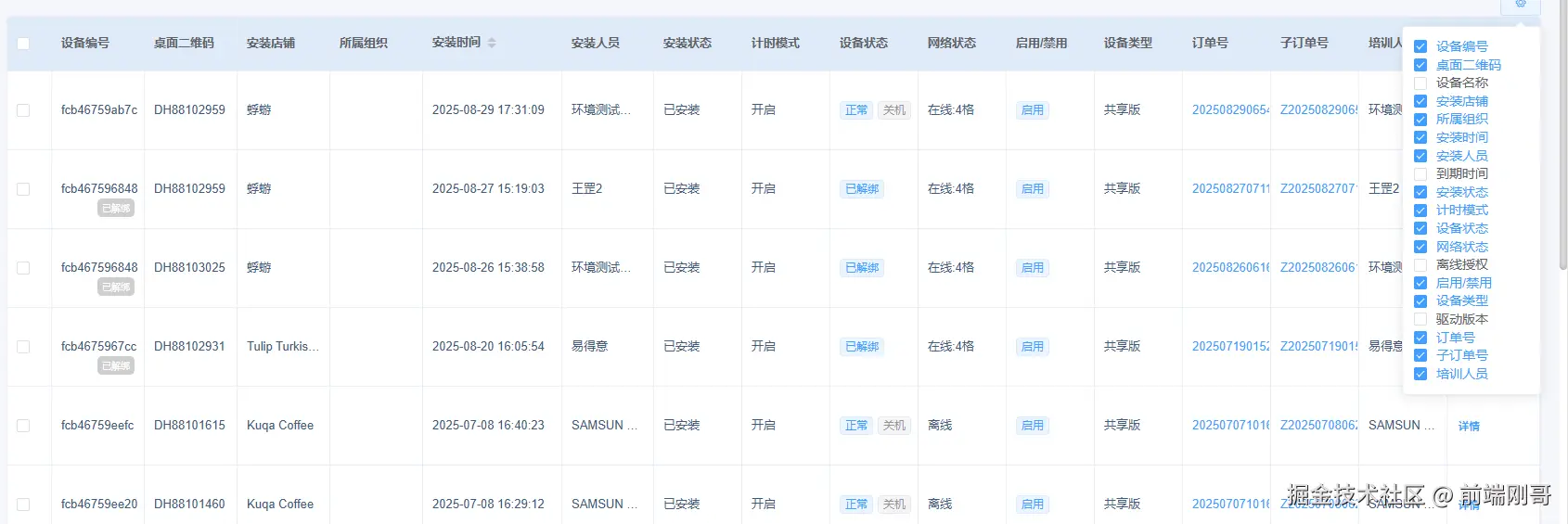
- 废话不多说上代码
新建CustomColumn.vue组件
xml
  <el-table-column v-for="(item, index) in checkedHeader" :width="item.width" :key="index" :prop="item.prop" :label="item.label" :sortable="item.sortable" :fixed="item.fixed"
     show-overflow-tooltip>

    <template slot-scope="scope">
         <!-- 如果有列需要特殊处理则根据类型进行具体处理 -->
      <div v-if="item.type == 'tag'">

        <p v-if="typeof scope.row[item.prop] == 'string'">{{ scope.row[item.prop] }}</p>
        <p v-else-if="Array.isArray(scope.row[item.prop])">
          <span v-for="value in scope.row[item.prop]">
            <el-tag size="mini" :type="typeof value == 'string' ? '' : value.type" style="margin-right: 5px;">{{
              typeof value == 'string' ? value : value.text }}</el-tag>
          </span>
        </p>
        <P v-else>
          <el-tag size="mini" :type="typeof scope.row[item.prop] == 'string' ? '' : scope.row[item.prop].type"
            style="margin-right: 5px;">{{ typeof scope.row[item.prop] == 'string' ? scope.row[item.prop] :
              scope.row[item.prop].text }}</el-tag>

        </P>
      </div>
      <div v-else-if="item.type == 'up-down-tag'">
        <div class="morefix">
          <span class="morefix_span" v-if="scope.row[item.prop].up">
            {{ scope.row[item.prop].up }}
          </span>
          <span class="morefix_span1" v-if="scope.row[item.prop].down">
            {{ scope.row[item.prop].down }}

          </span>
          <span>
            {{ scope.row[item.prop].text }}
          </span>
        </div>
      </div>
      <div v-else-if="item.type == 'order'">
       <span style="color:#409EFF;cursor: pointer;" @click="handleClickOrder(scope.row)"> {{ scope.row[item.prop] }}</span>
      </div>
         <!-- 如果列表没有需要特殊处理的直接使用这个 -->
      <span v-else>{{ scope.row[item.prop] }}</span>
    </template>

  </el-table-column>

  <!-- 表格操作 -->
  <el-table-column :width="tableOperate.width" :label="tableOperate.label" fixed="right" v-if="tableOperate.show">

    <template slot-scope="scope">
      <slot name="tablerow" :row="scope.row"></slot>
    </template>
  </el-table-column>
</el-table>
js
export default {
  props: {
    tableBody: {
      required: true,
      type: Array
    },
    tableHeader: {
      type: Array,
      required: true
    },
    needCheckBox: {
      required: true,
      type: Boolean
    },
    tableOperate: {
      required: true,
      type: Object
    }
  },
  data() {
    return {
      checkedHeader: [],
      childCheckedItems: []
    };
  },
  watch: {

    tableHeader: {
      handler(newVal, oldVal) {
        console.log(newVal)
        this.checkedHeader = newVal.filter(item => item.show == true)
        this.childCheckedItems = this.checkedHeader.map(item => {
          return item.label
        })
      },
      immediate: true,
      deep: true
    }
  },
  mounted() {

  },
  methods: {
     <!-- 触发父组件事件 -->
    handleClickOrder(order) {
      this.$emit('handleClickOrder', order)
    },
    handleCheckedColumChange(value) {

      this.$emit('changeCheckedColum', value)
    },


    handleSelectionChange(value) {
      this.$emit('handleSelectionChange', value)
    }
  },
};
css
.myWrap {
  width: 100%;
  height: 100%;
  box-sizing: border-box;

  .colum-set {
    float: right;
  }

  ::deep .el-table {
    .el-table__header-wrapper {
      tr {
        th {
          cursor: move;
        }
      }
    }
  }
}
.morefix {
    position: relative;
    height: 60px;
    line-height: 60px;

    .morefix_span {
        position: absolute;
        right: 0;
        top: -0px;
        z-index: 2;
        height: 20px;
        line-height: 20px;
        display: block;
        font-size: 10px;
        color: #fff;
        border-radius: 5px;
        padding: 0 5px;
        background: rgba(255, 191, 107, 1);
    }

    .morefix_span1 {
        position: absolute;
        right: 0;
        bottom: -0px;
        z-index: 2;
        height: 20px;
        line-height: 22px;
        display: block;
        font-size: 10px;
        color: #fff;
        border-radius: 5px;
        padding: 0 5px;
        background: rgba(206, 206, 206, 1);
    }
}- 父组件
<MyTable :tableBody="dataList" :tableHeader="tableHeader" :needCheckBox="true" :tableOperate="tableOperate" @changeCheckedColum="changeCheckedColum" @handleSelectionChange="selectionChangeHandle" @handleClickOrder="handleClickOrder">
bash
        <template v-slot:tablerow="scope">
            <el-button type="text" size="small" @click="showDetails(scope.row.machineId, scope.row.id)">
                {{ $t('详情') }}
            </el-button>
            <el-button type="text" size="small" v-permission="['remote_control']"
                v-if="scope.row.machineState == '1'" @click="clickAddInstallUser(scope.row)">

                {{ $t('新增') }}
            </el-button>
        </template>
    </MyTable>
js
tableHeader: [
        {
          label: this.$t("列表一"),
          prop: "machineNo",
          show: true,
          type: "up-down-tag",
          fixed: 'left',
          width: 100,
        },
        {
          label: this.$t("列表二"),
          prop: "deskQrcode",
          show: true,
          type: "order",
          fixed: 'left',
          width: 100,
        },
        {
          label: this.$t("列表三"),
          prop: "machineName",
          show: false,
          type: "tag",
          fixed: 'left',
        },
       ]