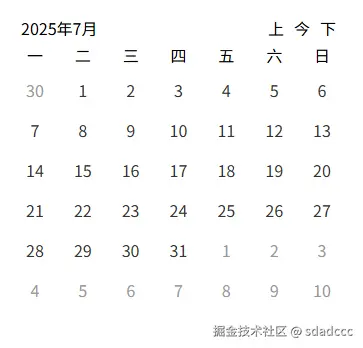
先看下效果图

组件概述
日历组件将支持以下功能:
-
显示当前月份的日历。
-
通过滑动切换到上一个月或下一个月
-
点击特定日期可以触发事件。
使用方式
组件中使用moment和vant的swipe组件需要安装
npm i moment vant
main.js引入下
import { Swipe, SwipeItem } from 'vant';
Vue.use(Swipe);
Vue.use(SwipeItem);
组件也发布了npm包可直接使用
npm i vue-swipe-calendar
组件结构
ini
<template>
  <div class="calendar">
    <div class="calendar-header">
      <div>{{ getFormatDate() }}</div>
      <div>
        <span class="btn" @click="handleMonth('pre')">上</span>
        <span class="btn" @click="handleMonth('current')">今</span>
        <span class="btn" @click="handleMonth('next')">下</span>
      </div>
    </div>
    <van-swipe ref="vanSwipe" :show-indicators="false" @change="onSwipeChange">
      <van-swipe-item v-for="dateArr in dateArrs" :key="dateArr.fullDate">
        <div class="calendar-week">
          <div
            class="calendar-week-item flex-c"
            v-for="(item, index) in weekArrs"
            :key="index"
          >
            {{ item }}
          </div>
        </div>
        <div class="calendar-date">
          <div
            class="calendar-date-item flex-c"
            v-for="item in dateArr"
            :key="item.fullDate"
            :class="item.type"
            @click="handleDate(item)"
          >
            {{ item.date }}
            <slot name="calendarItem" :item="item"></slot>
          </div>
        </div>
      </van-swipe-item>
    </van-swipe>
  </div>
</template>

<script>
import moment from "moment";
export default {
  name: "SwipeCalendar",
  data() {
    return {
      weekArrs: ["一", "二", "三", "四", "五", "六", "日"],
      dateArrs: [],
      today: moment().format("YYYY-MM-DD"),
      currentMonth: "",
      allCell: 42,
      currentSwipeIndex: 0, // 当前轮播的索引
    };
  },
  components: {},
  mounted() {
    this.initCalendar("current", 0);
  },
  methods: {
    onSwipeChange(index) {
      this.dateArrs = [[], [], []];
      // 判断滑动方向
      if (
        index - this.currentSwipeIndex === 1 ||
        index - this.currentSwipeIndex === -2
      ) {
        //console.log('向左滑动++');
        this.initCalendar("next", index);
      } else {
        //console.log('向右滑动--');
        this.initCalendar("pre", index);
      }

      this.currentSwipeIndex = index;
    },
    handleMonth(type) {
      if (type == "pre") {
        this.$refs.vanSwipe.prev();
      } else if (type == "next") {
        this.$refs.vanSwipe.next();
      } else {
        this.initCalendar("current");
      }
    },
    initCalendar(type, index) {
      if (type == "pre") {
        this.currentMonth = moment(this.currentMonth)
          .subtract(1, "month")
          .startOf("month");
      } else if (type == "next") {
        this.currentMonth = this.currentMonth.add(1, "month").startOf("month");
      } else {
        this.currentMonth = moment(this.today).startOf("month");
      }
      //获取当前上个月的第一天
      const preMonthFirstDay = this.currentMonth
        .clone()
        .subtract(1, "month")
        .startOf("month");
      //获取当前下个月的第一天
      const nextMonthFirstDay = this.currentMonth
        .clone()
        .add(1, "month")
        .startOf("month");
      const currentDateArrs = this.getMonthDateArrs(this.currentMonth.clone());
      const nextDateArrs = this.getMonthDateArrs(nextMonthFirstDay);
      const preDateArrs = this.getMonthDateArrs(preMonthFirstDay);
      if (index === 0) {
        // 初始化第0张图 当前月在第0张 月视图数据顺序为120(1为当前月)
        this.dateArrs = [currentDateArrs, nextDateArrs, preDateArrs];
      } else if (index === 1) {
        // 划到第1张图 当前月在第1张 月视图数据顺序为012(1为当前月)
        this.dateArrs = [preDateArrs, currentDateArrs, nextDateArrs];
      } else if (index === 2) {
        //划到第2张图 当前月在第2张 月视图数据顺序为201(1为当前月)
        this.dateArrs = [nextDateArrs, preDateArrs, currentDateArrs];
      }
    },
    getFormatDate() {
      if (this.currentMonth) {
        return this.currentMonth.format(`YYYY年M月`);
      } else {
        return moment(this.today).format(`YYYY年M月`);
      }
    },
    getMonthDateArrs(firstDay) {
      // 获取当前月一共多少天(占格子)
      const currentCell = this.getMonthDates(firstDay);
      // 获取当前月之前多少天(占格子)
      const preCell = this.getPreMonthDates(firstDay);
      // 获取当前月之后多少天(占格子)
      const nextCell = this.getNextMonthDates(firstDay, currentCell, preCell);
      return [...preCell, ...currentCell, ...nextCell];
    },
    getDateObj(day, diff, type) {
      const currentDate = moment(day).subtract(diff, "days");
      const fullDate = currentDate.format("YYYY-MM-DD"); // 完整日期格式
      const date = currentDate.date(); // 日期部分
      return { fullDate, date, type };
    },
    getMonthDates(firstDay) {
      // 计算当前月份补充的天数
      let daysInMonth = moment(firstDay).daysInMonth() - 1;
      const lastDay = moment(firstDay).endOf("month");
      const dates = [];
      // 遍历当前月的每一天
      while (daysInMonth >= 0) {
        const daysInfo = this.getDateObj(lastDay, daysInMonth, "current");
        dates.push(daysInfo);
        daysInMonth--; // 移动到下一天
      }
      return dates;
    },
    getPreMonthDates(firstDay) {
      //  计算前面需要补充的天数 获取当前月第一天是周几(0 表示周日,1 表示周一,...,6 表示周六)
      let preDaysInMonth = moment(firstDay).day() - 1;
      // 将周日0改为6
      if (preDaysInMonth === -1) {
        preDaysInMonth = 6;
      }
      const dates = [];
      while (preDaysInMonth > 0) {
        const daysInfo = this.getDateObj(firstDay, preDaysInMonth, "pre");
        dates.push(daysInfo);
        preDaysInMonth--;
      }
      return dates;
    },
    getNextMonthDates(firstDay, currentCell, preCell) {
      //计算当前月份之后补充的天数
      let nextDaysInMonth = this.allCell - currentCell.length - preCell.length;
      const lastDay = firstDay.endOf("month");
      const cellLastDay = lastDay.add(nextDaysInMonth, "days");
      const dates = [];
      while (nextDaysInMonth > 0) {
        const daysInfo = this.getDateObj(
          cellLastDay,
          nextDaysInMonth - 1,
          "next"
        );
        dates.push(daysInfo);
        nextDaysInMonth--;
      }
      return dates;
    },
    handleDate(item) {
      this.$emit("handleDate", item);
    },
  },
};
</script>
  <style lang="less" scoped>
  .calendar {
    padding: 20px;

    .flex-c {
      display: flex;
      justify-content: center;
      align-items: center;
    }

    &-header {
      padding: 0 10px;
      display: flex;
      justify-content: space-between;
      align-items: center;

      .btn {
        margin-left: 10px;
      }
    }

    &-week {
      display: flex;

      &-item {
        flex: 1;
        height: 30px;
      }
    }

    /deep/.van-swipe {
      overflow: hidden;

      .van-swipe__track {
        display: flex;
      }
    }

    .calendar-date {
      display: flex;
      flex-wrap: wrap;

      .calendar-date-item {
        width: calc(100% / 7);
        height: 40px;
        color: #333;

        &.pre,
        &.next {
          color: #999;
        }
      }
    }
  }
  </style>