很多同学在学 Vue3 的时候会发现,有两种写法:
- 一种是传统的 setup 函数
- 一种是更简洁的
<script setup>语法糖
看起来功能都差不多,到底有没有区别呢? 今天咱们就用大白话给大家解释清楚。
一、两个写法长啥样?
1. setup 函数写法
js
<template>
  <div>
    <h1>{{ msg }}</h1>
    <button @click="increase">count: {{ count }}</button>
  </div>
</template>

<script>
import { ref } from 'vue'

export default {
  name: 'FooSetupFn',
  setup(props, { expose }) {
    const msg = 'Hello from setup()'
    const count = ref(0)
    function increase() {
      count.value++
    }

    // 如果需要控制暴露出去的内容
    expose({ msg, count, increase })

    // setup 函数需要手动 return
    return {
      msg,
      count,
      increase,
    }
  }
}
</script>
2. <script setup> 语法糖写法
js
<template>
  <div>
    <h1>{{ msg }}</h1>
    <button @click="increase">count: {{ count }}</button>
  </div>
</template>

<script setup>
import { ref } from 'vue'

const msg = 'Hello from <script setup>'
const count = ref(0)

function increase() {
  count.value++
}

// 如果要控制暴露,可以用 defineExpose
defineExpose({
  msg,
  count,
  increase
})
</script>
二、运行效果有区别吗?
运行效果其实完全一样:页面都会显示一个标题和一个按钮,点按钮数字会加 1。
所以很多人就会觉得: 这不就是两个写法吗?功能完全一样啊!
但实际上,它们在 底层编译结果 和 默认暴露行为 上是有区别的。
三、内部编译结果区别
Vue 单文件组件(.vue 文件)是不能直接被浏览器运行的,它要经过 编译。
我们用 vite-plugin-inspect 插件看编译结果,就能发现区别。
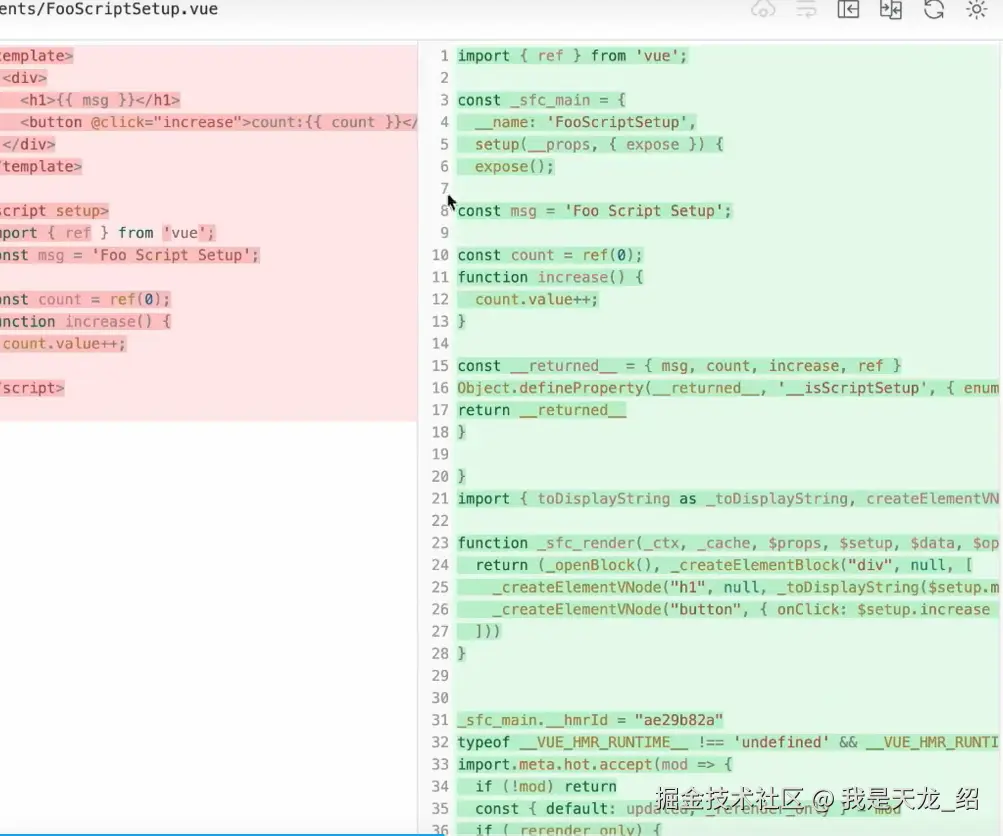
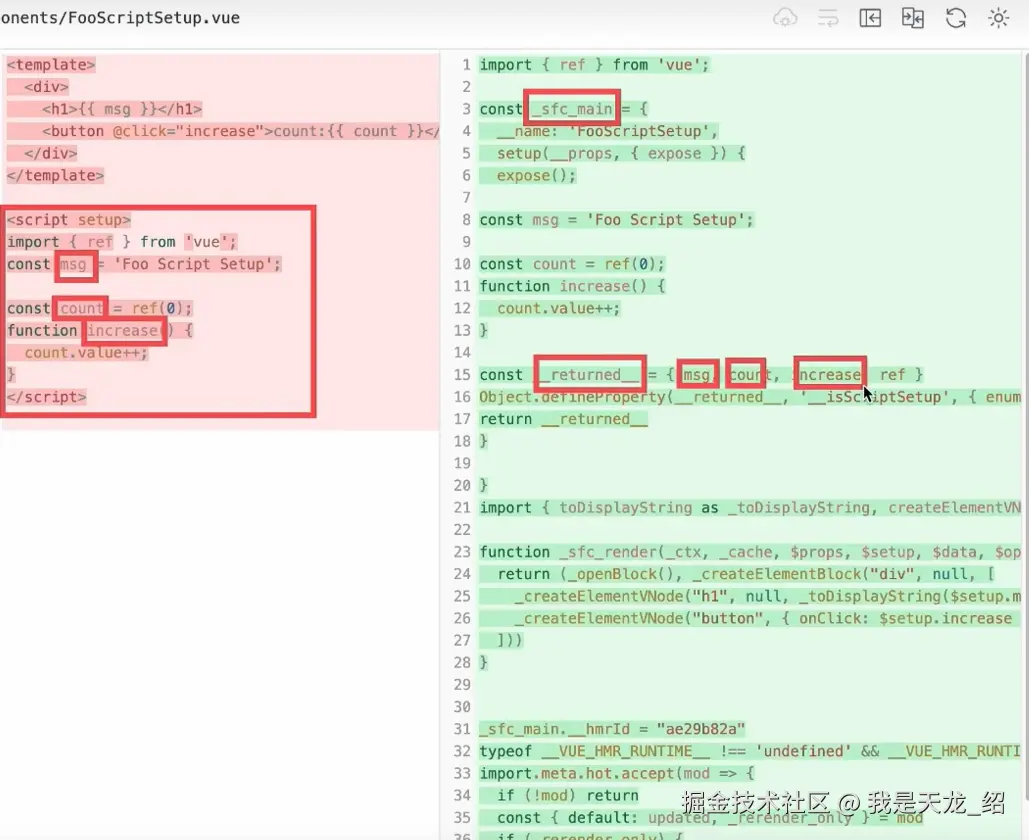
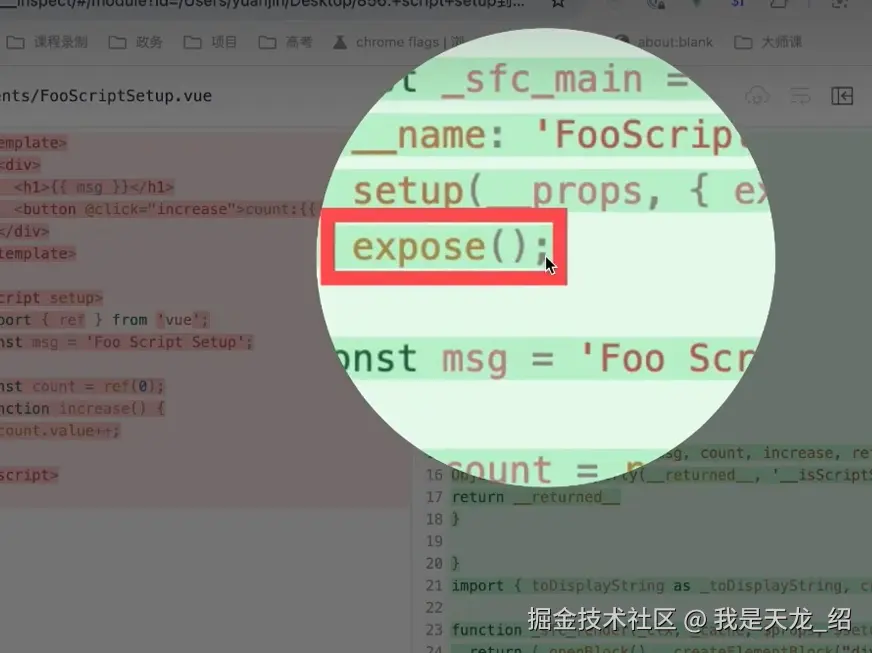
多了expose():
1. setup 函数的编译结果
setup 函数的内容,原封不动放到组件配置对象里:
js
const _sfc_main = {
  name: "FooSetupFn",
  setup(props, { expose }) {
    const msg = "Hello from setup()"
    const count = ref(0)
    function increase() {
      count.value++
    }

    expose() // 控制暴露
    return { msg, count, increase }
  }
}它返回的东西(msg, count, increase),都会被挂到模板里用。
2. <script setup> 的编译结果
<script setup> 会被编译成一个 setup 函数,但是 Vue 会帮你自动 return 里面的变量:
js
const _sfc_main = {
  name: "FooScriptSetup",
  setup(__props, { expose }) {
    const msg = "Hello from <script setup>"
    const count = ref(0)
    function increase() {
      count.value++
    }

    // 注意!Vue 自动帮你调用了 expose()
    expose()

    return { msg, count, increase, ref } // 所有顶层变量都会暴露
  }
}
区别就在于:
- 普通 setup 函数:你自己决定 return 什么。
<script setup>:你定义的变量默认都会暴露给模板用。
四、为啥 <script setup> 打印 ref 结果是空的?
当我们用 ref 获取子组件实例,然后打印时:
- setup 函数组件:实例对象里会看到 msg、count、increase。
<script setup>组件:实例对象是空的,看不到 msg、count、increase。
为啥?
因为 <script setup> 里,Vue 默认加了一行:
js
expose()啥意思呢?意思就是:我不暴露任何东西。 所以你在父组件里拿到子组件实例时,看不到 msg、count 等等。
五、那我想暴露怎么办?
Vue 给我们提供了两个方法:
1. 在 setup 函数里用 expose
js
setup(props, { expose }) {
  const msg = 'Hello'
  const count = ref(0)

  expose({ msg, count }) // 只暴露 msg 和 count

  return { msg, count }
}
2. 在 <script setup> 里用 defineExpose
vue
<script setup>
import { ref } from 'vue'

const msg = 'Hello'
const count = ref(0)
function increase() {
  count.value++
}

// 只暴露这三个
defineExpose({
  msg,
  count,
  increase
})
</script>
这里的 defineExpose 是一个 宏函数 (编译时才存在),不需要 import,它最后会被编译成 expose()。
六、总结
-
<script setup>就是 setup 函数的语法糖,写法更简洁。 -
setup 函数 → 你自己决定 return 什么。
-
<script setup>→ 默认所有变量都能用,但对子组件实例默认不暴露。 -
想控制暴露的内容:
- setup 里用
expose() <script setup>里用defineExpose()
- setup 里用
一句话总结: 👉 平时写组件用 <script setup>,简单省事。 👉 真要做库或者控制暴露,就用 expose / defineExpose。