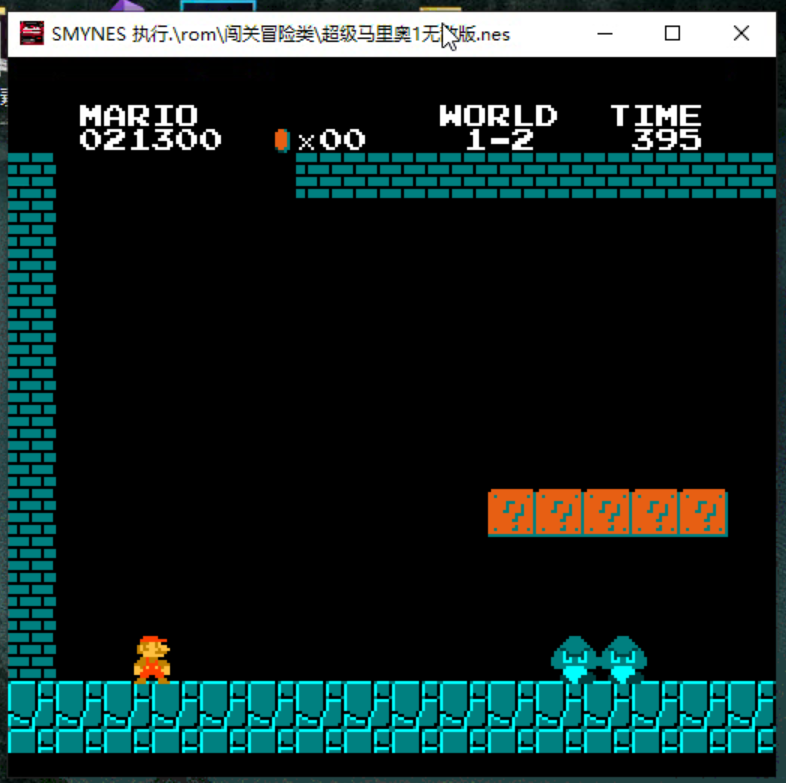
在超级玛丽中 有带问号的箱子 还有会运动的蘑菇 还有金币
这显然是不普通的 障碍物
今天我们实现一个 顶箱子 然后出现 会自动移动的蘑菇功能
直接放代码 这玩意写了我两天 实现了能走的蘑菇 还有顶出金币的箱子 还有吃金币。
过程懒得写了,不过说实话 这9个demo之后,写了几千行 应该差不多1万行代码 前前后后
项目工程能力 有了提升。
对游戏开发 卷轴 敌人 碰撞 等等的基础开发框架 开发模式 有了初步了解。
说实话最大的体会就是之前玩了一款游戏使用汇编语言编程,现在用一个c++这样的底层语言之后,能完成这种规模的项目,如果用汇编语言是完全没有可能去实现的。
汇编语言 要一行一行的完成 到处都是goto语句 阅读起来也很困难 哪怕是个for循环都要写10行。
后面这个项目我看找机会录个视频发b站讲解一下吧。
目录
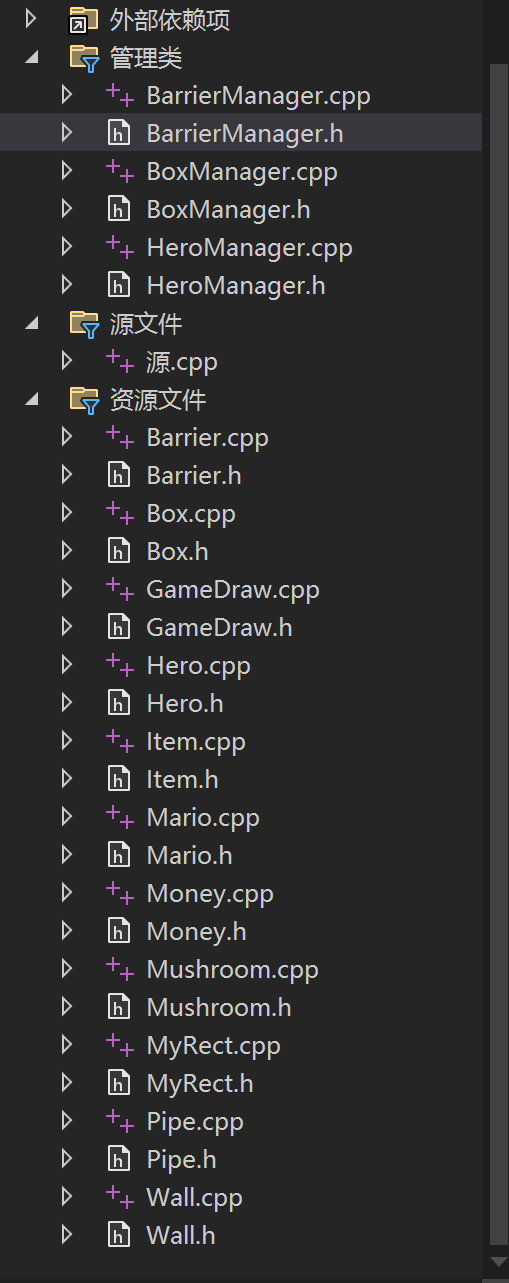
超级玛丽demo9
管理类
BarrierManager.h
cpp
#pragma once
#include<list>
#include"BarrierManager.h"
using namespace std;

class CBarrier;
class CHero;


class CBarrierManager {
public:
	list<CBarrier*> m_BarrierList;
public:
	bool AddBarrier(CBarrier* pBarrier);
	bool HeroBarCld(CHero* pHero, int fx);
	void Run();
};

extern CBarrierManager g_BarrierManager;
BarrierManager.cpp
cpp
#include "BarrierManager.h"
#include"Hero.h"
#include"Barrier.h"

CBarrierManager g_BarrierManager;

bool CBarrierManager::AddBarrier(CBarrier* pBarrier)
{
    if (pBarrier == nullptr)
        return false;
    m_BarrierList.push_back(pBarrier);
    return true;
}

bool CBarrierManager::HeroBarCld(CHero* pHero, int fx)
{
    if (pHero == nullptr)
        return false;

    //把英雄构造成矩形
    //属性结构体是封装了的 用get函数 访问私有变量 SX* GetSx();
    //CMyrect 里面的东西没有封装 是public 直接用
    CMyRect heroRect;
    heroRect.left = pHero->GetSx()->x;
    heroRect.top = pHero->GetSx()->y;
    heroRect.right = pHero->GetSx()->x + pHero->GetSx()->w - 1;
    heroRect.bottom = pHero->GetSx()->y + pHero->GetSx()->h - 1;
    //还是该写个中间量 写了一大堆pHero->GetSx() 耽误时间了 不过也是复制粘贴

    for (auto pBarrier : m_BarrierList) {
        if (pBarrier->getRect().collider(&heroRect)) {
            //pBarrier->ColliderFun(*pHero, fx);
            return true;
        }
    }
    return false;
}

void CBarrierManager::Run() {
    for (auto pBarrier : m_BarrierList) {
        pBarrier->Run();
    }
}
BoxManager.h
cpp
#pragma once
#include<list>
#include"Box.h"
using namespace std;

class CBox;

class CBoxManager {
public:
	list<CBox*> m_boxList;
public:
	bool AddBox(CBox* pBox);
	void Run();
};

extern CBoxManager g_CBoxManager;
BoxManager.cpp
cpp
#include "BoxManager.h"

CBoxManager g_CBoxManager;

bool CBoxManager::AddBox(CBox* pBox) {
	if(pBox == nullptr)
		return false;
	m_boxList.push_back(pBox);
	return true;
}

void CBoxManager::Run() {
	for (auto pBox : m_boxList) {
		pBox->Run();
	}
}
HeroManager.h
cpp
#pragma once
#include<vector>
#include<iostream>
using namespace std;

class CHero;


class CHeroManager {
public:
     vector<CHero*> m_HeroList;
public:
    bool AddHero(CHero* pHero);
    void Run();//用管理类 遍历更新所有英雄(调用所有英雄的run()) 虽然目前只有一个
};

extern CHeroManager g_CHeroManager;
HeroManager.cpp
cpp
#include "HeroManager.h"
#include "Hero.h"
//在cpp文件里定义全局变量,在头文件里extern 这样其他文件包含头文件时,就能使用全局变量了
CHeroManager g_CHeroManager;

bool CHeroManager::AddHero(CHero* pHero)
{
    if(pHero == nullptr)
        return false;
    m_HeroList.push_back(pHero);
    return true;
}


void CHeroManager::Run()
{
    //遍历所有英雄  因为用不到下标 直接用auto了
    //c++ 11 新特性 自动推导类型
    for(auto pHero : m_HeroList)
    {
        pHero->Run();
    }
}
源文件.cpp
cpp
#include <iostream>
#include"GameDraw.h"
#include"Hero.h"
#include"Mario.h"
#include"MyRect.h"
#include"Barrier.h"
#include"BarrierManager.h"
#include"HeroManager.h"
#include"wall.h"
#include"windows.h"
#include"pipe.h"
#include"Mushroom.h"
#include"Item.h"
#include"Box.h"
#include"BoxManager.h"
using namespace std;


void main() {
	g_gd.Init();
	//          1 2 3 4 5 6 7
	g_gd.SetTs("▲★●■▽□○");


	//创建地面障碍物

		char* map = (char*) malloc(sizeof(char) * 70);
		for (int i = 0; i < 70; i++) {
			map[i] = 4;
		}
		Cwall ground;
		ground.setPos(0, 15);
		ground.setWH(70, 1);
		ground.SetBmp("ground",map);
		g_BarrierManager.AddBarrier(&ground);


		//?Box
		char* map_box1 = (char*)malloc(sizeof(char) * 1);
		for (int i = 0; i < 1; i++) {
			map_box1[i] = 6;
		}
		char* map_box2 = (char*)malloc(sizeof(char) * 1);
		map_box2[0] = 4;
		CBox box;
		box.Init();
		box.setPos(11, 7);
		box.setWH(1, 1);
		box.SetBmp(box.m_bmpKey[0], map_box1);
		box.SetBmp(box.m_bmpKey[1], map_box2);
		g_BarrierManager.AddBarrier(&box);
		g_CBoxManager.AddBox(&box);

		CBox boxes[20];
		for (int j = 0; j < 4; j++) {
			for (int i = 0; i < 5; i++) {
				int index = j * 5 + i;
				boxes[index].Init();
				boxes[index].setPos(22+i+j*10, 7);
				boxes[index].setWH(1, 1);
				boxes[index].SetBmp(boxes[index].m_bmpKey[0], map_box1);
				boxes[index].SetBmp(boxes[index].m_bmpKey[1], map_box2);
				g_BarrierManager.AddBarrier(&boxes[index]);
				g_CBoxManager.AddBox(&boxes[index]);
			}

		}

		int temp_map[20] = {
			4,4,4,4,
			4,4,4,4,
			0,4,4,0,
			0,4,4,0,
			0,4,4,0,
		};
		char* map_pipe = (char*)malloc(sizeof(char) * 20);
		for (int i = 0; i < 20; i++) {
			map_pipe[i] = temp_map[i];
		}


		Cpipe pipe[5];
		for (int i = 0; i < 5; i++) {
			pipe[i].setPos(1+i*10, 10);
			pipe[i].setWH(4, 5);
			pipe[i].SetBmp("pipe", map_pipe);
			g_BarrierManager.AddBarrier(&pipe[i]);


		}


		CMario mario;
		mario.Init();
		g_CHeroManager.AddHero(&mario);

		char* map_craft3 = (char*)malloc(sizeof(char) * 3);
		for (int i = 0; i < 3; i++) {
			map[i] = 4;
		}
		Cwall craft3;
		craft3.setPos(12, 7);
		craft3.setWH(3, 1);
		craft3.SetBmp("craft", map);
		g_BarrierManager.AddBarrier(&craft3);

		CMushroom mushroom;
		char* map_mushroom = (char*)malloc(sizeof(char) * 1);
		map_mushroom[0] = 7;

		mushroom.Init();
		mushroom.SetPos(14, 8);
		mushroom.SetWH(1, 1);
		mushroom.SetBmp("mushroom", map_mushroom);


	while (1) {
		g_gd.Begin();
		g_BarrierManager.Run();

		g_CHeroManager.Run();
		mushroom.Run();


		g_gd.cx = mario.m_sx.x - g_gd.cw / 2;
		if (g_gd.cx < 0)	g_gd.cx = 0;
		if (g_gd.cx > 70 - g_gd.cw) g_gd.cx = 70 - g_gd.cw;
		g_gd.End();
		cout << "金币数量为" << g_gd.money << endl;
		Sleep(100);

		if (mario.m_sx.x == 69) {
			g_gd.Begin();
			g_gd.End();
			cout << "恭喜通关!" << endl<<endl;
			cout << "金币数量为" << g_gd.money << endl << endl;
			system("pause");
		}

	}
}
GameDraw类
GameDraw.h
cpp
#pragma once
#include <map>

// 纹理集符号索引枚举(对应纹理集中的字符顺序)
enum TextureIndex {
	Space = 0,       // 空格(索引0)
	TriangleUp = 1,  // ▲(三角形,索引1)
	Star = 2,        // ★(五角星,索引2)
	Circle = 3,      // ●(圆形,索引3)
	Square = 4,      // ■(正方形,索引4)
	TriangleDown = 5 // ▽(倒三角形,索引5)
};

struct BMP {
	int w, h;
	char* _map;//存放堆的首地址 这里用char 后面使用char来存放整数 节约内存
};

class CGameDraw {
	public:
	//这里我们用 int ww = 70, wh = 16; 代表当前世界的宽高
	//int _max_w, _max_h;  这个游戏 最大支持 的宽高 这里暂时不用 (在游戏分辨率的调整中会有用)
	//int _w, _h;   这是当前屏幕的宽高
	int _max_w = 256, _max_h = 32;
    int _w=15, _h=16;
	int ww=70, wh=16;

	int cx = 0, cy = 0, cw = 15, ch = 16;
	int client[70 * 16];
	int money = 0;

	std::map<const char*, BMP> bmp_map;
public:
	char _ts[128];
	int _tslen;
	char print[(15 * 2 + 1) * 16 + 1];//窗口大小 宽15 高16

public:
	~CGameDraw();
	void Init();
	void Begin();//把窗口中的client清零
	void End();//把client中的内容显示到窗口上

	bool SetTs(const char* ts);
	void Draw(const char* key,int x,int y);//给client 赋值,必须是已经存在的bmp


	bool AddBmp(const char* key, int w,int h, const char* map);
};

extern CGameDraw g_gd;
GameDraw.cpp
cpp
#include "GameDraw.h"
#include <iostream>
#include "Hero.h"
#include <map>
using namespace std;

CGameDraw g_gd;

CGameDraw::~CGameDraw()
{
    map<const char*, BMP>::iterator it;
    for (it = bmp_map.begin(); it != bmp_map.end(); it++) {
        free(it->second._map);
    }
}


bool CGameDraw::SetTs(const char* ts)
{
    if (ts == nullptr) {
        return false;
    }
    int i = 0;
    while (1) {
        if (ts[i] == '\0' || ts[i + 1] == '\0') {
            break;
        }
        _tslen++;
        _ts[_tslen * 2] = ts[i++];
        _ts[_tslen * 2 + 1] = ts[i++];
    }
    return true;
}

void CGameDraw::Init()
{
    ww = 70;
    wh = 16;

    _ts[0] = "  "[0];
    _ts[1] = "  "[1];
    _tslen = 0;

}

void CGameDraw::Begin()
{
    for (int i = 0; i < wh; i++) {
        for (int j = 0; j < ww; j++) {
            client[i * ww + j] = 0;
        }
    }
}

void CGameDraw::Draw(const char* key, int x, int y)
{

    ////第一个 左上角的定位点在地图中就行,其他的出界就不画

    if (key == nullptr)
        return;

    map<const char*, BMP>::iterator it;
    it = bmp_map.find(key);
    if (it == bmp_map.end())
        return;

    BMP bmp = it->second;
    for (int i = 0; i < bmp.h; i++) {
        for (int j = 0; j < bmp.w; j++) {

            if (bmp._map[j + i * bmp.w] != 0)
                client[y * ww + x] = bmp._map[j + i * bmp.w];
            x++;
        }
        y++;
        x -= bmp.w;
    }
}


void CGameDraw::End()
{

    int pos = cx + cy * ww;
    int size = 0;
    for (int i = 0; i < ch; i++) {
        for (int j = 0; j < cw; j++) {
            if (client[pos + i * ww + j] == 0) {
                print[size++] = _ts[client[pos + i * ww + j]];

            }
            else {
                print[size++] = _ts[client[pos + i * ww + j] * 2];
                print[size++] = _ts[client[pos + i * ww + j] * 2 + 1];
            }

        }
        print[size++] = '\n';
    }
    print[size] = 0;
    system("cls");
    std::cout << print;
}


bool CGameDraw::AddBmp(const char* key, int w, int h, const char* map)
{

    if (key == nullptr)
        return false;
    BMP bmp;
    bmp.w = w;
    bmp.h = h;
    bmp._map = (char*)malloc(w * h);
    for (int i = 0; i < w * h; i++) {
        bmp._map[i] = map[i];
    }


    std::map<const char*, BMP>::iterator it;
    it = bmp_map.find(key);

    if (it == bmp_map.end()) {
        bmp_map.insert(pair<const char*, BMP>(key, bmp));
        return true;
    }
    else
        return false;
}
抽象类
Barrier.h
cpp
#pragma once
#include"MyRect.h"
#include"GameDraw.h"

class CHero;

class CBarrier {
public:
	const char* m_key;//名字

	int m_x, m_y, m_w, m_h;
	char* m_map;

public:
	virtual ~CBarrier();
	//要先设置了w h  再设置bmp  里面会往gd里构造好一个BMP
	void SetBmp(const char* key, char* map);
	void setPos(int x, int y);
	void setWH(int w, int h);
	int getX();
	int getY();
	CMyRect getRect();//这里我没用虚函数 我认为障碍物的碰撞体积和实际体积一直 不需要子类来实现

	//这三个函数 我一直觉得抽象 init run 好理解 这里end 拿来干什么? 总感觉和构函数功能重复了
	//个人理解是 可能有的障碍物 需被吃掉  变身第二阶段  吃道具改皮肤?
	virtual void Run();
	virtual void Init();
	virtual void End();
	virtual void ColliderFun(CHero* hero, int fx);
};
Barrier.cpp
cpp
#include "Barrier.h"
#include "Hero.h"
#include<iostream>
using namespace std;

CBarrier::~CBarrier()//虚析构函数 子类去实现
{
}

void CBarrier::SetBmp(const char* key,char* map)
{
    m_key = key;
    m_map = map;
    g_gd.AddBmp(key, m_w, m_h, map);
}

void CBarrier::setPos(int x, int y)
{
    m_x = x;
    m_y = y;
}

void CBarrier::setWH(int w, int h)
{
    m_w = w;
    m_h = h;
}

int CBarrier::getX()
{
    return m_x;
}

int CBarrier::getY()
{
    return m_y;
}

CMyRect CBarrier::getRect()
{
    //我们的碰撞函数都是基于矩形实现的 无论是英雄还是障碍物都要先构造矩形
    //然后再调用碰撞函数
    CMyRect barRect;
    barRect.left = m_x;
    barRect.right = m_x + m_w - 1;
    barRect.top = m_y;
    barRect.bottom = m_y + m_h - 1;
    return barRect;
}


//这四个都是虚函数
void CBarrier::ColliderFun(CHero* hero, int fx)//碰撞的对象不同 子类去实现
{
}

void  CBarrier::Run() {

}
void CBarrier::Init() {

}
void  CBarrier::End() {

}
Hero.h
cpp
#pragma once
#include "MyRect.h"

enum EHeroAction {
	H_IDLE = 0,
	H_MOVE = 1,
	H_UP = 2,
	H_DOWN = 3,
};

struct SX {
	int x, y;
	int w, h;
	int jumpPower;
	int curJumpPower;

	int toward; //朝向
	int physicsState;//2 5 8
	int curAction;
};

class CHero {
public:
	SX  m_sx;
	const char* m_BMP_nameKey;

	virtual void Idle();
	virtual void Move();
	virtual void Up();
	virtual void Down();
public:
	~CHero();
	virtual void Init();
	virtual void Run();
	virtual void End();//暂时不用 没写英雄死亡
	SX* GetSx();
	CMyRect getRect();
	void SetNameBMP(const char* BMP_nameKey);
};
Hero.cpp
cpp
#include "Hero.h"

//只有 设置图片索引名称  get属性   其他都在子类中实现

void CHero::Idle()
{
}

void CHero::Move()
{
}

void CHero::Up()
{
}

void CHero::Down()
{
}

void CHero::Run()
{

}

void CHero::Init()
{
}

void CHero::End()
{
}

SX* CHero::GetSx()
{
	return &m_sx;
}


void CHero::SetNameBMP(const char* BMP_nameKey)
{
	m_BMP_nameKey = BMP_nameKey;
}
CMyRect CHero::getRect()
{
    //我们的碰撞函数都是基于矩形实现的 无论是英雄还是障碍物都要先构造矩形
    //然后再调用碰撞函数
    CMyRect barRect;
    barRect.left = m_sx.x;
    barRect.right = m_sx.x;
    barRect.top = m_sx.y;
    barRect.bottom = m_sx.y;
    return barRect;
}

CHero::~CHero()
{
	//子类来释放,如果子类没有开堆 子类可以不写这个函数
}
Item.h
cpp
#pragma once
#include"MyRect.h"
#include"GameDraw.h"

class CHero;

class CItem {
protected:
	const char* m_key;
	int m_x, m_y;
	int m_w, m_h;
	bool m_act;
public:
	void SetBmp(const char* key, char* map);//设置好大小 map 之后再调用
	void SetPos(int x, int y);
	void SetWH(int w, int h);
	int GrtX();
	int GrtY();
	void SetActive(bool act);//true 存在 calse消失
	virtual void Run();

	virtual ~CItem();
	virtual void ColliderFun();
	virtual CMyRect GetRect();
};
cpp
#include "Item.h"

CMyRect CItem::GetRect()
{
    CMyRect rect;
    rect.left = m_x;
    rect.top = m_y;
    rect.right = m_x + m_w -1;
    rect.bottom = m_y + m_h -1;
    return rect;
}

void CItem::SetBmp(const char* key,char* map)
{
    m_key = key;
    g_gd.AddBmp(key, m_w, m_h, map);
}

void CItem::SetPos(int x, int y)
{
    m_x = x;
    m_y = y;
}

void CItem::SetWH(int w, int h)
{
    m_w = w;
    m_h = h;
}

int CItem::GrtX()
{
    return m_x;
}

int CItem::GrtY()
{
    return m_y;
}

void CItem::SetActive(bool act)
{
    m_act = act;
}

void CItem::Run()
{
}


CItem::~CItem()
{
}

void CItem::ColliderFun()
{
}
Item.cpp
cpp
#include "Item.h"

CMyRect CItem::GetRect()
{
    CMyRect rect;
    rect.left = m_x;
    rect.top = m_y;
    rect.right = m_x + m_w -1;
    rect.bottom = m_y + m_h -1;
    return rect;
}

void CItem::SetBmp(const char* key,char* map)
{
    m_key = key;
    g_gd.AddBmp(key, m_w, m_h, map);
}

void CItem::SetPos(int x, int y)
{
    m_x = x;
    m_y = y;
}

void CItem::SetWH(int w, int h)
{
    m_w = w;
    m_h = h;
}

int CItem::GrtX()
{
    return m_x;
}

int CItem::GrtY()
{
    return m_y;
}

void CItem::SetActive(bool act)
{
    m_act = act;
}

void CItem::Run()
{
}


CItem::~CItem()
{
}

void CItem::ColliderFun()
{
}
工具类
MyRect.h
cpp
#pragma once
class CMyRect {
public:
	int left, top, right, bottom;

	bool collider(CMyRect* other);
	bool setRect(int x, int y, int w, int h);
};
MyRect.cpp
cpp
#include "MyRect.h"

bool CMyRect::collider(CMyRect* other)
{
    if(right < other->left || left > other->right || bottom < other->top || top > other->bottom)
        return false;
    return true;
}

bool CMyRect::setRect(int x, int y, int w, int h)
{
    left = x;
    top = y;
    right = x + w - 1;
    bottom = y + h - 1;
    return true;
}
派生类
Box.h
cpp
class CBox : public CBarrier {
public:
	const char* m_bmpKey[2];
	int m_state;
	CMoney* m_money;
public:
	virtual void Run();
	virtual void Init();
	virtual void End();
	virtual void ColliderFun();
	bool Collider(CHero* hero);
};
Box.cpp
cpp
#include "Box.h"
#include"Hero.h"
#include"GameDraw.h"
#include "Mario.h"
#include "Money.h"

void CBox::Init()
{
	m_bmpKey[0] = "?box";
	m_bmpKey[1] = "metelBox";
	m_state = 0;
	m_w = 1;
	m_h = 1;
}

void CBox::Run(){
	if (m_state == 0) {
		g_gd.Draw(m_bmpKey[0], m_x, m_y);
	}
	else if (m_state == 1) {
		g_gd.Draw(m_bmpKey[1], m_x, m_y);
		m_money->Run();
	}

}
void CBox::End(){}
void CBox::ColliderFun(){
	//爆金币
	if(m_state == 1)
		return;
	m_state = 1;
	//创建金币类 然后出现在游戏中
	m_money = new CMoney();
	m_money->Init();
	m_money->SetPos(m_x, m_y-1);
}

bool CBox::Collider(CHero* hero) {
		CMyRect rect = hero->getRect();
		if (this->getRect().collider(&rect)) {
			ColliderFun();
			return true;
		}

	return false;
}
Mario.h
cpp
#pragma once
#include "Hero.h"
#include"GameDraw.h"
#include"Hero.h"
#include"HeroManager.h"
#include"BarrierManager.h"
#include"MyRect.h"
#include"Wall.h"

class CMario : public CHero {
	const char* m_BMPkey[3];//用于存放3个状态的 的英雄图片
    //相当于父类提供的 是静止的图片
    int jumpTemp;//跳跃时每帧会衰减
    //char m_map_empty[1] = { 0 };

    //重写父类的虚函数  没用用堆 自动重写空虚构
    virtual void Idle();
    virtual void Move();
    virtual void Up();
    virtual void Down();

public:
    CMyRect m_rect;
    virtual void Init();
    virtual void Run();
    virtual void End();//空的 没写死亡

};
Mario.cpp
cpp
#include "Mario.h"
#include <windows.h>
#include "GameDraw.h"
#include "BarrierManager.h"
#include"BoxManager.h"
//管理类的碰撞函数 只判断是否碰撞  墙的碰撞函数 会让英雄归位

void CMario:: Idle(){
	//左右移动 跳跃 重力下落四种方式可以切换状态
	//先左右移动打断 重力写在最后 可以移动后 自动切换为下落
	m_sx.toward = 5;
	if (GetAsyncKeyState('A') ){
		m_sx.toward = 4;
		m_sx.curAction = H_MOVE;
	}
	if (GetAsyncKeyState('D') ){
		m_sx.toward = 6;
		m_sx.curAction = H_MOVE;
	}


	//重力 切换为下落
	//因为碰撞判断 要遍历所有障碍物 所以要写完 障碍管理类 再写
	m_sx.y += 1;
	//碰撞函数
	if (g_BarrierManager.HeroBarCld(this, 2) == false) {
		m_sx.curAction = H_DOWN;
		m_sx.physicsState = 2;
		return;//直接返回 不能跳跃
	}
	else { m_sx.y -= 1; }

	//跳跃
	if (GetAsyncKeyState('J')) {
		//必须在静止和移动状态才能跳跃
		m_sx.curAction = H_UP;
		m_sx.physicsState = 8;
		//跳跃力更新
		m_sx.curJumpPower = m_sx.jumpPower;
	}
}
void CMario::Move() {
	//切换朝向 移动位置左右平移
	m_sx.toward = 5;
	if (GetAsyncKeyState('A')) {
		m_sx.toward = 4;
		m_sx.x -= 1;
		if (g_BarrierManager.HeroBarCld(this, m_sx.toward)) {
			m_sx.curAction = H_IDLE;
			m_sx.x += 1;
		}
	}
	if (GetAsyncKeyState('D')) {
		m_sx.toward = 6;
		m_sx.x += 1;
		if (g_BarrierManager.HeroBarCld(this, m_sx.toward)) {
			m_sx.curAction = H_IDLE;
			m_sx.x -= 1;
		}
	}
	//左右碰撞检测
	/*if (g_BarrierManager.HeroBarCld(this, m_sx.toward)) {
		m_sx.curAction = H_IDLE;
	}*/

	//重力下落碰到东西 就切换为静止
	m_sx.y += 1;
	if (g_BarrierManager.HeroBarCld(this, 2) == false) {
		m_sx.curAction = H_DOWN;
		m_sx.physicsState = 2;
		return;//直接返回 不能跳跃
	}
	else { m_sx.y -= 1; }


	//跳跃切换空中
	if (GetAsyncKeyState('J')) {
		m_sx.curAction = H_UP;
		m_sx.physicsState = 8;
		m_sx.curJumpPower = m_sx.jumpPower;
	}


}
void CMario::Up() {
	//跳跃力用完 边下落 空中也可以切换方向 向上碰撞检测、
	//这个状态 不受重力
	m_sx.toward = 5;
	if (GetAsyncKeyState('A')) {
		m_sx.toward = 4;
		m_sx.x -= 1;
		if (g_BarrierManager.HeroBarCld(this, m_sx.toward)) {
			m_sx.curAction = H_IDLE;
			m_sx.x += 1;
		}
	}
	if (GetAsyncKeyState('D')) {
		m_sx.toward = 6;
		m_sx.x += 1;
		if (g_BarrierManager.HeroBarCld(this, m_sx.toward)) {
			m_sx.curAction = H_IDLE;
			m_sx.x -= 1;
		}
	}
	//g_BarrierManager.HeroBarCld(this, m_sx.toward);
	//左右碰撞检测


     //上升 每帧 上升当前跳跃力格
	for (int i = 0; i < m_sx.curJumpPower; i++) {
		m_sx.y -= 1;
		//碰撞检测 如果碰撞 就开始下落 当前跳跃力为0
		if (g_BarrierManager.HeroBarCld(this, 8)) {
			m_sx.curAction = H_DOWN;
			m_sx.physicsState = 2;
			m_sx.curJumpPower = 0;

			//金币箱子
			for (auto pBox : g_CBoxManager.m_boxList) {
				pBox->Collider(this);
			}

			m_sx.y += 1;
		}
	}

	//跳跃力为0 就开始下落
	m_sx.curJumpPower--;

	if (m_sx.curJumpPower == 0) {
		m_sx.curAction = H_DOWN;
		m_sx.physicsState = 2;
	}
}
void CMario::Down() {
	// 左右碰撞  重力碰撞
	m_sx.toward = 5;
	if (GetAsyncKeyState('A')) {
		m_sx.toward = 4;
		m_sx.x -= 1;
		if (g_BarrierManager.HeroBarCld(this, m_sx.toward)) {
			m_sx.curAction = H_IDLE;
			m_sx.x += 1;
		}
	}
	if (GetAsyncKeyState('D')) {
		m_sx.toward = 6;
		m_sx.x += 1;
		if (g_BarrierManager.HeroBarCld(this, m_sx.toward)) {
			m_sx.curAction = H_IDLE;
			m_sx.x -= 1;
		}
	}
	//左右碰撞
	//g_BarrierManager.HeroBarCld(this, m_sx.toward);

	//重力下落 碰撞检测
	m_sx.y += 1;
	if (g_BarrierManager.HeroBarCld(this, 2)) {
		if (m_sx.toward == 4 || m_sx.toward == 6){
			m_sx.curAction = H_MOVE;
			m_sx.y -= 1;
		}
		else {
			m_sx.curAction = H_IDLE;
			m_sx.y -= 1;
		}

		m_sx.physicsState = 5;
		return;
	}

}
extern CGameDraw g_gd;
void CMario::Init() {
	//字体库的原因 这里只搞三种图片 根据物理状态来的,上升 下降 水平
	//设置好 main函数里的图素 再来写
	//int x, y;
	//int w, h;
	//int jumpPower;
	//int curJumpPower;

	//int toward; //朝向
	//int physicsState;
	//int curAction;

	m_sx.x = 0;
	m_sx.y = 0;
	m_sx.w = 1;
	m_sx.h = 1;
	m_sx.jumpPower = 3;
	m_sx.curJumpPower = 0;

	m_sx.toward = 5;
	m_sx.physicsState = 2;
	m_sx.curAction = H_DOWN;
	{
		/*BMP bmptemp;
		bmptemp._map = (char*)malloc(sizeof(char) * 1);
		*bmptemp._map = Star;
		bmptemp.h = 1;
		bmptemp.w = 1;*/
		char map[1] = { Star };
		g_gd.AddBmp("groundHero",1,1,map);
	}

	{
		/*BMP bmptemp;
		bmptemp._map = (char*)malloc(sizeof(char) * 1);
		*bmptemp._map = TriangleUp;
		bmptemp.h = 1;
		bmptemp.w = 1;*/
		char map[1] = { TriangleUp };
		g_gd.AddBmp("upHero",1,1, map);
	}

	{
		/*BMP bmptemp;
		bmptemp._map = (char*)malloc(sizeof(char) * 1);
		*bmptemp._map = TriangleDown;
		bmptemp.h = 1;
		bmptemp.w = 1;*/
		char map[1] = { TriangleDown };
		g_gd.AddBmp("downHero", 1,1,map);
	}
	//这里不要释放 AddBmp函数中的 map 创建的时候 是浅拷贝,释放了资源加载不出来。
}
void CMario::Run() {
	//根据当前状态来运行
	switch (m_sx.curAction) {
	case H_IDLE:Idle(); break;
	case H_MOVE:Move(); break;
	case H_UP:Up(); break;
	case H_DOWN:Down(); break;
	}


	//根据物理状态来切换图片
	if (m_sx.physicsState == 2) {
		m_BMP_nameKey = "downHero";
	}
	else if (m_sx.physicsState == 8) {
		m_BMP_nameKey = "upHero";
	}
	else {
		m_BMP_nameKey = "groundHero";
	}


	//给client赋值
	g_gd.Draw(m_BMP_nameKey, m_sx.x, m_sx.y);
}

void CMario::End() {//
}
Money.h
cpp
#pragma once
#include"Item.h"
class CMoney : public CItem {
public:
	void Run();
	void Init();
	void ColliderFun(CHero* hero, int toward);
};
cpp
#include"Money.h"
#include"HeroManager.h"
#include"Hero.h"
class CHero;
class HeroManager;

void CMoney::Run() {
	if (m_act == false)
		return;

	g_gd.Draw(m_key, m_x, m_y);


	//吃蘑菇判断
	for (auto pHero : g_CHeroManager.m_HeroList) {
		CMyRect rect = pHero->getRect();
		if (this->GetRect().collider(&rect)) {
			m_act = false;
			g_gd.money++;
		}
	}
}
Mushroom.h
cpp
#pragma once
#include"Item.h"

class CMushroom : public CItem {
	int m_toward;
public:
	void Run();
	void Init();
	void ColliderFun(CHero* hero, int toward);
};
Mushroom.cpp
cpp
#include "Mushroom.h"
#include "BarrierManager.h"
#include "HeroManager.h"
#include"Barrier.h"
#include"Hero.h"


class HeroManager;

void CMushroom::Run() {
	if(m_act == false)
		return;

	g_gd.Draw(m_key, m_x, m_y);

	//吃蘑菇判断
	for (auto pHero : g_CHeroManager.m_HeroList) {
		CMyRect rect = pHero->getRect();
		if (this->GetRect().collider(&rect)) {
			m_act = false;
			pHero->m_sx.jumpPower += 1;
		}
	}

	if (m_toward == 4) {
		m_x -= 1;
		for (auto pBar : g_BarrierManager.m_BarrierList) {
			CMyRect Rect = pBar->getRect();
			if (this->GetRect().collider(&Rect)){
				m_toward = 6;
				m_x += 1;
			}
		}
	}
	else if (m_toward == 6) {
		m_x += 1;
		for (auto pBar : g_BarrierManager.m_BarrierList) {
			CMyRect Rect = pBar->getRect();
			if (this->GetRect().collider(&Rect)) {
				m_toward = 4;
				m_x -= 1;
			}
		}
	}

	m_y += 1;//重力
	for (auto pBar : g_BarrierManager.m_BarrierList) {
		CMyRect Rect = pBar->getRect();
		if (this->GetRect().collider(&Rect)) {
			m_y -= 1;
		}
	}

	//吃蘑菇判断
	for (auto pHero : g_CHeroManager.m_HeroList) {
		CMyRect rect = pHero->getRect();
		if (this->GetRect().collider(&rect)) {
			m_act = false;
			pHero->m_sx.jumpPower += 1;
		}
	}
}


void CMushroom::Init() {
	m_act = true;
	m_toward = 4;
}
//感觉不好用 直接在run里判断就好
// 以防万一 蘑菇动之前判断一次吃掉没 动之后判断一次吃掉没
void CMushroom::ColliderFun(CHero* hero, int toward)
{
	SX* sx = hero->GetSx();
	sx->jumpPower += 1;
	m_act = false;
}
Pipe.h
cpp
#pragma once
#include"Barrier.h"
#include"Hero.h"
#include"GameDraw.h"
#include "Mario.h"
#include "BarrierManager.h"
#include"Wall.h"

class Cpipe : public CBarrier {
public:
	//这里感觉 init 和 构造函数又没啥区别 写一个就行
	//感觉老师喜欢写 init 函数
	void Run();//调用 gd 绘制图片
	void Init();//没用
	void End();//没用
	void CollierFun(CHero* hero, int fx);

};
Pipe.cpp
cpp
#include "Pipe.h"
#include"Hero.h"
#include"GameDraw.h"
#include "Mario.h"
#include"Wall.h"
#include"BarrierManager.h"

void Cpipe::Init()
{
	m_key = 0;
}

void Cpipe::End() {
}

void Cpipe::Run() {
	g_gd.Draw(m_key, m_x, m_y);
}

void Cpipe::CollierFun(CHero* hero, int fx)
{
	SX* sx = hero->GetSx();

	int left = m_x;
	int right = m_x + m_w - 1;
	int top = m_y;
	int bottom = m_y + m_h - 1;

	//这里 因为我们英雄 只有1*1的大小 所以直接用1代替了w h,如果英雄有体积的话,就要用w h来代替
	if (fx == 4) {
		sx->x = right + 1;
	}
	else if (fx == 6) {
		sx->x = left - 1;
	}
	else if (fx == 8) {
		sx->y = bottom + 1;

	}
	else if (fx == 2) {
		sx->y = top - 1;
	}
}
Wall.h
cpp
#pragma once
#include"Barrier.h"

class Cwall : public CBarrier {
public:
	//这里感觉 init 和 构造函数又没啥区别 写一个就行
	//感觉老师喜欢写 init 函数
	void Run();//调用 gd 绘制图片
	void Init();//没用
	void End();//没用
	void CollierFun(CHero* hero,int fx);
};
Wall.cpp
cpp
#include "Wall.h"
#include"Hero.h"
#include"GameDraw.h"
#include "Mario.h"

void Cwall::Init()
{
	m_key = 0;
}

void Cwall::End() {
}

void Cwall::Run() {
	g_gd.Draw(m_key, m_x, m_y);
}

void Cwall::CollierFun(CHero* hero, int fx)
{
	SX* sx = hero->GetSx();

	int left = m_x;
	int right = m_x + m_w - 1;
	int top = m_y;
	int bottom = m_y + m_h - 1;

	//这里 因为我们英雄 只有1*1的大小 所以直接用1代替了w h,如果英雄有体积的话,就要用w h来代替
	if (fx == 4) {
		sx->x = right + 1;
	}
	else if (fx == 6) {
		sx->x = left - 1;
	}
	else if (fx == 8) {
		sx->y = bottom + 1;
	}
	else if (fx == 2) {
		sx->y = top - 1;
	}
}