基于真实代码整理。文中涉及的
sdkAppId、userSig_*、roomId等敏感参数均已脱敏,请务必在配置文件中使用真实的安全值后再发布。
1. 方案总览
React Native 侧通过 trtc-react-native SDK 采集/渲染音视频流,业务层再结合 WebSocket 指令、机器人硬件事件实现在线巡检与客服会话。可以将这条链路理解为"配置 → 权限 → 入会 → 音视频渲染 → 任务控制"的闭环:前端直接从配置文件 src/config/trtc.ts 读取 sdkAppId、roomId 与 userSig;在加入房间前,统一请求摄像头与麦克风权限;入会成功后由统一的 Hook 负责维护用户列表、摄像头、扬声器以及远端首帧渲染;当 WebSocket 推送机器人任务或对端挂断时,组件即可根据事件快速切换状态。
整体结构示意如下:
机器人端 React Native App 音视频流 任务/指令 RemoteMonitoringTrtcAgent USB 摄像头/麦克风 useTRTC / useRobotTRTC TRTC 页面组件 usePermissions WebSocketProvider Tencent TRTC Cloud Task Service deviceService / trtcService
useTRTC(src/hooks/useTRTC.ts)是底层 Hook,封装了实例初始化、事件监听、入退房、音视频开关、摄像头切换等;useRobotTRTC(src/hooks/useRobotTRTC.ts)在此之上做了角色区分:role='phone'默认使用前置摄像头,role='robot'自动优先后置/外接摄像头,并暴露connect / toggleMic / toggleCam等快捷方法;src/config/trtc.ts配置文件提供 sdkAppId、roomId 与 userSig,所有 Demo 直接读取配置即可使用;- 这些模块组合在一起,就完成了"上层页面只处理业务 UI,下层 Hook 负责音视频生命周期,配置文件提供基础参数"的分层思路,便于未来在更多场景复用。
2. 核心模块速览
2.1 配置与签名(src/config/trtc.ts)
ts
export const TRTC_CONFIG = {
  sdkAppId: 16******50,   // 用真实 AppID 替换
  userSig_demo: '***MASKED***',
  userSig_1: '***MASKED***',
  roomId: '123456',
  userId: 'DemoUser',
  userName: 'Demo 用户',
};- 配置文件包含所有必需的 TRTC 参数:
sdkAppId、roomId、userSig_*(按 userId 命名); checkUserSig/getUserSig提供了检查与获取 userSig 的工具函数;- 所有 Demo 直接读取此配置文件,无需调用后端接口。
2.2 通话 Hook(src/hooks/useTRTC.ts)
initTRTC:创建单例、注册TRTCCloudListener,在onEnterRoom里自动开启本地音频、摄像头;joinRoom(roomId, userId, { userSig }):校验权限 → 构造TRTCParams→enterRoom;startCamera / stopCamera / toggleSpeaker:统一封装了摄像头切换、扬声器/听筒切换等体验逻辑;users:记录本地与远端用户的音视频状态,供 UI 做"在线列表、首帧提示"等。
该 Hook 把"SDK 初始化、事件监听、状态同步、UI 操作"拆分成独立函数,并通过闭包持续共享 trtcRef、currentRoomIdRef 等信息。任何页面只要调用 useTRTC,就能以最少的业务代码完成"权限授予 → 入会 → 控件交互 → 清理资源"的完整逻辑;上层页面完全不需要关心 SDK 的生命周期,也无需重复处理各种 TRTCCloudListener 事件,大幅减轻维护负担。
2.3 机器人封装(src/hooks/useRobotTRTC.ts)
ts
const {
  connect,
  disconnect,
  toggleMic,
  toggleCam,
  toggleSpeaker,
} = useRobotTRTC({ role, hasPermissions, onPermissionRequired: requestPermissions });role='robot'时默认 userId 复用机器人序列号,preferredCamera='external-first'可优先调起 USB 摄像头;- 所有 demo 直接使用
src/config/trtc.ts中的roomId和userSig_xxx,从配置文件读取参数即可使用; RobotMeetingTrtcScreen、RemoteMonitoringTrtcScreen、RemoteMonitoringTrtcAgent等线上页面都基于此 Hook,可直接参考。
3. Demo A:手机 ↔ 手机(TrtcTestScreen.tsx)
3.1 场景
位于 src/screens/TrtcTestScreen.tsx,包含房间配置、权限申请、本地/远端画面、音频控制、在线用户列表等。两台手机各自进入页面,输入同一房间号即可互通。整个思路是:先由用户输入房间号和 userId,再从 TRTC_CONFIG 中读取对应的 userSig(通过 getUserSig(userId) 获取);在 joinRoom 前确认权限已通过;Hook 负责完成入会、拉取远端的音量事件与首帧视频,并把所有状态合并到 users 数组,最终映射到 UI。链路短小精悍,特别适合定位权限、签名、推流等基础问题。
3.2 流程
手机A (TrtcTestScreen) 配置文件(trtc.ts) TRTC Cloud 手机B (TrtcTestScreen) 读取 roomId + userSig_xxx 返回配置值 join(roomId, userA, userSig) 读取同一配置 返回 userSig join(roomId, userB, userSig) 远端音/视频帧 远端音/视频帧 leaveRoom (挂断) leaveRoom 手机A (TrtcTestScreen) 配置文件(trtc.ts) TRTC Cloud 手机B (TrtcTestScreen)
3.3 关键代码
ts
// 权限与入会
const { hasPermissions, requestPermissions } = usePermissions();
const {
  isJoined,
  remoteUsers,
  cameraStarted,
  isMuted,
  isSpeakerOn,
  joinRoom,
  exitRoom,
  toggleMute,
  toggleCamera,
  toggleSpeaker,
  switchCamera,
} = useTRTC({ hasPermissions, onPermissionRequired: requestPermissions });

const handleJoinRoom = async () => {
  if (!hasPermissions && !(await requestPermissions())) return;
  const userSig = getUserSig(userId) || TRTC_CONFIG[`userSig_${userId}`];
  if (!userSig) {
    Alert.alert('配置错误', `未找到用户 ${userId} 的 userSig,请检查配置文件`);
    return;
  }
  joinRoom(roomId, userId, { userSig });
};
ts
// 预览区域:src/screens/TrtcTestScreen.tsx
{cameraStarted ? (
  <TXVideoView.LocalView style={{ width: '100%', height: 200, backgroundColor: '#000' }} />
) : (
  <Placeholder text="摄像头未启动" />
)}
{remoteUsers.map((user) => (
  <TXVideoView.RemoteView
    key={user.userId}
    userId={user.userId}
    streamType={TRTCCloudDef.TRTC_VIDEO_STREAM_TYPE_BIG}
    style={{ height: 200 }}
  />
))}- 进入房间后
useTRTC会在onEnterRoom里自动startLocalAudio、尝试startCamera,并监听onUserVideoAvailable处理远端首帧; remoteUsers列表能实时显示谁开启了麦克风/摄像头,非常适合调试;switchCamera仅在摄像头已启动时可用,避免触发 SDK 异常。- 此 Demo 的 UI 有意保持"表单 + 控制面板 + 监控面板"的结构,目的是让读者一眼就能看出链路:左侧表单负责提供
joinRoom的参数,中部控制面板驱动 Hook 的方法,底部的远端画面与用户列表就是 Hook 输出的实时状态。借助这种"输入 → 方法 → 状态"排布,复刻或排查问题都更直观。
3.4 使用步骤
- 在
DemoScreen中点击「腾讯云 TRTC Demo」或直接路由到TrtcTest; - 输入房间号(建议 6~9 位纯数字)和 userId(如
user_001),点击"获取权限"→"加入房间"; - 第二台手机重复上述操作,填入相同房间号即可互通;
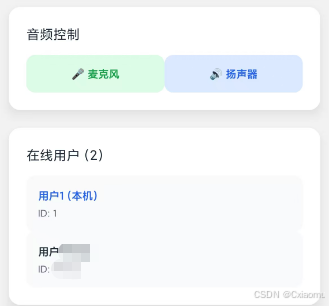
- 可借助"切换摄像头""音频控制""在线用户"区域验证 SDK 状态;
- 完成测试后点击"退出房间",以释放摄像头与 TRTC 实例。
4. Demo B:手机 ↔ 机器人(RobotTrtcDemoScreen.tsx)
4.1 场景
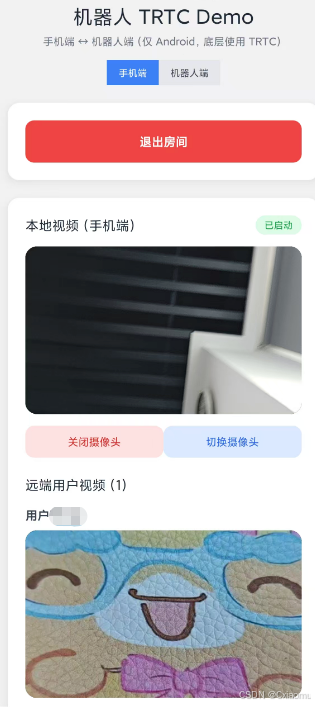
位于 src/screens/RobotTrtcDemoScreen.tsx。同一页面通过 role 切换手机端与机器人端:在本地渲染层面重用相同的 UI,底层逻辑则根据角色切换默认 userId、摄像头优先级与自动操作策略。这样既能快速模拟"客服手机 ↔ 机器人"真机对测,又能将所有业务逻辑封装在单一页面中,外部调用仅需传入 role 即可。
- 手机端(role='phone'):默认调起前置摄像头、支持切换前后摄、用于客服/安防人员;
- 机器人端(role='robot') :优先外接 USB 摄像头(
preferredCamera='external-first'),并在远端离线时自动挂断。
4.2 流程
4.3 关键代码片段
ts
// 角色切换:src/screens/RobotTrtcDemoScreen.tsx
const [role, setRole] = useState<RobotTrtcRole>('phone');
const {
  isJoined,
  remoteUsers,
  cameraStarted,
  defaultUserId,
  connect,
  disconnect,
  toggleMic,
  toggleCam,
  toggleSpeaker,
  switchCamera,
} = useRobotTRTC({ role, hasPermissions, onPermissionRequired: requestPermissions });

const effectiveUserId = (userId || defaultUserId || '').trim();
const handleJoin = async () => {
  if (!hasPermissions && !(await requestPermissions())) return;
  const userSig = getUserSig(effectiveUserId) || TRTC_CONFIG[`userSig_${effectiveUserId}`];
  if (!userSig) {
    Alert.alert('配置错误', `未找到用户 ${effectiveUserId} 的 userSig,请检查配置文件`);
    return;
  }
  connect(roomId, effectiveUserId, { userSig });
};
ts
// USB 摄像头优先 + 自动挂断逻辑
useEffect(() => {
  if (remoteUsers.length > 0) {
    hadRemoteRef.current = true;
    return;
  }
  if (isJoined && hadRemoteRef.current && remoteUsers.length === 0) {
    disconnect(); // 远端挂断,自动退出
    hadRemoteRef.current = false;
  }
}, [isJoined, remoteUsers.length, disconnect]);TXVideoView.LocalView在机器人角色下不暴露"切换前后摄"的按钮,避免误切换到前置摄像头;useRobotTRTC自动把preferredCamera设为external-first,适配 USB 摄像头;- 机器人端如果没有 UI,也可以直接使用
RemoteMonitoringTrtcAgent组件,接收 WebSocket 指令后自动connect/ disconnect。 - 该页面最值得借鉴的思路是"角色驱动的差异化处理":当角色为手机时,允许手动切换前后摄像头并在 UI 上飘出提示;当角色为机器人时,则将所有摄像头控制交给底层 Hook,并在探测到远端离开时主动
disconnect,确保无人值守状态下不会长时间占用摄像头资源。
4.4 双端操作指北
手机端
- 打开 Demo,保持
role='phone'; - 输入房间号(或使用配置中的默认值)、userId(如
1或test),系统会从配置文件中读取对应的 userSig; - 点击"加入房间",默认使用前置摄像头,可通过按钮切换。
机器人端(Android + USB 摄像头)
- 运行同一 App,切换为
role='robot'; - 输入同一房间号(或使用配置中的默认值),可保留默认 userId(来自配置或机器人序列号);
- 系统会从配置文件中读取对应的 userSig,点击"加入房间",若远端加入则自动开麦、开扬声器;
- 若远端挂断或网络断开,会触发自动
disconnect,界面回到准备状态。
5. 安卓权限配置
-
Manifest 静态声明
-
android/app/src/main/AndroidManifest.xml(含mobile、robotflavor)需要声明摄像头、麦克风、外部存储以及 USB 访问能力,方便机器人模式唤醒外接摄像头:xml<manifest ...> <uses-permission android:name="android.permission.CAMERA" /> <uses-permission android:name="android.permission.RECORD_AUDIO" /> <uses-permission android:name="android.permission.READ_EXTERNAL_STORAGE" /> <uses-permission android:name="android.permission.WRITE_EXTERNAL_STORAGE" /> <uses-permission android:name="android.permission.BLUETOOTH" /> <uses-permission android:name="android.permission.BLUETOOTH_ADMIN" /> <uses-feature android:name="android.hardware.camera.any" android:required="false" /> <uses-feature android:name="android.hardware.usb.host" android:required="false" /> <!-- 机器人模式下常见的外设声明,可按需裁剪 --> </manifest> -
如需在局域网内抓取未加密流,可在
<application>上增加android:usesCleartextTraffic="true"并在network_security_config中列出信任域名。
-
-
运行时权限
-
src/hooks/usePermissions.ts统一包装了PermissionsAndroid.requestMultiple,进入 TRTC 页面前都要调用:tsconst permissions = [ PermissionsAndroid.PERMISSIONS.CAMERA, PermissionsAndroid.PERMISSIONS.RECORD_AUDIO, PermissionsAndroid.PERMISSIONS.WRITE_EXTERNAL_STORAGE, PermissionsAndroid.PERMISSIONS.READ_EXTERNAL_STORAGE, ]; const granted = await PermissionsAndroid.requestMultiple(permissions); -
机器人端建议在设备启动时即预申请权限,避免在无人值守状态被拒绝。
-
-
USB 摄像头适配
useRobotTRTC将preferredCamera设为external-first,搭配 Manifest 中的android.hardware.usb.host即可优先调起外接摄像头;- 特殊品牌若需要自定义 HAL,可在
android/app/src/main/java/.../MainActivity.kt里通过厂商 SDK 初始化,再交由 React Native 层的useRobotTRTC控制。
-
Gradle/SDK 版本
compileSdkVersion >= 34、targetSdkVersion >= 33可确保新版权限策略工作正常;- 打包机器人专用 APK 时,建议在
android/app/build.gradle中启用ndk { abiFilters "armeabi-v7a", "arm64-v8a" }以匹配 TRTC 原生依赖。
6. 隐私、安全与复刻建议
- 敏感参数脱敏 :不要把真实
sdkAppId、userSig、privateKey写入仓库;本文中展示的值均为16******50/***MASKED***占位。 - 配置文件管理 :
src/config/trtc.ts包含所有 TRTC 参数,请妥善保管,避免泄露。生产环境建议将配置文件加入.gitignore,或使用环境变量管理。 - 权限处理 :
usePermissions统一处理 Android 运行时权限(摄像头/麦克风/存储),在加入房间前务必确认hasPermissions为真。 - 可靠性 :
useTRTC对TRTCCloudListener做了全量监听(远端进出、音视频可用、音量事件等),并在cleanup中销毁实例,避免内存泄漏。 - 复刻建议 :
- 拷贝
src/hooks/useTRTC.ts+useRobotTRTC.ts到新项目,替换成你的 UI; - 按需裁剪
TrtcTestScreen与RobotTrtcDemoScreen,保留你需要的控制面板; - 在
src/config/trtc.ts中配置好 sdkAppId、roomId 和对应的 userSig; - 结合 Mermaid 流程图快速向团队解释链路,降低接入成本。
- 拷贝
通过以上两个示例,你可以在数小时内完成「手机 ↔ 手机」「手机 ↔ 机器人(USB 摄像头)」两套 React Native + TRTC 在线视频 Demo,并在保持敏感数据安全的同时,拥有可复刻、易于扩展的工程模板。
7. 关键代码清单
src/hooks/useTRTC.ts
ts
import { useState, useEffect, useRef, useCallback } from 'react';
import { Alert } from 'react-native';
import TRTCCloud, { TRTCCloudDef, TRTCParams, TRTCCloudListener } from 'trtc-react-native';
import { TRTC_CONFIG } from '../config/trtc.ts';

const sleep = (duration: number) => new Promise<void>((resolve) => setTimeout(() => resolve(), duration));
export interface User {
  userId: string;
  userName: string;
  isLocal: boolean;
  hasAudio: boolean;
  hasVideo: boolean;
}

interface UseTRTCProps {
  hasPermissions: boolean;
  onPermissionRequired: () => Promise<boolean>;
  preferredCamera?: 'external-first' | 'back-first' | 'front-first';
}

interface JoinRoomOptions {
  userSig?: string;
}

export const useTRTC = ({
  hasPermissions,
  onPermissionRequired,
  preferredCamera = 'front-first',
}: UseTRTCProps) => {
  // 状态管理
  const [isJoined, setIsJoined] = useState(false);
  const [users, setUsers] = useState<User[]>([]);
  const [isMuted, setIsMuted] = useState(false);
  const [isCameraOff, setIsCameraOff] = useState(false);
  const [isSpeakerOn, setIsSpeakerOn] = useState(true);
  const [cameraStarted, setCameraStarted] = useState(false);
  const [isInitializing, setIsInitializing] = useState(false);
  const [trtcInitialized, setTrtcInitialized] = useState(false);

  // refs
  const trtcRef = useRef<TRTCCloud | null>(null);
  const listenerRef = useRef<null | ((type: any, params: any) => void)>(null);
  const joinTimeoutRef = useRef<any>(null);
  const currentUserIdRef = useRef<string>('');
  const currentRoomIdRef = useRef<number | null>(null);

  // 清理定时器
  const clearTimeouts = useCallback(() => {
    if (joinTimeoutRef.current) {
      clearTimeout(joinTimeoutRef.current);
      joinTimeoutRef.current = null;
    }
  }, []);

  // 检查TRTC实例是否可用
  const checkTRTCInstance = useCallback(() => {
    if (!trtcRef.current) {
      console.log('TRTC实例为空,尝试重新初始化');
      return false;
    }
    return true;
  }, []);

  // 开始播放远端视频
  const startRemoteVideo = useCallback(
    async (remoteUserId: string) => {
      if (!checkTRTCInstance() || !isJoined) return;

      try {
        console.log(`开始播放远端用户 ${remoteUserId} 的视频`);
        await trtcRef.current!.muteRemoteVideoStream(remoteUserId, false);
      } catch (error) {
        console.log(`播放远端用户 ${remoteUserId} 视频失败:`, error);
      }
    },
    [isJoined, checkTRTCInstance]
  );

  // 停止播放远端视频
  const stopRemoteVideo = useCallback(
    async (remoteUserId: string) => {
      if (!checkTRTCInstance()) return;

      try {
        console.log(`停止播放远端用户 ${remoteUserId} 的视频`);
        await trtcRef.current!.stopRemoteView(
          remoteUserId,
          TRTCCloudDef.TRTC_VIDEO_STREAM_TYPE_BIG
        );
      } catch (error) {
        console.log(`停止远端用户 ${remoteUserId} 视频失败:`, error);
      }
    },
    [checkTRTCInstance]
  );

  // 获取远端用户列表
  const getRemoteUsers = useCallback(
    async (_currentUserId: string) => {
      if (!checkTRTCInstance() || !isJoined) return;

      try {
        console.log('开始获取远端用户列表...');
        // 启用音量回调来发现用户
        try {
          await trtcRef.current!.enableAudioVolumeEvaluation(1000);
          console.log('已启用音量回调,将通过音量事件发现远端用户');
        } catch (volumeError) {
          console.warn('启用音量回调失败:', volumeError);
        }
      } catch (error) {
        console.log('获取远端用户列表失败:', error);
      }
    },
    [isJoined, checkTRTCInstance]
  );

  const applyCameraPreference = useCallback(async () => {
    if (!checkTRTCInstance()) return;

    const deviceManager = trtcRef.current!.getDeviceManager();
    const trySwitch = async (useFront: boolean) => {
      try {
        await deviceManager.switchCamera(useFront);
        console.log('已根据优先级切换摄像头,front:', useFront);
        return true;
      } catch (error) {
        console.warn('摄像头切换失败,front:', useFront, error);
        return false;
      }
    };

    if (preferredCamera === 'external-first' || preferredCamera === 'back-first') {
      if (await trySwitch(false)) return;
      await trySwitch(true);
      return;
    }

    if (await trySwitch(true)) return;
    await trySwitch(false);
  }, [checkTRTCInstance, preferredCamera]);

  // 摄像头启动
  const startCamera = useCallback(async (): Promise<boolean> => {
    if (!checkTRTCInstance() || !isJoined) {
      console.log('TRTC未初始化或未加入房间');
      return false;
    }

    try {
      console.log('开始启动摄像头 (通过 TXVideoView + 取消视频静音)...');
      await applyCameraPreference();
      // 取消视频静音(本地挂载 LocalView 后即开始采集+推流)
      await trtcRef.current!.muteLocalVideo(false);
      console.log('视频流开启成功');

      setCameraStarted(true);
      setIsCameraOff(false);
      return true;
    } catch (error) {
      console.log('启动摄像头失败:', error);
      Alert.alert('摄像头启动失败', '请检查设备权限设置或重试');
      setCameraStarted(false);
      setIsCameraOff(true);
      return false;
    }
  }, [isJoined, checkTRTCInstance]);

  // 摄像头关闭
  const stopCamera = useCallback(async (): Promise<boolean> => {
    if (!checkTRTCInstance()) return false;

    try {
      // 静音视频流
      await trtcRef.current!.muteLocalVideo(true);

      setCameraStarted(false);
      setIsCameraOff(true);
      return true;
    } catch (error) {
      console.log('关闭摄像头失败:', error);
      return false;
    }
  }, [checkTRTCInstance, isJoined, applyCameraPreference]);

  // 用户管理方法
  const addLocalUser = useCallback(
    (userId: string, userName: string) => {
      const localUser: User = {
        userId: userId,
        userName: userName,
        isLocal: true,
        hasAudio: !isMuted,
        hasVideo: !isCameraOff,
      };

      // 合并本地用户,避免覆盖已发现的远端用户
      setUsers((prev) => {
        // 去掉旧的本地用户记录,保留远端用户
        const others = prev.filter((u) => !(u.isLocal && u.userId === userId));
        return [localUser, ...others];
      });
    },
    [isMuted, isCameraOff]
  );

  const addRemoteUser = useCallback((remoteUserId: string) => {
    if (!remoteUserId || remoteUserId === currentUserIdRef.current) return;

    const remoteUser: User = {
      userId: remoteUserId,
      userName: `用户${remoteUserId}`,
      isLocal: false,
      hasAudio: true,
      // 默认认为远端用户可能已经打开视频,后续由事件进行校正
      hasVideo: true,
    };

    setUsers((prev) => {
      if (prev.some((user) => user.userId === remoteUserId)) {
        console.log(`用户 ${remoteUserId} 已存在于列表中`);
        return prev;
      }
      console.log(`添加远端用户 ${remoteUserId} 到列表`);
      return [...prev, remoteUser];
    });
  }, []);

  const removeUser = useCallback((targetUserId: string) => {
    console.log(`从列表中移除用户 ${targetUserId}`);
    setUsers((prev) => prev.filter((user) => user.userId !== targetUserId));
  }, []);

  const updateUserAudio = useCallback((targetUserId: string, available: boolean) => {
    setUsers((prev) =>
      prev.map((u) => (u.userId === targetUserId ? { ...u, hasAudio: available } : u))
    );
  }, []);

  const updateUserVideo = useCallback((targetUserId: string, available: boolean) => {
    setUsers((prev) =>
      prev.map((u) => (u.userId === targetUserId ? { ...u, hasVideo: available } : u))
    );
  }, []);

  const waitForNativeInstanceReady = useCallback(async () => {
    const MAX_ATTEMPTS = 5;
    for (let attempt = 0; attempt < MAX_ATTEMPTS; attempt += 1) {
      if (!trtcRef.current) {
        return false;
      }

      try {
        await trtcRef.current.getSDKVersion();
        return true;
      } catch (error) {
        console.warn('TRTC原生实例未准备好,重试中...', { attempt: attempt + 1, error });
        await sleep(100);
      }
    }
    return false;
  }, []);

  // 清理资源
  const cleanup = useCallback(async () => {
    try {
      clearTimeouts();

      if (trtcRef.current) {
        try {
          // 停止所有远端视频
          const remoteUsers = users.filter((user) => !user.isLocal);
          for (const user of remoteUsers) {
            await stopRemoteVideo(user.userId);
          }
        } catch (error) {
          console.warn('停止远端视频失败:', error);
        }

        try {
          if (cameraStarted) {
            await stopCamera();
          }
        } catch (error) {
          console.warn('停止摄像头失败:', error);
        }

        try {
          await trtcRef.current.exitRoom();
        } catch (exitError) {
          console.warn('退出房间时出错:', exitError);
        }

        try {
          if (listenerRef.current) {
            trtcRef.current.unRegisterListener(listenerRef.current);
          }
        } catch (listenerError) {
          console.warn('注销监听器时出错:', listenerError);
        }
      }

      try {
        TRTCCloud.destroySharedInstance();
      } catch (destroyError) {
        console.warn('销毁实例时出错:', destroyError);
      }

      // 重置状态
      setTrtcInitialized(false);
      setIsJoined(false);
      setUsers([]);
      setCameraStarted(false);
      trtcRef.current = null;
      listenerRef.current = null;
    } catch (error) {
      console.log('清理TRTC资源时出错:', error);
    }
  }, [users, cameraStarted, stopRemoteVideo, stopCamera, clearTimeouts]);

  // 初始化TRTC
  const initTRTC = useCallback(async () => {
    if (isInitializing || trtcInitialized) return;

    setIsInitializing(true);
    console.log('开始初始化TRTC...');

    try {
      // 先销毁之前的实例
      try {
        TRTCCloud.destroySharedInstance();
      } catch (error) {
        console.log('销毁旧实例:', error);
      }

      // 等待一段时间确保资源被释放
      await sleep(100);

      // 获取新的TRTC实例
      trtcRef.current = TRTCCloud.sharedInstance();

      if (!trtcRef.current) {
        throw new Error('无法创建TRTC实例');
      }

      const nativeReady = await waitForNativeInstanceReady();
      if (!nativeReady) {
        throw new Error('TRTC原生实例初始化超时');
      }

      console.log('TRTC实例创建成功');

      const onRtcListener = (type: any, params: any) => {
        console.log('TRTC事件:', type, params);

        switch (type) {
          case TRTCCloudListener.onEnterRoom: {
            clearTimeouts();

            if (params?.result > 0) {
              console.log('成功进入房间, 房间ID:', params.result);
              setIsJoined(true);

              // 启动本地音频采集与推流
              (async () => {
                try {
                  console.log('开始启动本地音频...');
                  await trtcRef.current!.startLocalAudio(TRTCCloudDef.TRTC_AUDIO_QUALITY_DEFAULT);
                  console.log('本地音频启动成功');
                } catch (audioError) {
                  console.warn('本地音频启动失败:', audioError);
                }
              })();

              // 添加本地用户
              setTimeout(() => {
                const userId = currentUserIdRef.current;
                if (userId) {
                  addLocalUser(userId, `用户${userId}`);
                  getRemoteUsers(userId);
                }
              }, 200);

              // 延迟启动摄像头
              joinTimeoutRef.current = setTimeout(async () => {
                if (hasPermissions) {
                  await startCamera();
                }
              }, 1000);
            } else {
              console.log('进入房间失败, 错误码:', params?.result);
              setIsJoined(false);
              Alert.alert('错误', `进入房间失败,错误码: ${params?.result}`);
            }
            break;
          }

          case TRTCCloudListener.onExitRoom: {
            console.log('已退出房间, 原因:', params?.reason);
            clearTimeouts();
            setIsJoined(false);
            setUsers([]);
            setCameraStarted(false);
            setIsCameraOff(false);
            currentRoomIdRef.current = null;
            currentUserIdRef.current = '';
            break;
          }

          case TRTCCloudListener.onRemoteUserEnterRoom: {
            if (params?.userId && params.userId !== currentUserIdRef.current) {
              console.log(`远端用户 ${params.userId} 进入房间`);
              addRemoteUser(params.userId);
            }
            break;
          }

          case TRTCCloudListener.onRemoteUserLeaveRoom: {
            if (params?.userId) {
              console.log(`远端用户 ${params.userId} 离开房间`);
              stopRemoteVideo(params.userId);
              removeUser(params.userId);
            }
            break;
          }

          case TRTCCloudListener.onUserAudioAvailable: {
            if (params?.userId != null && typeof params?.available === 'boolean') {
              console.log(`用户 ${params.userId} 音频状态: ${params.available}`);
              updateUserAudio(params.userId, params.available);
            }
            break;
          }

          case TRTCCloudListener.onFirstAudioFrame: {
            // 收到远端首帧音频时,确保将该用户加入远端用户列表
            if (params?.userId && params.userId !== currentUserIdRef.current) {
              console.log(`收到远端首帧音频, 发现远端用户: ${params.userId}`);
              addRemoteUser(params.userId);
            }
            break;
          }

          case TRTCCloudListener.onUserVideoAvailable: {
            const uid = params?.userId;
            const available = params?.available;

            if (uid != null && typeof available === 'boolean') {
              console.log(`用户 ${uid} 视频状态: ${available}`);

              // 如果是远端用户,确保已在用户列表中
              if (uid !== currentUserIdRef.current && available) {
                addRemoteUser(uid);
              }

              updateUserVideo(uid, available);

              if (available) {
                setTimeout(() => startRemoteVideo(uid), 300);
              } else {
                stopRemoteVideo(uid);
              }
            }
            break;
          }

          case TRTCCloudListener.onFirstVideoFrame: {
            const uid = params?.userId;
            if (uid && uid !== currentUserIdRef.current) {
              console.log(`远端用户 ${uid} 首帧视频已渲染`);
              addRemoteUser(uid);
              updateUserVideo(uid, true);
            }
            break;
          }

          case TRTCCloudListener.onUserVoiceVolume: {
            // 通过音量事件发现远端用户
            if (params?.userVolumes && Array.isArray(params.userVolumes)) {
              params.userVolumes.forEach((volumeInfo: any) => {
                if (volumeInfo.userId && volumeInfo.userId !== currentUserIdRef.current) {
                  console.log(`通过音量事件发现远端用户: ${volumeInfo.userId}`);
                  addRemoteUser(volumeInfo.userId);
                }
              });
            }
            break;
          }

          case TRTCCloudListener.onError: {
            console.log('TRTC错误:', params);
            Alert.alert('TRTC错误', `错误码: ${params?.errCode}\n错误信息: ${params?.errMsg}`);
            break;
          }

          case TRTCCloudListener.onWarning: {
            console.warn('TRTC警告:', params);
            break;
          }

          default:
            break;
        }
      };

      listenerRef.current = onRtcListener;
      trtcRef.current.registerListener(onRtcListener);
      console.log('TRTC监听器注册成功');

      setTrtcInitialized(true);
      console.log('TRTC初始化完成');
    } catch (error: any) {
      console.log('TRTC初始化失败:', error);
      Alert.alert('初始化失败', `TRTC初始化失败: ${error.message || error}`);
      setTrtcInitialized(false);
    } finally {
      setIsInitializing(false);
    }
  }, [
    isInitializing,
    trtcInitialized,
    hasPermissions,
    startCamera,
    addLocalUser,
    addRemoteUser,
    getRemoteUsers,
    startRemoteVideo,
    stopRemoteVideo,
    removeUser,
    updateUserAudio,
    updateUserVideo,
    clearTimeouts,
    waitForNativeInstanceReady,
  ]);

  // 加入房间
  const joinRoom = useCallback(
    async (roomId: string, userId: string, options?: JoinRoomOptions) => {
      if (!trtcInitialized || !checkTRTCInstance()) {
        Alert.alert('错误', 'TRTC未初始化,请稍后重试');
        return;
      }

      const nativeReady = await waitForNativeInstanceReady();
      if (!nativeReady) {
        Alert.alert('错误', 'TRTC服务未准备就绪,请稍后重试');
        return;
      }

      const numericRoomId = Number(roomId);
      if (Number.isNaN(numericRoomId)) {
        Alert.alert('错误', '房间ID无效');
        return;
      }

      if (
        isJoined &&
        currentRoomIdRef.current === numericRoomId &&
        currentUserIdRef.current === userId
      ) {
        console.log('已经在目标房间中,跳过重复加入');
        return;
      }

      if (isJoined) {
        console.warn('已在其他房间中,如需切换请先退出');
        return;
      }

      // 检查权限
      const hasPermission = await onPermissionRequired();
      if (!hasPermission) {
        Alert.alert('权限不足', '无法获取必要权限,请在系统设置中手动开启');
        return;
      }

      try {
        console.log(`准备加入房间,用户ID: ${userId}, 房间ID: ${roomId}`);

        // 保存当前用户ID
        currentUserIdRef.current = userId;
        currentRoomIdRef.current = numericRoomId;
        const userSigKey = `userSig_${userId}`;
        const userSig = options?.userSig?.trim();

        if (!userSig) {
          const fallbackSig = TRTC_CONFIG[userSigKey];
          if (fallbackSig) {
            console.log(`[TRTC] 从配置文件读取 userSig(key=${userSigKey})`);
          } else {
            Alert.alert('配置错误', `未能获取用户 ${userId} 的 userSig,请在配置文件中添加 userSig_${userId}`);
            return;
          }
        }

        const finalUserSig = userSig || TRTC_CONFIG[userSigKey];
        if (!finalUserSig) {
          Alert.alert('配置错误', `未能获取用户 ${userId} 的 userSig,请在配置文件中添加 userSig_${userId}`);
          return;
        }

        const params = new TRTCParams({
          sdkAppId: TRTC_CONFIG.sdkAppId,
          userId: userId,
          userSig: finalUserSig,
          roomId: numericRoomId,
          role: TRTCCloudDef.TRTCRoleAnchor,
        });

        console.log('TRTC参数:', {
          sdkAppId: params.sdkAppId,
          userId: params.userId,
          roomId: params.roomId,
          role: params.role,
        });

        await trtcRef.current!.enterRoom(params, TRTCCloudDef.TRTC_APP_SCENE_VIDEOCALL);
        console.log('已发起加入房间请求');
      } catch (error) {
        console.log('加入房间失败:', error);
        Alert.alert('错误', `加入房间失败: ${error}`);
      }
    },
    [trtcInitialized, isJoined, onPermissionRequired, checkTRTCInstance, waitForNativeInstanceReady]
  );

  // 退出房间
  const exitRoom = useCallback(async () => {
    if (!checkTRTCInstance() || !isJoined) return;

    try {
      clearTimeouts();

      const trtc = trtcRef.current;
      if (!trtc) {
        console.warn('TRTC实例缺失,无法退出房间');
        return;
      }

      // 停止摄像头
      if (cameraStarted) {
        await stopCamera();
      }

      // 停止所有远端视频
      const remoteUsers = users.filter((user) => !user.isLocal);
      for (const user of remoteUsers) {
        await stopRemoteVideo(user.userId);
      }

      await trtc.exitRoom();

      // 清理状态
      currentUserIdRef.current = '';
      currentRoomIdRef.current = null;
    } catch (error) {
      console.log('退出房间失败:', error);
    }
  }, [
    isJoined,
    cameraStarted,
    users,
    stopCamera,
    stopRemoteVideo,
    clearTimeouts,
    checkTRTCInstance,
  ]);

  // 切换静音
  const toggleMute = useCallback(
    async (userId: string) => {
      if (!checkTRTCInstance() || !isJoined) return;

      try {
        const newMutedState = !isMuted;
        await trtcRef.current!.muteLocalAudio(newMutedState);
        setIsMuted(newMutedState);
        updateUserAudio(userId, !newMutedState);
      } catch (error) {
        console.log('切换静音失败:', error);
      }
    },
    [isMuted, isJoined, updateUserAudio, checkTRTCInstance]
  );

  // 切换摄像头
  const toggleCamera = useCallback(
    async (userId: string) => {
      if (!checkTRTCInstance() || !isJoined) return;

      try {
        if (isCameraOff || !cameraStarted) {
          const success = await startCamera();
          if (success) {
            updateUserVideo(userId, true);
          }
        } else {
          const success = await stopCamera();
          if (success) {
            updateUserVideo(userId, false);
          }
        }
      } catch (error) {
        console.log('切换摄像头失败:', error);
      }
    },
    [
      isCameraOff,
      cameraStarted,
      isJoined,
      startCamera,
      stopCamera,
      updateUserVideo,
      checkTRTCInstance,
    ]
  );

  // 切换扬声器
  const toggleSpeaker = useCallback(async () => {
    if (!checkTRTCInstance() || !isJoined) return;

    try {
      const newSpeakerState = !isSpeakerOn;
      const route = newSpeakerState
        ? TRTCCloudDef.TRTC_AUDIO_ROUTE_SPEAKER
        : TRTCCloudDef.TRTC_AUDIO_ROUTE_EARPIECE;

      await trtcRef.current!.setAudioRoute(route);
      setIsSpeakerOn(newSpeakerState);
    } catch (error) {
      console.log('切换扬声器失败:', error);
    }
  }, [isSpeakerOn, isJoined, checkTRTCInstance]);

  // 切换摄像头(前后置)
  const switchCamera = useCallback(async () => {
    if (!checkTRTCInstance() || !isJoined || !cameraStarted) return;

    try {
      const deviceManager = trtcRef.current!.getDeviceManager();
      // 查询当前是否为前置摄像头,然后切换到相反方向
      const isFront = await deviceManager.isFrontCamera();
      await deviceManager.switchCamera(!isFront);
      console.log('已切换摄像头, 当前是否前置:', !isFront);
    } catch (error) {
      console.log('切换摄像头失败:', error);
    }
  }, [isJoined, cameraStarted, checkTRTCInstance]);

  // 初始化和清理
  useEffect(() => {
    initTRTC();
    return () => {
      cleanup();
    };
  }, []);

  // 获取远端用户列表
  const remoteUsers = users.filter((user) => !user.isLocal);
  const localUser = users.find((user) => user.isLocal);

  return {
    // 状态
    isJoined,
    users,
    remoteUsers,
    localUser,
    isMuted,
    isCameraOff,
    isSpeakerOn,
    cameraStarted,
    isInitializing,
    trtcInitialized,

    // 方法
    joinRoom,
    exitRoom,
    toggleMute,
    toggleCamera,
    toggleSpeaker,
    switchCamera,
    initTRTC, // 暴露重新初始化方法
  };
};
src/hooks/useRobotTRTC.ts
ts
import { useMemo, useCallback } from 'react';
import { useTRTC } from './useTRTC';
import { TRTC_CONFIG } from '../config/trtc.ts';

export type RobotTrtcRole = 'phone' | 'robot';

interface UseRobotTRTCOptions {
  role: RobotTrtcRole;
  hasPermissions: boolean;
  onPermissionRequired: () => Promise<boolean>;
}

/**
 * 针对"手机端 ↔ 机器人端"的 TRTC 封装 hook
 *
 * 说明:
 * - 内部复用 useTRTC,统一 join / exit / 麦克风 / 摄像头 / 扬声器控制
 * - 仅负责选择默认 userId,不做 userSig 逻辑(由上层调用提供)
 */
export const useRobotTRTC = ({
  role,
  hasPermissions,
  onPermissionRequired,
}: UseRobotTRTCOptions) => {
  // 简单约定:机器人沿用 TRTC_CONFIG.userId,手机端默认用 "1"
  const defaultUserId = useMemo(() => (role === 'robot' ? TRTC_CONFIG.userId : '1'), [role]);

  const {
    // 状态
    isJoined,
    users,
    remoteUsers,
    localUser,
    isMuted,
    isCameraOff,
    isSpeakerOn,
    cameraStarted,
    isInitializing,
    trtcInitialized,

    // 方法
    joinRoom,
    exitRoom,
    toggleMute,
    toggleCamera,
    toggleSpeaker,
    switchCamera,
  } = useTRTC({
    hasPermissions,
    onPermissionRequired,
    preferredCamera: role === 'robot' ? 'external-first' : 'front-first',
  });

  const connect = useCallback(
    (roomId: string, userId?: string, options?: { userSig?: string }) => {
      const uid = (userId || defaultUserId || '').trim();
      if (!uid) {
        console.warn('[RobotTRTC] userId 为空,无法加入房间');
        return;
      }
      joinRoom(roomId, uid, options);
    },
    [defaultUserId, joinRoom]
  );

  const disconnect = useCallback(() => {
    return exitRoom();
  }, [exitRoom]);

  const toggleMic = useCallback(
    (userId?: string) => {
      const uid = (userId || defaultUserId || '').trim();
      if (!uid) return;
      toggleMute(uid);
    },
    [defaultUserId, toggleMute]
  );

  const toggleCam = useCallback(
    (userId?: string) => {
      const uid = (userId || defaultUserId || '').trim();
      if (!uid) return;
      toggleCamera(uid);
    },
    [defaultUserId, toggleCamera]
  );

  return {
    // 状态
    role,
    defaultUserId,
    isJoined,
    users,
    remoteUsers,
    localUser,
    isMuted,
    isCameraOff,
    isSpeakerOn,
    cameraStarted,
    isInitializing,
    trtcInitialized,

    // 操作
    connect,
    disconnect,
    toggleMic,
    toggleCam,
    toggleSpeaker,
    switchCamera,
  };
};
src/screens/TrtcTestScreen.tsx
ts
import React, { useState } from 'react';
import { View, Text, TouchableOpacity, TextInput, ScrollView } from 'react-native';
import { useSafeAreaInsets } from 'react-native-safe-area-context';
import { Alert } from 'react-native';
import { TXVideoView } from 'trtc-react-native';
import { TRTCCloudDef } from 'trtc-react-native';
import { TRTC_CONFIG, getUserSig } from '../config/trtc.ts';
import { useTRTC } from '../hooks/useTRTC.ts';
import { usePermissions } from '../hooks/usePermissions';
const TrtcTestScreen: React.FC = () => {
const insets = useSafeAreaInsets();
// 表单状态
const [roomId, setRoomId] = useState('123456');
const [userId, setUserId] = useState(TRTC_CONFIG.userId);
const [userName, setUserName] = useState(TRTC_CONFIG.userName);
// 权限管理
const { hasPermissions, requestPermissions } = usePermissions();
// TRTC功能
const {
// 状态
isJoined,
users,
remoteUsers,
isMuted,
isSpeakerOn,
cameraStarted,
isInitializing,
// 方法
joinRoom,
exitRoom,
toggleMute,
toggleCamera,
toggleSpeaker,
switchCamera,
} = useTRTC({
hasPermissions,
onPermissionRequired: requestPermissions,
});
// 处理加入房间
const handleJoinRoom = () => {
const userSig = getUserSig(userId) || TRTC_CONFIG[`userSig_${userId}`];
if (!userSig) {
Alert.alert('配置错误', `未找到用户 ${userId} 的 userSig,请检查配置文件`);
return;
}
joinRoom(roomId, userId, { userSig });
};
// 处理切换静音
const handleToggleMute = () => {
toggleMute(userId);
};
// 处理切换摄像头
const handleToggleCamera = () => {
toggleCamera(userId);
};
return (
<View
className="flex-1 bg-gradient-to-b from-blue-50 to-white"
style={{ paddingTop: insets.top }}
>
<ScrollView className="flex-1" showsVerticalScrollIndicator={false}>
{/* 标题区域 */}
<View className="px-6 pt-4 pb-6">
<Text className="text-3xl font-bold text-center text-gray-800 mb-2">腾讯云 TRTC</Text>
<Text className="text-center text-gray-500">实时音视频通话</Text>
</View>
{/* 连接状态卡片 */}
<View className="mx-4 mb-6">
<View className="bg-white rounded-2xl p-6 shadow-lg">
<View className="flex-row items-center justify-center mb-4">
<View
className={`w-4 h-4 rounded-full mr-3 ${
isJoined ? 'bg-green-500' : hasPermissions ? 'bg-yellow-500' : 'bg-gray-300'
}`}
/>
<Text className="text-lg font-semibold text-gray-800">
{isJoined ? '已连接' : hasPermissions ? '准备就绪' : '等待权限'}
</Text>
</View>
{/* 状态指示器 */}
<View className="flex-row justify-around">
<View className="items-center">
<View
className={`w-10 h-10 rounded-full mb-2 flex items-center justify-center ${
hasPermissions ? 'bg-blue-100' : 'bg-gray-100'
}`}
>
<Text className={`text-lg ${hasPermissions ? 'text-blue-600' : 'text-gray-400'}`}>
🔐
</Text>
</View>
<Text className="text-xs text-gray-600">权限</Text>
</View>
<View className="items-center">
<View
className={`w-10 h-10 rounded-full mb-2 flex items-center justify-center ${
isJoined ? 'bg-green-100' : 'bg-gray-100'
}`}
>
<Text className={`text-lg ${isJoined ? 'text-green-600' : 'text-gray-400'}`}>
🌐
</Text>
</View>
<Text className="text-xs text-gray-600">连接</Text>
</View>
<View className="items-center">
<View
className={`w-10 h-10 rounded-full mb-2 flex items-center justify-center ${
cameraStarted ? 'bg-purple-100' : 'bg-gray-100'
}`}
>
<Text
className={`text-lg ${cameraStarted ? 'text-purple-600' : 'text-gray-400'}`}
>
📹
</Text>
</View>
<Text className="text-xs text-gray-600">摄像头</Text>
</View>
</View>
</View>
</View>
{/* 房间配置 */}
{!isJoined && (
<View className="mx-4 mb-6">
<View className="bg-white rounded-2xl p-6 shadow-lg">
<Text className="text-xl font-bold text-gray-800 mb-4">房间设置</Text>
<View className="space-y-4">
<View>
<Text className="text-sm font-medium text-gray-600 mb-2">房间ID</Text>
<TextInput
className="bg-gray-50 border border-gray-200 rounded-xl p-4 text-base"
placeholder="请输入房间ID"
value={roomId}
onChangeText={setRoomId}
keyboardType="numeric"
/>
</View>
<View>
<Text className="text-sm font-medium text-gray-600 mb-2">用户ID</Text>
<TextInput
className="bg-gray-50 border border-gray-200 rounded-xl p-4 text-base"
placeholder="请输入用户ID"
value={userId}
onChangeText={setUserId}
/>
</View>
<View>
<Text className="text-sm font-medium text-gray-600 mb-2">用户名</Text>
<TextInput
className="bg-gray-50 border border-gray-200 rounded-xl p-4 text-base"
placeholder="请输入用户名"
value={userName}
onChangeText={setUserName}
/>
</View>
</View>
</View>
</View>
)}
{/* 主要控制按钮 */}
<View className="mx-4 mb-6">
<View className="bg-white rounded-2xl p-6 shadow-lg">
{!isJoined ? (
<View className="space-y-4">
<TouchableOpacity
className="bg-blue-500 rounded-xl py-4 px-6"
onPress={requestPermissions}
>
<Text className="text-white text-center font-semibold text-lg">
{hasPermissions ? '✓ 权限已获取' : '获取权限'}
</Text>
</TouchableOpacity>
<TouchableOpacity
className={`rounded-xl py-4 px-6 ${
isInitializing ? 'bg-gray-400' : 'bg-green-500'
}`}
onPress={handleJoinRoom}
disabled={isInitializing}
>
<Text className="text-white text-center font-semibold text-lg">
{isInitializing ? '连接中...' : '加入房间'}
</Text>
</TouchableOpacity>
</View>
) : (
<TouchableOpacity className="bg-red-500 rounded-xl py-4 px-6" onPress={exitRoom}>
<Text className="text-white text-center font-semibold text-lg">退出房间</Text>
</TouchableOpacity>
)}
</View>
</View>
{/* 视频预览区域 */}
{isJoined && (
<View className="mx-4 mb-6">
<View className="bg-white rounded-2xl p-6 shadow-lg">
{/* 本地视频 */}
<View className="mb-6">
<View className="flex-row items-center justify-between mb-4">
<Text className="text-xl font-bold text-gray-800">本地视频</Text>
<View
className={`px-3 py-1 rounded-full ${
cameraStarted ? 'bg-green-100' : 'bg-gray-100'
}`}
>
<Text
className={`text-sm font-medium ${
cameraStarted ? 'text-green-600' : 'text-gray-500'
}`}
>
{cameraStarted ? '已启动' : '未启动'}
</Text>
</View>
</View>
<View
className="w-full rounded-2xl overflow-hidden bg-gray-900 mb-4"
style={{ height: 200 }}
>
{cameraStarted ? (
<>
<TXVideoView.LocalView
style={{
width: '100%',
height: '100%',
backgroundColor: '#000000',
}}
/>
<View className="absolute top-4 right-4 bg-green-500 rounded-full w-3 h-3" />
</>
) : (
<View className="flex-1 justify-center items-center">
<Text className="text-white text-center text-lg mb-2">📹</Text>
<Text className="text-white text-center">摄像头未启动</Text>
</View>
)}
</View>
{/* 摄像头控制按钮 */}
<View className="flex-row space-x-3">
<TouchableOpacity
className={`flex-1 py-3 rounded-xl ${
cameraStarted ? 'bg-red-100' : 'bg-green-100'
}`}
onPress={handleToggleCamera}
>
<Text
className={`text-center font-medium ${
cameraStarted ? 'text-red-600' : 'text-green-600'
}`}
>
{cameraStarted ? '关闭摄像头' : '开启摄像头'}
</Text>
</TouchableOpacity>
<TouchableOpacity
className="flex-1 py-3 rounded-xl bg-blue-100"
onPress={switchCamera}
disabled={!cameraStarted}
>
<Text
className={`text-center font-medium ${cameraStarted ? 'text-blue-600' : 'text-gray-400'}`}
>
切换摄像头
</Text>
</TouchableOpacity>
</View>
</View>
{/* 远端用户视频 */}
{remoteUsers.length > 0 && (
<View>
<Text className="text-xl font-bold text-gray-800 mb-4">
远端用户视频 ({remoteUsers.length})
</Text>
{remoteUsers.map((user) => (
<View key={user.userId} className="mb-4">
<View className="flex-row items-center justify-between mb-2">
<Text className="text-lg font-semibold text-gray-700">{user.userName}</Text>
<View
className={`px-3 py-1 rounded-full ${
user.hasVideo ? 'bg-green-100' : 'bg-gray-100'
}`}
>
<Text
className={`text-sm font-medium ${
user.hasVideo ? 'text-green-600' : 'text-gray-500'
}`}
>
{user.hasVideo ? '视频开启' : '视频关闭'}
</Text>
</View>
</View>
<View
className="w-full rounded-2xl overflow-hidden bg-gray-900"
style={{ height: 200 }}
>
{user.hasVideo ? (
<>
<TXVideoView.RemoteView
userId={user.userId}
streamType={TRTCCloudDef.TRTC_VIDEO_STREAM_TYPE_BIG}
style={{
width: '100%',
height: '100%',
backgroundColor: '#000000',
}}
/>
<View className="absolute top-4 right-4 bg-blue-500 rounded-full w-3 h-3" />
<View className="absolute bottom-4 left-4 bg-black bg-opacity-50 rounded px-2 py-1">
<Text className="text-white text-sm">{user.userName}</Text>
</View>
</>
) : (
<View className="flex-1 justify-center items-center">
<Text className="text-white text-center text-lg mb-2">👤</Text>
<Text className="text-white text-center">{user.userName}</Text>
<Text className="text-gray-400 text-center text-sm">视频已关闭</Text>
</View>
)}
</View>
</View>
))}
</View>
)}
</View>
</View>
)}
{/* 音频控制 */}
{isJoined && (
<View className="mx-4 mb-6">
<View className="bg-white rounded-2xl p-6 shadow-lg">
<Text className="text-xl font-bold text-gray-800 mb-4">音频控制</Text>
<View className="flex-row space-x-3">
<TouchableOpacity
className={`flex-1 py-4 rounded-xl ${isMuted ? 'bg-red-100' : 'bg-green-100'}`}
onPress={handleToggleMute}
>
<Text
className={`text-center font-semibold ${
isMuted ? 'text-red-600' : 'text-green-600'
}`}
>
{isMuted ? '🔇 已静音' : '🎤 麦克风'}
</Text>
</TouchableOpacity>
<TouchableOpacity
className={`flex-1 py-4 rounded-xl ${
isSpeakerOn ? 'bg-blue-100' : 'bg-gray-100'
}`}
onPress={toggleSpeaker}
>
<Text
className={`text-center font-semibold ${
isSpeakerOn ? 'text-blue-600' : 'text-gray-600'
}`}
>
{isSpeakerOn ? '🔊 扬声器' : '🎧 听筒'}
</Text>
</TouchableOpacity>
</View>
</View>
</View>
)}
{/* 用户列表 */}
{isJoined && users.length > 0 && (
<View className="mx-4 mb-6">
<View className="bg-white rounded-2xl p-6 shadow-lg">
<Text className="text-xl font-bold text-gray-800 mb-4">
在线用户 ({users.length})
</Text>
<View className="space-y-3">
{users.map((user) => (
<View
key={user.userId}
className="flex-row items-center justify-between p-4 bg-gray-50 rounded-xl"
>
<View className="flex-1">
<Text
className={`text-base font-semibold ${
user.isLocal ? 'text-blue-600' : 'text-gray-800'
}`}
>
{user.userName} {user.isLocal ? '(我)' : ''}
</Text>
<Text className="text-sm text-gray-500 mt-1">ID: {user.userId}</Text>
</View>
<View className="flex-row space-x-3">
<View
className={`w-8 h-8 rounded-full flex items-center justify-center ${
user.hasAudio ? 'bg-green-100' : 'bg-gray-200'
}`}
>
<Text className={user.hasAudio ? 'text-green-600' : 'text-gray-400'}>
🎤
</Text>
</View>
<View
className={`w-8 h-8 rounded-full flex items-center justify-center ${
user.hasVideo ? 'bg-blue-100' : 'bg-gray-200'
}`}
>
<Text className={user.hasVideo ? 'text-blue-600' : 'text-gray-400'}>
📹
</Text>
</View>
</View>
</View>
))}
</View>
</View>
</View>
)}
{/* 底部空间 */}
<View style={{ height: 80 }} />
</ScrollView>
</View>
);
};
export default TrtcTestScreen;src/screens/RobotTrtcDemoScreen.tsx
ts
import React, { useEffect, useRef, useState } from 'react';
import { Alert, ScrollView, Text, TextInput, TouchableOpacity, View } from 'react-native';
import { useSafeAreaInsets } from 'react-native-safe-area-context';
import { TRTCCloudDef, TXVideoView } from 'trtc-react-native';
import { TRTC_CONFIG, getUserSig } from '../config/trtc.ts';
import { useRobotTRTC, RobotTrtcRole } from '../hooks/useRobotTRTC';
import { usePermissions } from '../hooks/usePermissions';

const RobotTrtcDemoScreen: React.FC = () => {
  const insets = useSafeAreaInsets();

  // 基础表单
  const [roomId, setRoomId] = useState('123456');
  const [userId, setUserId] = useState('');
  const [role, setRole] = useState<RobotTrtcRole>('phone');

  // 统一的音视频权限管理(Android)
  const { hasPermissions, requestPermissions } = usePermissions();

  const {
    isJoined,
    users,
    remoteUsers,
    localUser,
    isMuted,
    isSpeakerOn,
    cameraStarted,
    isInitializing,
    defaultUserId,
    connect,
    disconnect,
    toggleMic,
    toggleCam,
    toggleSpeaker,
    switchCamera,
  } = useRobotTRTC({
    role,
    hasPermissions,
    onPermissionRequired: requestPermissions,
  });

  const effectiveUserId = (userId || defaultUserId || '').trim();

  const handleJoin = () => {
    const userSig = getUserSig(effectiveUserId) || TRTC_CONFIG[`userSig_${effectiveUserId}`];
    if (!userSig) {
      Alert.alert('配置错误', `未找到用户 ${effectiveUserId} 的 userSig,请检查配置文件`);
      return;
    }
    connect(roomId, effectiveUserId, { userSig });
  };

  const handleLeave = () => {
    disconnect();
  };

  const handleToggleMic = () => {
    toggleMic(effectiveUserId);
  };

  const handleToggleCam = () => {
    toggleCam(effectiveUserId);
  };

  // 记录是否曾经存在远端用户,用于判断"对方挂断"
  const hadRemoteRef = useRef(false);

  useEffect(() => {
    if (remoteUsers.length > 0) {
      hadRemoteRef.current = true;
      return;
    }

    // 当正在通话中且远端用户从有到无,视为对方挂断,自动执行本地挂断
    if (isJoined && hadRemoteRef.current && remoteUsers.length === 0) {
      console.log('[RobotTrtcDemo] 远端用户离开,自动挂断本地会议');
      disconnect();
      hadRemoteRef.current = false;
    }
  }, [isJoined, remoteUsers.length, disconnect]);

  return (
    <View
      className="flex-1 bg-gradient-to-b from-blue-50 to-white"
      style={{ paddingTop: insets.top }}
    >
      <ScrollView className="flex-1" showsVerticalScrollIndicator={false}>
        {/* 标题 / 角色选择 */}
        <View className="px-6 pt-4 pb-6">
          <Text className="text-3xl font-bold text-center text-gray-800 mb-2">
            机器人 TRTC Demo
          </Text>
          <Text className="text-center text-gray-500">
            手机端 ↔ 机器人端(仅 Android,底层使用 TRTC)
          </Text>

          <View className="flex-row justify-center mt-4 rounded-full overflow-hidden">
            <TouchableOpacity
              className={`px-4 py-2 ${role === 'phone' ? 'bg-blue-500' : 'bg-gray-200'}`}
              onPress={() => setRole('phone')}
            >
              <Text className={`text-sm ${role === 'phone' ? 'text-white' : 'text-gray-700'}`}>
                手机端
              </Text>
            </TouchableOpacity>
            <TouchableOpacity
              className={`px-4 py-2 ${role === 'robot' ? 'bg-blue-500' : 'bg-gray-200'}`}
              onPress={() => setRole('robot')}
            >
              <Text className={`text-sm ${role === 'robot' ? 'text-white' : 'text-gray-700'}`}>
                机器人端
              </Text>
            </TouchableOpacity>
          </View>
        </View>

        {/* 房间配置(未加入时显示) */}
        {!isJoined && (
          <View className="mx-4 mb-6 bg-white rounded-2xl p-6 shadow-lg">
            <Text className="text-xl font-bold text-gray-800 mb-4">房间设置</Text>

            <View className="space-y-4">
              <View>
                <Text className="text-sm font-medium text-gray-600 mb-2">房间 ID</Text>
                <TextInput
                  className="bg-gray-50 border border-gray-200 rounded-xl p-3 text-base"
                  placeholder="请输入房间ID"
                  value={roomId}
                  onChangeText={setRoomId}
                  keyboardType="numeric"
                />
              </View>

              <View>
                <Text className="text-sm font-medium text-gray-600 mb-2">
                  用户 ID(留空使用默认)
                </Text>
                <TextInput
                  className="bg-gray-50 border border-gray-200 rounded-xl p-3 text-base"
                  placeholder={`默认: ${role === 'robot' ? defaultUserId : '1'}`}
                  value={userId}
                  onChangeText={setUserId}
                />
              </View>

              <View>
                <Text className="text-sm font-medium text-gray-600 mb-2">音视频权限</Text>
                <TouchableOpacity
                  className={`rounded-xl py-3 px-4 ${
                    hasPermissions ? 'bg-green-100' : 'bg-blue-500'
                  }`}
                  onPress={requestPermissions}
                >
                  <Text
                    className={`text-center font-medium ${
                      hasPermissions ? 'text-green-700' : 'text-white'
                    }`}
                  >
                    {hasPermissions ? '✓ 权限已获取' : '获取摄像头/麦克风权限'}
                  </Text>
                </TouchableOpacity>
              </View>
            </View>
          </View>
        )}

        {/* 加入 / 退出按钮 */}
        <View className="mx-4 mb-6 bg-white rounded-2xl p-6 shadow-lg">
          {!isJoined ? (
            <TouchableOpacity
              className={`rounded-xl py-4 px-6 ${isInitializing ? 'bg-gray-400' : 'bg-green-500'}`}
              onPress={handleJoin}
              disabled={isInitializing}
            >
              <Text className="text-white text-center font-semibold text-lg">
                {isInitializing ? '连接中...' : '加入房间'}
              </Text>
            </TouchableOpacity>
          ) : (
            <TouchableOpacity className="bg-red-500 rounded-xl py-4 px-6" onPress={handleLeave}>
              <Text className="text-white text-center font-semibold text-lg">退出房间</Text>
            </TouchableOpacity>
          )}
        </View>

        {/* 视频预览区域 */}
        {isJoined && (
          <View className="mx-4 mb-6 bg-white rounded-2xl p-6 shadow-lg">
            {/* 本地视频 */}
            <View className="mb-6">
              <View className="flex-row items-center justify-between mb-4">
                <Text className="text-xl font-bold text-gray-800">
                  本地视频({role === 'robot' ? '机器人端' : '手机端'})
                </Text>
                <View
                  className={`px-3 py-1 rounded-full ${
                    cameraStarted ? 'bg-green-100' : 'bg-gray-100'
                  }`}
                >
                  <Text
                    className={`text-sm font-medium ${
                      cameraStarted ? 'text-green-600' : 'text-gray-500'
                    }`}
                  >
                    {cameraStarted ? '已启动' : '未启动'}
                  </Text>
                </View>
              </View>

              <View
                className="w-full rounded-2xl overflow-hidden bg-gray-900 mb-4"
                style={{ height: 200 }}
              >
                {cameraStarted ? (
                  <TXVideoView.LocalView
                    // Android 下:优先使用外接/后置摄像头;若无外接摄像头,则回退到手机自带摄像头
                    // - 手机端:使用前置摄像头(frontCamera = true)
                    // - 机器人端:使用后置/外接摄像头(frontCamera = false,由系统/厂商映射)
                    frontCamera={role === 'phone'}
                    style={{
                      width: '100%',
                      height: '100%',
                      backgroundColor: '#000000',
                    }}
                  />
                ) : (
                  <View className="flex-1 justify-center items-center">
                    <Text className="text-white text-center text-lg mb-2">📹</Text>
                    <Text className="text-white text-center">摄像头未启动</Text>
                  </View>
                )}
              </View>

              <View className="flex-row space-x-3">
                <TouchableOpacity
                  className={`flex-1 py-3 rounded-xl ${
                    cameraStarted ? 'bg-red-100' : 'bg-green-100'
                  }`}
                  onPress={handleToggleCam}
                >
                  <Text
                    className={`text-center font-medium ${
                      cameraStarted ? 'text-red-600' : 'text-green-600'
                    }`}
                  >
                    {cameraStarted ? '关闭摄像头' : '开启摄像头'}
                  </Text>
                </TouchableOpacity>

                {/* 仅在"手机端"角色下允许切换前/后摄像头。
                   机器人角色进入会议时,只使用外接/后置摄像头,不暴露前置摄像头切换入口。 */}
                {role === 'phone' && (
                  <TouchableOpacity
                    className="flex-1 py-3 rounded-xl bg-blue-100"
                    onPress={switchCamera}
                    disabled={!cameraStarted}
                  >
                    <Text
                      className={`text-center font-medium ${
                        cameraStarted ? 'text-blue-600' : 'text-gray-400'
                      }`}
                    >
                      切换摄像头
                    </Text>
                  </TouchableOpacity>
                )}
              </View>
            </View>

            {/* 远端用户视频 */}
            {remoteUsers.length > 0 && (
              <View>
                <Text className="text-xl font-bold text-gray-800 mb-4">
                  远端用户视频 ({remoteUsers.length})
                </Text>

                {remoteUsers.map((user) => (
                  <View key={user.userId} className="mb-4">
                    <View className="flex-row items-center justify-between mb-2">
                      <Text className="text-lg font-semibold text-gray-700">{user.userName}</Text>
                    </View>

                    <View
                      className="w-full rounded-2xl overflow-hidden bg-gray-900"
                      style={{ height: 200 }}
                    >
                      <TXVideoView.RemoteView
                        userId={user.userId}
                        streamType={TRTCCloudDef.TRTC_VIDEO_STREAM_TYPE_BIG}
                        style={{
                          width: '100%',
                          height: '100%',
                          backgroundColor: '#000000',
                        }}
                      />
                    </View>
                  </View>
                ))}
              </View>
            )}
          </View>
        )}

        {/* 音频控制 */}
        {isJoined && (
          <View className="mx-4 mb-6 bg-white rounded-2xl p-6 shadow-lg">
            <Text className="text-xl font-bold text-gray-800 mb-4">音频控制</Text>

            <View className="flex-row space-x-3">
              <TouchableOpacity
                className={`flex-1 py-4 rounded-xl ${isMuted ? 'bg-red-100' : 'bg-green-100'}`}
                onPress={handleToggleMic}
              >
                <Text
                  className={`text-center font-semibold ${
                    isMuted ? 'text-red-600' : 'text-green-600'
                  }`}
                >
                  {isMuted ? '🔇 已静音' : '🎤 麦克风'}
                </Text>
              </TouchableOpacity>

              <TouchableOpacity
                className={`flex-1 py-4 rounded-xl ${isSpeakerOn ? 'bg-blue-100' : 'bg-gray-100'}`}
                onPress={toggleSpeaker}
              >
                <Text
                  className={`text-center font-semibold ${
                    isSpeakerOn ? 'text-blue-600' : 'text-gray-600'
                  }`}
                >
                  {isSpeakerOn ? '🔊 扬声器' : '🎧 听筒'}
                </Text>
              </TouchableOpacity>
            </View>
          </View>
        )}

        {/* 在线用户列表 */}
        {isJoined && users.length > 0 && (
          <View className="mx-4 mb-6 bg-white rounded-2xl p-6 shadow-lg">
            <Text className="text-xl font-bold text-gray-800 mb-4">在线用户 ({users.length})</Text>

            <View className="space-y-3">
              {users.map((user) => (
                <View
                  key={user.userId}
                  className="flex-row items-center justify-between p-4 bg-gray-50 rounded-xl"
                >
                  <View className="flex-1">
                    <Text
                      className={`text-base font-semibold ${
                        user.isLocal ? 'text-blue-600' : 'text-gray-800'
                      }`}
                    >
                      {user.userName} {user.isLocal ? '(本机)' : ''}
                    </Text>
                    <Text className="text-sm text-gray-500 mt-1">ID: {user.userId}</Text>
                  </View>
                </View>
              ))}
            </View>
          </View>
        )}

        <View style={{ height: 80 }} />
      </ScrollView>
    </View>
  );
};

export default RobotTrtcDemoScreen;