Activity 组件
Activity 组件是 React 19.2.0 引入的一个新特性,用于管理不可见内容的渲染优化。与传统的条件渲染方式不同,Activity 组件能够在视觉上隐藏内容的同时,保持其组件状态和生命周期,只在必要时才执行副作用操作。 特别适合以下场景:
- 选项卡内容(tab content)
- 模态对话框内容
- 侧边栏导航(折叠时隐藏)
- 延迟加载的列表项
- 预加载页面部分
用法也很简单,Activity包裹所需要的组件即可,
- 隐藏状态 (Hidden Mode):子树被渲染但 DOM 中不可见
- 可见状态 (Visible Mode):子树正常渲染并显示
js
<Activity mode={activeTab === 'home' ? 'visible' : 'hidden'}>
  <Home />
</Activity>
<Activity mode={activeTab === 'contact' ? 'visible' : 'hidden'}>
  <Contact />
</Activity>
问题引入
前两天在antd社区已经看有有人使用了,并提出了一个这样的问题:
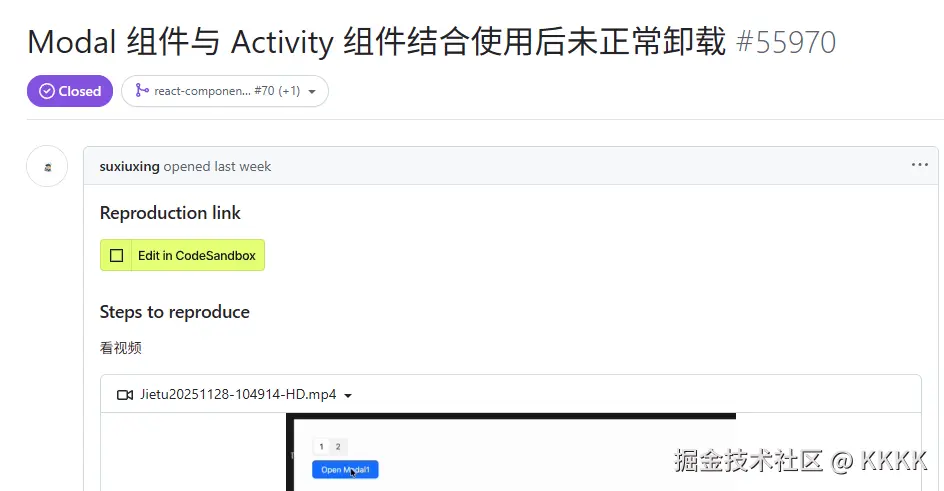
首先打开弹窗1后关闭,然后切换到2,再切回1,此时 Activity 切换会导致组件从 hidden 变回 visible 。 此时再次打开弹窗1并关闭,此时出现了遮罩层残留的问题,Modal 的 DOM 和遮罩层无法被正常清理,进而影响页面交互。
antd中的 Modal 组件底层依赖于@rc-component/dialog,这个组件我试了一下,也是有残留问题,因此直接调试这个dialog组件。
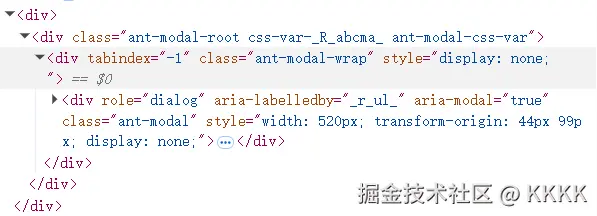
首先看一下为什么会残留,正常情况下,modal关闭后,遮罩层将被设置样式display:none,做到隐藏:
js
  const mergedStyle: React.CSSProperties = {
    zIndex,
    ...wrapStyle,
    ...modalStyles?.wrapper,
    display: !animatedVisible ? 'none' : null,
  };
但是在当 Activity mode 从 hidden 切换回 visible 时,关闭弹窗后就变成了:
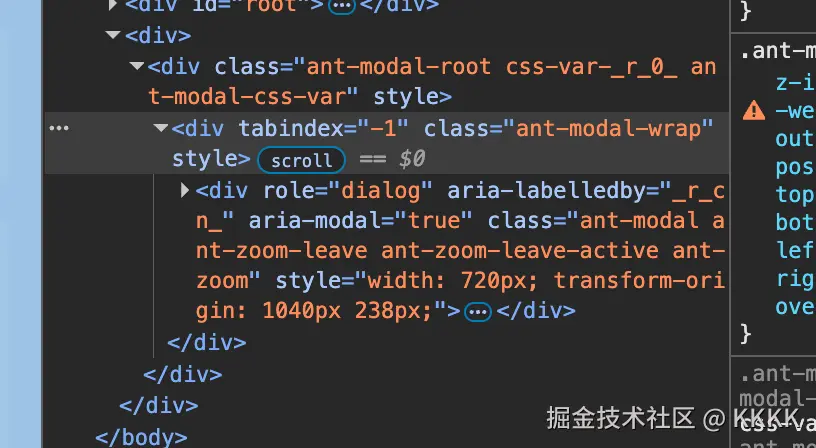 ant-modal-wrap的display属性没有加上,看起来和animatedVisible这个属性有关。
这个值怎么调用的呢:
js
// Close action will trigger by:
  //   1. When hide motion end
  //   2. Controlled `open` to `false` immediately after set to `true` which will not trigger motion
  function doClose() {
    // Clean up scroll bar & focus back
    setAnimatedVisible(false);//关闭方法

    if (mask && lastOutSideActiveElementRef.current && focusTriggerAfterClose) {
      try {
        lastOutSideActiveElementRef.current.focus({ preventScroll: true });
      } catch (e) {
        // Do nothing
      }
      lastOutSideActiveElementRef.current = null;
    }
  }
doClose是一个关闭方法,用于将animatedVisible变为false,进而将ant-modal-wrap隐藏,所以问题出在doClose的调用上。
doClose的调用有两处:
第一处:这个onDialogVisibleChanged传入动画组件motion中,由motion动画结束后调用doClose
js
function onDialogVisibleChanged(newVisible: boolean) {
    // Try to focus
    if (newVisible) {
      focusDialogContent();
    } else {
      doClose();
    }
    afterOpenChange?.(newVisible);
  }
第二处:
contentRef是动画组件的引用,这里的逻辑是,enableMotion为真也就是开启了动画, inMotion为false,也就是动画结束,并且animatedVisible为真,animatedVisible实际上是一个异步的关闭状态,最后doClose。
js
  useEffect(() => {
    if (visible) {
      setAnimatedVisible(true);
      saveLastOutSideActiveElementRef();
    } else if (
      animatedVisible &&//(弹窗当前显示中)
      contentRef.current.enableMotion() &&//(支持动画)
      !contentRef.current.inMotion()//(当前没有在执行动画)
    ) {
      doClose();
    }
  }, [visible]);
这里分析一下链路,点击关闭后,visible = false,这个时候,animatedVisible和inMotion实际上都是true,animatedVisible状态由doClose改变,inMotion是一个内部动画状态,动画结束的时候才为false。
随着动画结束,onDialogVisibleChanged(false) 执行,此时animatedVisible为false,inMotion也变为false,但是inMotion的变化不会触发 Effect 。所以这里的条件其实没啥用,doCLose依赖于onDialogVisibleChanged就够了,无论有没有动画,最终都会通过 onDialogVisibleChanged 调用 doClose()。
因此从onDialogVisibleChanged入手,打开弹窗,切换Activity组件后再回来,发现onDialogVisibleChanged函数不调用了,看起来问题出现在动画组件里。
动画组件
@rc-component/dialog使用了CSSMotion动画组件包裹,实现动画效果,并将onVisibleChanged函数传入来控制遮罩层的样式显隐。
进入@rc-component/motion组件中,看看这个函数是怎么执行的。 有这样一段逻辑,currentStatus === STATUS_NONE,简单说就是动画效果结束,但是断点后发现根本没进来,动画效果一直没有结束。
js
if (asyncVisible !== undefined && currentStatus === STATUS_NONE) {
      // Skip first render is invisible since it's nothing changed
      if (firstMountChangeRef.current || asyncVisible) {
        onVisibleChanged?.(asyncVisible);
      }
      firstMountChangeRef.current = true;
    }
这其实解释了为什么残留的DOM样式带着ZOOM的原因,因为结束动画卡住了。
currentStatus是怎么变为STATUS_NONE的
js
  function updateMotionEndStatus() {
    setStatus(STATUS_NONE);
    setStyle(null, true);
  }
看谁在调用
js
const onInternalMotionEnd = useEvent(event => {
    ....
    // Only update status when `canEnd` and not destroyed
    if (currentActive && canEnd !== false) {
      // console.log('[onInternalMotionEnd] Updating motion end status');
      updateMotionEndStatus();
    }
  });
  const [patchMotionEvents] = useDomMotionEvents(onInternalMotionEnd);
继续断点,发现根本没有进入这段逻辑,Activity 组件切换后onInternalMotionEnd根本没有调用啊。
看来是Activity 组件影响到了useDomMotionEvents。
js
export default (onInternalMotionEnd => {
  const cacheElementRef = useRef();
  // Remove events
  function removeMotionEvents(element) {
    if (element) {
      element.removeEventListener(transitionEndName, onInternalMotionEnd);
      element.removeEventListener(animationEndName, onInternalMotionEnd);
    }
  }

  // Patch events
  function patchMotionEvents(element) {
    if (cacheElementRef.current && cacheElementRef.current !== element) {
      removeMotionEvents(cacheElementRef.current);
    }

    if (element && element !== cacheElementRef.current) {
      element.addEventListener(transitionEndName, onInternalMotionEnd);
      element.addEventListener(animationEndName, onInternalMotionEnd);

      // Save as cache in case dom removed trigger by `motionDeadline`
      cacheElementRef.current = element;
    } else {
    }
  }

  // Clean up when removed
  React.useEffect(() => {
    return () => {
      removeMotionEvents(cacheElementRef.current);
    };
  }, []);

  return [patchMotionEvents, removeMotionEvents];
});
这里的逻辑其实是比较清晰的,就是给动画dom加了动画结束的事件监听器。 但是在Activity 场景下的核心问题:cleanup 移除了监听器,但没有清除缓存引用,导致后续误以为监听器还在。
来看一下Activity副作用执行顺序:
js
显示:DOM显示 → Layout Effects执行 → useEffect执行
隐藏:Layout Effects清理 → DOM隐藏 → useEffect清理这个判断逻辑有问题:比较的是 DOM 元素对象,而不是元素实例。在 Activity 场景下:
- Activity cleanup 时,cacheElementRef.current 仍然指向旧的 DOM 元素引用
- 切换回来后,虽然 DOM 元素看起来一样(相同的类名)
- 但 监听器已经被 cleanup 移除了
- 然而 element === cacheElementRef.current 仍然为 true(因为是同一个 DOM 对象)
- 所以跳过了重新添加监听器的逻辑
- 结果:没有监听器,事件不会触发
只需要在 Activity cleanup 后,清除 cacheElementRef.current,这样下次就会重新添加监听器。
js
cacheElementRef.current = null;总结一下整体调用链路:
js
动画结束 (transitionend/animationend 事件)
  ↓
onInternalMotionEnd (在 useStatus.js 中)
  ↓
updateMotionEndStatus() → setStatus(STATUS_NONE)
  ↓
useEffect 监听 currentStatus 变化
  ↓
onVisibleChanged?.(asyncVisible)  // asyncVisible = false
  ↓
onDialogVisibleChanged(false)  // 传递给 Content/Mask
  ↓
doClose()  // ← 第一处:动画正常结束时调用
Activity 场景问题:
在 Activity 切换场景下,问题出现在:
- Activity 切换 → cleanup 移除事件监听器 ↓
- 切换回来,打开弹窗
- 监听器没有重新绑定(如果 cacheElementRef 没清空) ↓
- 关闭弹窗
- leave 动画开始 ↓
- 动画结束
- ❌ transitionend 事件不触发(没有监听器)
- ❌ onInternalMotionEnd 不执行
- ❌ status 卡在 STATUS_LEAVE,不会变为 STATUS_NONE ↓
- useStatus 的 useEffect 不触发(currentStatus 没变)
- ❌ onVisibleChanged 不会被调用
- ❌ 第一处 doClose() 不执行 ↓
- Dialog 的 useEffect 检查
- inMotion() 返回 true (因为 status 还是 STATUS_LEAVE)
- ❌ 第二处 doClose() 也不执行 ↓
- 结果
- animatedVisible 永远是 true
- display: none 永远不生效
- 弹窗残留在页面上
最后,我在react官方文档看到这样一句话:
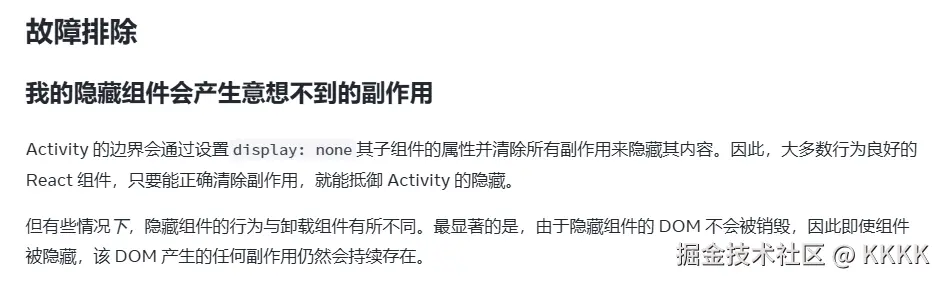
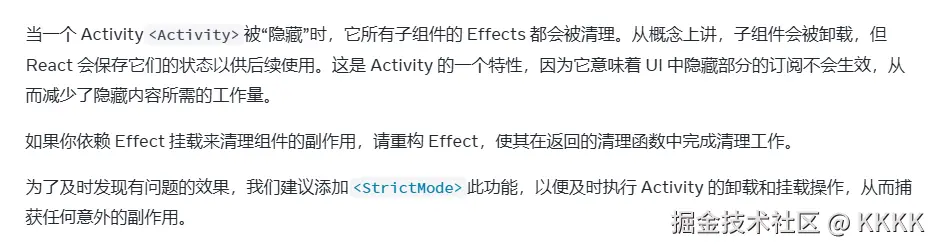
也就是说,需要越来越小心的在卸载函数中清理必要的变量,不然就会出问题。之前可能问题不明显,但是在Activity 组件这种组件中,隐藏相当于子组件会被保留状态的卸载,不卸载干净的话再次使用就会出现很多奇奇怪怪的问题。