效果图
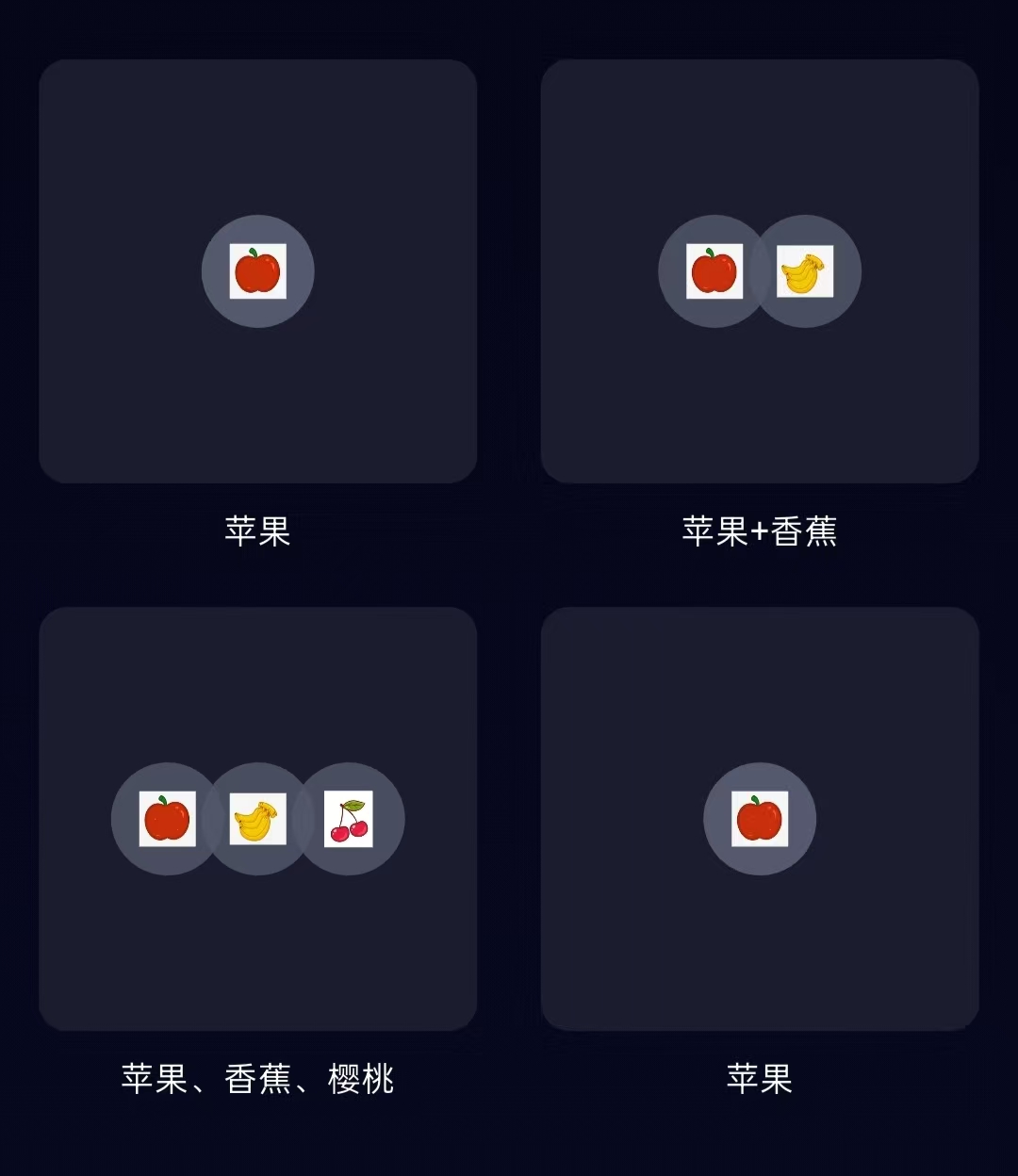
说明:版本1的中心水果图片只是简单的排列,这个版本是让图片进行两两交叠
实现步骤
1.构建网格子项
Dart
  Widget _buildInAudioItem({
    required String name,
    required List<String> images, //用列表接收图片
    required VoidCallback onTap,
    double imageSize = 40,
  }) {
    return Column(
      mainAxisSize: MainAxisSize.min,
      children: [
        GestureDetector(
          onTap: onTap,
          child: Container(
            height: 150,
            width: 155,
            decoration: BoxDecoration(
              color: Color(0xFF1B1D2E),
              borderRadius: BorderRadius.circular(10),
            ),
            child: Center(
              child: _buildImageLayout(images, imageSize: imageSize), //传递图片和图片尺寸
            ),
          ),
        ),
        SizedBox(height: 8),
        Container(
          height: 30,
          child: Text(
            name,
            style: TextStyle(color: Colors.white, fontSize: 12),
            textAlign: TextAlign.center,
            maxLines: 2,
            overflow: TextOverflow.ellipsis,
          ),
        ),
      ],
    );
  }
2.构建图片布局 ******
Dart
Widget _buildImageLayout(List<String> images, {double imageSize = 40}) {

    int count = images.length; //图片个数

    if (count == 1) {
      // 单个图片居中显示
      return Container(
        height: imageSize,
        width: imageSize,
        decoration: BoxDecoration(
          color: Color(0xFF55596D),
          borderRadius: BorderRadius.circular(imageSize / 2),
        ),
        child: Center(
          child: Image.asset(
            images[0],
            width: imageSize * 0.5,
            height: imageSize * 0.5,
          ),
        ),
      );
    } else if (count == 2) {

      // 两个图片交叠显示
      double overlap = imageSize * 0.2; // 交叠宽度
      double totalWidth = imageSize * 2 - overlap;

      return Container(
        width: totalWidth,
        child: Stack(
          children: [
            // 第一个图片在左边
            Positioned(
              top: 55,
              left: 0,
              child: Container(
                height: imageSize,
                width: imageSize,
                decoration: BoxDecoration(
                  color: Color(0xFF55596D).withOpacity(0.8),
                  borderRadius: BorderRadius.circular(imageSize / 2),
                ),
                child: Center(
                  child: Image.asset(
                    images[0],
                    width: imageSize * 0.5,
                    height: imageSize * 0.5,
                  ),
                ),
              ),
            ),
            // 第二个图片在右边,交叠一部分
            Positioned(
              top: 55,
              left: imageSize - overlap,
              child: Container(
                height: imageSize,
                width: imageSize,
                decoration: BoxDecoration(
                  color: Color(0xFF55596D).withOpacity(0.8),
                  borderRadius: BorderRadius.circular(imageSize / 2),
                ),
                child: Center(
                  child: Image.asset(
                    images[1],
                    width: imageSize * 0.5,
                    height: imageSize * 0.5,
                  ),
                ),
              ),
            ),
          ],
        ),
      );
    } else if (count == 3) {
      // 三个图片交叠显示
      double overlap = imageSize * 0.2; // 交叠宽度
      double totalWidth = imageSize + (imageSize - overlap) * 2;

      return Container(
        width: totalWidth,
        child: Stack(
          children: [
            // 第一个图片在最左边
            Positioned(
              top:55,
              left: 0,
              child: Container(
                height: imageSize,
                width: imageSize,
                decoration: BoxDecoration(
                  color: Color(0xFF55596D).withOpacity(0.8),
                  borderRadius: BorderRadius.circular(imageSize / 2),
                ),
                child: Center(
                  child: Image.asset(
                    images[0],
                    width: imageSize * 0.5,
                    height: imageSize * 0.5,
                  ),
                ),
              ),
            ),
            // 第二个图片在中间
            Positioned(
              top:55,
              left: imageSize - overlap,
              child: Container(
                height: imageSize,
                width: imageSize,
                decoration: BoxDecoration(
                  color: Color(0xFF55596D).withOpacity(0.8),
                  borderRadius: BorderRadius.circular(imageSize / 2),
                ),
                child: Center(
                  child: Image.asset(
                    images[1],
                    width: imageSize * 0.5,
                    height: imageSize * 0.5,
                  ),
                ),
              ),
            ),
            // 第三个图片在最右边
            Positioned(
              top:55,
              left: (imageSize - overlap) * 2,
              child: Container(
                height: imageSize,
                width: imageSize,
                decoration: BoxDecoration(
                  color: Color(0xFF55596D).withOpacity(0.8),
                  borderRadius: BorderRadius.circular(imageSize / 2),
                ),
                child: Center(
                  child: Image.asset(
                    images[2],
                    width: imageSize * 0.5,
                    height: imageSize * 0.5,
                  ),
                ),
              ),
            ),
          ],
        ),
      );
    }

    return SizedBox.shrink();
  }
}
3.使用子项构建表格
Dart
  Widget buildInAudioList() {
    return Padding(
      padding: EdgeInsets.symmetric(horizontal: 10, vertical: 40),
      child: GridView.count(
        crossAxisCount: 2,
        crossAxisSpacing: 15,
        mainAxisSpacing: 5,
        childAspectRatio: 155 / 180,
        shrinkWrap: true,
        children: [
          _buildInAudioItem(
            name: "苹果",
            images: ["assets/images/apple.png"],
            onTap: () => print("点击苹果"),
          ),
          _buildInAudioItem(
            name: "苹果+香蕉",
            images: ["assets/images/apple.png", "assets/images/banana.png"],
            onTap: () => print("点击苹果+香蕉"),
          ),
          _buildInAudioItem(
            name: "苹果、香蕉、樱桃",
            images: ["assets/images/apple.png", "assets/images/banana.png", "assets/images/cherry.png"],
            onTap: () => print("点击苹果、香蕉、樱桃"),
          ),
          _buildInAudioItem(
            name: "苹果",
            images: ["assets/images/apple.png"],
            onTap: () => print("苹果"),
          ),
        ],
      ),
    );
  }
代码实例
Dart
import 'package:flutter/cupertino.dart';
import 'package:flutter/material.dart';

class DemoPage extends StatefulWidget {
  const DemoPage({super.key});

  @override
  State<DemoPage> createState() => _DemoPageState();
}

class _DemoPageState extends State<DemoPage> {
  @override
  Widget build(BuildContext context) {
    return Scaffold(
      backgroundColor: Colors.transparent,
      body: Container(
        width: double.infinity,
        height: double.infinity,
        decoration: const BoxDecoration(
          gradient: LinearGradient(
            begin: Alignment.topCenter,
            end: Alignment.bottomCenter,
            colors: [
              Color(0xFF060618),
              Color(0xFF070A23),
            ],
          ),
        ),
        child: buildInAudioList(),
      ),
    );
  }

  Widget buildInAudioList() {
    return Padding(
      padding: EdgeInsets.symmetric(horizontal: 10, vertical: 40),
      child: GridView.count(
        crossAxisCount: 2,
        crossAxisSpacing: 15,
        mainAxisSpacing: 5,
        childAspectRatio: 155 / 180,
        shrinkWrap: true,
        children: [
          _buildInAudioItem(
            name: "苹果",
            images: ["assets/images/apple.png"],
            onTap: () => print("点击苹果"),
          ),
          _buildInAudioItem(
            name: "苹果+香蕉",
            images: ["assets/images/apple.png", "assets/images/banana.png"],
            onTap: () => print("点击苹果+香蕉"),
          ),
          _buildInAudioItem(
            name: "苹果、香蕉、樱桃",
            images: ["assets/images/apple.png", "assets/images/banana.png", "assets/images/cherry.png"],
            onTap: () => print("点击苹果、香蕉、樱桃"),
          ),
          _buildInAudioItem(
            name: "苹果",
            images: ["assets/images/apple.png"],
            onTap: () => print("苹果"),
          ),
        ],
      ),
    );
  }

  // 网格子项
  Widget _buildInAudioItem({
    required String name,
    required List<String> images, //用列表接收图片
    required VoidCallback onTap,
    double imageSize = 40,
  }) {
    return Column(
      mainAxisSize: MainAxisSize.min,
      children: [
        GestureDetector(
          onTap: onTap,
          child: Container(
            height: 150,
            width: 155,
            decoration: BoxDecoration(
              color: Color(0xFF1B1D2E),
              borderRadius: BorderRadius.circular(10),
            ),
            child: Center(
              child: _buildImageLayout(images, imageSize: imageSize), //传递图片和图片尺寸
            ),
          ),
        ),
        SizedBox(height: 8),
        Container(
          height: 30,
          child: Text(
            name,
            style: TextStyle(color: Colors.white, fontSize: 12),
            textAlign: TextAlign.center,
            maxLines: 2,
            overflow: TextOverflow.ellipsis,
          ),
        ),
      ],
    );
  }

  // 构建图片布局
  Widget _buildImageLayout(List<String> images, {double imageSize = 40}) {

    int count = images.length; //图片个数

    if (count == 1) {
      // 单个图片居中显示
      return Container(
        height: imageSize,
        width: imageSize,
        decoration: BoxDecoration(
          color: Color(0xFF55596D),
          borderRadius: BorderRadius.circular(imageSize / 2),
        ),
        child: Center(
          child: Image.asset(
            images[0],
            width: imageSize * 0.5,
            height: imageSize * 0.5,
          ),
        ),
      );
    } else if (count == 2) {
      // 两个图片交叠显示
      double overlap = imageSize * 0.2; // 交叠宽度
      double totalWidth = imageSize * 2 - overlap;

      return Container(
        width: totalWidth,
        child: Stack(
          children: [
            // 第一个图片在左边
            Positioned(
              top: 55,
              left: 0,
              child: Container(
                height: imageSize,
                width: imageSize,
                decoration: BoxDecoration(
                  color: Color(0xFF55596D).withOpacity(0.8),
                  borderRadius: BorderRadius.circular(imageSize / 2),
                ),
                child: Center(
                  child: Image.asset(
                    images[0],
                    width: imageSize * 0.5,
                    height: imageSize * 0.5,
                  ),
                ),
              ),
            ),
            // 第二个图片在右边,交叠一部分
            Positioned(
              top: 55,
              left: imageSize - overlap,
              child: Container(
                height: imageSize,
                width: imageSize,
                decoration: BoxDecoration(
                  color: Color(0xFF55596D).withOpacity(0.8),
                  borderRadius: BorderRadius.circular(imageSize / 2),
                ),
                child: Center(
                  child: Image.asset(
                    images[1],
                    width: imageSize * 0.5,
                    height: imageSize * 0.5,
                  ),
                ),
              ),
            ),
          ],
        ),
      );
    } else if (count == 3) {
      // 三个图片交叠显示
      double overlap = imageSize * 0.2; // 交叠宽度
      double totalWidth = imageSize + (imageSize - overlap) * 2;

      return Container(
        width: totalWidth,
        child: Stack(
          children: [
            // 第一个图片在最左边
            Positioned(
              top:55,
              left: 0,
              child: Container(
                height: imageSize,
                width: imageSize,
                decoration: BoxDecoration(
                  color: Color(0xFF55596D).withOpacity(0.8),
                  borderRadius: BorderRadius.circular(imageSize / 2),
                ),
                child: Center(
                  child: Image.asset(
                    images[0],
                    width: imageSize * 0.5,
                    height: imageSize * 0.5,
                  ),
                ),
              ),
            ),
            // 第二个图片在中间
            Positioned(
              top:55,
              left: imageSize - overlap,
              child: Container(
                height: imageSize,
                width: imageSize,
                decoration: BoxDecoration(
                  color: Color(0xFF55596D).withOpacity(0.8),
                  borderRadius: BorderRadius.circular(imageSize / 2),
                ),
                child: Center(
                  child: Image.asset(
                    images[1],
                    width: imageSize * 0.5,
                    height: imageSize * 0.5,
                  ),
                ),
              ),
            ),
            // 第三个图片在最右边
            Positioned(
              top:55,
              left: (imageSize - overlap) * 2,
              child: Container(
                height: imageSize,
                width: imageSize,
                decoration: BoxDecoration(
                  color: Color(0xFF55596D).withOpacity(0.8),
                  borderRadius: BorderRadius.circular(imageSize / 2),
                ),
                child: Center(
                  child: Image.asset(
                    images[2],
                    width: imageSize * 0.5,
                    height: imageSize * 0.5,
                  ),
                ),
              ),
            ),
          ],
        ),
      );
    }

    return SizedBox.shrink();
  }
}