效果图
详细描述
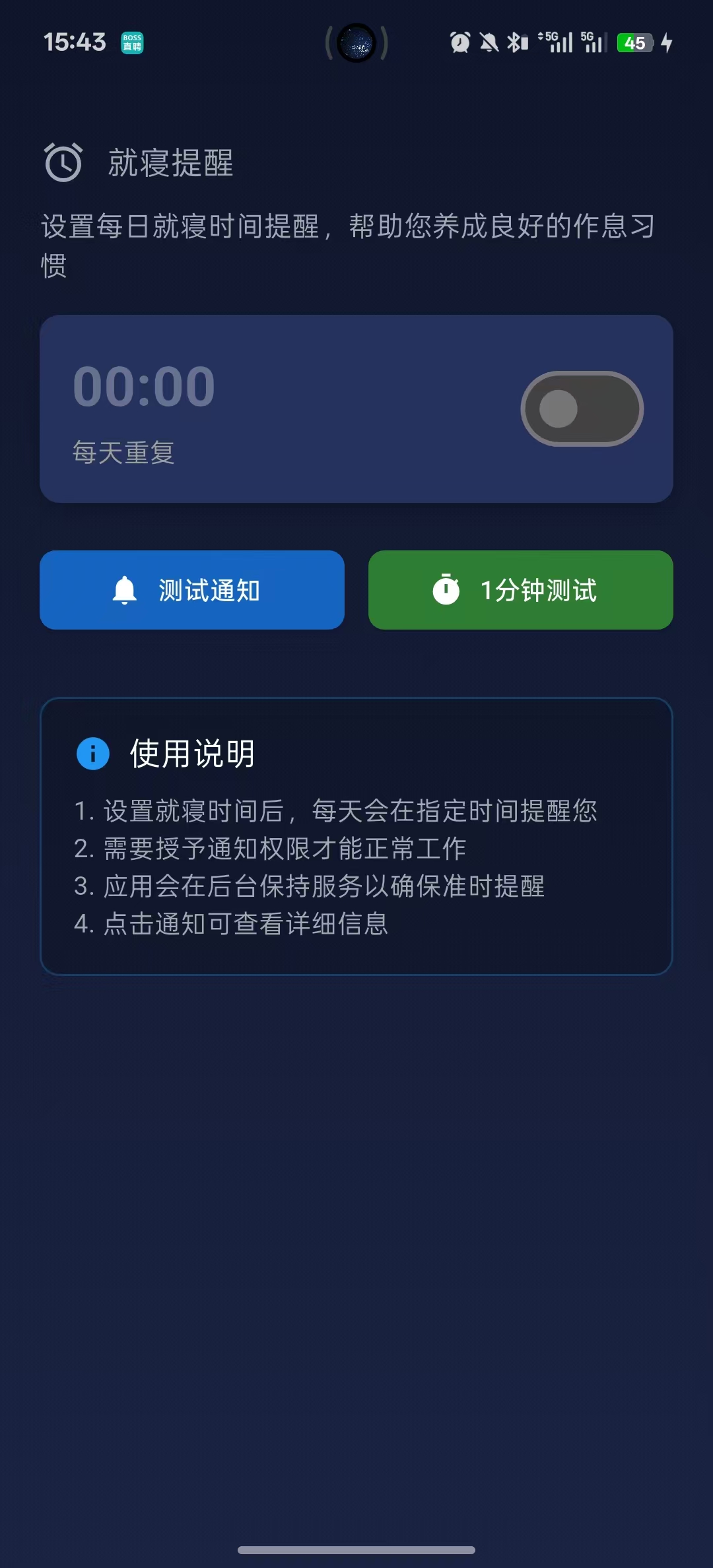
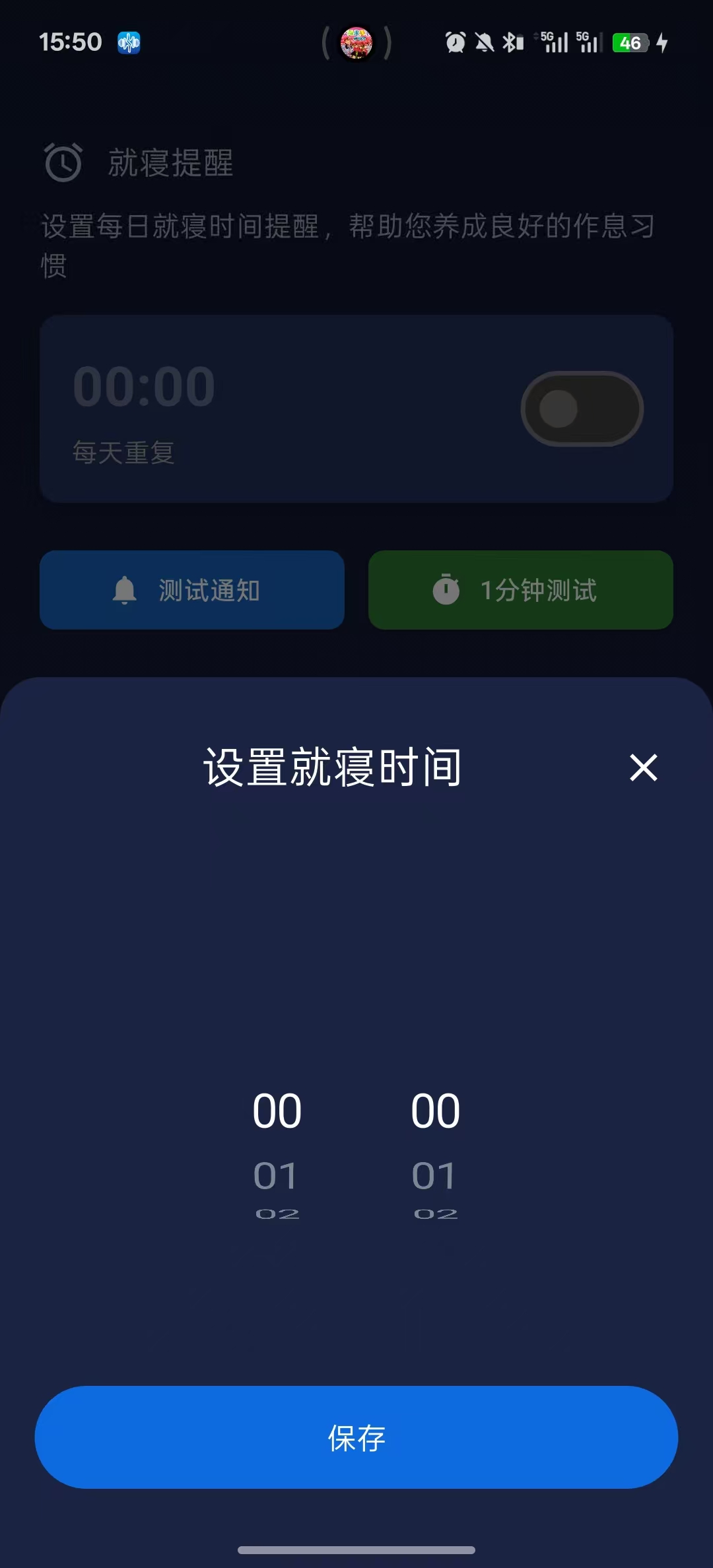
这是一个就寝提醒的闹钟通知,根据用户设置的时间,到了时间点就弹出通知,测试通知按钮是测试通知是否可行,一点击按钮就一个弹出一个测试通知。一分钟测试也是测试通知的效果,是根据当前的时间,再加上一分钟,然后设置闹钟通知,用户可以在一分钟后看到通知。
核心逻辑流程图
Dart
┌─────────────────────────────────────────────────────┐
│                   应用启动                           │
└─────────────────────────┬───────────────────────────┘
                          ↓
┌─────────────────────────────────────────────────────┐
│         initState() 初始化                           │
│   1. 创建通知插件实例                                │
│   2. 初始化通知设置                                  │
└─────────────────────────┬───────────────────────────┘
                          ↓
┌─────────────────────────────────────────────────────┐
│                   主界面显示                          │
│   - 显示当前设置时间                                │
│   - 显示开关状态                                    │
│   - 提供操作按钮                                    │
└───────────┬────────────┬────────────┬───────────────┘
            │            │            │
    ┌───────┴────┐ ┌─────┴─────┐ ┌─────┴──────┐
    │ 修改时间    │ │ 开关切换  │ │ 测试按钮   │
    └───────┬────┘ └─────┬─────┘ └─────┬──────┘
            │            │            │
    ┌───────▼────┐ ┌─────▼─────┐ ┌─────▼──────┐
    │ 时间对话框  │ │_setAlarm()│ │测试通知    │
    │ 选择新时间  │ │或_cancel()│ │            │
    └───────┬────┘ └─────┬─────┘ └────────────┘
            │            │
            │    ┌───────▼──────────────────┐
            │    │  核心闹钟逻辑_setAlarm()  │
            │    │ 1. 检查权限              │
            │    │ 2. 计算时间              │
            │    │ 3. 设置定时器            │
            └────┼──────────────────────────┤
                 │ 定时器触发               │
                 │ 1. 显示通知              │
                 │ 2. 设置明天的定时器(递归) │
                 └──────────────────────────┘
关键点
1.当闹钟通知打开,是怎么实现闹钟通知每天都触发的?
Dart
因为设置了递归
关键代码

// 5. 设置定时器
    _alarmTimer = Timer(delay, () async {
      //设置今天的闹钟
      await _showAlarmNotification();

      //立即设置明天的闹钟
      if (isSleepAlarmOpen && mounted) {
        // 等1秒后设置明天的闹钟
        Timer(const Duration(seconds: 1), () {
          _setAlarm(isRepeating: true);
        });
      }
    });
完整数据流
Dart
12月15日 用户设置22:00闹钟
    ↓
第一次调用:_setAlarm()  // isRepeating = false
    ↓
计算:12月15日22:00
    ↓
设置Timer(到12月15日22:00)
    ↓
──────────────────────────────────
12月15日22:00 Timer触发
    ├─ 执行:_showAlarmNotification()  // 今天通知
    └─ 执行:Timer(1秒后) {
         _setAlarm(isRepeating: true)  // 第二次调用!
       }
    ↓
──────────────────────────────────
12月15日22:00:01
    ↓
第二次调用:_setAlarm(isRepeating: true)
    ↓
计算:12月16日22:00  // now.day + 1
    ↓
设置Timer(到12月16日22:00)
    ↓
──────────────────────────────────
12月16日22:00 Timer触发
    ├─ 执行:_showAlarmNotification()  // 明天通知
    └─ 执行:Timer(1秒后) {
         _setAlarm(isRepeating: true)  // 第三次调用!
       }
    ↓
──────────────────────────────────
12月16日22:00:01
    ↓
第三次调用:_setAlarm(isRepeating: true)
    ↓
计算:12月17日22:00  // now.day + 1
    ↓
设置Timer(到12月17日22:00)
    ↓
──────────────────────────────────
12月17日22:00 Timer触发
    ├─ 执行:_showAlarmNotification()  // 后天通知
    └─ 执行:Timer(1秒后) {
         _setAlarm(isRepeating: true)  // 第四次调用!
       }
    ↓
... 无限循环
实现步骤
1.定义一些变量
Dart
  // 初始化通知插件
  late FlutterLocalNotificationsPlugin flutterLocalNotificationsPlugin;

  // 就寝提醒时间
  int _selectedSleepRemindHour = 0; //用户选择的就寝提醒小时
  int _selectedSleepRemindMinute = 0;//用户设置的就寝提醒分钟
  bool isSleepAlarmOpen = false; //就寝提醒是否开启

  // Timer定时器
  Timer? _alarmTimer; //用于定时检查是否到达提醒时间的计时器
2.初始化
Dart
  @override
  void initState() {
    super.initState();
    flutterLocalNotificationsPlugin = FlutterLocalNotificationsPlugin();//初始化通知
    _initializeNotifications(); //初始化通知
  }

  @override
  void dispose() {
    _alarmTimer?.cancel(); //取消定时器
    super.dispose();
  }
3.具体的初始化设置的方法
Dart
 //=================================初始化通知设置================================
  Future<void> _initializeNotifications() async {


    //1.Android初始化设置:设置Android平台的通知配置
    const AndroidInitializationSettings initializationSettingsAndroid = AndroidInitializationSettings('@mipmap/ic_launcher');

    // 2.iOS初始化设置
    const DarwinInitializationSettings initializationSettingsIOS =
    DarwinInitializationSettings(
      requestAlertPermission: true, //请求显示弹窗权限
      requestBadgePermission: true, //请求角标权限
      requestSoundPermission: true, //请求声音权限
    );

    // 3.合并平台设置
    final InitializationSettings initializationSettings = InitializationSettings(
      android: initializationSettingsAndroid,
      iOS: initializationSettingsIOS,
    );

    //4. 初始化插件
    await flutterLocalNotificationsPlugin.initialize(
      initializationSettings,
      onDidReceiveNotificationResponse: (NotificationResponse response) {
        print('通知被点击: ${response.payload}');
      },
    );

    // 5.创建通知通道:就寝通知通道
    const channels = [

      //就寝通知通道
      AndroidNotificationChannel(
        'sleep_alarm_channel', //通道ID
        '就寝提醒', //通道名称
        description: '就寝时间提醒',//通道描述
        importance: Importance.max, //重要性级别
      ),

    ];

    //创建通道
    for (var channel in channels) {
      try {
        await flutterLocalNotificationsPlugin.resolvePlatformSpecificImplementation<AndroidFlutterLocalNotificationsPlugin>()
            ?.createNotificationChannel(channel);
        print('创建通知通道: ${channel.name}');
      } catch (e) {
        print('创建通道失败: $e');
      }
    }


  }
4.设置闹钟的方法
Dart
//=================================设置闹钟的方法=============================
  Future<void> _setAlarm({bool isRepeating = false}) async {

    if (!isSleepAlarmOpen) return;

    // 1. 先取消之前的定时器
    _alarmTimer?.cancel();

    // 2. 检查权限
    if (!await Permission.notification.isGranted) {
      final status = await Permission.notification.request(); //权限获取
      if (!status.isGranted) { //权限未被允许
        _showErrorSnackBar('需要通知权限');
        setState(() => isSleepAlarmOpen = false);
        return;
      }
    }

    // 3. 计算触发时间
    final now = DateTime.now();

    //统一的计算逻辑
    DateTime scheduledTime = DateTime(
      now.year,
      now.month,
      now.day + (isRepeating ? 1 : 0),  // 重复就加1天
      _selectedSleepRemindHour,
      _selectedSleepRemindMinute,
    );

    //即使重复设置也要检查时间是否已过
    if (scheduledTime.isBefore(now)) {
      // 如果时间已过,再加1天
      scheduledTime = scheduledTime.add(const Duration(days: 1));
    }

    // 4. 计算延迟时间
    final delay = scheduledTime.difference(now);

    // 5. 设置定时器
    _alarmTimer = Timer(delay, () async {
      //设置今天的闹钟
      await _showAlarmNotification();

      //立即设置明天的闹钟
      if (isSleepAlarmOpen && mounted) {
        // 等1秒后设置明天的闹钟
        Timer(const Duration(seconds: 1), () {
          _setAlarm(isRepeating: true);
        });
      }
    });

    _showSuccessSnackBar('就寝提醒设置成功');
  }
5.显示闹钟的通知
Dart
  //===================================显示闹钟的通知=================================
  Future<void> _showAlarmNotification() async {
    //安卓通知详情配置
    final AndroidNotificationDetails androidPlatformChannelSpecifics =
    AndroidNotificationDetails(
      'sleep_alarm_channel', //通道ID
      '就寝提醒', //通道名称
      channelDescription: '就寝时间提醒', //通道描述
      importance: Importance.max, //重要性
      priority: Priority.high, //优先级
      playSound: true, //播放声音
      enableVibration: true, //启用震动
      vibrationPattern: Int64List.fromList(const [0, 1000, 500, 1000]),
      color: Colors.blue,//通知颜色
      icon: '@mipmap/ic_launcher', // 如果有通知专用图标
      largeIcon: const DrawableResourceAndroidBitmap('@mipmap/ic_launcher'), // 大图标
    );

    //跨平台通知配置
    final NotificationDetails platformChannelSpecifics = NotificationDetails(
      android: androidPlatformChannelSpecifics,
      iOS: const DarwinNotificationDetails(),
    );

    //显示通知
    await flutterLocalNotificationsPlugin.show(
      0,
      '就寝提醒',
      '是时候放松一下了,酣眠时分到',
      platformChannelSpecifics,
      payload: 'sleep_alarm_channel', //使用通道
    );
  }
6.取消闹钟
Dart
//=========================================取消闹钟===============================
  Future<void> _cancelAlarm() async {
    _alarmTimer?.cancel();
    await flutterLocalNotificationsPlugin.cancel(0);
    print('✅ 取消闹钟');
  }
7.测试的详细方法
Dart
  //=====================================测试通知==================================
  Future<void> _testNotification() async {
    const AndroidNotificationDetails androidDetails = AndroidNotificationDetails(
      'sleep_alarm_channel',
      '就寝提醒',
      importance: Importance.max,
      priority: Priority.high,
    );

    const NotificationDetails details = NotificationDetails(
      android: androidDetails,
      iOS: DarwinNotificationDetails(),
    );

    await flutterLocalNotificationsPlugin.show(
      9999,
      '✅ 测试通知',
      '通知功能正常',
      details,
    );

    _showInfoSnackBar('测试通知已发送');
  }
8.就寝提醒的UI组件
Dart
 //==================================就寝提醒UI组件============================
  Widget _buildSleepRemind() {
    return Column(
      children: [

        // 标题
        const Row(
          children: [
            SizedBox(width: 20),
            Icon(Icons.alarm, color: Color(0xFFA4A6B3)),
            SizedBox(width: 10),
            Text('就寝提醒', style: TextStyle(color: Color(0xFFA4A6B3), fontSize: 16)),
          ],
        ),
        const SizedBox(height: 10),
        // 文字描述
        const Padding(
          padding: EdgeInsets.symmetric(horizontal: 20),
          child: Text(
            '设置每日就寝时间提醒,帮助您养成良好的作息习惯',
            style: TextStyle(color: Color(0xFFA4A6B3), fontSize: 14),
          ),
        ),
        const SizedBox(height: 15),

        // 就寝提醒的闹钟
        GestureDetector(
          behavior: HitTestBehavior.opaque,
          onTap: _buildChangeSleepTimeDialog,
          child: Container(
            margin: const EdgeInsets.symmetric(horizontal: 20),
            padding: const EdgeInsets.all(16),
            decoration: BoxDecoration(
              color: const Color(0xFF25325D),
              borderRadius: BorderRadius.circular(10),
              boxShadow: [
                BoxShadow(
                  color: Colors.black.withOpacity(0.2),
                  blurRadius: 8,
                  offset: const Offset(0, 4),
                ),
              ],
            ),
            child: Row(
              children: [
                // 左侧时间区域
                Expanded(
                  child: Column(
                    crossAxisAlignment: CrossAxisAlignment.start,
                    children: [
                      // 时间点
                      Text(
                        '${_selectedSleepRemindHour.toString().padLeft(2, '0')}:${_selectedSleepRemindMinute.toString().padLeft(2, '0')}',
                        style: TextStyle(
                          fontSize: 28,
                          fontWeight: FontWeight.bold,
                          color: isSleepAlarmOpen ? Colors.white : Colors.white.withOpacity(0.3),
                        ),
                      ),
                      const SizedBox(height: 4),
                      // 重复日期
                      Text(
                        '每天重复',
                        style: TextStyle(
                          fontSize: 13,
                          color: isSleepAlarmOpen ? Colors.blue[200] : Colors.grey[500],
                        ),
                      ),
                    ],
                  ),
                ),
                // 右侧开关
                Transform.scale(
                  scale: 1.2, //外层缩放
                  child: Switch(
                    value: isSleepAlarmOpen,//当前开关状态 : true→ 开关显示为开启状态,false→ 开关显示为关闭状态
                    onChanged: (bool value) async { //状态修改时的回调
                      //更新UI状态
                      setState(() {
                        isSleepAlarmOpen = value;
                      });

                      if (value) {
                        await _setAlarm();//开启闹钟
                      } else {
                        await _cancelAlarm();//关闭闹钟
                      }
                    },
                    activeColor: Colors.blue, //开启时滑块颜色
                    activeTrackColor: Colors.blue[300],//开启时轨道颜色
                    inactiveThumbColor: Colors.grey[600],//关闭时滑块颜色
                    inactiveTrackColor: Colors.grey[800],//关闭时轨道颜色
                  ),
                ),
              ],
            ),
          ),
        ),
        const SizedBox(height: 20),

        // 测试按钮
        Container(
          margin: const EdgeInsets.symmetric(horizontal: 20),
          child: Row(
            children: [
              //测试通知按钮
              Expanded(
                child: ElevatedButton.icon(
                  onPressed: _testNotification,
                  icon: const Icon(Icons.notifications, size: 18),
                  label: const Text('测试通知', style: TextStyle(fontSize: 13)),
                  style: ElevatedButton.styleFrom(
                    backgroundColor: Colors.blue[800],
                    foregroundColor: Colors.white,
                    shape: RoundedRectangleBorder(
                      borderRadius: BorderRadius.circular(8),
                    ),
                  ),
                ),
              ),
              const SizedBox(width: 12),

              //一分钟测试按钮
              Expanded(
                child: ElevatedButton.icon(
                  onPressed: () async {
                    // 测试1分钟后的闹钟
                    final now = DateTime.now();
                    _selectedSleepRemindHour = now.hour;
                    _selectedSleepRemindMinute = now.minute + 1;
                    if (_selectedSleepRemindMinute >= 60) {
                      _selectedSleepRemindHour = (_selectedSleepRemindHour + 1) % 24;
                      _selectedSleepRemindMinute = 0;
                    }

                    setState(() {
                      isSleepAlarmOpen = true;
                    });

                    await _setAlarm();
                    _showInfoSnackBar('已设置1分钟后测试');
                  },
                  icon: const Icon(Icons.timer, size: 18),
                  label: const Text('1分钟测试', style: TextStyle(fontSize: 13)),
                  style: ElevatedButton.styleFrom(
                    backgroundColor: Colors.green[800],
                    foregroundColor: Colors.white,
                    shape: RoundedRectangleBorder(
                      borderRadius: BorderRadius.circular(8),
                    ),
                  ),
                ),
              ),
            ],
          ),
        ),
      ],
    );
  }
9.选择时间的弹窗
Dart
  //===================================选择时间的弹窗==============================
  void _buildChangeSleepTimeDialog() {

    // 创建临时变量来保存弹窗中的选择
    int tempSelectedHour = _selectedSleepRemindHour;
    int tempSelectedMinute = _selectedSleepRemindMinute;

    showModalBottomSheet(
      context: context,
      isScrollControlled: true,
      builder: (context) {
        return Container(
          height: 450,
          decoration: const BoxDecoration(
            color: Color(0xFF1A2342),
            borderRadius: BorderRadius.only(
              topLeft: Radius.circular(20),
              topRight: Radius.circular(20),
            ),
          ),
          child: Column(
            children: [
              SizedBox(height: 30,),
              //标题栏
              Row(
                children: [
                  const SizedBox(width: 23,),
                  // Opacity(opacity:0,child: Image.asset("assets/images/setting.png"),),
                  const Spacer(),
                  Text("设置就寝时间",style: const TextStyle(color: Colors.white,fontSize: 22),),
                  const Spacer(),
                  GestureDetector(
                    onTap: (){
                      Navigator.pop(context);
                    },
                    child: const Icon(
                      Icons.close,
                      color: Colors.white,
                      size: 24, // 可以根据需要调整大小
                    ),
                  ),
                  const SizedBox(width: 23,)
                ],
              ),

              // 时间选择器
              Expanded(
                child: Container(
                  margin: const EdgeInsets.only(top: 20),
                  child: Row(
                    mainAxisAlignment: MainAxisAlignment.center,
                    children: [
                      // 小时选择
                      Container(
                        height: 120,
                        width: 80,
                        child: CupertinoPicker(
                          itemExtent: 40,
                          scrollController: FixedExtentScrollController(initialItem: tempSelectedHour),
                          onSelectedItemChanged: (int index){
                            tempSelectedHour = index;
                          },
                          selectionOverlay: null,
                          children: List.generate(24, (index) {
                            return Center(
                              child: Text(
                                index.toString().padLeft(2, '0'),
                                style: TextStyle(fontSize: 24, color: Colors.white),
                              ),
                            );
                          }),
                        ),
                      ),

                      // 分钟选择
                      Container(
                        height: 120,
                        width: 80,
                        child: CupertinoPicker(
                          itemExtent: 40,
                          scrollController: FixedExtentScrollController(initialItem: tempSelectedMinute),
                          onSelectedItemChanged: (int index){
                            tempSelectedMinute= index;
                          },
                          selectionOverlay: null,
                          children: List.generate(60, (index) {
                            return Center(
                              child: Text(
                                index.toString().padLeft(2, '0'),
                                style: TextStyle(fontSize: 24, color: Colors.white),
                              ),
                            );
                          }),
                        ),
                      ),
                    ],
                  ),
                ),
              ),

              //保存按钮
              GestureDetector(
                  onTap: (){
                    setState(() {
                      _selectedSleepRemindHour = tempSelectedHour;
                      _selectedSleepRemindMinute = tempSelectedMinute;
                      isSleepAlarmOpen = true;
                    });
                    Navigator.pop(context);
                    _setAlarm();//设置就寝提醒
                  },
                  child: Container(
                    height: 52,
                    width: 325,
                    decoration: BoxDecoration(
                      color: const Color(0xFF0D6BDF),
                      borderRadius:BorderRadius.circular(26),
                    ),
                    child: Center(
                      child: Text("保存",style: TextStyle(color: Colors.white,fontSize: 15),),
                    ),
                  )
              ),

              const SizedBox(height: 40,),
            ],
          ),
        );
      },
    );
  }
10.一些提示方法
Dart
  //==============================SnackBar辅助方法=================================
  void _showSuccessSnackBar(String message) {
    ScaffoldMessenger.of(context).showSnackBar(
      SnackBar(
        content: Text(message),
        backgroundColor: Colors.green,
        duration: const Duration(seconds: 2),
      ),
    );
  }

  void _showErrorSnackBar(String message) {
    ScaffoldMessenger.of(context).showSnackBar(
      SnackBar(
        content: Text(message),
        backgroundColor: Colors.red,
        duration: const Duration(seconds: 2),
      ),
    );
  }

  void _showInfoSnackBar(String message) {
    ScaffoldMessenger.of(context).showSnackBar(
      SnackBar(
        content: Text(message),
        backgroundColor: Colors.blue,
        duration: const Duration(seconds: 2),
      ),
    );
  }
11.UI主体
Dart
  @override
  Widget build(BuildContext context) {
    return Scaffold(
      body: Container(
        padding: EdgeInsets.only(top: 50),
        decoration: const BoxDecoration(
          gradient: LinearGradient(
            begin: Alignment.topCenter,
            end: Alignment.bottomCenter,
            colors: [Color(0xFF0F162B), Color(0xFF1A2342)],
          ),
        ),
        child: Column(
          crossAxisAlignment: CrossAxisAlignment.start,
          children: [
            const SizedBox(height: 20),
            _buildSleepRemind(),
            const SizedBox(height: 30),
            // 使用说明
            Container(
              margin: const EdgeInsets.symmetric(horizontal: 20),
              padding: const EdgeInsets.all(16),
              decoration: BoxDecoration(
                color: Colors.black.withOpacity(0.2),
                borderRadius: BorderRadius.circular(10),
                border: Border.all(color: Colors.blue.withOpacity(0.3)),
              ),
              child: const Column(
                crossAxisAlignment: CrossAxisAlignment.start,
                children: [
                  Row(
                    children: [
                      Icon(Icons.info, color: Colors.blue, size: 20),
                      SizedBox(width: 8),
                      Text('使用说明', style: TextStyle(color: Colors.white, fontSize: 16)),
                    ],
                  ),
                  SizedBox(height: 8),
                  Text(
                    '1. 设置就寝时间后,每天会在指定时间提醒您\n'
                        '2. 需要授予通知权限才能正常工作\n'
                        '3. 应用会在后台保持服务以确保准时提醒\n'
                        '4. 点击通知可查看详细信息',
                    style: TextStyle(color: Color(0xFFA4A6B3), fontSize: 13),
                  ),
                ],
              ),
            ),
          ],
        ),
      ),
    );
  }
代码实例
Dart
import 'dart:async';
import 'dart:typed_data';
import 'package:flutter/cupertino.dart';
import 'package:flutter/material.dart';
import 'package:flutter_local_notifications/flutter_local_notifications.dart';
import 'package:timezone/data/latest.dart' as tz;
import 'package:timezone/timezone.dart' as tz;
import 'package:permission_handler/permission_handler.dart';
class DemoPage extends StatefulWidget {
const DemoPage({Key? key}) : super(key: key);
@override
State<DemoPage> createState() => _DemoPageState();
}
class _DemoPageState extends State<DemoPage> {
// 初始化通知插件
late FlutterLocalNotificationsPlugin flutterLocalNotificationsPlugin;
// 就寝提醒时间
int _selectedSleepRemindHour = 0; //用户选择的就寝提醒小时
int _selectedSleepRemindMinute = 0;//用户设置的就寝提醒分钟
bool isSleepAlarmOpen = false; //就寝提醒是否开启
// Timer定时器
Timer? _alarmTimer; //用于定时检查是否到达提醒时间的计时器
@override
void initState() {
super.initState();
flutterLocalNotificationsPlugin = FlutterLocalNotificationsPlugin();//初始化通知
_initializeNotifications(); //初始化通知
}
@override
void dispose() {
_alarmTimer?.cancel(); //取消定时器
super.dispose();
}
//=================================初始化通知设置================================
Future<void> _initializeNotifications() async {
//1.Android初始化设置:设置Android平台的通知配置
const AndroidInitializationSettings initializationSettingsAndroid = AndroidInitializationSettings('@mipmap/ic_launcher');
// 2.iOS初始化设置
const DarwinInitializationSettings initializationSettingsIOS =
DarwinInitializationSettings(
requestAlertPermission: true, //请求显示弹窗权限
requestBadgePermission: true, //请求角标权限
requestSoundPermission: true, //请求声音权限
);
// 3.合并平台设置
final InitializationSettings initializationSettings = InitializationSettings(
android: initializationSettingsAndroid,
iOS: initializationSettingsIOS,
);
//4. 初始化插件
await flutterLocalNotificationsPlugin.initialize(
initializationSettings,
onDidReceiveNotificationResponse: (NotificationResponse response) {
print('通知被点击: ${response.payload}');
},
);
// 5.创建通知通道:就寝通知通道
const channels = [
//就寝通知通道
AndroidNotificationChannel(
'sleep_alarm_channel', //通道ID
'就寝提醒', //通道名称
description: '就寝时间提醒',//通道描述
importance: Importance.max, //重要性级别
),
];
//创建通道
for (var channel in channels) {
try {
await flutterLocalNotificationsPlugin.resolvePlatformSpecificImplementation<AndroidFlutterLocalNotificationsPlugin>()
?.createNotificationChannel(channel);
print('创建通知通道: ${channel.name}');
} catch (e) {
print('创建通道失败: $e');
}
}
}
//=================================设置闹钟的方法=============================
Future<void> _setAlarm({bool isRepeating = false}) async {
if (!isSleepAlarmOpen) return;
// 1. 先取消之前的定时器
_alarmTimer?.cancel();
// 2. 检查权限
if (!await Permission.notification.isGranted) {
final status = await Permission.notification.request(); //权限获取
if (!status.isGranted) { //权限未被允许
_showErrorSnackBar('需要通知权限');
setState(() => isSleepAlarmOpen = false);
return;
}
}
// 3. 计算触发时间
final now = DateTime.now();
//统一的计算逻辑
DateTime scheduledTime = DateTime(
now.year,
now.month,
now.day + (isRepeating ? 1 : 0), // 重复就加1天
_selectedSleepRemindHour,
_selectedSleepRemindMinute,
);
//即使重复设置也要检查时间是否已过
if (scheduledTime.isBefore(now)) {
// 如果时间已过,再加1天
scheduledTime = scheduledTime.add(const Duration(days: 1));
}
// 4. 计算延迟时间
final delay = scheduledTime.difference(now);
// 5. 设置定时器
_alarmTimer = Timer(delay, () async {
//设置今天的闹钟
await _showAlarmNotification();
//立即设置明天的闹钟
if (isSleepAlarmOpen && mounted) {
// 等1秒后设置明天的闹钟
Timer(const Duration(seconds: 1), () {
_setAlarm(isRepeating: true);
});
}
});
_showSuccessSnackBar('就寝提醒设置成功');
}
//===================================显示闹钟的通知=================================
Future<void> _showAlarmNotification() async {
//安卓通知详情配置
final AndroidNotificationDetails androidPlatformChannelSpecifics =
AndroidNotificationDetails(
'sleep_alarm_channel', //通道ID
'就寝提醒', //通道名称
channelDescription: '就寝时间提醒', //通道描述
importance: Importance.max, //重要性
priority: Priority.high, //优先级
playSound: true, //播放声音
enableVibration: true, //启用震动
vibrationPattern: Int64List.fromList(const [0, 1000, 500, 1000]),
color: Colors.blue,//通知颜色
icon: '@mipmap/ic_launcher', // 如果有通知专用图标
largeIcon: const DrawableResourceAndroidBitmap('@mipmap/ic_launcher'), // 大图标
);
//跨平台通知配置
final NotificationDetails platformChannelSpecifics = NotificationDetails(
android: androidPlatformChannelSpecifics,
iOS: const DarwinNotificationDetails(),
);
//显示通知
await flutterLocalNotificationsPlugin.show(
0,
'就寝提醒',
'是时候放松一下了,酣眠时分到',
platformChannelSpecifics,
payload: 'sleep_alarm_channel', //使用通道
);
}
//=========================================取消闹钟===============================
Future<void> _cancelAlarm() async {
_alarmTimer?.cancel();
await flutterLocalNotificationsPlugin.cancel(0);
print('✅ 取消闹钟');
}
//=====================================测试通知==================================
Future<void> _testNotification() async {
const AndroidNotificationDetails androidDetails = AndroidNotificationDetails(
'sleep_alarm_channel',
'就寝提醒',
importance: Importance.max,
priority: Priority.high,
);
const NotificationDetails details = NotificationDetails(
android: androidDetails,
iOS: DarwinNotificationDetails(),
);
await flutterLocalNotificationsPlugin.show(
9999,
'✅ 测试通知',
'通知功能正常',
details,
);
_showInfoSnackBar('测试通知已发送');
}
//==================================就寝提醒UI组件============================
Widget _buildSleepRemind() {
return Column(
children: [
// 标题
const Row(
children: [
SizedBox(width: 20),
Icon(Icons.alarm, color: Color(0xFFA4A6B3)),
SizedBox(width: 10),
Text('就寝提醒', style: TextStyle(color: Color(0xFFA4A6B3), fontSize: 16)),
],
),
const SizedBox(height: 10),
// 文字描述
const Padding(
padding: EdgeInsets.symmetric(horizontal: 20),
child: Text(
'设置每日就寝时间提醒,帮助您养成良好的作息习惯',
style: TextStyle(color: Color(0xFFA4A6B3), fontSize: 14),
),
),
const SizedBox(height: 15),
// 就寝提醒的闹钟
GestureDetector(
behavior: HitTestBehavior.opaque,
onTap: _buildChangeSleepTimeDialog,
child: Container(
margin: const EdgeInsets.symmetric(horizontal: 20),
padding: const EdgeInsets.all(16),
decoration: BoxDecoration(
color: const Color(0xFF25325D),
borderRadius: BorderRadius.circular(10),
boxShadow: [
BoxShadow(
color: Colors.black.withOpacity(0.2),
blurRadius: 8,
offset: const Offset(0, 4),
),
],
),
child: Row(
children: [
// 左侧时间区域
Expanded(
child: Column(
crossAxisAlignment: CrossAxisAlignment.start,
children: [
// 时间点
Text(
'${_selectedSleepRemindHour.toString().padLeft(2, '0')}:${_selectedSleepRemindMinute.toString().padLeft(2, '0')}',
style: TextStyle(
fontSize: 28,
fontWeight: FontWeight.bold,
color: isSleepAlarmOpen ? Colors.white : Colors.white.withOpacity(0.3),
),
),
const SizedBox(height: 4),
// 重复日期
Text(
'每天重复',
style: TextStyle(
fontSize: 13,
color: isSleepAlarmOpen ? Colors.blue[200] : Colors.grey[500],
),
),
],
),
),
// 右侧开关
Transform.scale(
scale: 1.2, //外层缩放
child: Switch(
value: isSleepAlarmOpen,//当前开关状态 : true→ 开关显示为开启状态,false→ 开关显示为关闭状态
onChanged: (bool value) async { //状态修改时的回调
//更新UI状态
setState(() {
isSleepAlarmOpen = value;
});
if (value) {
await _setAlarm();//开启闹钟
} else {
await _cancelAlarm();//关闭闹钟
}
},
activeColor: Colors.blue, //开启时滑块颜色
activeTrackColor: Colors.blue[300],//开启时轨道颜色
inactiveThumbColor: Colors.grey[600],//关闭时滑块颜色
inactiveTrackColor: Colors.grey[800],//关闭时轨道颜色
),
),
],
),
),
),
const SizedBox(height: 20),
// 测试按钮
Container(
margin: const EdgeInsets.symmetric(horizontal: 20),
child: Row(
children: [
//测试通知按钮
Expanded(
child: ElevatedButton.icon(
onPressed: _testNotification,
icon: const Icon(Icons.notifications, size: 18),
label: const Text('测试通知', style: TextStyle(fontSize: 13)),
style: ElevatedButton.styleFrom(
backgroundColor: Colors.blue[800],
foregroundColor: Colors.white,
shape: RoundedRectangleBorder(
borderRadius: BorderRadius.circular(8),
),
),
),
),
const SizedBox(width: 12),
//一分钟测试按钮
Expanded(
child: ElevatedButton.icon(
onPressed: () async {
// 测试1分钟后的闹钟
final now = DateTime.now();
_selectedSleepRemindHour = now.hour;
_selectedSleepRemindMinute = now.minute + 1;
if (_selectedSleepRemindMinute >= 60) {
_selectedSleepRemindHour = (_selectedSleepRemindHour + 1) % 24;
_selectedSleepRemindMinute = 0;
}
setState(() {
isSleepAlarmOpen = true;
});
await _setAlarm();
_showInfoSnackBar('已设置1分钟后测试');
},
icon: const Icon(Icons.timer, size: 18),
label: const Text('1分钟测试', style: TextStyle(fontSize: 13)),
style: ElevatedButton.styleFrom(
backgroundColor: Colors.green[800],
foregroundColor: Colors.white,
shape: RoundedRectangleBorder(
borderRadius: BorderRadius.circular(8),
),
),
),
),
],
),
),
],
);
}
//===================================选择时间的弹窗==============================
void _buildChangeSleepTimeDialog() {
// 创建临时变量来保存弹窗中的选择
int tempSelectedHour = _selectedSleepRemindHour;
int tempSelectedMinute = _selectedSleepRemindMinute;
showModalBottomSheet(
context: context,
isScrollControlled: true,
builder: (context) {
return Container(
height: 450,
decoration: const BoxDecoration(
color: Color(0xFF1A2342),
borderRadius: BorderRadius.only(
topLeft: Radius.circular(20),
topRight: Radius.circular(20),
),
),
child: Column(
children: [
SizedBox(height: 30,),
//标题栏
Row(
children: [
const SizedBox(width: 23,),
// Opacity(opacity:0,child: Image.asset("assets/images/setting.png"),),
const Spacer(),
Text("设置就寝时间",style: const TextStyle(color: Colors.white,fontSize: 22),),
const Spacer(),
GestureDetector(
onTap: (){
Navigator.pop(context);
},
child: const Icon(
Icons.close,
color: Colors.white,
size: 24, // 可以根据需要调整大小
),
),
const SizedBox(width: 23,)
],
),
// 时间选择器
Expanded(
child: Container(
margin: const EdgeInsets.only(top: 20),
child: Row(
mainAxisAlignment: MainAxisAlignment.center,
children: [
// 小时选择
Container(
height: 120,
width: 80,
child: CupertinoPicker(
itemExtent: 40,
scrollController: FixedExtentScrollController(initialItem: tempSelectedHour),
onSelectedItemChanged: (int index){
tempSelectedHour = index;
},
selectionOverlay: null,
children: List.generate(24, (index) {
return Center(
child: Text(
index.toString().padLeft(2, '0'),
style: TextStyle(fontSize: 24, color: Colors.white),
),
);
}),
),
),
// 分钟选择
Container(
height: 120,
width: 80,
child: CupertinoPicker(
itemExtent: 40,
scrollController: FixedExtentScrollController(initialItem: tempSelectedMinute),
onSelectedItemChanged: (int index){
tempSelectedMinute= index;
},
selectionOverlay: null,
children: List.generate(60, (index) {
return Center(
child: Text(
index.toString().padLeft(2, '0'),
style: TextStyle(fontSize: 24, color: Colors.white),
),
);
}),
),
),
],
),
),
),
//保存按钮
GestureDetector(
onTap: (){
setState(() {
_selectedSleepRemindHour = tempSelectedHour;
_selectedSleepRemindMinute = tempSelectedMinute;
isSleepAlarmOpen = true;
});
Navigator.pop(context);
_setAlarm();//设置就寝提醒
},
child: Container(
height: 52,
width: 325,
decoration: BoxDecoration(
color: const Color(0xFF0D6BDF),
borderRadius:BorderRadius.circular(26),
),
child: Center(
child: Text("保存",style: TextStyle(color: Colors.white,fontSize: 15),),
),
)
),
const SizedBox(height: 40,),
],
),
);
},
);
}
//==============================SnackBar辅助方法=================================
void _showSuccessSnackBar(String message) {
ScaffoldMessenger.of(context).showSnackBar(
SnackBar(
content: Text(message),
backgroundColor: Colors.green,
duration: const Duration(seconds: 2),
),
);
}
void _showErrorSnackBar(String message) {
ScaffoldMessenger.of(context).showSnackBar(
SnackBar(
content: Text(message),
backgroundColor: Colors.red,
duration: const Duration(seconds: 2),
),
);
}
void _showInfoSnackBar(String message) {
ScaffoldMessenger.of(context).showSnackBar(
SnackBar(
content: Text(message),
backgroundColor: Colors.blue,
duration: const Duration(seconds: 2),
),
);
}
@override
Widget build(BuildContext context) {
return Scaffold(
body: Container(
padding: EdgeInsets.only(top: 50),
decoration: const BoxDecoration(
gradient: LinearGradient(
begin: Alignment.topCenter,
end: Alignment.bottomCenter,
colors: [Color(0xFF0F162B), Color(0xFF1A2342)],
),
),
child: Column(
crossAxisAlignment: CrossAxisAlignment.start,
children: [
const SizedBox(height: 20),
_buildSleepRemind(),
const SizedBox(height: 30),
// 使用说明
Container(
margin: const EdgeInsets.symmetric(horizontal: 20),
padding: const EdgeInsets.all(16),
decoration: BoxDecoration(
color: Colors.black.withOpacity(0.2),
borderRadius: BorderRadius.circular(10),
border: Border.all(color: Colors.blue.withOpacity(0.3)),
),
child: const Column(
crossAxisAlignment: CrossAxisAlignment.start,
children: [
Row(
children: [
Icon(Icons.info, color: Colors.blue, size: 20),
SizedBox(width: 8),
Text('使用说明', style: TextStyle(color: Colors.white, fontSize: 16)),
],
),
SizedBox(height: 8),
Text(
'1. 设置就寝时间后,每天会在指定时间提醒您\n'
'2. 需要授予通知权限才能正常工作\n'
'3. 应用会在后台保持服务以确保准时提醒\n'
'4. 点击通知可查看详细信息',
style: TextStyle(color: Color(0xFFA4A6B3), fontSize: 13),
),
],
),
),
],
),
),
);
}
}