1, 安装-- 使用 npm 安装:
npm install file-saver xlsx -S
npm install script-loader -D


npm install -S file-saver
npm install --save xlsx@0.10.0
npm install -D script-loader
npm install xlsx-style --save

npm install file-saver -S
npm install xlsx -S
npm install -D script-loader


npm install --save script-loader!src/vendor/Blob
Blob.js的GitHub地址是:
https://github.com/eligrey/Blob.js一个常用的Export2Excel.js源码如下(通常放在项目的src/utils目录下):
https://github.com/PanJiaChen/vue-element-admin/blob/master/src/vendor/Export2Excel.js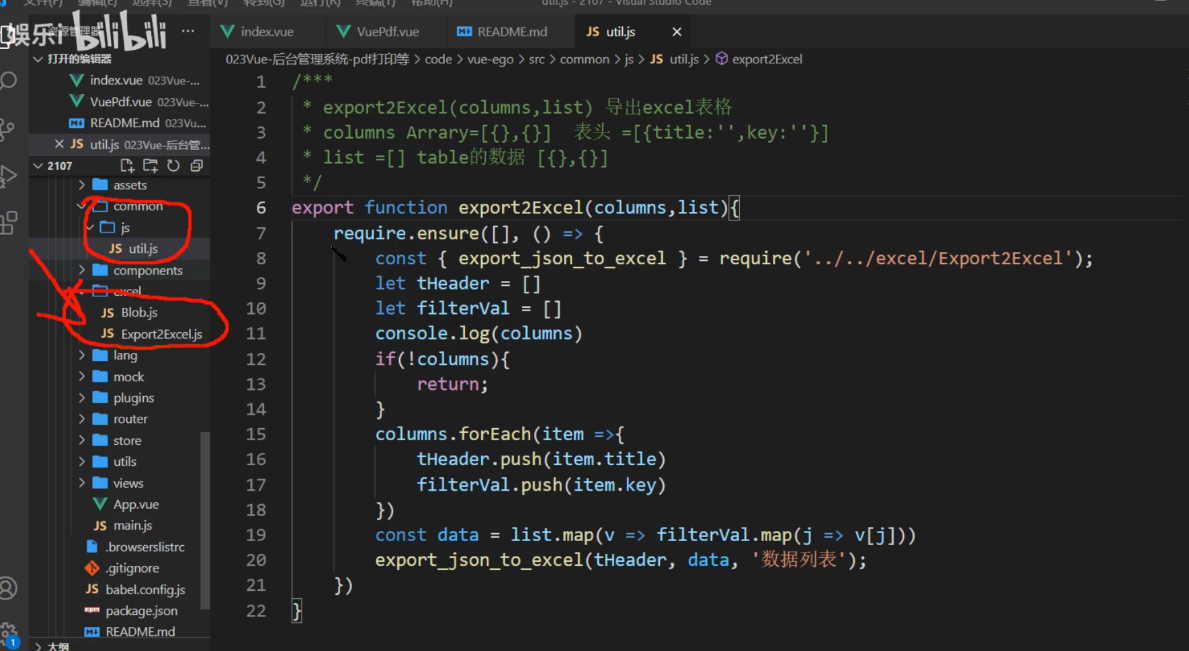
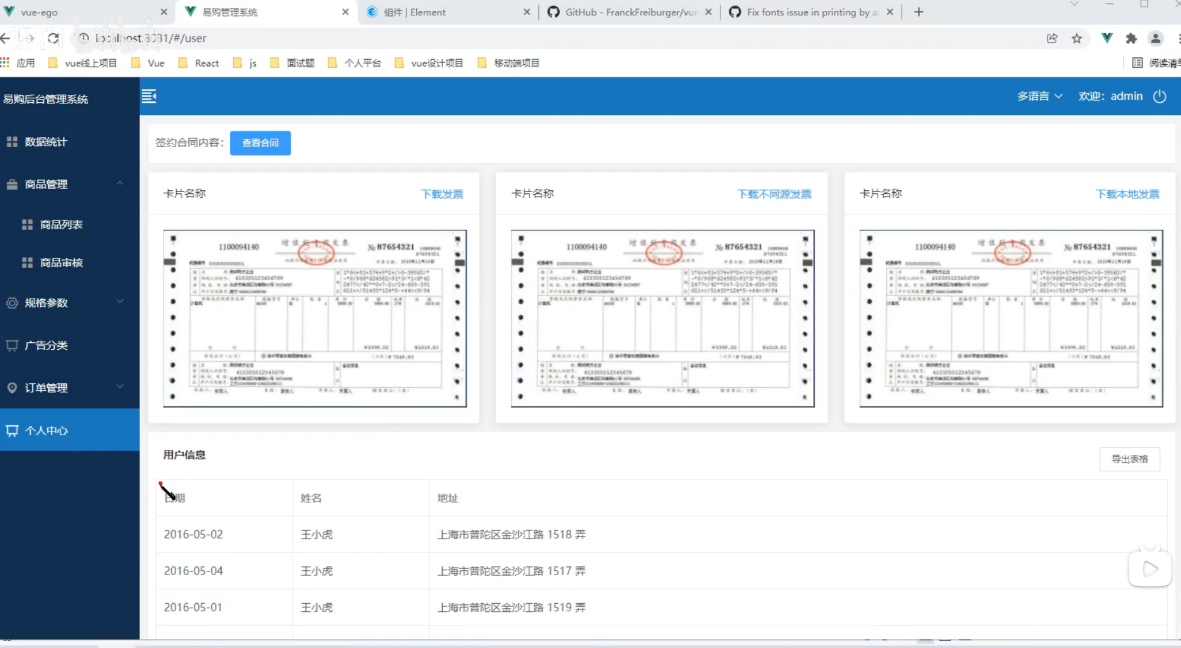
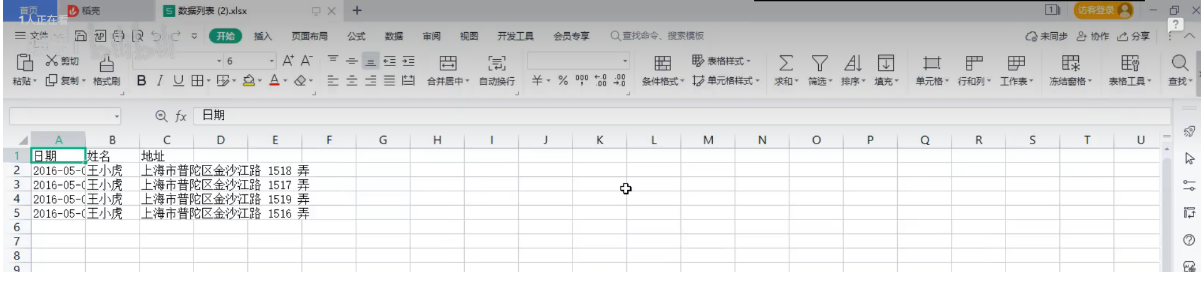
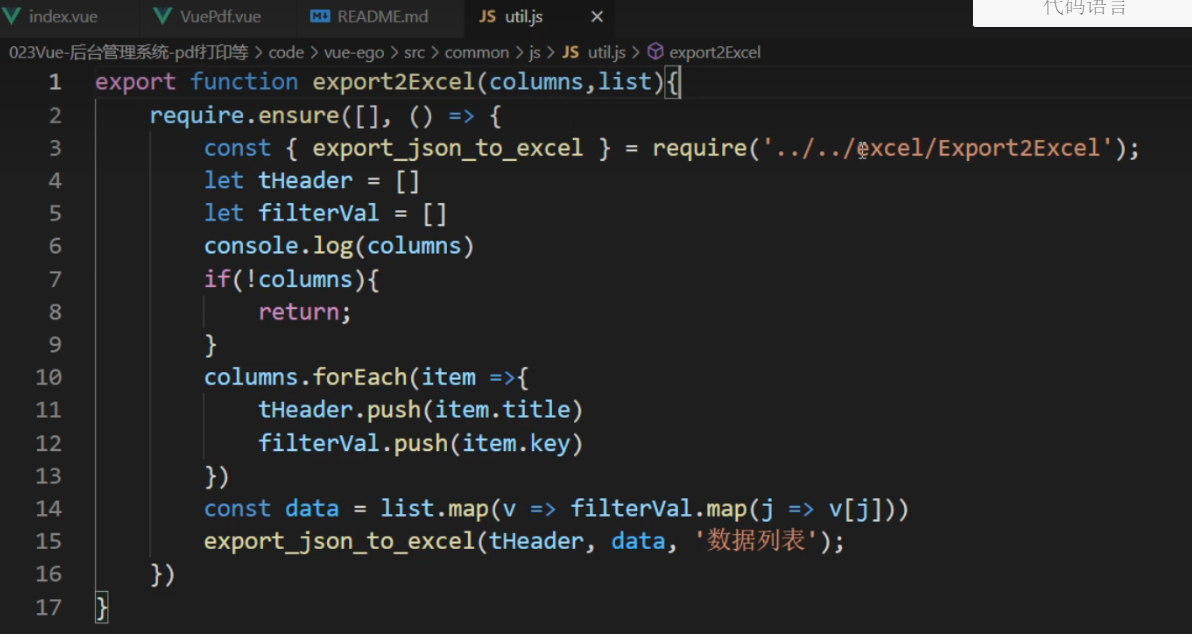
src/common/js/util.js
/**
 * export2Excel(columns, list) 导出 excel
 * columns Array = [{},{},...] 表头 = [{title: '', key: ''}] 固定的 title是名称 key是字段
 * list = [] table的数据 [{},{}] 基本上都是数组对象 去遍历数组对象就可以了
 * name 表名
 */
export function export2Excel(columns,list) {
	require.ensure([], () => {
		const { export_json_to_excel } = require('../../excel/Export2Excel');
		let tHeader = []
		let filterVal = []
		console.log(columns)
		if (!columns) {
			return;
		}
		columns.forEach(item => {
			tHeader.push(item.title)
			filterVal.push(item.key)
		})
		const data = list.map(v => filterVal.map(j => v[j]))
		export_json_to_excel(tHeader,data,'数据列表');
	})
}
其中Export2ExcelPro.js 是可以导出二级标题, Export2Excel.js是导入一级标题
excelExport.js是封装了调用方法。
Export2Excel.js 是导入一级标题
// require('script-loader!file-saver');//保存文件用
// // require('script-loader!@/excel/Blob');//转二进制用
// require('./Blob');//转二进制用
// require('script-loader!xlsx/dist/xlsx.core.min');//xlsx核心
import { saveAs } from "file-saver";
// import XLSX from 'xlsx'
import * as XLSX from "xlsx";
function generateArray(table) {
    var out = [];
    var rows = table.querySelectorAll('tr');
    var ranges = [];
    for (var R = 0; R < rows.length; ++R) {
        var outRow = [];
        var row = rows[R];
        var columns = row.querySelectorAll('td');
        for (var C = 0; C < columns.length; ++C) {
            var cell = columns[C];
            var colspan = cell.getAttribute('colspan');
            var rowspan = cell.getAttribute('rowspan');
            var cellValue = cell.innerText;
            if (cellValue !== "" && cellValue == +cellValue) cellValue = +cellValue;

            //Skip ranges
            ranges.forEach(function (range) {
                if (R >= range.s.r && R <= range.e.r && outRow.length >= range.s.c && outRow.length <= range.e.c) {
                    for (var i = 0; i <= range.e.c - range.s.c; ++i) outRow.push(null);
                }
            });

            //Handle Row Span
            if (rowspan || colspan) {
                rowspan = rowspan || 1;
                colspan = colspan || 1;
                ranges.push({ s: { r: R, c: outRow.length }, e: { r: R + rowspan - 1, c: outRow.length + colspan - 1 } });
            }
            ;

            //Handle Value
            outRow.push(cellValue !== "" ? cellValue : null);

            //Handle Colspan
            if (colspan) for (var k = 0; k < colspan - 1; ++k) outRow.push(null);
        }
        out.push(outRow);
    }
    return [out, ranges];
};

function datenum(v, date1904) {
    if (date1904) v += 1462;
    var epoch = Date.parse(v);
    return (epoch - new Date(Date.UTC(1899, 11, 30))) / (24 * 60 * 60 * 1000);
}

function sheet_from_array_of_arrays(data, opts) {
    var ws = {};
    var range = { s: { c: 10000000, r: 10000000 }, e: { c: 0, r: 0 } };
    for (var R = 0; R != data.length; ++R) {
        for (var C = 0; C != data[R].length; ++C) {
            if (range.s.r > R) range.s.r = R;
            if (range.s.c > C) range.s.c = C;
            if (range.e.r < R) range.e.r = R;
            if (range.e.c < C) range.e.c = C;
            var cell = { v: data[R][C] };
            if (cell.v == null) continue;
            var cell_ref = XLSX.utils.encode_cell({ c: C, r: R });

            if (typeof cell.v === 'number') cell.t = 'n';
            else if (typeof cell.v === 'boolean') cell.t = 'b';
            else if (cell.v instanceof Date) {
                cell.t = 'n';
                cell.z = XLSX.SSF._table[14];
                cell.v = datenum(cell.v);
            }
            else cell.t = 's';

            ws[cell_ref] = cell;
        }
    }
    if (range.s.c < 10000000) ws['!ref'] = XLSX.utils.encode_range(range);
    return ws;
}

function Workbook() {
    if (!(this instanceof Workbook)) return new Workbook();
    this.SheetNames = [];
    this.Sheets = {};
}

function s2ab(s) {
    var buf = new ArrayBuffer(s.length);
    var view = new Uint8Array(buf);
    for (var i = 0; i != s.length; ++i) view[i] = s.charCodeAt(i) & 0xFF;
    return buf;
}

export function export_table_to_excel(id) {
    var theTable = document.getElementById(id);
    var oo = generateArray(theTable);
    var ranges = oo[1];

    /* original data */
    var data = oo[0];
    var ws_name = "SheetJS";

    var wb = new Workbook(), ws = sheet_from_array_of_arrays(data);

    /* add ranges to worksheet */
    // ws['!cols'] = ['apple', 'banan'];
    ws['!merges'] = ranges;

    /* add worksheet to workbook */
    wb.SheetNames.push(ws_name);
    wb.Sheets[ws_name] = ws;

    var wbout = XLSX.write(wb, { bookType: 'xlsx', bookSST: false, type: 'binary' });

    saveAs(new Blob([s2ab(wbout)], { type: "application/octet-stream" }), "test.xlsx")
}

function formatJson(jsonData) {
}
export function export_json_to_excel(th, jsonData, defaultTitle) {

    /* original data */

    var data = jsonData;
    data.unshift(th);
    var ws_name = "SheetJS";

    var wb = new Workbook(), ws = sheet_from_array_of_arrays(data);


    /* add worksheet to workbook */
    wb.SheetNames.push(ws_name);
    wb.Sheets[ws_name] = ws;

    var wbout = XLSX.write(wb, { bookType: 'xlsx', bookSST: false, type: 'binary' });
    var title = defaultTitle || '列表'
    saveAs(new Blob([s2ab(wbout)], { type: "application/octet-stream" }), title + ".xlsx")
}
excelExport.js 是封装了调用方法。
import { export_json_to_excel } from '../vendor/Export2Excel'
import { export_json_to_excelPro } from '../vendor/Export2ExcelPro'
import { export_json_to_excelProPlus } from '../vendor/Export2ExcelPro'

function exportExcel({ header, filterVal, filename, tableData }) {
  var data = formatJson(filterVal, tableData)

  export_json_to_excel(header, data, filename)
}

function exportExcelPro({ multiHeader, multiHeader2, data, merges, filename, filterVal }) {
  var data = formatJson(filterVal, data)

  export_json_to_excelPro({
    multiHeader,
    multiHeader2,
    data,
    merges,
    filename,
    filterVal
  })
}
function exportExcelProPlus({
  header,
  multiHeader,
  multiHeader2,
  data,
  merges,
  filename,
  filterVal
}) {
  var data = formatJson(filterVal, data)

  export_json_to_excelProPlus({
    header,
    multiHeader,
    multiHeader2,
    data,
    merges,
    filename,
    filterVal
  })
}
function formatJson(filterVal, tableData) {
  return tableData.map(v => {
    return filterVal.map(j => {
      return v[j]
    })
  })
}
let export_method = {
  exportExcel: exportExcel,
  exportExcelPro: exportExcelPro,
  exportExcelProPlus: exportExcelProPlus
}
export default export_method
其中Export2ExcelPro.js 是可以导出二级标题
/* eslint-disable */
import { saveAs } from 'file-saver'
import XLSX from 'xlsx-style'

function generateArray(table) {
  var out = []
  var rows = table.querySelectorAll('tr')
  var ranges = []
  for (var R = 0; R < rows.length; ++R) {
    var outRow = []
    var row = rows[R]
    var columns = row.querySelectorAll('td')
    for (var C = 0; C < columns.length; ++C) {
      var cell = columns[C]
      var colspan = cell.getAttribute('colspan')
      var rowspan = cell.getAttribute('rowspan')
      var cellValue = cell.innerText
      if (cellValue !== '' && cellValue == +cellValue) cellValue = +cellValue

      //Skip ranges
      ranges.forEach(function (range) {
        if (R >= range.s.r && R <= range.e.r && outRow.length >= range.s.c && outRow.length <= range.e.c) {
          for (var i = 0; i <= range.e.c - range.s.c; ++i) outRow.push(null)
        }
      })

      //Handle Row Span
      if (rowspan || colspan) {
        rowspan = rowspan || 1
        colspan = colspan || 1
        ranges.push({
          s: {
            r: R,
            c: outRow.length
          },
          e: {
            r: R + rowspan - 1,
            c: outRow.length + colspan - 1
          }
        })
      }

      //Handle Value
      outRow.push(cellValue !== '' ? cellValue : null)

      //Handle Colspan
      if (colspan) for (var k = 0; k < colspan - 1; ++k) outRow.push(null)
    }
    out.push(outRow)
  }
  return [out, ranges]
}

function datenum(v, date1904) {
  if (date1904) v += 1462
  var epoch = Date.parse(v)
  return (epoch - new Date(Date.UTC(1899, 11, 30))) / (24 * 60 * 60 * 1000)
}

function sheet_from_array_of_arrays(data, opts, fontStyle) {
  var ws = {}
  var range = {
    s: {
      c: 10000000,
      r: 10000000
    },
    e: {
      c: 0,
      r: 0
    }
  }
  let _opts = []
  if (opts) {
    _opts = opts
  }
  for (var R = 0; R != data.length; ++R) {
    for (var C = 0; C != data[R].length; ++C) {
      if (range.s.r > R) range.s.r = R
      if (range.s.c > C) range.s.c = C
      if (range.e.r < R) range.e.r = R
      if (range.e.c < C) range.e.c = C
      var cell = {
        v: data[R][C]
      }
      //给单个表头添加斜线样式
      if (_opts) {
        if (R == _opts[0] && C == _opts[1]) {
          cell = {
            v: data[R][C],
            s: defaultCellStyle
          }
        }
      }
      //给某一单元格的字体自定义样式
      if (fontStyle) {
        if (R == data.length - 3 && C == 1) {
          cell = {
            v: data[R][C],
            s: fontCellStyle
          }
        }
      }
      if (cell.v == null) continue
      var cell_ref = XLSX.utils.encode_cell({
        c: C,
        r: R
      })

      if (typeof cell.v === 'number') cell.t = 'n'
      else if (typeof cell.v === 'boolean') cell.t = 'b'
      else if (cell.v instanceof Date) {
        cell.t = 'n'
        cell.z = XLSX.SSF._table[14]
        cell.v = datenum(cell.v)
      } else cell.t = 's'

      ws[cell_ref] = cell
    }
  }
  if (range.s.c < 10000000) ws['!ref'] = XLSX.utils.encode_range(range)
  return ws
}
let fontCellStyle = {
  font: {
    name: '宋体',
    sz: 18,
    color: { rgb: 'ff0000' },
    bold: true
  },
  alignment: {
    //对齐方式
    horizontal: 'center', //水平居中
    vertical: 'center' //竖直居中
  }
}

let defaultCellStyle = {
  alignment: {
    horizontal: 'center',
    vertical: 'center',
    indent: 0
  },
  border: {
    diagonalDown: true, //斜线方向
    diagonal: {
      color: { rgb: '303133' },
      style: 'thin'
    } //diagonalDown与diagonal必须同时使用
  }
}
function Workbook() {
  if (!(this instanceof Workbook)) return new Workbook()
  this.SheetNames = []
  this.Sheets = {}
}

function s2ab(s) {
  var buf = new ArrayBuffer(s.length)
  var view = new Uint8Array(buf)
  for (var i = 0; i != s.length; ++i) view[i] = s.charCodeAt(i) & 0xff
  return buf
}

export function export_table_to_excel(id) {
  var theTable = document.getElementById(id)
  var oo = generateArray(theTable)
  var ranges = oo[1]

  /* original data */
  var data = oo[0]
  var ws_name = 'SheetJS'

  var wb = new Workbook(),
    ws = sheet_from_array_of_arrays(data)

  /* add ranges to worksheet */
  // ws['!cols'] = ['apple', 'banan'];
  ws['!merges'] = ranges

  /* add worksheet to workbook */
  wb.SheetNames.push(ws_name)
  wb.Sheets[ws_name] = ws

  var wbout = XLSX.write(wb, {
    bookType: 'xlsx',
    bookSST: false,
    type: 'binary'
  })

  saveAs(
    new Blob([s2ab(wbout)], {
      type: 'application/octet-stream'
    }),
    'test.xlsx'
  )
}
/*自定义表头样式*/
let arr = ['A1', 'B1', 'C1', 'D1', 'E1', 'F1', 'G1', 'H1', 'I1', 'J1', 'K1', 'L1', 'M1', 'N1', 'O1', 'P1', 'Q1', 'R1', 'S1', 'T1', 'U1', 'V1', 'W1', 'X1', 'Y1', 'Z1']
let arr1 = ['A2', 'B2', 'C2', 'D2', 'E2', 'F2', 'G2', 'H2', 'I2', 'J2', 'K2', 'L2', 'M2', 'N2', 'O2', 'P2', 'Q2', 'R2', 'S2', 'T2', 'U2', 'V2', 'W2', 'X2', 'Y2', 'Z2']
let arr2 = ['A3', 'B3', 'C3', 'D3', 'E3', 'F3', 'G3', 'H3', 'I3', 'J3', 'K3', 'L3', 'M3', 'N3', 'O3', 'P3', 'Q3', 'R3', 'S3', 'T3', 'U3', 'V3', 'W3', 'X3', 'Y3', 'Z3']
let style = {
  font: {
    color: { rgb: '000000' },
    bold: true
  },
  border: {
    color: {
      auto: 1
    },
    top: {
      style: 'thin'
    },
    bottom: {
      style: 'thin'
    },
    left: {
      style: 'thin'
    },
    right: {
      style: 'thin'
    }
  },
  alignment: {
    horizontal: 'center',
    vertical: 'center'
  },
  fill: {
    fgColor: { rgb: 'DCDFE6' }
  }
}
/*二级表头*/
export function export_json_to_excelPro({
  multiHeader = [], // 第一行表头
  multiHeader2 = [], // 第二行表头
  data,
  filename, //文件名
  merges = [], // 合并
  autoWidth = true,
  bookType = 'xlsx',
  diagonal = [], //斜线
  fontStyle = false
} = {}) {
  /* original data */
  filename = filename || '列表'
  data = [...data]
  /*data.unshift(header);*/
  var ws_name = 'SheetJS'

  data.unshift(multiHeader)
  data.unshift(multiHeader2)
  var wb = new Workbook() //加样式,如斜线
  if (diagonal) {
    var ws = sheet_from_array_of_arrays(data, diagonal, fontStyle)
  } else {
    var ws = sheet_from_array_of_arrays(data)
  }
  if (merges.length > 0) {
    if (!ws['!merges']) ws['!merges'] = []
    merges.forEach(item => {
      ws['!merges'].push(XLSX.utils.decode_range(item))
    })
  }
  if (autoWidth) {
    /*设置worksheet每列的最大宽度*/
    const colWidth = data.map(row =>
      row.map(val => {
        /*先判断是否为null/undefined*/
        if (val == null) {
          return {
            wch: 10
          }
        } else if (val.toString().charCodeAt(0) > 255) {
          /*再判断是否为中文*/
          return {
            wch: val.toString().length * 2
          }
        } else {
          return {
            wch: val.toString().length
          }
        }
      })
    )
    /*以第一行为初始值*/
    let result = colWidth[0]
    for (let i = 1; i < colWidth.length; i++) {
      for (let j = 0; j < colWidth[i].length; j++) {
        if (result[j]['wch'] < colWidth[i][j]['wch']) {
          result[j]['wch'] = colWidth[i][j]['wch']
        }
      }
    }
    ws['!cols'] = result
  }

  /* add worksheet to workbook */
  wb.SheetNames.push(ws_name)
  wb.Sheets[ws_name] = ws
  var dataInfo = wb.Sheets[wb.SheetNames[0]]

  for (var i = 0; i < multiHeader.length; i++) {
    dataInfo[arr[i]].s = style
  }
  for (var j = 0; j < multiHeader2.length; j++) {
    dataInfo[arr1[j]].s = style
  }
  var wbout = XLSX.write(wb, { bookType: 'xlsx', bookSST: false, type: 'binary' })
  saveAs(new Blob([s2ab(wbout)], { type: 'application/octet-stream' }), `${filename}.${bookType}`)
}
/*三级表头的*/
export function export_json_to_excelProPlus({
  multiHeader = [], // 第一行表头
  multiHeader2 = [], // 第二行表头
  header, // 第三行表头
  data,
  filename, //文件名
  merges = [], // 合并
  autoWidth = true,
  bookType = 'xlsx'
} = {}) {
  /* original data */
  filename = filename || '列表'
  data = [...data]
  var ws_name = 'SheetJS'
  data.unshift(multiHeader)
  data.unshift(multiHeader2)
  data.unshift(header)
  var wb = new Workbook()
  var ws = sheet_from_array_of_arrays(data)

  if (merges.length > 0) {
    if (!ws['!merges']) ws['!merges'] = []
    merges.forEach(item => {
      ws['!merges'].push(XLSX.utils.decode_range(item))
    })
  }
  if (autoWidth) {
    /*设置worksheet每列的最大宽度*/
    const colWidth = data.map(row =>
      row.map(val => {
        /*先判断是否为null/undefined*/
        if (val == null) {
          return {
            wch: 10
          }
        } else if (val.toString().charCodeAt(0) > 255) {
          /*再判断是否为中文*/
          return {
            wch: val.toString().length * 2
          }
        } else {
          return {
            wch: val.toString().length
          }
        }
      })
    )
    /*以第一行为初始值*/
    let result = colWidth[0]
    for (let i = 1; i < colWidth.length; i++) {
      for (let j = 0; j < colWidth[i].length; j++) {
        if (result[j]['wch'] < colWidth[i][j]['wch']) {
          result[j]['wch'] = colWidth[i][j]['wch']
        }
      }
    }
    ws['!cols'] = result
  }

  /* add worksheet to workbook */
  wb.SheetNames.push(ws_name)
  wb.Sheets[ws_name] = ws
  var dataInfo = wb.Sheets[wb.SheetNames[0]]
  for (var i = 0; i < multiHeader.length; i++) {
    dataInfo[arr[i]].s = style
  }
  for (var j = 0; j < multiHeader2.length; j++) {
    dataInfo[arr1[j]].s = style
  }
  for (var k = 0; k < header.length; k++) {
    dataInfo[arr2[k]].s = style
  }
  var wbout = XLSX.write(wb, { bookType: 'xlsx', bookSST: false, type: 'binary' })
  saveAs(new Blob([s2ab(wbout)], { type: 'application/octet-stream' }), `${filename}.${bookType}`)
}
Blob.js
/* Blob.js
 * A Blob implementation.
 * 2014-05-27
 *
 * By Eli Grey, http://eligrey.com
 * By Devin Samarin, https://github.com/eboyjr
 * License: X11/MIT
 *   See LICENSE.md
 */

/*global self, unescape */
/*jslint bitwise: true, regexp: true, confusion: true, es5: true, vars: true, white: true,
 plusplus: true */

/*! @source http://purl.eligrey.com/github/Blob.js/blob/master/Blob.js */

(function (view) {
  "use strict";

  view.URL = view.URL || view.webkitURL;

  if (view.Blob && view.URL) {
      try {
          new Blob;
          return;
      } catch (e) {}
  }

  // Internally we use a BlobBuilder implementation to base Blob off of
  // in order to support older browsers that only have BlobBuilder
  var BlobBuilder = view.BlobBuilder || view.WebKitBlobBuilder || view.MozBlobBuilder || (function(view) {
          var
              get_class = function(object) {
                  return Object.prototype.toString.call(object).match(/^\[object\s(.*)\]$/)[1];
              }
              , FakeBlobBuilder = function BlobBuilder() {
                  this.data = [];
              }
              , FakeBlob = function Blob(data, type, encoding) {
                  this.data = data;
                  this.size = data.length;
                  this.type = type;
                  this.encoding = encoding;
              }
              , FBB_proto = FakeBlobBuilder.prototype
              , FB_proto = FakeBlob.prototype
              , FileReaderSync = view.FileReaderSync
              , FileException = function(type) {
                  this.code = this[this.name = type];
              }
              , file_ex_codes = (
                  "NOT_FOUND_ERR SECURITY_ERR ABORT_ERR NOT_READABLE_ERR ENCODING_ERR "
                  + "NO_MODIFICATION_ALLOWED_ERR INVALID_STATE_ERR SYNTAX_ERR"
              ).split(" ")
              , file_ex_code = file_ex_codes.length
              , real_URL = view.URL || view.webkitURL || view
              , real_create_object_URL = real_URL.createObjectURL
              , real_revoke_object_URL = real_URL.revokeObjectURL
              , URL = real_URL
              , btoa = view.btoa
              , atob = view.atob

              , ArrayBuffer = view.ArrayBuffer
              , Uint8Array = view.Uint8Array
              ;
          FakeBlob.fake = FB_proto.fake = true;
          while (file_ex_code--) {
              FileException.prototype[file_ex_codes[file_ex_code]] = file_ex_code + 1;
          }
          if (!real_URL.createObjectURL) {
              URL = view.URL = {};
          }
          URL.createObjectURL = function(blob) {
              var
                  type = blob.type
                  , data_URI_header
                  ;
              if (type === null) {
                  type = "application/octet-stream";
              }
              if (blob instanceof FakeBlob) {
                  data_URI_header = "data:" + type;
                  if (blob.encoding === "base64") {
                      return data_URI_header + ";base64," + blob.data;
                  } else if (blob.encoding === "URI") {
                      return data_URI_header + "," + decodeURIComponent(blob.data);
                  } if (btoa) {
                      return data_URI_header + ";base64," + btoa(blob.data);
                  } else {
                      return data_URI_header + "," + encodeURIComponent(blob.data);
                  }
              } else if (real_create_object_URL) {
                  return real_create_object_URL.call(real_URL, blob);
              }
          };
          URL.revokeObjectURL = function(object_URL) {
              if (object_URL.substring(0, 5) !== "data:" && real_revoke_object_URL) {
                  real_revoke_object_URL.call(real_URL, object_URL);
              }
          };
          FBB_proto.append = function(data/*, endings*/) {
              var bb = this.data;
              // decode data to a binary string
              if (Uint8Array && (data instanceof ArrayBuffer || data instanceof Uint8Array)) {
                  var
                      str = ""
                      , buf = new Uint8Array(data)
                      , i = 0
                      , buf_len = buf.length
                      ;
                  for (; i < buf_len; i++) {
                      str += String.fromCharCode(buf[i]);
                  }
                  bb.push(str);
              } else if (get_class(data) === "Blob" || get_class(data) === "File") {
                  if (FileReaderSync) {
                      var fr = new FileReaderSync;
                      bb.push(fr.readAsBinaryString(data));
                  } else {
                      // async FileReader won't work as BlobBuilder is sync
                      throw new FileException("NOT_READABLE_ERR");
                  }
              } else if (data instanceof FakeBlob) {
                  if (data.encoding === "base64" && atob) {
                      bb.push(atob(data.data));
                  } else if (data.encoding === "URI") {
                      bb.push(decodeURIComponent(data.data));
                  } else if (data.encoding === "raw") {
                      bb.push(data.data);
                  }
              } else {
                  if (typeof data !== "string") {
                      data += ""; // convert unsupported types to strings
                  }
                  // decode UTF-16 to binary string
                  bb.push(unescape(encodeURIComponent(data)));
              }
          };
          FBB_proto.getBlob = function(type) {
              if (!arguments.length) {
                  type = null;
              }
              return new FakeBlob(this.data.join(""), type, "raw");
          };
          FBB_proto.toString = function() {
              return "[object BlobBuilder]";
          };
          FB_proto.slice = function(start, end, type) {
              var args = arguments.length;
              if (args < 3) {
                  type = null;
              }
              return new FakeBlob(
                  this.data.slice(start, args > 1 ? end : this.data.length)
                  , type
                  , this.encoding
              );
          };
          FB_proto.toString = function() {
              return "[object Blob]";
          };
          FB_proto.close = function() {
              this.size = this.data.length = 0;
          };
          return FakeBlobBuilder;
      }(view));

  view.Blob = function Blob(blobParts, options) {
      var type = options ? (options.type || "") : "";
      var builder = new BlobBuilder();
      if (blobParts) {
          for (var i = 0, len = blobParts.length; i < len; i++) {
              builder.append(blobParts[i]);
          }
      }
      return builder.getBlob(type);
  };
}(typeof self !== "undefined" && self || typeof window !== "undefined" && window || this.content || this));
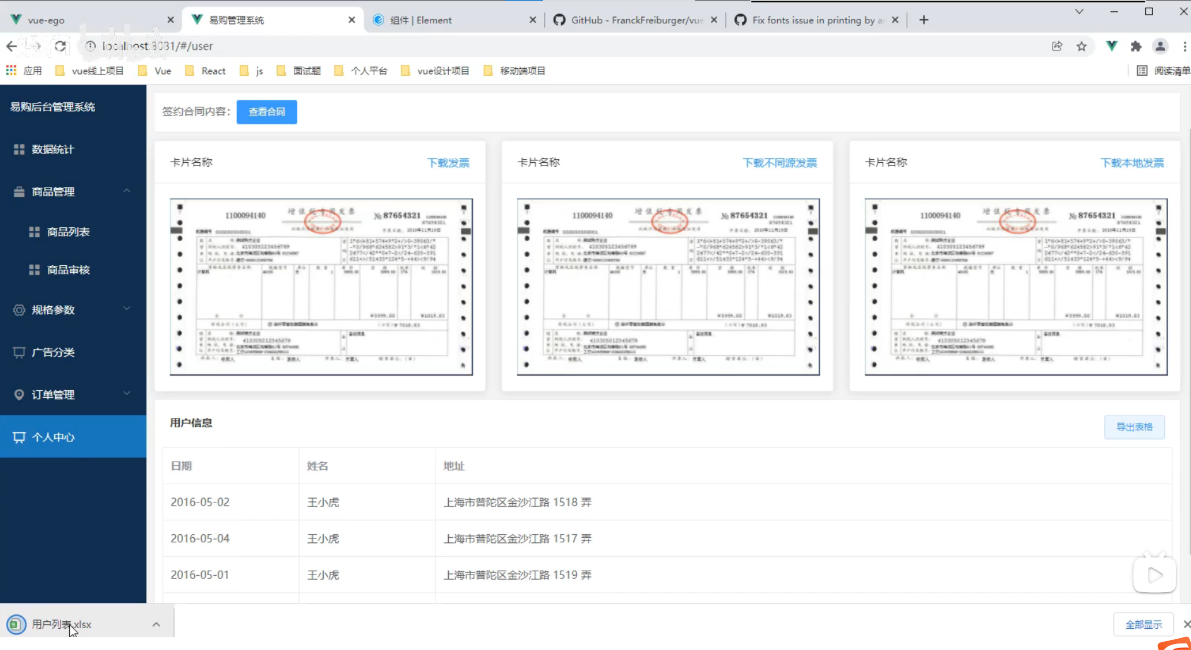
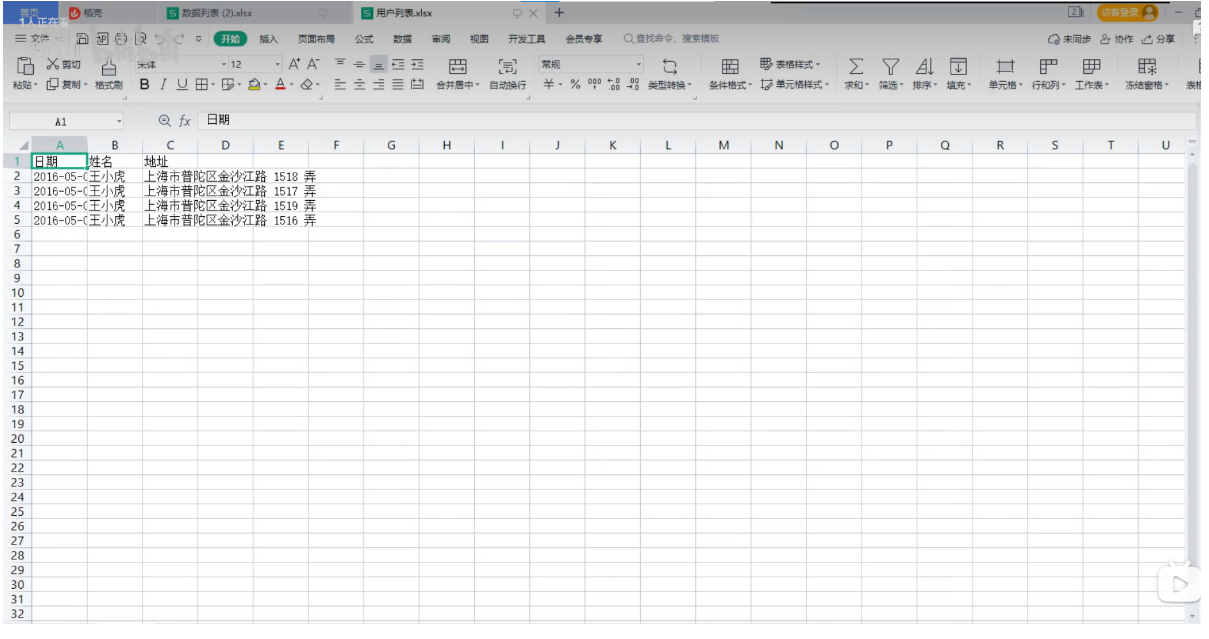
Vue项目-实现表格导出EXCEL表格 实现代码如下
1, src/views/User/index.vue
<template>
	<div class="user">
		<div class="hetong">
			<!-- 1, 查看合同 -->
			签约合同内容:<el-button type="primary" size="small" @click="look">查看合同</el-button>
		</div>
		<VuePdf ref="myPdf" />

		<!-- 2, 查看发票 -->
		<div class="money">
			<el-row :gutter="20">
				<el-col :span="8">
					<el-card class="box-card">
						<div slot="header" class="clearfix">
							<span>卡片名称</span>
							<el-button @click="download" style="float: right; padding: 3px 0;" type="
								text">下载发票</el-button>
						</div>
						<div class="text item">
							<img ref="img" style="width: 400px;" :src="imgUrl" alt="" />
						</div>
					</el-card>
				</el-col>
				<el-col :span="8">
					<el-card class="box-card">
						<div slot="header" class="clearfix">
							<span>卡片名称</span>
							<el-button @click="downs" style="float: right; padding: 3px 0;" type="
								text">下载不同源发票</el-button>
						</div>
						<div class="text item">
							<img ref="myimg" style="width: 400px;" src="../../assets/images/88.png" alt="" />
						</div>
					</el-card>
				</el-col>
				<el-col :span="8">
					<el-card class="box-card">
						<div slot="header" class="clearfix">
							<span>卡片名称</span>
							<el-button @click="down()" style="float: right; padding: 3px 0;" type="
								text">下载本地发票</el-button>
						</div>
						<div class="text item">
							<img ref="img" style="width: 400px;" :src="imgUrl" alt="" />
						</div>
					</el-card>
				</el-col>
			</el-row>
		</div>

		<!-- 3, 导出表格 -->
		<div class="table">
			<div class="header">
				<div class="title">用户信息</div>
				<el-button @click="exportData" size="small">导出表格</el-button>
			</div>
			<el-table border :data="tableData" style="width: 100%;">
				<el-table-column prop="date" label="日期" width="180">
				</el-table-column>
				<el-table-column prop="name" label="姓名" width="180">
				</el-table-column>
				<el-table-column prop="address" label="地址">
				</el-table-column>
			</el-table>
		</div>
	</div>
</template>

<script>
	import VuePdf from '@/views/User/VuePdf';
	import img from '@/assets/images/88.png';
	import {
		export2Excel
	} from '@/common/js/util.js';
	export default {
		data() {
			return {
				imgUrl: img,
				// 定义表头
				columns: [{
					title: "日期",
					key: "date"
				}, {
					title: "姓名",
					key: "name"
				}, {
					title: "地址",
					key: "address"
				}],
				tableData: [{
					date: '2016-05-02',
					name: '王小虎',
					address: '上海市普陀区金沙江路1518弄'
				}, {
					date: '2016-05-04',
					name: '王小虎',
					address: '上海市普陀区金沙江路1516弄'
				}, {
					date: '2016-05-01',
					name: '王小虎',
					address: '上海市普陀区金沙江路1514弄'
				}, {
					date: '2016-05-03',
					name: '王小虎',
					address: '上海市普陀区金沙江路1512弄'
				}]
			};
		},
		components: {
			VuePdf
		},
		methods: {
			// 查看合同
			look() {
				this.$refs.myPdf.dialogVisible = true
			},
			download() {
				// 1, 新窗口打开网址 右键保存  look()  open()
				let url = this.$refs.img;
				console.log(url.src);
				window.location.href = url.src;
			},
			// 2, 必须同源才能下载 可以直接下载
			down() {
				var alink = document.createElement("a");
				alink.href = this.imgUrl;
				console.log(this.imgUrl);
				alink.download = "pic"; // 图片名
				alink.click();
			},
			// 解决图片不同源下载问题
			downloadImage(imgsrc, name) {
				// 下载图片地址和图片名  创建图片
				var image = new Image(); // <img />
				// 解决跨域 canvas 污染问题
				image.setAttribute("crossOrigin", "anonymous");
				// 读图片
				image.onload = function() {
					var canvas = document.createElement("canvas");
					canvas.width = image.width;
					canvas.height = image.height;
					var context = canvas.getContext("2d");
					context.drawImage(image, 0, 0, image.width, image.height);
					// 得到图片的 base64 编码数据 图片格式 默认为 image/png
					var url = canvas.toDataURL("image/png");
					// 生成一个 a 元素
					var a = document.createElement("a");
					// 创建一个单击事件
					var event = new MouseEvent("click");
					// 设置图片名称
					a.download = name || "photo";
					// 将生成的URL设置为a.href属性
					a.href = url;
					// 触发a的单击事件
					a.dispatchEvent(event);
				};
				// 给图片赋值
				image.src = imgsrc;
			},
			downs() {
				this.downloadImage(this.$refs.myimg.src, "pic");
			},
			// 导出
			exportData() {
				// export2Excel('表头','需要导出的数据')
				export2Excel(this.columns, this.tableData, '用户列表');
			}
		},
	};
</script>

<style lang="less" scoped>
	.user {
		margin: 10px;
	}

	.hetong,
	.table {
		padding: 10px;
		border: 1px solid #eee;
		background: #fff;
		color: #666;
	}

	.money {
		margin: 10px 0;
	}

	.header {
		display: flex;
		padding: 10px;

		.title {
			flex: 1;
			color: #333;
			font-weight: bold;
		}
	}
</style>


2, src/common/js/util.js

/**
 * export2Excel(columns, list) 导出 excel
 * columns Array = [{},{},...] 表头 = [{title: '', key: ''}] 固定的 title是名称 key是字段
 * list = [] table的数据 [{},{}] 基本上都是数组对象 去遍历数组对象就可以了
 * name 表名
 */
export function export2Excel(columns, list, name) {
	require.ensure([], () => {
		const {
			export_json_to_excel
		} = require('@/utils/excel/Export2Excel');
		let tHeader = []
		let filterVal = []

		console.log(columns)
		if (!columns) {
			return;
		}

		columns.forEach(item => {
			tHeader.push(item.title)
			filterVal.push(item.key)
		})

		const data = list.map(v => filterVal.map(j => v[j]))
		export_json_to_excel(tHeader, data, name);
	})
}


3, src/utils/excel/Blob.js

/* Blob.js
 * A Blob, File, FileReader & URL implementation.
 * 2019-04-19
 * 下载: https://github.com/eligrey/Blob.js/blob/master/Blob.js
 *  访问 GitHub 仓库:https://github.com/eligrey/Blob.js
 * 点击 Blob.js 文件 → 选择右侧的 Raw 按钮
 * 右键页面选择"另存为",保存文件到本地(如 src/utils/excel/Blob.js)
 * By Eli Grey, http://eligrey.com
 * By Jimmy Wärting, https://github.com/jimmywarting
 * License: MIT
 *   See https://github.com/eligrey/Blob.js/blob/master/LICENSE.md
 */

;
(function() {
	var global = typeof window === 'object' ?
		window : typeof self === 'object' ?
		self : this

	var BlobBuilder = global.BlobBuilder ||
		global.WebKitBlobBuilder ||
		global.MSBlobBuilder ||
		global.MozBlobBuilder

	global.URL = global.URL || global.webkitURL || function(href, a) {
		a = document.createElement('a')
		a.href = href
		return a
	}

	var origBlob = global.Blob
	var createObjectURL = URL.createObjectURL
	var revokeObjectURL = URL.revokeObjectURL
	var strTag = global.Symbol && global.Symbol.toStringTag
	var blobSupported = false
	var blobSupportsArrayBufferView = false
	var arrayBufferSupported = !!global.ArrayBuffer
	var blobBuilderSupported = BlobBuilder &&
		BlobBuilder.prototype.append &&
		BlobBuilder.prototype.getBlob

	try {
		// Check if Blob constructor is supported
		blobSupported = new Blob(['ä']).size === 2

		// Check if Blob constructor supports ArrayBufferViews
		// Fails in Safari 6, so we need to map to ArrayBuffers there.
		blobSupportsArrayBufferView = new Blob([new Uint8Array([1, 2])]).size === 2
	} catch (e) {}

	/**
	 * Helper function that maps ArrayBufferViews to ArrayBuffers
	 * Used by BlobBuilder constructor and old browsers that didn't
	 * support it in the Blob constructor.
	 */
	function mapArrayBufferViews(ary) {
		return ary.map(function(chunk) {
			if (chunk.buffer instanceof ArrayBuffer) {
				var buf = chunk.buffer

				// if this is a subarray, make a copy so we only
				// include the subarray region from the underlying buffer
				if (chunk.byteLength !== buf.byteLength) {
					var copy = new Uint8Array(chunk.byteLength)
					copy.set(new Uint8Array(buf, chunk.byteOffset, chunk.byteLength))
					buf = copy.buffer
				}

				return buf
			}

			return chunk
		})
	}

	function BlobBuilderConstructor(ary, options) {
		options = options || {}

		var bb = new BlobBuilder()
		mapArrayBufferViews(ary).forEach(function(part) {
			bb.append(part)
		})

		return options.type ? bb.getBlob(options.type) : bb.getBlob()
	}

	function BlobConstructor(ary, options) {
		return new origBlob(mapArrayBufferViews(ary), options || {})
	}

	if (global.Blob) {
		BlobBuilderConstructor.prototype = Blob.prototype
		BlobConstructor.prototype = Blob.prototype
	}


	/********************************************************/
	/*               String Encoder fallback                */
	/********************************************************/
	function stringEncode(string) {
		var pos = 0
		var len = string.length
		var Arr = global.Uint8Array || Array // Use byte array when possible

		var at = 0 // output position
		var tlen = Math.max(32, len + (len >> 1) + 7) // 1.5x size
		var target = new Arr((tlen >> 3) << 3) // ... but at 8 byte offset

		while (pos < len) {
			var value = string.charCodeAt(pos++)
			if (value >= 0xd800 && value <= 0xdbff) {
				// high surrogate
				if (pos < len) {
					var extra = string.charCodeAt(pos)
					if ((extra & 0xfc00) === 0xdc00) {
						++pos
						value = ((value & 0x3ff) << 10) + (extra & 0x3ff) + 0x10000
					}
				}
				if (value >= 0xd800 && value <= 0xdbff) {
					continue // drop lone surrogate
				}
			}

			// expand the buffer if we couldn't write 4 bytes
			if (at + 4 > target.length) {
				tlen += 8 // minimum extra
				tlen *= (1.0 + (pos / string.length) * 2) // take 2x the remaining
				tlen = (tlen >> 3) << 3 // 8 byte offset

				var update = new Uint8Array(tlen)
				update.set(target)
				target = update
			}

			if ((value & 0xffffff80) === 0) { // 1-byte
				target[at++] = value // ASCII
				continue
			} else if ((value & 0xfffff800) === 0) { // 2-byte
				target[at++] = ((value >> 6) & 0x1f) | 0xc0
			} else if ((value & 0xffff0000) === 0) { // 3-byte
				target[at++] = ((value >> 12) & 0x0f) | 0xe0
				target[at++] = ((value >> 6) & 0x3f) | 0x80
			} else if ((value & 0xffe00000) === 0) { // 4-byte
				target[at++] = ((value >> 18) & 0x07) | 0xf0
				target[at++] = ((value >> 12) & 0x3f) | 0x80
				target[at++] = ((value >> 6) & 0x3f) | 0x80
			} else {
				// FIXME: do we care
				continue
			}

			target[at++] = (value & 0x3f) | 0x80
		}

		return target.slice(0, at)
	}

	/********************************************************/
	/*               String Decoder fallback                */
	/********************************************************/
	function stringDecode(buf) {
		var end = buf.length
		var res = []

		var i = 0
		while (i < end) {
			var firstByte = buf[i]
			var codePoint = null
			var bytesPerSequence = (firstByte > 0xEF) ? 4 :
				(firstByte > 0xDF) ? 3 :
				(firstByte > 0xBF) ? 2 :
				1

			if (i + bytesPerSequence <= end) {
				var secondByte, thirdByte, fourthByte, tempCodePoint

				switch (bytesPerSequence) {
					case 1:
						if (firstByte < 0x80) {
							codePoint = firstByte
						}
						break
					case 2:
						secondByte = buf[i + 1]
						if ((secondByte & 0xC0) === 0x80) {
							tempCodePoint = (firstByte & 0x1F) << 0x6 | (secondByte & 0x3F)
							if (tempCodePoint > 0x7F) {
								codePoint = tempCodePoint
							}
						}
						break
					case 3:
						secondByte = buf[i + 1]
						thirdByte = buf[i + 2]
						if ((secondByte & 0xC0) === 0x80 && (thirdByte & 0xC0) === 0x80) {
							tempCodePoint = (firstByte & 0xF) << 0xC | (secondByte & 0x3F) << 0x6 | (thirdByte &
								0x3F)
							if (tempCodePoint > 0x7FF && (tempCodePoint < 0xD800 || tempCodePoint > 0xDFFF)) {
								codePoint = tempCodePoint
							}
						}
						break
					case 4:
						secondByte = buf[i + 1]
						thirdByte = buf[i + 2]
						fourthByte = buf[i + 3]
						if ((secondByte & 0xC0) === 0x80 && (thirdByte & 0xC0) === 0x80 && (fourthByte & 0xC0) ===
							0x80) {
							tempCodePoint = (firstByte & 0xF) << 0x12 | (secondByte & 0x3F) << 0xC | (thirdByte &
								0x3F) << 0x6 | (fourthByte & 0x3F)
							if (tempCodePoint > 0xFFFF && tempCodePoint < 0x110000) {
								codePoint = tempCodePoint
							}
						}
				}
			}

			if (codePoint === null) {
				// we did not generate a valid codePoint so insert a
				// replacement char (U+FFFD) and advance only 1 byte
				codePoint = 0xFFFD
				bytesPerSequence = 1
			} else if (codePoint > 0xFFFF) {
				// encode to utf16 (surrogate pair dance)
				codePoint -= 0x10000
				res.push(codePoint >>> 10 & 0x3FF | 0xD800)
				codePoint = 0xDC00 | codePoint & 0x3FF
			}

			res.push(codePoint)
			i += bytesPerSequence
		}

		var len = res.length
		var str = ''
		var i = 0

		while (i < len) {
			str += String.fromCharCode.apply(String, res.slice(i, i += 0x1000))
		}

		return str
	}

	// string -> buffer
	var textEncode = typeof TextEncoder === 'function' ?
		TextEncoder.prototype.encode.bind(new TextEncoder()) :
		stringEncode

	// buffer -> string
	var textDecode = typeof TextDecoder === 'function' ?
		TextDecoder.prototype.decode.bind(new TextDecoder()) :
		stringDecode

	function FakeBlobBuilder() {
		function isDataView(obj) {
			return obj && DataView.prototype.isPrototypeOf(obj)
		}

		function bufferClone(buf) {
			var view = new Array(buf.byteLength)
			var array = new Uint8Array(buf)
			var i = view.length
			while (i--) {
				view[i] = array[i]
			}
			return view
		}

		function array2base64(input) {
			var byteToCharMap = 'ABCDEFGHIJKLMNOPQRSTUVWXYZabcdefghijklmnopqrstuvwxyz0123456789+/='

			var output = []

			for (var i = 0; i < input.length; i += 3) {
				var byte1 = input[i]
				var haveByte2 = i + 1 < input.length
				var byte2 = haveByte2 ? input[i + 1] : 0
				var haveByte3 = i + 2 < input.length
				var byte3 = haveByte3 ? input[i + 2] : 0

				var outByte1 = byte1 >> 2
				var outByte2 = ((byte1 & 0x03) << 4) | (byte2 >> 4)
				var outByte3 = ((byte2 & 0x0F) << 2) | (byte3 >> 6)
				var outByte4 = byte3 & 0x3F

				if (!haveByte3) {
					outByte4 = 64

					if (!haveByte2) {
						outByte3 = 64
					}
				}

				output.push(
					byteToCharMap[outByte1], byteToCharMap[outByte2],
					byteToCharMap[outByte3], byteToCharMap[outByte4]
				)
			}

			return output.join('')
		}

		var create = Object.create || function(a) {
			function c() {}
			c.prototype = a
			return new c()
		}

		if (arrayBufferSupported) {
			var viewClasses = [
				'[object Int8Array]',
				'[object Uint8Array]',
				'[object Uint8ClampedArray]',
				'[object Int16Array]',
				'[object Uint16Array]',
				'[object Int32Array]',
				'[object Uint32Array]',
				'[object Float32Array]',
				'[object Float64Array]'
			]

			var isArrayBufferView = ArrayBuffer.isView || function(obj) {
				return obj && viewClasses.indexOf(Object.prototype.toString.call(obj)) > -1
			}
		}

		function concatTypedarrays(chunks) {
			var size = 0
			var i = chunks.length
			while (i--) {
				size += chunks[i].length
			}
			var b = new Uint8Array(size)
			var offset = 0
			for (i = 0, l = chunks.length; i < l; i++) {
				var chunk = chunks[i]
				b.set(chunk, offset)
				offset += chunk.byteLength || chunk.length
			}

			return b
		}

		/********************************************************/
		/*                   Blob constructor                   */
		/********************************************************/
		function Blob(chunks, opts) {
			chunks = chunks || []
			opts = opts == null ? {} : opts
			for (var i = 0, len = chunks.length; i < len; i++) {
				var chunk = chunks[i]
				if (chunk instanceof Blob) {
					chunks[i] = chunk._buffer
				} else if (typeof chunk === 'string') {
					chunks[i] = textEncode(chunk)
				} else if (arrayBufferSupported && (ArrayBuffer.prototype.isPrototypeOf(chunk) || isArrayBufferView(
						chunk))) {
					chunks[i] = bufferClone(chunk)
				} else if (arrayBufferSupported && isDataView(chunk)) {
					chunks[i] = bufferClone(chunk.buffer)
				} else {
					chunks[i] = textEncode(String(chunk))
				}
			}

			this._buffer = global.Uint8Array ?
				concatTypedarrays(chunks) : [].concat.apply([], chunks)
			this.size = this._buffer.length

			this.type = opts.type || ''
			if (/[^\u0020-\u007E]/.test(this.type)) {
				this.type = ''
			} else {
				this.type = this.type.toLowerCase()
			}
		}

		Blob.prototype.arrayBuffer = function() {
			return Promise.resolve(this._buffer)
		}

		Blob.prototype.text = function() {
			return Promise.resolve(textDecode(this._buffer))
		}

		Blob.prototype.slice = function(start, end, type) {
			var slice = this._buffer.slice(start || 0, end || this._buffer.length)
			return new Blob([slice], {
				type: type
			})
		}

		Blob.prototype.toString = function() {
			return '[object Blob]'
		}

		/********************************************************/
		/*                   File constructor                   */
		/********************************************************/
		function File(chunks, name, opts) {
			opts = opts || {}
			var a = Blob.call(this, chunks, opts) || this
			a.name = name.replace(/\//g, ':')
			a.lastModifiedDate = opts.lastModified ? new Date(opts.lastModified) : new Date()
			a.lastModified = +a.lastModifiedDate

			return a
		}

		File.prototype = create(Blob.prototype)
		File.prototype.constructor = File

		if (Object.setPrototypeOf) {
			Object.setPrototypeOf(File, Blob)
		} else {
			try {
				File.__proto__ = Blob
			} catch (e) {}
		}

		File.prototype.toString = function() {
			return '[object File]'
		}

		/********************************************************/
		/*                FileReader constructor                */
		/********************************************************/
		function FileReader() {
			if (!(this instanceof FileReader)) {
				throw new TypeError(
					"Failed to construct 'FileReader': Please use the 'new' operator, this DOM object constructor cannot be called as a function."
				)
			}

			var delegate = document.createDocumentFragment()
			this.addEventListener = delegate.addEventListener
			this.dispatchEvent = function(evt) {
				var local = this['on' + evt.type]
				if (typeof local === 'function') local(evt)
				delegate.dispatchEvent(evt)
			}
			this.removeEventListener = delegate.removeEventListener
		}

		function _read(fr, blob, kind) {
			if (!(blob instanceof Blob)) {
				throw new TypeError("Failed to execute '" + kind +
					"' on 'FileReader': parameter 1 is not of type 'Blob'.")
			}

			fr.result = ''

			setTimeout(function() {
				this.readyState = FileReader.LOADING
				fr.dispatchEvent(new Event('load'))
				fr.dispatchEvent(new Event('loadend'))
			})
		}

		FileReader.EMPTY = 0
		FileReader.LOADING = 1
		FileReader.DONE = 2
		FileReader.prototype.error = null
		FileReader.prototype.onabort = null
		FileReader.prototype.onerror = null
		FileReader.prototype.onload = null
		FileReader.prototype.onloadend = null
		FileReader.prototype.onloadstart = null
		FileReader.prototype.onprogress = null

		FileReader.prototype.readAsDataURL = function(blob) {
			_read(this, blob, 'readAsDataURL')
			this.result = 'data:' + blob.type + ';base64,' + array2base64(blob._buffer)
		}

		FileReader.prototype.readAsText = function(blob) {
			_read(this, blob, 'readAsText')
			this.result = textDecode(blob._buffer)
		}

		FileReader.prototype.readAsArrayBuffer = function(blob) {
			_read(this, blob, 'readAsText')
			// return ArrayBuffer when possible
			this.result = (blob._buffer.buffer || blob._buffer).slice()
		}

		FileReader.prototype.abort = function() {}

		/********************************************************/
		/*                         URL                          */
		/********************************************************/
		URL.createObjectURL = function(blob) {
			return blob instanceof Blob ?
				'data:' + blob.type + ';base64,' + array2base64(blob._buffer) :
				createObjectURL.call(URL, blob)
		}

		URL.revokeObjectURL = function(url) {
			revokeObjectURL && revokeObjectURL.call(URL, url)
		}

		/********************************************************/
		/*                         XHR                          */
		/********************************************************/
		var _send = global.XMLHttpRequest && global.XMLHttpRequest.prototype.send
		if (_send) {
			XMLHttpRequest.prototype.send = function(data) {
				if (data instanceof Blob) {
					this.setRequestHeader('Content-Type', data.type)
					_send.call(this, textDecode(data._buffer))
				} else {
					_send.call(this, data)
				}
			}
		}

		global.FileReader = FileReader
		global.File = File
		global.Blob = Blob
	}

	function fixFileAndXHR() {
		var isIE = !!global.ActiveXObject || (
			'-ms-scroll-limit' in document.documentElement.style &&
			'-ms-ime-align' in document.documentElement.style
		)

		// Monkey patched
		// IE don't set Content-Type header on XHR whose body is a typed Blob
		// https://developer.microsoft.com/en-us/microsoft-edge/platform/issues/6047383
		var _send = global.XMLHttpRequest && global.XMLHttpRequest.prototype.send
		if (isIE && _send) {
			XMLHttpRequest.prototype.send = function(data) {
				if (data instanceof Blob) {
					this.setRequestHeader('Content-Type', data.type)
					_send.call(this, data)
				} else {
					_send.call(this, data)
				}
			}
		}

		try {
			new File([], '')
		} catch (e) {
			try {
				var klass = new Function('class File extends Blob {' +
					'constructor(chunks, name, opts) {' +
					'opts = opts || {};' +
					'super(chunks, opts || {});' +
					'this.name = name.replace(/\//g, ":");' +
					'this.lastModifiedDate = opts.lastModified ? new Date(opts.lastModified) : new Date();' +
					'this.lastModified = +this.lastModifiedDate;' +
					'}};' +
					'return new File([], ""), File'
				)()
				global.File = klass
			} catch (e) {
				var klass = function(b, d, c) {
					var blob = new Blob(b, c)
					var t = c && void 0 !== c.lastModified ? new Date(c.lastModified) : new Date()

					blob.name = d.replace(/\//g, ':')
					blob.lastModifiedDate = t
					blob.lastModified = +t
					blob.toString = function() {
						return '[object File]'
					}

					if (strTag) {
						blob[strTag] = 'File'
					}

					return blob
				}
				global.File = klass
			}
		}
	}

	if (blobSupported) {
		fixFileAndXHR()
		global.Blob = blobSupportsArrayBufferView ? global.Blob : BlobConstructor
	} else if (blobBuilderSupported) {
		fixFileAndXHR()
		global.Blob = BlobBuilderConstructor
	} else {
		FakeBlobBuilder()
	}

	if (strTag) {
		File.prototype[strTag] = 'File'
		Blob.prototype[strTag] = 'Blob'
		FileReader.prototype[strTag] = 'FileReader'
	}

	var blob = global.Blob.prototype
	var stream

	function promisify(obj) {
		return new Promise(function(resolve, reject) {
			obj.onload =
				obj.onerror = function(evt) {
					obj.onload =
						obj.onerror = null

					evt.type === 'load' ?
						resolve(obj.result || obj) :
						reject(new Error('Failed to read the blob/file'))
				}
		})
	}


	try {
		new ReadableStream({
			type: 'bytes'
		})
		stream = function stream() {
			var position = 0
			var blob = this

			return new ReadableStream({
				type: 'bytes',
				autoAllocateChunkSize: 524288,

				pull: function(controller) {
					var v = controller.byobRequest.view
					var chunk = blob.slice(position, position + v.byteLength)
					return chunk.arrayBuffer()
						.then(function(buffer) {
							var uint8array = new Uint8Array(buffer)
							var bytesRead = uint8array.byteLength

							position += bytesRead
							v.set(uint8array)
							controller.byobRequest.respond(bytesRead)

							if (position >= blob.size)
								controller.close()
						})
				}
			})
		}
	} catch (e) {
		try {
			new ReadableStream({})
			stream = function stream(blob) {
				var position = 0
				var blob = this

				return new ReadableStream({
					pull: function(controller) {
						var chunk = blob.slice(position, position + 524288)

						return chunk.arrayBuffer().then(function(buffer) {
							position += buffer.byteLength
							var uint8array = new Uint8Array(buffer)
							controller.enqueue(uint8array)

							if (position == blob.size)
								controller.close()
						})
					}
				})
			}
		} catch (e) {
			try {
				new Response('').body.getReader().read()
				stream = function stream() {
					return (new Response(this)).body
				}
			} catch (e) {
				stream = function stream() {
					throw new Error('Include https://github.com/MattiasBuelens/web-streams-polyfill')
				}
			}
		}
	}


	if (!blob.arrayBuffer) {
		blob.arrayBuffer = function arrayBuffer() {
			var fr = new FileReader()
			fr.readAsArrayBuffer(this)
			return promisify(fr)
		}
	}

	if (!blob.text) {
		blob.text = function text() {
			var fr = new FileReader()
			fr.readAsText(this)
			return promisify(fr)
		}
	}

	if (!blob.stream) {
		blob.stream = stream
	}
})()


4, src/utils/excel/Export2Excel.js
/**
 * 下载: https://github.com/PanJiaChen/vue-element-admin/blob/master/src/vendor/Export2Excel.js
 * 点击右侧 Raw 按钮 → 右键"另存为" → 保存到 src/utils/excel/Export2Excel.js
 * 常用于 Vue 项目的前端 Excel 导出工具,依赖 xlsx 和 file-saver。
 * 安装依赖包(在项目根目录运行命令):
 * npm install xlsx file-saver --save
 * npm install script-loader --save-dev
 * eslint-disable
 * */
import {
	saveAs
} from 'file-saver'
// import XLSX from 'xlsx'
import xlsx from 'xlsx'

function generateArray(table) {
	var out = [];
	var rows = table.querySelectorAll('tr');
	var ranges = [];
	for (var R = 0; R < rows.length; ++R) {
		var outRow = [];
		var row = rows[R];
		var columns = row.querySelectorAll('td');
		for (var C = 0; C < columns.length; ++C) {
			var cell = columns[C];
			var colspan = cell.getAttribute('colspan');
			var rowspan = cell.getAttribute('rowspan');
			var cellValue = cell.innerText;
			if (cellValue !== "" && cellValue == +cellValue) cellValue = +cellValue;

			//Skip ranges
			ranges.forEach(function(range) {
				if (R >= range.s.r && R <= range.e.r && outRow.length >= range.s.c && outRow.length <= range.e
					.c) {
					for (var i = 0; i <= range.e.c - range.s.c; ++i) outRow.push(null);
				}
			});

			//Handle Row Span
			if (rowspan || colspan) {
				rowspan = rowspan || 1;
				colspan = colspan || 1;
				ranges.push({
					s: {
						r: R,
						c: outRow.length
					},
					e: {
						r: R + rowspan - 1,
						c: outRow.length + colspan - 1
					}
				});
			};

			//Handle Value
			outRow.push(cellValue !== "" ? cellValue : null);

			//Handle Colspan
			if (colspan)
				for (var k = 0; k < colspan - 1; ++k) outRow.push(null);
		}
		out.push(outRow);
	}
	return [out, ranges];
};

function datenum(v, date1904) {
	if (date1904) v += 1462;
	var epoch = Date.parse(v);
	return (epoch - new Date(Date.UTC(1899, 11, 30))) / (24 * 60 * 60 * 1000);
}

function sheet_from_array_of_arrays(data, opts) {
	var ws = {};
	var range = {
		s: {
			c: 10000000,
			r: 10000000
		},
		e: {
			c: 0,
			r: 0
		}
	};
	for (var R = 0; R != data.length; ++R) {
		for (var C = 0; C != data[R].length; ++C) {
			if (range.s.r > R) range.s.r = R;
			if (range.s.c > C) range.s.c = C;
			if (range.e.r < R) range.e.r = R;
			if (range.e.c < C) range.e.c = C;
			var cell = {
				v: data[R][C]
			};
			if (cell.v == null) continue;
			var cell_ref = XLSX.utils.encode_cell({
				c: C,
				r: R
			});

			if (typeof cell.v === 'number') cell.t = 'n';
			else if (typeof cell.v === 'boolean') cell.t = 'b';
			else if (cell.v instanceof Date) {
				cell.t = 'n';
				cell.z = XLSX.SSF._table[14];
				cell.v = datenum(cell.v);
			} else cell.t = 's';

			ws[cell_ref] = cell;
		}
	}
	if (range.s.c < 10000000) ws['!ref'] = XLSX.utils.encode_range(range);
	return ws;
}

function Workbook() {
	if (!(this instanceof Workbook)) return new Workbook();
	this.SheetNames = [];
	this.Sheets = {};
}

function s2ab(s) {
	var buf = new ArrayBuffer(s.length);
	var view = new Uint8Array(buf);
	for (var i = 0; i != s.length; ++i) view[i] = s.charCodeAt(i) & 0xFF;
	return buf;
}

export function export_table_to_excel(id) {
	var theTable = document.getElementById(id);
	var oo = generateArray(theTable);
	var ranges = oo[1];

	/* original data */
	var data = oo[0];
	var ws_name = "SheetJS";

	var wb = new Workbook(),
		ws = sheet_from_array_of_arrays(data);

	/* add ranges to worksheet */
	// ws['!cols'] = ['apple', 'banan'];
	ws['!merges'] = ranges;

	/* add worksheet to workbook */
	wb.SheetNames.push(ws_name);
	wb.Sheets[ws_name] = ws;

	var wbout = XLSX.write(wb, {
		bookType: 'xlsx',
		bookSST: false,
		type: 'binary'
	});

	saveAs(new Blob([s2ab(wbout)], {
		type: "application/octet-stream"
	}), "test.xlsx")
}

export function export_json_to_excel({
	multiHeader = [],
	header,
	data,
	filename,
	merges = [],
	autoWidth = true,
	bookType = 'xlsx'
} = {}) {
	/* original data */
	filename = filename || 'excel-list'
	data = [...data]
	// data = [{}, {}, ...]
	data.unshift(header);

	for (let i = multiHeader.length - 1; i > -1; i--) {
		data.unshift(multiHeader[i])
	}

	var ws_name = "SheetJS";
	var wb = new Workbook(),
		ws = sheet_from_array_of_arrays(data);

	if (merges.length > 0) {
		if (!ws['!merges']) ws['!merges'] = [];
		merges.forEach(item => {
			ws['!merges'].push(XLSX.utils.decode_range(item))
		})
	}

	if (autoWidth) {
		/*设置worksheet每列的最大宽度*/
		const colWidth = data.map(row => row.map(val => {
			/*先判断是否为null/undefined*/
			if (val == null) {
				return {
					'wch': 10
				};
			}
			/*再判断是否为中文*/
			else if (val.toString().charCodeAt(0) > 255) {
				return {
					'wch': val.toString().length * 2
				};
			} else {
				return {
					'wch': val.toString().length
				};
			}
		}))
		/*以第一行为初始值*/
		let result = colWidth[0];
		for (let i = 1; i < colWidth.length; i++) {
			for (let j = 0; j < colWidth[i].length; j++) {
				if (result[j]['wch'] < colWidth[i][j]['wch']) {
					result[j]['wch'] = colWidth[i][j]['wch'];
				}
			}
		}
		ws['!cols'] = result;
	}

	/* add worksheet to workbook */
	wb.SheetNames.push(ws_name);
	wb.Sheets[ws_name] = ws;

	var wbout = XLSX.write(wb, {
		bookType: bookType,
		bookSST: false,
		type: 'binary'
	});
	saveAs(new Blob([s2ab(wbout)], {
		type: "application/octet-stream"
	}), `${filename}.${bookType}`);
}
备份
1, public/index.html
<!DOCTYPE html>
<html lang="">
<head>
<meta charset="utf-8">
<meta http-equiv="X-UA-Compatible" content="IE=edge">
<meta name="viewport" content="width=device-width,initial-scale=1.0">
<link rel="icon" href="<%= BASE_URL %>favicon.ico">
<title>易购后台管理系统</title>
</head>
<body>
<noscript>
<strong>We're sorry but <%= htmlWebpackPlugin.options.title %> doesn't work properly without JavaScript
enabled. Please enable it to continue.</strong>
</noscript>
<div id="app"></div>
<!-- built files will be auto injected -->
</body>
</html>
2, src/api/base.js
/**
* 接口的路径配置:
* 一般文件目录: base.js index.js
* base.js : 放所有路径的配置
* index.js: 放所有请求的方法
*/
const base = {
host: 'http://localhost:8989', // 基础域名
goodsList: '/api/api/projectList', // 商品列表
search: '/api/api/search', // 商品的搜索功能
selectCategory: '/api/api/backend/itemCategory/selectItemCategoryByParentId', // 类目选择
uploadUrl: '/api/api/upload', // 图片上传 post请求
addGoods: '/api/api/backend/item/insertTbItem', // 添加商品
deleteGoods: '/api/api/backend/item/deleteItemById', // 删除商品
updateGoods: '/api/api/backend/item/updateTbItem', // 编辑商品
login: '/api/api/login', // 登录接口
params: '/api/api/backend/itemParam/selectItemParamAll', // 规格参数列表获取
statistical: '/api/api/statistical', // 统计数据
sellTotal: '/api/api/sellTotal', // 统计数据
orderList: '/api/api/order-list', // 订单列表
insertItemParam: '/api/api/backend/itemParam/insertItemParam', // 规格参数的配置--添加
categoryData: '/api/api/category/data', // 规格参数配置
}
export default base;
3, src/api/index.js
/**
* 所有请求的方法
*/
import axios from "axios";
import base from "./base";
// node>js
const qs = require('querystring');
const api = {
/**
* 登录接口
*/
getLogin(params) { // params={username:'',password:''}
// console.log('=====', params, qs.stringify(params));
return axios.post(base.login, qs.stringify(params))
},
/**
* 商品列表方法
*/
getGoodsList(params) { // {page:xx}
return axios.get(base.goodsList, {
params
})
},
/**
* 搜索商品数据方法
* search
*/
getSearch(params) { // {search: xx}
return axios.get(base.search, {
params
})
},
/**
* 获取类目选择
* {id: cid}
*/
getSelectCategory(params) {
return axios.get(base.selectCategory, {
params
})
},
/**
* 添加商品
* 参数: title cid category sellPoint price num desc paramsInfo image
*/
addGoods(params) { // = {}
return axios.get(base.addGoods, {
params
})
},
/**
* 删除商品 id
*/
deleteGoods(params) {
return axios.get(base.deleteGoods, {
params
})
},
/**
* 编辑商品 id
*/
updateGoods(params) {
return axios.get(base.updateGoods, {
params
})
},
/**
* 规格参数获取列表
* params: xx
*/
getParams(params) {
return axios.get(base.params, {
params
})
},
/**
* 获取订单数据
* currPage: xx
*/
orderList(params) {
return axios.get(base.orderList, {
params
})
},
/**
* 规格参数 新增
* 参数: itemCatId,content,specsName
*/
insertItemParams(params) {
return axios.get(base.insertItemParam, {
params
})
},
/**
* 商品列表--获取类目规格配置
* cid
*/
categoryData(params) {
return axios.get(base.categoryData, {
params
})
}
}
export default api;
4, src/assets/css/iconfont.css
@font-face {
font-family: "iconfont";
/* Project id 5071804 */
src: url('../fonts/iconfont.woff2?t=1763845203530') format('woff2'),
url('../fonts/iconfont.woff?t=1763845203530') format('woff'),
url('../fonts/iconfont.ttf?t=1763845203530') format('truetype');
}
.iconfont {
font-family: "iconfont" !important;
font-size: 16px;
font-style: normal;
-webkit-font-smoothing: antialiased;
-moz-osx-font-smoothing: grayscale;
}
.icon-shezhi1:before {
content: "\e684";
}
.icon-bottom-l022x:before {
content: "\e640";
}
.icon-shangpinguanli-xuanzhong:before {
content: "\e607";
}
.icon-shangpinguanli:before {
content: "\e6d1";
}
.icon-qiyeshangpinguanli:before {
content: "\e604";
}
.icon-shangpinguanli1:before {
content: "\e69c";
}
.icon-guigecanshu:before {
content: "\e644";
}
.icon-shezhi:before {
content: "\e643";
}
.icon-dingdanxinxiicon_weizhi:before {
content: "\e610";
}
.icon-dingdanxinxi:before {
content: "\e63f";
}
.icon-icon-service:before {
content: "\e669";
}
.icon-left-indent:before {
content: "\e7b7";
}
.icon-right-indent:before {
content: "\e805";
}
.icon-icon-add-circle:before {
content: "\e601";
}
.icon-icon_nav:before {
content: "\e616";
}
.icon-xiugai:before {
content: "\e63c";
}
.icon-icon-tuichu:before {
content: "\e60b";
}
.icon-icon_quit:before {
content: "\e665";
}
.icon-icon-product:before {
content: "\e6a5";
}
.icon-shanchu:before {
content: "\e67a";
}
.icon-user_1:before {
content: "\e659";
}
.icon-a-icon_Productdisplay:before {
content: "\e629";
}
.icon-icon_add:before {
content: "\e657";
}
.icon-manage:before {
content: "\e602";
}
.icon-icon_youxiang:before {
content: "\e6ec";
}
.icon-icon-shanchu2:before {
content: "\e603";
}
5, src/assets/css/reset.css
/*@import url(https://at.alicdn.com/t/c/font_5071804_r9oe8ved79f.css);*/
* {
margin: 0;
padding: 0;
}
ul {
list-style: none;
}
a {
text-decoration: none;
}
img {
vertical-align: middle;
}
body {
font-family: '微软雅黑', 'Arial Narrow', Arial, sans-serif;
font-size: 14px;
background: #f5f5f5;
}
/*清浮动*/
.clear {
clear: both;
/* 清除左右浮动 */
}
/* --------以下两行样式代码为固定写法-------- */
.clearfix:after,
.clearfix:before {
display: block;
height: 0;
overflow: hidden;
clear: both;
/* 关键清除属性 */
content: '';
/* display: table; */
}
.clearfix {
/* 为 IE6、IE7浏览器设置的清除浮动 */
*zoom: 1;
}
/* --------以上两行样式代码为固定写法--------- */
.app {
overflow: hidden;
/* 父元素添加 overflow 属性清除浮动 */
width: 500px;
margin: 0 auto;
border: 1px solid #409EFF;
}
.app1 {
float: left;
/* 子元素向左浮动 */
width: 200px;
height: 100px;
background-color: skyblue;
}
.app2 {
float: left;
/* 子元素向左浮动 */
width: 200px;
height: 100px;
background-color: pink;
}
6, src/common/js/util.js
/**
* export2Excel(columns, list) 导出 excel
* columns Array = [{},{},...] 表头 = [{title: '', key: ''}] 固定的 title是名称 key是字段
* list = [] table的数据 [{},{}] 基本上都是数组对象 去遍历数组对象就可以了
* name 表名
*/
export function export2Excel(columns, list, name) {
require.ensure([], () => {
//注意这个Export2Excel路径
const {
export_json_to_excel
} = require('@/utils/excel/Export2Excel.js');
// 上面设置Excel的表格第一行的标题
let tHeader = ['日期', '姓名', '地址'];
// 上面的index、nickName、name是tableData里对象的属性key值
let filterVal = ['date', 'name', 'address'];
// 把要导出的数据 tableData 存储到 list
// const list = this.columns;
// const data = this.tableData;
console.log(columns)
if (!columns) {
return;
}
columns.forEach(item => {
tHeader.push(item.title)
filterVal.push(item.key)
})
const data = list.map(v => filterVal.map(j => v[j]))
export_json_to_excel(tHeader, data, name);
})
}
7, src/components/MyPagination.vue
<template>
<div style="text-align: center;margin: 20px;">
<el-pagination background layout="total,prev, pager, next,jumper" :total="total" :page-size="pageSize"
:current-page.sync="currentPage" @current-change="changePage">
</el-pagination>
</div>
</template>
<script>
export default {
props: {
// 接收
total: {
type: Number,
default: 100
},
pageSize: {
type: Number,
default: 10
},
currentPage: {
type: Number,
default: 3,
},
},
// watch: {
// currentPage(val) {
// console.log('--val--', val);
// }
// },
methods: {
changePage(page) {
this.$emit('changePage', page)
}
}
}
</script>
<style>
</style>
8, src/lang/en.js
export default {
// 页面的英文内容
menu: {
home: 'home',
goods: 'Goods Manage',
params: 'Specification'
// advert: 'Advert',
// my: 'My',
// logistics: 'Logistics',
// order: 'Order'
},
news: {
//
}
}
9, src/lang/index.js
import Vue from 'vue'
import Element from 'element-ui'
import VueI18n from 'vue-i18n'
import enLocale from 'element-ui/lib/locale/lang/en'
import zhLocale from 'element-ui/lib/locale/lang/zh-CN'
// 导入自己的语言包
import en from '@/lang/en.js'
import zh from '@/lang/zh.js'
Vue.use(VueI18n)
// 1,准备语言
const messages = {
// 1, 英文
en: {
...en,
// 导入 element-ui 里面的国际化语法
// message: 'hello',
...enLocale // 或者用 Object.assign({ message: 'hello' }, enLocale)
},
// 2, 中文
zh: {
...zh,
// 导入 element-ui 里面的国际化语法
// message: '你好',
...zhLocale // 或者用 Object.assign({ message: '你好' }, zhLocale)
}
}
// 2, 通过选项创建 VueI18n 实例
const i18n = new VueI18n({
// locale: 'zh', // 当前选中的语言
locale: 'en', // 当前选中的语言
messages, // 语言环境
})
// 3, 兼容i18n写法
Vue.use(Element, {
i18n: (key, value) => i18n.t(key, value)
})
// 导出 i18n
export default i18n
10, src/lang/zh.js
export default {
// 页面的中文内容
menu: {
home: '首页',
goods: '商品管理',
params: '规格参数'
// advert: '广告分类',
// my: '个人中心',
// logistics: '物流管理',
// order: '订单管理'
},
news: {
//
}
}
11, src/plugins/element.js
import Vue from 'vue';
import {
Pagination,
Dialog,
Autocomplete,
Dropdown,
DropdownMenu,
DropdownItem,
Menu,
Submenu,
MenuItem,
MenuItemGroup,
Input,
InputNumber,
Radio,
RadioGroup,
RadioButton,
Checkbox,
CheckboxButton,
CheckboxGroup,
Switch,
Select,
Option,
OptionGroup,
Button,
ButtonGroup,
Table,
TableColumn,
DatePicker,
TimeSelect,
TimePicker,
Popover,
Tooltip,
Breadcrumb,
BreadcrumbItem,
Form,
FormItem,
Tabs,
TabPane,
Tag,
Tree,
Alert,
Slider,
Icon,
Row,
Col,
Upload,
Progress,
Spinner,
Badge,
Card,
Rate,
Steps,
Step,
Carousel,
CarouselItem,
Collapse,
CollapseItem,
Cascader,
ColorPicker,
Transfer,
Container,
Header,
Aside,
Main,
Footer,
Timeline,
TimelineItem,
Link,
Divider,
Image,
Calendar,
Backtop,
PageHeader,
CascaderPanel,
Loading,
MessageBox,
Message,
Notification
} from 'element-ui';
Vue.use(Pagination);
Vue.use(Dialog);
Vue.use(Autocomplete);
Vue.use(Dropdown);
Vue.use(DropdownMenu);
Vue.use(DropdownItem);
Vue.use(Menu);
Vue.use(Submenu);
Vue.use(MenuItem);
Vue.use(MenuItemGroup);
Vue.use(Input);
Vue.use(InputNumber);
Vue.use(Radio);
Vue.use(RadioGroup);
Vue.use(RadioButton);
Vue.use(Checkbox);
Vue.use(CheckboxButton);
Vue.use(CheckboxGroup);
Vue.use(Switch);
Vue.use(Select);
Vue.use(Option);
Vue.use(OptionGroup);
Vue.use(Button);
Vue.use(ButtonGroup);
Vue.use(Table);
Vue.use(TableColumn);
Vue.use(DatePicker);
Vue.use(TimeSelect);
Vue.use(TimePicker);
Vue.use(Popover);
Vue.use(Tooltip);
Vue.use(Breadcrumb);
Vue.use(BreadcrumbItem);
Vue.use(Form);
Vue.use(FormItem);
Vue.use(Tabs);
Vue.use(TabPane);
Vue.use(Tag);
Vue.use(Tree);
Vue.use(Alert);
Vue.use(Slider);
Vue.use(Icon);
Vue.use(Row);
Vue.use(Col);
Vue.use(Upload);
Vue.use(Progress);
Vue.use(Spinner);
Vue.use(Badge);
Vue.use(Card);
Vue.use(Rate);
Vue.use(Steps);
Vue.use(Step);
Vue.use(Carousel);
Vue.use(CarouselItem);
Vue.use(Collapse);
Vue.use(CollapseItem);
Vue.use(Cascader);
Vue.use(ColorPicker);
Vue.use(Transfer);
Vue.use(Container);
Vue.use(Header);
Vue.use(Aside);
Vue.use(Main);
Vue.use(Footer);
Vue.use(Timeline);
Vue.use(TimelineItem);
Vue.use(Link);
Vue.use(Divider);
Vue.use(Image);
Vue.use(Calendar);
Vue.use(Backtop);
Vue.use(PageHeader);
Vue.use(CascaderPanel);
Vue.use(Loading.directive);
Vue.prototype.$loading = Loading.service;
Vue.prototype.$msgbox = MessageBox;
Vue.prototype.$alert = MessageBox.alert;
Vue.prototype.$confirm = MessageBox.confirm;
Vue.prototype.$prompt = MessageBox.prompt;
Vue.prototype.$notify = Notification;
Vue.prototype.$message = Message;
12, src/router/index.js
import Vue from 'vue'
import VueRouter from 'vue-router'
import Layout from '@/views/Layout/index.vue'
import Home from '@/views/Home/index.vue'
import Login from '@/views/Login/Login.vue'
// 异步
const Goods = () => import('../views/Goods/GoodsList/Goods.vue')
const Params = () => import('../views/Params/Params.vue')
const Specifications = () => import('../views/Params/ParamsInfo/Specifications.vue')
const Advert = () => import('../views/Advert/Advert.vue')
const User = () => import('../views/User/index.vue')
const Logistics = () => import('../views/Logistics/Logistics.vue')
const Order = () => import('../views/Order/index.vue')
const OrderList = () => import('../views/Order/OrderList/index.vue')
const OrderBack = () => import('../views/Order/OrderBack/index.vue')
const OrderShipment = () => import('../views/Order/OrderShipment/index.vue')
const OrderExchange = () => import('../views/Order/OrderExchange/index.vue')
// 子级路由
const AddGoods = () => import('../views/Goods/GoodsList/AddGoods.vue')
Vue.use(VueRouter)
const routes = [{
path: '',
component: Layout,
// 路由的元信息
meta: {
isLogin: false
},
children: [{
path: '/',
name: 'Home',
component: Home
}, {
path: '/goods',
name: 'Goods',
component: Goods
}, {
path: '/add-goods',
name: 'AddGoods',
component: AddGoods
}, {
path: '/params',
name: 'Params',
component: Params,
redirect: '/params/specifications',
children: [{
path: 'specifications',
name: 'Specifications',
component: Specifications
}]
}, {
path: '/advert',
name: 'Advert',
component: Advert
}, {
path: '/user',
name: 'User',
component: User
}, {
path: '/logistics',
name: 'Logistics',
component: Logistics
}, {
path: '/order',
name: 'Order',
component: Order,
redirect: '/order/order-list',
children: [{
path: 'order-list',
component: OrderList
}, {
path: 'order-back',
component: OrderBack
}, {
path: 'order-shipment',
component: OrderShipment
}, {
path: 'order-exchange',
component: OrderExchange
}]
}]
},
{
path: '/login',
name: 'Login',
component: Login,
}
]
const router = new VueRouter({
mode: 'history',
base: process.env.BASE_URL,
routes
})
export default router
13, src/router/permission.js
import router from '@/router/index.js';
// 获取 vuex 数据
import store from '@/store/index.js'
// 路由拦截
router.beforeEach((to, from, next) => {
// console.log('---to---', to);
// 1, 判断是否需要登录
if (to.matched.some(ele => ele.meta.isLogin)) {
// 2, 判断当前的用户是否已经登录
let token = store.state.loginModule.userinfo.token;
if (token) {
// 判断已登录
next();
} else { // 判断未登录
// 跳转到登录页面
next('/login');
}
} else { // 不需要登录
next();
}
})
14, src/store/index.js
import Vue from 'vue'
import Vuex from 'vuex'
import loginModule from '@/store/modules/loginModules.js'
Vue.use(Vuex)
export default new Vuex.Store({
state: {},
getters: {},
mutations: {},
actions: {},
// 注册
modules: {
loginModule
}
})
15, src/store/modules/loginModules.js
export default {
// 命名空间
namespaced: true,
// 数据
state: {
userinfo: {
user: '',
token: ''
}
},
// 设置
mutations: {
// 设置用户信息
setUser(state, payload) {
state.userinfo = payload;
},
// 清空
clearUser(state) {
state.userinfo = {
user: '',
token: ''
}
}
},
// 方法
actions: {
//
}
}
16, src/utils/localStorage.js
import store from '@/store/index.js'
// 持久化
let user = localStorage.getItem('user')
if (user) {
user = JSON.parse(user);
store.commit('loginModule/setUser', user);
}
17, src/utils/excel/Blob.js
/* Blob.js
* A Blob, File, FileReader & URL implementation.
* 2019-04-19
* 下载: https://github.com/eligrey/Blob.js/blob/master/Blob.js
* 访问 GitHub 仓库:https://github.com/eligrey/Blob.js
* 点击 Blob.js 文件 → 选择右侧的 Raw 按钮
* 右键页面选择"另存为",保存文件到本地(如 src/utils/excel/Blob.js)
* By Eli Grey, http://eligrey.com
* By Jimmy Wärting, https://github.com/jimmywarting
* License: MIT
* See https://github.com/eligrey/Blob.js/blob/master/LICENSE.md
*/
;
(function() {
var global = typeof window === 'object' ?
window : typeof self === 'object' ?
self : this
var BlobBuilder = global.BlobBuilder ||
global.WebKitBlobBuilder ||
global.MSBlobBuilder ||
global.MozBlobBuilder
global.URL = global.URL || global.webkitURL || function(href, a) {
a = document.createElement('a')
a.href = href
return a
}
var origBlob = global.Blob
var createObjectURL = URL.createObjectURL
var revokeObjectURL = URL.revokeObjectURL
var strTag = global.Symbol && global.Symbol.toStringTag
var blobSupported = false
var blobSupportsArrayBufferView = false
var arrayBufferSupported = !!global.ArrayBuffer
var blobBuilderSupported = BlobBuilder &&
BlobBuilder.prototype.append &&
BlobBuilder.prototype.getBlob
try {
// Check if Blob constructor is supported
blobSupported = new Blob(['ä']).size === 2
// Check if Blob constructor supports ArrayBufferViews
// Fails in Safari 6, so we need to map to ArrayBuffers there.
blobSupportsArrayBufferView = new Blob([new Uint8Array([1, 2])]).size === 2
} catch (e) {}
/**
* Helper function that maps ArrayBufferViews to ArrayBuffers
* Used by BlobBuilder constructor and old browsers that didn't
* support it in the Blob constructor.
*/
function mapArrayBufferViews(ary) {
return ary.map(function(chunk) {
if (chunk.buffer instanceof ArrayBuffer) {
var buf = chunk.buffer
// if this is a subarray, make a copy so we only
// include the subarray region from the underlying buffer
if (chunk.byteLength !== buf.byteLength) {
var copy = new Uint8Array(chunk.byteLength)
copy.set(new Uint8Array(buf, chunk.byteOffset, chunk.byteLength))
buf = copy.buffer
}
return buf
}
return chunk
})
}
function BlobBuilderConstructor(ary, options) {
options = options || {}
var bb = new BlobBuilder()
mapArrayBufferViews(ary).forEach(function(part) {
bb.append(part)
})
return options.type ? bb.getBlob(options.type) : bb.getBlob()
}
function BlobConstructor(ary, options) {
return new origBlob(mapArrayBufferViews(ary), options || {})
}
if (global.Blob) {
BlobBuilderConstructor.prototype = Blob.prototype
BlobConstructor.prototype = Blob.prototype
}
/********************************************************/
/* String Encoder fallback */
/********************************************************/
function stringEncode(string) {
var pos = 0
var len = string.length
var Arr = global.Uint8Array || Array // Use byte array when possible
var at = 0 // output position
var tlen = Math.max(32, len + (len >> 1) + 7) // 1.5x size
var target = new Arr((tlen >> 3) << 3) // ... but at 8 byte offset
while (pos < len) {
var value = string.charCodeAt(pos++)
if (value >= 0xd800 && value <= 0xdbff) {
// high surrogate
if (pos < len) {
var extra = string.charCodeAt(pos)
if ((extra & 0xfc00) === 0xdc00) {
++pos
value = ((value & 0x3ff) << 10) + (extra & 0x3ff) + 0x10000
}
}
if (value >= 0xd800 && value <= 0xdbff) {
continue // drop lone surrogate
}
}
// expand the buffer if we couldn't write 4 bytes
if (at + 4 > target.length) {
tlen += 8 // minimum extra
tlen *= (1.0 + (pos / string.length) * 2) // take 2x the remaining
tlen = (tlen >> 3) << 3 // 8 byte offset
var update = new Uint8Array(tlen)
update.set(target)
target = update
}
if ((value & 0xffffff80) === 0) { // 1-byte
target[at++] = value // ASCII
continue
} else if ((value & 0xfffff800) === 0) { // 2-byte
target[at++] = ((value >> 6) & 0x1f) | 0xc0
} else if ((value & 0xffff0000) === 0) { // 3-byte
target[at++] = ((value >> 12) & 0x0f) | 0xe0
target[at++] = ((value >> 6) & 0x3f) | 0x80
} else if ((value & 0xffe00000) === 0) { // 4-byte
target[at++] = ((value >> 18) & 0x07) | 0xf0
target[at++] = ((value >> 12) & 0x3f) | 0x80
target[at++] = ((value >> 6) & 0x3f) | 0x80
} else {
// FIXME: do we care
continue
}
target[at++] = (value & 0x3f) | 0x80
}
return target.slice(0, at)
}
/********************************************************/
/* String Decoder fallback */
/********************************************************/
function stringDecode(buf) {
var end = buf.length
var res = []
var i = 0
while (i < end) {
var firstByte = buf[i]
var codePoint = null
var bytesPerSequence = (firstByte > 0xEF) ? 4 :
(firstByte > 0xDF) ? 3 :
(firstByte > 0xBF) ? 2 :
1
if (i + bytesPerSequence <= end) {
var secondByte, thirdByte, fourthByte, tempCodePoint
switch (bytesPerSequence) {
case 1:
if (firstByte < 0x80) {
codePoint = firstByte
}
break
case 2:
secondByte = buf[i + 1]
if ((secondByte & 0xC0) === 0x80) {
tempCodePoint = (firstByte & 0x1F) << 0x6 | (secondByte & 0x3F)
if (tempCodePoint > 0x7F) {
codePoint = tempCodePoint
}
}
break
case 3:
secondByte = buf[i + 1]
thirdByte = buf[i + 2]
if ((secondByte & 0xC0) === 0x80 && (thirdByte & 0xC0) === 0x80) {
tempCodePoint = (firstByte & 0xF) << 0xC | (secondByte & 0x3F) << 0x6 | (thirdByte &
0x3F)
if (tempCodePoint > 0x7FF && (tempCodePoint < 0xD800 || tempCodePoint > 0xDFFF)) {
codePoint = tempCodePoint
}
}
break
case 4:
secondByte = buf[i + 1]
thirdByte = buf[i + 2]
fourthByte = buf[i + 3]
if ((secondByte & 0xC0) === 0x80 && (thirdByte & 0xC0) === 0x80 && (fourthByte & 0xC0) ===
0x80) {
tempCodePoint = (firstByte & 0xF) << 0x12 | (secondByte & 0x3F) << 0xC | (thirdByte &
0x3F) << 0x6 | (fourthByte & 0x3F)
if (tempCodePoint > 0xFFFF && tempCodePoint < 0x110000) {
codePoint = tempCodePoint
}
}
}
}
if (codePoint === null) {
// we did not generate a valid codePoint so insert a
// replacement char (U+FFFD) and advance only 1 byte
codePoint = 0xFFFD
bytesPerSequence = 1
} else if (codePoint > 0xFFFF) {
// encode to utf16 (surrogate pair dance)
codePoint -= 0x10000
res.push(codePoint >>> 10 & 0x3FF | 0xD800)
codePoint = 0xDC00 | codePoint & 0x3FF
}
res.push(codePoint)
i += bytesPerSequence
}
var len = res.length
var str = ''
var i = 0
while (i < len) {
str += String.fromCharCode.apply(String, res.slice(i, i += 0x1000))
}
return str
}
// string -> buffer
var textEncode = typeof TextEncoder === 'function' ?
TextEncoder.prototype.encode.bind(new TextEncoder()) :
stringEncode
// buffer -> string
var textDecode = typeof TextDecoder === 'function' ?
TextDecoder.prototype.decode.bind(new TextDecoder()) :
stringDecode
function FakeBlobBuilder() {
function isDataView(obj) {
return obj && DataView.prototype.isPrototypeOf(obj)
}
function bufferClone(buf) {
var view = new Array(buf.byteLength)
var array = new Uint8Array(buf)
var i = view.length
while (i--) {
view[i] = array[i]
}
return view
}
function array2base64(input) {
var byteToCharMap = 'ABCDEFGHIJKLMNOPQRSTUVWXYZabcdefghijklmnopqrstuvwxyz0123456789+/='
var output = []
for (var i = 0; i < input.length; i += 3) {
var byte1 = input[i]
var haveByte2 = i + 1 < input.length
var byte2 = haveByte2 ? input[i + 1] : 0
var haveByte3 = i + 2 < input.length
var byte3 = haveByte3 ? input[i + 2] : 0
var outByte1 = byte1 >> 2
var outByte2 = ((byte1 & 0x03) << 4) | (byte2 >> 4)
var outByte3 = ((byte2 & 0x0F) << 2) | (byte3 >> 6)
var outByte4 = byte3 & 0x3F
if (!haveByte3) {
outByte4 = 64
if (!haveByte2) {
outByte3 = 64
}
}
output.push(
byteToCharMap[outByte1], byteToCharMap[outByte2],
byteToCharMap[outByte3], byteToCharMap[outByte4]
)
}
return output.join('')
}
var create = Object.create || function(a) {
function c() {}
c.prototype = a
return new c()
}
if (arrayBufferSupported) {
var viewClasses = [
'[object Int8Array]',
'[object Uint8Array]',
'[object Uint8ClampedArray]',
'[object Int16Array]',
'[object Uint16Array]',
'[object Int32Array]',
'[object Uint32Array]',
'[object Float32Array]',
'[object Float64Array]'
]
var isArrayBufferView = ArrayBuffer.isView || function(obj) {
return obj && viewClasses.indexOf(Object.prototype.toString.call(obj)) > -1
}
}
function concatTypedarrays(chunks) {
var size = 0
var i = chunks.length
while (i--) {
size += chunks[i].length
}
var b = new Uint8Array(size)
var offset = 0
for (i = 0, l = chunks.length; i < l; i++) {
var chunk = chunks[i]
b.set(chunk, offset)
offset += chunk.byteLength || chunk.length
}
return b
}
/********************************************************/
/* Blob constructor */
/********************************************************/
function Blob(chunks, opts) {
chunks = chunks || []
opts = opts == null ? {} : opts
for (var i = 0, len = chunks.length; i < len; i++) {
var chunk = chunks[i]
if (chunk instanceof Blob) {
chunks[i] = chunk._buffer
} else if (typeof chunk === 'string') {
chunks[i] = textEncode(chunk)
} else if (arrayBufferSupported && (ArrayBuffer.prototype.isPrototypeOf(chunk) || isArrayBufferView(
chunk))) {
chunks[i] = bufferClone(chunk)
} else if (arrayBufferSupported && isDataView(chunk)) {
chunks[i] = bufferClone(chunk.buffer)
} else {
chunks[i] = textEncode(String(chunk))
}
}
this._buffer = global.Uint8Array ?
concatTypedarrays(chunks) : [].concat.apply([], chunks)
this.size = this._buffer.length
this.type = opts.type || ''
if (/[^\u0020-\u007E]/.test(this.type)) {
this.type = ''
} else {
this.type = this.type.toLowerCase()
}
}
Blob.prototype.arrayBuffer = function() {
return Promise.resolve(this._buffer)
}
Blob.prototype.text = function() {
return Promise.resolve(textDecode(this._buffer))
}
Blob.prototype.slice = function(start, end, type) {
var slice = this._buffer.slice(start || 0, end || this._buffer.length)
return new Blob([slice], {
type: type
})
}
Blob.prototype.toString = function() {
return '[object Blob]'
}
/********************************************************/
/* File constructor */
/********************************************************/
function File(chunks, name, opts) {
opts = opts || {}
var a = Blob.call(this, chunks, opts) || this
a.name = name.replace(/\//g, ':')
a.lastModifiedDate = opts.lastModified ? new Date(opts.lastModified) : new Date()
a.lastModified = +a.lastModifiedDate
return a
}
File.prototype = create(Blob.prototype)
File.prototype.constructor = File
if (Object.setPrototypeOf) {
Object.setPrototypeOf(File, Blob)
} else {
try {
File.__proto__ = Blob
} catch (e) {}
}
File.prototype.toString = function() {
return '[object File]'
}
/********************************************************/
/* FileReader constructor */
/********************************************************/
function FileReader() {
if (!(this instanceof FileReader)) {
throw new TypeError(
"Failed to construct 'FileReader': Please use the 'new' operator, this DOM object constructor cannot be called as a function."
)
}
var delegate = document.createDocumentFragment()
this.addEventListener = delegate.addEventListener
this.dispatchEvent = function(evt) {
var local = this['on' + evt.type]
if (typeof local === 'function') local(evt)
delegate.dispatchEvent(evt)
}
this.removeEventListener = delegate.removeEventListener
}
function _read(fr, blob, kind) {
if (!(blob instanceof Blob)) {
throw new TypeError("Failed to execute '" + kind +
"' on 'FileReader': parameter 1 is not of type 'Blob'.")
}
fr.result = ''
setTimeout(function() {
this.readyState = FileReader.LOADING
fr.dispatchEvent(new Event('load'))
fr.dispatchEvent(new Event('loadend'))
})
}
FileReader.EMPTY = 0
FileReader.LOADING = 1
FileReader.DONE = 2
FileReader.prototype.error = null
FileReader.prototype.onabort = null
FileReader.prototype.onerror = null
FileReader.prototype.onload = null
FileReader.prototype.onloadend = null
FileReader.prototype.onloadstart = null
FileReader.prototype.onprogress = null
FileReader.prototype.readAsDataURL = function(blob) {
_read(this, blob, 'readAsDataURL')
this.result = 'data:' + blob.type + ';base64,' + array2base64(blob._buffer)
}
FileReader.prototype.readAsText = function(blob) {
_read(this, blob, 'readAsText')
this.result = textDecode(blob._buffer)
}
FileReader.prototype.readAsArrayBuffer = function(blob) {
_read(this, blob, 'readAsText')
// return ArrayBuffer when possible
this.result = (blob._buffer.buffer || blob._buffer).slice()
}
FileReader.prototype.abort = function() {}
/********************************************************/
/* URL */
/********************************************************/
URL.createObjectURL = function(blob) {
return blob instanceof Blob ?
'data:' + blob.type + ';base64,' + array2base64(blob._buffer) :
createObjectURL.call(URL, blob)
}
URL.revokeObjectURL = function(url) {
revokeObjectURL && revokeObjectURL.call(URL, url)
}
/********************************************************/
/* XHR */
/********************************************************/
var _send = global.XMLHttpRequest && global.XMLHttpRequest.prototype.send
if (_send) {
XMLHttpRequest.prototype.send = function(data) {
if (data instanceof Blob) {
this.setRequestHeader('Content-Type', data.type)
_send.call(this, textDecode(data._buffer))
} else {
_send.call(this, data)
}
}
}
global.FileReader = FileReader
global.File = File
global.Blob = Blob
}
function fixFileAndXHR() {
var isIE = !!global.ActiveXObject || (
'-ms-scroll-limit' in document.documentElement.style &&
'-ms-ime-align' in document.documentElement.style
)
// Monkey patched
// IE don't set Content-Type header on XHR whose body is a typed Blob
// https://developer.microsoft.com/en-us/microsoft-edge/platform/issues/6047383
var _send = global.XMLHttpRequest && global.XMLHttpRequest.prototype.send
if (isIE && _send) {
XMLHttpRequest.prototype.send = function(data) {
if (data instanceof Blob) {
this.setRequestHeader('Content-Type', data.type)
_send.call(this, data)
} else {
_send.call(this, data)
}
}
}
try {
new File([], '')
} catch (e) {
try {
var klass = new Function('class File extends Blob {' +
'constructor(chunks, name, opts) {' +
'opts = opts || {};' +
'super(chunks, opts || {});' +
'this.name = name.replace(/\//g, ":");' +
'this.lastModifiedDate = opts.lastModified ? new Date(opts.lastModified) : new Date();' +
'this.lastModified = +this.lastModifiedDate;' +
'}};' +
'return new File([], ""), File'
)()
global.File = klass
} catch (e) {
var klass = function(b, d, c) {
var blob = new Blob(b, c)
var t = c && void 0 !== c.lastModified ? new Date(c.lastModified) : new Date()
blob.name = d.replace(/\//g, ':')
blob.lastModifiedDate = t
blob.lastModified = +t
blob.toString = function() {
return '[object File]'
}
if (strTag) {
blob[strTag] = 'File'
}
return blob
}
global.File = klass
}
}
}
if (blobSupported) {
fixFileAndXHR()
global.Blob = blobSupportsArrayBufferView ? global.Blob : BlobConstructor
} else if (blobBuilderSupported) {
fixFileAndXHR()
global.Blob = BlobBuilderConstructor
} else {
FakeBlobBuilder()
}
if (strTag) {
File.prototype[strTag] = 'File'
Blob.prototype[strTag] = 'Blob'
FileReader.prototype[strTag] = 'FileReader'
}
var blob = global.Blob.prototype
var stream
function promisify(obj) {
return new Promise(function(resolve, reject) {
obj.onload =
obj.onerror = function(evt) {
obj.onload =
obj.onerror = null
evt.type === 'load' ?
resolve(obj.result || obj) :
reject(new Error('Failed to read the blob/file'))
}
})
}
try {
new ReadableStream({
type: 'bytes'
})
stream = function stream() {
var position = 0
var blob = this
return new ReadableStream({
type: 'bytes',
autoAllocateChunkSize: 524288,
pull: function(controller) {
var v = controller.byobRequest.view
var chunk = blob.slice(position, position + v.byteLength)
return chunk.arrayBuffer()
.then(function(buffer) {
var uint8array = new Uint8Array(buffer)
var bytesRead = uint8array.byteLength
position += bytesRead
v.set(uint8array)
controller.byobRequest.respond(bytesRead)
if (position >= blob.size)
controller.close()
})
}
})
}
} catch (e) {
try {
new ReadableStream({})
stream = function stream(blob) {
var position = 0
var blob = this
return new ReadableStream({
pull: function(controller) {
var chunk = blob.slice(position, position + 524288)
return chunk.arrayBuffer().then(function(buffer) {
position += buffer.byteLength
var uint8array = new Uint8Array(buffer)
controller.enqueue(uint8array)
if (position == blob.size)
controller.close()
})
}
})
}
} catch (e) {
try {
new Response('').body.getReader().read()
stream = function stream() {
return (new Response(this)).body
}
} catch (e) {
stream = function stream() {
throw new Error('Include https://github.com/MattiasBuelens/web-streams-polyfill')
}
}
}
}
if (!blob.arrayBuffer) {
blob.arrayBuffer = function arrayBuffer() {
var fr = new FileReader()
fr.readAsArrayBuffer(this)
return promisify(fr)
}
}
if (!blob.text) {
blob.text = function text() {
var fr = new FileReader()
fr.readAsText(this)
return promisify(fr)
}
}
if (!blob.stream) {
blob.stream = stream
}
})()
18, src/utils/excel/Export2Excel.js
/**
* 下载: https://github.com/PanJiaChen/vue-element-admin/blob/master/src/vendor/Export2Excel.js
* 点击右侧 Raw 按钮 → 右键"另存为" → 保存到 src/utils/excel/Export2Excel.js
* 常用于 Vue 项目的前端 Excel 导出工具,依赖 xlsx 和 file-saver。
* 安装依赖包(在项目根目录运行命令):
* npm install xlsx file-saver --save
* npm install script-loader --save-dev
* eslint-disable
* */
import {
saveAs
} from 'file-saver'
// import XLSX from 'xlsx'
import xlsx from 'xlsx'
function generateArray(table) {
var out = [];
var rows = table.querySelectorAll('tr');
var ranges = [];
for (var R = 0; R < rows.length; ++R) {
var outRow = [];
var row = rows[R];
var columns = row.querySelectorAll('td');
for (var C = 0; C < columns.length; ++C) {
var cell = columns[C];
var colspan = cell.getAttribute('colspan');
var rowspan = cell.getAttribute('rowspan');
var cellValue = cell.innerText;
if (cellValue !== "" && cellValue == +cellValue) cellValue = +cellValue;
//Skip ranges
ranges.forEach(function(range) {
if (R >= range.s.r && R <= range.e.r && outRow.length >= range.s.c && outRow.length <= range.e
.c) {
for (var i = 0; i <= range.e.c - range.s.c; ++i) outRow.push(null);
}
});
//Handle Row Span
if (rowspan || colspan) {
rowspan = rowspan || 1;
colspan = colspan || 1;
ranges.push({
s: {
r: R,
c: outRow.length
},
e: {
r: R + rowspan - 1,
c: outRow.length + colspan - 1
}
});
};
//Handle Value
outRow.push(cellValue !== "" ? cellValue : null);
//Handle Colspan
if (colspan)
for (var k = 0; k < colspan - 1; ++k) outRow.push(null);
}
out.push(outRow);
}
return [out, ranges];
};
function datenum(v, date1904) {
if (date1904) v += 1462;
var epoch = Date.parse(v);
return (epoch - new Date(Date.UTC(1899, 11, 30))) / (24 * 60 * 60 * 1000);
}
function sheet_from_array_of_arrays(data, opts) {
var ws = {};
var range = {
s: {
c: 10000000,
r: 10000000
},
e: {
c: 0,
r: 0
}
};
for (var R = 0; R != data.length; ++R) {
for (var C = 0; C != data[R].length; ++C) {
if (range.s.r > R) range.s.r = R;
if (range.s.c > C) range.s.c = C;
if (range.e.r < R) range.e.r = R;
if (range.e.c < C) range.e.c = C;
var cell = {
v: data[R][C]
};
if (cell.v == null) continue;
var cell_ref = XLSX.utils.encode_cell({
c: C,
r: R
});
if (typeof cell.v === 'number') cell.t = 'n';
else if (typeof cell.v === 'boolean') cell.t = 'b';
else if (cell.v instanceof Date) {
cell.t = 'n';
cell.z = XLSX.SSF._table[14];
cell.v = datenum(cell.v);
} else cell.t = 's';
ws[cell_ref] = cell;
}
}
if (range.s.c < 10000000) ws['!ref'] = XLSX.utils.encode_range(range);
return ws;
}
function Workbook() {
if (!(this instanceof Workbook)) return new Workbook();
this.SheetNames = [];
this.Sheets = {};
}
function s2ab(s) {
var buf = new ArrayBuffer(s.length);
var view = new Uint8Array(buf);
for (var i = 0; i != s.length; ++i) view[i] = s.charCodeAt(i) & 0xFF;
return buf;
}
export function export_table_to_excel(id) {
var theTable = document.getElementById(id);
var oo = generateArray(theTable);
var ranges = oo[1];
/* original data */
var data = oo[0];
var ws_name = "SheetJS";
var wb = new Workbook(),
ws = sheet_from_array_of_arrays(data);
/* add ranges to worksheet */
// ws['!cols'] = ['apple', 'banan'];
ws['!merges'] = ranges;
/* add worksheet to workbook */
wb.SheetNames.push(ws_name);
wb.Sheets[ws_name] = ws;
var wbout = XLSX.write(wb, {
bookType: 'xlsx',
bookSST: false,
type: 'binary'
});
saveAs(new Blob([s2ab(wbout)], {
type: "application/octet-stream"
}), "test.xlsx")
}
export function export_json_to_excel({
multiHeader = [],
header,
data,
filename,
merges = [],
autoWidth = true,
bookType = 'xlsx'
} = {}) {
/* original data */
filename = filename || 'excel-list'
data = [...data]
// data = [{}, {}, ...]
data.unshift(header);
for (let i = multiHeader.length - 1; i > -1; i--) {
data.unshift(multiHeader[i])
}
var ws_name = "SheetJS";
var wb = new Workbook(),
ws = sheet_from_array_of_arrays(data);
if (merges.length > 0) {
if (!ws['!merges']) ws['!merges'] = [];
merges.forEach(item => {
ws['!merges'].push(XLSX.utils.decode_range(item))
})
}
if (autoWidth) {
/*设置worksheet每列的最大宽度*/
const colWidth = data.map(row => row.map(val => {
/*先判断是否为null/undefined*/
if (val == null) {
return {
'wch': 10
};
}
/*再判断是否为中文*/
else if (val.toString().charCodeAt(0) > 255) {
return {
'wch': val.toString().length * 2
};
} else {
return {
'wch': val.toString().length
};
}
}))
/*以第一行为初始值*/
let result = colWidth[0];
for (let i = 1; i < colWidth.length; i++) {
for (let j = 0; j < colWidth[i].length; j++) {
if (result[j]['wch'] < colWidth[i][j]['wch']) {
result[j]['wch'] = colWidth[i][j]['wch'];
}
}
}
ws['!cols'] = result;
}
/* add worksheet to workbook */
wb.SheetNames.push(ws_name);
wb.Sheets[ws_name] = ws;
var wbout = XLSX.write(wb, {
bookType: bookType,
bookSST: false,
type: 'binary'
});
saveAs(new Blob([s2ab(wbout)], {
type: "application/octet-stream"
}), `${filename}.${bookType}`);
}
19, src/views/Advert/Advert.vue
<template>
<div>
<h2>广告分类</h2>
</div>
</template>
<script>
</script>
<style>
</style>
20, src/views/Goods/GoodsList/AddGoods.vue
<template>
<div class="add-goods">
<!-- 面包屑导航 -->
<div class="title">
<el-breadcrumb separator="/">
<el-breadcrumb-item :to="{ path: '/' }">首页</el-breadcrumb-item>
<!-- <el-breadcrumb-item><a href="/goods">商品管理</a></el-breadcrumb-item> -->
<el-breadcrumb-item :to="{ path: '/goods' }">商品管理</el-breadcrumb-item>
<el-breadcrumb-item :to="{ path: '/params' }">规格参数</el-breadcrumb-item>
<el-breadcrumb-item :to="{ path: '/advert' }">广告分类</el-breadcrumb-item>
<el-breadcrumb-item :to="{ path: '/my' }">个人中心</el-breadcrumb-item>
<el-breadcrumb-item :to="{ path: '/logistics' }">物流管理</el-breadcrumb-item>
<el-breadcrumb-item :to="{ path: '/order' }">订单管理</el-breadcrumb-item>
<el-breadcrumb-item :to="{ path: '/goods' }">添加商品</el-breadcrumb-item>
</el-breadcrumb>
</div>
<!-- 添加商品表单数据 -->
<div class="myform">
<el-form :model="goodsForm" :rules="rules" ref="ruleForm" label-width="100px" class="demo-ruleForm">
<el-form-item label="类目选择" prop="category">
<el-button type="primary">类目选择</el-button>
</el-form-item>
<el-form-item label="商品名称" prop="title">
<el-input v-model="goodsForm.title"></el-input>
</el-form-item>
<el-form-item label="商品价格" prop="price">
<el-input v-model="goodsForm.price"></el-input>
</el-form-item>
<el-form-item label="商品数量" prop="num">
<el-input v-model="goodsForm.num"></el-input>
</el-form-item>
<el-form-item label="发布时间" required>
<el-col :span="11">
<el-form-item prop="date1">
<el-date-picker type="date" placeholder="选择日期" v-model="goodsForm.date1"
style="width: 100%;"></el-date-picker>
</el-form-item>
</el-col>
<el-col class="line" :span="2">-</el-col>
<el-col :span="11">
<el-form-item prop="date2">
<el-time-picker placeholder="选择时间" v-model="goodsForm.date2"
style="width: 100%;"></el-time-picker>
</el-form-item>
</el-col>
</el-form-item>
<el-form-item label="商品卖点" prop="sellPoint">
<el-input v-model="goodsForm.sellPoint"></el-input>
</el-form-item>
<el-form-item label="商品图片" prop="image">
<el-button type="primary">商品图片</el-button>
</el-form-item>
<el-form-item label="商品描述" prop="descs">
<textarea name="" id="" cols="30" rows="10"></textarea>
</el-form-item>
<el-form-item label="活动区域" prop="region">
<el-select v-model="goodsForm.region" placeholder="请选择活动区域">
<el-option label="区域一" value="shanghai"></el-option>
<el-option label="区域二" value="beijing"></el-option>
</el-select>
</el-form-item>
<!-- <el-form-item label="活动时间" required>
<el-col :span="11">
<el-form-item prop="date1">
<el-date-picker type="date" placeholder="选择日期" v-model="goodsForm.date1"
style="width: 100%;"></el-date-picker>
</el-form-item>
</el-col>
<el-col class="line" :span="2">-</el-col>
<el-col :span="11">
<el-form-item prop="date2">
<el-time-picker placeholder="选择时间" v-model="goodsForm.date2"
style="width: 100%;"></el-time-picker>
</el-form-item>
</el-col>
</el-form-item> -->
<el-form-item label="即时配送" prop="delivery">
<el-switch v-model="goodsForm.delivery"></el-switch>
</el-form-item>
<el-form-item label="活动性质" prop="type">
<el-checkbox-group v-model="goodsForm.type">
<el-checkbox label="美食/餐厅线上活动" name="type"></el-checkbox>
<el-checkbox label="地推活动" name="type"></el-checkbox>
<el-checkbox label="线下主题活动" name="type"></el-checkbox>
<el-checkbox label="单纯品牌曝光" name="type"></el-checkbox>
</el-checkbox-group>
</el-form-item>
<el-form-item label="特殊资源" prop="resource">
<el-radio-group v-model="goodsForm.resource">
<el-radio label="线上品牌商赞助"></el-radio>
<el-radio label="线下场地免费"></el-radio>
</el-radio-group>
</el-form-item>
<el-form-item label="活动形式" prop="desc">
<el-input type="textarea" v-model="goodsForm.desc"></el-input>
</el-form-item>
<el-form-item>
<el-button type="primary" @click="submitForm('goodsForm')">确定</el-button>
<el-button @click="resetForm('goodsForm')">取消</el-button>
</el-form-item>
</el-form>
</div>
</div>
</template>
<script>
export default {
data() {
return {
goodsForm: { // 表单容器-对象
title: '', // 商品的名称
price: '', // 商品的价格
num: '', // 商品的数量
sellPoint: '', // 商品的卖点
image: '', // 商品的图片
descs: '', // 商品的描述
category: '', // 商品的类目
// time: '', // 商品发布时间
region: '',
date1: '',
date2: '',
delivery: false,
type: [],
resource: '',
desc: ''
},
rules: { // 效验规则
title: [{
required: true,
message: '请输入商品名称',
trigger: 'blur'
},
{
min: 2,
max: 8,
message: '长度在 2 到 8 个字符',
trigger: 'blur'
}
],
price: [{
required: true,
message: '请输入商品价格',
trigger: 'blur'
}
// {
// min: 3,
// max: 5,
// message: '长度在 3 到 5 个字符',
// trigger: 'blur'
// }
],
num: [{
required: true,
message: '请输入商品数量',
trigger: 'blur'
}
// {
// min: 3,
// max: 5,
// message: '长度在 3 到 5 个字符',
// trigger: 'blur'
// }
],
name: [{
required: true,
message: '请输入活动名称',
trigger: 'blur'
},
{
min: 3,
max: 5,
message: '长度在 3 到 5 个字符',
trigger: 'blur'
}
],
region: [{
// required: true,
message: '请选择活动区域',
trigger: 'change'
}],
date1: [{
type: 'date',
required: true,
message: '请选择日期',
trigger: 'change'
}],
date2: [{
type: 'date',
required: true,
message: '请选择时间',
trigger: 'change'
}],
type: [{
type: 'array',
// required: true,
message: '请至少选择一个活动性质',
trigger: 'change'
}],
resource: [{
// required: true,
message: '请选择活动资源',
trigger: 'change'
}],
desc: [{
// required: true,
message: '请填写活动形式',
trigger: 'blur'
}]
}
};
},
methods: {
submitForm(formName) {
this.$refs[formName].validate((valid) => {
if (valid) {
alert('submit!');
} else {
console.log('error submit!!');
return false;
}
});
},
resetForm(formName) {
this.$refs[formName].resetFields();
}
}
}
</script>
<style lang="less" scoped>
.add-goods {
margin: 20px;
}
.title {
padding: 10px;
background: #fff;
border: 1px solid #eee;
margin-bottom: 20px;
}
.myform {
background: #fff;
padding: 20px;
padding-right: 30px;
}
.line {
text-align: center;
}
</style>
21, src/views/Goods/GoodsList/Goods.vue
<template>
<div class="goods">
<!-- 1,搜索区域 -->
<div class="header">
<!-- 仅在输入框失去焦点或用户按下回车时触发 -->
<el-input @change="searchInput" v-model="input" placeholder="请输入内容"></el-input>
<el-button type="primary">查询</el-button>
<!-- 页面添加 -->
<el-button type="primary">
<router-link to="/add-goods" style="color: #fff;">页面添加</router-link>
</el-button>
<!-- 弹窗添加 -->
<el-button type="primary" @click="addGoods">弹框添加</el-button>
</div>
<!-- 2, 表格区域 展示视图数据 -->
<div class="wrapper">
<el-table :data="tableData" border @selection-change="handleSelectionChange">
<el-table-column type="selection" width="55">
</el-table-column>
<el-table-column prop="id" label="商品ID" width="100">
</el-table-column>
<el-table-column prop="title" label="商品名称" width="100" show-overflow-tooltip>
</el-table-column>
<el-table-column prop="price" sortable label="商品价格" width="120">
</el-table-column>
<el-table-column prop="num" sortable label="商品数量" width="120">
</el-table-column>
<el-table-column prop="category" label="规格类目" width="100">
</el-table-column>
<el-table-column prop="image" label="商品图片" show-overflow-tooltip>
</el-table-column>
<el-table-column prop="sellPoint" label="商品卖点" width="160" show-overflow-tooltip>
</el-table-column>
<el-table-column prop="descs" label="商品描述" show-overflow-tooltip>
</el-table-column>
<el-table-column label="操作" width="280">
<template slot-scope="scope">
<el-button type="info" size="mini">查看</el-button>
<el-button type="primary" size="mini" @click="handleEdit(scope.$index, scope.row)"
icon="el-icon-edit">编辑</el-button>
<el-button size="mini" type="danger" @click="handleDelete(scope.$index, scope.row)"
icon="el-icon-delete">删除</el-button>
</template>
</el-table-column>
</el-table>
</div>
<!-- 全选--反选--批量删除 -->
<div class="bottom">
<el-button type="primary" size="small">全选</el-button>
<el-button type="primary" size="small">反选</el-button>
<el-button type="primary" size="small">批量删除</el-button>
</div>
<!-- 3, 分页展示 接收页码-->
<MyPagination :total="total" :pageSize="pageSize" @changePage="changePage" :currentPage="currentPage" />
<!-- 4, 显示弹框组件 :dialogVisible="dialogVisible"传值给子组件 GoodsDialog.vue-->
<!-- 在调动资源的父组件位置 接收一个自定义事件 @changeDialog="changeDialog"-->
<!--显示弹框组件 操作子组件:1, 父传子 2, children 3,ref -->
<!-- <GoodsDialog :dialogVisible="dialogVisible" @changeDialog="changeDialog" /> -->
<GoodsDialog ref='dialog' :title="title" :rowData="rowData" />
</div>
</template>
<script>
import MyPagination from '@/components/MyPagination.vue';
import GoodsDialog from '@/views/Goods/GoodsList/GoodsDialog.vue';
export default {
components: {
MyPagination,
GoodsDialog
},
data() {
return {
// 声明变量
input: "",
tableData: [],
total: 10,
pageSize: 1,
type: 1,
list: [],
dialogVisible: false,
currentPage: 1, // 选中的高亮页码
title: '添加商品', // 默认添加商品
rowData: {}, // 当前行的数据--对象
};
},
methods: {
// 添加商品 -- 出现弹窗
addGoods() {
// 当点击 '弹框添加' 时,把变量dialogVisible赋值为true
// this.dialogVisible = true;
// 修改子组件实例的数据
this.$refs.dialog.dialogVisible = true;
this.title = '添加商品';
},
changeDialog() {
this.dialogVisible = false;
},
// 分页的页码 搜索状态的分页
changePage(num) {
this.currentPage = num;
if (this.type == 1) {
this.http(num); // 商品列表分页
} else {
// 搜索分页 1,2,3-- list=[1,2,3,4,5,6,7,8] 0-3 3-6 6-9 9-12
console.log('搜索的分页处理--', 截取分页的长度);
// (num-1)*3 num*3 安装一个list容器
this.tableData = this.list.slice((num - 1) * 3, num * 3);
}
},
// 搜索查询的数据
searchInput(val) {
// 当没有搜索时,返回到商品列表页
if (!val) {
this.http(1);
this.currentPage = 1;
this.type = 1;
return;
}
// console.log('搜索---', val);
this.$api.getSearch({
search: val
}).then((res) => {
console.log('搜索---', res.data);
// 初始化为 1
this.currentPage = 1;
if (res.data.status === 200) {
// 获取搜索总数据的条数---数据分割
this.list = res.data.result;
// 让前台匹配数据,这个数据就先不要赋值了
// this.tableData = res.data.result;
// 假设需要分页----我们处理分页
// 1, 获取总数据
this.total = res.data.result.length;
// 2, 撤数据 正常情况下都是让后台匹配字段,我们这里让前台匹配
this.pageSize = 3;
// 3,赋值截取字段
this.tableData = res.data.result.slice(0, 3);
// 4, 搜索分页处理
this.type = 2;
// this.currentPage = 1;
console.log('分页', this.currentPage);
} else {
this.tableData = [];
this.total = 1;
this.pageSize = 1;
this.type = 1;
// this.currentPage = 1;
}
})
},
// 编辑操作
handleEdit(index, row) { // row={} 每次都是一个新对象,都去赋值新地址
// 1. 点击编辑按钮 显示弹框 // 2, 弹框上回显数据展示-当前行的数据
this.$refs.dialog.dialogVisible = true;
this.title = '编辑商品';
// 每次赋值都是新地址
this.rowData = {
...row
};
// this.$refs.dialog.goodsForm = row; // 方法1
//
},
// 删除操作
handleDelete(index, row) {
console.log('删除', index, row);
this.$confirm('此操作将永久删除该商品, 是否继续?', '提示', {
confirmButtonText: '确定',
cancelButtonText: '取消',
type: 'warning'
}).then(() => {
// 请求接口
this.$api.deleteGoods({
// 前端传给后端的数据
id: row.id
}).then(res => {
//
console.log('删除', res.data);
// 更新视图
if (res.data.status === 200) {
this.$message({
type: 'success',
message: '删除成功!'
});
// 视图更新
this.http(1);
}
})
}).catch(() => {
this.$message({
type: 'info',
message: '已取消删除'
});
});
},
// 选择数据
handleSelectionChange(val) {
this.multipleSelection = val;
},
// 商品列表的获取 封装http 结构赋值
http(page) {
this.$api.getGoodsList({
page,
}).then((res) => {
console.log('获取商品列表数据', res.data);
if (res.data.status === 200) {
// 数据列表
this.tableData = res.data.data;
this.total = res.data.total;
this.pageSize = res.data.pageSize;
}
});
},
},
// 生命周期函数
created() {
this.http(1);
}
};
</script>
<style lang="less" scoped>
.goods {
margin: 20px;
}
.header {
display: flex;
button {
margin-left: 20px;
}
}
.wrapper {
margin: 20px 0;
}
</style>
22, src/views/Goods/GoodsList/GoodsDialog.vue
<template>
<div>
<!--
title="添加商品" 弹框的标题
:visible.sync="dialogVisible" 控制弹框的显示与隐藏 boolean true 表示显示
width="70%" 宽度 大小
-->
<el-dialog :title="title" :visible.sync="dialogVisible" width="70%" :before-close="clearForm">
<!-- 中间弹框内容区域 添加(修改)商品表单数据-->
<el-form :model="goodsForm" :rules="rules" ref="ruleForm" label-width="100px" class="demo-ruleForm">
<el-form-item label="类目选择" prop="category">
<el-button type="primary" @click="innerVisible=true">类目选择</el-button>
<span style="margin-left: 10px;">{{goodsForm.category}}</span>
</el-form-item>
<el-form-item label="商品名称" prop="title">
<el-input v-model="goodsForm.title"></el-input>
</el-form-item>
<el-form-item label="商品价格" prop="price">
<el-input v-model="goodsForm.price"></el-input>
</el-form-item>
<el-form-item label="商品数量" prop="num">
<el-input v-model="goodsForm.num"></el-input>
</el-form-item>
<el-form-item label="发布时间" required>
<el-col :span="11">
<el-form-item prop="date1">
<el-date-picker type="date" placeholder="选择日期" v-model="goodsForm.date1"
style="width: 100%;"></el-date-picker>
</el-form-item>
</el-col>
<el-col class="line" :span="2">-</el-col>
<el-col :span="11">
<el-form-item prop="date2">
<el-time-picker placeholder="选择时间" v-model="goodsForm.date2"
style="width: 100%;"></el-time-picker>
</el-form-item>
</el-col>
</el-form-item>
<el-form-item label="商品卖点" prop="sellPoint">
<el-input v-model="goodsForm.sellPoint"></el-input>
</el-form-item>
<el-form-item label="商品图片" prop="image">
<el-button type="primary" @click="innerVisibleImg=true">上传图片</el-button>
<img :src="goodsForm.image" height="200px" style="margin-left: 10px;" alt="" />
</el-form-item>
<el-form-item label="商品描述" prop="descs">
<!-- 父组件接收 sendEditor 数据 -->
<WangEditor ref="myEditor" @sendEditor="sendEditor" />
</el-form-item>
<!-- 规格参数配置 -->
<el-form-item label="规格参数配置" v-show="isShow">
<!-- 表单里面套表单 start-->
<el-form ref="dynamicValidateForm" label-width="100px" class="demo-dynamic">
<el-form-item v-for="(item, index) in groups" :label="item.title" :key="index"
:prop="item.value">
<div class="item">
<el-input v-model="item.value"></el-input>
</div>
<!-- 内层的表单项 -->
<el-form-item v-for="(ele, i) in item.children" :label="ele.title" :key="i"
:prop="ele.value">
<div class="item">
<el-input v-model="ele.value"></el-input>
</div>
</el-form-item>
</el-form-item>
</el-form>
<!-- 表单里面套表单 end-->
</el-form-item>
<el-form-item label="活动区域" prop="region">
<el-select v-model="goodsForm.region" placeholder="请选择活动区域">
<el-option label="区域一" value="shanghai"></el-option>
<el-option label="区域二" value="beijing"></el-option>
</el-select>
</el-form-item>
<el-form-item label="即时配送" prop="delivery">
<el-switch v-model="goodsForm.delivery"></el-switch>
</el-form-item>
<el-form-item label="活动性质" prop="type">
<el-checkbox-group v-model="goodsForm.type">
<el-checkbox label="美食/餐厅线上活动" name="type"></el-checkbox>
<el-checkbox label="地推活动" name="type"></el-checkbox>
<el-checkbox label="线下主题活动" name="type"></el-checkbox>
<el-checkbox label="单纯品牌曝光" name="type"></el-checkbox>
</el-checkbox-group>
</el-form-item>
<el-form-item label="特殊资源" prop="resource">
<el-radio-group v-model="goodsForm.resource">
<el-radio label="线上品牌商赞助"></el-radio>
<el-radio label="线下场地免费"></el-radio>
</el-radio-group>
</el-form-item>
<el-form-item label="活动形式" prop="desc">
<el-input type="textarea" v-model="goodsForm.desc"></el-input>
</el-form-item>
<!-- <el-form-item>
<el-button type="primary" @click="submitForm('goodsForm')">确定</el-button>
<el-button @click="resetForm('goodsForm')">重置</el-button>
</el-form-item> -->
</el-form>
<!-- 弹框的底部区域 -->
<span slot="footer" class="dialog-footer">
<!-- ref -->
<el-button @click="clearForm">取消</el-button>
<el-button type="primary" @click="submitForm">确 定</el-button>
<!-- 父传子 -->
<!-- <el-button @click="close">取消</el-button>
<el-button type="primary" @click="close">确 定</el-button> -->
</span>
<!-- 1, 内弹框 --类目选择-->
<el-dialog width="40%" title="类目选择" :visible.sync="innerVisible" append-to-body>
<!-- 父组件接收 sendTreeData 数据 -->
<TreeGoods @sendTreeData="sendTreeData" />
<!-- 内弹框的底部区域 -->
<span slot="footer" class="dialog-footer">
<!-- ref -->
<!-- <el-button @click="innerVisible = false">取 消</el-button>
<el-button type="primary" @click="innerVisible = false">确 定</el-button> -->
<!-- 父传子 -->
<el-button @click="close">取消</el-button>
<el-button type="primary" @click="showTreeData">确 定</el-button>
</span>
</el-dialog>
<!-- 2, 内弹框 --上传图片-->
<el-dialog width="40%" title="上传图片" :visible.sync="innerVisibleImg" append-to-body>
<!-- 父组件接收 sendImg 数据 -->
<UploadImg @sendImg="sendImg" />
<!-- 内弹框的底部区域 -->
<span slot="footer" class="dialog-footer">
<!-- ref -->
<el-button @click="innerVisibleImg = false">取 消</el-button>
<el-button type="primary" @click="showImg">确 定</el-button>
<!-- <el-button type="primary" @click="innerVisibleImg = false">确 定</el-button> -->
<!-- 父传子 -->
<!-- <el-button @click="close">取消</el-button>
<el-button type="primary" @click="showTreeData">确 定</el-button> -->
</span>
</el-dialog>
</el-dialog>
</div>
</template>
<script>
import TreeGoods from '@/views/Goods/GoodsList/TreeGoods.vue';
import UploadImg from '@/views/Goods/GoodsList/UploadImg.vue';
import WangEditor from '@/views/Goods/GoodsList/WangEditor.vue';
export default {
props: {
title: {
type: String,
default: '添加商品'
},
rowData: {
type: Object,
default: function() {
return {}
}
}
},
// mounted() { // 不行
// console.log('生命周期--');
// this.goodsForm = this.rowData;
// },
components: {
TreeGoods,
UploadImg,
WangEditor
},
// 接收父组件(Goods.vue)传值dialogVisible
// props: ['dialogVisible'],
data() {
return {
isShow: false, // 是否显示规格参数配置 默认不显示
dialogVisible: false, // 外弹框
innerVisible: false, // 内弹框
innerVisibleImg: false, // 图片弹框
treeData: {}, // 接收 tree 数据
imgUrl: '', // 图片地址
goodsForm: { // 表单容器-对象
id: '',
title: '', // 商品的名称
price: '', // 商品的价格
num: '', // 商品的数量
sellPoint: '', // 商品的卖点
image: '', // 商品的图片
descs: '', // 商品的描述
cid: '', // 类目的id
category: '', // 商品的类目
// time: '', // 商品发布时间
date1: '',
date2: '',
// region: '',
// delivery: false,
// type: [],
// resource: '',
// desc: ''
},
groups: [], // 规格参数 独立的
rules: { // 效验规则
title: [{
required: true,
message: '请输入商品名称',
trigger: 'blur'
},
{
min: 2,
max: 8,
message: '长度在 2 到 8 个字符',
trigger: 'blur'
}
],
price: [{
required: true,
message: '请输入商品价格',
trigger: 'blur'
}
// {
// min: 3,
// max: 5,
// message: '长度在 3 到 5 个字符',
// trigger: 'blur'
// }
],
num: [{
required: true,
message: '请输入商品数量',
trigger: 'blur'
}
// {
// min: 3,
// max: 5,
// message: '长度在 3 到 5 个字符',
// trigger: 'blur'
// }
],
name: [{
required: true,
message: '请输入活动名称',
trigger: 'blur'
},
{
min: 3,
max: 5,
message: '长度在 3 到 5 个字符',
trigger: 'blur'
}
],
region: [{
// required: true,
message: '请选择活动区域',
trigger: 'change'
}],
date1: [{
type: 'date',
required: true,
message: '请选择日期',
trigger: 'change'
}],
date2: [{
type: 'date',
required: true,
message: '请选择时间',
trigger: 'change'
}],
type: [{
type: 'array',
// required: true,
message: '请至少选择一个活动性质',
trigger: 'change'
}],
resource: [{
// required: true,
message: '请选择活动资源',
trigger: 'change'
}],
desc: [{
// required: true,
message: '请填写活动形式',
trigger: 'blur'
}]
}
};
},
// 监听器-----
watch: {
// 不要考虑老数据,直接拿当前的数据
rowData(val) {
console.log('监听到数据变化', val);
// 赋值
this.goodsForm = val;
// 设置富文本编辑的数据内容 ref就是操作DOM
// console.log('this.$refs.myEditor', this.$refs.myEditor); // underfine
this.$nextTick(() => {
this.$refs.myEditor.editor.txt.html(val.descs);
// console.log('this.$refs.myEditor', this.$refs.myEditor);
})
// 是否显示规格配置参数------
if (val.paramsaInfo) {
//不为空显示规格参数
this.isShow = true;
this.groups = JSON.parse(val.paramsInfo); // 转成对象
} else {
this.isShow = false;
}
}
},
methods: {
// 接收 wangEditor 数据
sendEditor(val) {
// 存储
this.goodsForm.descs = val;
},
// 显示图片地址
sendImg(val) {
console.log('显示图片地址', val);
this.imgUrl = val;
},
// 显示图片---确定按钮
showImg() {
// 让内弹框隐藏
this.innerVisibleImg = false;
// 渲染图片到页面
this.goodsForm.image = this.imgUrl;
},
// 显示 tree 的数据
showTreeData() {
// 关闭内弹框
this.innerVisible = false;
// 显示 tree 数据
this.goodsForm.category = this.treeData.name;
this.goodsForm.cid = this.treeData.cid;
// 显示规格参数--获取--向后台(数据库)
// this.isShow = true;
this.$api.categoryData({
cid: this.treeData.cid
}).then(res => {
console.log('显示规格参数--获取-', res.data);
if (res.data.status === 200) {
// 有类目规格配置参数----
this.isShow = true;
// 存储规格参数
let result = res.data.result[res.data.result.length - 1];
console.log(result.paramData);
this.groups = JSON.parse(result.paramData);
} else {
this.isShow = false;
}
})
},
// 获取 tree 数据
sendTreeData(val) {
console.log('tree数据', val);
this.treeData = val;
},
// 自定义事件--通知父组件--修改变量 dialogVisible
close() {
// 赋值
// this.$emit('changeDialog', false);
this.$emit('changeDialog');
},
submitForm() {
this.$refs.ruleForm.validate((valid) => {
if (valid) {
console.log('获取输入的信息', this.goodsForm);
console.log('规格参数配置这信息', this.groups);
// 结构赋值
// title cid category sellPoint price num descs paramsInfo image
let {
title,
cid,
category,
sellPoint,
price,
num,
descs,
// paramsInfo,
image,
id
} = this.goodsForm;
// 判断当前的确定按钮类型
if (this.title === '添加商品') {
console.log('添加商品');
this.$api
.addGoods({
title,
cid,
category,
sellPoint,
price,
num,
descs,
// paramsInfo, // 规格参数
paramsInfo: JSON.stringify(this.groups),
image,
id
})
.then(res => {
console.log('添加--实现--', res.data);
if (res.data.status === 200) {
// 成功
this.$parent.http(1); // 2,更新父组件列表数据
this.$message({ // 3. 消息提示
message: "恭喜你,添加商品成功",
type: "success"
});
// 清空表单
this.clearForm();
} else {
// 失败
this.$message.error('错了,这是一条错误的消息');
}
});
} else {
console.log('编辑商品');
this.$api.updateGoods({
id,
title,
cid,
category,
sellPoint,
price,
num,
descs,
// paramsInfo,
paramsInfo: JSON.stringify(this.groups),
image,
id
})
.then(res => {
console.log(res.data);
if (res.data.status === 200) {
// 成功
this.$parent.http(1); // 2,更新父组件列表数据
this.$message({ // 3. 消息提示
message: "恭喜你,修改商品成功",
type: "success"
});
// 清空表单
this.clearForm();
} else {
// 修改失败
this.$message.error('错了,这是一条错误的消息');
}
})
}
} else {
console.log('error submit!!');
return false;
}
});
},
/**
* 清空表单数据列表
*/
clearForm() {
this.dialogVisible = false; // 1,关闭弹框按钮
// 4,清空表单
// 4.1 使用 element 里面的重置表单
// 4.2 自己手动初始化 goodsForm 表格数据
// this.$refs.ruleForm.resetFields(); // 问题将商品描述里面的数据清空了
this.goodsForm = {
title: '', // 商品的名称
price: '', // 商品的价格
num: '', // 商品的数量
sellPoint: '', // 商品的卖点
image: '', // 商品的图片
descs: '', // 商品的描述
cid: '', // 类目的id
category: '', // 商品的类目
date1: '', // 商品发布时间
date2: '', // 商品发布时间
}
// 单独--清空编辑器内容--editor.txt.clear()
this.$refs.myEditor.editor.txt.clear();
// 清空规格参数
this.groups = [];
this.isShow = false; // 隐藏
}
// resetForm(formName) {
// this.$refs[formName].resetFields();
// }
}
}
</script>
<style lang="less" scoped>
.myform {
background: #fff;
padding: 20px;
padding-right: 30px;
}
.line {
text-align: center;
}
.item {
margin: 10px;
}
</style>
23, src/views/Goods/GoodsList/TreeGoods.vue
<template>
<!-- props="props" 渲染的数据
配置选项:
label: 'name', // 指定节点标签为节点对象的某个属性值
children: 'zones', // 指定子树为节点对象的某个属性值
isLeaf: 'leaf' // 指定节点是否为叶子节点,仅在指定了 lazy 属性的情况下生效
:load="loadNode" // 加载子树数据的方法,仅当 lazy 属性为true 时生效 自动执行函数 -- 异步请求数据
lazy // 是否懒加载子节点,需与 load 方法结合使用
show-checkbox> // 节点是否可被选择 选择框
accordion // 是否每次只打开一个同级树节点展开
node-click // 节点被点击时的回调 共三个参数,依次为:传递给 data 属性的数组中该节点所对应的对象、节点对应的 Node、节点组件本身。
-->
<el-tree :props="props" :load="loadNode" lazy accordion @node-click="nodeClick">
</el-tree>
</template>
<script>
export default {
data() {
return {
props: {
label: 'name', // 指定节点标签为节点对象的某个属性值
children: 'zones', // 指定子树为节点对象的某个属性值
isLeaf: 'leaf' // 指定节点是否为叶子节点,仅在指定了 lazy 属性的情况下生效
},
};
},
methods: {
// 点击 tree 获取数据
nodeClick(data, node) {
console.log(data, node);
// 传递数据给父组件
this.$emit('sendTreeData', data)
},
loadNode(node, resolve) { // resolve() 成功的返回数据结果
// console.log('load--自动执行', node);
if (node.level === 0) {
// 进入页面 获取第一层的tree数据
// this.$api.getSelectCategory()
// .then(res => {
// console.log('一级tree', res.data);
// return resolve(res.data.result);
// })
return resolve([{
name: '家用电器'
}, {
name: '手机/运营商/数码'
}, {
name: '电脑/办公'
}, {
name: '家具/家居'
}]);
}
// 合并 所有级别(level)大于等1
// if (node.level >= 1) { // 合并
// // 请求当前的点击的 tree 下面的数据
// this.$api.getSelectCategory({
// id: node.data.cid
// })
// .then(res => {
// console.log('二级tree', res.data);
// if (res.data.status === 200) {
// return resolve(res.data.result);
// } else {
// return resolve([])
// }
// })
// }
if (node.level == 1) {
// 请求当前的点击的 tree 下面的数据
// this.$api.getSelectCategory({ // 动态从数据库中拿数据
// id: node.data.cid
// })
// .then(res => {
// console.log('二级tree', res.data);
// if (res.data.status === 200) {
// return resolve(res.data.result);
// } else {
// return resolve([])
// }
// })
return resolve([{
name: '电视'
}, {
name: '空调'
}, {
name: '洗衣机'
}, {
name: '冰箱'
}], [{
name: '手机通讯'
}, {
name: '运营商'
}, {
name: '摄影'
}, {
name: '摄像'
}], [{
name: '电脑整机'
}, {
name: '电脑配件'
}, {
name: '外设产品'
}, {
name: '游戏设备'
}], [{
name: '厨具'
}, {
name: '家纺'
}, {
name: '灯具'
}, {
name: '家具'
}]);
}
if (node.level == 2) {
// // 请求当前的点击的 tree 下面的数据
// this.$api.getSelectCategory({
// id: node.data.cid;
// })
// .then(res => {
// console.log('三级tree', res.data);
// if (res.data.status === 200) {
// return resolve(res.data.result);
// } else {
// return resolve([])
// }
// })
return resolve([{
name: '超薄电视'
}, {
name: '全屏电视'
}]);
}
}
}
};
</script>
<style>
</style>
24, src/views/Goods/GoodsList/UploadImg.vue
<template>
<!--
ref="upload" // 获取DOM元素 获取--upload 就可以使用upload的方法
action // 必选参数,上传的地址
action="https://jsonplaceholder.typicode.com/posts/"
on-preview // 点击文件列表中已上传的文件时的钩子 类型:function(file)
:on-preview="handlePreview"
on-remove // 文件列表移除文件时的钩子 类型: function(file, fileList)
:on-remove="handleRemove"
file-list // 上传的文件列表 类型: Array []
:file-list="fileList"
auto-upload // 是否在选取文件后立即进行上传 类型:boolean 默认值为 true
:auto-upload="false">
on-success // 文件上传成功时的钩子 function(response, file, fileList)
on-error 文件上传失败时的钩子 function(err, file, fileList)
on-progress 文件上传时的钩子 function(event, file, fileList)
on-change 文件状态改变时的钩子,添加文件、上传成功和上传失败时都会被调用 function(file, fileList)
multiple // 是否支持多选文件
-->
<el-upload class="upload-demo" ref="upload" :action="url" :on-preview="handlePreview" :on-remove="handleRemove"
:on-success="successUpload" :file-list="fileList" :auto-upload="false">
<el-button slot="trigger" size="small" type="primary">选取文件</el-button>
<el-button style="margin-left: 10px;" size="small" type="success" @click="submitUpload">上传到服务器</el-button>
<!-- <div slot="tip" class="el-upload__tip">只能上传jpg/png文件,且不超过500kb</div> -->
</el-upload>
</template>
<script>
import base from '@/api/base.js'
export default {
data() {
return {
url: base.uploadUrl, // 图片地址服务器
fileList: [],
// fileList: [{
// name: 'food.jpeg',
// url: 'https://fuss10.elemecdn.com/3/63/4e7f3a15429bfda99bce42a18cdd1jpeg.jpeg?imageMogr2/thumbnail/360x360/format/webp/quality/100'
// }, {
// name: 'food2.jpeg',
// url: 'https://fuss10.elemecdn.com/3/63/4e7f3a15429bfda99bce42a18cdd1jpeg.jpeg?imageMogr2/thumbnail/360x360/format/webp/quality/100'
// }]
};
},
methods: {
// 点击 '上传图片' submit() 手动上传文件列表 按钮触发的事件 这个方法是当前库(elemnet-ui)提供的
submitUpload() {
this.$refs.upload.submit();
},
// 上传成功的函数
successUpload(response, file, fileList) {
console.log('上传成功', response, file, fileList);
this.$message({
message: '恭喜你,图片上传成功',
type: 'success'
});
// 把成功的数据接口 response 传递给 父组件
// http://localhost:8989/1764489007859-server-mesh7.png
let imgUrl = base.host + '/' + response.url.slice(7);
this.$emit('sendImg', imgUrl);
},
handleRemove(file, fileList) {
console.log(file, fileList);
},
handlePreview(file) {
console.log(file);
}
}
}
</script>
<style>
</style>
25, src/views/Goods/GoodsList/WangEditor.vue
<template>
<div id="main">
<!-- <p>富文本编辑</p> -->
</div>
</template>
<script>
import E from 'wangeditor'
export default {
data() {
return {
// 声明一个editor全局变量,这样我们操作属性就方便使用了
editor: ''
}
},
mounted() {
// 创建 wangeditor 实例 通过this.xx去拿值
this.editor = new E('#main');
// 取消自动 focus
this.editor.config.focus = false;
// 配置 onchange 回调函数 获取当前编辑框编辑输入值的内容
// 将普通函数改为箭头函数
this.editor.config.onchange = newHtml => {
// console.log("change之后最新的html", newHtml);
// 把获取的富文本编辑内容--传递给弹框组件--父组件
this.$emit('sendEditor', newHtml);
};
// 普通函数如下:
// this.editor.config.onchange = function(newHtml) {
// console.log("change之后最新的html", newHtml);
// // 把获取的富文本编辑内容--传递给弹框组件--父组件
// };
// 配置触发 onchange 的时间频率,默认为 200 ms
this.editor.config.onchange.Timeout = 500; // 修改为 500ms
// 配置菜单栏 删减菜单 调整顺序
// this.editor.config.menus = ["bold", "head", "link", "italic", "underline"];
this.editor.config.menus = [
"head",
"bold",
"fontSize",
"fontName",
"italic",
"underline",
"strikeThrough",
"indent",
"lineHeight",
"foreColor",
"backColor",
"link",
"list",
"todo",
"justify",
"quote",
"emoticon",
"image",
"video",
"table",
"code",
"splitLine",
"undo",
"redo",
];
// 创建菜单
this.editor.create();
// 可获取编辑器所有菜单,从中找到自己想要的菜单 key 即可
// console.log(this.editor.getAllMenuKeys())
}
}
</script>
<style>
</style>
26, src/views/Goods/index.vue
<template>
<router-view></router-view>
</template>
<script>
export default {
//
}
</script>
<style>
</style>
27, src/views/Home/index.vue
<template>
<div class="home">
<h2>首页</h2>
<!-- 为 ECharts 准备一个定义了宽高的 DOM -->
<div id="main" style="width: 600px;height:400px;background: #fff;"></div>
</div>
</template>
<script>
export default {
mounted() {
// 调用
this.bar();
},
methods: {
bar() {
// 基于准备好的dom,初始化echarts实例
var myChart = this.$echarts.init(document.getElementById('main'));
// 指定图表的配置项和数据
var option = {
title: {
text: 'ECharts 入门示例'
},
tooltip: {},
legend: {
data: ['销量']
},
xAxis: {
data: ['衬衫', '羊毛衫', '雪纺衫', '裤子', '高跟鞋', '袜子']
},
yAxis: {},
series: [{
name: '销量',
type: 'bar',
data: [5, 20, 36, 10, 10, 20]
}]
};
// 使用刚指定的配置项和数据显示图表。
myChart.setOption(option);
},
line() {}
}
}
</script>
<style scoped>
.home {
margin: 20px;
}
</style>
28, src/views/Layout/Content.vue
<template>
<div>
<div class="header">
<i v-if="!isCollapse" @click="changeMenu" class="iconfont icon-right-indent"></i>
<i v-else @click="changeMenu" class="iconfont icon-left-indent"></i>
<div class="header-right">
<el-dropdown @command='clickLang'>
<span class="el-dropdown-link" style="color: #fff;">
选择语言<i class="el-icon-arrow-down el-icon--right"></i>
</span>
<el-dropdown-menu slot="dropdown">
<el-dropdown-item command='zh'>中文</el-dropdown-item>
<el-dropdown-item command='en'>English</el-dropdown-item>
<!-- <el-dropdown-item>韩文</el-dropdown-item>
<el-dropdown-item disabled>FR:法语</el-dropdown-item>
<el-dropdown-item divided>LI:林堡语</el-dropdown-item> -->
</el-dropdown-menu>
</el-dropdown>
<div class="user">
欢迎: {{ userinfo.user }}
<i class="iconfont icon-icon-tuichu" @click="loginout"></i>
</div>
</div>
</div>
<!-- 右侧内容区域 --左侧 路由出口 -->
<div class="content">
<!-- 路由出口 -->
<router-view />
</div>
</div>
</template>
<script>
import {
mapState,
mapMutations
} from 'vuex';
export default {
props: ['isCollapse'],
// 利用 vuex 的计算属性,读取数据
computed: {
...mapState('loginModule', ['userinfo'])
},
methods: {
...mapMutations('loginModule', ['clearUser']),
changeMenu() {
// 点击切换按钮的时候,修改父组件的数据 isCollapse
this.$emit('changeCollapse')
},
clickLang(command) {
console.log(command);
// console.log(this); // 打印参数
this.$i18n.locale = command; // 切换语言
},
loginout() {
// 退出登录
// console.log(123);
// 清空 vuex 数据
this.clearUser()
// 清空本地存储
localStorage.removeItem('user')
// 返回登录
this.$router.push('/login')
}
},
};
</script>
<style lang="less" scoped>
.header {
height: 50px;
line-height: 50px;
color: #fff;
background: #1e78bf;
.iconfont {
font-size: 24px;
}
}
.header-right {
display: flex;
float: right;
padding-right: 20px;
.user {
margin-left: 20px;
}
}
</style>
29, src/views/Layout/index.vue
<template>
<div class="layout">
<!-- 左侧导航区域 -->
<MyMenu class="menu" :isCollapse='isCollapse' />
<!-- 右侧内容区域 -->
<Content class="content" :class="{isActive:isCollapse}" @changeCollapse='changeCollapse'
:isCollapse='isCollapse' />
</div>
</template>
<script>
import MyMenu from './Mymenu.vue'
import Content from './Content.vue'
export default {
components: {
MyMenu,
Content
},
data() {
return {
// 数据传递给menu
isCollapse: false,
}
},
methods: {
changeCollapse() {
this.isCollapse = !this.isCollapse;
}
}
}
</script>
<style lang="less" scoped>
.layout {
.menu {
// width: 200px;
// min-height: 500px;
background: #666;
position: fixed;
top: 0;
bottom: 0;
}
.content {
margin-left: 200px;
}
.isActive {
margin-left: 64px;
}
}
</style>
30, src/views/Layout/Mymenu.vue
<template>
<div>
<el-menu :default-active="$route.path" class="el-menu-vertical-demo" background-color="#545c64"
text-color="#fff" active-text-color="#ffd04b" router :collapse="isCollapse">
<el-menu-item>
<i class="iconfont icon-icon_nav" style="color: skyblue;padding-right: 6px;font-size: 24px;"></i>
<span slot="title">易购后台管理系统</span>
</el-menu-item>
<el-menu-item index="/">
<i class="el-icon-menu"></i>
<span slot="title">{{ $t("menu.home") }}</span>
<!-- <span slot="title">首页</span> -->
</el-menu-item>
<el-menu-item index="/goods">
<i class="el-icon-document"></i>
<span slot="title">{{ $t("menu.goods") }}</span>
<!-- <span slot="title">商品管理</span> -->
</el-menu-item>
<el-submenu index="/params">
<template slot="title">
<i class="el-icon-setting"></i>
<span slot="title">{{ $t("menu.params") }}</span>
<!-- <span slot="title">规格参数</span> -->
</template>
<el-menu-item index="/params/specifications">
<i class="el-icon-document"></i>
<span>规格与包装</span>
</el-menu-item>
</el-submenu>
<el-menu-item index="/advert">
<i class="el-icon-setting"></i>
<!-- <span slot="title">{{ $t("menu.advert") }}</span> -->
<span slot="title">广告分类</span>
</el-menu-item>
<el-menu-item index="/logistics">
<i class="el-icon-setting"></i>
<!-- <span slot="title">{{ $t(menu.logistics) }}</span> -->
<span slot="title">物流管理</span>
</el-menu-item>
<el-submenu index="/order">
<template slot="title">
<i class="el-icon-location"></i>
<!-- <span>{{ $t(menu.order) }}</span> -->
<span>订单管理</span>
</template>
<el-menu-item-group>
<template slot="title">订单管理</template>
<el-menu-item index="/order/order-list">
<i class="el-icon-menu"></i>
<span>订单列表</span>
</el-menu-item>
<el-menu-item index="/order/order-shipment">
<i class="el-icon-menu"></i>
<span>发货列表</span>
</el-menu-item>
<el-menu-item index="/order/order-exchange">
<i class="el-icon-menu"></i>
<span>换货列表</span>
</el-menu-item>
<el-menu-item index="/order/order-back">
<i class="el-icon-menu"></i>
<span>退货管理</span>
</el-menu-item>
</el-menu-item-group>
<el-menu-item-group>
<template slot="title">分组一</template>
<el-menu-item index="5-3">选项1</el-menu-item>
<el-menu-item index="5-4">选项2</el-menu-item>
</el-menu-item-group>
<el-menu-item-group title="分组2">
<el-menu-item index="5-5">选项3</el-menu-item>
</el-menu-item-group>
<el-submenu index="1-4">
<template slot="title">选项4</template>
<el-menu-item index="1-4-1">选项1</el-menu-item>
</el-submenu>
</el-submenu>
<el-menu-item index="/user">
<i class="el-icon-setting"></i>
<!-- <span slot="title">{{ $t(menu.my) }}</span> -->
<span slot="title">个人中心</span>
</el-menu-item>
</el-menu>
</div>
</template>
<script>
export default {
// 子组件Mymenu接收父组件(index)传递过来的数据
props: ['isCollapse'],
data() {
return {
// isCollapse: false
};
},
};
</script>
<style lang="less" scoped>
.el-menu {
border-right: 0;
.is-active {
background: #1e78bf !important;
color: #fff !important;
}
}
.el-menu-vertical-demo:not(.el-menu--collapse) {
width: 200px;
min-height: 400px;
}
</style>
31, src/views/Login/Login.vue
<template>
<div>
<div class="login-box">
<h3 class="title">登录界面</h3>
<!-- <div>{{info}}</div> -->
<el-form :model="loginForm" status-icon :rules="rules" ref="ruleForm" label-width="60px"
class="demo-ruleForm">
<el-form-item label="账号" prop="username" required>
<el-input type="text" v-model="loginForm.username" autocomplete="off"></el-input>
</el-form-item>
<el-form-item label="密码" prop="password" required>
<el-input type="password" v-model="loginForm.password" autocomplete="off"></el-input>
</el-form-item>
<el-form-item>
<el-button type="primary" @click="submitForm('ruleForm')">提交</el-button>
<el-button @click="resetForm('ruleForm')">重置</el-button>
</el-form-item>
</el-form>
</div>
</div>
</template>
<script>
import * as jwt from 'jwt-decode';
import {
mapMutations
} from 'vuex';
export default {
data() {
var validateUser = (rule, value, callback) => {
if (value === '') {
callback(new Error('请输入账号'));
} else {
callback();
}
};
var validatePass = (rule, value, callback) => {
if (value === '') {
callback(new Error('请输入密码'));
} else {
callback();
}
};
return {
// info: '',
loginForm: {
username: '',
password: ''
},
rules: {
username: [{
validator: validateUser,
trigger: 'blur'
}],
password: [{
validator: validatePass,
trigger: 'blur'
}]
}
};
},
methods: {
...mapMutations('loginModule', ['setUser']),
submitForm(formName) {
this.$refs[formName].validate((valid) => {
if (valid) {
console.log('效验通过', this.loginForm);
let {
username,
password
} = this.loginForm;
console.log(username, password);
// 请求登录接口-----
this.$api.getLogin({
username,
password
}).then(res => {
console.log('----', res.data);
if (res.data.status === 200) {
console.log(jwt(res.data.data));
// 登录成功后:
// 1,存储登录信息
let obj = {
user: jwt(res.data.data).username,
token: res.data.data
};
this.setUser(obj);
// 2, 存储本地 将数据持久化
localStorage.setItem('user', JSON.stringify(obj));
// 3, 跳转
this.$router.push('/');
// 3, 顶部区域显示用户信息
// 4, 跳转网页
// this.info = ''
} else {
this.$message.error('错了哦,这是一条错误消息');
// 用户名密码错误
// this.info = '用户名密码错误'
}
})
} else {
console.log('error submit!!');
return false;
}
});
},
resetForm(formName) {
this.$refs[formName].resetFields();
}
}
}
</script>
<style lang="less" scoped>
.login-box {
width: 600px;
height: 300px;
// 上下为100px,左右自由,掉在当中
margin: 150px auto;
// 添加阴影 10 px
padding: 20px;
border-radius: 10px;
border: 1px solid #eee;
background: #fff;
}
.title {
margin-bottom: 40px;
text-align: center;
color: #666;
}
</style>
32, src/views/Logistics/Logistics.vue
<template>
<div>
<h2>物流管理</h2>
</div>
</template>
<script>
</script>
<style>
</style>
33, src/views/Order/OrderBack/index.vue
<template>
<div>
<h2>退货管理</h2>
</div>
</template>
<script>
</script>
<style>
</style>
34, src/views/Order/OrderExchange/index.vue
<template>
<div>
<h2>换货列表</h2>
</div>
</template>
<script>
</script>
<style>
</style>
35, src/views/Order/OrderList/index.vue
<template>
<div>
<h2>
订单列表
</h2>
</div>
</template>
<script>
</script>
<style>
</style>
36, src/views/Order/OrderShipment/index.vue
<template>
<div>
<h2>发货列表</h2>
</div>
</template>
<script>
</script>
<style>
</style>
37, src/views/Order/index.vue
<template>
<div>
<!-- 路由出口 -->
<router-view />
</div>
</template>
<script>
</script>
<style>
</style>
38, src/views/Params/ParamsInfo/ParamsDialog.vue
<template>
<el-dialog title="添加规格参数" :visible.sync="dialogVisible" width="50%">
<!-- 显示规格类目 -->
<TreeGoods @sendTreeData="sendTreeData" />
<!-- 外弹框底部 -->
<span slot="footer" class="dialog-footer">
<el-button @click="dialogVisible = false">取 消</el-button>
<el-button type="primary" @click="innerVisible=true" :disabled="isDisabled">确定并添加分组</el-button>
</span>
<!-- 二级弹框--嵌套 -->
<el-dialog width="45%" title="商品规格参数配置" :visible.sync="innerVisible" append-to-body>
<div class="title">当前选中的商品: {{ treeData.name }}</div>
<el-button type="primary" @click="addDomain">新增规格列表</el-button>
<hr />
<!-- groups = [{title: '',value: '', children:[]},...] -->
<!-- 动态增减表单项 start-->
<el-form :model="dynamicValidateForm" ref="dynamicValidateForm" label-width="100px" class="demo-dynamic">
<el-form-item v-for="(item, index) in dynamicValidateForm.groups" :label="item.title + index"
:key="index" :prop="item.title" :rules="{
required: true, message: '域名不能为空', trigger: 'blur'
}">
<div class="item">
<el-input v-model="item.title"></el-input>
<el-button type="primary" @click.prevent="addChildDomain(index)">添加子组</el-button>
<el-button type="warning" @click.prevent="removeDomain(index)">删除</el-button>
</div>
<!-- 内层的表单项 -->
<el-form-item v-for="(ele, i) in item.children" :label="ele.title + i" :key="i" :prop="ele.title"
:rules="{
required: true, message: '域名不能为空', trigger: 'blur'
}">
<div class="item">
<el-input v-model="ele.title"></el-input>
<el-button type="warning" @click.prevent="removeChildDomain(index,i)">删除</el-button>
</div>
</el-form-item>
</el-form-item>
</el-form>
<!-- 动态增减表单项 end-->
<!-- 内弹框底部 -->
<span slot="footer" class="dialog-footer">
<el-button type="primary" @click="submitForm('dynamicValidateForm')">确 定</el-button>
<el-button @click="resetForm('dynamicValidateForm')">重 置</el-button>
</span>
</el-dialog>
</el-dialog>
</template>
<script>
import TreeGoods from '@/views/Goods/GoodsList/TreeGoods.vue'
export default {
components: {
TreeGoods
},
data() {
return {
dialogVisible: false,
innerVisible: false,
isDisabled: true, // 默认是不可以点击
treeData: {}, // 接收 tree 数据
dynamicValidateForm: { // 动态表单数据
groups: [],
// groups: [{
// value: '',
// title: '',
// children: [{
// value: '',
// title: '',
// }]
// }, {
// value: '',
// title: '',
// children: []
// }]
},
};
},
methods: {
// 获取点击 tree 的数据
sendTreeData(val) {
console.log('获取 tree 的数据', val);
this.treeData = val;
this.isDisabled = false;
},
// 增加子组
addChildDomain(index) {
this.dynamicValidateForm.groups[index].children.push({
value: '',
title: ''
})
},
// 删除当前组
removeDomain(index) {
this.dynamicValidateForm.groups.splice(index, 1)
// var index = this.dynamicValidateForm.groups.indexOf(item)
// if (index !== -1) {
// this.dynamicValidateForm.groups.splice(index, 1)
// }
},
// 删除子组
removeChildDomain(index, i) {
this.dynamicValidateForm.groups[index].children.splice(i, 1);
},
// 新增列表---增加大组说明规格配置
addDomain() {
this.dynamicValidateForm.groups.push({
value: '',
title: '',
children: [],
});
},
// 提交事件
submitForm(formName) {
this.$refs[formName].validate((valid) => {
if (valid) {
console.log('提交规格参数', this.dynamicValidateForm.groups);
// 参数: itemCatId,content,specsName
this.$api.insertItemParams({
itemCatId: this.treeData.cid,
specsName: this.treeData.name,
content: JSON.stringify(this.dynamicValidateForm.groups),
})
.then(res => {
console.log('====', res.data);
if (res.data.status === 200) {
// 添加成功 隐藏弹框 更新规格列表
this.innerVisible = false;
this.dialogVisible = false;
// 清空数据
this.dynamicValidateForm.groups = [];
this.isDisabled = true;
this.$parent.http(1);
} else {
// 最后用弹框
console.log('信息提示失败了--数据库没有去重');
}
})
} else {
console.log('error submit!!');
return false;
}
});
},
// 重置
resetForm(formName) {
this.$refs[formName].resetFields();
},
},
};
</script>
<style lang="less" scoped>
.demo-dynamic {
margin: 10px;
}
.item {
display: flex;
margin-bottom: 10px;
button {
margin-left: 10px;
}
}
.child_item {
display: flex;
margin: 10px;
}
</style>
39, src/views/Params/ParamsInfo/Specifications.vue
<template>
<div class="params">
<!-- 二级菜单 -->
<!-- 1, 目录位置 -->
<div class="nav">
<el-breadcrumb separator="/">
<el-breadcrumb-item :to="{ path: '/' }">首页</el-breadcrumb-item>
<el-breadcrumb-item><a href="/">规格管理</a></el-breadcrumb-item>
<el-breadcrumb-item :to="{ path: '/params' }">规格参数</el-breadcrumb-item>
<el-breadcrumb-item :to="{ path: '/params/specifications' }">规格包装</el-breadcrumb-item>
</el-breadcrumb>
</div>
<!-- 2, 搜索框 -->
<div class="header">
<el-input v-model="inp" />
<el-button type="primary">查看</el-button>
<el-button type="primary" @click="showParams">添加</el-button>
</div>
<!-- 3, 表格区域 展示视图数据 -->
<el-table :data="tableData" class="my-table">
<el-table-column prop="itemCatId" label="规格参数ID" width="120">
</el-table-column>
<el-table-column prop="id" label="类目ID" width="120">
</el-table-column>
<el-table-column prop="specsName" label="规格名称" width="120">
</el-table-column>
<el-table-column prop="paramsData" label="规格参数" show-overflow-tooltip>
</el-table-column>
<!-- <el-table-column prop="date" label="日期" width="180">
</el-table-column>
<el-table-column prop="name" label="姓名" width="180">
</el-table-column>
<el-table-column prop="address" label="地址">
</el-table-column>
<el-table-column prop="email" label="邮件">
</el-table-column> -->
<el-table-column label="操作" width="280">
<template slot-scope="scope">
<el-button type="info" size="mini">查看</el-button>
<el-button type="primary" size="mini" @click="handleEdit(scope.$index, scope.row)"
icon="el-icon-edit">编辑</el-button>
<el-button size="mini" type="danger" @click="handleDelete(scope.$index, scope.row)"
icon="el-icon-delete">删除</el-button>
</template>
</el-table-column>
</el-table>
<!-- 4, 分页展示 接收页码- -->
<MyPagination :total="total" :pageSize="pageSize" @changePage="changePage" :currentPage="currentPage" />
<!-- 5, 弹框 dialog是页面变量-->
<ParamsDialog ref="dialog" />
</div>
</template>
<script>
import MyPagination from '@/components/MyPagination.vue';
import ParamsDialog from '@/views/Params/ParamsInfo/ParamsDialog.vue';
export default {
components: {
MyPagination,
ParamsDialog
},
data() {
return {
inp: '', // 输入框
tableData: [],
total: 10,
pageSize: 1,
currentPage: 1,
// tableData: [{
// id: '2016-05-02',
// itemCatId: '王小虎',
// specsName: '上海市普陀区金沙江路 1518 弄',
// paramsData: '2570650096@qq.com'
// }, {
// id: '2016-05-02',
// itemCatId: '王小虎',
// specsName: '上海市普陀区金沙江路 1518 弄',
// paramsData: '2570650096@qq.com'
// }, {
// id: '2016-05-02',
// itemCatId: '王小虎',
// specsName: '上海市普陀区金沙江路 1518 弄',
// paramsData: '2570650096@qq.com'
// }, {
// id: '2016-05-02',
// itemCatId: '王小虎',
// specsName: '上海市普陀区金沙江路 1518 弄',
// paramsData: '2570650096@qq.com'
// }], //
}
},
methods: {
// 点击显示弹框--配置规格参数
showParams() {
this.$refs.dialog.dialogVisible = true;
},
// 点击分页 切换
changePage(num) {
this.http(num);
},
// 获取规格参数列表
http(page) {
this.$api.getParams({
page
})
.then(res => {
console.log(res.data);
if (res.data.status === 200) {
this.tableData = res.data.data;
// 获取分页
this.total = res.data.total;
this.pageSize = res.data.pageSize;
}
})
}
},
created() {
this.http(1)
}
}
</script>
<style lang="less" scoped>
.params {
margin: 10px;
}
.nav {
padding: 10px;
}
.header {
display: flex;
background: #fff;
padding: 10px;
border: 1px solid #eee;
button {
margin-left: 20px;
}
}
.my-table {
margin: 10px auto;
}
</style>
40, src/views/Params/Params.vue
<template>
<div>
<!-- 路由出口 -- 一级菜单 -->
<router-view></router-view>
</div>
</template>
<script>
</script>
<style>
</style>
41, src/views/User/index.vue
<template>
<div class="user">
<div class="hetong">
<!-- 1, 查看合同 -->
签约合同内容:<el-button type="primary" size="small" @click="look">查看合同</el-button>
</div>
<VuePdf ref="myPdf" />
<!-- 2, 查看发票 -->
<div class="money">
<el-row :gutter="20">
<el-col :span="8">
<el-card class="box-card">
<div slot="header" class="clearfix">
<span>卡片名称</span>
<el-button @click="download" style="float: right; padding: 3px 0;" type="
text">下载发票</el-button>
</div>
<div class="text item">
<img ref="img" style="width: 400px;" :src="imgUrl" alt="" />
</div>
</el-card>
</el-col>
<el-col :span="8">
<el-card class="box-card">
<div slot="header" class="clearfix">
<span>卡片名称</span>
<el-button @click="downs" style="float: right; padding: 3px 0;" type="
text">下载不同源发票</el-button>
</div>
<div class="text item">
<img ref="myimg" style="width: 400px;" src="../../assets/images/88.png" alt="" />
</div>
</el-card>
</el-col>
<el-col :span="8">
<el-card class="box-card">
<div slot="header" class="clearfix">
<span>卡片名称</span>
<el-button @click="down()" style="float: right; padding: 3px 0;" type="
text">下载本地发票</el-button>
</div>
<div class="text item">
<img ref="img" style="width: 400px;" :src="imgUrl" alt="" />
</div>
</el-card>
</el-col>
</el-row>
</div>
<!-- 3, 导出表格 -->
<div class="table">
<div class="header">
<div class="title">用户信息</div>
<el-button @click="exportData" size="small">导出表格</el-button>
</div>
<el-table border :data="tableData" style="width: 100%;">
<el-table-column prop="date" label="日期" width="180">
</el-table-column>
<el-table-column prop="name" label="姓名" width="180">
</el-table-column>
<el-table-column prop="address" label="地址">
</el-table-column>
</el-table>
</div>
</div>
</template>
<script>
import VuePdf from '@/views/User/VuePdf';
import img from '@/assets/images/88.png';
import {
export2Excel
} from '@/common/js/util.js';
export default {
data() {
return {
imgUrl: img,
// 定义表头
columns: [{
title: "日期",
key: "date"
}, {
title: "姓名",
key: "name"
}, {
title: "地址",
key: "address"
}],
tableData: [{
date: '2016-05-02',
name: '王小虎',
address: '上海市普陀区金沙江路1518弄'
}, {
date: '2016-05-04',
name: '王小虎',
address: '上海市普陀区金沙江路1516弄'
}, {
date: '2016-05-01',
name: '王小虎',
address: '上海市普陀区金沙江路1514弄'
}, {
date: '2016-05-03',
name: '王小虎',
address: '上海市普陀区金沙江路1512弄'
}]
};
},
components: {
VuePdf
},
methods: {
// 查看合同
look() {
this.$refs.myPdf.dialogVisible = true
},
download() {
// 1, 新窗口打开网址 右键保存 look() open()
let url = this.$refs.img;
console.log(url.src);
window.location.href = url.src;
},
// 2, 必须同源才能下载 可以直接下载
down() {
var alink = document.createElement("a");
alink.href = this.imgUrl;
console.log(this.imgUrl);
alink.download = "pic"; // 图片名
alink.click();
},
// 解决图片不同源下载问题
downloadImage(imgsrc, name) {
// 下载图片地址和图片名 创建图片
var image = new Image(); // <img />
// 解决跨域 canvas 污染问题
image.setAttribute("crossOrigin", "anonymous");
// 读图片
image.onload = function() {
var canvas = document.createElement("canvas");
canvas.width = image.width;
canvas.height = image.height;
var context = canvas.getContext("2d");
context.drawImage(image, 0, 0, image.width, image.height);
// 得到图片的 base64 编码数据 图片格式 默认为 image/png
var url = canvas.toDataURL("image/png");
// 生成一个 a 元素
var a = document.createElement("a");
// 创建一个单击事件
var event = new MouseEvent("click");
// 设置图片名称
a.download = name || "photo";
// 将生成的URL设置为a.href属性
a.href = url;
// 触发a的单击事件
a.dispatchEvent(event);
};
// 给图片赋值
image.src = imgsrc;
},
downs() {
this.downloadImage(this.$refs.myimg.src, "pic");
},
// 导出
exportData() {
// export2Excel('表头','需要导出的数据')
export2Excel(this.columns, this.tableData, '用户列表');
}
},
};
</script>
<style lang="less" scoped>
.user {
margin: 10px;
}
.hetong,
.table {
padding: 10px;
border: 1px solid #eee;
background: #fff;
color: #666;
}
.money {
margin: 10px 0;
}
.header {
display: flex;
padding: 10px;
.title {
flex: 1;
color: #333;
font-weight: bold;
}
}
</style>
42, src/views/User/VuePdf.vue
<template>
<el-dialog title="合同内容" :visible.sync="dialogVisible" width="70%" :before-close="handleClose">
<!-- <span>这是一段信息</span> -->
<!--
属性:
:src='' 表示PDF文件的URL 文件的路径
:page 显示页码
:rotate 旋转90的倍数
event:
@num-pages 拿所有页码
page-loaded 拿当前页码
@num-pages="pageCount = $event" 获取总页码
@page-loaded="currentPage = $event" 获取当前页码
style="" 可以设置文件大小
methods:
print() 打印
-->
<hr />
<el-button @click="num=num-1">上一页</el-button>
<el-button @click="num++">下一页</el-button>
<hr />
{{currentPage}}/{{pageCount}}
<el-button @click="print">打印合同</el-button>
<!-- pdf基本写法 1-->
<pdf src='./color.pdf' ref="myPdf" :page="num" @num-pages="pageCount = $event"
@page-loaded="currentPage = $event">
</pdf>
<!-- pdf写法 2 展示所有 同一个pdf 文件的所有页面-->
<!-- <pdf v-for="i in numPages" :key="i" :src="src" :page="i" style="display: inline-block; width: 25%"></pdf> -->
<span slot="footer" class="dialog-footer">
<el-button @click="dialogVisible = false">取 消</el-button>
<el-button type="primary" @click="dialogVisible = false">确 定</el-button>
</span>
</el-dialog>
</template>
<script>
// 安装vue-pdf: npm i vue-pdf -S 导入 使用
import pdf from 'vue-pdf'
// 获取 pdf 文件
// var loadingTask = pdf.createLoadingTask('https://cdn.mozilla.net/pdfjs/tracemonkey.pdf');
// const source = pdf.createLoadingTask('./color.pdf');
export default {
components: {
pdf
},
data() {
return {
dialogVisible: false,
num: 1,
currentPage: 0, // 默认当前页为0
pageCount: 0 // 默认总页码数为0
// numPages: undefined,
// src: source
// src: loadingTask
};
},
// 通过生命周期函数去读取
mounted() {
this.src.promise.then(pdf => {
this.numPages = pdf.numPages;
});
},
methods: {
// 打印合同
print() {
this.$refs.myPdf.print();
}
}
}
</script>
<style>
</style>
43, src/App.vue
<template>
<div id="app">
<router-view />
</div>
</template>
<script>
export default {
name: 'app',
components: {},
};
</script>
<style lang="less">
//
</style>
44, src/main.js
import Vue from 'vue'
import App from './App.vue'
import router from './router'
import store from './store'
import '@/plugins/element.js'
import '@/assets/css/reset.css'
import '@/assets/css/iconfont.css'
// 挂载 api
import api from './api/index.js'
Vue.prototype.$api = api;
// 导入语言
import i18n from '@/lang/index.js'
import '@/router/permission.js'
import '@/utils/localStorage.js'
// echarts
import * as echarts from 'echarts'
Vue.prototype.$echarts = echarts;
// console.log('--ectarts--', echarts);
//
import Blob from '@/utils/excel/Blob.js'
import Export2Excel from '@/utils/excel/Export2Excel.js'
Vue.config.productionTip = false
new Vue({
router,
store,
i18n,
render: function(h) {
return h(App)
}
}).$mount('#app')
45, babel.config.js
module.exports = {
"presets": [
"@vue/cli-plugin-babel/preset"
],
"plugins": [
[
"component",
{
"libraryName": "element-ui",
"styleLibraryName": "theme-chalk"
}
]
]
}
46, package.json
{
"name": "vue-ego",
"version": "0.1.0",
"private": true,
"scripts": {
"serve": "vue-cli-service serve",
"build": "vue-cli-service build"
},
"dependencies": {
"@wangeditor/editor-for-vue": "^1.0.2",
"axios": "^0.24.0",
"core-js": "^3.6.5",
"echarts": "^6.0.0",
"element-ui": "^2.4.5",
"express": "^5.1.0",
"file-saver": "^2.0.5",
"fs": "^0.0.1-security",
"jsonwebtoken": "^9.0.2",
"jwt-decode": "^4.0.0",
"less": "^3.0.4",
"less-loader": "^5.0.0",
"mockjs": "^1.1.0",
"multer": "^2.0.2",
"mysql": "^2.18.1",
"mysql2": "^3.15.3",
"source-map": "^0.6.0",
"vue": "^2.6.11",
"vue-i18n": "^8.28.2",
"vue-pdf": "^4.3.0",
"vue-router": "^3.2.0",
"vuex": "^3.4.0",
"wangeditor": "^4.7.15",
"xlsx": "^0.18.5"
},
"devDependencies": {
"@vue/cli-plugin-babel": "~4.5.0",
"@vue/cli-plugin-router": "~4.5.0",
"@vue/cli-plugin-vuex": "~4.5.0",
"@vue/cli-service": "~4.5.0",
"babel-plugin-component": "^1.1.1",
"script-loader": "^0.7.2",
"vue-cli-plugin-element": "~1.0.1",
"vue-template-compiler": "^2.6.11"
},
"browserslist": [
"> 1%",
"last 2 versions",
"not dead"
],
"babel": {
"plugins": [
[
"component",
{
"libraryName": "element-ui",
"styleLibraryName": "theme-chalk"
}
]
]
}
}
47, vue.config.js
// 配置参数
/**
* devServer.proxy
* 如果你的前端和后端 API 服务器没有运行在同一个主机上,你需要在开发环境下降 API 请求* 做跨域处理
*/
module.exports = {
devServer: {
proxy: {
'/api': {
target: 'http://localhost:8989',
ws: true,
changeOrigin: true,
pathRewrite: { // 重写路径
'^/api': ''
}
}
}
}
}
48, server/index.js // 搭建 express 服务
// 搭建 express 服务
const express = require('express')
const app = express()
// post 请求表单数据
app.use(express.urlencoded({
extended: true
}))
// 静态文件托管 --- 访问: http://localhost:8989/图片.jpg
app.use(express.static('upload'))
// 导入路由
const router = require('./router.js')
// 配置根路径
app.use('/api', router)
// 监听
app.listen(8989, () => {
console.log(8989);
})
49, server/mysql.js // 连接数据库和封装操作sql语句
// 连接数据库 1,安装mysql 2, 创建连接
const mysql = require('mysql')
// 创建数据库连接
const client = mysql.createConnection({
host: 'localhost', // 数据域名 地址
user: 'zengguoqing', // 数据库用户名称
password: 'zengguoqing', // 数据库密码 xampp 集成
database: 'vue_ego',
port: '3306'
})
// 封装数据库操作语句 sql语句 参数数组 arr callback 成功函数结果 老师的
function sqlFn(sql, arr, callback) {
client.query(sql, arr, function(error, result) {
if (error) {
console.log('数据库语句错误');
return;
}
callback(result);
})
}
module.exports = sqlFn;
50, server/router.js // 后端接口文件
// 专门放所有的接口 这里只写一部分大约有二十几个接口
// 导入 express
const express = require('express')
// 使用里面的 Router() 这个方法
const router = express.Router()
// token 导入模块 jsonwebtoken 秘钥
const jwt = require('jsonwebtoken')
// 秘钥 config.jwtSecert
const config = require('./secert.js')
// 导入数据库 sqlFn('sql',[],res=>{})
const sqlFn = require('./mysql.js')
// 图片上传支持的模块 导入 multer 导入 fs
const multer = require('multer')
const fs = require('fs')
// 导入 mockjs 模块
const Mock = require('mockjs');
// 测试接口
// router.get('/', (req, res) => {
// res.send('hello')
// })
// 路由接口
// 登录接口
/**
* 语法
* 如 60,'2 day','10h','7d',expiration time 过期时间
* jwt.sign({},'秘钥','过期时间',{expiresIn: 20*1,'1 day','1h'})
*/
/**
* 登录 login
* 接收的字段: username password
* postman
*/
router.post('/login', (req, res) => {
console.log('获取前端传递的参数', username, password);
let {
username,
password
} = req.body
// 请求数据库
let sql = "select * from userinfo where username=? and password=?";
let arr = [username, password]
console.log(arr);
sqlFn(sql, arr, result => {
if (result.length > 0) {
let token = jwt.sign({
username: result[0].username,
id: result[0].id
}, config.jwtSecert, {
expiresIn: 20 * 1
})
res.send({
status: 200,
data: token
})
} else {
res.send({
status: 404,
msg: '信息错误'
})
}
})
})
// router.post("/login", (req, res) => {
// let {
// username,
// password
// } = req.body
// // 请求数据库
// let sql = "select * from userinfo where username=? and password=?";
// let arr = [username, password]
// sqlFn(sql, arr, result => {
// if (result.length > 0) {
// let token = jwt.sign({
// username: result[0].username,
// id: result[0].id
// }, config.jwtSecert, {
// expiresIn: 20 * 1
// })
// res.send({
// status: 200,
// data: token
// })
// } else {
// res.send({
// status: 404,
// msg: '信息错误'
// })
// }
// })
// })
/**
* 注册接口 /register
*/
/**
* 注册接口 /register
*/
router.post("/register", (req, res) => {
const {
username,
password
} = req.body;
const sql = "insert into userinfo values(null,?,?)";
const arr = [username, password];
sqlFn(sql, arr, (result) => {
if (result.affectedRows > 0) {
res.send({
msg: "注册成功",
status: 200
})
} else {
res.status(401).json({
errors: "用户名密码错误"
})
}
})
})
/**
* 商品列表:获取分页 {total: '',arr:[{},{},{}],pagesize:8,}
* 参数:page 页码
*/
router.get('/projectList', (req, res) => {
const page = req.query.page || 1;
const sqlLen = "select * from project where id";
sqlFn(sqlLen, null, data => {
let len = data.length;
const sql = "select * from project order by id desc limit 8 offset" + (page - 1) * 8;
sqlFn(sql, null, result => {
if (result.length > 0) {
res.send({
status: 200,
data: result,
pageSize: 8,
total: len
})
} else {
res.send({
status: 200,
msg: "暂无数据"
})
}
})
})
})
// router.get('/projectList', (req, res) => {
// // 接收页码 可以不传 默认为1
// const page = req.query.page || 1;
// // 根据 id 去查 project 表
// const sqlLen = "select * from project where id";
// sqlFn(sqlLen, null, data => {
// let len = data.length;
// const sql = "select * from project order by id desc limit 8 offset" + (page - 1) * 8;
// sqlFn(sql, null, result => {
// if (result.length > 0) {
// // 返回数据
// res.send({
// status: 200,
// data: result,
// pageSize: 8,
// total: len
// })
// } else {
// // 返回数据
// res.send({
// status: 500,
// msg: "暂无数据"
// })
// }
// })
// })
// })
/**
* 商品查询接口 search
* 参数: search
*/
router.get("/search", (req, res) => {
var search = req.query.search;
const sql = "select * from project where concat(`title`,`sellPoint`,`descs`) like '%" + search + "%'";
sqlFn(sql, null, (result) => {
if (result.length > 0) {
res.send({
status: 200,
data: result
})
} else {
res.send({
status: 500,
msg: '暂无数据'
})
}
})
})
/** 类目选择
* 接口说明:接口不同的参数 cid 返回不同的类目数据,后台接受变量 id
*/
router.get('/backend/itemCategory/selectItemCategoryByParentId', (req, res) => {
const id = req.query.id || 1;
const sql = 'select * from category where id=?'
var arr = [id];
sqlFn(sql, arr, result => {
if (result.length > 0) {
res.send({
status: 200,
result
// data: result
})
} else {
res.send({
status: 500,
msg: '暂无数据'
})
}
})
})
/**
* 类目结构数据获取
*/
router.get('/category/data', (req, res) => {
var cid = req.query.cid;
var sql = "select * from params where itemCatId=?";
sqlFn(sql, [cid], result => {
if (result.length > 0) {
res.send({
status: 200,
result
// data: result
})
} else {
res.send({
status: 500,
msg: '暂无数据'
})
}
})
})
/**
* 上传图片 post 请求 upload
* 说明:
* 1, 后台安装 multer 图片模块 同时引入 fs 文件模块
* 2,router.js 入口文件导入 模块
* const fs = require('fs') //fs是属于nodejs,只需引入即可
* const multer=require('multer') // multer是需要安装的
* 3, 上传图片 可以跨域 需要配置 cors index.js 导入文件,并配置 cors跨域
* 4, 在服务端 server 根目录下创建 upload 文件夹,专门装图片的文件
*/
var storage = multer.diskStorage({
destination: function(req, file, cb) {
cb(null, './upload/')
},
filename: function(req, file, cb) {
cb(null, Date.now() + "-" + file.originalname)
}
})
var createFolder = function(folder) {
try {
fs.accessSync(folder);
} catch (e) {
fs.mkdirSync(folder);
}
}
var uploadFolder = './upload';
createFolder(uploadFolder);
var upload = multer({
storage: storage
});
router.post('/upload', upload.single('file'), function(req, res, next) {
var file = req.file;
console.log('文件类型,%s', file.mimetype);
console.log('原始文件名,%s', file.originalname);
console.log('文件大小,%s', file.size);
console.log('文件保存路径,%s', file.path);
res.json({
res_code: '0',
name: file.originalname,
url: file.path
});
});
/**
* 商品添加接口
* 参数: title cid category sellPoint price num descs paramsInfo image
*/
router.get('/backend/item/insertTbItem', (req, res) => {
// 获取参数
var title = req.query.title || "";
var cid = req.query.cid || "";
var category = req.query.category || "";
var sellPoint = req.query.sellPoint || "";
var price = req.query.price || "";
var num = req.query.num || "";
var desc = req.query.descs || "";
var paramsInfo = req.query.paramsInfo || "";
var image = req.query.image || "";
const sql = "insert into project values (null,?,?,?,?,?,?,?,'',1,'','',?,?)"
var arr = [title, image, sellPoint, price, cid, category, num, desc, paramsInfo];
sqlFn(sql, arr, result => {
if (result.affectedRows > 0) {
res.send({
status: 200,
msg: "添加成功"
})
} else {
res.send({
status: 500,
msg: "添加失败"
})
}
})
})
/**
* 商品删除 接口 id
*/
router.get("/backend/item/deleteItemById", (req, res) => {
// 后端接收前端传递的数据
var id = req.query.id;
const sql = "delete from project where id=?"
const arr = [id];
sqlFn(sql, arr, result => {
if (result.affectedRows > 0) {
res.send({
status: 200,
msg: "删除成功"
})
} else {
res.send({
status: 500,
msg: '删除失败'
})
}
})
})
/**
* 批量删除: batchDelete idArr id 标识
* sql = "delete from A where in in (1,2,3)"
*/
router.get("/batchDelete", (req, res) => {
let arr = req.query.idArr; // []数组格式 需要传递数据是 离散的数字格式
// const sql = 'delete from project where id in (?)';
let sql = '';
function fun(arr) { // sql=`delete from project where id in (101,102,103`;
sql = `delete from project where id in (`
for (let i = 0; i < arr.length; i++) {
sql += arr[i] + ',' // 101,102,
}
sql = sql.slice(0, -1)
sql = sql + ')'
// console.log(sql);
}
fun(arr)
sqlFn(sql, null, result => {
if (result.affectedRows > 0) {
res.send({
status: 200,
msg: "删除成功"
})
} else {
res.send({
status: 500,
msg: "删除失败"
})
}
})
/**
* 修改商品
*/
router.get("/backend/item/updateTbItem", (req, res) => {
var id = req.query.id;
var title = req.query.title || "";
var sellPoint = req.query.sellPoint || "";
var price = req.query.price || "";
var cid = req.query.cid || "";
var category = req.query.category || "";
var num = req.query.num || "";
var desc = req.query.descs || "";
var paramsInfo = req.query.paramsInfo || "";
var image = req.query.image || "";
var sql =
"update project set title=?,sellPoint=?,price=?,cid=?,category=?,num=?,descs=?,paramsInfo=?,image=?"
var arr = [title, sellPoint, price, cid, category, num, descs, paramsInfo, image, id];
sqlFn(sql, arr, result => {
if (result.affectedRows > 0) {
res.send({
status: 200,
msg: "修改成功"
})
} else {
res.send({
status: 500,
msg: "修改失败"
})
}
})
})
})
/**
* 规格参数列表 参数 page
*/
router.get("/backend/itemParam/selectItemParamAll", (req, res) => {
const page = req.query.page || 1;
const sqlLen = "select * from params where id";
sqlFn(sqlLen, null, data => {
let len = data.length;
const sql = "select * from params order by id desc limit 8 offset" + (page - 1) * 8;
sqlFn(sql, null, result => {
if (result.length > 0) {
res.send({
status: 200,
data: result,
pageSize: 8,
total: len
})
} else {
res.send({
status: 500,
msg: '暂无数据'
})
}
})
})
})
/**
* 规格参数 模糊查询 参数; search
*/
router.get('/params/search', (req, res) => {
var search = req.query.search;
const sql = "select * from params where concat('paramData') like '%" + search + "%' ";
sqlFn(sql, [search], result => {
if (result.length > 0) {
res.send({
status: 200,
result
})
} else {
res.send({
status: 500,
msg: '暂无数据'
})
}
})
})
/**
* 规格参数 添加
* 参数: itemCatId,content,specsName
*/
router.get('/backend/itemParam/insertItemParam', (req, res) => {
var itemCatId = req.query.itemCatId;
var paramsContent = req.query.content;
var specsName = req.query.specsName;
// console.log(itemCatId,paramsContent,specsName);
var sql = "insert into params values (null,?,?,?)";
sqlFn(sql, [itemCatId, paramsContent, specsName], result => {
if (result.affectedRows > 0) {
res.send({
status: 200,
msg: '添加成功'
})
} else {
res.send({
status: 500,
msg: '添加失败'
})
}
})
})
/**
* 修改规格参数 cid content id specsnName
*/
router.get('/update/category', (req, res) => {
var cid = req.query.cid;
var content = req.query.content;
var id = req.query.id;
var specsName = req.query.specsName;
var sql = "update params set paramData=?,itemCatId=?,specsName=? where id=?";
sqlFn(sql, [content, cid, specsName, id], result => {
if (result.affectedRows > 0) {
res.send({
status: 200,
msg: '修改成功'
})
} else {
res.send({
status: 500,
msg: '修改失败'
})
}
})
})
/**
* 规格参数 删除
*/
router.get('/params/delete', (req, res) => {
var id = req.query.id;
const sql = "delete from params where id=?"
const arr = [id];
sqlFn(sql, arr, result => {
if (result.affectedRows > 0) {
res.send({
status: 200,
msg: '删除成功'
})
} else {
res.send({
status: 500,
msg: '删除失败'
})
}
})
})
/**
* 规格参数类目结构数据获取 cid
*/
router.get('/category/data', (req, res) => {
var cid = req.query.cid;
var sql = "select * from params where itemCatId=?";
sqlFn(sql, [cid], result => {
if (result.length > 0) {
res.send({
status: 200,
result
})
} else {
res.send({
status: 500,
msg: '暂无数据'
})
}
})
})
/**
* 内容分类管理 导航
*/
router.get('/content/selectContentCategoryByParentId', (req, res) => {
const id = req.query.id || 1;
const sql = "select * from content where id=?";
sqlFn(sql, [id], result => {
if (result.length > 0) {
res.send({
status: 200,
result
})
} else {
res.send({
status: 500,
msg: '暂无数据'
})
}
})
})
/**
* 统计数据--销售信息
*/
router.get('/statistical', (req, res) => {
res.send(Mock.mock({
success: true,
status: 200,
"list|4": [{
'id|+1': 100,
"title|+1": ['总销售额', '访问量', '支付总量', '收藏量'],
"current|0-2000": 100,
"total|100-999999": 200
}]
}))
})
/**
* 统计 半年 月销量对比数据
* 月度销售额
*/
router.get('/sellTotal', (req, res) => {
res.send(Mock.mock({
success: true,
status: 200,
info: { // (property)'id|+1': numer
'id|+1': 100,
date: function() {
var category = [];
var dottedBase = +new Date();
for (var i = 30; i > 0; i--) {
var date = new Date((dottedBase -= 1000 * 3600 * 24 * 30));
category.push([date.getFullYear(), date.getMonth() + 1].join());
}
return category.slice(0, 6);
},
"xResult|3": [{
'xName|+1': ["家具", "手机", "家电"],
"data|6": [{
'num|100-1000': 10
}]
}, ],
}
}))
})
// 测试 mockjs 数据
router.get('/test', (req, res) => {
// 使用 mock 生成数据
let data = Mock.mock({
info: '我是一个单纯的对象',
status: 200,
// 生成list字段:数组类型 内容是6个数据 = {} 就是6个对象 +1 id会累加
"list|6": [{
"id|+1": 100, // id 自增的格式 若 id为100 你的起始值就是100
"flag|1-2": true,
// 写成如下对象,表示随机从里面取两个
"province|2": { // 获取两个省份的数据
"310000": "上海市",
"320000": "江苏省",
"330000": "浙江省",
"340000": "安徽省"
},
"arr|+1": [ // 依次获取一个数据值,依次获取 数组加1 表示一个一个依次取值
"AMD",
"CMD",
"UMD",
"CLS",
"CLEAR",
"CLOSE"
],
// 随机汉字
"desc": '@cword(20,80)',
// 图片
// "imgUrl": '@image()',
"imgUrl": '@Image()',
// 过滤数据 或者拼接
'foo': 'Syntax Demo',
'name': function() {
return this.foo
},
// 正则
'regexp': /[a-z][A-Z][0-9]/,
// Path 路径
"foo1": "Hello",
"nested": {
"a": {
"b": {
"c": "Mock.js"
}
}
},
"absolutePath": "@/foo1 @/nested/a/b/c"
// date
}],
})
res.send(data)
})
// =====================
/**
* 内容分类管理 内容查询
*/
router.get("/content/selectTbContentAllByCategoryId", (req, res) => {
const pid = req.query.pid;
const sql = "select * from contentinfo where pid=?"
sqlFn(sql, [pid], result => {
if (result.length > 0) {
res.send({
status: 200,
result
})
} else {
res.send({
status: 500,
msg: "暂无数据"
})
}
})
})
module.exports = router
51, server/secert.js // 秘钥文件
module.exports = {
jwtSecert: 'lalalahahahazhousil'
}