项目背景与设计理念
在日常开发工作中,我们经常需要访问各种网络资源,但浏览器自带书签管理以及一些主流的在线导航工具站存在如数据共享限制、数据安全管控等不便之处,尤其是在公司内网或企业级局域网等类似环境中。基于此,我通过 AI 赋能,设计并实现了 host-navs 站导 , 一个以 配置即数据 为核心设计理念的纯前端且简洁高效的网站链接导航工具站。
核心设计思想:
- 使用 YAML 配置文件管理所有导航数据,实现数据与逻辑分离
- 采用模块化设计,确保代码可维护性和扩展性
- 优先考虑性能和用户体验,实现流畅的交互效果
- 支持多端适配,提供一致的跨设备体验
- 代码基于 MIT 开源协议共享且轻量易用
技术栈与架构设计
技术选型
- HTML5 - 语义化页面结构
- JavaScript (ES6+) - 核心交互逻辑
- Tailwind CSS - 原子化 CSS 框架,实现高效样式开发
- js-yaml - YAML 解析库,处理配置文件
页面框架
text
╭─────────────╮
│  HOST NAVS  │  ←  天青色 + 泥陶色 LOGO
╰─────────────╯

┌─────────────────────────────────────────────────────────┐
│  LOGO                                     站点名称       │
│                                           站点描述       │
├─────────────────────────────────────────────────────────┤
│  🔍 搜索链接...                      [📱卡片] [📋列表]     │
├─────────────────────────────────────────────────────────┤
│  [特别鸣谢 n] [学习资源 n] [助手工具 n] [谁在使用 n]          │
├─────────────────────────────────────────────────────────┤
│  ┌─────────┐ ┌─────────┐ ┌─────────┐                    │
│  │ Github  │ │ VS Code │ │  Claude │                    │
│  │  GIT    │ │  Code   │ │    AI   │   ← 支持滚动        │
│  └─────────┘ └─────────┘ └─────────┘                    │
└─────────────────────────────────────────────────────────┘
页面预览
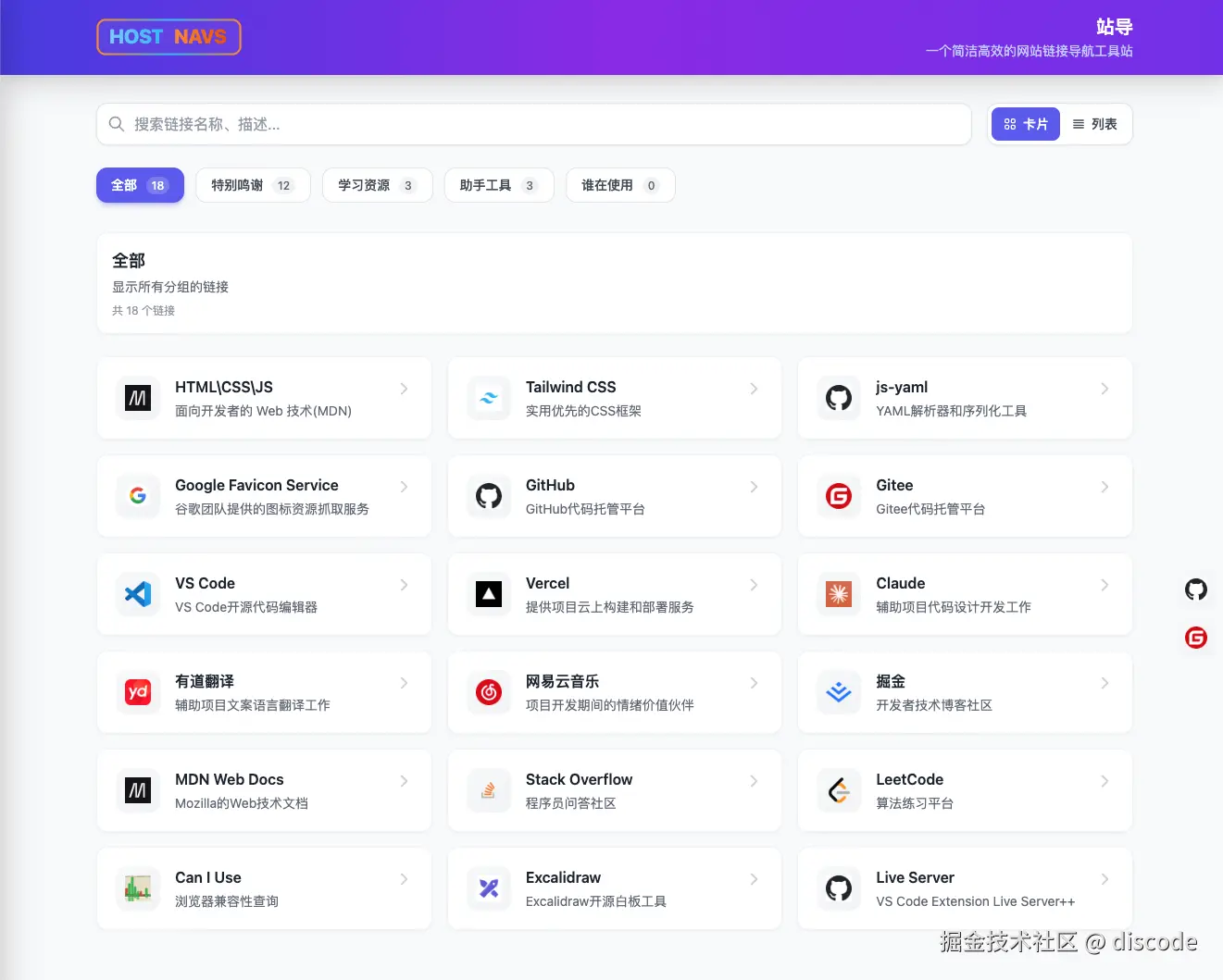
项目实际页面截图(位于
assets/host-navs.png)
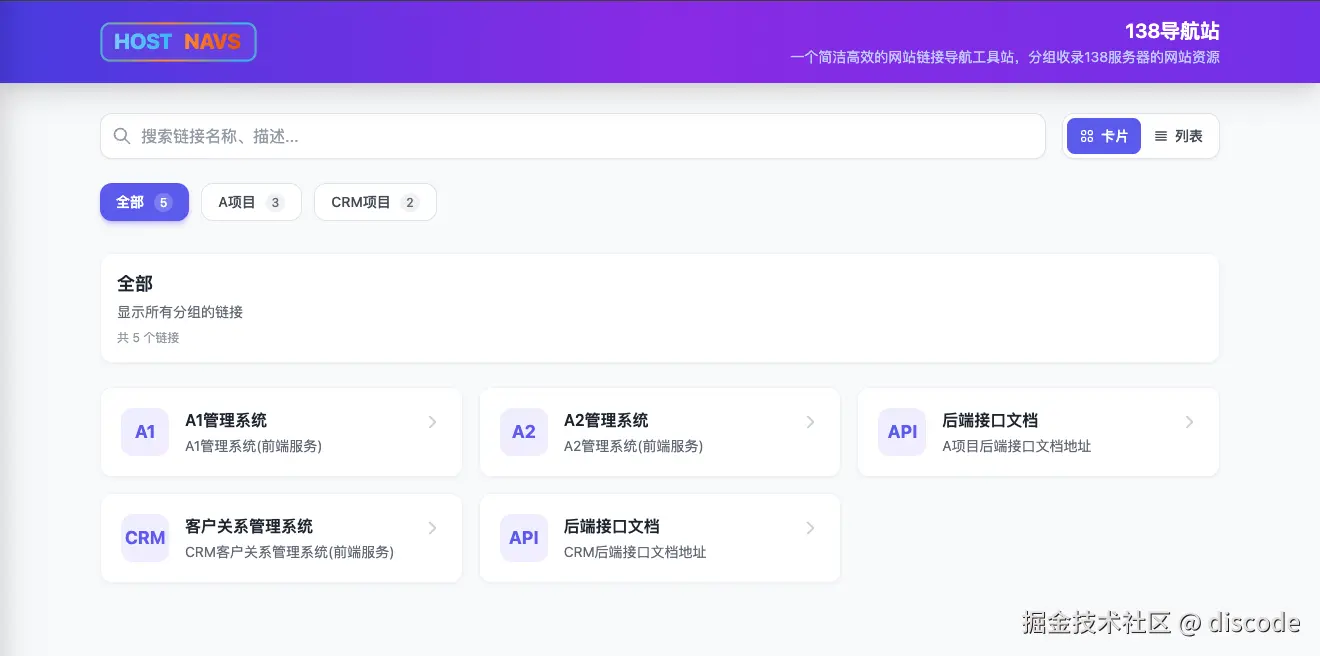
项目实际页面截图(位于
assets/host-navs-138.png)
部分核心功能技术实现说明
1. YAML 配置驱动机制
实现思路 :将所有导航数据存储在 host.conf 文件中,通过 js-yaml 库解析为 JavaScript 对象,再进行配置验证和规范化处理,将数据动态渲染到页面上。
host.conf:
yaml
# 主站配置
name: 站导
description: 一个简洁高效的网站链接导航工具站

# 配置数据调试输出(浏览器控制台)
console_output: false

# 图标配置
use_text_icon: false       # true: 只使用文字图标
use_google_favicon: true  # true: 使用 Google Favicon API

# 固定快捷导航
fixed_navs:
  fixed:
    top: 50%
    right: 16px
  items:
    - name: GitHub
      short_name: GIT
      description: 代码托管平台
      nav_to: https://github.com
    - name: Gitee
      short_name: GIT
      description: 国内代码托管平台
      nav_to: https://gitee.com

# 导航分组
navs:
  - name: 常用工具
    description: 日常工作中常用的工具网站
    items:
      - name: GitHub
        short_name: GIT # 可选,文字图标简称(最多4字符)
        description: GitHub代码托管平台
        nav_to: https://github.com
      - name: VS Code
        short_name: CODE
        description: VS Code开源代码编辑器
nav_to: https://code.visualstudio.com/配置项说明:
| 配置项 | 类型 | 必填 | 说明 |
|---|---|---|---|
name |
string | ✅ | 站点名称 |
description |
string | ❌ | 站点描述 |
console_output |
boolean | ❌ | 配置数据调试输出(浏览器控制台) |
use_text_icon |
boolean | ❌ | 是否只使用文字图标 |
use_google_favicon |
boolean | ❌ | 是否使用 Google Favicon API |
navs |
array | ✅ | 导航分组集合 |
navs[].name |
string | ✅ | 分组名称 |
navs[].description |
string | ❌ | 分组描述 |
navs[].items |
array | ✅ | 链接集合 |
navs[].items[].name |
string | ✅ | 链接名称 |
navs[].items[].short_name |
string | ❌ | 链接简称(用于文字图标) |
navs[].items[].description |
string | ❌ | 链接描述 |
navs[].items[].nav_to |
string | ✅ | 链接地址 |
fixed_navs |
object | ❌ | 右侧固定快捷导航配置(可选) |
fixed_navs.fixed |
object | ❌ | 位置设置,允许 top/right/bottom/left(值为数字(px)或字符串,例如 '50%') |
fixed_navs.fixed.top |
string\number | ❌ | 顶部位置,数字视为 px,例如 20 或 '10px' 或 '50%' |
fixed_navs.fixed.right |
string\number | ❌ | 右侧位置 |
fixed_navs.fixed.bottom |
string\number | ❌ | 下方位置 |
fixed_navs.fixed.left |
string\number | ❌ | 左侧位置 |
fixed_navs.items |
array | ❌ | 固定图标项,子字段同 navs[].items[](name/short_name/description/nav_to) |
关键代码:
javascript
// 异步加载并解析 YAML 配置
async function loadConfig() {
  const response = await fetch("host.conf");
  if (!response.ok) {
    throw new Error(`HTTP ${response.status}: ${response.statusText}`);
  }
  const yamlText = await response.text();

  // 使用 js-yaml 库解析 YAML
  const config = jsyaml.load(yamlText);

  // 验证配置结构
  if (!config || typeof config !== "object") {
    throw new Error("配置文件格式错误:不是有效的YAML对象");
  }
  if (!config.name) {
    throw new Error("配置文件缺少必要字段:name");
  }
  if (!Array.isArray(config.navs)) {
    throw new Error("配置文件缺少必要字段:navs (应为数组)");
  }

  // 规范化配置
  const normalizedConfig = {
    name: config.name,
    description: config.description || "",
    console_output: config.console_output === true,
    use_text_icon: config.use_text_icon === true,
    use_google_favicon: config.use_google_favicon === true,
    navs: config.navs.map((nav, index) => {
      if (!nav.name) {
        throw new Error(`第 ${index + 1} 个分组缺少 name 字段`);
      }
      return {
        name: nav.name,
        description: nav.description || "",
        items: Array.isArray(nav.items)
          ? nav.items.map((item) => ({
              name: item.name || "未命名链接",
              short_name: item.short_name || "",
              description: item.description || "",
              nav_to: item.nav_to || "#",
            }))
          : [],
      };
    }),
    // 固定导航配置处理...
  };

  return normalizedConfig;
}设计优势:
- 数据与逻辑完全分离,便于维护和扩展
- 严格的配置验证,确保数据完整性
- 自动规范化处理,提高代码健壮性
- 支持动态更新配置,无需重新部署
2. 网站图标获取策略机制
实现思路:设计了多级图标获取策略,通过 host.conf 策略配置实现站点图标的加载,包括原生 favicon 尝试、Google Favicon 服务和文字图标降级,确保每个链接都能显示合适的图标。
关键代码:
javascript
// 获取网站原生 favicon 地址(多种可能路径)
function getNativeFaviconUrls(url) {
  try {
    const urlObj = new URL(url);
    const origin = urlObj.origin;
    // 可根据预览情况添加更多规则,如本站的 /svgs/favicon.svg 等路径
    return [
      `${origin}/favicon.ico`,
      `${origin}/favicon.png`,
      `${origin}/favicon.svg`,
      `${origin}/apple-touch-icon.png`,
      `${origin}/assets/favicon.ico`,
      `${origin}/static/favicon.ico`,
      `${origin}/images/favicon.ico`,
    ];
  } catch {
    return [];
  }
}

// 获取 Google favicon 服务地址
function getGoogleFaviconUrl(url) {
  try {
    const urlObj = new URL(url);
    return `https://www.google.com/s2/favicons?domain=${urlObj.hostname}&sz=64`;
  } catch {
    return null;
  }
}

// 生成文字缩写(支持中英文)
function getTextAbbr(item) {
  const name = item.name;
  const shortName = item.short_name;
  // 优先使用配置的简称
  if (shortName && shortName.trim()) {
    return shortName.trim().slice(0, 4);
  }

  // 中文:取前两个字
  const chineseMatch = name.match(/[\u4e00-\u9fa5]/g);
  if (chineseMatch && chineseMatch.length >= 2) {
    return chineseMatch.slice(0, 2).join("");
  }
  if (chineseMatch && chineseMatch.length === 1) {
    return chineseMatch[0];
  }

  // 英文:取单词首字母(最多2个)或前两个字符
  const words = name.split(/[\s\-_\/]+/).filter((w) => w.length > 0);
  if (words.length >= 2) {
    return words
      .slice(0, 2)
      .map((w) => w[0].toUpperCase())
      .join("");
  } else if (words.length === 1) {
    return name.slice(0, 2).toUpperCase();
  }

  return name.slice(0, 2).toUpperCase();
}图标获取策略:
text
┌─────────────────────────────────────────────────┐
│              图标配置优先级                       │
├─────────────────────────────────────────────────┤
│                                                 │
│  use_text_icon: true                            │
│       ↓                                         │
│  ┌─────────────────────────────────┐            │
│  │  直接显示文字缩写(推荐局域网使用)   │            │
│  │  short_name > 中文前2字 > 英文缩写 │            │
│  └─────────────────────────────────┘            │
│                                                 │
│  use_text_icon: false                           │
│  use_google_favicon: true                       │
│       ↓                                         │
│  ┌─────────────────────────────────┐            │
│  │  使用 Google Favicon API         │            │
│  │  失败后显示文字缩写                │            │
│  └─────────────────────────────────┘            │
│                                                 │
│  use_text_icon: false                           │
│  use_google_favicon: false                      │
│       ↓                                         │
│  ┌─────────────────────────────────┐            │
│  │  尝试网站原生 favicon             │            │
│  │  /favicon.ico                   │            │
│  │  /favicon.png                   │            │
│  │  /apple-touch-icon.png          │            │
│  │  全部失败后显示文字缩写             │            │
│  └─────────────────────────────────┘            │
│                                                 │
└─────────────────────────────────────────────────┘技术亮点:
- 配置优先,多路径原生 favicon 尝试,提高成功率
- 支持 Google Favicon 服务作为备选
- 智能文字图标生成,支持中英文混合场景
- 图标加载失败自动降级机制
- 使用
loading="lazy"实现图标懒加载
3. 实时搜索功能实现
实现思路:采用前端实时搜索,通过正则表达式匹配链接的名称、描述和 URL,高亮关键词,实现即时响应的搜索体验。
关键代码:
javascript
// 搜索处理函数
function handleSearch(e) {
  searchKeyword = e.target.value.trim();
  const clearBtn = document.getElementById("clear-search");
  clearBtn.classList.toggle("hidden", !searchKeyword);
  renderLinks();
}

// 清除搜索
function clearSearch() {
  const input = document.getElementById("search-input");
  input.value = "";
  searchKeyword = "";
  document.getElementById("clear-search").classList.add("hidden");
  renderLinks();
  input.focus();
}

// 高亮关键词
function highlightKeyword(text) {
  if (!searchKeyword || !text) return text;
  const escaped = searchKeyword.replace(/[.*+?^${}()|[\]\\]/g, "\\$&");
  const regex = new RegExp(`(${escaped})`, "gi");
  return text.replace(
    regex,
    '<mark class="bg-yellow-200 text-yellow-900 rounded px-0.5">$1</mark>'
  );
}
性能优化策略
-
图标懒加载:
- 使用
loading="lazy"属性实现图标延迟加载 - 优化图标请求顺序,优先加载可见区域图标
- 支持文字图标降级,避免图标加载失败影响用户体验
- 使用
-
DOM 操作优化:
- 批量 DOM 更新,通过
innerHTML一次性生成所有链接 HTML - 减少 DOM 节点数量,使用语义化标签
- 合理使用 CSS 类切换,避免频繁样式计算
- 批量 DOM 更新,通过
-
搜索性能优化:
- 使用字符串
includes()方法进行高效匹配 - 搜索关键词小写转换,实现大小写不敏感搜索
- 实时搜索与结果渲染结合,减少不必要的函数调用
- 使用字符串
-
资源加载优化:
- 内联关键 JavaScript,减少 HTTP 请求
- 优化 SVG 图标,减少文件大小
- 合理使用 Tailwind CSS 工具类,减少自定义 CSS 体积
部署与 CI/CD 实现
静态部署架构
由于项目是纯前端应用,部署非常简单,可以直接部署到任何静态托管服务:
- Nginx:自定义服务器部署
- GitHub Pages:通过 GitHub Actions 自动部署
- Vercel:实时预览和自动部署
- etc...
Nginx 部署配置示例
nginx
server {
    listen 80;
    server_name host-nav.example.com;
    root /var/www/host-navs/public;
    index index.html;

    location / {
        try_files $uri $uri/ =404;
    }

    # 缓存静态资源
    location ~* \.(svg|ico)$ {
        expires 7d;
        add_header Cache-Control "public, immutable";
    }
}
CI/CD 配置
yaml
# GitHub Actions 配置示例
name: Deploy to GitHub Pages

on:
  push:
    branches: [main]

jobs:
  deploy:
    runs-on: ubuntu-latest
    steps:
      - uses: actions/checkout@v3
      - name: Deploy
        uses: peaceiris/actions-gh-pages@v3
        with:
          github_token: ${{ secrets.GITHUB_TOKEN }}
          publish_dir: ./public
text
Vercel 部署(通过监听github push等事件,自动触发构建与部署)
通过 Vercel 平台导入你的 GitHub 项目,集成后即可进行自动化配置部署
项目地址
致谢
感谢以下开源项目和服务:
- Tailwind CSS - 现代化 CSS 框架
- js-yaml - 强大的 YAML 解析库
- Google Favicon Service - 提供可靠的图标服务
最后
- 🚀 更多功能细节的设计与实现请查阅项目源码,欢迎不吝赐教与 Star。
- 🚀 如果你正在使用本站,欢迎提注 issue,格式如 navs\[\].items\[\];诚邀一起共建优质资源·网站链接·聚合共享·网链平台。
- 🚀 如果你对项目感兴趣,欢迎参与贡献,诚邀一起完善【host-navs 站导】网站链接导航工具站。