windows禁用更新

1. 按下 Windows + R ,输入regedit 或**注册表编辑器**,以管理员身份运行。

2,依次点击:HKEY_LOCAL_MACHINE > SOFTWARE > Microsoft > WindowsUpdate > UX > Settings

计算机\HKEY_LOCAL_MACHINE\SOFTWARE\Microsoft\WindowsUpdate\UX\Settings
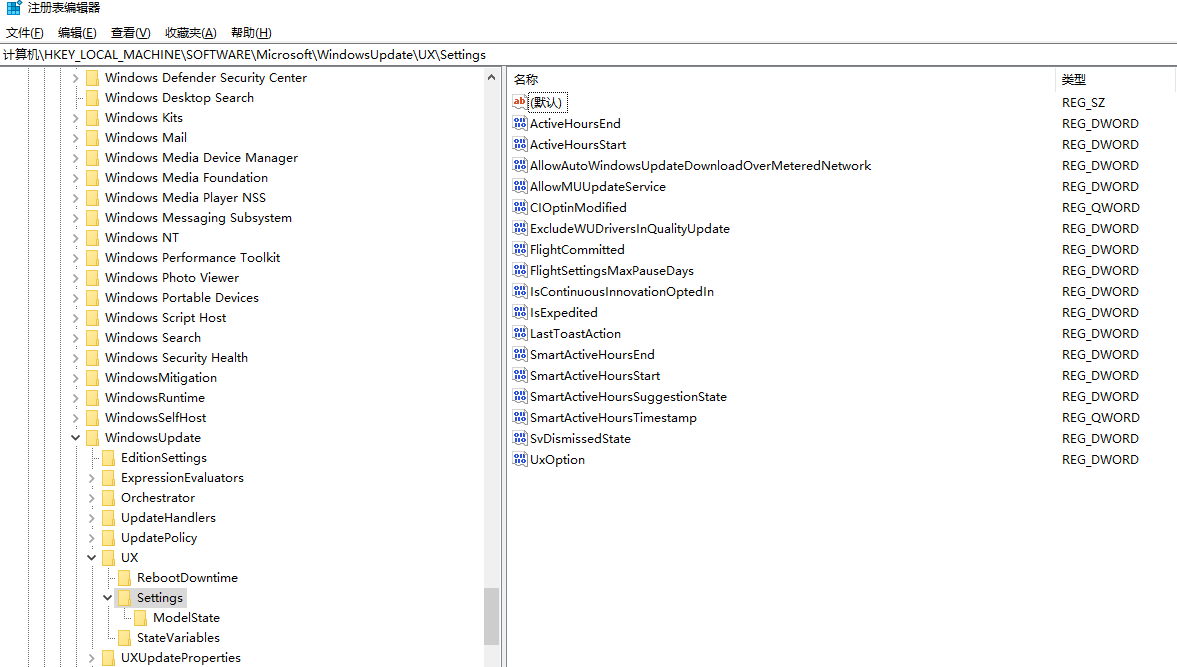
  1. 右键空白处,选择新建 > DWORD(32位)值。

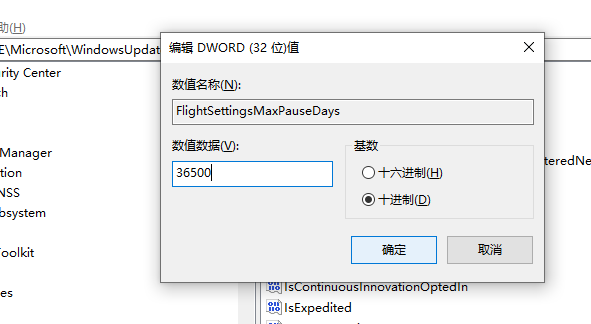
  2. 重命名 FlightSettingsMaxPauseDays

相关推荐
flyingonpine5 小时前
PowerShell脚本数字签名实战:自签名证书、代码签名与信任链验证
windows·信任链
goehou10 小时前
让 AI 替我操作这台电脑,先把手能伸多远定下来
windows·自动化·权限管理·ai agent
公子小六11 小时前
基于.NET的Windows窗体编程之WinForms数据持久化(1)
windows·microsoft·c#·.net·winforms
2601_967987371 天前
安装 Redis 或 Redis Stack
linux·windows·redis·macos·安装
xbzb1 天前
自定义 yum 软件源:Linux 上 createrepo,Windows 上纯 Python 也能造
linux·运维·windows·python·yum·createrepo
武雄(小星Ai)1 天前
Ollama报llama-server binary not found排坑实录:服务活着引擎没了
人工智能·windows·大模型·ollama·排坑
叼烟扛炮2 天前
[LangChain] 学习笔记(06):突破大模型限制——结构化输出(Structured Output)
windows·笔记·学习·langchain
Thneonl2 天前
桌宠穿透不是一行 SetWindowLong
windows·程序员
艺杯羹3 天前
Windows原生软件锁设计:从暴力杀进程丢数据到零轮询事件驱动架构
windows·系统架构·开源·开源软件·内存管理·开源协议
csdn_aspnet4 天前
Redis 入门:Windows、Mac安装指南
数据库·windows·redis·缓存·mac