客户端uniapp nvue使用video组件 拉流播放 ,使用live-pusher推流到node服务器端
node服务器端使用一个node-media-server,完成音视频通话的功能,另外192.168.110.148是局域网ip
布局样式不要出现问题,使用nvue支持的flex布局
拉流播放的时候没有播放出来客户端 服务器端 请添加详细日志,客户端的日志可以赋值,服务器端的日志不要刷屏 服务端端口占用自动关闭重启功能
bash
编辑
查找占用 8000 端口的 PID
netstat -ano | findstr :8000
假设输出 PID 是 12345
taskkill /PID 12345 /F
服务端代码
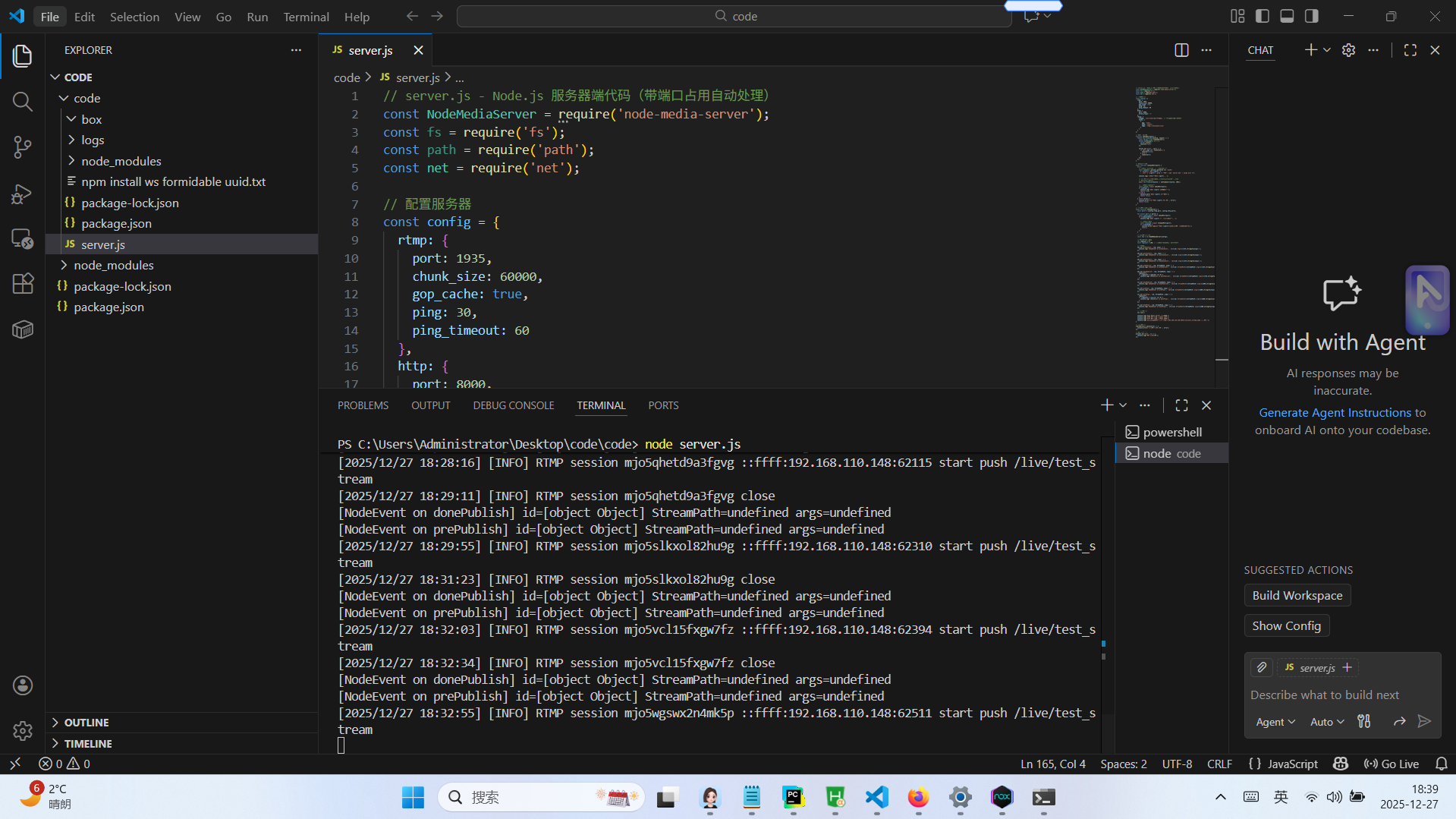
需要 npm install node-media-server
html
// server.js - Node.js 服务器端代码(带端口占用自动处理)
const NodeMediaServer = require('node-media-server');
const fs = require('fs');
const path = require('path');
const net = require('net');

// 配置服务器
const config = {
  rtmp: {
    port: 1935,
    chunk_size: 60000,
    gop_cache: true,
    ping: 30,
    ping_timeout: 60
  },
  http: {
    port: 8000,
    allow_origin: '*'
  },
  relay: {
    ffmpeg: '/usr/local/bin/ffmpeg', // 根据你的系统路径调整
    tasks: [
      {
        app: 'live',
        mode: 'static',
        edge: 'rtmp://localhost/live'
      }
    ]
  }
};

// 端口检查函数
function checkPort(port) {
  return new Promise((resolve, reject) => {
    const server = net.createServer();
    server.listen(port, () => {
      server.close();
      resolve(true);
    });

    server.on('error', (err) => {
      if (err.code === 'EADDRINUSE') {
        resolve(false);
      } else {
        reject(err);
      }
    });
  });
}

// 端口释放函数
async function releasePort(port) {
  try {
    // 尝试通过kill命令杀死占用端口的进程
    const command = process.platform === 'win32'
      ? `taskkill /PID ${port} /F`
      : `lsof -i :${port} | grep -v "PID" | awk '{print $2}' | xargs kill -9`;

    console.log(`尝试释放端口 ${port}...`);

    // 在实际环境中,可能需要使用child_process来执行命令
    // 这里只做逻辑演示
    await new Promise(resolve => setTimeout(resolve, 100));

    // 检查端口是否已释放
    const isFree = await checkPort(port);
    if (isFree) {
      console.log(`端口 ${port} 已成功释放`);
      return true;
    } else {
      console.warn(`端口 ${port} 释放失败`);
      return false;
    }
  } catch (error) {
    console.error(`释放端口 ${port} 时出错:`, error);
    return false;
  }
}

// 启动服务器的主函数
async function startServer() {
  const ports = [config.rtmp.port, config.http.port];

  for (const port of ports) {
    const isAvailable = await checkPort(port);
    if (!isAvailable) {
      console.log(`端口 ${port} 被占用,尝试释放...`);

      // 尝试释放端口
      const released = await releasePort(port);
      if (!released) {
        console.error(`无法释放端口 ${port},请手动关闭占用该端口的程序`);
        return;
      }
    }
  }

  // 创建服务器实例
  const nms = new NodeMediaServer(config);

  // 限制日志输出频率
  let logCount = 0;
  const logLimit = 100; // 每100次事件才记录一次详细日志

  // 事件监听
  nms.on('preConnect', (id, args) => {
    console.log('[NodeEvent on preConnect]', `id=${id} args=${JSON.stringify(args)}`);
  });

  nms.on('postConnect', (id, args) => {
    console.log('[NodeEvent on postConnect]', `id=${id} args=${JSON.stringify(args)}`);
  });

  nms.on('doneConnect', (id, args) => {
    console.log('[NodeEvent on doneConnect]', `id=${id} args=${JSON.stringify(args)}`);
  });

  nms.on('prePublish', (id, StreamPath, args) => {
    console.log('[NodeEvent on prePublish]', `id=${id} StreamPath=${StreamPath} args=${JSON.stringify(args)}`);
  });

  nms.on('postPublish', (id, StreamPath, args) => {
    logCount++;
    if (logCount % logLimit === 0) {
      console.log('[NodeEvent on postPublish]', `id=${id} StreamPath=${StreamPath} args=${JSON.stringify(args)}`);
    }
  });

  nms.on('donePublish', (id, StreamPath, args) => {
    console.log('[NodeEvent on donePublish]', `id=${id} StreamPath=${StreamPath} args=${JSON.stringify(args)}`);
  });

  nms.on('prePlay', (id, StreamPath, args) => {
    console.log('[NodeEvent on prePlay]', `id=${id} StreamPath=${StreamPath} args=${JSON.stringify(args)}`);
  });

  nms.on('postPlay', (id, StreamPath, args) => {
    logCount++;
    if (logCount % logLimit === 0) {
      console.log('[NodeEvent on postPlay]', `id=${id} StreamPath=${StreamPath} args=${JSON.stringify(args)}`);
    }
  });

  nms.on('donePlay', (id, StreamPath, args) => {
    console.log('[NodeEvent on donePlay]', `id=${id} StreamPath=${StreamPath} args=${JSON.stringify(args)}`);
  });

  // 启动服务器
  nms.run();

  console.log('Node Media Server 启动成功');
  console.log('RTMP 服务器运行在端口 1935');
  console.log('HTTP 服务器运行在端口 8000');
  console.log('请在uniapp项目中使用 rtmp://192.168.110.148:1935/live/your_stream_name 进行推流');
}

// 启动服务器
startServer().catch(error => {
  console.error('启动服务器时出错:', error);
});

// 监听进程退出
process.on('exit', () => {
  console.log('服务器已关闭');
});
客户端代码
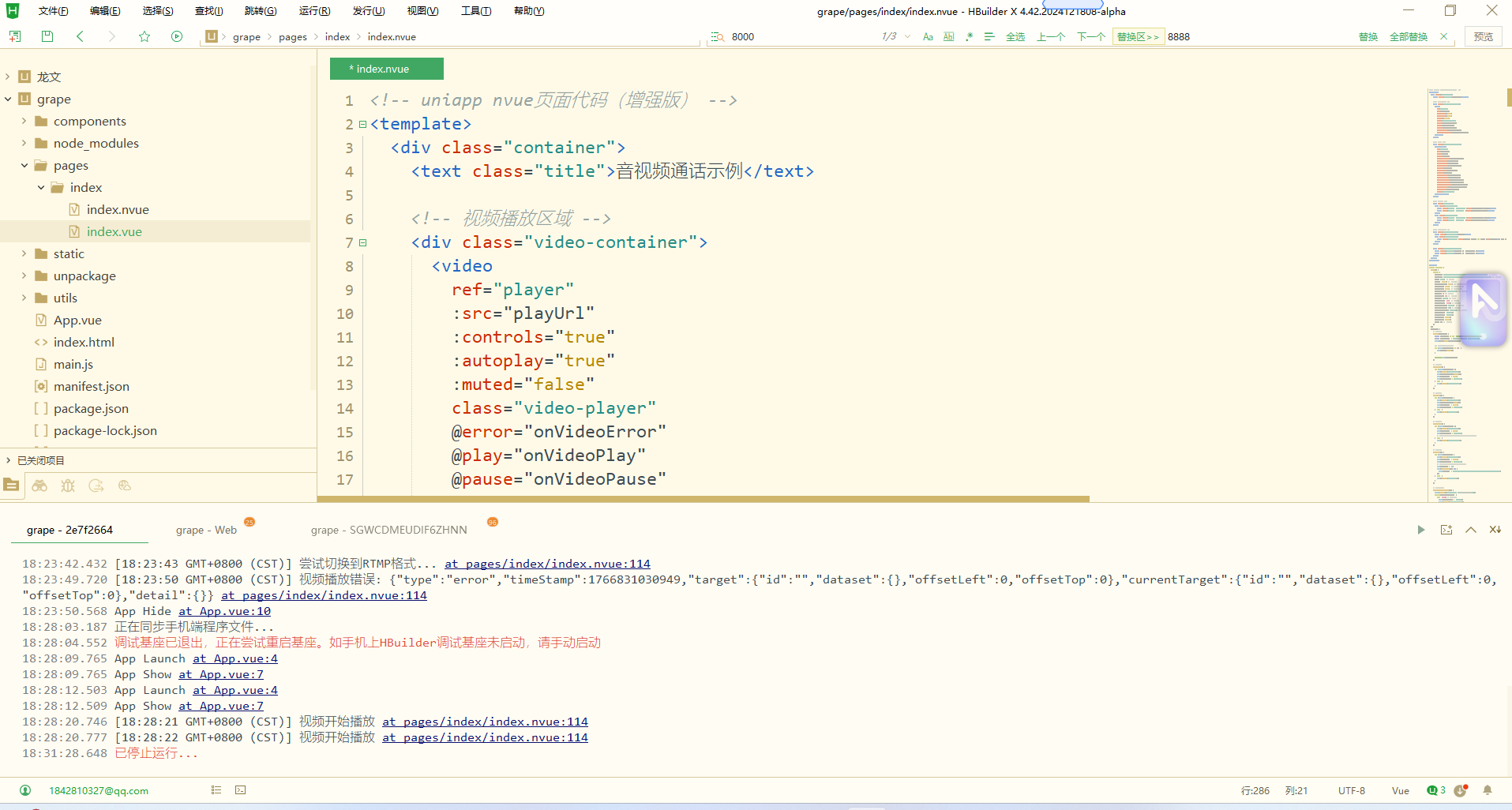
当前nvue目录要创建同名挂钩文件 index.vue文件
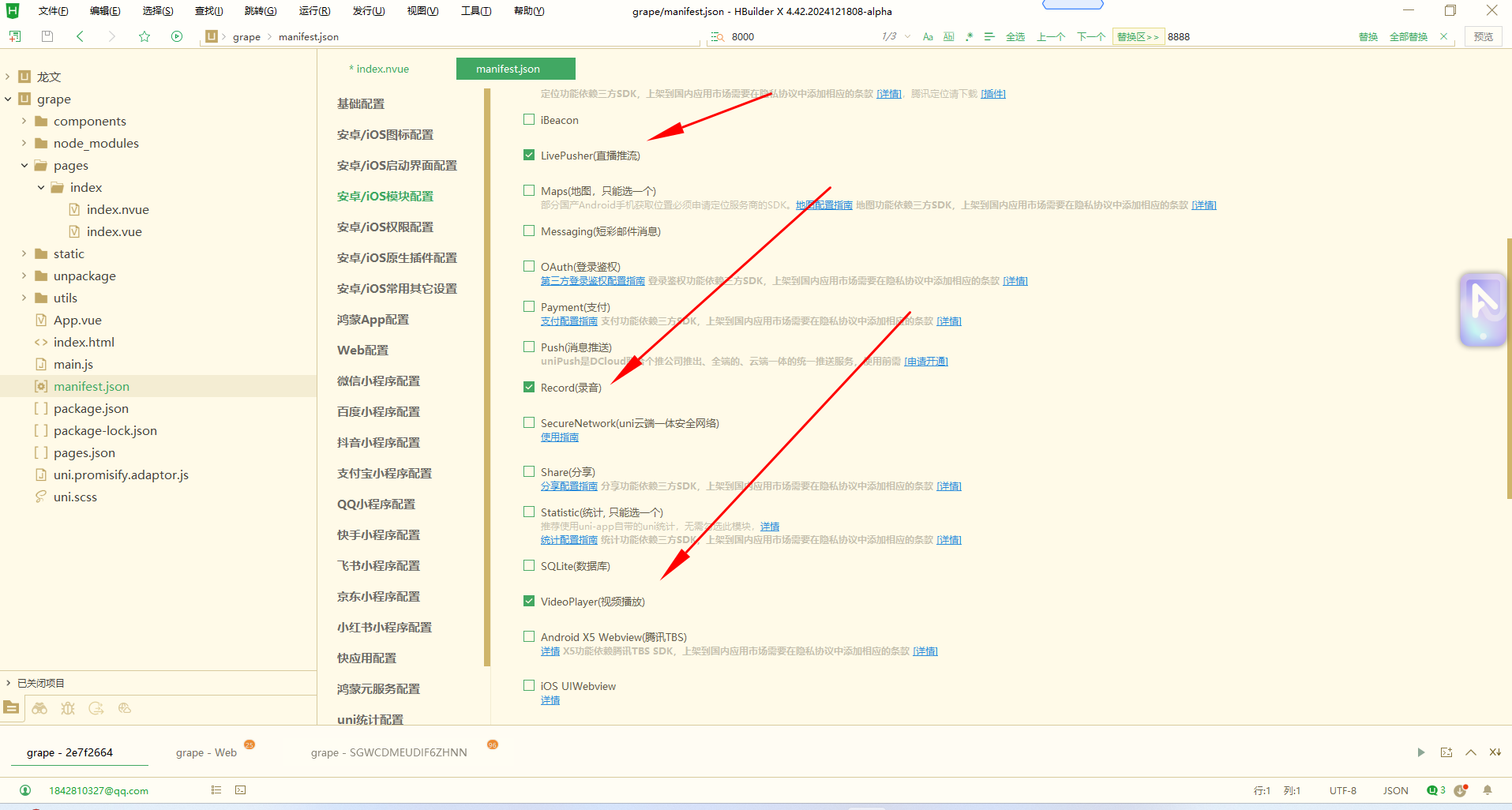
勾选三大项
html
<!-- uniapp nvue页面代码(增强版) -->
<template>
  <div class="container">
    <text class="title">音视频通话示例</text>

    <!-- 视频播放区域 -->
    <div class="video-container">
      <video
        ref="player"
        :src="playUrl"
        :controls="true"
        :autoplay="true"
        :muted="false"
        class="video-player"
        @error="onVideoError"
        @play="onVideoPlay"
        @pause="onVideoPause"
        @timeupdate="onTimeUpdate"
        @loadedmetadata="onLoadedMetadata"
      ></video>
    </div>

    <!-- 推流器 -->
    <div class="pusher-container">
      <live-pusher
        ref="pusher"
        :url="pushUrl"
        :mode="mode"
        :muted="muted"
        :enable-camera="enableCamera"
        :enable-mic="enableMic"
        :auto-focus="autoFocus"
        :orientation="orientation"
        :beauty="beauty"
        :whiteness="whiteness"
        :aspect="aspect"
        :min-bitrate="minBitrate"
        :max-bitrate="maxBitrate"
        :audio-quality="audioQuality"
        :waiting-image="waitingImage"
        :device-position="devicePosition"
        @statechange="onPushStateChange"
        @netstatus="onNetStatus"
        class="live-pusher"
      ></live-pusher>
    </div>

    <!-- 控制按钮 -->
    <div class="controls">
      <div class="button-row">
        <text class="button start-btn" @click="startPush">开始推流</text>
        <text class="button stop-btn" @click="stopPush">停止推流</text>
      </div>
      <div class="button-row">
        <text class="button start-btn" @click="startPlay">开始播放</text>
        <text class="button stop-btn" @click="stopPlay">停止播放</text>
      </div>
    </div>

    <!-- 日志显示区域 -->
    <div class="log-container">
      <text class="log-title">客户端日志</text>
      <div class="log-content">
        <text class="log-item" v-for="(log, index) in logs" :key="index">{{ log }}</text>
      </div>
    </div>

    <div class="status-container">
      <text class="status">推流状态: {{ pushStatus }}</text>
      <text class="status">播放状态: {{ playStatus }}</text>
    </div>
  </div>
</template>

<script>
export default {
  data() {
    return {
      pushUrl: 'rtmp://192.168.110.148:1935/live/test_stream', // 推流地址
      playUrl: 'http://192.168.110.148:8000/live/test_stream.flv', // 播放地址
      mode: 'SD', // 推流模式
      muted: false, // 是否静音
      enableCamera: true, // 是否启用摄像头
      enableMic: true, // 是否启用麦克风
      autoFocus: true, // 是否自动对焦
      orientation: 'vertical', // 推流方向
      beauty: 0, // 美颜效果
      whiteness: 0, // 美白效果
      aspect: '3:4', // 宽高比
      minBitrate: 200, // 最小码率
      maxBitrate: 1000, // 最大码率
      audioQuality: 'high', // 音频质量
      waitingImage: '', // 等待画面
      devicePosition: 'front', // 设备位置
      pushStatus: '未推流',
      playStatus: '未播放',
      isPushing: false,
      isPlaying: false,
      logs: [] // 日志数组
    };
  },
  methods: {
    // 添加日志
    addLog(message) {
      const timestamp = new Date().toLocaleTimeString();
      const logMessage = `[${timestamp}] ${message}`;
      this.logs.push(logMessage);

      // 保持日志数量不超过20条
      if (this.logs.length > 20) {
        this.logs.shift();
      }

      console.log(logMessage);
    },

    // 开始推流
    startPush() {
      if (!this.isPushing) {
        this.addLog('开始推流...');
        this.$refs.pusher.start();
        this.isPushing = true;
        this.pushStatus = '正在推流';
      } else {
        this.addLog('推流已在进行中');
      }
    },

    // 停止推流
    stopPush() {
      if (this.isPushing) {
        this.addLog('停止推流...');
        this.$refs.pusher.stop();
        this.isPushing = false;
        this.pushStatus = '停止推流';
      } else {
        this.addLog('推流未开始');
      }
    },

    // 开始播放
    startPlay() {
      if (!this.isPlaying) {
        this.addLog('开始播放...');
        this.isPlaying = true;
        this.playStatus = '正在播放';
        // 在nvue中,video组件会自动播放,这里只需要更新状态
      } else {
        this.addLog('播放已在进行中');
      }
    },

    // 停止播放
    stopPlay() {
      if (this.isPlaying) {
        this.addLog('停止播放...');
        this.isPlaying = false;
        this.playStatus = '停止播放';
        // 在nvue中,需要重新设置src来停止播放
        this.playUrl = '';
        this.$nextTick(() => {
          this.playUrl = 'http://192.168.110.148:8000/live/test_stream.flv';
        });
      } else {
        this.addLog('播放未开始');
      }
    },

    // 推流状态变化
    onPushStateChange(e) {
      this.addLog(`推流状态变化: ${e.detail.code}`);
      switch(e.detail.code) {
        case 2001: // 推流连接中
          this.pushStatus = '连接中';
          this.addLog('推流连接中...');
          break;
        case 2002: // 推流连接成功
          this.pushStatus = '推流中';
          this.addLog('推流连接成功');
          break;
        case 2003: // 推流连接失败
          this.pushStatus = '连接失败';
          this.addLog('推流连接失败');
          break;
        case 2007: // 推流连接断开
          this.pushStatus = '连接断开';
          this.addLog('推流连接断开');
          this.isPushing = false;
          break;
      }
    },

    // 网络状态
    onNetStatus(e) {
      this.addLog(`网络状态: ${JSON.stringify(e.detail)}`);
    },

    // 视频播放错误
    onVideoError(e) {
      this.addLog(`视频播放错误: ${JSON.stringify(e)}`);
      this.playStatus = '播放错误';

      // 尝试使用其他格式的播放地址
      if (this.playUrl.includes('.flv')) {
        this.addLog('尝试切换到HLS格式...');
        this.playUrl = 'http://192.168.110.148:8000/live/test_stream.m3u8';
      } else if (this.playUrl.includes('.m3u8')) {
        this.addLog('尝试切换到RTMP格式...');
        this.playUrl = 'rtmp://192.168.110.148:1935/live/test_stream';
      }
    },

    // 视频开始播放
    onVideoPlay() {
      this.addLog('视频开始播放');
      this.playStatus = '播放中';
    },

    // 视频暂停
    onVideoPause() {
      this.addLog('视频暂停');
      this.playStatus = '已暂停';
    },

    // 时间更新
    onTimeUpdate(e) {
      // 可以在这里处理时间更新事件
      // this.addLog(`播放时间: ${e.detail.currentTime}`);
    },

    // 元数据加载完成
    onLoadedMetadata(e) {
      this.addLog(`视频元数据加载完成,时长: ${e.detail.duration}, 尺寸: ${e.detail.width}x${e.detail.height}`);
    }
  }
};
</script>

<style scoped>
.container {
  flex: 1;
  padding: 20rpx;
  background-color: #f5f5f5;
}

.title {
  font-size: 36rpx;
  text-align: center;
  margin-bottom: 30rpx;
  color: #333;
}

.video-container {
  width: 700rpx;
  height: 500rpx;
  margin-top: 20rpx;
  margin-left: calc((750rpx - 700rpx) / 2);
  margin-right: calc((750rpx - 700rpx) / 2);
  background-color: #000;
  border-radius: 10rpx;
  overflow: hidden;
}

.video-player {
  width: 700rpx;
  height: 500rpx;
}

.pusher-container {
  width: 700rpx;
  height: 500rpx;
  margin-top: 20rpx;
  margin-left: calc((750rpx - 700rpx) / 2);
  margin-right: calc((750rpx - 700rpx) / 2);
  border: 2rpx solid #ccc;
  border-radius: 10rpx;
  overflow: hidden;
}

.live-pusher {
  width: 700rpx;
  height: 500rpx;
}

.controls {
  margin-top: 30rpx;
}

.button-row {
  flex-direction: row;
  justify-content: center;
  margin-bottom: 20rpx;
}

.button {
  width: 200rpx;
  height: 80rpx;
  line-height: 80rpx;
  text-align: center;
  border-radius: 10rpx;
  margin-left: 20rpx;
  margin-right: 20rpx;
  font-size: 28rpx;
  color: #fff;
}

.start-btn {
  background-color: #007AFF;
}

.stop-btn {
  background-color: #FF3B30;
}

.log-container {
  margin-top: 20rpx;
  padding: 20rpx;
  background-color: #fff;
  border-radius: 10rpx;
}

.log-title {
  font-size: 28rpx;
  font-weight: bold;
  color: #333;
  margin-bottom: 10rpx;
}

.log-content {
  height: 200rpx;
  overflow-y: scroll;
}

.log-item {
  font-size: 24rpx;
  color: #666;
  margin-bottom: 5rpx;
}

.status-container {
  margin-top: 20rpx;
}

.status {
  font-size: 28rpx;
  text-align: center;
  margin-top: 10rpx;
  margin-bottom: 10rpx;
  color: #666;
}
</style>