背景与需求
在桌面应用开发中,实时监控系统资源使用情况是一个常见需求。本文以 Qt/QML 应用为例,介绍如何在状态栏中实现 CPU 和内存的动态监控,包括:
- 实时数据采集:定时获取系统 CPU 和内存使用率
- 跨平台支持:支持 Windows、Linux
- UI 可视化:在状态栏显示使用率、进度条和详细信息
- 低性能开销:不影响主程序性能
技术方案对比
方案一:Qt 原生 API(QProcess + 系统命令)
优点:
- 简单快速,无需第三方库
- 跨平台,通过不同平台的系统命令获取数据
缺点:
- 性能开销较大(频繁创建进程)
- 解析文本输出容易出错
- 不同平台命令差异大
示例代码:
cpp
// Windows: tasklist、wmic
// Linux: top、ps
// macOS: top、vm_stat

QProcess process;
process.start("wmic", QStringList() << "cpu" << "get" << "loadpercentage");
process.waitForFinished();
QString output = process.readAllStandardOutput();
方案二:Qt 系统信息类(推荐)
优点:
- Qt 官方支持,API 统一
- 跨平台无需适配
- 性能较好
缺点:
- 需要额外链接 Qt 模块
- 某些信息需要自行计算
核心模块:
QStorageInfo:磁盘信息QSysInfo:系统基本信息- 自定义 C++ 类封装平台特定 API
方案三:平台原生 API(本文采用)
优点:
- 性能最优,直接访问系统 API
- 数据最准确、实时
- 可获取详细的系统信息
缺点:
- 需要针对不同平台编写代码
- 实现复杂度较高
平台 API:
- Windows :
GetSystemTimes()、GlobalMemoryStatusEx() - Linux :
/proc/stat、/proc/meminfo
效果图:
SystemMonitorPanel:
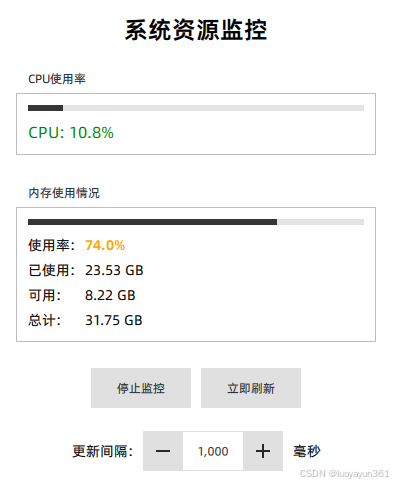
SystemMonitorWidget:

完整实现方案
1. C++ 后端实现
1.1 类定义(systemmonitor.h)
cpp
#ifndef SYSTEMMONITOR_H
#define SYSTEMMONITOR_H

#include <QObject>
#include <QTimer>
#include <QProcess>
#include <QQmlEngine>

/**
 * @brief 系统资源监控类
 * 动态监控CPU和内存占用情况
 */
class SystemMonitor : public QObject
{
    Q_OBJECT
    Q_PROPERTY(double cpuUsage READ cpuUsage NOTIFY cpuUsageChanged)
    Q_PROPERTY(qint64 totalMemory READ totalMemory NOTIFY totalMemoryChanged)
    Q_PROPERTY(qint64 usedMemory READ usedMemory NOTIFY usedMemoryChanged)
    Q_PROPERTY(qint64 availableMemory READ availableMemory NOTIFY availableMemoryChanged)
    Q_PROPERTY(double memoryUsagePercent READ memoryUsagePercent NOTIFY memoryUsagePercentChanged)
    Q_PROPERTY(int updateInterval READ updateInterval WRITE setUpdateInterval NOTIFY updateIntervalChanged)
    Q_PROPERTY(bool monitoring READ isMonitoring NOTIFY monitoringChanged)

public:
    explicit SystemMonitor(QObject *parent = nullptr);
    ~SystemMonitor();

    static SystemMonitor* getInstance();
    static void registerQmlType(QQmlEngine *engine);

    // Property getters
    double cpuUsage() const { return m_cpuUsage; }
    qint64 totalMemory() const { return m_totalMemory; }
    qint64 usedMemory() const { return m_usedMemory; }
    qint64 availableMemory() const { return m_availableMemory; }
    double memoryUsagePercent() const { return m_memoryUsagePercent; }
    int updateInterval() const { return m_updateInterval; }
    bool isMonitoring() const { return m_monitoring; }

    // Property setters
    void setUpdateInterval(int interval);

public slots:
    /**
     * @brief 开始监控
     */
    void startMonitoring();

    /**
     * @brief 停止监控
     */
    void stopMonitoring();

    /**
     * @brief 立即更新一次系统信息
     */
    void updateSystemInfo();

signals:
    void cpuUsageChanged(double usage);
    void totalMemoryChanged(qint64 total);
    void usedMemoryChanged(qint64 used);
    void availableMemoryChanged(qint64 available);
    void memoryUsagePercentChanged(double percent);
    void updateIntervalChanged(int interval);
    void monitoringChanged(bool monitoring);

private slots:
    void onTimerTimeout();

private:
    void updateCpuUsage();
    void updateMemoryInfo();

#ifdef Q_OS_WIN
    void updateCpuUsageWindows();
    void updateMemoryInfoWindows();

    // Windows特定成员
    qint64 m_lastIdleTime = 0;
    qint64 m_lastKernelTime = 0;
    qint64 m_lastUserTime = 0;
#elif defined(Q_OS_LINUX)
    void updateCpuUsageLinux();
    void updateMemoryInfoLinux();

    // Linux特定成员
    qint64 m_lastTotalTime = 0;
    qint64 m_lastIdleTime = 0;
#endif

private:
    QTimer *m_timer = nullptr;

    double m_cpuUsage = 0.0;
    qint64 m_totalMemory = 0;
    qint64 m_usedMemory = 0;
    qint64 m_availableMemory = 0;
    double m_memoryUsagePercent = 0.0;

    int m_updateInterval = 1000;  // 默认1秒更新一次
    bool m_monitoring = false;
};

#endif // SYSTEMMONITOR_H
1.2 CPP实现
cpp
#include "SystemMonitor.h"
#include <QDebug>
#include <QQmlContext>

#ifdef Q_OS_WIN
#include <Windows.h>
#include <psapi.h>
#pragma comment(lib, "psapi.lib")
#elif defined(Q_OS_LINUX)
#include <QFile>
#include <QTextStream>
#include <unistd.h>
#endif

SystemMonitor::SystemMonitor(QObject *parent)
    : QObject(parent)
{
    m_timer = new QTimer(this);
    connect(m_timer, &QTimer::timeout, this, &SystemMonitor::onTimerTimeout);
}

SystemMonitor::~SystemMonitor()
{
    stopMonitoring();
}

SystemMonitor* SystemMonitor::getInstance()
{
    static SystemMonitor instance;
    return &instance;
}

void SystemMonitor::registerQmlType(QQmlEngine *engine)
{
    qmlRegisterUncreatableType<SystemMonitor>("VoiceAI.Utils", 1, 0, "SystemMonitor",
                                              "Cannot instantiate SystemMonitor in QML");
    engine->rootContext()->setContextProperty("systemMonitor", SystemMonitor::getInstance());
}

void SystemMonitor::setUpdateInterval(int interval)
{
    if (m_updateInterval == interval || interval < 100)
        return;

    m_updateInterval = interval;
    if (m_monitoring) {
        m_timer->setInterval(m_updateInterval);
    }
    emit updateIntervalChanged(m_updateInterval);
}

void SystemMonitor::startMonitoring()
{
    if (m_monitoring)
        return;

    m_monitoring = true;

    // 初始化CPU统计
#ifdef Q_OS_WIN
    FILETIME idleTime, kernelTime, userTime;
    if (GetSystemTimes(&idleTime, &kernelTime, &userTime)) {
        m_lastIdleTime = ((qint64)idleTime.dwHighDateTime << 32) | idleTime.dwLowDateTime;
        m_lastKernelTime = ((qint64)kernelTime.dwHighDateTime << 32) | kernelTime.dwLowDateTime;
        m_lastUserTime = ((qint64)userTime.dwHighDateTime << 32) | userTime.dwLowDateTime;
    }
#elif defined(Q_OS_LINUX)
    QFile file("/proc/stat");
    if (file.open(QIODevice::ReadOnly)) {
        QTextStream stream(&file);
        QString line = stream.readLine();
        if (line.startsWith("cpu ")) {
            QStringList tokens = line.split(' ', Qt::SkipEmptyParts);
            if (tokens.size() >= 5) {
                qint64 user = tokens[1].toLongLong();
                qint64 nice = tokens[2].toLongLong();
                qint64 system = tokens[3].toLongLong();
                qint64 idle = tokens[4].toLongLong();
                m_lastTotalTime = user + nice + system + idle;
                m_lastIdleTime = idle;
            }
        }
        file.close();
    }
#endif

    // 立即更新一次
    updateSystemInfo();

    // 启动定时器
    m_timer->start(m_updateInterval);
    emit monitoringChanged(m_monitoring);

    qDebug() << "SystemMonitor: Started monitoring with interval" << m_updateInterval << "ms";
}

void SystemMonitor::stopMonitoring()
{
    if (!m_monitoring)
        return;

    m_monitoring = false;
    m_timer->stop();
    emit monitoringChanged(m_monitoring);

    qDebug() << "SystemMonitor: Stopped monitoring";
}

void SystemMonitor::updateSystemInfo()
{
    updateCpuUsage();
    updateMemoryInfo();
}

void SystemMonitor::onTimerTimeout()
{
    updateSystemInfo();
}

void SystemMonitor::updateCpuUsage()
{
#ifdef Q_OS_WIN
    updateCpuUsageWindows();
#elif defined(Q_OS_LINUX)
    updateCpuUsageLinux();
#endif
}

void SystemMonitor::updateMemoryInfo()
{
#ifdef Q_OS_WIN
    updateMemoryInfoWindows();
#elif defined(Q_OS_LINUX)
    updateMemoryInfoLinux();
#endif
}

#ifdef Q_OS_WIN

void SystemMonitor::updateCpuUsageWindows()
{
    FILETIME idleTime, kernelTime, userTime;

    if (!GetSystemTimes(&idleTime, &kernelTime, &userTime)) {
        qWarning() << "SystemMonitor: Failed to get system times";
        return;
    }

    qint64 idle = ((qint64)idleTime.dwHighDateTime << 32) | idleTime.dwLowDateTime;
    qint64 kernel = ((qint64)kernelTime.dwHighDateTime << 32) | kernelTime.dwLowDateTime;
    qint64 user = ((qint64)userTime.dwHighDateTime << 32) | userTime.dwLowDateTime;

    qint64 idleDiff = idle - m_lastIdleTime;
    qint64 kernelDiff = kernel - m_lastKernelTime;
    qint64 userDiff = user - m_lastUserTime;

    qint64 totalDiff = kernelDiff + userDiff;

    if (totalDiff > 0) {
        double usage = 100.0 * (totalDiff - idleDiff) / totalDiff;

        if (qAbs(usage - m_cpuUsage) > 0.1) {  // 变化超过0.1%才更新
            m_cpuUsage = usage;
            emit cpuUsageChanged(m_cpuUsage);
        }
    }

    m_lastIdleTime = idle;
    m_lastKernelTime = kernel;
    m_lastUserTime = user;
}

void SystemMonitor::updateMemoryInfoWindows()
{
    MEMORYSTATUSEX memInfo;
    memInfo.dwLength = sizeof(MEMORYSTATUSEX);

    if (!GlobalMemoryStatusEx(&memInfo)) {
        qWarning() << "SystemMonitor: Failed to get memory status";
        return;
    }

    qint64 totalMem = memInfo.ullTotalPhys;
    qint64 availMem = memInfo.ullAvailPhys;
    qint64 usedMem = totalMem - availMem;
    double percent = memInfo.dwMemoryLoad;

    bool changed = false;

    if (m_totalMemory != totalMem) {
        m_totalMemory = totalMem;
        emit totalMemoryChanged(m_totalMemory);
        changed = true;
    }

    if (m_usedMemory != usedMem) {
        m_usedMemory = usedMem;
        emit usedMemoryChanged(m_usedMemory);
        changed = true;
    }

    if (m_availableMemory != availMem) {
        m_availableMemory = availMem;
        emit availableMemoryChanged(m_availableMemory);
        changed = true;
    }

    if (qAbs(m_memoryUsagePercent - percent) > 0.1) {
        m_memoryUsagePercent = percent;
        emit memoryUsagePercentChanged(m_memoryUsagePercent);
        changed = true;
    }
}

#elif defined(Q_OS_LINUX)

void SystemMonitor::updateCpuUsageLinux()
{
    QFile file("/proc/stat");
    if (!file.open(QIODevice::ReadOnly)) {
        qWarning() << "SystemMonitor: Failed to open /proc/stat";
        return;
    }

    QTextStream stream(&file);
    QString line = stream.readLine();
    file.close();

    if (!line.startsWith("cpu ")) {
        return;
    }

    QStringList tokens = line.split(' ', Qt::SkipEmptyParts);
    if (tokens.size() < 5) {
        return;
    }

    qint64 user = tokens[1].toLongLong();
    qint64 nice = tokens[2].toLongLong();
    qint64 system = tokens[3].toLongLong();
    qint64 idle = tokens[4].toLongLong();
    qint64 iowait = tokens.size() > 5 ? tokens[5].toLongLong() : 0;
    qint64 irq = tokens.size() > 6 ? tokens[6].toLongLong() : 0;
    qint64 softirq = tokens.size() > 7 ? tokens[7].toLongLong() : 0;

    qint64 totalTime = user + nice + system + idle + iowait + irq + softirq;
    qint64 totalDiff = totalTime - m_lastTotalTime;
    qint64 idleDiff = idle - m_lastIdleTime;

    if (totalDiff > 0) {
        double usage = 100.0 * (totalDiff - idleDiff) / totalDiff;

        if (qAbs(usage - m_cpuUsage) > 0.1) {
            m_cpuUsage = usage;
            emit cpuUsageChanged(m_cpuUsage);
        }
    }

    m_lastTotalTime = totalTime;
    m_lastIdleTime = idle;
}

void SystemMonitor::updateMemoryInfoLinux()
{
    QFile file("/proc/meminfo");
    if (!file.open(QIODevice::ReadOnly)) {
        qWarning() << "SystemMonitor: Failed to open /proc/meminfo";
        return;
    }

    qint64 totalMem = 0;
    qint64 freeMem = 0;
    qint64 availMem = 0;
    qint64 buffers = 0;
    qint64 cached = 0;

    QTextStream stream(&file);
    while (!stream.atEnd()) {
        QString line = stream.readLine();
        if (line.startsWith("MemTotal:")) {
            totalMem = line.split(QRegExp("\\s+"))[1].toLongLong() * 1024;  // kB to bytes
        } else if (line.startsWith("MemFree:")) {
            freeMem = line.split(QRegExp("\\s+"))[1].toLongLong() * 1024;
        } else if (line.startsWith("MemAvailable:")) {
            availMem = line.split(QRegExp("\\s+"))[1].toLongLong() * 1024;
        } else if (line.startsWith("Buffers:")) {
            buffers = line.split(QRegExp("\\s+"))[1].toLongLong() * 1024;
        } else if (line.startsWith("Cached:")) {
            cached = line.split(QRegExp("\\s+"))[1].toLongLong() * 1024;
        }
    }
    file.close();

    // 如果没有MemAvailable,使用旧方法计算
    if (availMem == 0) {
        availMem = freeMem + buffers + cached;
    }

    qint64 usedMem = totalMem - availMem;
    double percent = totalMem > 0 ? 100.0 * usedMem / totalMem : 0.0;

    if (m_totalMemory != totalMem) {
        m_totalMemory = totalMem;
        emit totalMemoryChanged(m_totalMemory);
    }

    if (m_usedMemory != usedMem) {
        m_usedMemory = usedMem;
        emit usedMemoryChanged(m_usedMemory);
    }

    if (m_availableMemory != availMem) {
        m_availableMemory = availMem;
        emit availableMemoryChanged(m_availableMemory);
    }

    if (qAbs(m_memoryUsagePercent - percent) > 0.1) {
        m_memoryUsagePercent = percent;
        emit memoryUsagePercentChanged(m_memoryUsagePercent);
    }
}

#endif
1.4 注册到 QML
cpp
// main.cpp
#include "systemmonitor.h"

int main(int argc, char *argv[])
{
    QApplication app(argc, argv);

    // 创建全局单例
    SystemMonitor *monitor = new SystemMonitor(&app);

    QQmlApplicationEngine engine;

    // 注册类型
    qmlRegisterType<SystemMonitor>("VoiceAI.Utils", 1, 0, "SystemMonitor");

    // 或作为上下文属性
    engine.rootContext()->setContextProperty("systemMonitor", monitor);

    engine.load(QUrl(QStringLiteral("qrc:/main.qml")));

    return app.exec();
}
2. QML 前端实现
2.1 监控组件(SystemMonitorWidget.qml)
qml
import QtQuick 2.15
import QtQuick.Controls 2.15
import VoiceAI.Utils 1.0

Item {
    id: root
    width: monitorRow.implicitWidth
    height: 30

    // 内存格式化函数
    function formatMemory(bytes) {
        if (bytes === 0) return "0 B"

        const k = 1024
        const sizes = ["B", "KB", "MB", "GB"]
        const i = Math.floor(Math.log(bytes) / Math.log(k))

        return (bytes / Math.pow(k, i)).toFixed(1) + " " + sizes[i]
    }

    Row {
        id: monitorRow
        spacing: 15
        anchors.verticalCenter: parent.verticalCenter

        Component.onCompleted: {
            systemMonitor.startMonitoring(1000)  // 每秒更新
        }

        Component.onDestruction: {
            systemMonitor.stopMonitoring()
        }

        // CPU 监控区域
        Row {
            spacing: 5
            anchors.verticalCenter: parent.verticalCenter

            Text {
                text: "CPU:"
                font.pixelSize: 12
                color: "#666"
                anchors.verticalCenter: parent.verticalCenter
            }

            Text {
                width: 35
                text: systemMonitor.cpuUsage.toFixed(1) + "%"
                font.pixelSize: 12
                font.bold: true
                color: systemMonitor.cpuUsage > 80 ? "#FF4444" :
                       systemMonitor.cpuUsage > 60 ? "#FF9800" : "#4CAF50"
                anchors.verticalCenter: parent.verticalCenter

                Behavior on color {
                    ColorAnimation { duration: 200 }
                }
            }

            // CPU 进度条
            Rectangle {
                width: 50
                height: 4
                color: "#E0E0E0"
                radius: height / 2
                anchors.verticalCenter: parent.verticalCenter

                Rectangle {
                    width: parent.width * (systemMonitor.cpuUsage / 100)
                    height: parent.height
                    color: parent.parent.children[1].color  // 使用相同的颜色
                    radius: parent.radius

                    Behavior on width {
                        NumberAnimation { duration: 300; easing.type: Easing.OutCubic }
                    }
                }
            }
        }

        // 分隔线
        Rectangle {
            width: 1
            height: parent.height * 0.5
            color: "#CCCCCC"
            anchors.verticalCenter: parent.verticalCenter
        }

        // 内存监控区域
        Row {
            spacing: 5
            anchors.verticalCenter: parent.verticalCenter

            Text {
                text: qsTr("内存:")
                font.pixelSize: 12
                color: "#666"
                anchors.verticalCenter: parent.verticalCenter
            }

            Text {
                text: systemMonitor.memoryUsagePercent.toFixed(0) + "%"
                font.pixelSize: 12
                font.bold: true
                color: systemMonitor.memoryUsagePercent > 80 ? "#FF4444" :
                       systemMonitor.memoryUsagePercent > 60 ? "#FF9800" : "#4CAF50"
                anchors.verticalCenter: parent.verticalCenter

                Behavior on color {
                    ColorAnimation { duration: 200 }
                }
            }

            // 内存进度条
            Rectangle {
                width: 50
                height: 4
                color: "#E0E0E0"
                radius: height / 2
                anchors.verticalCenter: parent.verticalCenter

                Rectangle {
                    width: parent.width * (systemMonitor.memoryUsagePercent / 100)
                    height: parent.height
                    color: parent.parent.children[1].color
                    radius: parent.radius

                    Behavior on width {
                        NumberAnimation { duration: 300; easing.type: Easing.OutCubic }
                    }
                }
            }

            Text {
                text: formatMemory(systemMonitor.usedMemory) + " / " +
                      formatMemory(systemMonitor.totalMemory)
                font.pixelSize: 11
                color: "#999"
                anchors.verticalCenter: parent.verticalCenter
            }
        }
    }

    // 鼠标悬停提示
    MouseArea {
        anchors.fill: parent
        hoverEnabled: true

        ToolTip {
            visible: parent.containsMouse
            delay: 500
            text: qsTr("CPU 使用率: %1%\n内存使用率: %2%\n已用内存: %3\n可用内存: %4\n总内存: %5")
                .arg(systemMonitor.cpuUsage.toFixed(1))
                .arg(systemMonitor.memoryUsagePercent.toFixed(1))
                .arg(formatMemory(systemMonitor.usedMemory))
                .arg(formatMemory(systemMonitor.availableMemory))
                .arg(formatMemory(systemMonitor.totalMemory))
        }
    }
}
2.2 监控面板(SystemMonitorPanel.qml)
cpp
import QtQuick 2.15
import QtQuick.Controls 2.15
import QtQuick.Layouts 1.15
import VoiceAI.Utils 1.0

/**
 * 系统资源监控面板示例
 * 显示CPU和内存使用情况
 */
Rectangle {
    id: root
    width: 400
    height: 500

    Component.onCompleted: {
        // 页面加载时开始监控
        systemMonitor.startMonitoring()
    }

    Component.onDestruction: {
        // 页面卸载时停止监控
        systemMonitor.stopMonitoring()
    }

    ColumnLayout {
        anchors.fill: parent
        anchors.margins: 20
        spacing: 20

        // 标题
        Text {
            text: qsTr("系统资源监控")
            font.pixelSize: 24
            font.bold: true
            Layout.alignment: Qt.AlignHCenter
        }

        // CPU使用率
        GroupBox {
            title: qsTr("CPU使用率")
            Layout.fillWidth: true

            ColumnLayout {
                anchors.fill: parent
                spacing: 10

                // 进度条
                ProgressBar {
                    id: cpuProgressBar
                    Layout.fillWidth: true
                    from: 0
                    to: 100
                    value: systemMonitor.cpuUsage

                    Behavior on value {
                        NumberAnimation { duration: 300 }
                    }
                }

                // 数值显示
                Text {
                    text: qsTr("CPU: %1%").arg(systemMonitor.cpuUsage.toFixed(1))
                    font.pixelSize: 16
                    color: cpuProgressBar.value > 80 ? "red" :
                           cpuProgressBar.value > 60 ? "orange" : "green"
                }
            }
        }

        // 内存使用情况
        GroupBox {
            title: qsTr("内存使用情况")
            Layout.fillWidth: true

            ColumnLayout {
                anchors.fill: parent
                spacing: 10

                // 进度条
                ProgressBar {
                    id: memProgressBar
                    Layout.fillWidth: true
                    from: 0
                    to: 100
                    value: systemMonitor.memoryUsagePercent

                    Behavior on value {
                        NumberAnimation { duration: 300 }
                    }
                }

                // 详细信息
                GridLayout {
                    columns: 2
                    columnSpacing: 10
                    rowSpacing: 5

                    Text {
                        text: qsTr("使用率:")
                        font.pixelSize: 14
                    }
                    Text {
                        text: qsTr("%1%").arg(systemMonitor.memoryUsagePercent.toFixed(1))
                        font.pixelSize: 14
                        font.bold: true
                        color: memProgressBar.value > 80 ? "red" :
                               memProgressBar.value > 60 ? "orange" : "green"
                    }

                    Text {
                        text: qsTr("已使用:")
                        font.pixelSize: 14
                    }
                    Text {
                        text: formatBytes(systemMonitor.usedMemory)
                        font.pixelSize: 14
                    }

                    Text {
                        text: qsTr("可用:")
                        font.pixelSize: 14
                    }
                    Text {
                        text: formatBytes(systemMonitor.availableMemory)
                        font.pixelSize: 14
                    }

                    Text {
                        text: qsTr("总计:")
                        font.pixelSize: 14
                    }
                    Text {
                        text: formatBytes(systemMonitor.totalMemory)
                        font.pixelSize: 14
                    }
                }
            }
        }

        // 控制按钮
        RowLayout {
            Layout.alignment: Qt.AlignHCenter
            spacing: 10

            Button {
                text: systemMonitor.monitoring ? qsTr("停止监控") : qsTr("开始监控")
                onClicked: {
                    if (systemMonitor.monitoring) {
                        systemMonitor.stopMonitoring()
                    } else {
                        systemMonitor.startMonitoring()
                    }
                }
            }

            Button {
                text: qsTr("立即刷新")
                enabled: systemMonitor.monitoring
                onClicked: {
                    systemMonitor.updateSystemInfo()
                }
            }
        }

        // 更新间隔设置
        RowLayout {
            Layout.alignment: Qt.AlignHCenter
            spacing: 10

            Text {
                text: qsTr("更新间隔:")
                font.pixelSize: 14
            }

            SpinBox {
                id: intervalSpinBox
                from: 100
                to: 10000
                stepSize: 100
                value: systemMonitor.updateInterval
                editable: true

                onValueModified: {
                    systemMonitor.updateInterval = value
                }
            }

            Text {
                text: qsTr("毫秒")
                font.pixelSize: 14
            }
        }
    }

    // 格式化字节数为可读格式
    function formatBytes(bytes) {
        if (bytes === 0) return "0 B"

        const k = 1024
        const sizes = ["B", "KB", "MB", "GB", "TB"]
        const i = Math.floor(Math.log(bytes) / Math.log(k))

        return (bytes / Math.pow(k, i)).toFixed(2) + " " + sizes[i]
    }
}
最后,要在.pro文件中添加依赖:
cpp
win32:LIBS += -lkernel32 -lpsapi常见问题与解决
问题 1:频繁更新导致性能问题
优化策略:
cpp
void SystemMonitor::updateCpuUsage()
{
    // 计算新值
    double newUsage = calculateCpuUsage();

    // 只在变化超过阈值时发送信号
    if (qAbs(newUsage - m_cpuUsage) > 0.1) {  // 0.1% 阈值
        m_cpuUsage = newUsage;
        emit cpuUsageChanged();
    }
}
qml
// QML 中使用 Behavior 平滑过渡
Text {
    text: systemMonitor.cpuUsage.toFixed(1) + "%"

    Behavior on color {
        ColorAnimation { duration: 200 }
    }
}

Rectangle {
    width: parent.width * (systemMonitor.cpuUsage / 100)

    Behavior on width {
        NumberAnimation {
            duration: 300
            easing.type: Easing.OutCubic  // 使用缓动函数
        }
    }
}
问题 2:内存泄漏
检查要点:
cpp
SystemMonitor::~SystemMonitor()
{
    // 确保停止定时器
    if (m_updateTimer) {
        m_updateTimer->stop();
        delete m_updateTimer;
        m_updateTimer = nullptr;
    }
}

// 在 QML 组件销毁时停止监控
Component.onDestruction: {
    systemMonitor.stopMonitoring()
}
性能优化建议
1. 更新频率控制
cpp
// 根据使用场景调整更新间隔
systemMonitor.startMonitoring(1000);   // 普通显示:1秒
systemMonitor.startMonitoring(2000);   // 后台运行:2秒
systemMonitor.startMonitoring(500);    // 高精度监控:0.5秒
2. 按需启动
qml
Item {
    visible: false  // 组件不可见

    onVisibleChanged: {
        if (visible) {
            systemMonitor.startMonitoring()
        } else {
            systemMonitor.stopMonitoring()  // 节省资源
        }
    }
}
3. 数据缓存
cpp
class SystemMonitor : public QObject
{
    // ...
private:
    QDateTime m_lastUpdateTime;
    const int MIN_UPDATE_INTERVAL = 100;  // 最小更新间隔 100ms

    void updateData() {
        qint64 elapsed = m_lastUpdateTime.msecsTo(QDateTime::currentDateTime());
        if (elapsed < MIN_UPDATE_INTERVAL) {
            return;  // 防止过于频繁的更新
        }

        updateCpuUsage();
        updateMemoryUsage();
        m_lastUpdateTime = QDateTime::currentDateTime();
    }
};
扩展功能
1. 历史数据曲线图
qml
import QtCharts 2.15

ChartView {
    width: 400
    height: 200

    LineSeries {
        id: cpuSeries
        name: "CPU"
        axisX: DateTimeAxis { format: "hh:mm:ss" }
        axisY: ValueAxis { min: 0; max: 100 }
    }

    Connections {
        target: systemMonitor
        function onCpuUsageChanged() {
            cpuSeries.append(Date.now(), systemMonitor.cpuUsage)

            // 保留最近 60 个数据点
            if (cpuSeries.count > 60) {
                cpuSeries.remove(0)
            }
        }
    }
}
2. 进程详细信息
cpp
// 扩展 SystemMonitor 类
Q_INVOKABLE QVariantList getTopProcesses(int count = 5);

QVariantList SystemMonitor::getTopProcesses(int count)
{
    QVariantList result;

#ifdef Q_OS_WIN
    // 使用 EnumProcesses + GetProcessMemoryInfo
    // ...
#endif

    return result;
}
3. 告警功能
qml
QtObject {
    id: alertManager

    property real cpuThreshold: 80.0
    property real memoryThreshold: 90.0

    Connections {
        target: systemMonitor

        function onCpuUsageChanged() {
            if (systemMonitor.cpuUsage > alertManager.cpuThreshold) {
                showNotification("CPU 使用率过高: " +
                                systemMonitor.cpuUsage.toFixed(1) + "%")
            }
        }
    }

    function showNotification(message) {
        // 显示系统通知
    }
}