目录
- 前言
- [一、Server Actions 实现](#一、Server Actions 实现)
- [二、Zod 表单校验](#二、Zod 表单校验)
- 三、新增/编辑弹窗组件
- 四、删除确认弹窗
- 五、列表页面集成弹窗
- 最终效果
- 总结
前言
在上一章中,我们完成了岗位管理的基础功能,包括数据模型设计、后端API和前端列表页面。本章将实现岗位的完整 CRUD 操作:新增、编辑、删除功能。
本章采用 Next.js Server Actions 方式实现后端逻辑,相比传统 API 路由,Server Actions 提供了更简洁的代码组织和更好的类型安全。
本章目标:
- 使用 Server Actions 实现岗位的增删改
- 使用 Zod 进行表单校验
- 实现新增/编辑弹窗组件
- 实现删除确认弹窗
- 在列表页面中关联弹窗操作
一、Server Actions 实现
创建 src/actions/position.ts:
typescript
// src/actions/position.ts
"use server"

import prisma from "@/lib/prisma"
import { revalidatePath } from "next/cache"
import { positionSchema, PositionFormData } from "@/schemas/position"

// 创建岗位
export async function createPosition(data: PositionFormData) {
  // Zod 校验
  const validatedFields = positionSchema.safeParse(data)

  if (!validatedFields.success) {
    return { error: "数据校验失败,请检查输入" }
  }

  const { name, code, description, level, sortOrder, isActive, departmentId } = validatedFields.data

  try {
    // 检查岗位编码是否已存在
    if (code) {
      const existingPosition = await prisma.position.findUnique({
        where: { code },
      })
      if (existingPosition) {
        return { error: "该岗位编码已被使用" }
      }
    }

    const position = await prisma.position.create({
      data: {
        name,
        code: code || null,
        description: description || null,
        level: level || 1,
        sortOrder: sortOrder || 0,
        isActive: isActive ?? true,
        departmentId: departmentId || null,
      },
      include: {
        department: {
          select: {
            id: true,
            name: true,
          },
        },
      },
    })

    revalidatePath("/positions")
    return { success: "岗位创建成功!", data: position }
  } catch (error) {
    console.error("创建岗位失败:", error)
    return { error: "服务器发生内部错误" }
  }
}

// 更新岗位
export async function updatePosition(id: string, data: PositionFormData) {
  // Zod 校验
  const validatedFields = positionSchema.safeParse(data)

  if (!validatedFields.success) {
    return { error: "数据校验失败,请检查输入" }
  }

  const { name, code, description, level, sortOrder, isActive, departmentId } = validatedFields.data

  try {
    // 检查岗位是否存在
    const existingPosition = await prisma.position.findUnique({
      where: { id },
    })
    if (!existingPosition) {
      return { error: "岗位不存在" }
    }

    // 检查岗位编码是否被其他岗位使用
    if (code) {
      const codeExists = await prisma.position.findFirst({
        where: { code, id: { not: id } },
      })
      if (codeExists) {
        return { error: "该岗位编码已被其他岗位使用" }
      }
    }

    const position = await prisma.position.update({
      where: { id },
      data: {
        name,
        code: code || null,
        description: description || null,
        level: level || 1,
        sortOrder: sortOrder || 0,
        isActive: isActive ?? true,
        departmentId: departmentId || null,
      },
      include: {
        department: {
          select: {
            id: true,
            name: true,
          },
        },
      },
    })

    revalidatePath("/positions")
    return { success: "岗位更新成功!", data: position }
  } catch (error) {
    console.error("更新岗位失败:", error)
    return { error: "服务器发生内部错误" }
  }
}

// 删除岗位
export async function deletePosition(id: string) {
  try {
    // 检查岗位是否存在
    const existingPosition = await prisma.position.findUnique({
      where: { id },
      include: {
        _count: {
          select: {
            users: true,
          },
        },
      },
    })

    if (!existingPosition) {
      return { error: "岗位不存在" }
    }

    // 检查是否有关联用户
    if (existingPosition._count.users > 0) {
      return {
        error: `该岗位下还有 ${existingPosition._count.users} 名员工,无法删除`,
      }
    }

    await prisma.position.delete({
      where: { id },
    })

    revalidatePath("/positions")
    return { success: "岗位删除成功!" }
  } catch (error) {
    console.error("删除岗位失败:", error)
    return { error: "服务器发生内部错误" }
  }
}

// 获取部门列表(用于下拉选择)
export async function getDepartmentsForSelect() {
  try {
    const departments = await prisma.department.findMany({
      where: { isActive: true },
      orderBy: { sortOrder: "asc" },
      select: {
        id: true,
        name: true,
      },
    })
    return { success: true, data: departments }
  } catch (error) {
    console.error("获取部门列表失败:", error)
    return { error: "获取部门列表失败" }
  }
}
Server Actions 优势:
- 直接在服务端执行,无需创建 API 路由
- 自动类型安全,无需手动定义接口类型
- 使用
revalidatePath自动刷新页面缓存 - 代码组织更简洁,业务逻辑集中在 actions 文件中
二、Zod 表单校验
创建 src/schemas/position.ts:
typescript
// src/schemas/position
import { z } from "zod"

// 岗位级别枚举
export const PositionLevel = {
  STAFF: 1,      // 普通员工
  SUPERVISOR: 2, // 主管
  MANAGER: 3,    // 经理
  DIRECTOR: 4,   // 总监
} as const

// 岗位级别选项(用于下拉选择)
export const positionLevelOptions = [
  { value: 1, label: "普通员工" },
  { value: 2, label: "主管" },
  { value: 3, label: "经理" },
  { value: 4, label: "总监" },
]

// 岗位表单校验 Schema
export const positionSchema = z.object({
  name: z
    .string()
    .min(2, "岗位名称至少需要2个字符")
    .max(50, "岗位名称最多50个字符"),
  code: z
    .string()
    .max(20, "岗位编码最多20个字符")
    .optional()
    .or(z.literal("")),
  description: z
    .string()
    .max(500, "岗位描述最多500个字符")
    .optional()
    .or(z.literal("")),
  level: z.number().min(1).max(4).default(1),
  sortOrder: z.number().min(0).default(0),
  isActive: z.boolean().default(true),
  departmentId: z.string().optional().or(z.literal("")),
})

// 导出类型
export type PositionFormData = z.infer<typeof positionSchema>
三、新增/编辑弹窗组件
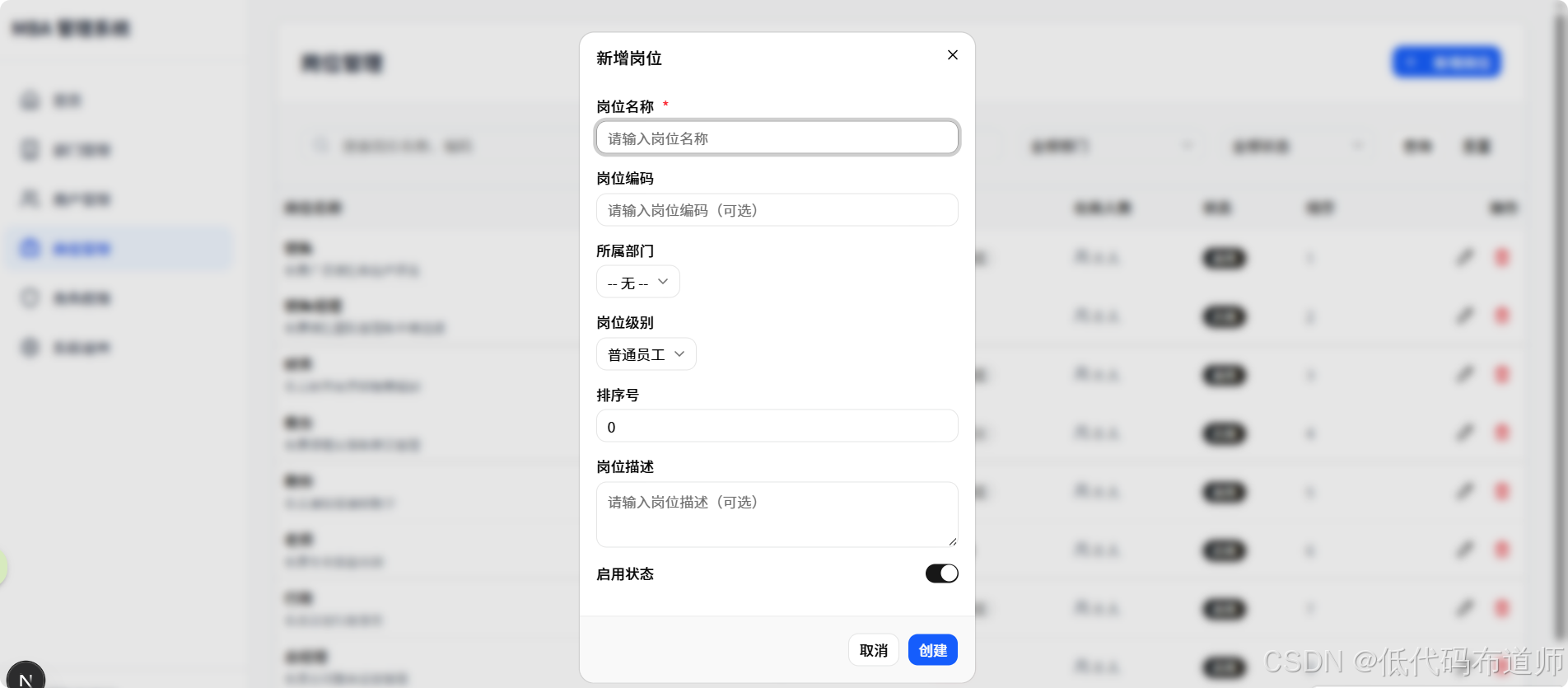
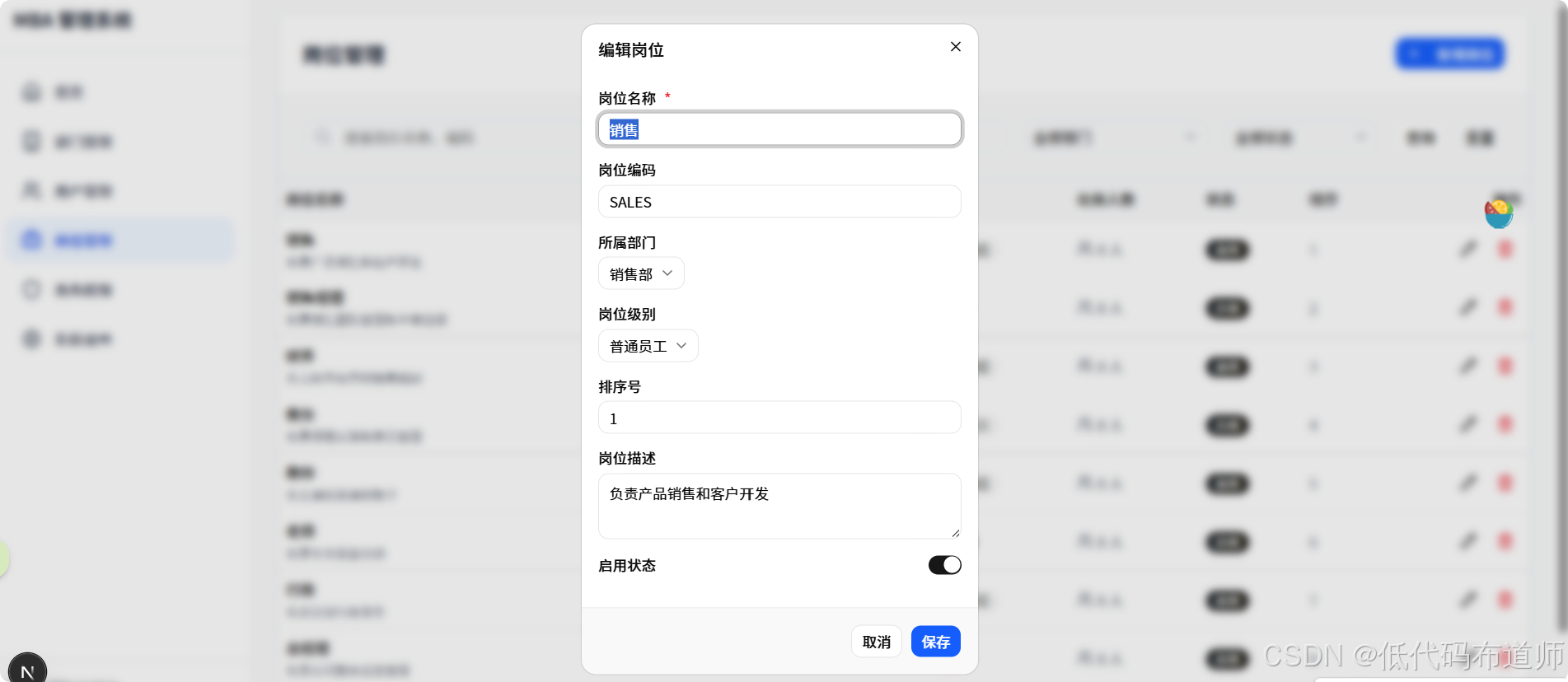
创建 src/components/position/PositionFormDialog.tsx:
tsx
// src/components/position/PositionFormDialog.tsx
"use client"

import { useEffect, useState } from "react"
import {
  Dialog,
  DialogContent,
  DialogHeader,
  DialogTitle,
  DialogFooter,
} from "@/components/ui/dialog"
import { Button } from "@/components/ui/button"
import { Label } from "@/components/ui/label"
import { Input } from "@/components/ui/input"
import { Textarea } from "@/components/ui/textarea"
import {
  Select,
  SelectContent,
  SelectItem,
  SelectTrigger,
  SelectValue,
} from "@/components/ui/select"
import { Switch } from "@/components/ui/switch"
import { createPosition, updatePosition, getDepartmentsForSelect } from "@/actions/position"
import { PositionFormData, positionLevelOptions } from "@/schemas/position"

// 部门选项类型
interface DepartmentOption {
  id: string
  name: string
}

interface PositionFormDialogProps {
  open: boolean
  onOpenChange: (open: boolean) => void
  position?: {
    id: string
    name: string
    code: string | null
    description: string | null
    level: number
    sortOrder: number
    isActive: boolean
    departmentId: string | null
  } | null
  onSuccess?: () => void
}

export function PositionFormDialog({
  open,
  onOpenChange,
  position,
  onSuccess,
}: PositionFormDialogProps) {
  const [loading, setLoading] = useState(false)
  const [departments, setDepartments] = useState<DepartmentOption[]>([])
  const [errors, setErrors] = useState<Record<string, string>>({})

  // 表单数据
  const [formData, setFormData] = useState<PositionFormData>({
    name: "",
    code: "",
    description: "",
    level: 1,
    sortOrder: 0,
    isActive: true,
    departmentId: "",
  })

  const isEditing = !!position

  // 加载部门列表
  useEffect(() => {
    if (open) {
      loadDepartments()
    }
  }, [open])

  // 编辑时回显数据
  useEffect(() => {
    if (position) {
      setFormData({
        name: position.name,
        code: position.code || "",
        description: position.description || "",
        level: position.level,
        sortOrder: position.sortOrder,
        isActive: position.isActive,
        departmentId: position.departmentId || "",
      })
    } else {
      // 新增时重置表单
      setFormData({
        name: "",
        code: "",
        description: "",
        level: 1,
        sortOrder: 0,
        isActive: true,
        departmentId: "",
      })
    }
    setErrors({})
  }, [position, open])

  const loadDepartments = async () => {
    const result = await getDepartmentsForSelect()
    if (result.success && result.data) {
      setDepartments(result.data)
    }
  }

  const handleSubmit = async () => {
    setLoading(true)
    setErrors({})

    try {
      let result
      if (isEditing && position?.id) {
        result = await updatePosition(position.id, formData)
      } else {
        result = await createPosition(formData)
      }

      if (result.error) {
        setErrors({ submit: result.error })
        return
      }

      onOpenChange(false)
      onSuccess?.()
    } catch (error) {
      setErrors({ submit: "操作失败,请重试" })
    } finally {
      setLoading(false)
    }
  }

  return (
    <Dialog open={open} onOpenChange={onOpenChange}>
      <DialogContent className="max-w-lg max-h-[90vh] overflow-y-auto">
        <DialogHeader>
          <DialogTitle>{isEditing ? "编辑岗位" : "新增岗位"}</DialogTitle>
        </DialogHeader>

        <div className="space-y-4 py-4">
          {/* 岗位名称 */}
          <div className="space-y-2">
            <Label htmlFor="name">
              岗位名称 <span className="text-red-500">*</span>
            </Label>
            <Input
              id="name"
              value={formData.name}
              onChange={(e) => setFormData({ ...formData, name: e.target.value })}
              placeholder="请输入岗位名称"
            />
            {errors.name && <p className="text-sm text-red-500">{errors.name}</p>}
          </div>

          {/* 岗位编码 */}
          <div className="space-y-2">
            <Label htmlFor="code">岗位编码</Label>
            <Input
              id="code"
              value={formData.code || ""}
              onChange={(e) => setFormData({ ...formData, code: e.target.value })}
              placeholder="请输入岗位编码(可选)"
            />
          </div>

          {/* 所属部门 */}
          <div className="space-y-2">
            <Label htmlFor="departmentId">所属部门</Label>
            <Select
              value={formData.departmentId || "none"}
              onValueChange={(value) =>
                setFormData({ ...formData, departmentId: value === "none" ? "" : value })
              }
            >
              <SelectTrigger>
                <SelectValue placeholder="选择所属部门" />
              </SelectTrigger>
              <SelectContent>
                <SelectItem value="none">-- 无 --</SelectItem>
                {departments.map((dept) => (
                  <SelectItem key={dept.id} value={dept.id}>
                    {dept.name}
                  </SelectItem>
                ))}
              </SelectContent>
            </Select>
          </div>

          {/* 岗位级别 */}
          <div className="space-y-2">
            <Label htmlFor="level">岗位级别</Label>
            <Select
              value={String(formData.level)}
              onValueChange={(value) =>
                setFormData({ ...formData, level: parseInt(value) })
              }
            >
              <SelectTrigger>
                <SelectValue placeholder="选择岗位级别" />
              </SelectTrigger>
              <SelectContent>
                {positionLevelOptions.map((option) => (
                  <SelectItem key={option.value} value={String(option.value)}>
                    {option.label}
                  </SelectItem>
                ))}
              </SelectContent>
            </Select>
          </div>

          {/* 排序号 */}
          <div className="space-y-2">
            <Label htmlFor="sortOrder">排序号</Label>
            <Input
              id="sortOrder"
              type="number"
              min={0}
              value={formData.sortOrder}
              onChange={(e) =>
                setFormData({ ...formData, sortOrder: parseInt(e.target.value) || 0 })
              }
              placeholder="请输入排序号"
            />
          </div>

          {/* 岗位描述 */}
          <div className="space-y-2">
            <Label htmlFor="description">岗位描述</Label>
            <Textarea
              id="description"
              value={formData.description || ""}
              onChange={(e) => setFormData({ ...formData, description: e.target.value })}
              placeholder="请输入岗位描述(可选)"
              rows={3}
            />
          </div>

          {/* 是否启用 */}
          <div className="flex items-center justify-between">
            <Label htmlFor="isActive">启用状态</Label>
            <Switch
              id="isActive"
              checked={formData.isActive}
              onCheckedChange={(checked) => setFormData({ ...formData, isActive: checked })}
            />
          </div>

          {/* 错误提示 */}
          {errors.submit && (
            <div className="text-sm text-red-500 text-center">{errors.submit}</div>
          )}
        </div>

        <DialogFooter>
          <Button variant="outline" onClick={() => onOpenChange(false)} disabled={loading}>
            取消
          </Button>
          <Button onClick={handleSubmit} disabled={loading} className="bg-blue-600 hover:bg-blue-700">
            {loading ? "保存中..." : isEditing ? "保存" : "创建"}
          </Button>
        </DialogFooter>
      </DialogContent>
    </Dialog>
  )
}
与 Server Action 的集成:
- 直接导入
createPosition和updatePosition函数 - 在
handleFormSubmit中直接调用 Server Action - 根据返回结果显示 toast 提示
- 成功时调用
onSuccess回调通知父组件刷新列表
四、删除确认弹窗
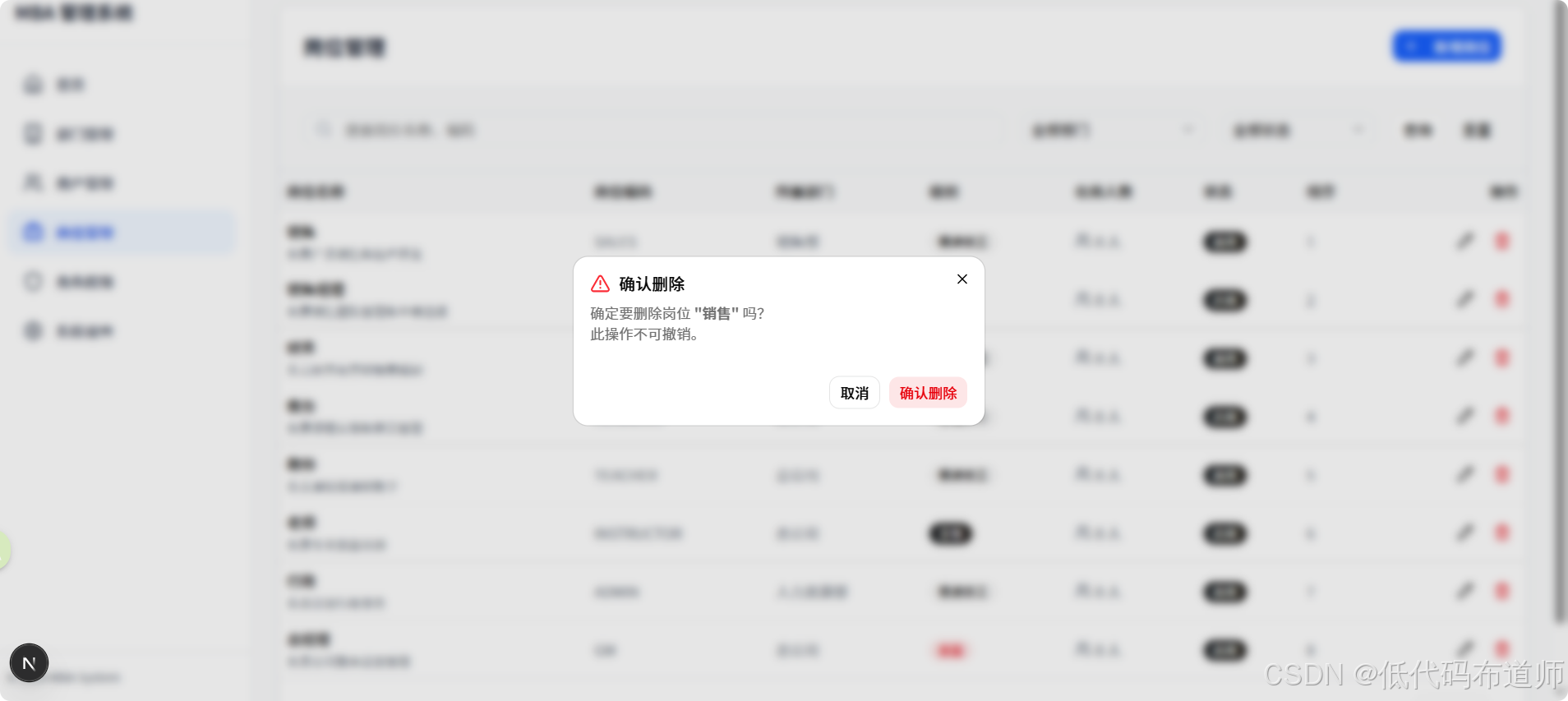
创建 src/components/position/DeletePositionDialog.tsx:
tsx
// src/components/position/DeletePositionDialog.tsx
"use client"

import {
  Dialog,
  DialogContent,
  DialogHeader,
  DialogTitle,
  DialogDescription,
} from "@/components/ui/dialog"
import { Button } from "@/components/ui/button"
import { AlertTriangle } from "lucide-react"
import { deletePosition } from "@/actions/position"
import { toast } from "sonner"

interface DeletePositionDialogProps {
  open: boolean
  onOpenChange: (open: boolean) => void
  position: {
    id: string
    name: string
    userCount: number
  } | null
  onSuccess: () => void  // 成功回调,用于刷新列表
}

export function DeletePositionDialog({
  open,
  onOpenChange,
  position,
  onSuccess,
}: DeletePositionDialogProps) {
  if (!position) return null

  const canDelete = position.userCount === 0

  // 处理删除确认
  const handleConfirm = async () => {
    try {
      const result = await deletePosition(position.id)

      if (result.error) {
        toast.error(result.error)
        return
      }

      toast.success(result.success)
      onSuccess()  // 通知父组件刷新列表
      onOpenChange(false)  // 关闭弹窗
    } catch (error) {
      toast.error("删除失败,请重试")
    }
  }

  return (
    <Dialog open={open} onOpenChange={onOpenChange}>
      <DialogContent className="sm:max-w-[400px]">
        <DialogHeader>
          <DialogTitle className="flex items-center gap-2">
            <AlertTriangle className="w-5 h-5 text-red-500" />
            确认删除
          </DialogTitle>
          <DialogDescription>
            {canDelete ? (
              <>
                确定要删除岗位 <strong>"{position.name}"</strong> 吗?
                <br />
                此操作不可撤销。
              </>
            ) : (
              <>
                无法删除岗位 <strong>"{position.name}"</strong>
                <br />
                <span className="text-red-500">
                  该岗位下还有 {position.userCount} 名员工,请先转移或删除这些员工后再删除岗位。
                </span>
              </>
            )}
          </DialogDescription>
        </DialogHeader>

        <div className="flex justify-end gap-2 pt-4">
          <Button variant="outline" onClick={() => onOpenChange(false)}>
            {canDelete ? "取消" : "知道了"}
          </Button>
          {canDelete && (
            <Button variant="destructive" onClick={handleConfirm}>
              确认删除
            </Button>
          )}
        </div>
      </DialogContent>
    </Dialog>
  )
}
与 Server Action 的集成:
- 直接导入
deletePosition函数 - 在
handleConfirm中直接调用 Server Action - 根据返回结果显示 toast 提示
- 成功时调用
onSuccess回调通知父组件刷新列表
五、列表页面集成弹窗
在 PositionList 中添加弹窗关联
文件位置: src/components/position/PositionList.tsx
步骤1:导入组件和类型
在文件顶部添加导入:
tsx
// 在文件顶部添加导入
import { useState, useCallback } from "react"
import { PositionFormDialog } from "./PositionFormDialog"
import { DeletePositionDialog } from "./DeletePositionDialog"
import { getDepartmentsForSelect } from "@/actions/position"
import { toast } from "sonner"
步骤2:添加状态管理
在组件内部添加以下状态:
tsx
export function PositionList() {
  // ... 原有状态(positions, loading, pagination 等)

  // 弹窗显示状态
  const [formDialogOpen, setFormDialogOpen] = useState(false)
  const [deleteDialogOpen, setDeleteDialogOpen] = useState(false)

  // 当前编辑的岗位(null 表示新增)
  const [editingPosition, setEditingPosition] = useState<Position | null>(null)

  // 待删除的岗位
  const [deletingPosition, setDeletingPosition] = useState<{
    id: string
    name: string
    userCount: number
  } | null>(null)

  // 部门列表(用于下拉选择)
  const [departments, setDepartments] = useState<{ id: string; name: string }[]>([])

  // ... 原有代码
}
步骤3:加载部门列表
在 useEffect 中添加加载部门列表的逻辑:
tsx
// 在 fetchPositions 调用后添加
useEffect(() => {
  fetchPositions()
  fetchDepartments()
}, [pagination.page, pagination.pageSize, departmentId, isActive])

// 获取部门列表
const fetchDepartments = async () => {
  try {
    const result = await getDepartmentsForSelect()
    if (result.success && result.data) {
      setDepartments(result.data)
    }
  } catch (error) {
    console.error("加载部门列表失败:", error)
  }
}
步骤4:刷新列表函数
添加刷新列表的回调函数(供弹窗调用):
tsx
// 刷新列表(供弹窗成功回调使用)
const refreshList = useCallback(() => {
  fetchPositions()
}, [fetchPositions])
步骤5:处理新增按钮点击
修改标题栏中的新增按钮:
tsx
// 找到新增按钮的位置,修改 onClick
<Button
  className="bg-blue-600 hover:bg-blue-700"
  onClick={() => {
    setEditingPosition(null)  // null 表示新增
    setFormDialogOpen(true)
  }}
>
  <Plus className="w-4 h-4 mr-2" />
  新增岗位
</Button>
步骤6:处理编辑按钮点击
在表格操作列的编辑按钮中添加点击事件:
tsx
// 找到编辑按钮的位置,修改 onClick
<Button
  variant="ghost"
  size="icon"
  title="编辑"
  onClick={() => {
    setEditingPosition(position)
    setFormDialogOpen(true)
  }}
>
  <Pencil className="w-4 h-4" />
</Button>
步骤7:处理删除按钮点击
在表格操作列的删除按钮中添加点击事件:
tsx
// 找到删除按钮的位置,修改 onClick
<Button
  variant="ghost"
  size="icon"
  className="text-red-600 hover:text-red-700"
  title="删除"
  onClick={() => {
    setDeletingPosition({
      id: position.id,
      name: position.name,
      userCount: position.userCount,
    })
    setDeleteDialogOpen(true)
  }}
>
  <Trash2 className="w-4 h-4" />
</Button>
步骤8:渲染弹窗组件
在组件返回的 JSX 末尾添加弹窗组件:
tsx
return (
  <div className="bg-white rounded-lg shadow-sm border border-gray-200">
    {/* ... 原有表格内容 ... */}

    {/* 新增/编辑弹窗 */}
    <PositionFormDialog
      open={formDialogOpen}
      onOpenChange={setFormDialogOpen}
      position={editingPosition}
      departments={departments}
      onSuccess={refreshList}  // 成功回调刷新列表
    />

    {/* 删除确认弹窗 */}
    <DeletePositionDialog
      open={deleteDialogOpen}
      onOpenChange={setDeleteDialogOpen}
      position={deletingPosition}
      onSuccess={refreshList}  // 成功回调刷新列表
    />
  </div>
)
最终效果
点击新增,打开新增岗位弹窗
点击修改,自动带入所在行的数据
点击删除,弹出确认删除弹窗
总结
本章使用 Next.js Server Actions 实现了岗位管理的完整 CRUD 功能:
-
Server Actions:
createPosition- 创建岗位(带编码唯一性检查)updatePosition- 更新岗位(带存在性检查)deletePosition- 删除岗位(带关联用户检查)getDepartmentsForSelect- 获取部门列表
-
表单校验:
- 使用 Zod 定义 positionSchema
- 在 Server Action 中使用
safeParse进行校验
-
弹窗组件:
- PositionFormDialog:新增/编辑共用弹窗,直接调用 Server Action
- DeletePositionDialog:删除确认弹窗,直接调用 Server Action
-
列表页面集成:
- 通过
onSuccess回调实现弹窗与列表的通信 - 使用
useCallback缓存刷新函数 - 使用
revalidatePath自动刷新页面缓存
- 通过
Server Actions 的优势:
- 代码更简洁,无需创建 API 路由
- 自动类型安全,无需手动定义接口
- 更好的开发体验,IDE 自动补全
下一步:可以继续完善岗位管理,如添加岗位导入导出、批量操作等功能。