今天遇到一个问题:
我自己(因为懒)不想编译qt5的交叉编译环境了(用x86电脑编译运行在arm64的qt程序),所以我就从同事那里拷贝一个环境。
正确的做法是解压他的环境,然后用他相同的路径,这样基本能正常编译成功。
但是只要跟对方的路径不一致,就不行(错误见3,qmake都不能正常执行)。
然后另一个同事说,可以解决。
于是就准备动手试试。
1. 先说解决办法:
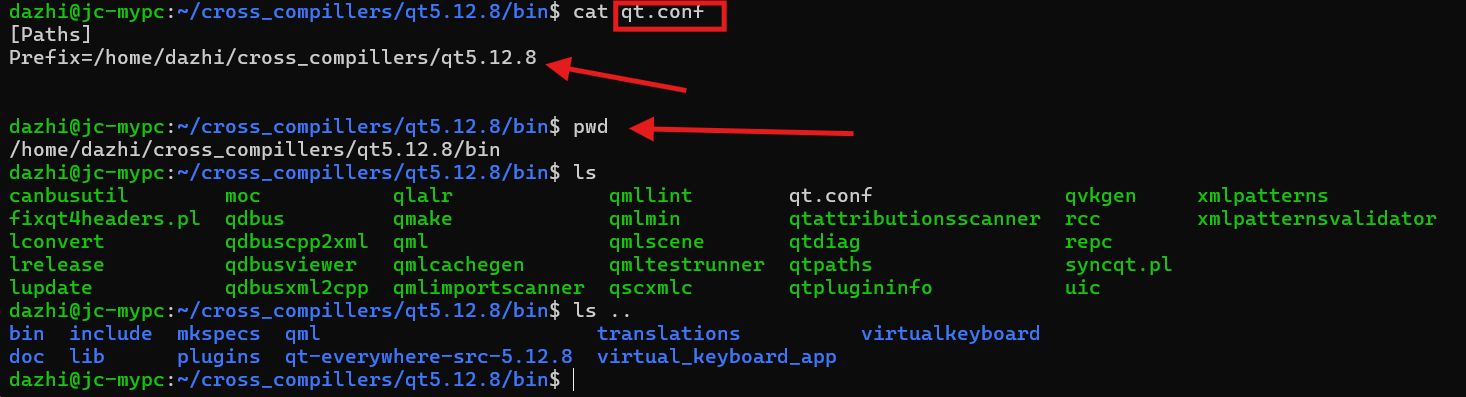
在解压的路径(已经是自己想要放置的路径了,具体路径看下图)下设置一个qt.conf文件,内容就是设置Prefix的值(参考下图),路径内容就是图中这个bin文件的上一级!
注意,这个路径不是我同事那个qt编译时的路径了,而是我自己想要放置的路径了。
dazhi@jc-mypc:~/cross_compillers/qt5.12.8/bin$ cat qt.conf
[Paths]
Prefix=/home/dazhi/cross_compillers/qt5.12.8


dazhi@jc-mypc:~/cross_compillers/qt5.12.8/bin$ pwd
/home/dazhi/cross_compillers/qt5.12.8/bin
dazhi@jc-mypc:~/cross_compillers/qt5.12.8/bin$ ls
canbusutil        moc           qlalr             qmllint        qt.conf                qvkgen     xmlpatterns
fixqt4headers.pl  qdbus         qmake             qmlmin         qtattributionsscanner  rcc        xmlpatternsvalidator
lconvert          qdbuscpp2xml  qml               qmlscene       qtdiag                 repc
lrelease          qdbusviewer   qmlcachegen       qmltestrunner  qtpaths                syncqt.pl
lupdate           qdbusxml2cpp  qmlimportscanner  qscxmlc        qtplugininfo           uic
dazhi@jc-mypc:~/cross_compillers/qt5.12.8/bin$ ls ..
bin  include  mkspecs  qml                       translations          virtualkeyboard
doc  lib      plugins  qt-everywhere-src-5.12.8  virtual_keyboard_app
dazhi@jc-mypc:~/cross_compillers/qt5.12.8/bin$
2. qt路径调试的方法
qmake -query 可以查看环境变量是否正常,当我看到下图这个时,我就知道这是我想要的了。
因为跟我的解压路径一致。
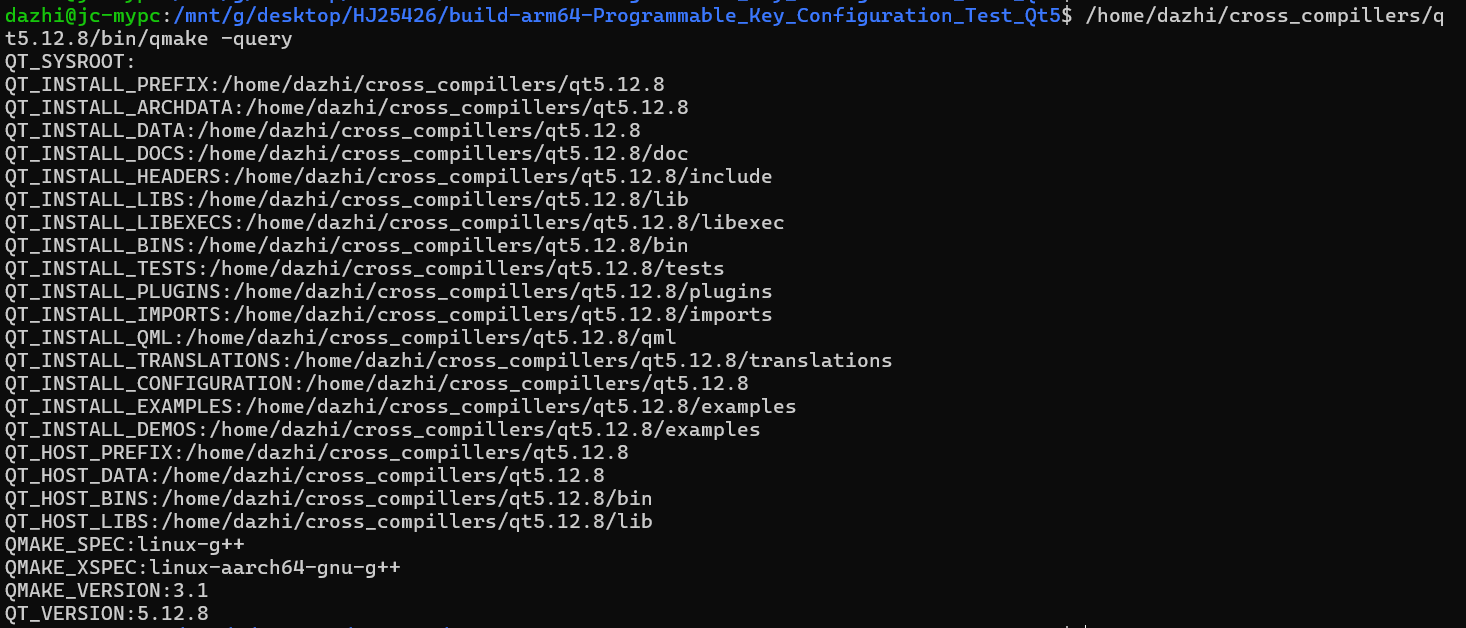
编译的时候,这些头文件的路径都是自己设置的路径,就没问题了

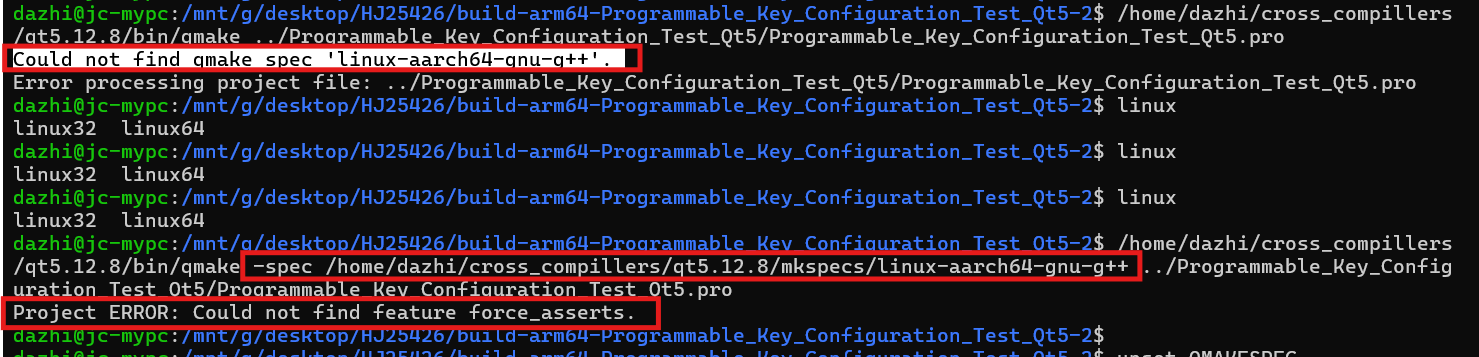
3.这是路径不一致的时候就报的错误:
无法qmake ,之后我也没有make,因为无法生成makefile。
dazhi@jc-mypc:/mnt/g/desktop/HJ25426/build-arm64-Programmable_Key_Configuration_Test_Qt5-2$ /home/dazhi/cross_compillers/qt5.12.8/bin/qmake ../Programmable_Key_Configuration_Test_Qt5/Programmable_Key_Configuration_Test_Qt5.pro
Could not find qmake spec 'linux-aarch64-gnu-g++'.
Error processing project file: ../Programmable_Key_Configuration_Test_Qt5/Programmable_Key_Configuration_Test_Qt5.pro
dazhi@jc-mypc:/mnt/g/desktop/HJ25426/build-arm64-Programmable_Key_Configuration_Test_Qt5-2$ linux
linux32  linux64
dazhi@jc-mypc:/mnt/g/desktop/HJ25426/build-arm64-Programmable_Key_Configuration_Test_Qt5-2$ linux
linux32  linux64
dazhi@jc-mypc:/mnt/g/desktop/HJ25426/build-arm64-Programmable_Key_Configuration_Test_Qt5-2$ linux
linux32  linux64
dazhi@jc-mypc:/mnt/g/desktop/HJ25426/build-arm64-Programmable_Key_Configuration_Test_Qt5-2$ /home/dazhi/cross_compillers/qt5.12.8/bin/qmake -spec /home/dazhi/cross_compillers/qt5.12.8/mkspecs/linux-aarch64-gnu-g++ ../Programmable_Key_Configuration_Test_Qt5/Programmable_Key_Configuration_Test_Qt5.pro
Project ERROR: Could not find feature force_asserts.
dazhi@jc-mypc:/mnt/g/desktop/HJ25426/build-arm64-Programmable_Key_Configuration_Test_Qt5-2$
这样就可以解决很多可以偷懒的问题了,哈哈,感谢同事tjy的技术支持!!!