引言
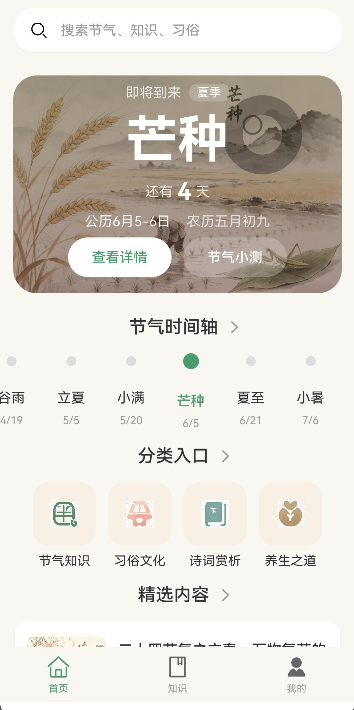
搜索功能是节气通应用的核心功能之一,为用户提供快速查找节气、文章和知识的能力。本文将详细介绍搜索功能的完整实现,包括搜索框组件设计、防抖处理机制、搜索历史管理、搜索结果展示以及分享功能。
通过本文,你将掌握如何实现一个功能完善的搜索系统。
学习目标
完成本文后,你将能够:
- ✅ 实现搜索框组件
- ✅ 实现防抖搜索机制
- ✅ 实现搜索历史管理
- ✅ 实现搜索建议功能
- ✅ 实现搜索结果展示
- ✅ 实现筛选与排序功能
- ✅ 实现分享功能
需求分析
功能模块设计
| 模块 | 功能描述 | 技术要点 |
|---|---|---|
| 搜索框 | 输入关键词并触发搜索 | TextInput、防抖处理 |
| 搜索建议 | 实时显示搜索建议 | 联想匹配、短延迟 |
| 搜索历史 | 保存并展示搜索记录 | AppStorage、本地存储 |
| 热门搜索 | 展示热门关键词 | Mock数据、排名展示 |
| 结果列表 | 展示搜索结果 | List布局、卡片组件 |
| 结果筛选 | 按类型过滤结果 | 条件筛选、状态管理 |
| 结果排序 | 按相关性/时间排序 | 排序算法、状态切换 |
| 分享功能 | 系统分享面板 | Share API |
设计思路
方案对比
| 方案 | 优点 | 缺点 | 适用场景 |
|---|---|---|---|
| 实时搜索(无防抖) | 响应最快 | 请求频繁,性能差 | 数据量极小场景 |
| 防抖搜索(300ms) | 平衡响应速度和性能 | 有短暂延迟 | 推荐 - 通用场景 |
| 点击搜索按钮 | 性能最优 | 用户体验差 | 数据量极大场景 |
关键决策
决策1: 使用防抖机制
- 原因:避免用户输入过程中频繁触发搜索
- 优势:减少API调用次数,提升性能
- 参数选择:搜索使用300ms延迟,搜索建议使用150ms延迟
决策2: 使用AppStorage存储历史
- 原因:ViewModel中无法获取context,preferences需要context
- 优势:无需context,使用简单
决策3: 搜索结果参考收藏列表布局
- 原因:保持应用UI一致性
- 优势:用户体验连贯,开发成本低
架构设计
typescript
// 搜索结果数据模型
interface SearchResultItem {
  id: string;           // 唯一标识
  title: string;        // 标题
  description: string;  // 描述
  type: string;         // 类型:season/article/knowledge
  coverImage?: string;  // 封面图
  date?: string;        // 日期
}

// 页面状态管理
@State searchText: string = '';           // 搜索关键词
@State searchResults: SearchResultItem[] = [];  // 搜索结果
@State searchHistory: string[] = [];      // 搜索历史
@State suggestions: string[] = [];        // 搜索建议
核心实现
步骤1: 搜索页面结构
typescript
// pages/Search.ets

import router from '@ohos.router';
import { SearchViewModel } from '../viewmodel/SearchViewModel';
import type { SearchResultItem, HotSearchItem } from '../viewmodel/SearchViewModel';

@Entry
@Component
struct SearchPage {
  @State searchText: string = '';
  @State searchResults: SearchResultItem[] = [];
  @State searchHistory: string[] = [];
  @State hotSearch: HotSearchItem[] = [];
  @State suggestions: string[] = [];
  @State isSearching: boolean = false;
  @State showHistory: boolean = true;
  @State showSuggestions: boolean = false;

  // 筛选和排序
  @State selectedFilter: string = 'all';
  @State sortType: string = 'relevance';
  @State showFilterPanel: boolean = false;

  private viewModel: SearchViewModel = new SearchViewModel();
  private debounceTimer: number = -1;
  private suggestionTimer: number = -1;
  private originalResults: SearchResultItem[] = [];

  aboutToAppear() {
    this.loadSearchHistory();
    this.loadHotSearch();
  }

  aboutToDisappear() {
    // 清除定时器
    if (this.debounceTimer !== -1) {
      clearTimeout(this.debounceTimer);
    }
    if (this.suggestionTimer !== -1) {
      clearTimeout(this.suggestionTimer);
    }
  }
}
步骤2: 防抖搜索实现
typescript
/**
 * 执行搜索(带防抖)
 */
performSearch(keyword: string) {
  // 清除之前的定时器
  if (this.debounceTimer !== -1) {
    clearTimeout(this.debounceTimer);
  }

  // 设置防抖延迟 300ms
  const timerId: number = setTimeout(() => {
    if (keyword.trim() === '') {
      this.searchResults = [];
      this.originalResults = [];
      this.showHistory = true;
      this.showSuggestions = false;
      return;
    }

    this.isSearching = true;
    this.showHistory = false;
    this.showSuggestions = false;

    // 执行搜索
    this.originalResults = this.viewModel.search(keyword);
    // 重置筛选和排序
    this.selectedFilter = 'all';
    this.sortType = 'relevance';
    // 应用筛选和排序
    this.applyFilterAndSort();
    this.isSearching = false;

    // 保存搜索历史
    this.saveSearchHistory(keyword);
  }, 300) as number;
  this.debounceTimer = timerId;
}
步骤3: 搜索历史管理
typescript
/**
 * 加载搜索历史
 */
async loadSearchHistory() {
  this.searchHistory = await this.viewModel.getSearchHistory();
}

/**
 * 保存搜索历史
 */
async saveSearchHistory(keyword: string) {
  if (keyword.trim() === '') {
    return;
  }

  await this.viewModel.addSearchHistory(keyword);
  this.searchHistory = await this.viewModel.getSearchHistory();
}

/**
 * 清除搜索历史
 */
async clearSearchHistory() {
  await this.viewModel.clearSearchHistory();
  this.searchHistory = [];
}
步骤4: ViewModel层实现
typescript
// viewmodel/SearchViewModel.ets

export class SearchViewModel {
  // 最大历史记录数量
  private static readonly MAX_HISTORY_SIZE = 10;

  /**
   * 获取搜索历史
   */
  async getSearchHistory(): Promise<string[]> {
    const historyStr = AppStorage.get('search_history') as string || '[]';
    try {
      return JSON.parse(historyStr);
    } catch {
      return [];
    }
  }

  /**
   * 添加搜索历史
   */
  async addSearchHistory(keyword: string): Promise<void> {
    const history = await this.getSearchHistory();

    // 移除重复项
    const filtered = history.filter(k => k !== keyword);

    // 添加到开头
    filtered.unshift(keyword);

    // 限制数量
    if (filtered.length > SearchViewModel.MAX_HISTORY_SIZE) {
      filtered.pop();
    }

    AppStorage.set('search_history', JSON.stringify(filtered));
  }

  /**
   * 清除搜索历史
   */
  async clearSearchHistory(): Promise<void> {
    AppStorage.set('search_history', '[]');
  }
}
布局设计
搜索栏布局
typescript
build() {
  Column() {
    // 搜索栏
    Row({ space: 12 }) {
      // 返回按钮
      Image($r('app.media.icon_back'))
        .width(24)
        .height(24)
        .fillColor('#333333')
        .onClick(() => {
          router.back();
        })

      // 搜索输入框
      TextInput({ placeholder: '搜索节气、文章、知识', text: this.searchText })
        .layoutWeight(1)
        .height(40)
        .padding({ left: 12, right: 12 })
        .backgroundColor('#F5F5F5')
        .borderRadius(20)
        .onChange((value: string) => {
          this.searchText = value;
          this.getSuggestions(value);
          this.performSearch(value);
        })

      // 清除按钮
      if (this.searchText !== '') {
        Image($r('app.media.icon_clear'))
          .width(20)
          .height(20)
          .fillColor('#999999')
          .onClick(() => {
            this.searchText = '';
            this.searchResults = [];
            this.suggestions = [];
            this.showHistory = this.searchHistory.length > 0;
            this.showSuggestions = false;
          })
      }
    }
    .width('100%')
    .height(56)
    .padding({ left: 16, right: 16 })
    .backgroundColor('#FFFFFF')
  }
}
搜索结果项布局
typescript
@Builder
buildResultItem(item: SearchResultItem) {
  Row({ space: 12 }) {
    // 封面图
    Stack() {
      if (item.type === 'season') {
        Image(getHolidayBg(item.id))
          .width(80)
          .height(80)
          .borderRadius(12)
          .objectFit(ImageFit.Cover)
      } else {
        this.buildArticleCover(item)
      }
    }
    .backgroundColor('#F0E6D2')
    .borderRadius(12)
    .width(80)

    // 内容信息
    Column({ space: 8 }) {
      // 标题
      Text(item.title)
        .fontSize(15)
        .fontWeight(FontWeight.Medium)
        .fontColor('#333333')
        .maxLines(2)
        .lineHeight(22)
        .textAlign(TextAlign.Start)
        .width('100%')

      // 描述
      Text(item.description)
        .fontSize(14)
        .fontColor('#666666')
        .maxLines(2)
        .textOverflow({ overflow: TextOverflow.Ellipsis })

      // 底部信息
      Row({ space: 6 }) {
        Text(this.getItemDate(item))
          .fontSize(12)
          .fontColor('#999999')

        Text(this.getTypeLabel(item.type))
          .fontSize(12)
          .fontColor(item.type === 'season' ? '#4A9B6D' : '#FF9800')
          .backgroundColor(item.type === 'season' ? '#E8F5E9' : '#FFF3E0')
          .padding({ left: 8, right: 8, top: 2, bottom: 2 })
          .borderRadius(6)
      }
    }
    .layoutWeight(1)
    .alignItems(HorizontalAlign.Start)
  }
  .width('100%')
  .padding(12)
  .backgroundColor('#FFFFFF')
  .borderRadius(12)
  .shadow({ radius: 4, color: '#0D000000', offsetX: 0, offsetY: 2 })
  .onClick(() => {
    this.navigateToDetail(item);
  })
}
筛选与排序功能
筛选实现
typescript
/**
 * 应用筛选和排序
 */
applyFilterAndSort() {
  let filteredResults = [...this.originalResults];

  // 筛选
  if (this.selectedFilter !== 'all') {
    filteredResults = filteredResults.filter(item => item.type === this.selectedFilter);
  }

  // 排序
  if (this.sortType === 'date') {
    filteredResults.sort((a, b) => {
      const dateA = a.date || '';
      const dateB = b.date || '';
      return dateB.localeCompare(dateA);
    });
  }

  this.searchResults = filteredResults;
}
筛选面板布局
typescript
// 筛选面板
if (this.showFilterPanel) {
  Column({ space: 8 }) {
    Row({ space: 8 }) {
      ForEach(['all', 'season', 'article', 'knowledge'], (filter: string) => {
        Text(filter === 'all' ? '全部' : this.getTypeLabel(filter))
          .fontSize(14)
          .fontColor(this.selectedFilter === filter ? '#4A9B6D' : '#666666')
          .padding({ left: 16, right: 16, top: 8, bottom: 8 })
          .backgroundColor(this.selectedFilter === filter ? '#E8F5E9' : '#FFFFFF')
          .borderRadius(20)
          .onClick(() => {
            this.setFilter(filter);
            this.showFilterPanel = false;
          })
      })
    }
    .width('100%')
    .justifyContent(FlexAlign.Center)
  }
  .width('100%')
  .padding({ bottom: 8 })
  .backgroundColor('#F5F5F5')
}
分享功能实现
系统分享实现
typescript
import share from '@ohos.share';

/**
 * 分享文本内容
 */
async shareText(title: string, content: string) {
  try {
    const shareInfo: share.ShareInfo = {
      shareType: share.ShareType.TEXT,
      text: `${title}\n${content}`,
      title: title
    };

    await share.share(shareInfo);
  } catch (error) {
    console.error('分享失败:', error);
  }
}

/**
 * 分享图片
 */
async shareImage(imagePath: string, title: string) {
  try {
    const shareInfo: share.ShareInfo = {
      shareType: share.ShareType.IMAGE,
      imagePath: imagePath,
      title: title
    };

    await share.share(shareInfo);
  } catch (error) {
    console.error('分享图片失败:', error);
  }
}
性能优化
防抖优化
typescript
// 搜索建议使用较短延迟(150ms)
getSuggestions(partialKeyword: string) {
  if (this.suggestionTimer !== -1) {
    clearTimeout(this.suggestionTimer);
  }

  const timerId: number = setTimeout(() => {
    if (partialKeyword.trim() === '') {
      this.suggestions = [];
      this.showSuggestions = false;
      return;
    }
    this.suggestions = this.viewModel.getSearchSuggestions(partialKeyword);
    this.showSuggestions = this.suggestions.length > 0;
  }, 150) as number;
  this.suggestionTimer = timerId;
}
搜索缓存
typescript
// 在ViewModel中添加缓存机制
private searchCache: Map<string, SearchResultItem[]> = new Map();
private static readonly MAX_CACHE_SIZE = 50;

search(keyword: string): SearchResultItem[] {
  const trimKeyword = keyword.trim();

  // 检查缓存
  if (this.searchCache.has(trimKeyword)) {
    return this.searchCache.get(trimKeyword)!;
  }

  // 执行搜索...

  // 更新缓存
  this.updateCache(trimKeyword, results);

  return results;
}
常见问题与解决方案
AppStorage vs Preferences
| 对比项 | AppStorage | Preferences |
|---|---|---|
| context依赖 | 不需要 | 需要 |
| 适用场景 | 全局状态 | 持久化存储 |
| 数据类型 | 支持任意类型 | 支持基本类型 |
| 复杂度 | 低 | 高 |
@Builder方法语法限制
问题 :@Builder方法中不能包含变量声明和逻辑代码。
解决方案:将逻辑代码移到普通方法中:
typescript
// 普通方法处理逻辑
needsHighlight(highlightedText?: string): boolean {
  if (!highlightedText) {
    return false;
  }
  return highlightedText.includes('<mark>');
}

// @Builder方法只包含UI组件
@Builder
buildHighlightedText(text: string, highlightedText?: string) {
  if (!this.needsHighlight(highlightedText)) {
    Text(text)
      .fontSize(15)
      .fontWeight(FontWeight.Medium)
      .fontColor('#333333')
  } else {
    Text(text)
      .fontSize(15)
      .fontWeight(FontWeight.Medium)
      .fontColor('#FF6B6B')
  }
}
ForEach vs forEach
问题 :UI组件中必须使用ForEach组件而非数组的forEach方法。
解决方案:
typescript
// 错误写法
['all', 'season', 'article'].forEach((filter) => {
  Text(filter)
})

// 正确写法
ForEach(['all', 'season', 'article'], (filter: string) => {
  Text(filter)
})
总结
本文详细介绍了搜索功能的完整实现,包括:
- 防抖机制 :使用
setTimeout实现搜索延迟执行 - 本地存储 :使用
AppStorage存储搜索历史 - 搜索建议:实时推荐搜索关键词
- 搜索结果展示:参考收藏列表布局,保持UI一致性
- 筛选排序:提供结果筛选和排序功能
- 分享功能:支持系统分享和图片生成
- 性能优化:缓存机制减少重复计算
搜索功能的设计遵循了HarmonyOS ArkTS的最佳实践,确保代码的可维护性和扩展性。