开启跨平台 UI 之旅
- 前言
-
- [1 行号面板:QPainter 手绘的艺术](#1 行号面板:QPainter 手绘的艺术)
-
- [1.1 为什么不用 QLabel 显示行号?](#1.1 为什么不用 QLabel 显示行号?)
- [1.2 LineNumberWidget 类结构](#1.2 LineNumberWidget 类结构)
- [1.3 行号绘制:paintEvent 三图层渲染](#1.3 行号绘制:paintEvent 三图层渲染)
- [1.4 断点管理:点击 Toggle](#1.4 断点管理:点击 Toggle)
- [2 异步语法高亮:后台线程 + 防抖 + VS Code Dark+ 配色](#2 异步语法高亮:后台线程 + 防抖 + VS Code Dark+ 配色)
-
- [2.1 整体架构](#2.1 整体架构)
- [2.2 数据结构:HighlightToken 和 HighlightCache](#2.2 数据结构:HighlightToken 和 HighlightCache)
- [2.3 后台解析器:parseSyntaxInBackground](#2.3 后台解析器:parseSyntaxInBackground)
- [2.4 前端渲染器:AsyncHighlighter](#2.4 前端渲染器:AsyncHighlighter)
- [2.5 防抖 + 调度:在新建标签页时连接](#2.5 防抖 + 调度:在新建标签页时连接)
- [3 括号配对 + 当前行高亮](#3 括号配对 + 当前行高亮)
-
- [3.1 ExtraSelection 是什么?](#3.1 ExtraSelection 是什么?)
- [3.2 当前行高亮](#3.2 当前行高亮)
- [3.3 括号配对高亮](#3.3 括号配对高亮)
- [4 智能代码补全与缩进](#4 智能代码补全与缩进)
-
- [4.1 成对符号自动补全](#4.1 成对符号自动补全)
- [4.2 回车智能缩进](#4.2 回车智能缩进)
- [4.3 Tab 展开代码片段](#4.3 Tab 展开代码片段)
- 本篇总结
- 下一篇预告
前言
上一篇我们实现了多标签页编辑器和完整的文件操作流程------新建、打开、保存、拖拽打开、最近文件列表。但现在的编辑器还是个"纯文本显示器"------没有行号,代码全是同一个颜色,看起来跟记事本没什么区别。
这篇要给编辑器"化妆"。我们要实现的是让它从一个记事本蜕变为一个真正的代码编辑器:
- 行号显示:QPainter 手绘行号面板,跟随滚动同步
- 断点管理:点击行号区域添加/移除红色断点(GDB 调试预留)
- 异步语法高亮:QtConcurrent 后台线程解析 + 300ms 防抖 + VS Code Dark+ 配色
- 括号配对高亮:光标移到括号处自动高亮匹配的另一个括号
- 当前行高亮:浅灰色背景标记当前编辑行
- 智能代码补全:成对符号自动补全、回车智能缩进、Tab 展开代码片段
1 行号面板:QPainter 手绘的艺术
行号是代码编辑器最基础的视觉元素。Qt 没有现成的行号组件,但提供了强大的 QPainter 绘图 API,让我们可以用纯代码手绘一个。
1.1 为什么不用 QLabel 显示行号?
有人可能会想:用循环创建一堆 QLabel 显示行号不就行了?
问题在于:一个几百行的文件就要创建几百个 QLabel 对象,内存开销大,滚动时还要同步更新每个 label 的位置,性能灾难。而 QPainter 方案只需要 一个 QWidget ,在 paintEvent 中逐行绘制,滚动时只需改一个 scrollY 偏移量,性能碾压 QLabel 方案。
1.2 LineNumberWidget 类结构
cpp
class LineNumberWidget : public QWidget {
public:
    QTextEdit *editor;            // 关联的编辑器
    QSet<int> breakpoints;        // 存储断点行号
    int currentExecLine = -1;     // GDB 当前执行行 (-1=没在调试)

    LineNumberWidget(QTextEdit *parent) : QWidget(parent), editor(parent) {
        setMouseTracking(true);              // 开启鼠标追踪
        setCursor(Qt::PointingHandCursor);   // 鼠标变小手,暗示可点击
    }

    // GDB 预留接口:控制黄色箭头跳跃
    void setExecutionLine(int line) {
        currentExecLine = line;
        update(); // 触发重绘
    }
};
1.3 行号绘制:paintEvent 三图层渲染
行号面板的核心是 paintEvent,它用 QPainter 逐行绘制三种视觉元素:
cpp
void paintEvent(QPaintEvent *) override {
    QPainter painter(this);
    painter.fillRect(rect(), QColor(0x1e, 0x1e, 0x1e)); // VS Code 极暗底色
    painter.setFont(editor->font());

    QTextBlock block = editor->document()->begin();
    int lineNumber = 1;
    int scrollY = editor->verticalScrollBar()->value(); // 滚动偏移量
    int h = height();

    while (block.isValid()) {
        QRectF bounds = editor->document()->documentLayout()->blockBoundingRect(block);
        QRectF rect = bounds.translated(0, -scrollY); // 平移到视口坐标

        if (rect.bottom() >= 0 && rect.top() <= h) {
            // 图层 1:GDB 当前执行行 ------ 黄色箭头 + 高亮带
            if (lineNumber == currentExecLine) {
                painter.setPen(Qt::NoPen);
                painter.setBrush(QColor(255, 255, 0, 40)); // 半透明黄色高亮
                painter.drawRect(0, rect.top(), width(), rect.height());

                // 手绘经典黄金指针(三角形)
                QPolygonF arrow;
                int cx = 14, cy = rect.top() + rect.height() / 2;
                arrow << QPointF(cx - 5, cy - 4)
                      << QPointF(cx + 3, cy)
                      << QPointF(cx - 5, cy + 4);
                painter.setBrush(QColor(0xFF, 0xCC, 0x00));
                painter.drawPolygon(arrow);
            }
            // 图层 2:断点红圆
            else if (breakpoints.contains(lineNumber)) {
                painter.setPen(Qt::NoPen);
                painter.setBrush(QColor(0xE5, 0x14, 0x00)); // VS Code 错误红
                int radius = 10;
                int y = rect.top() + (rect.height() - radius) / 2;
                painter.drawEllipse(8, y, radius, radius);
            }

            // 图层 3:行号文字
            bool isHL = breakpoints.contains(lineNumber) || lineNumber == currentExecLine;
            painter.setPen(isHL ? QColor(0xCC, 0xCC, 0xCC) : QColor(0x85, 0x85, 0x85));
            painter.drawText(0, rect.top(), width() - 10, rect.height(),
                             Qt::AlignRight | Qt::AlignVCenter,
                             QString::number(lineNumber));
        }

        if (rect.top() > h) break; // 超出视口,提前退出(性能优化)
        block = block.next();
        lineNumber++;
    }
}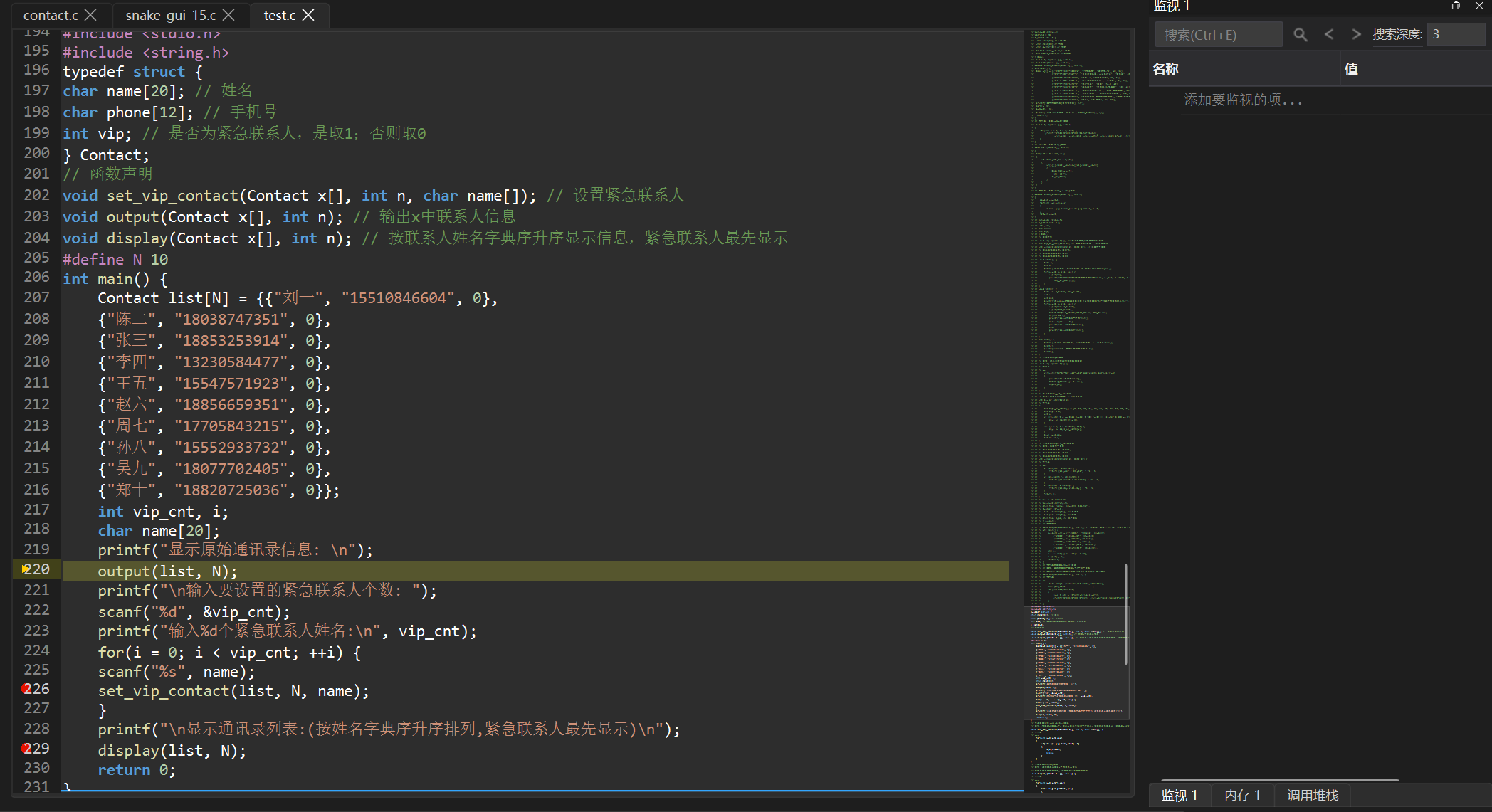
三个图层的渲染顺序:
#mermaid-svg-M1O4I8h2XCggOwuc{font-family:"trebuchet ms",verdana,arial,sans-serif;font-size:16px;fill:#333;}@keyframes edge-animation-frame{from{stroke-dashoffset:0;}}@keyframes dash{to{stroke-dashoffset:0;}}#mermaid-svg-M1O4I8h2XCggOwuc .edge-animation-slow{stroke-dasharray:9,5!important;stroke-dashoffset:900;animation:dash 50s linear infinite;stroke-linecap:round;}#mermaid-svg-M1O4I8h2XCggOwuc .edge-animation-fast{stroke-dasharray:9,5!important;stroke-dashoffset:900;animation:dash 20s linear infinite;stroke-linecap:round;}#mermaid-svg-M1O4I8h2XCggOwuc .error-icon{fill:#552222;}#mermaid-svg-M1O4I8h2XCggOwuc .error-text{fill:#552222;stroke:#552222;}#mermaid-svg-M1O4I8h2XCggOwuc .edge-thickness-normal{stroke-width:1px;}#mermaid-svg-M1O4I8h2XCggOwuc .edge-thickness-thick{stroke-width:3.5px;}#mermaid-svg-M1O4I8h2XCggOwuc .edge-pattern-solid{stroke-dasharray:0;}#mermaid-svg-M1O4I8h2XCggOwuc .edge-thickness-invisible{stroke-width:0;fill:none;}#mermaid-svg-M1O4I8h2XCggOwuc .edge-pattern-dashed{stroke-dasharray:3;}#mermaid-svg-M1O4I8h2XCggOwuc .edge-pattern-dotted{stroke-dasharray:2;}#mermaid-svg-M1O4I8h2XCggOwuc .marker{fill:#333333;stroke:#333333;}#mermaid-svg-M1O4I8h2XCggOwuc .marker.cross{stroke:#333333;}#mermaid-svg-M1O4I8h2XCggOwuc svg{font-family:"trebuchet ms",verdana,arial,sans-serif;font-size:16px;}#mermaid-svg-M1O4I8h2XCggOwuc p{margin:0;}#mermaid-svg-M1O4I8h2XCggOwuc .label{font-family:"trebuchet ms",verdana,arial,sans-serif;color:#333;}#mermaid-svg-M1O4I8h2XCggOwuc .cluster-label text{fill:#333;}#mermaid-svg-M1O4I8h2XCggOwuc .cluster-label span{color:#333;}#mermaid-svg-M1O4I8h2XCggOwuc .cluster-label span p{background-color:transparent;}#mermaid-svg-M1O4I8h2XCggOwuc .label text,#mermaid-svg-M1O4I8h2XCggOwuc span{fill:#333;color:#333;}#mermaid-svg-M1O4I8h2XCggOwuc .node rect,#mermaid-svg-M1O4I8h2XCggOwuc .node circle,#mermaid-svg-M1O4I8h2XCggOwuc .node ellipse,#mermaid-svg-M1O4I8h2XCggOwuc .node polygon,#mermaid-svg-M1O4I8h2XCggOwuc .node path{fill:#ECECFF;stroke:#9370DB;stroke-width:1px;}#mermaid-svg-M1O4I8h2XCggOwuc .rough-node .label text,#mermaid-svg-M1O4I8h2XCggOwuc .node .label text,#mermaid-svg-M1O4I8h2XCggOwuc .image-shape .label,#mermaid-svg-M1O4I8h2XCggOwuc .icon-shape .label{text-anchor:middle;}#mermaid-svg-M1O4I8h2XCggOwuc .node .katex path{fill:#000;stroke:#000;stroke-width:1px;}#mermaid-svg-M1O4I8h2XCggOwuc .rough-node .label,#mermaid-svg-M1O4I8h2XCggOwuc .node .label,#mermaid-svg-M1O4I8h2XCggOwuc .image-shape .label,#mermaid-svg-M1O4I8h2XCggOwuc .icon-shape .label{text-align:center;}#mermaid-svg-M1O4I8h2XCggOwuc .node.clickable{cursor:pointer;}#mermaid-svg-M1O4I8h2XCggOwuc .root .anchor path{fill:#333333!important;stroke-width:0;stroke:#333333;}#mermaid-svg-M1O4I8h2XCggOwuc .arrowheadPath{fill:#333333;}#mermaid-svg-M1O4I8h2XCggOwuc .edgePath .path{stroke:#333333;stroke-width:2.0px;}#mermaid-svg-M1O4I8h2XCggOwuc .flowchart-link{stroke:#333333;fill:none;}#mermaid-svg-M1O4I8h2XCggOwuc .edgeLabel{background-color:rgba(232,232,232, 0.8);text-align:center;}#mermaid-svg-M1O4I8h2XCggOwuc .edgeLabel p{background-color:rgba(232,232,232, 0.8);}#mermaid-svg-M1O4I8h2XCggOwuc .edgeLabel rect{opacity:0.5;background-color:rgba(232,232,232, 0.8);fill:rgba(232,232,232, 0.8);}#mermaid-svg-M1O4I8h2XCggOwuc .labelBkg{background-color:rgba(232, 232, 232, 0.5);}#mermaid-svg-M1O4I8h2XCggOwuc .cluster rect{fill:#ffffde;stroke:#aaaa33;stroke-width:1px;}#mermaid-svg-M1O4I8h2XCggOwuc .cluster text{fill:#333;}#mermaid-svg-M1O4I8h2XCggOwuc .cluster span{color:#333;}#mermaid-svg-M1O4I8h2XCggOwuc div.mermaidTooltip{position:absolute;text-align:center;max-width:200px;padding:2px;font-family:"trebuchet ms",verdana,arial,sans-serif;font-size:12px;background:hsl(80, 100%, 96.2745098039%);border:1px solid #aaaa33;border-radius:2px;pointer-events:none;z-index:100;}#mermaid-svg-M1O4I8h2XCggOwuc .flowchartTitleText{text-anchor:middle;font-size:18px;fill:#333;}#mermaid-svg-M1O4I8h2XCggOwuc rect.text{fill:none;stroke-width:0;}#mermaid-svg-M1O4I8h2XCggOwuc .icon-shape,#mermaid-svg-M1O4I8h2XCggOwuc .image-shape{background-color:rgba(232,232,232, 0.8);text-align:center;}#mermaid-svg-M1O4I8h2XCggOwuc .icon-shape p,#mermaid-svg-M1O4I8h2XCggOwuc .image-shape p{background-color:rgba(232,232,232, 0.8);padding:2px;}#mermaid-svg-M1O4I8h2XCggOwuc .icon-shape .label rect,#mermaid-svg-M1O4I8h2XCggOwuc .image-shape .label rect{opacity:0.5;background-color:rgba(232,232,232, 0.8);fill:rgba(232,232,232, 0.8);}#mermaid-svg-M1O4I8h2XCggOwuc .label-icon{display:inline-block;height:1em;overflow:visible;vertical-align:-0.125em;}#mermaid-svg-M1O4I8h2XCggOwuc .node .label-icon path{fill:currentColor;stroke:revert;stroke-width:revert;}#mermaid-svg-M1O4I8h2XCggOwuc :root{--mermaid-font-family:"trebuchet ms",verdana,arial,sans-serif;} 是
否
是
否
否
是
paintEvent 触发
填充 #1e1e1e 背景
遍历每个 QTextBlock
lineNumber == currentExecLine?
图层1: 半透明黄色高亮带
- 手绘黄金三角箭头
breakpoints.contains?
图层2: VS Code 红色断点圆
图层3: 行号文字
rect.top > h?
提前退出循环
1.4 断点管理:点击 Toggle
点击行号区域时,需要检测用户点中了哪一行,然后执行断点的添加/移除:
cpp
void mousePressEvent(QMouseEvent *event) override {
    if (event->button() != Qt::LeftButton) return;

    // 换算绝对坐标:鼠标相对Y + 滚动偏移
    int scrollY = editor->verticalScrollBar()->value();
    int clickY = event->pos().y() + scrollY;

    QTextBlock block = editor->document()->begin();
    int lineNumber = 1;

    while (block.isValid()) {
        QRectF bounds = editor->document()->documentLayout()->blockBoundingRect(block);
        if (clickY >= bounds.top() && clickY <= bounds.bottom()) {
            // Toggle:有就删,没有就加
            if (breakpoints.contains(lineNumber))
                breakpoints.remove(lineNumber);
            else
                breakpoints.insert(lineNumber);

            // 写入编辑器属性,供 GDB 调试器读取
            QList<QVariant> bpList;
            for (int bp : std::as_const(breakpoints)) bpList.append(bp);
            editor->setProperty("breakpoints", bpList);

            update(); // 立刻重绘
            break;
        }
        block = block.next();
        lineNumber++;
    }
}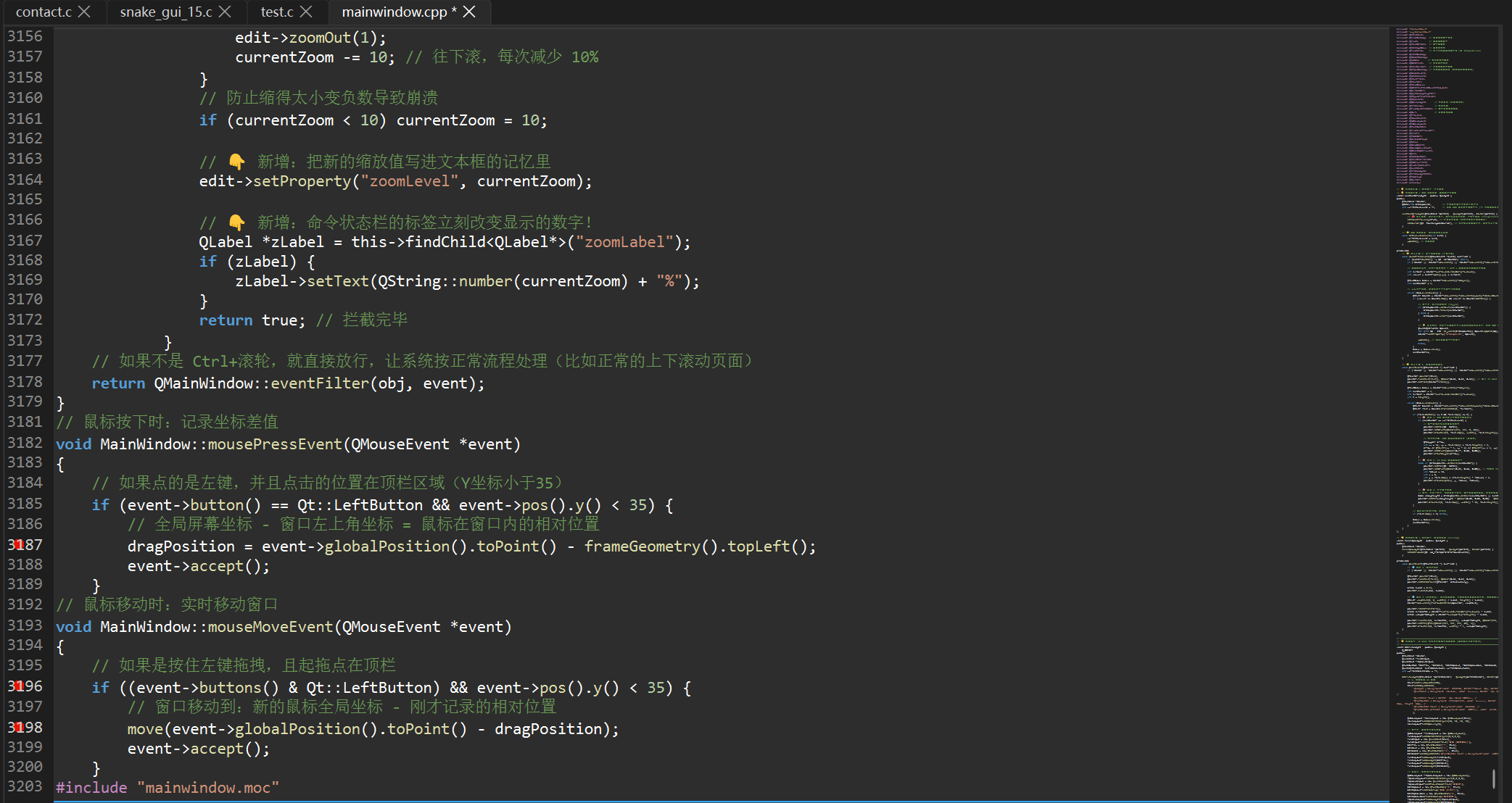
💡 断点数据存在哪里? 存在 QTextEdit 的
property("breakpoints")里------一个QList<QVariant>,存着所有断点行号。后续 GDB 调试器启动时,直接从这个属性里取出断点列表,用-break-insert指令批量设置。
2 异步语法高亮:后台线程 + 防抖 + VS Code Dark+ 配色
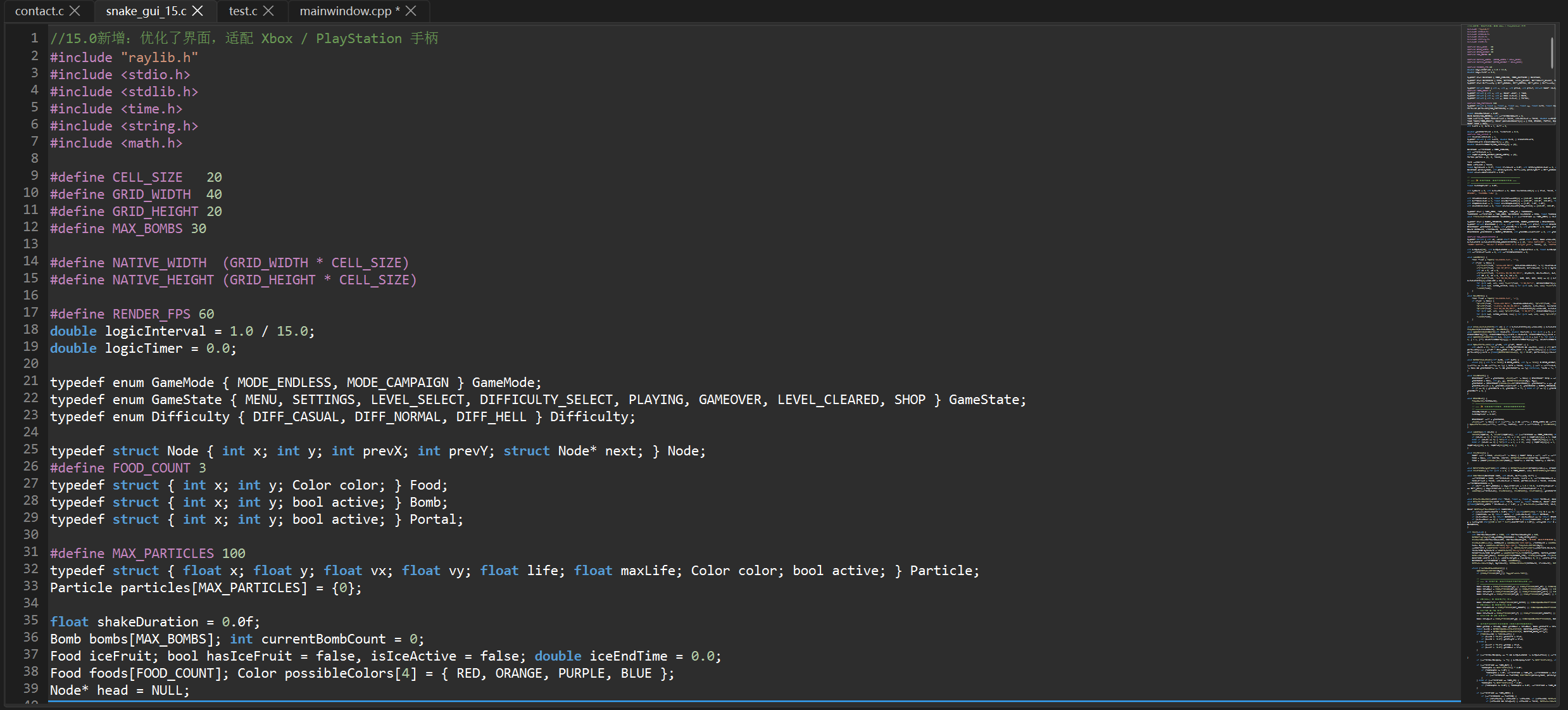
语法高亮是代码编辑器的灵魂。但直接在主线程做正则匹配,文件一大就会卡死 UI。这里用了一个 生产者-消费者 架构,通过 QtConcurrent::run[1](#1) 把耗时的解析工作扔到后台线程。
2.1 整体架构
AsyncHighlighter QtConcurrent 后台线程 防抖定时器(300ms) QTextDocument 用户打字 AsyncHighlighter QtConcurrent 后台线程 防抖定时器(300ms) QTextDocument 用户打字 #mermaid-svg-V9mZSypHqu7YO2xC{font-family:"trebuchet ms",verdana,arial,sans-serif;font-size:16px;fill:#333;}@keyframes edge-animation-frame{from{stroke-dashoffset:0;}}@keyframes dash{to{stroke-dashoffset:0;}}#mermaid-svg-V9mZSypHqu7YO2xC .edge-animation-slow{stroke-dasharray:9,5!important;stroke-dashoffset:900;animation:dash 50s linear infinite;stroke-linecap:round;}#mermaid-svg-V9mZSypHqu7YO2xC .edge-animation-fast{stroke-dasharray:9,5!important;stroke-dashoffset:900;animation:dash 20s linear infinite;stroke-linecap:round;}#mermaid-svg-V9mZSypHqu7YO2xC .error-icon{fill:#552222;}#mermaid-svg-V9mZSypHqu7YO2xC .error-text{fill:#552222;stroke:#552222;}#mermaid-svg-V9mZSypHqu7YO2xC .edge-thickness-normal{stroke-width:1px;}#mermaid-svg-V9mZSypHqu7YO2xC .edge-thickness-thick{stroke-width:3.5px;}#mermaid-svg-V9mZSypHqu7YO2xC .edge-pattern-solid{stroke-dasharray:0;}#mermaid-svg-V9mZSypHqu7YO2xC .edge-thickness-invisible{stroke-width:0;fill:none;}#mermaid-svg-V9mZSypHqu7YO2xC .edge-pattern-dashed{stroke-dasharray:3;}#mermaid-svg-V9mZSypHqu7YO2xC .edge-pattern-dotted{stroke-dasharray:2;}#mermaid-svg-V9mZSypHqu7YO2xC .marker{fill:#333333;stroke:#333333;}#mermaid-svg-V9mZSypHqu7YO2xC .marker.cross{stroke:#333333;}#mermaid-svg-V9mZSypHqu7YO2xC svg{font-family:"trebuchet ms",verdana,arial,sans-serif;font-size:16px;}#mermaid-svg-V9mZSypHqu7YO2xC p{margin:0;}#mermaid-svg-V9mZSypHqu7YO2xC .actor{stroke:hsl(259.6261682243, 59.7765363128%, 87.9019607843%);fill:#ECECFF;}#mermaid-svg-V9mZSypHqu7YO2xC text.actor>tspan{fill:black;stroke:none;}#mermaid-svg-V9mZSypHqu7YO2xC .actor-line{stroke:hsl(259.6261682243, 59.7765363128%, 87.9019607843%);}#mermaid-svg-V9mZSypHqu7YO2xC .innerArc{stroke-width:1.5;stroke-dasharray:none;}#mermaid-svg-V9mZSypHqu7YO2xC .messageLine0{stroke-width:1.5;stroke-dasharray:none;stroke:#333;}#mermaid-svg-V9mZSypHqu7YO2xC .messageLine1{stroke-width:1.5;stroke-dasharray:2,2;stroke:#333;}#mermaid-svg-V9mZSypHqu7YO2xC #arrowhead path{fill:#333;stroke:#333;}#mermaid-svg-V9mZSypHqu7YO2xC .sequenceNumber{fill:white;}#mermaid-svg-V9mZSypHqu7YO2xC #sequencenumber{fill:#333;}#mermaid-svg-V9mZSypHqu7YO2xC #crosshead path{fill:#333;stroke:#333;}#mermaid-svg-V9mZSypHqu7YO2xC .messageText{fill:#333;stroke:none;}#mermaid-svg-V9mZSypHqu7YO2xC .labelBox{stroke:hsl(259.6261682243, 59.7765363128%, 87.9019607843%);fill:#ECECFF;}#mermaid-svg-V9mZSypHqu7YO2xC .labelText,#mermaid-svg-V9mZSypHqu7YO2xC .labelText>tspan{fill:black;stroke:none;}#mermaid-svg-V9mZSypHqu7YO2xC .loopText,#mermaid-svg-V9mZSypHqu7YO2xC .loopText>tspan{fill:black;stroke:none;}#mermaid-svg-V9mZSypHqu7YO2xC .loopLine{stroke-width:2px;stroke-dasharray:2,2;stroke:hsl(259.6261682243, 59.7765363128%, 87.9019607843%);fill:hsl(259.6261682243, 59.7765363128%, 87.9019607843%);}#mermaid-svg-V9mZSypHqu7YO2xC .note{stroke:#aaaa33;fill:#fff5ad;}#mermaid-svg-V9mZSypHqu7YO2xC .noteText,#mermaid-svg-V9mZSypHqu7YO2xC .noteText>tspan{fill:black;stroke:none;}#mermaid-svg-V9mZSypHqu7YO2xC .activation0{fill:#f4f4f4;stroke:#666;}#mermaid-svg-V9mZSypHqu7YO2xC .activation1{fill:#f4f4f4;stroke:#666;}#mermaid-svg-V9mZSypHqu7YO2xC .activation2{fill:#f4f4f4;stroke:#666;}#mermaid-svg-V9mZSypHqu7YO2xC .actorPopupMenu{position:absolute;}#mermaid-svg-V9mZSypHqu7YO2xC .actorPopupMenuPanel{position:absolute;fill:#ECECFF;box-shadow:0px 8px 16px 0px rgba(0,0,0,0.2);filter:drop-shadow(3px 5px 2px rgb(0 0 0 / 0.4));}#mermaid-svg-V9mZSypHqu7YO2xC .actor-man line{stroke:hsl(259.6261682243, 59.7765363128%, 87.9019607843%);fill:#ECECFF;}#mermaid-svg-V9mZSypHqu7YO2xC .actor-man circle,#mermaid-svg-V9mZSypHqu7YO2xC line{stroke:hsl(259.6261682243, 59.7765363128%, 87.9019607843%);fill:#ECECFF;stroke-width:2px;}#mermaid-svg-V9mZSypHqu7YO2xC :root{--mermaid-font-family:"trebuchet ms",verdana,arial,sans-serif;} 输入内容 contentsChanged → 重启计时 300ms 超时 → QtConcurrent::run parseSyntaxInBackground 正则匹配 7 种语法元素 finished → updateCache() rehighlight() → highlightBlock() 按缓存涂色
2.2 数据结构:HighlightToken 和 HighlightCache
cpp
struct HighlightToken {
    int start;          // 令牌在行内的起始位置
    int length;         // 令牌长度
    QTextCharFormat format; // 高亮格式(颜色、粗体等)
};

// 缓存:行号 -> 该行的所有令牌
typedef QHash<int, QVector<HighlightToken>> HighlightCache;
2.3 后台解析器:parseSyntaxInBackground
这个函数在 后台线程 执行,所以声明为 static。它逐行扫描文本,用正则表达式匹配 7 种语法元素:
cpp
static HighlightCache parseSyntaxInBackground(const QString &fullText) {
HighlightCache cache;
QStringList lines = fullText.split('\n');
// VS Code Dark+ 配色方案
QTextCharFormat keywordFormat; // 关键字 → 蓝色
keywordFormat.setForeground(QColor(0x56, 0x9C, 0xD6));
keywordFormat.setFontWeight(QFont::Bold);
QRegularExpression keywordRegex(
"\\b(int|float|double|char|void|if|else|for|while|return|"
"struct|switch|case|break|continue|default)\\b"
);
QTextCharFormat preprocessorFormat; // 预处理器 → 品红色
preprocessorFormat.setForeground(QColor(0xC5, 0x86, 0xC0));
QRegularExpression preprocessorRegex("#[^\\\\n]*");
QTextCharFormat numberFormat; // 数字 → 绿色
numberFormat.setForeground(QColor(0xB5, 0xCE, 0xA8));
QRegularExpression numberRegex("\\b[0-9]+(\\.[0-9]+)?\\b");
QTextCharFormat stringFormat; // 字符串 → 橙色
stringFormat.setForeground(QColor(0xCE, 0x91, 0x78));
QRegularExpression stringRegex("\".*?\"");
QTextCharFormat functionFormat; // 函数名 → 黄色
functionFormat.setForeground(QColor(0xDC, 0xDC, 0xAA));
QRegularExpression functionRegex("\\b[A-Za-z0-9_]+(?=\\()");
QTextCharFormat commentFormat; // 注释 → 绿色
commentFormat.setForeground(QColor(0x6A, 0x99, 0x55));
QRegularExpression singleCommentRegex("//[^\\\\n]*");
// 多行注释状态机
bool inMultiLineComment = false;
for (int i = 0; i < lines.size(); ++i) {
QString text = lines[i];
QVector<HighlightToken> blockTokens;
// 快速匹配辅助函数
auto matchRule = [&](const QRegularExpression ®ex,
const QTextCharFormat &format) {
QRegularExpressionMatchIterator it = regex.globalMatch(text);
while (it.hasNext()) {
QRegularExpressionMatch match = it.next();
blockTokens.append({
static_cast<int>(match.capturedStart()),
static_cast<int>(match.capturedLength()),
format
});
}
};
if (!inMultiLineComment) {
matchRule(keywordRegex, keywordFormat);
matchRule(preprocessorRegex, preprocessorFormat);
matchRule(numberRegex, numberFormat);
matchRule(stringRegex, stringFormat);
matchRule(functionRegex, functionFormat);
matchRule(singleCommentRegex, commentFormat);
}
// 多行注释状态机(/* ... */ 跨行处理)
int startIndex = inMultiLineComment ? 0 : text.indexOf("/*");
while (startIndex >= 0) {
QRegularExpressionMatch match = QRegularExpression("\\*/").match(text, startIndex);
int endIndex = match.capturedStart();
int commentLength = 0;
if (endIndex == -1) {
inMultiLineComment = true;
commentLength = text.length() - startIndex;
} else {
inMultiLineComment = false;
commentLength = endIndex - startIndex + match.capturedLength();
}
blockTokens.append({startIndex, commentLength, commentFormat});
startIndex = text.indexOf("/*", startIndex + commentLength);
}
if (!blockTokens.isEmpty()) cache[i] = blockTokens;
}
return cache;
}
2.4 前端渲染器:AsyncHighlighter
AsyncHighlighter 是 QSyntaxHighlighter[2](#2) 的子类,它的工作很简单------从缓存中取令牌,涂色:
cpp
class AsyncHighlighter : public QSyntaxHighlighter {
    Q_OBJECT
public:
    explicit AsyncHighlighter(QTextDocument *parent = nullptr)
        : QSyntaxHighlighter(parent) {}

    // 接收后台计算结果
    void updateCache(const HighlightCache &newCache) {
        tokenCache = newCache;
        rehighlight(); // 命令主线程瞬间重绘全文
    }

protected:
    // Qt 按 block(段落)回调,每个 block 就是一行
    void highlightBlock(const QString &text) override {
        int blockNum = currentBlock().blockNumber();
        if (tokenCache.contains(blockNum)) {
            const QVector<HighlightToken> &tokens = tokenCache[blockNum];
            for (const HighlightToken &token : tokens) {
                setFormat(token.start, token.length, token.format);
            }
        }
    }

private:
    HighlightCache tokenCache;
};
2.5 防抖 + 调度:在新建标签页时连接
cpp
// 挂载高亮前端渲染器
AsyncHighlighter *highlighter = new AsyncHighlighter(newTextEdit->document());

// 防抖定时器 ------ 300ms
QTimer *debounceTimer = new QTimer(newTextEdit);
debounceTimer->setSingleShot(true);
debounceTimer->setInterval(300);

// 后台线程监视器
QFutureWatcher<HighlightCache> *watcher = new QFutureWatcher<HighlightCache>(newTextEdit);

// 文字改变 → 重启防抖
connect(newTextEdit->document(), &QTextDocument::contentsChanged,
        debounceTimer, [=]() { debounceTimer->start(); });

// 300ms 超时 → 发送到后台
connect(debounceTimer, &QTimer::timeout, newTextEdit, [=]() {
    if (watcher->isRunning()) return; // 上一波还没算完就别催
    QFuture<HighlightCache> future = QtConcurrent::run(
        parseSyntaxInBackground, newTextEdit->toPlainText()
    );
    watcher->setFuture(future);
});

// 后台算完 → 交给前端瞬间涂色
connect(watcher, &QFutureWatcher<HighlightCache>::finished, newTextEdit, [=]() {
    highlighter->updateCache(watcher->result());
});
💡 为什么要 300ms 防抖? 因为用户打字速度很快,每敲一个字就触发一次全文解析会浪费大量 CPU。防抖[3](#3)的逻辑是:用户停止打字 300ms 后才开始解析,这样既保证了响应速度,又避免了频繁解析。
3 括号配对 + 当前行高亮
光标移动时,编辑器需要实时反馈"你现在在哪一行"和"光标旁边的括号对应哪个"。这两个功能通过 QTextEdit::ExtraSelection 机制实现。
3.1 ExtraSelection 是什么?
ExtraSelection 是 QTextEdit 提供的"额外高亮"机制------可以在不改变用户选区的前提下,在文本上叠加多层半透明高亮。所有高亮效果通过 setExtraSelections() 一次性提交。
3.2 当前行高亮
cpp
connect(newTextEdit, &QTextEdit::cursorPositionChanged, this, [=]() {
    QList<QTextEdit::ExtraSelection> selections;

    // 当前行高亮:浅灰色背景,覆盖整行宽度
    QTextEdit::ExtraSelection lineSelection;
    QColor lineColor(128, 128, 128, 30); // 低透明度,不遮盖文字
    lineSelection.format.setBackground(lineColor);
    lineSelection.format.setProperty(QTextFormat::FullWidthSelection, true);
    lineSelection.cursor = newTextEdit->textCursor();
    lineSelection.cursor.clearSelection();
    selections.append(lineSelection);

    // ... 括号配对逻辑见下方 ...

    newTextEdit->setExtraSelections(selections); // 一次性提交所有高亮
});
关键属性:
| 属性 | 作用 |
|---|---|
FullWidthSelection = true |
高亮覆盖整行宽度(包括空白区域) |
clearSelection() |
只高亮光标所在行,不选中任何文字 |
QColor(128, 128, 128, 30) |
低 alpha 值确保不遮盖文字颜色 |
3.3 括号配对高亮
当光标紧邻一个括号时,自动找到并高亮匹配的另一个括号:
cpp
// 辅助 lambda:高亮指定位置的括号字符
auto highlightBracket = [&](int bracketPos) {
    QTextEdit::ExtraSelection bSel;
    bSel.cursor = newTextEdit->textCursor();
    bSel.cursor.setPosition(bracketPos);
    bSel.cursor.movePosition(QTextCursor::Right, QTextCursor::KeepAnchor, 1);
    bSel.format.setBackground(QColor(0, 122, 204, 80)); // 亮蓝色背景
    bSel.format.setFontWeight(QFont::Bold);
    selections.append(bSel);
};

QTextDocument *doc = newTextEdit->document();
int pos = newTextEdit->textCursor().position();

if (pos > 0 && pos <= doc->characterCount()) {
    QChar cLeft = doc->characterAt(pos - 1); // 光标左侧的字符

    // 情况 A:光标左侧是左括号 → 向后扫描找匹配的右括号
    if (cLeft == '(' || cLeft == '[' || cLeft == '{') {
        QChar openCh = cLeft;
        QChar closeCh = (openCh == '(') ? ')' : ((openCh == '[') ? ']' : '}');
        int depth = 1;

        for (int i = pos; i < doc->characterCount(); ++i) {
            QChar ch = doc->characterAt(i);
            if (ch == openCh) depth++;
            else if (ch == closeCh) depth--;
            if (depth == 0) {
                highlightBracket(pos - 1); // 点亮左括号
                highlightBracket(i);       // 点亮匹配的右括号
                break;
            }
        }
    }
    // 情况 B:光标左侧是右括号 → 向前逆向扫描找匹配的左括号
    else if (cLeft == ')' || cLeft == ']' || cLeft == '}') {
        QChar closeCh = cLeft;
        QChar openCh = (closeCh == ')') ? '(' : ((closeCh == ']') ? '[' : '{');
        int depth = 1;

        for (int i = pos - 2; i >= 0; --i) {
            QChar ch = doc->characterAt(i);
            if (ch == closeCh) depth++;
            else if (ch == openCh) depth--;
            if (depth == 0) {
                highlightBracket(pos - 1); // 点亮右括号
                highlightBracket(i);       // 点亮匹配的左括号
                break;
            }
        }
    }
}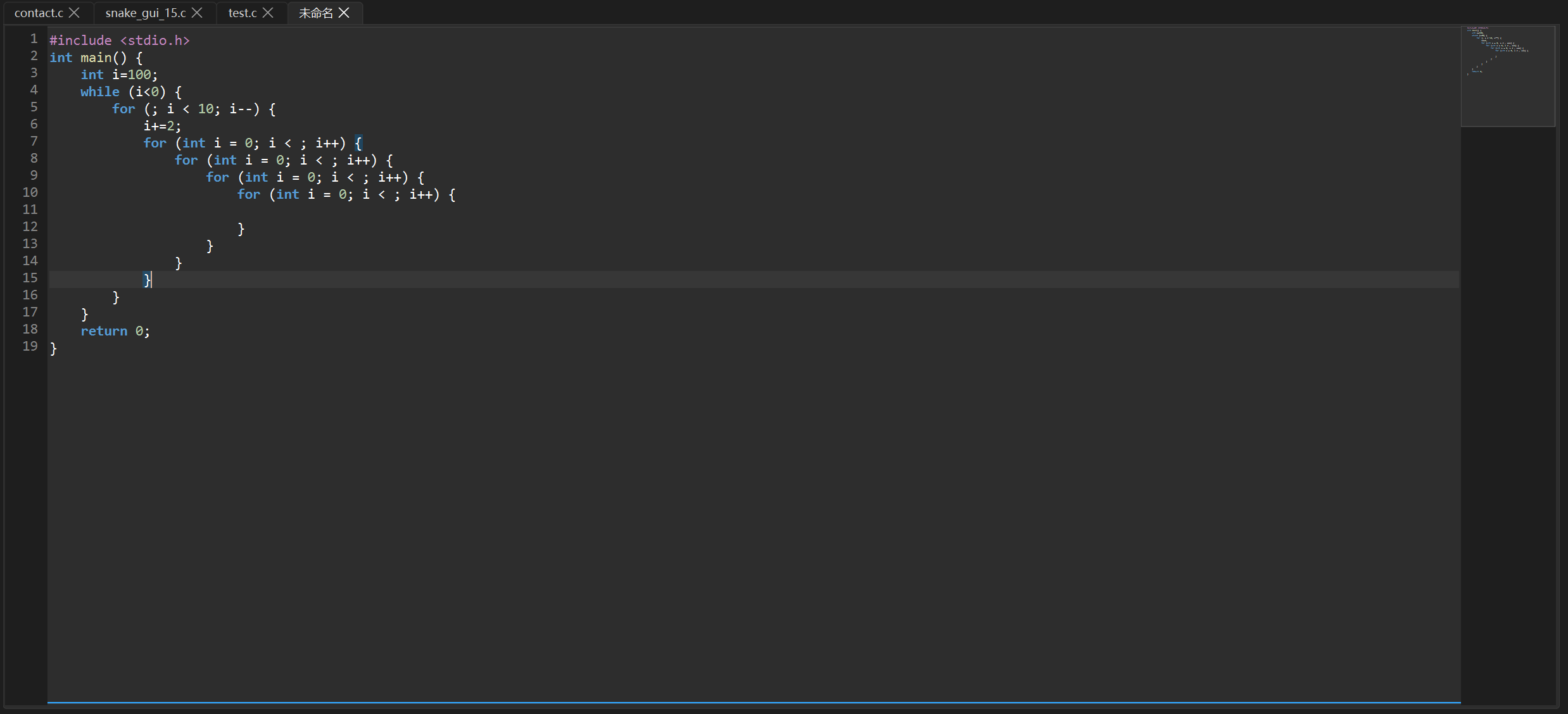
配对检测的核心是 深度计数法:
#mermaid-svg-XAcKKeCDT0S4213Q{font-family:"trebuchet ms",verdana,arial,sans-serif;font-size:16px;fill:#333;}@keyframes edge-animation-frame{from{stroke-dashoffset:0;}}@keyframes dash{to{stroke-dashoffset:0;}}#mermaid-svg-XAcKKeCDT0S4213Q .edge-animation-slow{stroke-dasharray:9,5!important;stroke-dashoffset:900;animation:dash 50s linear infinite;stroke-linecap:round;}#mermaid-svg-XAcKKeCDT0S4213Q .edge-animation-fast{stroke-dasharray:9,5!important;stroke-dashoffset:900;animation:dash 20s linear infinite;stroke-linecap:round;}#mermaid-svg-XAcKKeCDT0S4213Q .error-icon{fill:#552222;}#mermaid-svg-XAcKKeCDT0S4213Q .error-text{fill:#552222;stroke:#552222;}#mermaid-svg-XAcKKeCDT0S4213Q .edge-thickness-normal{stroke-width:1px;}#mermaid-svg-XAcKKeCDT0S4213Q .edge-thickness-thick{stroke-width:3.5px;}#mermaid-svg-XAcKKeCDT0S4213Q .edge-pattern-solid{stroke-dasharray:0;}#mermaid-svg-XAcKKeCDT0S4213Q .edge-thickness-invisible{stroke-width:0;fill:none;}#mermaid-svg-XAcKKeCDT0S4213Q .edge-pattern-dashed{stroke-dasharray:3;}#mermaid-svg-XAcKKeCDT0S4213Q .edge-pattern-dotted{stroke-dasharray:2;}#mermaid-svg-XAcKKeCDT0S4213Q .marker{fill:#333333;stroke:#333333;}#mermaid-svg-XAcKKeCDT0S4213Q .marker.cross{stroke:#333333;}#mermaid-svg-XAcKKeCDT0S4213Q svg{font-family:"trebuchet ms",verdana,arial,sans-serif;font-size:16px;}#mermaid-svg-XAcKKeCDT0S4213Q p{margin:0;}#mermaid-svg-XAcKKeCDT0S4213Q .label{font-family:"trebuchet ms",verdana,arial,sans-serif;color:#333;}#mermaid-svg-XAcKKeCDT0S4213Q .cluster-label text{fill:#333;}#mermaid-svg-XAcKKeCDT0S4213Q .cluster-label span{color:#333;}#mermaid-svg-XAcKKeCDT0S4213Q .cluster-label span p{background-color:transparent;}#mermaid-svg-XAcKKeCDT0S4213Q .label text,#mermaid-svg-XAcKKeCDT0S4213Q span{fill:#333;color:#333;}#mermaid-svg-XAcKKeCDT0S4213Q .node rect,#mermaid-svg-XAcKKeCDT0S4213Q .node circle,#mermaid-svg-XAcKKeCDT0S4213Q .node ellipse,#mermaid-svg-XAcKKeCDT0S4213Q .node polygon,#mermaid-svg-XAcKKeCDT0S4213Q .node path{fill:#ECECFF;stroke:#9370DB;stroke-width:1px;}#mermaid-svg-XAcKKeCDT0S4213Q .rough-node .label text,#mermaid-svg-XAcKKeCDT0S4213Q .node .label text,#mermaid-svg-XAcKKeCDT0S4213Q .image-shape .label,#mermaid-svg-XAcKKeCDT0S4213Q .icon-shape .label{text-anchor:middle;}#mermaid-svg-XAcKKeCDT0S4213Q .node .katex path{fill:#000;stroke:#000;stroke-width:1px;}#mermaid-svg-XAcKKeCDT0S4213Q .rough-node .label,#mermaid-svg-XAcKKeCDT0S4213Q .node .label,#mermaid-svg-XAcKKeCDT0S4213Q .image-shape .label,#mermaid-svg-XAcKKeCDT0S4213Q .icon-shape .label{text-align:center;}#mermaid-svg-XAcKKeCDT0S4213Q .node.clickable{cursor:pointer;}#mermaid-svg-XAcKKeCDT0S4213Q .root .anchor path{fill:#333333!important;stroke-width:0;stroke:#333333;}#mermaid-svg-XAcKKeCDT0S4213Q .arrowheadPath{fill:#333333;}#mermaid-svg-XAcKKeCDT0S4213Q .edgePath .path{stroke:#333333;stroke-width:2.0px;}#mermaid-svg-XAcKKeCDT0S4213Q .flowchart-link{stroke:#333333;fill:none;}#mermaid-svg-XAcKKeCDT0S4213Q .edgeLabel{background-color:rgba(232,232,232, 0.8);text-align:center;}#mermaid-svg-XAcKKeCDT0S4213Q .edgeLabel p{background-color:rgba(232,232,232, 0.8);}#mermaid-svg-XAcKKeCDT0S4213Q .edgeLabel rect{opacity:0.5;background-color:rgba(232,232,232, 0.8);fill:rgba(232,232,232, 0.8);}#mermaid-svg-XAcKKeCDT0S4213Q .labelBkg{background-color:rgba(232, 232, 232, 0.5);}#mermaid-svg-XAcKKeCDT0S4213Q .cluster rect{fill:#ffffde;stroke:#aaaa33;stroke-width:1px;}#mermaid-svg-XAcKKeCDT0S4213Q .cluster text{fill:#333;}#mermaid-svg-XAcKKeCDT0S4213Q .cluster span{color:#333;}#mermaid-svg-XAcKKeCDT0S4213Q div.mermaidTooltip{position:absolute;text-align:center;max-width:200px;padding:2px;font-family:"trebuchet ms",verdana,arial,sans-serif;font-size:12px;background:hsl(80, 100%, 96.2745098039%);border:1px solid #aaaa33;border-radius:2px;pointer-events:none;z-index:100;}#mermaid-svg-XAcKKeCDT0S4213Q .flowchartTitleText{text-anchor:middle;font-size:18px;fill:#333;}#mermaid-svg-XAcKKeCDT0S4213Q rect.text{fill:none;stroke-width:0;}#mermaid-svg-XAcKKeCDT0S4213Q .icon-shape,#mermaid-svg-XAcKKeCDT0S4213Q .image-shape{background-color:rgba(232,232,232, 0.8);text-align:center;}#mermaid-svg-XAcKKeCDT0S4213Q .icon-shape p,#mermaid-svg-XAcKKeCDT0S4213Q .image-shape p{background-color:rgba(232,232,232, 0.8);padding:2px;}#mermaid-svg-XAcKKeCDT0S4213Q .icon-shape .label rect,#mermaid-svg-XAcKKeCDT0S4213Q .image-shape .label rect{opacity:0.5;background-color:rgba(232,232,232, 0.8);fill:rgba(232,232,232, 0.8);}#mermaid-svg-XAcKKeCDT0S4213Q .label-icon{display:inline-block;height:1em;overflow:visible;vertical-align:-0.125em;}#mermaid-svg-XAcKKeCDT0S4213Q .node .label-icon path{fill:currentColor;stroke:revert;stroke-width:revert;}#mermaid-svg-XAcKKeCDT0S4213Q :root{--mermaid-font-family:"trebuchet ms",verdana,arial,sans-serif;} 是
是
否
是
否
否
是
否
是
是
否
是
否
否
是
光标左侧字符 cLeft
cLeft 是左括号?
初始化 depth=1
向后扫描
ch == openCh?
depth++
ch == closeCh?
depth--
下一个字符
depth == 0?
找到匹配!
高亮两端括号
cLeft 是右括号?
初始化 depth=1
向前逆向扫描
ch == closeCh?
depth++
ch == openCh?
depth--
前一个字符
depth == 0?
4 智能代码补全与缩进
这一节实现三种提升编码效率的交互:成对符号自动补全、回车智能缩进、Tab 展开代码片段。全部在 eventFilter 的 KeyPress 事件中处理。
4.1 成对符号自动补全
输入左括号时,自动补上右括号,光标居中:
cpp
if (event->type() == QEvent::KeyPress) {
    QKeyEvent *keyEvent = static_cast<QKeyEvent*>(event);
    QTextEdit *edit = qobject_cast<QTextEdit*>(obj);

    if (edit && edit->objectName() != "terminalEdit") {
        QString textToInsert;
        bool matched = false;

        if (keyEvent->key() == Qt::Key_ParenLeft)        { textToInsert = "()"; matched = true; }
        else if (keyEvent->key() == Qt::Key_BracketLeft) { textToInsert = "[]"; matched = true; }
        else if (keyEvent->key() == Qt::Key_BraceLeft)   { textToInsert = "{}"; matched = true; }
        else if (keyEvent->text() == "\"")               { textToInsert = "\"\""; matched = true; }
        else if (keyEvent->text() == "'")                { textToInsert = "''"; matched = true; }

        if (matched) {
            edit->insertPlainText(textToInsert);
            // 光标左移一位,落在两个符号中间
            QTextCursor cursor = edit->textCursor();
            cursor.movePosition(QTextCursor::Left, QTextCursor::MoveAnchor, 1);
            edit->setTextCursor(cursor);
            return true; // 告诉系统:按键已处理,不要再打字符了
        }
    }
}
效果:输入 ( 会变成 (),光标在中间;输入 { 会变成 {},光标在中间。
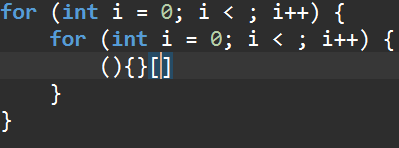
4.2 回车智能缩进
按回车时,自动继承当前行的缩进;如果光标在 {} 中间,还会多缩进 4 空格:
cpp
if (keyEvent->key() == Qt::Key_Return || keyEvent->key() == Qt::Key_Enter) {
    QTextCursor cursor = edit->textCursor();
    QString currentLine = cursor.block().text();
    int posInBlock = cursor.positionInBlock();
    QString textBeforeCursor = currentLine.left(posInBlock);

    // 提取当前行的基础缩进(开头的空格)
    QString baseIndent = "";
    for (int i = 0; i < currentLine.length(); ++i) {
        if (currentLine[i].isSpace()) baseIndent += currentLine[i];
        else break;
    }

    // 智能感知:光标是否被夹在 { } 中间?
    int pos = cursor.position();
    QTextDocument *doc = edit->document();
    if (pos > 0 && pos < doc->characterCount()) {
        if (doc->characterAt(pos - 1) == '{' && doc->characterAt(pos) == '}') {
            // 大括号展开魔法!
            QString innerIndent = baseIndent + "    "; // 内部多缩进 4 空格
            edit->insertPlainText("\n" + innerIndent + "\n" + baseIndent);

            // 光标回到中间空行的末尾
            QTextCursor newCursor = edit->textCursor();
            newCursor.movePosition(QTextCursor::Up, QTextCursor::MoveAnchor, 1);
            newCursor.movePosition(QTextCursor::EndOfLine);
            edit->setTextCursor(newCursor);
            return true;
        }
    }

    // 常规缩进:继承基础缩进,如果光标左侧以 { 结尾则多缩进 4 空格
    QString indent = baseIndent;
    if (textBeforeCursor.trimmed().endsWith('{')) {
        indent += "    ";
    }
    edit->insertPlainText("\n" + indent);
    return true;
}
缩进流程:
#mermaid-svg-Ca5iyypwP54YYH6C{font-family:"trebuchet ms",verdana,arial,sans-serif;font-size:16px;fill:#333;}@keyframes edge-animation-frame{from{stroke-dashoffset:0;}}@keyframes dash{to{stroke-dashoffset:0;}}#mermaid-svg-Ca5iyypwP54YYH6C .edge-animation-slow{stroke-dasharray:9,5!important;stroke-dashoffset:900;animation:dash 50s linear infinite;stroke-linecap:round;}#mermaid-svg-Ca5iyypwP54YYH6C .edge-animation-fast{stroke-dasharray:9,5!important;stroke-dashoffset:900;animation:dash 20s linear infinite;stroke-linecap:round;}#mermaid-svg-Ca5iyypwP54YYH6C .error-icon{fill:#552222;}#mermaid-svg-Ca5iyypwP54YYH6C .error-text{fill:#552222;stroke:#552222;}#mermaid-svg-Ca5iyypwP54YYH6C .edge-thickness-normal{stroke-width:1px;}#mermaid-svg-Ca5iyypwP54YYH6C .edge-thickness-thick{stroke-width:3.5px;}#mermaid-svg-Ca5iyypwP54YYH6C .edge-pattern-solid{stroke-dasharray:0;}#mermaid-svg-Ca5iyypwP54YYH6C .edge-thickness-invisible{stroke-width:0;fill:none;}#mermaid-svg-Ca5iyypwP54YYH6C .edge-pattern-dashed{stroke-dasharray:3;}#mermaid-svg-Ca5iyypwP54YYH6C .edge-pattern-dotted{stroke-dasharray:2;}#mermaid-svg-Ca5iyypwP54YYH6C .marker{fill:#333333;stroke:#333333;}#mermaid-svg-Ca5iyypwP54YYH6C .marker.cross{stroke:#333333;}#mermaid-svg-Ca5iyypwP54YYH6C svg{font-family:"trebuchet ms",verdana,arial,sans-serif;font-size:16px;}#mermaid-svg-Ca5iyypwP54YYH6C p{margin:0;}#mermaid-svg-Ca5iyypwP54YYH6C .label{font-family:"trebuchet ms",verdana,arial,sans-serif;color:#333;}#mermaid-svg-Ca5iyypwP54YYH6C .cluster-label text{fill:#333;}#mermaid-svg-Ca5iyypwP54YYH6C .cluster-label span{color:#333;}#mermaid-svg-Ca5iyypwP54YYH6C .cluster-label span p{background-color:transparent;}#mermaid-svg-Ca5iyypwP54YYH6C .label text,#mermaid-svg-Ca5iyypwP54YYH6C span{fill:#333;color:#333;}#mermaid-svg-Ca5iyypwP54YYH6C .node rect,#mermaid-svg-Ca5iyypwP54YYH6C .node circle,#mermaid-svg-Ca5iyypwP54YYH6C .node ellipse,#mermaid-svg-Ca5iyypwP54YYH6C .node polygon,#mermaid-svg-Ca5iyypwP54YYH6C .node path{fill:#ECECFF;stroke:#9370DB;stroke-width:1px;}#mermaid-svg-Ca5iyypwP54YYH6C .rough-node .label text,#mermaid-svg-Ca5iyypwP54YYH6C .node .label text,#mermaid-svg-Ca5iyypwP54YYH6C .image-shape .label,#mermaid-svg-Ca5iyypwP54YYH6C .icon-shape .label{text-anchor:middle;}#mermaid-svg-Ca5iyypwP54YYH6C .node .katex path{fill:#000;stroke:#000;stroke-width:1px;}#mermaid-svg-Ca5iyypwP54YYH6C .rough-node .label,#mermaid-svg-Ca5iyypwP54YYH6C .node .label,#mermaid-svg-Ca5iyypwP54YYH6C .image-shape .label,#mermaid-svg-Ca5iyypwP54YYH6C .icon-shape .label{text-align:center;}#mermaid-svg-Ca5iyypwP54YYH6C .node.clickable{cursor:pointer;}#mermaid-svg-Ca5iyypwP54YYH6C .root .anchor path{fill:#333333!important;stroke-width:0;stroke:#333333;}#mermaid-svg-Ca5iyypwP54YYH6C .arrowheadPath{fill:#333333;}#mermaid-svg-Ca5iyypwP54YYH6C .edgePath .path{stroke:#333333;stroke-width:2.0px;}#mermaid-svg-Ca5iyypwP54YYH6C .flowchart-link{stroke:#333333;fill:none;}#mermaid-svg-Ca5iyypwP54YYH6C .edgeLabel{background-color:rgba(232,232,232, 0.8);text-align:center;}#mermaid-svg-Ca5iyypwP54YYH6C .edgeLabel p{background-color:rgba(232,232,232, 0.8);}#mermaid-svg-Ca5iyypwP54YYH6C .edgeLabel rect{opacity:0.5;background-color:rgba(232,232,232, 0.8);fill:rgba(232,232,232, 0.8);}#mermaid-svg-Ca5iyypwP54YYH6C .labelBkg{background-color:rgba(232, 232, 232, 0.5);}#mermaid-svg-Ca5iyypwP54YYH6C .cluster rect{fill:#ffffde;stroke:#aaaa33;stroke-width:1px;}#mermaid-svg-Ca5iyypwP54YYH6C .cluster text{fill:#333;}#mermaid-svg-Ca5iyypwP54YYH6C .cluster span{color:#333;}#mermaid-svg-Ca5iyypwP54YYH6C div.mermaidTooltip{position:absolute;text-align:center;max-width:200px;padding:2px;font-family:"trebuchet ms",verdana,arial,sans-serif;font-size:12px;background:hsl(80, 100%, 96.2745098039%);border:1px solid #aaaa33;border-radius:2px;pointer-events:none;z-index:100;}#mermaid-svg-Ca5iyypwP54YYH6C .flowchartTitleText{text-anchor:middle;font-size:18px;fill:#333;}#mermaid-svg-Ca5iyypwP54YYH6C rect.text{fill:none;stroke-width:0;}#mermaid-svg-Ca5iyypwP54YYH6C .icon-shape,#mermaid-svg-Ca5iyypwP54YYH6C .image-shape{background-color:rgba(232,232,232, 0.8);text-align:center;}#mermaid-svg-Ca5iyypwP54YYH6C .icon-shape p,#mermaid-svg-Ca5iyypwP54YYH6C .image-shape p{background-color:rgba(232,232,232, 0.8);padding:2px;}#mermaid-svg-Ca5iyypwP54YYH6C .icon-shape .label rect,#mermaid-svg-Ca5iyypwP54YYH6C .image-shape .label rect{opacity:0.5;background-color:rgba(232,232,232, 0.8);fill:rgba(232,232,232, 0.8);}#mermaid-svg-Ca5iyypwP54YYH6C .label-icon{display:inline-block;height:1em;overflow:visible;vertical-align:-0.125em;}#mermaid-svg-Ca5iyypwP54YYH6C .node .label-icon path{fill:currentColor;stroke:revert;stroke-width:revert;}#mermaid-svg-Ca5iyypwP54YYH6C :root{--mermaid-font-family:"trebuchet ms",verdana,arial,sans-serif;} 是
否
是
否
用户按回车
提取 baseIndent
当前行开头的空格
光标被夹在
{ } 中间?
大括号展开:
插入换行 + innerIndent + 换行 + baseIndent
光标回到中间空行
textBeforeCursor
以 { 结尾?
indent = baseIndent + 4空格
indent = baseIndent
插入换行 + indent
4.3 Tab 展开代码片段
输入关键字后按 Tab,自动展开为完整的代码骨架:
cpp
if (keyEvent->key() == Qt::Key_Tab) {
    QTextCursor cursor = edit->textCursor();

    // 提取当前行的基础缩进
    QString currentLine = cursor.block().text();
    QString baseIndent = "";
    for (int i = 0; i < currentLine.length(); ++i) {
        if (currentLine[i].isSpace()) baseIndent += currentLine[i];
        else break;
    }
    QString innerIndent = baseIndent + "    ";

    // 选中光标所在的单词
    cursor.select(QTextCursor::WordUnderCursor);
    QString currentWord = cursor.selectedText();

    if (currentWord == "main") {
        QString mainBody = "int main() {\n" +
                           innerIndent + "\n" +
                           innerIndent + "return 0;\n" +
                           baseIndent + "}";
        cursor.insertText(mainBody);
        // 光标回到函数体内部的空行
        cursor.movePosition(QTextCursor::Up, QTextCursor::MoveAnchor, 2);
        cursor.movePosition(QTextCursor::EndOfLine);
        edit->setTextCursor(cursor);
        return true;
    }
    else if (currentWord == "for") {
        cursor.insertText("for (int i = 0; i < ; i++) {\n" +
                          innerIndent + "\n" + baseIndent + "}");
        cursor.movePosition(QTextCursor::Up, QTextCursor::MoveAnchor, 2);
        cursor.movePosition(QTextCursor::EndOfLine);
        cursor.movePosition(QTextCursor::Left, QTextCursor::MoveAnchor, 8);
        edit->setTextCursor(cursor);
        return true;
    }
    else if (currentWord == "inc") {
        cursor.insertText("#include <stdio.h>\n");
        return true;
    }
    // ... 还有 while, switch 等更多片段
}
目前支持的代码片段:
| 关键词 | 展开内容 |
|---|---|
main |
完整的 main 函数骨架(含 return 0) |
for |
for 循环模板(光标停在条件位置) |
inc |
#include <stdio.h> |
while |
while 循环模板 |
switch |
switch-case 模板 |
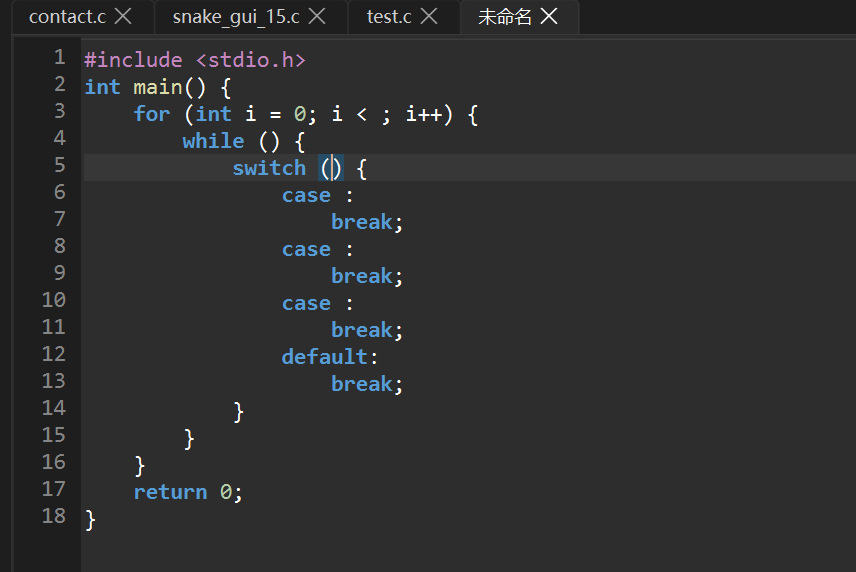
💡 为什么
return true很重要? 在eventFilter中,返回true表示"这个事件我已经处理了,系统不要再做任何事情"。如果不返回true,系统还会在编辑器里打出一个 Tab 字符或换行符,导致重复输入。
本篇总结
编辑器从一个记事本蜕变为真正的代码编辑器。回顾一下:
| 功能 | 核心技术 | 关键 API |
|---|---|---|
| 行号显示 | QPainter 手绘 + 滚动同步 | paintEvent(), drawText() |
| 断点管理 | 点击 Toggle + 属性存储 | breakpoints QSet, setProperty() |
| GDB 执行箭头 | 手绘多边形 | drawPolygon(), setExecutionLine() |
| 异步语法高亮 | QtConcurrent + 防抖 300ms | QtConcurrent::run(), QFutureWatcher |
| VS Code Dark+ 配色 | 7 种正则匹配规则 | QRegularExpression, QTextCharFormat |
| 当前行高亮 | ExtraSelection 整行高亮 | FullWidthSelection |
| 括号配对 | 深度计数法 | ExtraSelection, characterAt() |
| 成对符号补全 | eventFilter 拦截 | insertPlainText(), return true |
| 回车智能缩进 | 感知 { } 上下文 | textBeforeCursor, baseIndent |
| Tab 代码片段 | 关键词匹配 + 骨架展开 | WordUnderCursor |
本篇核心代码量约 500 行,实现了编辑器 80% 的视觉增强功能。
下一篇预告
编辑器的外观和编辑体验已经到位了。第 5 篇将让编辑器"活"起来------集成一个真正的终端:
- 集成 PowerShell 终端:QProcess 启动真 PowerShell 进程
- stdin/stdout 管道通信:实时读写终端输出
- 只读边界保护:防止用户修改历史输出
- 命令历史回溯:上下键翻阅历史命令
- Tab 路径自动补全:循环切换匹配项
- Ctrl+C 中断:kill + 重启进程模拟 SIGINT
- F5 一键编译运行:gcc 编译 + 弹出独立控制台
敬请期待!
脚注
-
QtConcurrent::run()是 Qt 提供的最简单的多线程 API,一行代码就能把函数扔到后台线程执行。底层使用全局线程池(QThreadPool),无需手动管理线程生命周期。配合QFutureWatcher可以异步获取结果,避免阻塞主线程。 ↩︎ -
QSyntaxHighlighter是 Qt 提供的语法高亮基类,通常在highlightBlock()回调中逐行涂色。但传统用法是在主线程同步执行,文件一大就会卡顿。我们的AsyncHighlighter是一个变体------它不自己解析语法,而是从后台线程的缓存中取现成的令牌来涂色,实现了"后台解析 + 前端渲染"的分离。 ↩︎ -
防抖(Debounce)是前端开发中常用的性能优化策略:连续触发事件时,只在最后一次触发后等待一段时间才真正执行。这样可以将高频事件(如打字、滚动)合并为低频执行(每 300ms 一次),大幅降低 CPU 开销。 ↩︎