适合谁看
-
正在做鸿蒙 Core Speech Kit 接入的 Flutter 开发者
-
遇到"语音识别结果收不到"或"引擎未关闭"问题的人
-
想理解 ArkTS 侧异步回调如何安全回传到 Flutter 侧的开发者
问题背景
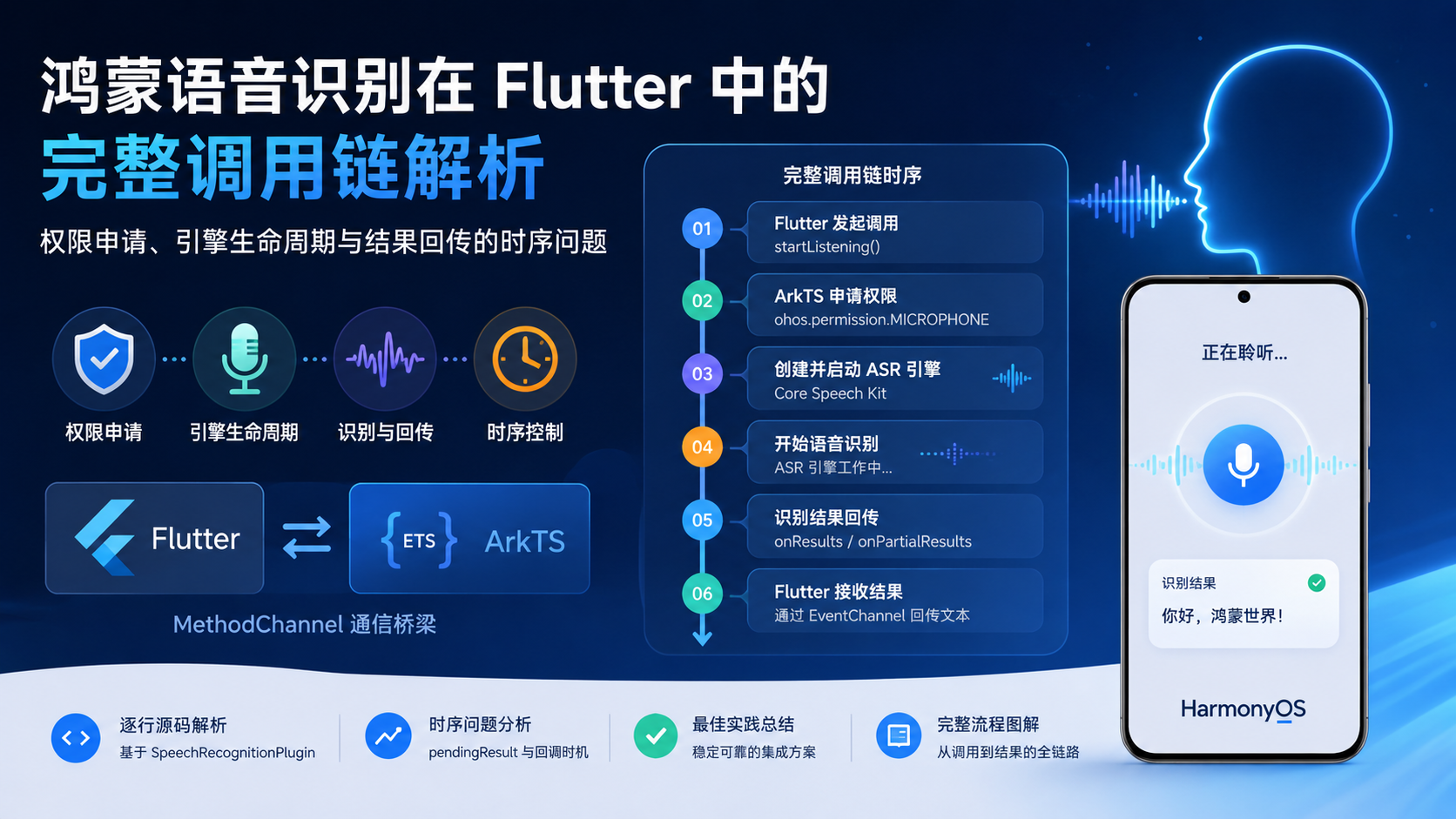
语音识别的调用链比普通 MethodChannel 调用复杂得多:
-
Flutter 调用
startListening -
ArkTS 侧先申请麦克风权限(异步)
-
权限通过后创建 ASR 引擎(异步)
-
设置监听器、启动识别(异步)
-
系统回调
onResult返回识别结果 -
通过
MethodResult回传到 Flutter
这条链路中有多个异步步骤,任何一步的时序问题都可能导致结果丢失或引擎泄漏。
项目中的真实场景
食界探味在 AI 助手页面支持语音输入。用户点击麦克风按钮后:
-
Flutter 调用
SpeechRecognitionChannel.startListening() -
ArkTS 侧
SpeechRecognitionPlugin.handleStartListening执行完整流程 -
识别完成后,Flutter 收到文本并填入输入框
整个流程的时序控制是本篇的重点。
核心实现
Flutter 侧发起调用
// speech_recognition_channel.dart
class SpeechRecognitionChannel {
  static const _channel = MethodChannel('com.foodvoyage.speech_recognition');

  static Future<String> startListening() async {
    try {
      final result = await _channel.invokeMethod<String>('startListening');
      return result ?? '';
    } on MissingPluginException {
      return '';
    } catch (e) {
      AppLogger.warning('Speech recognition failed: $e');
      return '';
    }
  }

  static Future<void> stopListening() async {
    try {
      await _channel.invokeMethod<void>('stopListening');
    } on MissingPluginException {
      // 非鸿蒙平台
    }
  }
}
Flutter 侧的调用是简单的 invokeMethod,但 ArkTS 侧的处理要复杂得多。
ArkTS 侧:handleStartListening 完整流程
// SpeechRecognitionPlugin.ets
private async handleStartListening(call: MethodCall, result: MethodResult): Promise<void> {
  // 1. 保存 MethodResult 引用
  this.pendingResult = result;

  // 2. 申请麦克风权限
  const hasPermission = await this.requestMicrophonePermission();
  if (!hasPermission) {
    this.pendingResult = null;
    result.error('PERMISSION_DENIED', '麦克风权限被拒绝', null);
    return;
  }

  // 3. 创建引擎
  try {
    await this.createEngine();
    // 4. 设置监听器
    this.setupListener();
    // 5. 启动识别
    this.startListening();
  } catch (err) {
    this.pendingResult = null;
    const error = err as BusinessError;
    result.error('ASR_ERROR', `语音识别启动失败: ${error.message}`, null);
  }
}关键设计:pendingResult模式 。ArkTS 侧不直接在 handleStartListening 中返回结果,而是保存 MethodResult 引用,等异步回调 onResult 触发时再通过 pendingResult.success() 回传。
权限申请
// SpeechRecognitionPlugin.ets
private async requestMicrophonePermission(): Promise<boolean> {
  try {
    const atManager = abilityAccessCtrl.createAtManager();
    const permissions: Permissions[] = ['ohos.permission.MICROPHONE'];
    const context = getContext(this);
    const grantResult = await atManager.requestPermissionsFromUser(context, permissions);
    return grantResult.authResults.every(
      status => status === abilityAccessCtrl.GrantStatus.PERMISSION_GRANTED
    );
  } catch (err) {
    console.error(TAG, `requestPermission failed: ${JSON.stringify(err)}`);
    return false;
  }
}
权限申请的关键点:
-
使用
abilityAccessCtrl.createAtManager()创建权限管理器 -
requestPermissionsFromUser弹出系统权限弹窗 -
返回
authResults数组,需要检查每个权限的状态 -
如果用户拒绝,返回
false,Flutter 侧收到PERMISSION_DENIED错误
ASR 引擎生命周期
// SpeechRecognitionPlugin.ets
private createEngine(): Promise<void> {
  return new Promise((resolve, reject) => {
    const extraParam: Record<string, Object> = {
      'locate': 'CN',
      'recognizerMode': 'short'
    };
    const initParams: speechRecognizer.CreateEngineParams = {
      language: 'zh-CN',
      online: 1,
      extraParams: extraParam
    };

    speechRecognizer.createEngine(initParams, (err, engine) => {
      if (!err) {
        this.asrEngine = engine;
        resolve();
      } else {
        reject(err);
      }
    });
  });
}
引擎配置参数:
-
language: 'zh-CN':中文识别 -
online: 1:在线识别(需要网络) -
recognizerMode: 'short':短语音模式
监听器设置
// SpeechRecognitionPlugin.ets
private setupListener(): void {
  if (!this.asrEngine) return;

  const listener: speechRecognizer.RecognitionListener = {
    onStart: (sessionId, eventMessage) => {
      console.info(TAG, `onStart sessionId: ${sessionId}`);
    },
    onEvent: (sessionId, eventCode, eventMessage) => {
      console.info(TAG, `onEvent code: ${eventCode}`);
    },
    onResult: (sessionId, result) => {
      console.info(TAG, `onResult: ${JSON.stringify(result)}`);
      if (result.isLast && this.pendingResult) {
        // 识别完成,回传结果
        this.pendingResult.success(result.result);
        this.pendingResult = null;
        this.shutdownEngine();
      }
    },
    onComplete: (sessionId, eventMessage) => {
      console.info(TAG, `onComplete`);
      if (this.pendingResult) {
        this.pendingResult.success('');
        this.pendingResult = null;
      }
      this.shutdownEngine();
    },
    onError: (sessionId, errorCode, errorMessage) => {
      console.error(TAG, `onError code: ${errorCode}`);
      if (this.pendingResult) {
        this.pendingResult.error('ASR_ERROR', errorMessage, null);
        this.pendingResult = null;
      }
      this.shutdownEngine();
    }
  };

  this.asrEngine.setListener(listener);
}
监听器的事件处理:
| 事件 | 处理逻辑 |
|---|---|
onStart |
仅记录日志 |
onEvent |
仅记录日志 |
onResult |
当 isLast 为 true 时,回传结果并关闭引擎 |
onComplete |
回传空结果并关闭引擎 |
onError |
回传错误并关闭引擎 |
引擎关闭
// SpeechRecognitionPlugin.ets
private shutdownEngine(): void {
  try {
    if (this.asrEngine) {
      this.asrEngine.shutdown();
      this.asrEngine = null;
      console.info(TAG, 'Engine shutdown');
    }
  } catch (err) {
    console.error(TAG, `shutdown error: ${JSON.stringify(err)}`);
  }
}
引擎关闭的时机:
-
onResult收到最终结果后 -
onComplete回调触发时 -
onError错误发生时 -
onDetachedFromEngine插件销毁时
停止识别
// SpeechRecognitionPlugin.ets
private handleStopListening(result: MethodResult): void {
  try {
    if (this.asrEngine) {
      this.asrEngine.finish(this.sessionId);
    }
    result.success(null);
  } catch (err) {
    const error = err as BusinessError;
    result.error('ASR_ERROR', `停止识别失败: ${error.message}`, null);
  }
}
finish 方法通知引擎停止录音,但不会立即关闭引擎。引擎会在 onResult 或 onComplete 回调中自然关闭。
关键代码位置
-
app/ohos/entry/src/main/ets/plugins/SpeechRecognitionPlugin.ets--- 完整的 ArkTS 侧实现 -
app/lib/core/platform/speech_recognition_channel.dart--- Flutter 侧调用封装 -
app/ohos/entry/src/main/ets/entryability/EntryAbility.ets--- 插件注册
鸿蒙侧实现
鸿蒙侧的工作分为四个层次:
-
权限层 :
abilityAccessCtrl.requestPermissionsFromUser申请麦克风权限 -
引擎层 :
speechRecognizer.createEngine创建 ASR 引擎 -
监听层 :
RecognitionListener处理识别事件 -
回传层 :
pendingResult.success/error将结果回传到 Flutter
引擎生命周期状态机:
创建引擎 → 设置监听器 → 启动识别 → onResult/onComplete/onError → 关闭引擎
    ↑                                                          ↓
    └──────────────────── 等待下次调用 ←──────────────────────────┘
Flutter 侧实现
Flutter 侧的职责相对简单:
-
调用
startListening()发起识别 -
等待
invokeMethod返回识别结果 -
调用
stopListening()手动停止识别 -
处理
MissingPluginException(非鸿蒙平台)
常见坑
-
坑 1:
pendingResult被覆盖 。如果用户快速连续点击麦克风按钮,第二次调用会覆盖第一次的pendingResult,导致第一次的调用永远收不到结果。需要在handleStartListening开头检查是否已有进行中的识别。 -
坑 2:引擎未关闭导致内存泄漏 。如果
onResult/onComplete/onError都没有触发(极端情况),引擎会一直占用资源。onDetachedFromEngine中需要强制关闭引擎。 -
坑 3:权限拒绝后
pendingResult未清理 。当前实现中,权限拒绝时会设置this.pendingResult = null并调用result.error。但如果权限弹窗被用户取消(非拒绝),行为可能不同。 -
坑 4:
onComplete和onResult同时触发 。如果引擎在返回结果后又触发了onComplete,pendingResult已经为 null,不会重复回传。但如果时序不同,可能有问题。 -
坑 5:在线识别需要网络 。
online: 1表示在线识别,如果设备无网络,引擎创建可能失败。需要考虑离线识别的降级方案。
可复用模板
// Flutter 侧 - 异步原生调用模板
class AsyncNativeCall<T> {
  static const _channel = MethodChannel('com.example.async');

  static Future<T?> callWithTimeout(
    String method, {
    Map<String, dynamic>? arguments,
    Duration timeout = const Duration(seconds: 10),
  }) async {
    try {
      final result = await _channel.invokeMethod<T>(
        method,
        arguments,
      ).timeout(timeout);
      return result;
    } on TimeoutException {
      AppLogger.warning('Native call timed out: $method');
      return null;
    } on MissingPluginException {
      return null;
    } catch (e) {
      AppLogger.warning('Native call failed: $method', e);
      return null;
    }
  }
}

// 鸿蒙侧 - pendingResult 模式模板
export default class AsyncPlugin implements FlutterPlugin, MethodCallHandler {
  private channel: MethodChannel | null = null;
  private pendingResult: MethodResult | null = null;
  private isProcessing = false;

  onMethodCall(call: MethodCall, result: MethodResult): void {
    if (call.method === 'startAsync') {
      this.handleStart(call, result);
    } else if (call.method === 'cancel') {
      this.handleCancel(result);
    }
  }

  private async handleStart(call: MethodCall, result: MethodResult): Promise<void> {
    if (this.isProcessing) {
      result.error('BUSY', 'Already processing', null);
      return;
    }

    this.isProcessing = true;
    this.pendingResult = result;

    try {
      await this.doAsyncWork();
    } catch (err) {
      this.pendingResult = null;
      this.isProcessing = false;
      result.error('ERROR', `${err}`, null);
    }
  }

  private onAsyncComplete(data: Object): void {
    if (this.pendingResult) {
      this.pendingResult.success(data);
      this.pendingResult = null;
    }
    this.isProcessing = false;
  }

  private onAsyncError(error: string): void {
    if (this.pendingResult) {
      this.pendingResult.error('ERROR', error, null);
      this.pendingResult = null;
    }
    this.isProcessing = false;
  }

  private handleCancel(result: MethodResult): void {
    this.pendingResult = null;
    this.isProcessing = false;
    result.success(null);
  }
}
本篇总结
语音识别的 Flutter ↔ ArkTS 完整调用链,核心挑战在于管理多个异步步骤的时序:权限申请 → 引擎创建 → 监听器设置 → 识别启动 → 结果回传 → 引擎关闭。pendingResult 模式是解决"异步回调如何回传到 Flutter"的关键设计,但需要注意防止覆盖、内存泄漏和时序竞争问题。