WORKFLOW服务在教育管理系统中的价值,在于围绕 WORKFLOW服务 的核心字段、接口动作和页面状态维护业务数据。模块需要和现有接口、权限、页面状态保持一致,不能只写成普通后台表格。
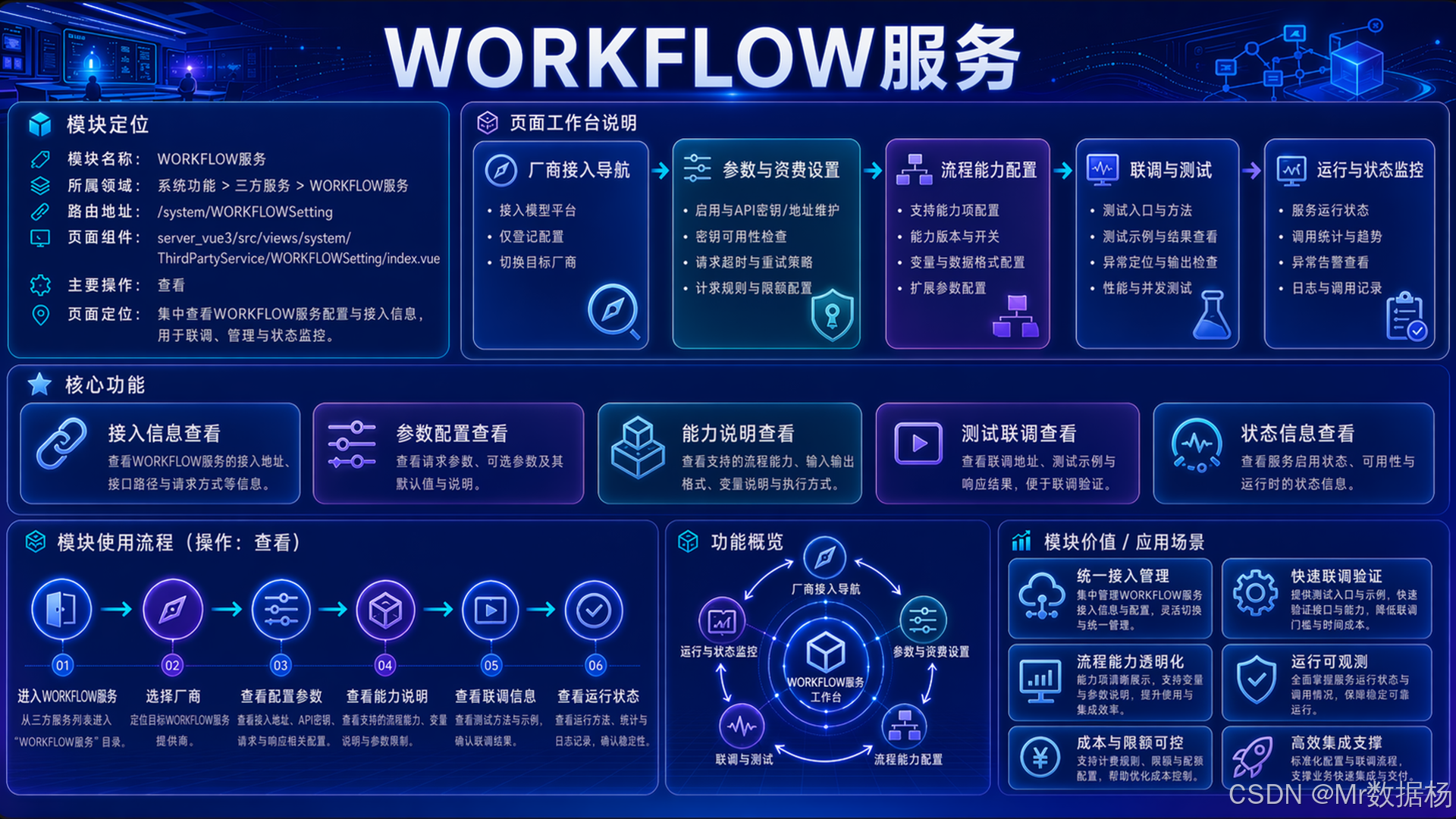
本文基于 系统功能/三方服务_WORKFLOW服务 对应源码,把业务目标拆成模型字段、接口规则、页面交互和验收标准,形成 Codex 可执行的项目代码生成任务。
文章目录
设计与需求
WORKFLOW服务不能只按普通 CRUD 理解。源码范围包括 server_backend/dvadmin/system/models.py、server_backend/dvadmin/system/urls.py、server_backend/dvadmin/third_party_service/views_setting.py、server_backend/dvadmin/third_party_service/views_workflow.py、server_vue3/src/views/system/ThirdPartyService/WORKFLOWSetting/api.ts、server_vue3/src/views/system/ThirdPartyService/WORKFLOWSetting/components/ModelManage/ModelCrud/crud.tsx,这些文件共同决定页面入口、字段保存、接口动作、权限边界和验收口径。交给 Codex 的任务需要明确业务字段、接口前缀、页面回显和异常处理,避免后端字段、前端表单和 PDD 文档相互脱节。
#mermaid-svg-NasyCsL9AgpioA4G{font-family:"trebuchet ms",verdana,arial,sans-serif;font-size:16px;fill:#333;}@keyframes edge-animation-frame{from{stroke-dashoffset:0;}}@keyframes dash{to{stroke-dashoffset:0;}}#mermaid-svg-NasyCsL9AgpioA4G .edge-animation-slow{stroke-dasharray:9,5!important;stroke-dashoffset:900;animation:dash 50s linear infinite;stroke-linecap:round;}#mermaid-svg-NasyCsL9AgpioA4G .edge-animation-fast{stroke-dasharray:9,5!important;stroke-dashoffset:900;animation:dash 20s linear infinite;stroke-linecap:round;}#mermaid-svg-NasyCsL9AgpioA4G .error-icon{fill:#552222;}#mermaid-svg-NasyCsL9AgpioA4G .error-text{fill:#552222;stroke:#552222;}#mermaid-svg-NasyCsL9AgpioA4G .edge-thickness-normal{stroke-width:1px;}#mermaid-svg-NasyCsL9AgpioA4G .edge-thickness-thick{stroke-width:3.5px;}#mermaid-svg-NasyCsL9AgpioA4G .edge-pattern-solid{stroke-dasharray:0;}#mermaid-svg-NasyCsL9AgpioA4G .edge-thickness-invisible{stroke-width:0;fill:none;}#mermaid-svg-NasyCsL9AgpioA4G .edge-pattern-dashed{stroke-dasharray:3;}#mermaid-svg-NasyCsL9AgpioA4G .edge-pattern-dotted{stroke-dasharray:2;}#mermaid-svg-NasyCsL9AgpioA4G .marker{fill:#333333;stroke:#333333;}#mermaid-svg-NasyCsL9AgpioA4G .marker.cross{stroke:#333333;}#mermaid-svg-NasyCsL9AgpioA4G svg{font-family:"trebuchet ms",verdana,arial,sans-serif;font-size:16px;}#mermaid-svg-NasyCsL9AgpioA4G p{margin:0;}#mermaid-svg-NasyCsL9AgpioA4G .label{font-family:"trebuchet ms",verdana,arial,sans-serif;color:#333;}#mermaid-svg-NasyCsL9AgpioA4G .cluster-label text{fill:#333;}#mermaid-svg-NasyCsL9AgpioA4G .cluster-label span{color:#333;}#mermaid-svg-NasyCsL9AgpioA4G .cluster-label span p{background-color:transparent;}#mermaid-svg-NasyCsL9AgpioA4G .label text,#mermaid-svg-NasyCsL9AgpioA4G span{fill:#333;color:#333;}#mermaid-svg-NasyCsL9AgpioA4G .node rect,#mermaid-svg-NasyCsL9AgpioA4G .node circle,#mermaid-svg-NasyCsL9AgpioA4G .node ellipse,#mermaid-svg-NasyCsL9AgpioA4G .node polygon,#mermaid-svg-NasyCsL9AgpioA4G .node path{fill:#ECECFF;stroke:#9370DB;stroke-width:1px;}#mermaid-svg-NasyCsL9AgpioA4G .rough-node .label text,#mermaid-svg-NasyCsL9AgpioA4G .node .label text,#mermaid-svg-NasyCsL9AgpioA4G .image-shape .label,#mermaid-svg-NasyCsL9AgpioA4G .icon-shape .label{text-anchor:middle;}#mermaid-svg-NasyCsL9AgpioA4G .node .katex path{fill:#000;stroke:#000;stroke-width:1px;}#mermaid-svg-NasyCsL9AgpioA4G .rough-node .label,#mermaid-svg-NasyCsL9AgpioA4G .node .label,#mermaid-svg-NasyCsL9AgpioA4G .image-shape .label,#mermaid-svg-NasyCsL9AgpioA4G .icon-shape .label{text-align:center;}#mermaid-svg-NasyCsL9AgpioA4G .node.clickable{cursor:pointer;}#mermaid-svg-NasyCsL9AgpioA4G .root .anchor path{fill:#333333!important;stroke-width:0;stroke:#333333;}#mermaid-svg-NasyCsL9AgpioA4G .arrowheadPath{fill:#333333;}#mermaid-svg-NasyCsL9AgpioA4G .edgePath .path{stroke:#333333;stroke-width:2.0px;}#mermaid-svg-NasyCsL9AgpioA4G .flowchart-link{stroke:#333333;fill:none;}#mermaid-svg-NasyCsL9AgpioA4G .edgeLabel{background-color:rgba(232,232,232, 0.8);text-align:center;}#mermaid-svg-NasyCsL9AgpioA4G .edgeLabel p{background-color:rgba(232,232,232, 0.8);}#mermaid-svg-NasyCsL9AgpioA4G .edgeLabel rect{opacity:0.5;background-color:rgba(232,232,232, 0.8);fill:rgba(232,232,232, 0.8);}#mermaid-svg-NasyCsL9AgpioA4G .labelBkg{background-color:rgba(232, 232, 232, 0.5);}#mermaid-svg-NasyCsL9AgpioA4G .cluster rect{fill:#ffffde;stroke:#aaaa33;stroke-width:1px;}#mermaid-svg-NasyCsL9AgpioA4G .cluster text{fill:#333;}#mermaid-svg-NasyCsL9AgpioA4G .cluster span{color:#333;}#mermaid-svg-NasyCsL9AgpioA4G div.mermaidTooltip{position:absolute;text-align:center;max-width:200px;padding:2px;font-family:"trebuchet ms",verdana,arial,sans-serif;font-size:12px;background:hsl(80, 100%, 96.2745098039%);border:1px solid #aaaa33;border-radius:2px;pointer-events:none;z-index:100;}#mermaid-svg-NasyCsL9AgpioA4G .flowchartTitleText{text-anchor:middle;font-size:18px;fill:#333;}#mermaid-svg-NasyCsL9AgpioA4G rect.text{fill:none;stroke-width:0;}#mermaid-svg-NasyCsL9AgpioA4G .icon-shape,#mermaid-svg-NasyCsL9AgpioA4G .image-shape{background-color:rgba(232,232,232, 0.8);text-align:center;}#mermaid-svg-NasyCsL9AgpioA4G .icon-shape p,#mermaid-svg-NasyCsL9AgpioA4G .image-shape p{background-color:rgba(232,232,232, 0.8);padding:2px;}#mermaid-svg-NasyCsL9AgpioA4G .icon-shape .label rect,#mermaid-svg-NasyCsL9AgpioA4G .image-shape .label rect{opacity:0.5;background-color:rgba(232,232,232, 0.8);fill:rgba(232,232,232, 0.8);}#mermaid-svg-NasyCsL9AgpioA4G .label-icon{display:inline-block;height:1em;overflow:visible;vertical-align:-0.125em;}#mermaid-svg-NasyCsL9AgpioA4G .node .label-icon path{fill:currentColor;stroke:revert;stroke-width:revert;}#mermaid-svg-NasyCsL9AgpioA4G :root{--mermaid-font-family:"trebuchet ms",verdana,arial,sans-serif;}#mermaid-svg-NasyCsL9AgpioA4G .input>*{fill:#EEF4FF!important;stroke:#5B8FF9!important;color:#1D39C4!important;stroke-width:1.2px!important;}#mermaid-svg-NasyCsL9AgpioA4G .input span{fill:#EEF4FF!important;stroke:#5B8FF9!important;color:#1D39C4!important;stroke-width:1.2px!important;}#mermaid-svg-NasyCsL9AgpioA4G .input tspan{fill:#1D39C4!important;}#mermaid-svg-NasyCsL9AgpioA4G .design>*{fill:#F6FFED!important;stroke:#52C41A!important;color:#237804!important;stroke-width:1.2px!important;}#mermaid-svg-NasyCsL9AgpioA4G .design span{fill:#F6FFED!important;stroke:#52C41A!important;color:#237804!important;stroke-width:1.2px!important;}#mermaid-svg-NasyCsL9AgpioA4G .design tspan{fill:#237804!important;}#mermaid-svg-NasyCsL9AgpioA4G .process>*{fill:#FFF7E6!important;stroke:#FA8C16!important;color:#AD4E00!important;stroke-width:1.2px!important;}#mermaid-svg-NasyCsL9AgpioA4G .process span{fill:#FFF7E6!important;stroke:#FA8C16!important;color:#AD4E00!important;stroke-width:1.2px!important;}#mermaid-svg-NasyCsL9AgpioA4G .process tspan{fill:#AD4E00!important;}#mermaid-svg-NasyCsL9AgpioA4G .check>*{fill:#F9F0FF!important;stroke:#722ED1!important;color:#531DAB!important;stroke-width:1.2px!important;}#mermaid-svg-NasyCsL9AgpioA4G .check span{fill:#F9F0FF!important;stroke:#722ED1!important;color:#531DAB!important;stroke-width:1.2px!important;}#mermaid-svg-NasyCsL9AgpioA4G .check tspan{fill:#531DAB!important;}#mermaid-svg-NasyCsL9AgpioA4G .output>*{fill:#E6FFFB!important;stroke:#13C2C2!important;color:#006D75!important;stroke-width:1.2px!important;}#mermaid-svg-NasyCsL9AgpioA4G .output span{fill:#E6FFFB!important;stroke:#13C2C2!important;color:#006D75!important;stroke-width:1.2px!important;}#mermaid-svg-NasyCsL9AgpioA4G .output tspan{fill:#006D75!important;} 生成阶段
设计阶段
输入阶段
教育需求
WORKFLOW
页面结构
数据模型
接口规则
权限验收
读取源码
生成代码
验收修复
| 需求层描述 | 设计层转换 | Codex 代码生成方向 |
|---|---|---|
| 业务目标 | 围绕 WORKFLOW服务 的核心字段、接口动作和页面状态维护业务数据。 | 生成模块入口、页面结构和业务说明 |
| 数据模型 | id_category(所属于分类名称)、name_category(所属于分类名称)、group(组名)、emoji(图标emoji)、name_workflow(工作流名称)、id_workflow(工作流id)、id_project(工作流项目id)、key_belong(所属API)、provider(厂商) | 生成序列化、字段校验、查询筛选和保存回显 |
| 页面结构 | server_vue3/src/views/system/ThirdPartyService/WORKFLOWSetting/api.ts、server_vue3/src/views/system/ThirdPartyService/WORKFLOWSetting/components/ModelManage/ModelCrud/crud.tsx | 生成列表、筛选区、表单、详情、预览或自定义操作区 |
| 接口规则 | /api/system/ai_service_setting/、/api/system/workflow_setting_data/key_list/?provider= | 保持 GetList、GetDefalutModelList、saveAppSetting、getAppSetting、getProviderList、GetObj、AddObj、provider_list、key_list 与页面调用一致 |
| 权限验收 | 按钮权限、接口权限、用户数据范围、异常响应 | 在 PDD 中列出角色、接口和越权用例 |
| 扩展能力 | 数据联动、工作流编排 | 只实现源码中真实存在的扩展入口和服务边界 |
更适合交给 Codex 的需求说明,应覆盖源码路径、字段、接口和验收口径。WORKFLOW服务的重点是把 AIServiceWorkflowModel 与前端接口封装、列表配置、表单状态或自定义页面逻辑合并成一个可测试的模块任务。
可以直接使用下面的Prompt进行模块功能的设计
text
请 Codex 基于教育管理系统真实源码设计"WORKFLOW服务"模块。

业务说明:围绕 WORKFLOW服务 的核心字段、接口动作和页面状态维护业务数据。
源码范围:server_backend/dvadmin/system/models.py、server_backend/dvadmin/system/urls.py、server_backend/dvadmin/third_party_service/views_setting.py、server_backend/dvadmin/third_party_service/views_workflow.py、server_vue3/src/views/system/ThirdPartyService/WORKFLOWSetting/api.ts、server_vue3/src/views/system/ThirdPartyService/WORKFLOWSetting/components/ModelManage/ModelCrud/crud.tsx
接口范围:/api/system/ai_service_setting/、/api/system/workflow_setting_data/key_list/?provider=
字段范围:id_category(所属于分类名称)、name_category(所属于分类名称)、group(组名)、emoji(图标emoji)、name_workflow(工作流名称)、id_workflow(工作流id)、id_project(工作流项目id)、key_belong(所属API)、provider(厂商)
已有动作:GetList、GetDefalutModelList、saveAppSetting、getAppSetting、getProviderList、GetObj、AddObj、provider_list、key_list
扩展能力边界:数据联动、工作流编排

请输出模块页面结构、数据模型、接口规则、权限验收、测试用例和 Codex 代码生成任务。只允许使用源码中存在的字段、接口和页面状态。
后端设计
WORKFLOW服务的后端设计重点不是堆 CRUD 接口,而是建立可复用的数据底座。当前后端范围包括 server_backend/dvadmin/system/models.py、server_backend/dvadmin/system/urls.py、server_backend/dvadmin/third_party_service/views_setting.py、server_backend/dvadmin/third_party_service/views_workflow.py。Codex 需要识别模型字段、序列化器、ViewSet、筛选逻辑和自定义 action,并让接口返回结构稳定服务前端。
源码中可识别的模型或查询对象为 AIServiceWorkflowModel,核心字段覆盖 id_category(所属于分类名称)、name_category(所属于分类名称)、group(组名)、emoji(图标emoji)、name_workflow(工作流名称)、id_workflow(工作流id)、id_project(工作流项目id)、key_belong(所属API)、provider(厂商)。接口动作包含 GetList、GetDefalutModelList、saveAppSetting、getAppSetting、getProviderList、GetObj、AddObj、provider_list、key_list,查询参数关注 provider(provider),这些内容需要和前端封装保持同名语义,避免页面有按钮但后端没有对应能力。
| 后端设计项 | 设计重点 | Codex 生成方向 |
|---|---|---|
| 核心字段 | id_category(所属于分类名称)、name_category(所属于分类名称)、group(组名)、emoji(图标emoji)、name_workflow(工作流名称) | 生成序列化、查询筛选、表单回显和保存校验 |
| 补充字段 | id_workflow(工作流id)、id_project(工作流项目id)、key_belong(所属API)、provider(厂商) | 处理状态、时间、JSON、资源或关联字段的格式转换 |
| 接口视图 | server_backend/dvadmin/system/models.py、server_backend/dvadmin/system/urls.py、server_backend/dvadmin/third_party_service/views_setting.py、server_backend/dvadmin/third_party_service/views_workflow.py | 按 /api/system/ai_service_setting/、/api/system/workflow_setting_data/key_list/?provider= 注册列表、详情、保存、删除和已有 action |
| 查询筛选 | provider(provider) | 生成 filterset、SearchFilter 或自定义查询参数 |
| 权限控制 | 后端接口承担真实访问边界,前端按钮只做入口展示 | 生成权限判断、异常响应和越权测试 |
| 扩展服务 | 数据联动、工作流编排 | 按真实源码补齐服务函数、异步任务或状态回写 |
可以直接使用下面的Prompt进行后端代码的设计
text
请 Codex 按"WORKFLOW服务"业务从源码上下文设计或补齐后端代码。

后端源码范围:server_backend/dvadmin/system/models.py、server_backend/dvadmin/system/urls.py、server_backend/dvadmin/third_party_service/views_setting.py、server_backend/dvadmin/third_party_service/views_workflow.py
模型或查询对象:AIServiceWorkflowModel
模型字段范围:id_category(所属于分类名称)、name_category(所属于分类名称)、group(组名)、emoji(图标emoji)、name_workflow(工作流名称)、id_workflow(工作流id)、id_project(工作流项目id)、key_belong(所属API)、provider(厂商)
接口前缀:/api/system/ai_service_setting/、/api/system/workflow_setting_data/key_list/?provider=
已有接口动作:GetList、GetDefalutModelList、saveAppSetting、getAppSetting、getProviderList、GetObj、AddObj、provider_list、key_list
查询参数:provider(provider)

需要生成或修正数据模型、序列化规则、接口视图、路由注册、筛选查询、权限控制和基础校验。同时补齐 数据联动、工作流编排 对应的后端接口或服务边界。

输出时列出涉及文件、字段校验、接口返回结构和需要执行的测试。
前端设计
WORKFLOW服务的前端设计重点不是把字段堆到页面上,而是让用户能按业务路径完成查询、编辑、状态处理和结果确认。当前前端范围包括 server_vue3/src/views/system/ThirdPartyService/WORKFLOWSetting/api.ts、server_vue3/src/views/system/ThirdPartyService/WORKFLOWSetting/components/ModelManage/ModelCrud/crud.tsx,其中 api.ts 负责接口封装,crud.tsx 或 index.vue 负责列表、表单、自定义布局和按钮交互。
页面需要围绕 id_category(所属于分类名称)、name_category(所属于分类名称)、group(组名)、emoji(图标emoji)、name_workflow(工作流名称)、id_workflow(工作流id)、id_project(工作流项目id)、key_belong(所属API)、provider(厂商) 组织筛选、表单和详情。保存前要处理字段格式转换,保存后刷新列表或回显详情;存在扩展能力时,还要把 数据联动、工作流编排 的入口、状态和结果纳入同一套页面状态。
| 前端设计项 | 设计重点 | Codex 生成方向 |
|---|---|---|
| 页面结构 | server_vue3/src/views/system/ThirdPartyService/WORKFLOWSetting/api.ts、server_vue3/src/views/system/ThirdPartyService/WORKFLOWSetting/components/ModelManage/ModelCrud/crud.tsx | 生成列表、筛选区、表单、详情抽屉、弹窗或自定义操作区 |
| 接口封装 | /api/system/ai_service_setting/、/api/system/workflow_setting_data/key_list/?provider= | 统一封装查询、详情、保存、删除和 GetList、GetDefalutModelList、saveAppSetting、getAppSetting、getProviderList、GetObj、AddObj、provider_list、key_list 等动作 |
| 字段回显 | id_category(所属于分类名称)、name_category(所属于分类名称)、group(组名)、emoji(图标emoji)、name_workflow(工作流名称)、id_workflow(工作流id)、id_project(工作流项目id)、key_belong(所属API)、provider(厂商) | 处理下拉、树形、JSON、状态、时间和资源字段回显 |
| 权限按钮 | 根据 auth、按钮权限或后端权限结果展示操作入口 | 生成新增、编辑、删除、处理、下载或预览按钮 |
| 扩展交互 | 数据联动、工作流编排 | 生成入口按钮、加载状态、结果回填、人工确认和异常提示 |
可以直接使用下面的Prompt进行前端代码的设计
text
请 Codex 按"WORKFLOW服务"业务生成或补齐前端页面代码。

前端源码范围:server_vue3/src/views/system/ThirdPartyService/WORKFLOWSetting/api.ts、server_vue3/src/views/system/ThirdPartyService/WORKFLOWSetting/components/ModelManage/ModelCrud/crud.tsx
接口范围:/api/system/ai_service_setting/、/api/system/workflow_setting_data/key_list/?provider=
字段范围:id_category(所属于分类名称)、name_category(所属于分类名称)、group(组名)、emoji(图标emoji)、name_workflow(工作流名称)、id_workflow(工作流id)、id_project(工作流项目id)、key_belong(所属API)、provider(厂商)
已有动作:GetList、GetDefalutModelList、saveAppSetting、getAppSetting、getProviderList、GetObj、AddObj、provider_list、key_list

需要生成页面结构、列表查询、筛选区域、新增编辑表单、详情预览、权限按钮、保存回显和接口调用;源码已有批量入口时再接入批量操作。涉及扩展交互时只实现源码已有的 数据联动、工作流编排,包括入口按钮、状态提示、结果回填和保存回显。

输出时说明字段转换、表单初始化、异常提示和刷新策略。
扩展功能
WORKFLOW服务的扩展能力来自源码中的字段结构、接口动作或页面组件,不属于单纯 CRUD。它们的价值在于把教育管理系统中的生成、识别、统计、文件、审批、任务或批量流程接入真实业务数据。
| 扩展功能 | 主要用途 | 落地重点 |
|---|---|---|
| 数据联动 | 把筛选条件、树节点、状态字段、远程下拉和表单回显组织成稳定数据流。 | 字段变化要同步查询参数、保存载荷和回显结构,避免页面临时状态与后端字段脱节。 |
| 工作流编排 | 把任务节点、执行状态、输入输出和外部服务调用串成可追踪流程。 | 工作流节点要有状态、错误信息和重试边界。 |
数据联动
源码中的 id_category(所属于分类名称)、name_category(所属于分类名称)、group(组名)、emoji(图标emoji)、name_workflow(工作流名称)、id_workflow(工作流id)、id_project(工作流项目id)、key_belong(所属API)、provider(厂商)、接口参数和页面状态之间存在联动关系。Codex 生成时需要把查询条件、表单选择、字段转换和详情回显串成一条数据流,不能把每个下拉框或状态开关写成互不关联的临时变量。
#mermaid-svg-VAdVX3WBoKGoqAkZ{font-family:"trebuchet ms",verdana,arial,sans-serif;font-size:16px;fill:#333;}@keyframes edge-animation-frame{from{stroke-dashoffset:0;}}@keyframes dash{to{stroke-dashoffset:0;}}#mermaid-svg-VAdVX3WBoKGoqAkZ .edge-animation-slow{stroke-dasharray:9,5!important;stroke-dashoffset:900;animation:dash 50s linear infinite;stroke-linecap:round;}#mermaid-svg-VAdVX3WBoKGoqAkZ .edge-animation-fast{stroke-dasharray:9,5!important;stroke-dashoffset:900;animation:dash 20s linear infinite;stroke-linecap:round;}#mermaid-svg-VAdVX3WBoKGoqAkZ .error-icon{fill:#552222;}#mermaid-svg-VAdVX3WBoKGoqAkZ .error-text{fill:#552222;stroke:#552222;}#mermaid-svg-VAdVX3WBoKGoqAkZ .edge-thickness-normal{stroke-width:1px;}#mermaid-svg-VAdVX3WBoKGoqAkZ .edge-thickness-thick{stroke-width:3.5px;}#mermaid-svg-VAdVX3WBoKGoqAkZ .edge-pattern-solid{stroke-dasharray:0;}#mermaid-svg-VAdVX3WBoKGoqAkZ .edge-thickness-invisible{stroke-width:0;fill:none;}#mermaid-svg-VAdVX3WBoKGoqAkZ .edge-pattern-dashed{stroke-dasharray:3;}#mermaid-svg-VAdVX3WBoKGoqAkZ .edge-pattern-dotted{stroke-dasharray:2;}#mermaid-svg-VAdVX3WBoKGoqAkZ .marker{fill:#333333;stroke:#333333;}#mermaid-svg-VAdVX3WBoKGoqAkZ .marker.cross{stroke:#333333;}#mermaid-svg-VAdVX3WBoKGoqAkZ svg{font-family:"trebuchet ms",verdana,arial,sans-serif;font-size:16px;}#mermaid-svg-VAdVX3WBoKGoqAkZ p{margin:0;}#mermaid-svg-VAdVX3WBoKGoqAkZ .label{font-family:"trebuchet ms",verdana,arial,sans-serif;color:#333;}#mermaid-svg-VAdVX3WBoKGoqAkZ .cluster-label text{fill:#333;}#mermaid-svg-VAdVX3WBoKGoqAkZ .cluster-label span{color:#333;}#mermaid-svg-VAdVX3WBoKGoqAkZ .cluster-label span p{background-color:transparent;}#mermaid-svg-VAdVX3WBoKGoqAkZ .label text,#mermaid-svg-VAdVX3WBoKGoqAkZ span{fill:#333;color:#333;}#mermaid-svg-VAdVX3WBoKGoqAkZ .node rect,#mermaid-svg-VAdVX3WBoKGoqAkZ .node circle,#mermaid-svg-VAdVX3WBoKGoqAkZ .node ellipse,#mermaid-svg-VAdVX3WBoKGoqAkZ .node polygon,#mermaid-svg-VAdVX3WBoKGoqAkZ .node path{fill:#ECECFF;stroke:#9370DB;stroke-width:1px;}#mermaid-svg-VAdVX3WBoKGoqAkZ .rough-node .label text,#mermaid-svg-VAdVX3WBoKGoqAkZ .node .label text,#mermaid-svg-VAdVX3WBoKGoqAkZ .image-shape .label,#mermaid-svg-VAdVX3WBoKGoqAkZ .icon-shape .label{text-anchor:middle;}#mermaid-svg-VAdVX3WBoKGoqAkZ .node .katex path{fill:#000;stroke:#000;stroke-width:1px;}#mermaid-svg-VAdVX3WBoKGoqAkZ .rough-node .label,#mermaid-svg-VAdVX3WBoKGoqAkZ .node .label,#mermaid-svg-VAdVX3WBoKGoqAkZ .image-shape .label,#mermaid-svg-VAdVX3WBoKGoqAkZ .icon-shape .label{text-align:center;}#mermaid-svg-VAdVX3WBoKGoqAkZ .node.clickable{cursor:pointer;}#mermaid-svg-VAdVX3WBoKGoqAkZ .root .anchor path{fill:#333333!important;stroke-width:0;stroke:#333333;}#mermaid-svg-VAdVX3WBoKGoqAkZ .arrowheadPath{fill:#333333;}#mermaid-svg-VAdVX3WBoKGoqAkZ .edgePath .path{stroke:#333333;stroke-width:2.0px;}#mermaid-svg-VAdVX3WBoKGoqAkZ .flowchart-link{stroke:#333333;fill:none;}#mermaid-svg-VAdVX3WBoKGoqAkZ .edgeLabel{background-color:rgba(232,232,232, 0.8);text-align:center;}#mermaid-svg-VAdVX3WBoKGoqAkZ .edgeLabel p{background-color:rgba(232,232,232, 0.8);}#mermaid-svg-VAdVX3WBoKGoqAkZ .edgeLabel rect{opacity:0.5;background-color:rgba(232,232,232, 0.8);fill:rgba(232,232,232, 0.8);}#mermaid-svg-VAdVX3WBoKGoqAkZ .labelBkg{background-color:rgba(232, 232, 232, 0.5);}#mermaid-svg-VAdVX3WBoKGoqAkZ .cluster rect{fill:#ffffde;stroke:#aaaa33;stroke-width:1px;}#mermaid-svg-VAdVX3WBoKGoqAkZ .cluster text{fill:#333;}#mermaid-svg-VAdVX3WBoKGoqAkZ .cluster span{color:#333;}#mermaid-svg-VAdVX3WBoKGoqAkZ div.mermaidTooltip{position:absolute;text-align:center;max-width:200px;padding:2px;font-family:"trebuchet ms",verdana,arial,sans-serif;font-size:12px;background:hsl(80, 100%, 96.2745098039%);border:1px solid #aaaa33;border-radius:2px;pointer-events:none;z-index:100;}#mermaid-svg-VAdVX3WBoKGoqAkZ .flowchartTitleText{text-anchor:middle;font-size:18px;fill:#333;}#mermaid-svg-VAdVX3WBoKGoqAkZ rect.text{fill:none;stroke-width:0;}#mermaid-svg-VAdVX3WBoKGoqAkZ .icon-shape,#mermaid-svg-VAdVX3WBoKGoqAkZ .image-shape{background-color:rgba(232,232,232, 0.8);text-align:center;}#mermaid-svg-VAdVX3WBoKGoqAkZ .icon-shape p,#mermaid-svg-VAdVX3WBoKGoqAkZ .image-shape p{background-color:rgba(232,232,232, 0.8);padding:2px;}#mermaid-svg-VAdVX3WBoKGoqAkZ .icon-shape .label rect,#mermaid-svg-VAdVX3WBoKGoqAkZ .image-shape .label rect{opacity:0.5;background-color:rgba(232,232,232, 0.8);fill:rgba(232,232,232, 0.8);}#mermaid-svg-VAdVX3WBoKGoqAkZ .label-icon{display:inline-block;height:1em;overflow:visible;vertical-align:-0.125em;}#mermaid-svg-VAdVX3WBoKGoqAkZ .node .label-icon path{fill:currentColor;stroke:revert;stroke-width:revert;}#mermaid-svg-VAdVX3WBoKGoqAkZ :root{--mermaid-font-family:"trebuchet ms",verdana,arial,sans-serif;}#mermaid-svg-VAdVX3WBoKGoqAkZ .input>*{fill:#EEF4FF!important;stroke:#5B8FF9!important;color:#1D39C4!important;stroke-width:1.2px!important;}#mermaid-svg-VAdVX3WBoKGoqAkZ .input span{fill:#EEF4FF!important;stroke:#5B8FF9!important;color:#1D39C4!important;stroke-width:1.2px!important;}#mermaid-svg-VAdVX3WBoKGoqAkZ .input tspan{fill:#1D39C4!important;}#mermaid-svg-VAdVX3WBoKGoqAkZ .process>*{fill:#FFF7E6!important;stroke:#FA8C16!important;color:#AD4E00!important;stroke-width:1.2px!important;}#mermaid-svg-VAdVX3WBoKGoqAkZ .process span{fill:#FFF7E6!important;stroke:#FA8C16!important;color:#AD4E00!important;stroke-width:1.2px!important;}#mermaid-svg-VAdVX3WBoKGoqAkZ .process tspan{fill:#AD4E00!important;}#mermaid-svg-VAdVX3WBoKGoqAkZ .check>*{fill:#F9F0FF!important;stroke:#722ED1!important;color:#531DAB!important;stroke-width:1.2px!important;}#mermaid-svg-VAdVX3WBoKGoqAkZ .check span{fill:#F9F0FF!important;stroke:#722ED1!important;color:#531DAB!important;stroke-width:1.2px!important;}#mermaid-svg-VAdVX3WBoKGoqAkZ .check tspan{fill:#531DAB!important;}#mermaid-svg-VAdVX3WBoKGoqAkZ .output>*{fill:#E6FFFB!important;stroke:#13C2C2!important;color:#006D75!important;stroke-width:1.2px!important;}#mermaid-svg-VAdVX3WBoKGoqAkZ .output span{fill:#E6FFFB!important;stroke:#13C2C2!important;color:#006D75!important;stroke-width:1.2px!important;}#mermaid-svg-VAdVX3WBoKGoqAkZ .output tspan{fill:#006D75!important;} 结果阶段
处理阶段
输入阶段
筛选条件
表单选择
参数转换
接口请求
字段回显
列表刷新
状态更新
交给 Codex 生成时,边界要限定在 server_backend/dvadmin/system/models.py、server_backend/dvadmin/system/urls.py、server_backend/dvadmin/third_party_service/views_setting.py、server_backend/dvadmin/third_party_service/views_workflow.py、server_vue3/src/views/system/ThirdPartyService/WORKFLOWSetting/api.ts、server_vue3/src/views/system/ThirdPartyService/WORKFLOWSetting/components/ModelManage/ModelCrud/crud.tsx 内。字段变化要同步查询参数、保存载荷和回显结构,避免页面临时状态与后端字段脱节。 同时需要补齐权限判断、异常提示、保存回显和测试用例。
可以直接使用下面的Prompt进行数据联动设计
text
请 Codex 基于真实源码补齐"WORKFLOW服务"的数据联动能力。

模块源码范围:server_backend/dvadmin/system/models.py、server_backend/dvadmin/system/urls.py、server_backend/dvadmin/third_party_service/views_setting.py、server_backend/dvadmin/third_party_service/views_workflow.py、server_vue3/src/views/system/ThirdPartyService/WORKFLOWSetting/api.ts、server_vue3/src/views/system/ThirdPartyService/WORKFLOWSetting/components/ModelManage/ModelCrud/crud.tsx
接口范围:/api/system/ai_service_setting/、/api/system/workflow_setting_data/key_list/?provider=
字段范围:id_category(所属于分类名称)、name_category(所属于分类名称)、group(组名)、emoji(图标emoji)、name_workflow(工作流名称)、id_workflow(工作流id)、id_project(工作流项目id)、key_belong(所属API)、provider(厂商)
功能用途:把筛选条件、树节点、状态字段、远程下拉和表单回显组织成稳定数据流。
落地边界:字段变化要同步查询参数、保存载荷和回显结构,避免页面临时状态与后端字段脱节。

要求只使用源码中已经存在的字段、接口和页面状态,不新增未确认的业务能力。输出接口设计、前端交互、权限约束、异常处理和验收清单。
工作流编排
工作流编排能力用于把任务节点、执行状态、输入输出和外部服务调用串成可追踪流程。交给 Codex 生成时,边界要限定在 server_backend/dvadmin/system/models.py、server_backend/dvadmin/system/urls.py、server_backend/dvadmin/third_party_service/views_setting.py、server_backend/dvadmin/third_party_service/views_workflow.py、server_vue3/src/views/system/ThirdPartyService/WORKFLOWSetting/api.ts、server_vue3/src/views/system/ThirdPartyService/WORKFLOWSetting/components/ModelManage/ModelCrud/crud.tsx 内,重点是工作流节点要有状态、错误信息和重试边界。
#mermaid-svg-pxEBBYEZl0dt52Am{font-family:"trebuchet ms",verdana,arial,sans-serif;font-size:16px;fill:#333;}@keyframes edge-animation-frame{from{stroke-dashoffset:0;}}@keyframes dash{to{stroke-dashoffset:0;}}#mermaid-svg-pxEBBYEZl0dt52Am .edge-animation-slow{stroke-dasharray:9,5!important;stroke-dashoffset:900;animation:dash 50s linear infinite;stroke-linecap:round;}#mermaid-svg-pxEBBYEZl0dt52Am .edge-animation-fast{stroke-dasharray:9,5!important;stroke-dashoffset:900;animation:dash 20s linear infinite;stroke-linecap:round;}#mermaid-svg-pxEBBYEZl0dt52Am .error-icon{fill:#552222;}#mermaid-svg-pxEBBYEZl0dt52Am .error-text{fill:#552222;stroke:#552222;}#mermaid-svg-pxEBBYEZl0dt52Am .edge-thickness-normal{stroke-width:1px;}#mermaid-svg-pxEBBYEZl0dt52Am .edge-thickness-thick{stroke-width:3.5px;}#mermaid-svg-pxEBBYEZl0dt52Am .edge-pattern-solid{stroke-dasharray:0;}#mermaid-svg-pxEBBYEZl0dt52Am .edge-thickness-invisible{stroke-width:0;fill:none;}#mermaid-svg-pxEBBYEZl0dt52Am .edge-pattern-dashed{stroke-dasharray:3;}#mermaid-svg-pxEBBYEZl0dt52Am .edge-pattern-dotted{stroke-dasharray:2;}#mermaid-svg-pxEBBYEZl0dt52Am .marker{fill:#333333;stroke:#333333;}#mermaid-svg-pxEBBYEZl0dt52Am .marker.cross{stroke:#333333;}#mermaid-svg-pxEBBYEZl0dt52Am svg{font-family:"trebuchet ms",verdana,arial,sans-serif;font-size:16px;}#mermaid-svg-pxEBBYEZl0dt52Am p{margin:0;}#mermaid-svg-pxEBBYEZl0dt52Am .label{font-family:"trebuchet ms",verdana,arial,sans-serif;color:#333;}#mermaid-svg-pxEBBYEZl0dt52Am .cluster-label text{fill:#333;}#mermaid-svg-pxEBBYEZl0dt52Am .cluster-label span{color:#333;}#mermaid-svg-pxEBBYEZl0dt52Am .cluster-label span p{background-color:transparent;}#mermaid-svg-pxEBBYEZl0dt52Am .label text,#mermaid-svg-pxEBBYEZl0dt52Am span{fill:#333;color:#333;}#mermaid-svg-pxEBBYEZl0dt52Am .node rect,#mermaid-svg-pxEBBYEZl0dt52Am .node circle,#mermaid-svg-pxEBBYEZl0dt52Am .node ellipse,#mermaid-svg-pxEBBYEZl0dt52Am .node polygon,#mermaid-svg-pxEBBYEZl0dt52Am .node path{fill:#ECECFF;stroke:#9370DB;stroke-width:1px;}#mermaid-svg-pxEBBYEZl0dt52Am .rough-node .label text,#mermaid-svg-pxEBBYEZl0dt52Am .node .label text,#mermaid-svg-pxEBBYEZl0dt52Am .image-shape .label,#mermaid-svg-pxEBBYEZl0dt52Am .icon-shape .label{text-anchor:middle;}#mermaid-svg-pxEBBYEZl0dt52Am .node .katex path{fill:#000;stroke:#000;stroke-width:1px;}#mermaid-svg-pxEBBYEZl0dt52Am .rough-node .label,#mermaid-svg-pxEBBYEZl0dt52Am .node .label,#mermaid-svg-pxEBBYEZl0dt52Am .image-shape .label,#mermaid-svg-pxEBBYEZl0dt52Am .icon-shape .label{text-align:center;}#mermaid-svg-pxEBBYEZl0dt52Am .node.clickable{cursor:pointer;}#mermaid-svg-pxEBBYEZl0dt52Am .root .anchor path{fill:#333333!important;stroke-width:0;stroke:#333333;}#mermaid-svg-pxEBBYEZl0dt52Am .arrowheadPath{fill:#333333;}#mermaid-svg-pxEBBYEZl0dt52Am .edgePath .path{stroke:#333333;stroke-width:2.0px;}#mermaid-svg-pxEBBYEZl0dt52Am .flowchart-link{stroke:#333333;fill:none;}#mermaid-svg-pxEBBYEZl0dt52Am .edgeLabel{background-color:rgba(232,232,232, 0.8);text-align:center;}#mermaid-svg-pxEBBYEZl0dt52Am .edgeLabel p{background-color:rgba(232,232,232, 0.8);}#mermaid-svg-pxEBBYEZl0dt52Am .edgeLabel rect{opacity:0.5;background-color:rgba(232,232,232, 0.8);fill:rgba(232,232,232, 0.8);}#mermaid-svg-pxEBBYEZl0dt52Am .labelBkg{background-color:rgba(232, 232, 232, 0.5);}#mermaid-svg-pxEBBYEZl0dt52Am .cluster rect{fill:#ffffde;stroke:#aaaa33;stroke-width:1px;}#mermaid-svg-pxEBBYEZl0dt52Am .cluster text{fill:#333;}#mermaid-svg-pxEBBYEZl0dt52Am .cluster span{color:#333;}#mermaid-svg-pxEBBYEZl0dt52Am div.mermaidTooltip{position:absolute;text-align:center;max-width:200px;padding:2px;font-family:"trebuchet ms",verdana,arial,sans-serif;font-size:12px;background:hsl(80, 100%, 96.2745098039%);border:1px solid #aaaa33;border-radius:2px;pointer-events:none;z-index:100;}#mermaid-svg-pxEBBYEZl0dt52Am .flowchartTitleText{text-anchor:middle;font-size:18px;fill:#333;}#mermaid-svg-pxEBBYEZl0dt52Am rect.text{fill:none;stroke-width:0;}#mermaid-svg-pxEBBYEZl0dt52Am .icon-shape,#mermaid-svg-pxEBBYEZl0dt52Am .image-shape{background-color:rgba(232,232,232, 0.8);text-align:center;}#mermaid-svg-pxEBBYEZl0dt52Am .icon-shape p,#mermaid-svg-pxEBBYEZl0dt52Am .image-shape p{background-color:rgba(232,232,232, 0.8);padding:2px;}#mermaid-svg-pxEBBYEZl0dt52Am .icon-shape .label rect,#mermaid-svg-pxEBBYEZl0dt52Am .image-shape .label rect{opacity:0.5;background-color:rgba(232,232,232, 0.8);fill:rgba(232,232,232, 0.8);}#mermaid-svg-pxEBBYEZl0dt52Am .label-icon{display:inline-block;height:1em;overflow:visible;vertical-align:-0.125em;}#mermaid-svg-pxEBBYEZl0dt52Am .node .label-icon path{fill:currentColor;stroke:revert;stroke-width:revert;}#mermaid-svg-pxEBBYEZl0dt52Am :root{--mermaid-font-family:"trebuchet ms",verdana,arial,sans-serif;}#mermaid-svg-pxEBBYEZl0dt52Am .input>*{fill:#EEF4FF!important;stroke:#5B8FF9!important;color:#1D39C4!important;stroke-width:1.2px!important;}#mermaid-svg-pxEBBYEZl0dt52Am .input span{fill:#EEF4FF!important;stroke:#5B8FF9!important;color:#1D39C4!important;stroke-width:1.2px!important;}#mermaid-svg-pxEBBYEZl0dt52Am .input tspan{fill:#1D39C4!important;}#mermaid-svg-pxEBBYEZl0dt52Am .process>*{fill:#FFF7E6!important;stroke:#FA8C16!important;color:#AD4E00!important;stroke-width:1.2px!important;}#mermaid-svg-pxEBBYEZl0dt52Am .process span{fill:#FFF7E6!important;stroke:#FA8C16!important;color:#AD4E00!important;stroke-width:1.2px!important;}#mermaid-svg-pxEBBYEZl0dt52Am .process tspan{fill:#AD4E00!important;}#mermaid-svg-pxEBBYEZl0dt52Am .check>*{fill:#F9F0FF!important;stroke:#722ED1!important;color:#531DAB!important;stroke-width:1.2px!important;}#mermaid-svg-pxEBBYEZl0dt52Am .check span{fill:#F9F0FF!important;stroke:#722ED1!important;color:#531DAB!important;stroke-width:1.2px!important;}#mermaid-svg-pxEBBYEZl0dt52Am .check tspan{fill:#531DAB!important;}#mermaid-svg-pxEBBYEZl0dt52Am .output>*{fill:#E6FFFB!important;stroke:#13C2C2!important;color:#006D75!important;stroke-width:1.2px!important;}#mermaid-svg-pxEBBYEZl0dt52Am .output span{fill:#E6FFFB!important;stroke:#13C2C2!important;color:#006D75!important;stroke-width:1.2px!important;}#mermaid-svg-pxEBBYEZl0dt52Am .output tspan{fill:#006D75!important;} 结果阶段
处理阶段
输入阶段
任务输入
节点配置
参数组装
节点执行
状态回写
结果展示
失败处理
交给 Codex 生成时,边界要限定在 server_backend/dvadmin/system/models.py、server_backend/dvadmin/system/urls.py、server_backend/dvadmin/third_party_service/views_setting.py、server_backend/dvadmin/third_party_service/views_workflow.py、server_vue3/src/views/system/ThirdPartyService/WORKFLOWSetting/api.ts、server_vue3/src/views/system/ThirdPartyService/WORKFLOWSetting/components/ModelManage/ModelCrud/crud.tsx 内。工作流节点要有状态、错误信息和重试边界。 同时需要补齐权限判断、异常提示、保存回显和测试用例。
可以直接使用下面的Prompt进行工作流编排设计
text
请 Codex 基于真实源码补齐"WORKFLOW服务"的工作流编排能力。

模块源码范围:server_backend/dvadmin/system/models.py、server_backend/dvadmin/system/urls.py、server_backend/dvadmin/third_party_service/views_setting.py、server_backend/dvadmin/third_party_service/views_workflow.py、server_vue3/src/views/system/ThirdPartyService/WORKFLOWSetting/api.ts、server_vue3/src/views/system/ThirdPartyService/WORKFLOWSetting/components/ModelManage/ModelCrud/crud.tsx
接口范围:/api/system/ai_service_setting/、/api/system/workflow_setting_data/key_list/?provider=
字段范围:id_category(所属于分类名称)、name_category(所属于分类名称)、group(组名)、emoji(图标emoji)、name_workflow(工作流名称)、id_workflow(工作流id)、id_project(工作流项目id)、key_belong(所属API)、provider(厂商)
功能用途:把任务节点、执行状态、输入输出和外部服务调用串成可追踪流程。
落地边界:工作流节点要有状态、错误信息和重试边界。

要求只使用源码中已经存在的字段、接口和页面状态,不新增未确认的业务能力。输出接口设计、前端交互、权限约束、异常处理和验收清单。
Codex开发标准
使用 Codex 开发 WORKFLOW服务 时,不能直接让它随意写代码。需求边界、PDD、SOP、接口权限规则和验收标准需要同时约束后端、前端和扩展能力,让生成结果能回到项目源码中运行。
#mermaid-svg-REBjo2ZcDPxhQYnc{font-family:"trebuchet ms",verdana,arial,sans-serif;font-size:16px;fill:#333;}@keyframes edge-animation-frame{from{stroke-dashoffset:0;}}@keyframes dash{to{stroke-dashoffset:0;}}#mermaid-svg-REBjo2ZcDPxhQYnc .edge-animation-slow{stroke-dasharray:9,5!important;stroke-dashoffset:900;animation:dash 50s linear infinite;stroke-linecap:round;}#mermaid-svg-REBjo2ZcDPxhQYnc .edge-animation-fast{stroke-dasharray:9,5!important;stroke-dashoffset:900;animation:dash 20s linear infinite;stroke-linecap:round;}#mermaid-svg-REBjo2ZcDPxhQYnc .error-icon{fill:#552222;}#mermaid-svg-REBjo2ZcDPxhQYnc .error-text{fill:#552222;stroke:#552222;}#mermaid-svg-REBjo2ZcDPxhQYnc .edge-thickness-normal{stroke-width:1px;}#mermaid-svg-REBjo2ZcDPxhQYnc .edge-thickness-thick{stroke-width:3.5px;}#mermaid-svg-REBjo2ZcDPxhQYnc .edge-pattern-solid{stroke-dasharray:0;}#mermaid-svg-REBjo2ZcDPxhQYnc .edge-thickness-invisible{stroke-width:0;fill:none;}#mermaid-svg-REBjo2ZcDPxhQYnc .edge-pattern-dashed{stroke-dasharray:3;}#mermaid-svg-REBjo2ZcDPxhQYnc .edge-pattern-dotted{stroke-dasharray:2;}#mermaid-svg-REBjo2ZcDPxhQYnc .marker{fill:#333333;stroke:#333333;}#mermaid-svg-REBjo2ZcDPxhQYnc .marker.cross{stroke:#333333;}#mermaid-svg-REBjo2ZcDPxhQYnc svg{font-family:"trebuchet ms",verdana,arial,sans-serif;font-size:16px;}#mermaid-svg-REBjo2ZcDPxhQYnc p{margin:0;}#mermaid-svg-REBjo2ZcDPxhQYnc .label{font-family:"trebuchet ms",verdana,arial,sans-serif;color:#333;}#mermaid-svg-REBjo2ZcDPxhQYnc .cluster-label text{fill:#333;}#mermaid-svg-REBjo2ZcDPxhQYnc .cluster-label span{color:#333;}#mermaid-svg-REBjo2ZcDPxhQYnc .cluster-label span p{background-color:transparent;}#mermaid-svg-REBjo2ZcDPxhQYnc .label text,#mermaid-svg-REBjo2ZcDPxhQYnc span{fill:#333;color:#333;}#mermaid-svg-REBjo2ZcDPxhQYnc .node rect,#mermaid-svg-REBjo2ZcDPxhQYnc .node circle,#mermaid-svg-REBjo2ZcDPxhQYnc .node ellipse,#mermaid-svg-REBjo2ZcDPxhQYnc .node polygon,#mermaid-svg-REBjo2ZcDPxhQYnc .node path{fill:#ECECFF;stroke:#9370DB;stroke-width:1px;}#mermaid-svg-REBjo2ZcDPxhQYnc .rough-node .label text,#mermaid-svg-REBjo2ZcDPxhQYnc .node .label text,#mermaid-svg-REBjo2ZcDPxhQYnc .image-shape .label,#mermaid-svg-REBjo2ZcDPxhQYnc .icon-shape .label{text-anchor:middle;}#mermaid-svg-REBjo2ZcDPxhQYnc .node .katex path{fill:#000;stroke:#000;stroke-width:1px;}#mermaid-svg-REBjo2ZcDPxhQYnc .rough-node .label,#mermaid-svg-REBjo2ZcDPxhQYnc .node .label,#mermaid-svg-REBjo2ZcDPxhQYnc .image-shape .label,#mermaid-svg-REBjo2ZcDPxhQYnc .icon-shape .label{text-align:center;}#mermaid-svg-REBjo2ZcDPxhQYnc .node.clickable{cursor:pointer;}#mermaid-svg-REBjo2ZcDPxhQYnc .root .anchor path{fill:#333333!important;stroke-width:0;stroke:#333333;}#mermaid-svg-REBjo2ZcDPxhQYnc .arrowheadPath{fill:#333333;}#mermaid-svg-REBjo2ZcDPxhQYnc .edgePath .path{stroke:#333333;stroke-width:2.0px;}#mermaid-svg-REBjo2ZcDPxhQYnc .flowchart-link{stroke:#333333;fill:none;}#mermaid-svg-REBjo2ZcDPxhQYnc .edgeLabel{background-color:rgba(232,232,232, 0.8);text-align:center;}#mermaid-svg-REBjo2ZcDPxhQYnc .edgeLabel p{background-color:rgba(232,232,232, 0.8);}#mermaid-svg-REBjo2ZcDPxhQYnc .edgeLabel rect{opacity:0.5;background-color:rgba(232,232,232, 0.8);fill:rgba(232,232,232, 0.8);}#mermaid-svg-REBjo2ZcDPxhQYnc .labelBkg{background-color:rgba(232, 232, 232, 0.5);}#mermaid-svg-REBjo2ZcDPxhQYnc .cluster rect{fill:#ffffde;stroke:#aaaa33;stroke-width:1px;}#mermaid-svg-REBjo2ZcDPxhQYnc .cluster text{fill:#333;}#mermaid-svg-REBjo2ZcDPxhQYnc .cluster span{color:#333;}#mermaid-svg-REBjo2ZcDPxhQYnc div.mermaidTooltip{position:absolute;text-align:center;max-width:200px;padding:2px;font-family:"trebuchet ms",verdana,arial,sans-serif;font-size:12px;background:hsl(80, 100%, 96.2745098039%);border:1px solid #aaaa33;border-radius:2px;pointer-events:none;z-index:100;}#mermaid-svg-REBjo2ZcDPxhQYnc .flowchartTitleText{text-anchor:middle;font-size:18px;fill:#333;}#mermaid-svg-REBjo2ZcDPxhQYnc rect.text{fill:none;stroke-width:0;}#mermaid-svg-REBjo2ZcDPxhQYnc .icon-shape,#mermaid-svg-REBjo2ZcDPxhQYnc .image-shape{background-color:rgba(232,232,232, 0.8);text-align:center;}#mermaid-svg-REBjo2ZcDPxhQYnc .icon-shape p,#mermaid-svg-REBjo2ZcDPxhQYnc .image-shape p{background-color:rgba(232,232,232, 0.8);padding:2px;}#mermaid-svg-REBjo2ZcDPxhQYnc .icon-shape .label rect,#mermaid-svg-REBjo2ZcDPxhQYnc .image-shape .label rect{opacity:0.5;background-color:rgba(232,232,232, 0.8);fill:rgba(232,232,232, 0.8);}#mermaid-svg-REBjo2ZcDPxhQYnc .label-icon{display:inline-block;height:1em;overflow:visible;vertical-align:-0.125em;}#mermaid-svg-REBjo2ZcDPxhQYnc .node .label-icon path{fill:currentColor;stroke:revert;stroke-width:revert;}#mermaid-svg-REBjo2ZcDPxhQYnc :root{--mermaid-font-family:"trebuchet ms",verdana,arial,sans-serif;}#mermaid-svg-REBjo2ZcDPxhQYnc .input>*{fill:#EEF4FF!important;stroke:#5B8FF9!important;color:#1D39C4!important;stroke-width:1.2px!important;}#mermaid-svg-REBjo2ZcDPxhQYnc .input span{fill:#EEF4FF!important;stroke:#5B8FF9!important;color:#1D39C4!important;stroke-width:1.2px!important;}#mermaid-svg-REBjo2ZcDPxhQYnc .input tspan{fill:#1D39C4!important;}#mermaid-svg-REBjo2ZcDPxhQYnc .design>*{fill:#F6FFED!important;stroke:#52C41A!important;color:#237804!important;stroke-width:1.2px!important;}#mermaid-svg-REBjo2ZcDPxhQYnc .design span{fill:#F6FFED!important;stroke:#52C41A!important;color:#237804!important;stroke-width:1.2px!important;}#mermaid-svg-REBjo2ZcDPxhQYnc .design tspan{fill:#237804!important;}#mermaid-svg-REBjo2ZcDPxhQYnc .dev>*{fill:#FFF7E6!important;stroke:#FA8C16!important;color:#AD4E00!important;stroke-width:1.2px!important;}#mermaid-svg-REBjo2ZcDPxhQYnc .dev span{fill:#FFF7E6!important;stroke:#FA8C16!important;color:#AD4E00!important;stroke-width:1.2px!important;}#mermaid-svg-REBjo2ZcDPxhQYnc .dev tspan{fill:#AD4E00!important;}#mermaid-svg-REBjo2ZcDPxhQYnc .check>*{fill:#F9F0FF!important;stroke:#722ED1!important;color:#531DAB!important;stroke-width:1.2px!important;}#mermaid-svg-REBjo2ZcDPxhQYnc .check span{fill:#F9F0FF!important;stroke:#722ED1!important;color:#531DAB!important;stroke-width:1.2px!important;}#mermaid-svg-REBjo2ZcDPxhQYnc .check tspan{fill:#531DAB!important;} 验收交付
Codex开发
模块设计
输入约束
需求边界
PDD设计
SOP目录
接口权限
后端设计
前端设计
扩展功能
读取上下文
生成后端
生成前端
补齐扩展
功能自检
PDD验收
问题修复
模块交付
SOP 标准
SOP 用于约束代码目录、文件职责和开发顺序。Codex 在动手写代码前,需要先确认目录结构和文档位置,再按后端、前端、联动、验收的顺序推进。
text
docs/modules/WORKFLOW服务/
├── pdd.md
├── api.md
├── test-cases.md
└── codex-sop.md
server_backend/
└── dvadmin/system/models.py
└── dvadmin/system/urls.py
└── dvadmin/third_party_service/views_setting.py
└── dvadmin/third_party_service/views_workflow.py
server_vue3/
└── src/views/system/ThirdPartyService/WORKFLOWSetting/api.ts
└── src/views/system/ThirdPartyService/WORKFLOWSetting/components/ModelManage/ModelCrud/crud.tsx| 开发阶段 | Codex 执行目标 | 输出结果 |
|---|---|---|
| 模块设计 | 读取源码、确认字段、接口和页面入口 | 输出模块边界和设计说明 |
| 目录规划 | 规划后端、前端和 docs/modules 文档 | 输出目录结构和文件职责 |
| 后端实现 | 补齐模型、序列化、ViewSet、路由和权限 | 输出可调用接口和基础校验 |
| 前端实现 | 补齐 api.ts、crud.tsx、index.vue 或自定义组件 | 输出可操作页面和保存回显 |
| 数据联动或功能补齐 | 校验筛选、下拉、状态、详情和异常提示 | 输出联动说明和修复记录 |
| 扩展功能 | 按源码补齐 数据联动、工作流编排 | 输出扩展接口、交互和边界测试 |
| 验收修复 | 按 PDD 和测试用例检查模块 | 输出验收结果和问题修复 |
可以直接使用下面的Prompt进行SOP撰写
text
请 Codex 按教育管理系统模块开发 SOP,从零实现或补齐"WORKFLOW服务"。

源码范围:server_backend/dvadmin/system/models.py、server_backend/dvadmin/system/urls.py、server_backend/dvadmin/third_party_service/views_setting.py、server_backend/dvadmin/third_party_service/views_workflow.py、server_vue3/src/views/system/ThirdPartyService/WORKFLOWSetting/api.ts、server_vue3/src/views/system/ThirdPartyService/WORKFLOWSetting/components/ModelManage/ModelCrud/crud.tsx
接口范围:/api/system/ai_service_setting/、/api/system/workflow_setting_data/key_list/?provider=
字段范围:id_category(所属于分类名称)、name_category(所属于分类名称)、group(组名)、emoji(图标emoji)、name_workflow(工作流名称)、id_workflow(工作流id)、id_project(工作流项目id)、key_belong(所属API)、provider(厂商)

执行要求:
1. 先输出目录结构,不要直接写代码。
2. 先生成 docs/modules/WORKFLOW服务/pdd.md、api.md、test-cases.md 和 codex-sop.md。
3. 再根据文档生成后端代码、前端代码、接口封装、权限控制和测试用例。
4. 开发阶段需要包含 数据联动、工作流编排,但只能写源码真实存在的能力。
5. 每个阶段输出涉及文件、修改目标和验收方式。
PDD 标准
PDD 是 WORKFLOW服务 的设计与验收文档,用于约束 Codex 输出是否符合真实业务。验收不能只看页面能否打开,还要检查字段、接口、权限、异常、回显和扩展功能是否与源码一致。
| 验收维度 | 验收重点 | 通过标准 |
|---|---|---|
| 业务目标 | 围绕 WORKFLOW服务 的核心字段、接口动作和页面状态维护业务数据 | 页面和接口围绕该目标闭环 |
| 页面结构 | server_vue3/src/views/system/ThirdPartyService/WORKFLOWSetting/api.ts、server_vue3/src/views/system/ThirdPartyService/WORKFLOWSetting/components/ModelManage/ModelCrud/crud.tsx | 列表、表单、详情或自定义操作区可用 |
| 数据模型 | id_category(所属于分类名称)、name_category(所属于分类名称)、group(组名)、emoji(图标emoji)、name_workflow(工作流名称)、id_workflow(工作流id)、id_project(工作流项目id)、key_belong(所属API)、provider(厂商) | 字段保存、查询、回显和校验一致 |
| 接口规则 | /api/system/ai_service_setting/、/api/system/workflow_setting_data/key_list/?provider= | GetList、GetDefalutModelList、saveAppSetting、getAppSetting、getProviderList、GetObj、AddObj、provider_list、key_list 能被前端正确调用 |
| 权限控制 | 按角色、按钮和接口权限检查 | 越权访问有后端拦截和错误响应 |
| 测试用例 | 覆盖新增、编辑、删除、查询、异常和回显 | 测试记录包含输入、输出和修复位置 |
| 数据联动 | 把筛选条件、树节点、状态字段、远程下拉和表单回显组织成稳定数据流。 | 字段变化要同步查询参数、保存载荷和回显结构,避免页面临时状态与后端字段脱节。 |
| 工作流编排 | 把任务节点、执行状态、输入输出和外部服务调用串成可追踪流程。 | 工作流节点要有状态、错误信息和重试边界。 |
可以直接使用下面的Prompt进行PDD 验收
text
请 Codex 根据 docs/modules/WORKFLOW服务/pdd.md 对"WORKFLOW服务"进行验收。

源码范围:server_backend/dvadmin/system/models.py、server_backend/dvadmin/system/urls.py、server_backend/dvadmin/third_party_service/views_setting.py、server_backend/dvadmin/third_party_service/views_workflow.py、server_vue3/src/views/system/ThirdPartyService/WORKFLOWSetting/api.ts、server_vue3/src/views/system/ThirdPartyService/WORKFLOWSetting/components/ModelManage/ModelCrud/crud.tsx
接口范围:/api/system/ai_service_setting/、/api/system/workflow_setting_data/key_list/?provider=
字段范围:id_category(所属于分类名称)、name_category(所属于分类名称)、group(组名)、emoji(图标emoji)、name_workflow(工作流名称)、id_workflow(工作流id)、id_project(工作流项目id)、key_belong(所属API)、provider(厂商)
验收范围必须包含 数据联动、工作流编排。

请输出验收结果表,标记通过、未通过和需要修复的文件位置。不要只给结论,需要指出具体问题、影响范围和修复建议。
总结
WORKFLOW服务的开发价值在于围绕 WORKFLOW服务 的核心字段、接口动作和页面状态维护业务数据。它把核心字段、接口规则和页面状态连成业务闭环,避免模块停留在普通列表维护。
Codex 开发该模块时,PDD 定义业务边界和验收标准,SOP 约束目录结构和开发顺序,Prompt 把页面、模型、接口、权限和扩展功能 分阶段交给 Codex 实现。