题库中心承载考试中心的试题资产建设,既要保存题干、答案、解析、教学指导等内容,也要把学科、题型、知识点、教材、难度、核心素养等教学属性沉淀下来,供组卷、审核、成绩分析和知识点推荐继续复用。这个模块如果只按普通增删改查处理,题目结构、选项分值、拍照识别、AI 辅助生成和保存回显都会被拆散,后续考试业务很难形成闭环。
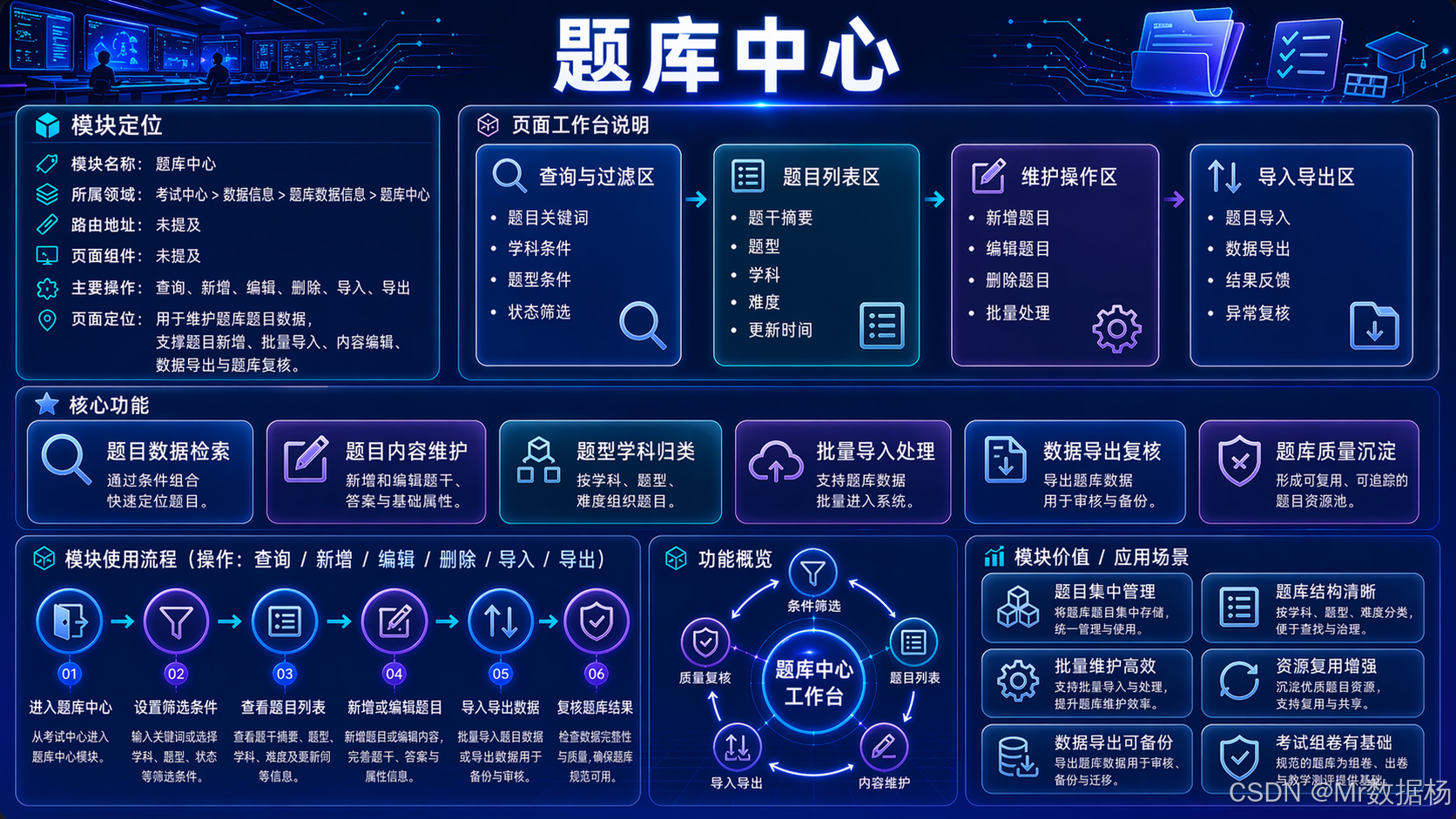
本文基于 server_backend/modules/TestingCenter 与 server_vue3/src/views/modules/TestingCenter/QuestionBank 的真实代码,说明如何把题库中心需求拆成 Codex 可执行的工程任务。文章重点不是泛讲 AI 写代码,而是把字段模型、接口动作、前端表单、流式生成、图片拆题和文件上传边界写清楚,让 Codex 能按教育管理系统的实际业务生成项目代码。
文章目录
设计与需求
题库中心不能只理解成试题表的 CRUD。QuestionBank 模型中同时存在题库状态 status、审核意见 audit_text、全局题目编号 uuid、学科 subject、题目标题 title、题型 question_type、知识点 question_tag、题干 description、选项结构 options、答案 answer、难度 difficulty/difficulty_label、核心素养 important_quality/important_quality_label、解析 explanation、教学指导 guidance、提示 help、额外要求 additional、分值 score、教材 text_book、参考图 image、考试类型 exam_type。这些字段决定题目能否进入审核、能否被组卷、能否被推荐引擎识别。
需求转换时,需要把业务拆成页面结构、数据模型、接口规则、权限验收和 Codex 生成任务。后端通过 QuestionBankViewSet 提供题库基础接口,并增加 update_create_question 与 get_fast_fill 动作;前端通过 QuestionBank/index.vue、crud.tsx、api.ts 实现列表筛选、编辑弹窗、字段联动、拍照识别、整卷导入、Markdown 图片上传和 LLM 流式回填。
#mermaid-svg-r0BZulXa6jM1nkFP{font-family:"trebuchet ms",verdana,arial,sans-serif;font-size:16px;fill:#333;}@keyframes edge-animation-frame{from{stroke-dashoffset:0;}}@keyframes dash{to{stroke-dashoffset:0;}}#mermaid-svg-r0BZulXa6jM1nkFP .edge-animation-slow{stroke-dasharray:9,5!important;stroke-dashoffset:900;animation:dash 50s linear infinite;stroke-linecap:round;}#mermaid-svg-r0BZulXa6jM1nkFP .edge-animation-fast{stroke-dasharray:9,5!important;stroke-dashoffset:900;animation:dash 20s linear infinite;stroke-linecap:round;}#mermaid-svg-r0BZulXa6jM1nkFP .error-icon{fill:#552222;}#mermaid-svg-r0BZulXa6jM1nkFP .error-text{fill:#552222;stroke:#552222;}#mermaid-svg-r0BZulXa6jM1nkFP .edge-thickness-normal{stroke-width:1px;}#mermaid-svg-r0BZulXa6jM1nkFP .edge-thickness-thick{stroke-width:3.5px;}#mermaid-svg-r0BZulXa6jM1nkFP .edge-pattern-solid{stroke-dasharray:0;}#mermaid-svg-r0BZulXa6jM1nkFP .edge-thickness-invisible{stroke-width:0;fill:none;}#mermaid-svg-r0BZulXa6jM1nkFP .edge-pattern-dashed{stroke-dasharray:3;}#mermaid-svg-r0BZulXa6jM1nkFP .edge-pattern-dotted{stroke-dasharray:2;}#mermaid-svg-r0BZulXa6jM1nkFP .marker{fill:#333333;stroke:#333333;}#mermaid-svg-r0BZulXa6jM1nkFP .marker.cross{stroke:#333333;}#mermaid-svg-r0BZulXa6jM1nkFP svg{font-family:"trebuchet ms",verdana,arial,sans-serif;font-size:16px;}#mermaid-svg-r0BZulXa6jM1nkFP p{margin:0;}#mermaid-svg-r0BZulXa6jM1nkFP .label{font-family:"trebuchet ms",verdana,arial,sans-serif;color:#333;}#mermaid-svg-r0BZulXa6jM1nkFP .cluster-label text{fill:#333;}#mermaid-svg-r0BZulXa6jM1nkFP .cluster-label span{color:#333;}#mermaid-svg-r0BZulXa6jM1nkFP .cluster-label span p{background-color:transparent;}#mermaid-svg-r0BZulXa6jM1nkFP .label text,#mermaid-svg-r0BZulXa6jM1nkFP span{fill:#333;color:#333;}#mermaid-svg-r0BZulXa6jM1nkFP .node rect,#mermaid-svg-r0BZulXa6jM1nkFP .node circle,#mermaid-svg-r0BZulXa6jM1nkFP .node ellipse,#mermaid-svg-r0BZulXa6jM1nkFP .node polygon,#mermaid-svg-r0BZulXa6jM1nkFP .node path{fill:#ECECFF;stroke:#9370DB;stroke-width:1px;}#mermaid-svg-r0BZulXa6jM1nkFP .rough-node .label text,#mermaid-svg-r0BZulXa6jM1nkFP .node .label text,#mermaid-svg-r0BZulXa6jM1nkFP .image-shape .label,#mermaid-svg-r0BZulXa6jM1nkFP .icon-shape .label{text-anchor:middle;}#mermaid-svg-r0BZulXa6jM1nkFP .node .katex path{fill:#000;stroke:#000;stroke-width:1px;}#mermaid-svg-r0BZulXa6jM1nkFP .rough-node .label,#mermaid-svg-r0BZulXa6jM1nkFP .node .label,#mermaid-svg-r0BZulXa6jM1nkFP .image-shape .label,#mermaid-svg-r0BZulXa6jM1nkFP .icon-shape .label{text-align:center;}#mermaid-svg-r0BZulXa6jM1nkFP .node.clickable{cursor:pointer;}#mermaid-svg-r0BZulXa6jM1nkFP .root .anchor path{fill:#333333!important;stroke-width:0;stroke:#333333;}#mermaid-svg-r0BZulXa6jM1nkFP .arrowheadPath{fill:#333333;}#mermaid-svg-r0BZulXa6jM1nkFP .edgePath .path{stroke:#333333;stroke-width:2.0px;}#mermaid-svg-r0BZulXa6jM1nkFP .flowchart-link{stroke:#333333;fill:none;}#mermaid-svg-r0BZulXa6jM1nkFP .edgeLabel{background-color:rgba(232,232,232, 0.8);text-align:center;}#mermaid-svg-r0BZulXa6jM1nkFP .edgeLabel p{background-color:rgba(232,232,232, 0.8);}#mermaid-svg-r0BZulXa6jM1nkFP .edgeLabel rect{opacity:0.5;background-color:rgba(232,232,232, 0.8);fill:rgba(232,232,232, 0.8);}#mermaid-svg-r0BZulXa6jM1nkFP .labelBkg{background-color:rgba(232, 232, 232, 0.5);}#mermaid-svg-r0BZulXa6jM1nkFP .cluster rect{fill:#ffffde;stroke:#aaaa33;stroke-width:1px;}#mermaid-svg-r0BZulXa6jM1nkFP .cluster text{fill:#333;}#mermaid-svg-r0BZulXa6jM1nkFP .cluster span{color:#333;}#mermaid-svg-r0BZulXa6jM1nkFP div.mermaidTooltip{position:absolute;text-align:center;max-width:200px;padding:2px;font-family:"trebuchet ms",verdana,arial,sans-serif;font-size:12px;background:hsl(80, 100%, 96.2745098039%);border:1px solid #aaaa33;border-radius:2px;pointer-events:none;z-index:100;}#mermaid-svg-r0BZulXa6jM1nkFP .flowchartTitleText{text-anchor:middle;font-size:18px;fill:#333;}#mermaid-svg-r0BZulXa6jM1nkFP rect.text{fill:none;stroke-width:0;}#mermaid-svg-r0BZulXa6jM1nkFP .icon-shape,#mermaid-svg-r0BZulXa6jM1nkFP .image-shape{background-color:rgba(232,232,232, 0.8);text-align:center;}#mermaid-svg-r0BZulXa6jM1nkFP .icon-shape p,#mermaid-svg-r0BZulXa6jM1nkFP .image-shape p{background-color:rgba(232,232,232, 0.8);padding:2px;}#mermaid-svg-r0BZulXa6jM1nkFP .icon-shape .label rect,#mermaid-svg-r0BZulXa6jM1nkFP .image-shape .label rect{opacity:0.5;background-color:rgba(232,232,232, 0.8);fill:rgba(232,232,232, 0.8);}#mermaid-svg-r0BZulXa6jM1nkFP .label-icon{display:inline-block;height:1em;overflow:visible;vertical-align:-0.125em;}#mermaid-svg-r0BZulXa6jM1nkFP .node .label-icon path{fill:currentColor;stroke:revert;stroke-width:revert;}#mermaid-svg-r0BZulXa6jM1nkFP :root{--mermaid-font-family:"trebuchet ms",verdana,arial,sans-serif;}#mermaid-svg-r0BZulXa6jM1nkFP .input>*{fill:#EEF4FF!important;stroke:#5B8FF9!important;color:#1D39C4!important;stroke-width:1.2px!important;}#mermaid-svg-r0BZulXa6jM1nkFP .input span{fill:#EEF4FF!important;stroke:#5B8FF9!important;color:#1D39C4!important;stroke-width:1.2px!important;}#mermaid-svg-r0BZulXa6jM1nkFP .input tspan{fill:#1D39C4!important;}#mermaid-svg-r0BZulXa6jM1nkFP .design>*{fill:#F6FFED!important;stroke:#52C41A!important;color:#237804!important;stroke-width:1.2px!important;}#mermaid-svg-r0BZulXa6jM1nkFP .design span{fill:#F6FFED!important;stroke:#52C41A!important;color:#237804!important;stroke-width:1.2px!important;}#mermaid-svg-r0BZulXa6jM1nkFP .design tspan{fill:#237804!important;}#mermaid-svg-r0BZulXa6jM1nkFP .process>*{fill:#FFF7E6!important;stroke:#FA8C16!important;color:#AD4E00!important;stroke-width:1.2px!important;}#mermaid-svg-r0BZulXa6jM1nkFP .process span{fill:#FFF7E6!important;stroke:#FA8C16!important;color:#AD4E00!important;stroke-width:1.2px!important;}#mermaid-svg-r0BZulXa6jM1nkFP .process tspan{fill:#AD4E00!important;}#mermaid-svg-r0BZulXa6jM1nkFP .check>*{fill:#F9F0FF!important;stroke:#722ED1!important;color:#531DAB!important;stroke-width:1.2px!important;}#mermaid-svg-r0BZulXa6jM1nkFP .check span{fill:#F9F0FF!important;stroke:#722ED1!important;color:#531DAB!important;stroke-width:1.2px!important;}#mermaid-svg-r0BZulXa6jM1nkFP .check tspan{fill:#531DAB!important;}#mermaid-svg-r0BZulXa6jM1nkFP .output>*{fill:#E6FFFB!important;stroke:#13C2C2!important;color:#006D75!important;stroke-width:1.2px!important;}#mermaid-svg-r0BZulXa6jM1nkFP .output span{fill:#E6FFFB!important;stroke:#13C2C2!important;color:#006D75!important;stroke-width:1.2px!important;}#mermaid-svg-r0BZulXa6jM1nkFP .output tspan{fill:#006D75!important;} 验收阶段
开发阶段
设计阶段
输入阶段
题库需求
源码上下文
权限规则
字段模型
页面结构
接口动作
扩展边界
生成后端
生成前端
补齐联动
接入生成
保存回显
审核可用
组卷可用
| 需求层描述 | 设计层转换 | Codex 代码生成方向 |
|---|---|---|
| 教师维护题目基础信息 | 建立 QuestionBank 字段与序列化规则,覆盖标题、题干、答案、解析、分值、教材和考试类型 |
生成模型、序列化器、CRUD 接口、列表筛选和表单保存 |
| 题目需要绑定教学属性 | subject 驱动 question_type、question_tag、text_book、important_quality 等下拉和树结构 |
生成前端联动、接口参数转换、保存前字段格式化 |
| 选择题和小题结构需要可编辑 | 用 options JSON 保存小题、选项、正确项、分值、知识点 |
生成选项编辑器、小题增删、答案同步、保存回显 |
| 题干、答案、提示、教学指导可由 LLM 辅助生成 | 前端调用 /api/tencentagent/chat_subject_help/,后端 QuestionBankPromptBuilder 生成上下文 Prompt |
生成流式读取、停止生成、草稿回填和人工确认保存 |
| 纸质试题图片可结构化导入 | 前端上传到 /api/system/file/,再调用 /api/tencentagent/chat_text_paper_disassembly/ 获取结构化题目 |
生成图片上传、SSE 解析、可编辑行、逐题导入 |
| 题目图片与 Markdown 图片需要保存 | image 字段、cropper-uploader、Markdown 编辑器上传统一使用文件接口 |
生成上传组件、URL 回写、失败提示和保存校验 |
可以直接使用下面的Prompt进行模块功能的设计
text
请基于当前教育管理系统源码,为考试中心的题库中心设计完整模块方案。

真实代码上下文如下:
- 后端模型:server_backend/modules/TestingCenter/models.py 中的 QuestionBank。
- 后端接口:server_backend/modules/TestingCenter/views_app/QuestionBank.py 中的 QuestionBankSerializer、QuestionBankPromptBuilder、QuestionBankSingleImagePromptBuilder、QuestionBankViewSet。
- 前端页面:server_vue3/src/views/modules/TestingCenter/QuestionBank/index.vue。
- 前端配置:server_vue3/src/views/modules/TestingCenter/QuestionBank/crud.tsx。
- 前端接口:server_vue3/src/views/modules/TestingCenter/QuestionBank/api.ts。

设计范围必须覆盖:
1. 题库字段:status、audit_text、uuid、subject、title、question_type、question_tag、description、options、options_max、answer、difficulty、difficulty_label、important_quality、important_quality_label、explanation、guidance、help、additional、score、text_book、image、exam_type。
2. 页面结构:列表筛选、新增编辑弹窗、基础信息区、题干/答案/提示/教学指导编辑区、选择题选项区、小题分值区、图片上传区、拍照识别区、整卷图片导入区。
3. 接口规则:基础 CRUD、update_create_question 保存/更新、get_fast_fill 学科模板填充、下拉接口、文件上传接口、chat_subject_help 流式生成、chat_text_paper_disassembly 图片拆题。
4. 数据联动:学科驱动题型、知识点、教材、核心素养;题型驱动选项结构和 options_max;知识点同步到 options[*].knowledge_point;选择题选项同步 answer。
5. 扩展能力:LLM 生成结果只回填表单,图像识别结果只进入可编辑草稿,文件上传只保存 URL,不直接绕过表单入库。

请输出模块 PDD 设计,包含业务目标、页面结构、数据模型、接口规则、权限规则、联动规则、扩展能力边界和验收标准。
后端设计
后端设计重点不是堆 CRUD 接口,而是搭建可复用的数据底座。题库中心的核心模型在 server_backend/modules/TestingCenter/models.py,表名为 TestingCenter_QuestionBank,通过 CoreModel 继承通用字段,通过 SoftDeleteModel 支持软删除。uuid 字段使用 get_str_uuid4 生成,并在 save() 中兼容旧的 32 位 hex 格式,避免历史题目在组卷和推荐链路中出现编号格式不一致。
接口层集中在 server_backend/modules/TestingCenter/views_app/QuestionBank.py。QuestionBankSerializer 负责字段序列化,并结合 LabelFieldMappingMixin 处理 label 字段映射;QuestionBankViewSet 继承 QuestionBankViewSetUtilsMixin 与 CustomModelViewSet,提供基础列表、新增、编辑、删除、详情接口。筛选逻辑中能看到 title、subject、description 的模糊查询,以及 answer_edited、explanation_edited、guidance_edited、help_edited、options_edited 这类"是否已编辑"过滤开关,用于区分占位内容和人工修订内容。
扩展接口不应塞进普通保存接口。update_create_question 用于前端"保存/更新"当前表单,适合处理先保存基础字段再触发生成的场景;get_fast_fill 根据学科读取 testing_fast_fill_dict,给题库表单返回默认模板。LLM 生成与图片拆题在前端通过腾讯智能体接口调用,但后端已经用 QuestionBankPromptBuilder、QuestionBankSingleImagePromptBuilder 定义了题库生成上下文,这些类应该被视为题库业务规则的一部分,不能在前端随意拼接。
| 后端设计项 | 设计重点 | Codex 生成方向 |
|---|---|---|
| 数据模型 | 使用 QuestionBank 保存题库状态、题目内容、教学属性、选项结构和参考图片 |
生成模型字段、表名、软删除、uuid 兼容逻辑和字段注释 |
| 序列化规则 | QuestionBankSerializer 输出题库完整字段,并保留 label 映射能力 |
生成序列化器、字段校验、默认值归一化和 JSONField 格式校验 |
| 基础接口 | QuestionBankViewSet 提供列表、详情、新增、更新、删除 |
生成 ViewSet、权限类、路由注册、分页排序和错误响应 |
| 筛选查询 | 支持标题、学科、题干、题型、知识点、审核状态、编辑状态等查询 | 生成 filter_fields、search_fields、自定义 edited switch filter |
| 保存动作 | update_create_question 支持有 id 更新、无 id 新增 |
生成动作接口、字段转换、保存后返回新 id 和 uuid |
| 快速填充 | get_fast_fill 按学科返回默认题型、分值、要求等模板 |
生成学科参数校验、未配置提示和默认值响应 |
| Prompt 规则 | QuestionBankPromptBuilder 聚合题目上下文、题型规则、选项快照 |
生成可维护的 Prompt Builder,不把业务规则散落在视图中 |
| 图片拆题规则 | QuestionBankSingleImagePromptBuilder 约束图片识别返回结构 |
生成识别上下文、结构化字段、异常信息和人工确认边界 |
| 权限控制 | 题库维护、审核入口、生成入口应受菜单与按钮权限限制 | 生成接口权限、前端按钮权限标识和越权请求拦截 |
可以直接使用下面的Prompt进行后端代码的设计
text
请按考试中心题库中心的真实业务,从零设计或补齐后端代码。

代码范围:
- server_backend/modules/TestingCenter/models.py
- server_backend/modules/TestingCenter/views_app/QuestionBank.py
- server_backend/modules/TestingCenter/urls.py
- 与题库相关的字典、筛选、权限和工具函数。

后端必须实现:
1. QuestionBank 模型字段:status、audit_text、uuid、subject、title、question_type、question_tag、description、options、options_max、answer、difficulty、difficulty_label、important_quality、important_quality_label、explanation、guidance、help、additional、score、text_book、image、exam_type。
2. uuid 保存兼容:空值自动生成,旧 32 位 hex 自动转换为标准 UUID 字符串。
3. QuestionBankSerializer:校验 options 必须是列表,question_tag/text_book 可接收数组或逗号字符串,保存前归一化。
4. QuestionBankViewSet:提供 CRUD、分页、模糊搜索、字段筛选、软删除和权限控制。
5. 自定义动作:update_create_question 支持新增与更新;get_fast_fill 根据 subject 返回 testing_fast_fill_dict 模板,未配置时返回明确提示。
6. 筛选能力:支持 title、subject、description、question_type、question_tag、status、exam_type,以及 answer_edited、explanation_edited、guidance_edited、help_edited、options_edited 这类编辑状态筛选。
7. LLM 生成支撑:保留 QuestionBankPromptBuilder,输入题目字段、题型配置、选项快照、额外要求,输出用于 chat_subject_help 的稳定上下文。
8. 图像识别支撑:保留 QuestionBankSingleImagePromptBuilder,约束 chat_text_paper_disassembly 的结构化返回,识别结果不能直接入库。
9. 文件管理边界:图片文件由 /api/system/file/ 上传,题库只保存 image 或 Markdown 中的 URL,不在题库接口中接收二进制。

请输出后端文件修改方案、接口清单、请求响应示例、权限点和必要测试用例。
前端设计
前端设计重点不是把字段堆到页面上,而是让教师能高效完成"选学科、定题型、维护题干、编辑答案、同步知识点、生成辅助内容、识别图片、保存回显"的完整操作。server_vue3/src/views/modules/TestingCenter/QuestionBank/crud.tsx 负责 FastCrud 列表与表单配置,api.ts 封装 /api/TestingCenter/QuestionBank/、update_create_question/、get_fast_fill/ 和下拉接口,index.vue 承载复杂交互。
列表层需要处理查询参数转换。crud.tsx 的 pageRequest 会把查询表单中的 question_type、question_tag、answer_edited、options_edited 等字段写入请求参数;返回列表后把 question_tag 归一化为数组,并把 options[*].knowledge_point 补齐成数组。保存层的 addRequest、editRequest 会把 question_tag、text_book 从数组转成逗号字符串,把 options 归一成后端可存的 JSON 结构。
编辑层在 index.vue 中明显超出普通表单。页面提供学科树、题型树、知识点树、教材树、难度、核心素养、考试类型、题目图片、Markdown 编辑器、选择题选项编辑、小题增删和保存按钮。saveBaseInfo 会把当前表单整理后调用 createQuestion,拿到返回的 id 再允许继续生成题干、答案、提示和教学指导,避免 LLM 生成挂在一个未保存的临时题目上。
| 前端设计项 | 设计重点 | Codex 生成方向 |
|---|---|---|
| 页面入口 | QuestionBank/index.vue 作为题库中心主页面 |
生成列表、弹窗、标签页、图片识别弹窗和整卷导入弹窗 |
| 接口封装 | api.ts 使用 apiPrefix = /api/TestingCenter/QuestionBank/ |
生成 GetList、GetObj、AddObj、UpdateObj、DelObj、createQuestion、fastFill 和下拉接口 |
| 列表配置 | crud.tsx 配置状态、学科、题型、知识点、难度、图片、编辑状态筛选 |
生成列配置、搜索区域、格式化展示、按钮权限和查询转换 |
| 表单结构 | 表单覆盖基础属性、题目内容、选项结构、教材和图片 | 生成字段组件、默认值、只读状态和保存前归一化 |
| 数据联动 | subject 驱动题型、知识点、教材、核心素养,question_type 驱动选项最大数 |
生成 focus/change 事件、缓存列表、参数转换和回显逻辑 |
| 选择题编辑 | options[0].answerOptions 保存选项,正确项同步到 answer |
生成添加选项、删除选项、单选/多选限制和答案同步 |
| 小题结构 | options 支持多个小题,每个小题有 score 与 knowledge_point |
生成小题增删、分值均分、知识点同步和最大数量限制 |
| LLM 回填 | fetchStreamData 调用 chat_subject_help 并写入目标字段 |
生成 SSE 解析、停止按钮、加载状态和人工确认保存 |
| 图片拆题 | 图片上传后调用 chat_text_paper_disassembly,结果转成可编辑题目行 |
生成上传、预览、识别状态、结构化解析和逐题导入 |
| 文件上传 | Markdown 图片和题目参考图统一上传到 /api/system/file/ |
生成 FormData 上传、URL 回写、失败提示和 token 处理 |
可以直接使用下面的Prompt进行前端代码的设计
text
请按考试中心题库中心的真实业务生成 Vue3 前端代码。

代码范围:
- server_vue3/src/views/modules/TestingCenter/QuestionBank/index.vue
- server_vue3/src/views/modules/TestingCenter/QuestionBank/crud.tsx
- server_vue3/src/views/modules/TestingCenter/QuestionBank/api.ts
- 必要的局部类型、工具函数和样式。

前端必须实现:
1. 列表查询:支持 title、subject、question_type、question_tag、status、exam_type、difficulty、answer_edited、explanation_edited、guidance_edited、help_edited、options_edited 等查询条件。
2. 表单结构:支持 status、subject、exam_type、title、question_type、question_tag、description、options、answer、difficulty、important_quality、explanation、guidance、help、additional、score、text_book、image。
3. 数据联动:subject 变化后加载题型、知识点、教材和核心素养;题型变化后同步 options_max、默认分值和选择题结构;question_tag 变化后同步到 options[*].knowledge_point。
4. 保存回显:新增或编辑时把 question_tag/text_book 数组转成逗号字符串,把 options 归一化为后端 JSONField 可保存结构,保存成功后回写 id。
5. 选择题交互:支持选项文本、解析、正确项勾选、单选和多选限制,并自动同步 answer。
6. LLM 生成入口:在题干、答案、提示、教学指导区域提供生成按钮,调用 /api/tencentagent/chat_subject_help/,读取 SSE 流,结果只回填表单,不直接入库。
7. 图像识别入口:提供拍照裁剪和整卷图片导入,先上传 /api/system/file/,再调用 /api/tencentagent/chat_text_paper_disassembly/,识别结果进入可编辑结构。
8. 文件上传:Markdown 编辑器图片上传与 image 字段上传都使用 /api/system/file/,失败时给出错误提示。
9. 权限按钮:新增、编辑、删除、保存、生成、识别、导入操作需要预留权限控制位置。

请输出前端文件结构、关键组件设计、接口调用代码、字段转换逻辑和交互验收点。
扩展功能
题库中心的扩展能力同时覆盖数据联动、LLM 内容生成、图像识别和文件管理。这些能力直接服务试题生产流程:联动保证题目属性一致,LLM 生成降低题干与解析维护成本,图像识别把纸质试题转成可编辑结构,文件管理解决题图和 Markdown 插图的持久化问题。它们都超出普通 CRUD,但代码中已经有明确入口和边界。
| 扩展功能 | 主要用途 | 落地重点 |
|---|---|---|
| 数据联动 | 保持学科、题型、知识点、教材、选项结构和答案一致 | 前端字段变化后生成正确接口参数,保存前完成格式转换 |
| LLM 内容生成 | 为题干、答案、提示、教学指导生成草稿 | 通过 SSE 回填目标字段,人工确认后再保存 |
| 图像识别 | 把试卷图片或拍照截图拆成结构化题目 | 上传图片后解析返回,进入可编辑题目行或当前表单 |
| 文件管理 | 保存题目参考图和 Markdown 插图 | 上传到系统文件接口,题库保存 URL |
数据联动
题库中心的数据联动集中在 QuestionBank/index.vue 和 crud.tsx。搜索区中,学科为空时需要清空 question_tag,避免把旧学科的知识点带入新查询;表单中,subject 变化后会触发题型、知识点、教材和核心素养的候选项加载;question_type 变化后会根据题型节点的 score、max 等信息调整默认分值、选项结构和 options_max;question_tag 变化后会同步到 options[*].knowledge_point。
保存前的格式转换是联动设计的关键。前端为了树选择和多选体验,会把 question_tag、text_book 保持为数组;后端模型字段是文本,因此保存前要转成逗号字符串。options 在前端既承载选择题 answerOptions,也承载主观题或小题的 score、knowledge_point,提交前必须统一成列表结构,否则回显和组卷都会出现结构不稳定。
#mermaid-svg-ajqXzkBeLrbDyPy9{font-family:"trebuchet ms",verdana,arial,sans-serif;font-size:16px;fill:#333;}@keyframes edge-animation-frame{from{stroke-dashoffset:0;}}@keyframes dash{to{stroke-dashoffset:0;}}#mermaid-svg-ajqXzkBeLrbDyPy9 .edge-animation-slow{stroke-dasharray:9,5!important;stroke-dashoffset:900;animation:dash 50s linear infinite;stroke-linecap:round;}#mermaid-svg-ajqXzkBeLrbDyPy9 .edge-animation-fast{stroke-dasharray:9,5!important;stroke-dashoffset:900;animation:dash 20s linear infinite;stroke-linecap:round;}#mermaid-svg-ajqXzkBeLrbDyPy9 .error-icon{fill:#552222;}#mermaid-svg-ajqXzkBeLrbDyPy9 .error-text{fill:#552222;stroke:#552222;}#mermaid-svg-ajqXzkBeLrbDyPy9 .edge-thickness-normal{stroke-width:1px;}#mermaid-svg-ajqXzkBeLrbDyPy9 .edge-thickness-thick{stroke-width:3.5px;}#mermaid-svg-ajqXzkBeLrbDyPy9 .edge-pattern-solid{stroke-dasharray:0;}#mermaid-svg-ajqXzkBeLrbDyPy9 .edge-thickness-invisible{stroke-width:0;fill:none;}#mermaid-svg-ajqXzkBeLrbDyPy9 .edge-pattern-dashed{stroke-dasharray:3;}#mermaid-svg-ajqXzkBeLrbDyPy9 .edge-pattern-dotted{stroke-dasharray:2;}#mermaid-svg-ajqXzkBeLrbDyPy9 .marker{fill:#333333;stroke:#333333;}#mermaid-svg-ajqXzkBeLrbDyPy9 .marker.cross{stroke:#333333;}#mermaid-svg-ajqXzkBeLrbDyPy9 svg{font-family:"trebuchet ms",verdana,arial,sans-serif;font-size:16px;}#mermaid-svg-ajqXzkBeLrbDyPy9 p{margin:0;}#mermaid-svg-ajqXzkBeLrbDyPy9 .label{font-family:"trebuchet ms",verdana,arial,sans-serif;color:#333;}#mermaid-svg-ajqXzkBeLrbDyPy9 .cluster-label text{fill:#333;}#mermaid-svg-ajqXzkBeLrbDyPy9 .cluster-label span{color:#333;}#mermaid-svg-ajqXzkBeLrbDyPy9 .cluster-label span p{background-color:transparent;}#mermaid-svg-ajqXzkBeLrbDyPy9 .label text,#mermaid-svg-ajqXzkBeLrbDyPy9 span{fill:#333;color:#333;}#mermaid-svg-ajqXzkBeLrbDyPy9 .node rect,#mermaid-svg-ajqXzkBeLrbDyPy9 .node circle,#mermaid-svg-ajqXzkBeLrbDyPy9 .node ellipse,#mermaid-svg-ajqXzkBeLrbDyPy9 .node polygon,#mermaid-svg-ajqXzkBeLrbDyPy9 .node path{fill:#ECECFF;stroke:#9370DB;stroke-width:1px;}#mermaid-svg-ajqXzkBeLrbDyPy9 .rough-node .label text,#mermaid-svg-ajqXzkBeLrbDyPy9 .node .label text,#mermaid-svg-ajqXzkBeLrbDyPy9 .image-shape .label,#mermaid-svg-ajqXzkBeLrbDyPy9 .icon-shape .label{text-anchor:middle;}#mermaid-svg-ajqXzkBeLrbDyPy9 .node .katex path{fill:#000;stroke:#000;stroke-width:1px;}#mermaid-svg-ajqXzkBeLrbDyPy9 .rough-node .label,#mermaid-svg-ajqXzkBeLrbDyPy9 .node .label,#mermaid-svg-ajqXzkBeLrbDyPy9 .image-shape .label,#mermaid-svg-ajqXzkBeLrbDyPy9 .icon-shape .label{text-align:center;}#mermaid-svg-ajqXzkBeLrbDyPy9 .node.clickable{cursor:pointer;}#mermaid-svg-ajqXzkBeLrbDyPy9 .root .anchor path{fill:#333333!important;stroke-width:0;stroke:#333333;}#mermaid-svg-ajqXzkBeLrbDyPy9 .arrowheadPath{fill:#333333;}#mermaid-svg-ajqXzkBeLrbDyPy9 .edgePath .path{stroke:#333333;stroke-width:2.0px;}#mermaid-svg-ajqXzkBeLrbDyPy9 .flowchart-link{stroke:#333333;fill:none;}#mermaid-svg-ajqXzkBeLrbDyPy9 .edgeLabel{background-color:rgba(232,232,232, 0.8);text-align:center;}#mermaid-svg-ajqXzkBeLrbDyPy9 .edgeLabel p{background-color:rgba(232,232,232, 0.8);}#mermaid-svg-ajqXzkBeLrbDyPy9 .edgeLabel rect{opacity:0.5;background-color:rgba(232,232,232, 0.8);fill:rgba(232,232,232, 0.8);}#mermaid-svg-ajqXzkBeLrbDyPy9 .labelBkg{background-color:rgba(232, 232, 232, 0.5);}#mermaid-svg-ajqXzkBeLrbDyPy9 .cluster rect{fill:#ffffde;stroke:#aaaa33;stroke-width:1px;}#mermaid-svg-ajqXzkBeLrbDyPy9 .cluster text{fill:#333;}#mermaid-svg-ajqXzkBeLrbDyPy9 .cluster span{color:#333;}#mermaid-svg-ajqXzkBeLrbDyPy9 div.mermaidTooltip{position:absolute;text-align:center;max-width:200px;padding:2px;font-family:"trebuchet ms",verdana,arial,sans-serif;font-size:12px;background:hsl(80, 100%, 96.2745098039%);border:1px solid #aaaa33;border-radius:2px;pointer-events:none;z-index:100;}#mermaid-svg-ajqXzkBeLrbDyPy9 .flowchartTitleText{text-anchor:middle;font-size:18px;fill:#333;}#mermaid-svg-ajqXzkBeLrbDyPy9 rect.text{fill:none;stroke-width:0;}#mermaid-svg-ajqXzkBeLrbDyPy9 .icon-shape,#mermaid-svg-ajqXzkBeLrbDyPy9 .image-shape{background-color:rgba(232,232,232, 0.8);text-align:center;}#mermaid-svg-ajqXzkBeLrbDyPy9 .icon-shape p,#mermaid-svg-ajqXzkBeLrbDyPy9 .image-shape p{background-color:rgba(232,232,232, 0.8);padding:2px;}#mermaid-svg-ajqXzkBeLrbDyPy9 .icon-shape .label rect,#mermaid-svg-ajqXzkBeLrbDyPy9 .image-shape .label rect{opacity:0.5;background-color:rgba(232,232,232, 0.8);fill:rgba(232,232,232, 0.8);}#mermaid-svg-ajqXzkBeLrbDyPy9 .label-icon{display:inline-block;height:1em;overflow:visible;vertical-align:-0.125em;}#mermaid-svg-ajqXzkBeLrbDyPy9 .node .label-icon path{fill:currentColor;stroke:revert;stroke-width:revert;}#mermaid-svg-ajqXzkBeLrbDyPy9 :root{--mermaid-font-family:"trebuchet ms",verdana,arial,sans-serif;}#mermaid-svg-ajqXzkBeLrbDyPy9 .input>*{fill:#EEF4FF!important;stroke:#5B8FF9!important;color:#1D39C4!important;stroke-width:1.2px!important;}#mermaid-svg-ajqXzkBeLrbDyPy9 .input span{fill:#EEF4FF!important;stroke:#5B8FF9!important;color:#1D39C4!important;stroke-width:1.2px!important;}#mermaid-svg-ajqXzkBeLrbDyPy9 .input tspan{fill:#1D39C4!important;}#mermaid-svg-ajqXzkBeLrbDyPy9 .process>*{fill:#FFF7E6!important;stroke:#FA8C16!important;color:#AD4E00!important;stroke-width:1.2px!important;}#mermaid-svg-ajqXzkBeLrbDyPy9 .process span{fill:#FFF7E6!important;stroke:#FA8C16!important;color:#AD4E00!important;stroke-width:1.2px!important;}#mermaid-svg-ajqXzkBeLrbDyPy9 .process tspan{fill:#AD4E00!important;}#mermaid-svg-ajqXzkBeLrbDyPy9 .output>*{fill:#E6FFFB!important;stroke:#13C2C2!important;color:#006D75!important;stroke-width:1.2px!important;}#mermaid-svg-ajqXzkBeLrbDyPy9 .output span{fill:#E6FFFB!important;stroke:#13C2C2!important;color:#006D75!important;stroke-width:1.2px!important;}#mermaid-svg-ajqXzkBeLrbDyPy9 .output tspan{fill:#006D75!important;}#mermaid-svg-ajqXzkBeLrbDyPy9 .check>*{fill:#F9F0FF!important;stroke:#722ED1!important;color:#531DAB!important;stroke-width:1.2px!important;}#mermaid-svg-ajqXzkBeLrbDyPy9 .check span{fill:#F9F0FF!important;stroke:#722ED1!important;color:#531DAB!important;stroke-width:1.2px!important;}#mermaid-svg-ajqXzkBeLrbDyPy9 .check tspan{fill:#531DAB!important;} 结果阶段
处理阶段
输入阶段
选择学科
选择题型
选择知识点
加载候选项
同步选项数
转换字段
提交保存
表单回显
列表刷新
组卷可用
交给 Codex 生成时,需要明确几个边界:不要把学科树、知识点树和教材树混成一个接口;不要把前端数组直接写入后端文本字段;不要在题型变化时清空教师已经编辑过的题干和答案;不要为了保存方便把 options 简化成字符串。
可以直接使用下面的Prompt进行数据联动设计
text
请为题库中心实现数据联动能力。

真实字段与代码边界:
- subject:学科,驱动题型、知识点、教材和核心素养候选项。
- question_type:题型,驱动 options_max、默认分值、选择题结构和小题数量限制。
- question_tag:知识点,多选树结构,保存前需要转换为逗号字符串,并同步到 options[*].knowledge_point。
- text_book:教材,多选树结构,保存前需要转换为逗号字符串。
- options:JSON 列表,既保存小题分值,也保存选择题 answerOptions。
- answer:选择题正确项变化后自动同步。

实现要求:
1. 搜索区 subject 为空时清空 question_tag。
2. 表单 subject 变化后刷新 select_question_type、select_knowledge_point、select_textbook、important_quality 候选项。
3. question_type 变化后保留已编辑内容,只更新题型相关默认结构。
4. question_tag 变化后同步到每个小题的 knowledge_point。
5. 保存前把 question_tag/text_book 数组转为逗号字符串,把 options 归一化为后端 JSONField 可保存结构。
6. 回显时把 question_tag/text_book 拆回数组,把 options[*].knowledge_point 归一化为数组。

请输出前端实现代码、后端字段校验、联动流程和验收用例。
LLM 内容生成
题库中心的 LLM 能力不是泛用聊天,而是针对题库字段生成可编辑草稿。QuestionBank/index.vue 中的 fetchStreamData 会根据当前目标字段调用 /api/tencentagent/chat_subject_help/,目标字段包括 description、answer、help、guidance。请求体会携带 rowId、target_field、当前题目表单上下文和 additional 额外要求;返回内容按 SSE 流读取,经过 parseTencentAgentSegment 解析后写入对应字段。
后端侧的 QuestionBankPromptBuilder 才是生成质量的核心。它会把学科、题型、难度、题干、答案、选项快照、题型配置约束、已有字段内容和额外要求合成 Prompt。这样做的价值在于,Codex 生成代码时可以把 LLM 作为模块能力接入,而不是让前端随意把一段用户输入发给模型。生成结果必须先回填表单,由教师检查题干、选项、答案和解析是否一致,再通过 saveBaseInfo 保存。
#mermaid-svg-z2dW8PWDXHOsWsJG{font-family:"trebuchet ms",verdana,arial,sans-serif;font-size:16px;fill:#333;}@keyframes edge-animation-frame{from{stroke-dashoffset:0;}}@keyframes dash{to{stroke-dashoffset:0;}}#mermaid-svg-z2dW8PWDXHOsWsJG .edge-animation-slow{stroke-dasharray:9,5!important;stroke-dashoffset:900;animation:dash 50s linear infinite;stroke-linecap:round;}#mermaid-svg-z2dW8PWDXHOsWsJG .edge-animation-fast{stroke-dasharray:9,5!important;stroke-dashoffset:900;animation:dash 20s linear infinite;stroke-linecap:round;}#mermaid-svg-z2dW8PWDXHOsWsJG .error-icon{fill:#552222;}#mermaid-svg-z2dW8PWDXHOsWsJG .error-text{fill:#552222;stroke:#552222;}#mermaid-svg-z2dW8PWDXHOsWsJG .edge-thickness-normal{stroke-width:1px;}#mermaid-svg-z2dW8PWDXHOsWsJG .edge-thickness-thick{stroke-width:3.5px;}#mermaid-svg-z2dW8PWDXHOsWsJG .edge-pattern-solid{stroke-dasharray:0;}#mermaid-svg-z2dW8PWDXHOsWsJG .edge-thickness-invisible{stroke-width:0;fill:none;}#mermaid-svg-z2dW8PWDXHOsWsJG .edge-pattern-dashed{stroke-dasharray:3;}#mermaid-svg-z2dW8PWDXHOsWsJG .edge-pattern-dotted{stroke-dasharray:2;}#mermaid-svg-z2dW8PWDXHOsWsJG .marker{fill:#333333;stroke:#333333;}#mermaid-svg-z2dW8PWDXHOsWsJG .marker.cross{stroke:#333333;}#mermaid-svg-z2dW8PWDXHOsWsJG svg{font-family:"trebuchet ms",verdana,arial,sans-serif;font-size:16px;}#mermaid-svg-z2dW8PWDXHOsWsJG p{margin:0;}#mermaid-svg-z2dW8PWDXHOsWsJG .label{font-family:"trebuchet ms",verdana,arial,sans-serif;color:#333;}#mermaid-svg-z2dW8PWDXHOsWsJG .cluster-label text{fill:#333;}#mermaid-svg-z2dW8PWDXHOsWsJG .cluster-label span{color:#333;}#mermaid-svg-z2dW8PWDXHOsWsJG .cluster-label span p{background-color:transparent;}#mermaid-svg-z2dW8PWDXHOsWsJG .label text,#mermaid-svg-z2dW8PWDXHOsWsJG span{fill:#333;color:#333;}#mermaid-svg-z2dW8PWDXHOsWsJG .node rect,#mermaid-svg-z2dW8PWDXHOsWsJG .node circle,#mermaid-svg-z2dW8PWDXHOsWsJG .node ellipse,#mermaid-svg-z2dW8PWDXHOsWsJG .node polygon,#mermaid-svg-z2dW8PWDXHOsWsJG .node path{fill:#ECECFF;stroke:#9370DB;stroke-width:1px;}#mermaid-svg-z2dW8PWDXHOsWsJG .rough-node .label text,#mermaid-svg-z2dW8PWDXHOsWsJG .node .label text,#mermaid-svg-z2dW8PWDXHOsWsJG .image-shape .label,#mermaid-svg-z2dW8PWDXHOsWsJG .icon-shape .label{text-anchor:middle;}#mermaid-svg-z2dW8PWDXHOsWsJG .node .katex path{fill:#000;stroke:#000;stroke-width:1px;}#mermaid-svg-z2dW8PWDXHOsWsJG .rough-node .label,#mermaid-svg-z2dW8PWDXHOsWsJG .node .label,#mermaid-svg-z2dW8PWDXHOsWsJG .image-shape .label,#mermaid-svg-z2dW8PWDXHOsWsJG .icon-shape .label{text-align:center;}#mermaid-svg-z2dW8PWDXHOsWsJG .node.clickable{cursor:pointer;}#mermaid-svg-z2dW8PWDXHOsWsJG .root .anchor path{fill:#333333!important;stroke-width:0;stroke:#333333;}#mermaid-svg-z2dW8PWDXHOsWsJG .arrowheadPath{fill:#333333;}#mermaid-svg-z2dW8PWDXHOsWsJG .edgePath .path{stroke:#333333;stroke-width:2.0px;}#mermaid-svg-z2dW8PWDXHOsWsJG .flowchart-link{stroke:#333333;fill:none;}#mermaid-svg-z2dW8PWDXHOsWsJG .edgeLabel{background-color:rgba(232,232,232, 0.8);text-align:center;}#mermaid-svg-z2dW8PWDXHOsWsJG .edgeLabel p{background-color:rgba(232,232,232, 0.8);}#mermaid-svg-z2dW8PWDXHOsWsJG .edgeLabel rect{opacity:0.5;background-color:rgba(232,232,232, 0.8);fill:rgba(232,232,232, 0.8);}#mermaid-svg-z2dW8PWDXHOsWsJG .labelBkg{background-color:rgba(232, 232, 232, 0.5);}#mermaid-svg-z2dW8PWDXHOsWsJG .cluster rect{fill:#ffffde;stroke:#aaaa33;stroke-width:1px;}#mermaid-svg-z2dW8PWDXHOsWsJG .cluster text{fill:#333;}#mermaid-svg-z2dW8PWDXHOsWsJG .cluster span{color:#333;}#mermaid-svg-z2dW8PWDXHOsWsJG div.mermaidTooltip{position:absolute;text-align:center;max-width:200px;padding:2px;font-family:"trebuchet ms",verdana,arial,sans-serif;font-size:12px;background:hsl(80, 100%, 96.2745098039%);border:1px solid #aaaa33;border-radius:2px;pointer-events:none;z-index:100;}#mermaid-svg-z2dW8PWDXHOsWsJG .flowchartTitleText{text-anchor:middle;font-size:18px;fill:#333;}#mermaid-svg-z2dW8PWDXHOsWsJG rect.text{fill:none;stroke-width:0;}#mermaid-svg-z2dW8PWDXHOsWsJG .icon-shape,#mermaid-svg-z2dW8PWDXHOsWsJG .image-shape{background-color:rgba(232,232,232, 0.8);text-align:center;}#mermaid-svg-z2dW8PWDXHOsWsJG .icon-shape p,#mermaid-svg-z2dW8PWDXHOsWsJG .image-shape p{background-color:rgba(232,232,232, 0.8);padding:2px;}#mermaid-svg-z2dW8PWDXHOsWsJG .icon-shape .label rect,#mermaid-svg-z2dW8PWDXHOsWsJG .image-shape .label rect{opacity:0.5;background-color:rgba(232,232,232, 0.8);fill:rgba(232,232,232, 0.8);}#mermaid-svg-z2dW8PWDXHOsWsJG .label-icon{display:inline-block;height:1em;overflow:visible;vertical-align:-0.125em;}#mermaid-svg-z2dW8PWDXHOsWsJG .node .label-icon path{fill:currentColor;stroke:revert;stroke-width:revert;}#mermaid-svg-z2dW8PWDXHOsWsJG :root{--mermaid-font-family:"trebuchet ms",verdana,arial,sans-serif;}#mermaid-svg-z2dW8PWDXHOsWsJG .input>*{fill:#EEF4FF!important;stroke:#5B8FF9!important;color:#1D39C4!important;stroke-width:1.2px!important;}#mermaid-svg-z2dW8PWDXHOsWsJG .input span{fill:#EEF4FF!important;stroke:#5B8FF9!important;color:#1D39C4!important;stroke-width:1.2px!important;}#mermaid-svg-z2dW8PWDXHOsWsJG .input tspan{fill:#1D39C4!important;}#mermaid-svg-z2dW8PWDXHOsWsJG .process>*{fill:#FFF7E6!important;stroke:#FA8C16!important;color:#AD4E00!important;stroke-width:1.2px!important;}#mermaid-svg-z2dW8PWDXHOsWsJG .process span{fill:#FFF7E6!important;stroke:#FA8C16!important;color:#AD4E00!important;stroke-width:1.2px!important;}#mermaid-svg-z2dW8PWDXHOsWsJG .process tspan{fill:#AD4E00!important;}#mermaid-svg-z2dW8PWDXHOsWsJG .output>*{fill:#E6FFFB!important;stroke:#13C2C2!important;color:#006D75!important;stroke-width:1.2px!important;}#mermaid-svg-z2dW8PWDXHOsWsJG .output span{fill:#E6FFFB!important;stroke:#13C2C2!important;color:#006D75!important;stroke-width:1.2px!important;}#mermaid-svg-z2dW8PWDXHOsWsJG .output tspan{fill:#006D75!important;}#mermaid-svg-z2dW8PWDXHOsWsJG .check>*{fill:#F9F0FF!important;stroke:#722ED1!important;color:#531DAB!important;stroke-width:1.2px!important;}#mermaid-svg-z2dW8PWDXHOsWsJG .check span{fill:#F9F0FF!important;stroke:#722ED1!important;color:#531DAB!important;stroke-width:1.2px!important;}#mermaid-svg-z2dW8PWDXHOsWsJG .check tspan{fill:#531DAB!important;} 结果阶段
处理阶段
输入阶段
当前题目
目标字段
额外要求
保存基础
构造Prompt
读取流式
写入表单
人工确认
提交保存
内容可用
交给 Codex 生成时,需要强调生成结果不能直接作为正式数据入库。接口返回的是候选内容,不代表题目已经通过审核。前端应提供停止生成、加载状态、错误提示和字段覆盖提醒;后端 Prompt Builder 需要保留题型和选项约束,避免选择题答案、选项解析和题干之间不一致。
可以直接使用下面的Prompt进行LLM功能设计
text
请为题库中心实现 LLM 内容生成能力。

真实业务边界:
- 生成目标字段只包括 description、answer、help、guidance。
- 前端入口在 QuestionBank/index.vue。
- 请求接口为 /api/tencentagent/chat_subject_help/。
- 后端上下文由 QuestionBankPromptBuilder 组织。
- 生成结果只能回填表单,必须由教师确认后通过 saveBaseInfo 保存。

实现要求:
1. 生成前检查当前题目基础信息是否已保存,没有 id 时先调用 update_create_question。
2. 请求体携带 rowId、target_field、subject、question_type、question_tag、difficulty_label、description、answer、options、additional 等上下文。
3. 使用 fetch 读取 SSE 流,解析 data 行,支持 delta、answer、content、message 等字段。
4. 每个目标字段有独立 loading、thought、AbortController 状态。
5. 支持停止生成,停止后保留已生成草稿。
6. 生成内容写入对应表单字段,不直接调用保存接口。
7. 生成完成后提示教师确认题干、答案、选项和解析一致性。

请输出前端流式读取代码、状态管理设计、Prompt Builder 输入结构、异常处理和验收用例。
图像识别
图像识别能力在题库中心有两个入口:整卷图片导入和单题拍照识别。整卷导入通过 paperImportDialogVisible 打开弹窗,上传图片后调用 /api/system/file/ 获取 URL,再调用 /api/tencentagent/chat_text_paper_disassembly/ 读取 SSE 返回。前端会把返回内容解析成 PaperDisassemblyResult,再构造成 paperImportQuestionRows,每一行都能编辑题号、标题、学科、题型、分值、题干、选项和知识点,确认后逐题导入。
单题拍照识别通过 questionPhotoDialogVisible 和 vue-cropper 完成裁剪、旋转、缩放和重置。裁剪后的图片同样先上传到文件接口,再调用 chat_text_paper_disassembly。识别结果通过 applyQuestionPhotoResultToForm 写入当前题库表单,包括标题、学科、题型、分值、题干、选择题选项和小题结构。这里的关键边界是"识别到可编辑结构",不是"识别即入库"。
#mermaid-svg-H7r2YuVstVaywrEY{font-family:"trebuchet ms",verdana,arial,sans-serif;font-size:16px;fill:#333;}@keyframes edge-animation-frame{from{stroke-dashoffset:0;}}@keyframes dash{to{stroke-dashoffset:0;}}#mermaid-svg-H7r2YuVstVaywrEY .edge-animation-slow{stroke-dasharray:9,5!important;stroke-dashoffset:900;animation:dash 50s linear infinite;stroke-linecap:round;}#mermaid-svg-H7r2YuVstVaywrEY .edge-animation-fast{stroke-dasharray:9,5!important;stroke-dashoffset:900;animation:dash 20s linear infinite;stroke-linecap:round;}#mermaid-svg-H7r2YuVstVaywrEY .error-icon{fill:#552222;}#mermaid-svg-H7r2YuVstVaywrEY .error-text{fill:#552222;stroke:#552222;}#mermaid-svg-H7r2YuVstVaywrEY .edge-thickness-normal{stroke-width:1px;}#mermaid-svg-H7r2YuVstVaywrEY .edge-thickness-thick{stroke-width:3.5px;}#mermaid-svg-H7r2YuVstVaywrEY .edge-pattern-solid{stroke-dasharray:0;}#mermaid-svg-H7r2YuVstVaywrEY .edge-thickness-invisible{stroke-width:0;fill:none;}#mermaid-svg-H7r2YuVstVaywrEY .edge-pattern-dashed{stroke-dasharray:3;}#mermaid-svg-H7r2YuVstVaywrEY .edge-pattern-dotted{stroke-dasharray:2;}#mermaid-svg-H7r2YuVstVaywrEY .marker{fill:#333333;stroke:#333333;}#mermaid-svg-H7r2YuVstVaywrEY .marker.cross{stroke:#333333;}#mermaid-svg-H7r2YuVstVaywrEY svg{font-family:"trebuchet ms",verdana,arial,sans-serif;font-size:16px;}#mermaid-svg-H7r2YuVstVaywrEY p{margin:0;}#mermaid-svg-H7r2YuVstVaywrEY .label{font-family:"trebuchet ms",verdana,arial,sans-serif;color:#333;}#mermaid-svg-H7r2YuVstVaywrEY .cluster-label text{fill:#333;}#mermaid-svg-H7r2YuVstVaywrEY .cluster-label span{color:#333;}#mermaid-svg-H7r2YuVstVaywrEY .cluster-label span p{background-color:transparent;}#mermaid-svg-H7r2YuVstVaywrEY .label text,#mermaid-svg-H7r2YuVstVaywrEY span{fill:#333;color:#333;}#mermaid-svg-H7r2YuVstVaywrEY .node rect,#mermaid-svg-H7r2YuVstVaywrEY .node circle,#mermaid-svg-H7r2YuVstVaywrEY .node ellipse,#mermaid-svg-H7r2YuVstVaywrEY .node polygon,#mermaid-svg-H7r2YuVstVaywrEY .node path{fill:#ECECFF;stroke:#9370DB;stroke-width:1px;}#mermaid-svg-H7r2YuVstVaywrEY .rough-node .label text,#mermaid-svg-H7r2YuVstVaywrEY .node .label text,#mermaid-svg-H7r2YuVstVaywrEY .image-shape .label,#mermaid-svg-H7r2YuVstVaywrEY .icon-shape .label{text-anchor:middle;}#mermaid-svg-H7r2YuVstVaywrEY .node .katex path{fill:#000;stroke:#000;stroke-width:1px;}#mermaid-svg-H7r2YuVstVaywrEY .rough-node .label,#mermaid-svg-H7r2YuVstVaywrEY .node .label,#mermaid-svg-H7r2YuVstVaywrEY .image-shape .label,#mermaid-svg-H7r2YuVstVaywrEY .icon-shape .label{text-align:center;}#mermaid-svg-H7r2YuVstVaywrEY .node.clickable{cursor:pointer;}#mermaid-svg-H7r2YuVstVaywrEY .root .anchor path{fill:#333333!important;stroke-width:0;stroke:#333333;}#mermaid-svg-H7r2YuVstVaywrEY .arrowheadPath{fill:#333333;}#mermaid-svg-H7r2YuVstVaywrEY .edgePath .path{stroke:#333333;stroke-width:2.0px;}#mermaid-svg-H7r2YuVstVaywrEY .flowchart-link{stroke:#333333;fill:none;}#mermaid-svg-H7r2YuVstVaywrEY .edgeLabel{background-color:rgba(232,232,232, 0.8);text-align:center;}#mermaid-svg-H7r2YuVstVaywrEY .edgeLabel p{background-color:rgba(232,232,232, 0.8);}#mermaid-svg-H7r2YuVstVaywrEY .edgeLabel rect{opacity:0.5;background-color:rgba(232,232,232, 0.8);fill:rgba(232,232,232, 0.8);}#mermaid-svg-H7r2YuVstVaywrEY .labelBkg{background-color:rgba(232, 232, 232, 0.5);}#mermaid-svg-H7r2YuVstVaywrEY .cluster rect{fill:#ffffde;stroke:#aaaa33;stroke-width:1px;}#mermaid-svg-H7r2YuVstVaywrEY .cluster text{fill:#333;}#mermaid-svg-H7r2YuVstVaywrEY .cluster span{color:#333;}#mermaid-svg-H7r2YuVstVaywrEY div.mermaidTooltip{position:absolute;text-align:center;max-width:200px;padding:2px;font-family:"trebuchet ms",verdana,arial,sans-serif;font-size:12px;background:hsl(80, 100%, 96.2745098039%);border:1px solid #aaaa33;border-radius:2px;pointer-events:none;z-index:100;}#mermaid-svg-H7r2YuVstVaywrEY .flowchartTitleText{text-anchor:middle;font-size:18px;fill:#333;}#mermaid-svg-H7r2YuVstVaywrEY rect.text{fill:none;stroke-width:0;}#mermaid-svg-H7r2YuVstVaywrEY .icon-shape,#mermaid-svg-H7r2YuVstVaywrEY .image-shape{background-color:rgba(232,232,232, 0.8);text-align:center;}#mermaid-svg-H7r2YuVstVaywrEY .icon-shape p,#mermaid-svg-H7r2YuVstVaywrEY .image-shape p{background-color:rgba(232,232,232, 0.8);padding:2px;}#mermaid-svg-H7r2YuVstVaywrEY .icon-shape .label rect,#mermaid-svg-H7r2YuVstVaywrEY .image-shape .label rect{opacity:0.5;background-color:rgba(232,232,232, 0.8);fill:rgba(232,232,232, 0.8);}#mermaid-svg-H7r2YuVstVaywrEY .label-icon{display:inline-block;height:1em;overflow:visible;vertical-align:-0.125em;}#mermaid-svg-H7r2YuVstVaywrEY .node .label-icon path{fill:currentColor;stroke:revert;stroke-width:revert;}#mermaid-svg-H7r2YuVstVaywrEY :root{--mermaid-font-family:"trebuchet ms",verdana,arial,sans-serif;}#mermaid-svg-H7r2YuVstVaywrEY .input>*{fill:#EEF4FF!important;stroke:#5B8FF9!important;color:#1D39C4!important;stroke-width:1.2px!important;}#mermaid-svg-H7r2YuVstVaywrEY .input span{fill:#EEF4FF!important;stroke:#5B8FF9!important;color:#1D39C4!important;stroke-width:1.2px!important;}#mermaid-svg-H7r2YuVstVaywrEY .input tspan{fill:#1D39C4!important;}#mermaid-svg-H7r2YuVstVaywrEY .process>*{fill:#FFF7E6!important;stroke:#FA8C16!important;color:#AD4E00!important;stroke-width:1.2px!important;}#mermaid-svg-H7r2YuVstVaywrEY .process span{fill:#FFF7E6!important;stroke:#FA8C16!important;color:#AD4E00!important;stroke-width:1.2px!important;}#mermaid-svg-H7r2YuVstVaywrEY .process tspan{fill:#AD4E00!important;}#mermaid-svg-H7r2YuVstVaywrEY .output>*{fill:#E6FFFB!important;stroke:#13C2C2!important;color:#006D75!important;stroke-width:1.2px!important;}#mermaid-svg-H7r2YuVstVaywrEY .output span{fill:#E6FFFB!important;stroke:#13C2C2!important;color:#006D75!important;stroke-width:1.2px!important;}#mermaid-svg-H7r2YuVstVaywrEY .output tspan{fill:#006D75!important;}#mermaid-svg-H7r2YuVstVaywrEY .check>*{fill:#F9F0FF!important;stroke:#722ED1!important;color:#531DAB!important;stroke-width:1.2px!important;}#mermaid-svg-H7r2YuVstVaywrEY .check span{fill:#F9F0FF!important;stroke:#722ED1!important;color:#531DAB!important;stroke-width:1.2px!important;}#mermaid-svg-H7r2YuVstVaywrEY .check tspan{fill:#531DAB!important;} 结果阶段
处理阶段
输入阶段
上传图片
拍照裁剪
当前表单
文件上传
调用识别
SSE解析
结构转换
可编辑行
表单回填
人工修正
确认保存
交给 Codex 生成时,必须要求它处理异常返回和半结构化文本。当前代码中已经有 tryParsePaperImportJson、parsePaperImportSsePayload、normalizePaperImportResult、normalizePaperOptions、normalizePaperSubQuestionItem 这类结构清洗逻辑,说明识别服务返回不一定稳定。Codex 不能把识别返回假设成固定完美 JSON,也不能绕过可编辑表格直接批量保存。
可以直接使用下面的Prompt进行图像识别功能设计
text
请为题库中心实现图像识别导题能力。

真实业务入口:
- 整卷图片导入:QuestionBank/index.vue 中的 paperImportDialogVisible、paperImportQuestionRows、startPaperImportRecognition。
- 单题拍照识别:questionPhotoDialogVisible、vue-cropper、startQuestionPhotoRecognition、applyQuestionPhotoResultToForm。
- 文件上传接口:/api/system/file/。
- 识别接口:/api/tencentagent/chat_text_paper_disassembly/。

实现要求:
1. 图片必须先上传到 /api/system/file/,拿到 URL 后再调用识别接口。
2. 识别接口用 fetch 读取 SSE 流,支持停止识别和错误提示。
3. 返回内容需要经过 JSON 提取、结构归一化和字段兜底,不能假设服务永远返回标准 JSON。
4. 整卷识别结果进入可编辑表格,用户可修改标题、学科、题型、分值、题干、选项、知识点后逐题导入。
5. 单题识别结果只回填当前表单,覆盖前应尽量保留用户已编辑字段。
6. 识别结果不能直接入库,必须经人工修正后再调用题库保存接口。
7. 需要处理图片类型校验、上传失败、识别中止、空结果、题型无法匹配、知识点为空等状态。

请输出前端组件结构、接口调用代码、识别结果标准结构、字段映射规则和验收用例。
文件管理
题库中心的文件管理主要包含两类:题目参考图和 Markdown 内容插图。crud.tsx 中 image 字段使用 cropper-uploader,用于保存题目参考图片 URL;index.vue 中的 handleUploadImage 为 Markdown 编辑器提供图片上传能力,把多个文件通过 FormData 提交到 /api/system/file/,再把返回的 URL 写入编辑器。图像识别导入也复用同一文件接口。
文件管理的边界需要写清楚:题库接口保存的是 URL,不负责存储二进制;上传失败不能继续触发识别;Markdown 插图和题目参考图都要走统一 token 和接口地址解析;保存题目时不应把文件对象写进 image 或 description。
#mermaid-svg-LrNFoEbkD1FNeFMX{font-family:"trebuchet ms",verdana,arial,sans-serif;font-size:16px;fill:#333;}@keyframes edge-animation-frame{from{stroke-dashoffset:0;}}@keyframes dash{to{stroke-dashoffset:0;}}#mermaid-svg-LrNFoEbkD1FNeFMX .edge-animation-slow{stroke-dasharray:9,5!important;stroke-dashoffset:900;animation:dash 50s linear infinite;stroke-linecap:round;}#mermaid-svg-LrNFoEbkD1FNeFMX .edge-animation-fast{stroke-dasharray:9,5!important;stroke-dashoffset:900;animation:dash 20s linear infinite;stroke-linecap:round;}#mermaid-svg-LrNFoEbkD1FNeFMX .error-icon{fill:#552222;}#mermaid-svg-LrNFoEbkD1FNeFMX .error-text{fill:#552222;stroke:#552222;}#mermaid-svg-LrNFoEbkD1FNeFMX .edge-thickness-normal{stroke-width:1px;}#mermaid-svg-LrNFoEbkD1FNeFMX .edge-thickness-thick{stroke-width:3.5px;}#mermaid-svg-LrNFoEbkD1FNeFMX .edge-pattern-solid{stroke-dasharray:0;}#mermaid-svg-LrNFoEbkD1FNeFMX .edge-thickness-invisible{stroke-width:0;fill:none;}#mermaid-svg-LrNFoEbkD1FNeFMX .edge-pattern-dashed{stroke-dasharray:3;}#mermaid-svg-LrNFoEbkD1FNeFMX .edge-pattern-dotted{stroke-dasharray:2;}#mermaid-svg-LrNFoEbkD1FNeFMX .marker{fill:#333333;stroke:#333333;}#mermaid-svg-LrNFoEbkD1FNeFMX .marker.cross{stroke:#333333;}#mermaid-svg-LrNFoEbkD1FNeFMX svg{font-family:"trebuchet ms",verdana,arial,sans-serif;font-size:16px;}#mermaid-svg-LrNFoEbkD1FNeFMX p{margin:0;}#mermaid-svg-LrNFoEbkD1FNeFMX .label{font-family:"trebuchet ms",verdana,arial,sans-serif;color:#333;}#mermaid-svg-LrNFoEbkD1FNeFMX .cluster-label text{fill:#333;}#mermaid-svg-LrNFoEbkD1FNeFMX .cluster-label span{color:#333;}#mermaid-svg-LrNFoEbkD1FNeFMX .cluster-label span p{background-color:transparent;}#mermaid-svg-LrNFoEbkD1FNeFMX .label text,#mermaid-svg-LrNFoEbkD1FNeFMX span{fill:#333;color:#333;}#mermaid-svg-LrNFoEbkD1FNeFMX .node rect,#mermaid-svg-LrNFoEbkD1FNeFMX .node circle,#mermaid-svg-LrNFoEbkD1FNeFMX .node ellipse,#mermaid-svg-LrNFoEbkD1FNeFMX .node polygon,#mermaid-svg-LrNFoEbkD1FNeFMX .node path{fill:#ECECFF;stroke:#9370DB;stroke-width:1px;}#mermaid-svg-LrNFoEbkD1FNeFMX .rough-node .label text,#mermaid-svg-LrNFoEbkD1FNeFMX .node .label text,#mermaid-svg-LrNFoEbkD1FNeFMX .image-shape .label,#mermaid-svg-LrNFoEbkD1FNeFMX .icon-shape .label{text-anchor:middle;}#mermaid-svg-LrNFoEbkD1FNeFMX .node .katex path{fill:#000;stroke:#000;stroke-width:1px;}#mermaid-svg-LrNFoEbkD1FNeFMX .rough-node .label,#mermaid-svg-LrNFoEbkD1FNeFMX .node .label,#mermaid-svg-LrNFoEbkD1FNeFMX .image-shape .label,#mermaid-svg-LrNFoEbkD1FNeFMX .icon-shape .label{text-align:center;}#mermaid-svg-LrNFoEbkD1FNeFMX .node.clickable{cursor:pointer;}#mermaid-svg-LrNFoEbkD1FNeFMX .root .anchor path{fill:#333333!important;stroke-width:0;stroke:#333333;}#mermaid-svg-LrNFoEbkD1FNeFMX .arrowheadPath{fill:#333333;}#mermaid-svg-LrNFoEbkD1FNeFMX .edgePath .path{stroke:#333333;stroke-width:2.0px;}#mermaid-svg-LrNFoEbkD1FNeFMX .flowchart-link{stroke:#333333;fill:none;}#mermaid-svg-LrNFoEbkD1FNeFMX .edgeLabel{background-color:rgba(232,232,232, 0.8);text-align:center;}#mermaid-svg-LrNFoEbkD1FNeFMX .edgeLabel p{background-color:rgba(232,232,232, 0.8);}#mermaid-svg-LrNFoEbkD1FNeFMX .edgeLabel rect{opacity:0.5;background-color:rgba(232,232,232, 0.8);fill:rgba(232,232,232, 0.8);}#mermaid-svg-LrNFoEbkD1FNeFMX .labelBkg{background-color:rgba(232, 232, 232, 0.5);}#mermaid-svg-LrNFoEbkD1FNeFMX .cluster rect{fill:#ffffde;stroke:#aaaa33;stroke-width:1px;}#mermaid-svg-LrNFoEbkD1FNeFMX .cluster text{fill:#333;}#mermaid-svg-LrNFoEbkD1FNeFMX .cluster span{color:#333;}#mermaid-svg-LrNFoEbkD1FNeFMX div.mermaidTooltip{position:absolute;text-align:center;max-width:200px;padding:2px;font-family:"trebuchet ms",verdana,arial,sans-serif;font-size:12px;background:hsl(80, 100%, 96.2745098039%);border:1px solid #aaaa33;border-radius:2px;pointer-events:none;z-index:100;}#mermaid-svg-LrNFoEbkD1FNeFMX .flowchartTitleText{text-anchor:middle;font-size:18px;fill:#333;}#mermaid-svg-LrNFoEbkD1FNeFMX rect.text{fill:none;stroke-width:0;}#mermaid-svg-LrNFoEbkD1FNeFMX .icon-shape,#mermaid-svg-LrNFoEbkD1FNeFMX .image-shape{background-color:rgba(232,232,232, 0.8);text-align:center;}#mermaid-svg-LrNFoEbkD1FNeFMX .icon-shape p,#mermaid-svg-LrNFoEbkD1FNeFMX .image-shape p{background-color:rgba(232,232,232, 0.8);padding:2px;}#mermaid-svg-LrNFoEbkD1FNeFMX .icon-shape .label rect,#mermaid-svg-LrNFoEbkD1FNeFMX .image-shape .label rect{opacity:0.5;background-color:rgba(232,232,232, 0.8);fill:rgba(232,232,232, 0.8);}#mermaid-svg-LrNFoEbkD1FNeFMX .label-icon{display:inline-block;height:1em;overflow:visible;vertical-align:-0.125em;}#mermaid-svg-LrNFoEbkD1FNeFMX .node .label-icon path{fill:currentColor;stroke:revert;stroke-width:revert;}#mermaid-svg-LrNFoEbkD1FNeFMX :root{--mermaid-font-family:"trebuchet ms",verdana,arial,sans-serif;}#mermaid-svg-LrNFoEbkD1FNeFMX .input>*{fill:#EEF4FF!important;stroke:#5B8FF9!important;color:#1D39C4!important;stroke-width:1.2px!important;}#mermaid-svg-LrNFoEbkD1FNeFMX .input span{fill:#EEF4FF!important;stroke:#5B8FF9!important;color:#1D39C4!important;stroke-width:1.2px!important;}#mermaid-svg-LrNFoEbkD1FNeFMX .input tspan{fill:#1D39C4!important;}#mermaid-svg-LrNFoEbkD1FNeFMX .process>*{fill:#FFF7E6!important;stroke:#FA8C16!important;color:#AD4E00!important;stroke-width:1.2px!important;}#mermaid-svg-LrNFoEbkD1FNeFMX .process span{fill:#FFF7E6!important;stroke:#FA8C16!important;color:#AD4E00!important;stroke-width:1.2px!important;}#mermaid-svg-LrNFoEbkD1FNeFMX .process tspan{fill:#AD4E00!important;}#mermaid-svg-LrNFoEbkD1FNeFMX .output>*{fill:#E6FFFB!important;stroke:#13C2C2!important;color:#006D75!important;stroke-width:1.2px!important;}#mermaid-svg-LrNFoEbkD1FNeFMX .output span{fill:#E6FFFB!important;stroke:#13C2C2!important;color:#006D75!important;stroke-width:1.2px!important;}#mermaid-svg-LrNFoEbkD1FNeFMX .output tspan{fill:#006D75!important;}#mermaid-svg-LrNFoEbkD1FNeFMX .check>*{fill:#F9F0FF!important;stroke:#722ED1!important;color:#531DAB!important;stroke-width:1.2px!important;}#mermaid-svg-LrNFoEbkD1FNeFMX .check span{fill:#F9F0FF!important;stroke:#722ED1!important;color:#531DAB!important;stroke-width:1.2px!important;}#mermaid-svg-LrNFoEbkD1FNeFMX .check tspan{fill:#531DAB!important;} 选择文件
类型校验
裁剪图片
上传接口
返回URL
字段回写
保存题目
交给 Codex 生成时,需要让它复用已有 /api/system/file/,不要为题库中心新增独立上传接口。错误处理也要完整:缺 token、接口地址不一致、返回缺少 data.url、图片过大、非图片格式都要给用户明确提示。
可以直接使用下面的Prompt进行文件管理功能设计
text
请为题库中心实现文件管理能力。

真实业务范围:
- image 字段使用 cropper-uploader 保存题目参考图 URL。
- Markdown 编辑器通过 handleUploadImage 上传插图。
- 拍照识别和整卷导入复用 uploadPaperImportImage。
- 上传接口统一为 /api/system/file/。

实现要求:
1. 上传前校验文件类型,题目参考图和识别图片必须是 image/*。
2. 使用 FormData 提交 file 字段,并携带当前 token。
3. 兼容 VITE_API_URL 和相对路径,避免重复斜杠。
4. 上传成功后读取 data.url,并写回 image、Markdown 编辑器或识别请求。
5. 上传失败时中止后续识别或保存,并给出错误提示。
6. 题库保存接口只接收 URL,不接收 File、Blob 或 base64 大字段。

请输出文件上传工具函数、组件接入方式、失败处理和验收用例。
Codex开发标准
使用 Codex 开发题库中心时,不能直接让它随意写页面和接口。题库字段多、联动关系强、扩展能力复杂,如果 Prompt 只写"做一个题库 CRUD",Codex 很容易漏掉 options 结构、知识点回显、LLM 流式状态、图片识别人工确认和保存前字段转换。更稳妥的做法是用 PDD 定义业务边界和验收标准,用 SOP 约束目录结构和开发顺序,再把后端、前端、扩展能力分阶段交给 Codex。
#mermaid-svg-rn00v5aJnf2NWHL3{font-family:"trebuchet ms",verdana,arial,sans-serif;font-size:16px;fill:#333;}@keyframes edge-animation-frame{from{stroke-dashoffset:0;}}@keyframes dash{to{stroke-dashoffset:0;}}#mermaid-svg-rn00v5aJnf2NWHL3 .edge-animation-slow{stroke-dasharray:9,5!important;stroke-dashoffset:900;animation:dash 50s linear infinite;stroke-linecap:round;}#mermaid-svg-rn00v5aJnf2NWHL3 .edge-animation-fast{stroke-dasharray:9,5!important;stroke-dashoffset:900;animation:dash 20s linear infinite;stroke-linecap:round;}#mermaid-svg-rn00v5aJnf2NWHL3 .error-icon{fill:#552222;}#mermaid-svg-rn00v5aJnf2NWHL3 .error-text{fill:#552222;stroke:#552222;}#mermaid-svg-rn00v5aJnf2NWHL3 .edge-thickness-normal{stroke-width:1px;}#mermaid-svg-rn00v5aJnf2NWHL3 .edge-thickness-thick{stroke-width:3.5px;}#mermaid-svg-rn00v5aJnf2NWHL3 .edge-pattern-solid{stroke-dasharray:0;}#mermaid-svg-rn00v5aJnf2NWHL3 .edge-thickness-invisible{stroke-width:0;fill:none;}#mermaid-svg-rn00v5aJnf2NWHL3 .edge-pattern-dashed{stroke-dasharray:3;}#mermaid-svg-rn00v5aJnf2NWHL3 .edge-pattern-dotted{stroke-dasharray:2;}#mermaid-svg-rn00v5aJnf2NWHL3 .marker{fill:#333333;stroke:#333333;}#mermaid-svg-rn00v5aJnf2NWHL3 .marker.cross{stroke:#333333;}#mermaid-svg-rn00v5aJnf2NWHL3 svg{font-family:"trebuchet ms",verdana,arial,sans-serif;font-size:16px;}#mermaid-svg-rn00v5aJnf2NWHL3 p{margin:0;}#mermaid-svg-rn00v5aJnf2NWHL3 .label{font-family:"trebuchet ms",verdana,arial,sans-serif;color:#333;}#mermaid-svg-rn00v5aJnf2NWHL3 .cluster-label text{fill:#333;}#mermaid-svg-rn00v5aJnf2NWHL3 .cluster-label span{color:#333;}#mermaid-svg-rn00v5aJnf2NWHL3 .cluster-label span p{background-color:transparent;}#mermaid-svg-rn00v5aJnf2NWHL3 .label text,#mermaid-svg-rn00v5aJnf2NWHL3 span{fill:#333;color:#333;}#mermaid-svg-rn00v5aJnf2NWHL3 .node rect,#mermaid-svg-rn00v5aJnf2NWHL3 .node circle,#mermaid-svg-rn00v5aJnf2NWHL3 .node ellipse,#mermaid-svg-rn00v5aJnf2NWHL3 .node polygon,#mermaid-svg-rn00v5aJnf2NWHL3 .node path{fill:#ECECFF;stroke:#9370DB;stroke-width:1px;}#mermaid-svg-rn00v5aJnf2NWHL3 .rough-node .label text,#mermaid-svg-rn00v5aJnf2NWHL3 .node .label text,#mermaid-svg-rn00v5aJnf2NWHL3 .image-shape .label,#mermaid-svg-rn00v5aJnf2NWHL3 .icon-shape .label{text-anchor:middle;}#mermaid-svg-rn00v5aJnf2NWHL3 .node .katex path{fill:#000;stroke:#000;stroke-width:1px;}#mermaid-svg-rn00v5aJnf2NWHL3 .rough-node .label,#mermaid-svg-rn00v5aJnf2NWHL3 .node .label,#mermaid-svg-rn00v5aJnf2NWHL3 .image-shape .label,#mermaid-svg-rn00v5aJnf2NWHL3 .icon-shape .label{text-align:center;}#mermaid-svg-rn00v5aJnf2NWHL3 .node.clickable{cursor:pointer;}#mermaid-svg-rn00v5aJnf2NWHL3 .root .anchor path{fill:#333333!important;stroke-width:0;stroke:#333333;}#mermaid-svg-rn00v5aJnf2NWHL3 .arrowheadPath{fill:#333333;}#mermaid-svg-rn00v5aJnf2NWHL3 .edgePath .path{stroke:#333333;stroke-width:2.0px;}#mermaid-svg-rn00v5aJnf2NWHL3 .flowchart-link{stroke:#333333;fill:none;}#mermaid-svg-rn00v5aJnf2NWHL3 .edgeLabel{background-color:rgba(232,232,232, 0.8);text-align:center;}#mermaid-svg-rn00v5aJnf2NWHL3 .edgeLabel p{background-color:rgba(232,232,232, 0.8);}#mermaid-svg-rn00v5aJnf2NWHL3 .edgeLabel rect{opacity:0.5;background-color:rgba(232,232,232, 0.8);fill:rgba(232,232,232, 0.8);}#mermaid-svg-rn00v5aJnf2NWHL3 .labelBkg{background-color:rgba(232, 232, 232, 0.5);}#mermaid-svg-rn00v5aJnf2NWHL3 .cluster rect{fill:#ffffde;stroke:#aaaa33;stroke-width:1px;}#mermaid-svg-rn00v5aJnf2NWHL3 .cluster text{fill:#333;}#mermaid-svg-rn00v5aJnf2NWHL3 .cluster span{color:#333;}#mermaid-svg-rn00v5aJnf2NWHL3 div.mermaidTooltip{position:absolute;text-align:center;max-width:200px;padding:2px;font-family:"trebuchet ms",verdana,arial,sans-serif;font-size:12px;background:hsl(80, 100%, 96.2745098039%);border:1px solid #aaaa33;border-radius:2px;pointer-events:none;z-index:100;}#mermaid-svg-rn00v5aJnf2NWHL3 .flowchartTitleText{text-anchor:middle;font-size:18px;fill:#333;}#mermaid-svg-rn00v5aJnf2NWHL3 rect.text{fill:none;stroke-width:0;}#mermaid-svg-rn00v5aJnf2NWHL3 .icon-shape,#mermaid-svg-rn00v5aJnf2NWHL3 .image-shape{background-color:rgba(232,232,232, 0.8);text-align:center;}#mermaid-svg-rn00v5aJnf2NWHL3 .icon-shape p,#mermaid-svg-rn00v5aJnf2NWHL3 .image-shape p{background-color:rgba(232,232,232, 0.8);padding:2px;}#mermaid-svg-rn00v5aJnf2NWHL3 .icon-shape .label rect,#mermaid-svg-rn00v5aJnf2NWHL3 .image-shape .label rect{opacity:0.5;background-color:rgba(232,232,232, 0.8);fill:rgba(232,232,232, 0.8);}#mermaid-svg-rn00v5aJnf2NWHL3 .label-icon{display:inline-block;height:1em;overflow:visible;vertical-align:-0.125em;}#mermaid-svg-rn00v5aJnf2NWHL3 .node .label-icon path{fill:currentColor;stroke:revert;stroke-width:revert;}#mermaid-svg-rn00v5aJnf2NWHL3 :root{--mermaid-font-family:"trebuchet ms",verdana,arial,sans-serif;}#mermaid-svg-rn00v5aJnf2NWHL3 .input>*{fill:#EEF4FF!important;stroke:#5B8FF9!important;color:#1D39C4!important;stroke-width:1.2px!important;}#mermaid-svg-rn00v5aJnf2NWHL3 .input span{fill:#EEF4FF!important;stroke:#5B8FF9!important;color:#1D39C4!important;stroke-width:1.2px!important;}#mermaid-svg-rn00v5aJnf2NWHL3 .input tspan{fill:#1D39C4!important;}#mermaid-svg-rn00v5aJnf2NWHL3 .design>*{fill:#F6FFED!important;stroke:#52C41A!important;color:#237804!important;stroke-width:1.2px!important;}#mermaid-svg-rn00v5aJnf2NWHL3 .design span{fill:#F6FFED!important;stroke:#52C41A!important;color:#237804!important;stroke-width:1.2px!important;}#mermaid-svg-rn00v5aJnf2NWHL3 .design tspan{fill:#237804!important;}#mermaid-svg-rn00v5aJnf2NWHL3 .dev>*{fill:#FFF7E6!important;stroke:#FA8C16!important;color:#AD4E00!important;stroke-width:1.2px!important;}#mermaid-svg-rn00v5aJnf2NWHL3 .dev span{fill:#FFF7E6!important;stroke:#FA8C16!important;color:#AD4E00!important;stroke-width:1.2px!important;}#mermaid-svg-rn00v5aJnf2NWHL3 .dev tspan{fill:#AD4E00!important;}#mermaid-svg-rn00v5aJnf2NWHL3 .check>*{fill:#F9F0FF!important;stroke:#722ED1!important;color:#531DAB!important;stroke-width:1.2px!important;}#mermaid-svg-rn00v5aJnf2NWHL3 .check span{fill:#F9F0FF!important;stroke:#722ED1!important;color:#531DAB!important;stroke-width:1.2px!important;}#mermaid-svg-rn00v5aJnf2NWHL3 .check tspan{fill:#531DAB!important;} 验收交付
Codex开发
模块设计
输入约束
需求边界
PDD设计
SOP目录规范
接口权限规则
后端设计
前端设计
扩展功能
读取上下文
生成后端代码
生成前端代码
补齐联动扩展
功能自检
PDD验收
问题修复
模块交付
SOP 标准
SOP 用于约束代码目录、文件职责和开发顺序。题库中心涉及后端模型、视图、前端 CRUD 配置、页面交互、接口封装、文件上传和智能生成接口,目录必须先规划清楚,再进入编码。
text
server_backend/
  modules/
    TestingCenter/
      models.py
      urls.py
      views_app/
        QuestionBank.py
      recommend_engine/
        utils.py

server_vue3/
  src/
    views/
      modules/
        TestingCenter/
          QuestionBank/
            index.vue
            crud.tsx
            api.ts
            types.ts

docs/
  modules/
    TestingCenter/
      QuestionBank/
        pdd.md
        api.md
        test-cases.md
codex-sop.md| 开发阶段 | Codex 执行目标 | 输出结果 |
|---|---|---|
| 模块设计 | 阅读题库模型、视图、前端页面和接口封装 | 输出 pdd.md,明确业务边界 |
| 目录规划 | 确认后端、前端、文档文件职责 | 输出 codex-sop.md,限定修改范围 |
| 后端实现 | 补齐模型、序列化器、ViewSet、动作接口、筛选和权限 | 题库接口可运行,字段校验完整 |
| 前端实现 | 生成列表、表单、保存回显、接口调用和权限按钮 | 页面可完成题目录入与编辑 |
| 数据联动 | 补齐学科、题型、知识点、教材、选项和答案联动 | 查询、编辑、保存、回显一致 |
| 扩展功能 | 接入 LLM、图片识别和文件上传 | 生成与识别结果进入可编辑草稿 |
| 验收修复 | 按 PDD 检查字段、接口、页面、权限和扩展边界 | 输出问题清单并修复对应文件 |
可以直接使用下面的Prompt进行SOP撰写
text
请为考试中心题库中心撰写 Codex 开发 SOP,并按 SOP 从零实现或补齐模块。

要求:
1. 先读取源码上下文:server_backend/modules/TestingCenter/models.py、server_backend/modules/TestingCenter/views_app/QuestionBank.py、server_vue3/src/views/modules/TestingCenter/QuestionBank/index.vue、crud.tsx、api.ts。
2. 先输出目录结构,不要直接写代码。
3. 先生成 docs/modules/TestingCenter/QuestionBank/pdd.md、api.md、test-cases.md、codex-sop.md。
4. pdd.md 需要覆盖业务目标、字段模型、页面结构、接口规则、权限控制、数据联动、LLM 生成、图像识别、文件管理和验收标准。
5. api.md 需要列出 QuestionBank CRUD、update_create_question、get_fast_fill、下拉接口、/api/system/file/、/api/tencentagent/chat_subject_help/、/api/tencentagent/chat_text_paper_disassembly/。
6. test-cases.md 需要覆盖新增、编辑、删除、筛选、保存回显、选择题答案同步、知识点联动、LLM 回填、图片识别草稿、文件上传失败。
7. codex-sop.md 需要定义开发顺序:后端模型与接口、前端接口封装、列表表单、数据联动、扩展功能、验收修复。
8. 文档确认后再生成或修改项目代码。

请按 SOP 输出阶段计划、文件清单、开发步骤和验收检查项。
PDD 标准
PDD 是题库中心的设计与验收文档,用于约束 Codex 输出是否符合真实业务。题库中心的验收不能只看接口能否新增记录,还要检查字段转换、保存回显、编辑状态筛选、LLM 生成边界、图像识别草稿和文件 URL 保存。
| 验收维度 | 验收重点 | 通过标准 |
|---|---|---|
| 业务目标 | 题库维护服务考试、审核、组卷和推荐 | 题目保存后可被审核中心和组卷流程继续使用 |
| 页面结构 | 列表、筛选、表单、题目内容、选项、图片、生成和识别入口 | 页面元素完整,操作路径清晰 |
| 数据模型 | QuestionBank 字段完整,options 保持 JSON 列表 |
字段默认值、uuid、软删除和回显正常 |
| 接口规则 | CRUD、update_create_question、get_fast_fill、下拉接口可用 |
请求参数和响应结构稳定 |
| 权限控制 | 新增、编辑、删除、保存、生成、识别、导入有权限约束 | 无权限用户不能执行受控操作 |
| 测试用例 | 覆盖新增、编辑、筛选、删除、保存回显和异常分支 | 测试文档有输入、操作、预期和结果 |
| 数据联动 | 学科、题型、知识点、教材、选项和答案联动 | 切换和保存后不丢失有效数据 |
| LLM 生成 | 流式生成内容回填表单 | 不存在绕过人工确认直接入库 |
| 图像识别 | 图片拆题进入可编辑结构 | 识别结果可修订后保存 |
| 文件管理 | 图片上传后保存 URL | 上传失败不继续识别或保存 |
可以直接使用下面的Prompt进行PDD 验收
text
请根据 docs/modules/TestingCenter/QuestionBank/pdd.md 对考试中心题库中心进行 PDD 验收。

验收范围:
- 后端:server_backend/modules/TestingCenter/models.py、server_backend/modules/TestingCenter/views_app/QuestionBank.py、server_backend/modules/TestingCenter/urls.py。
- 前端:server_vue3/src/views/modules/TestingCenter/QuestionBank/index.vue、crud.tsx、api.ts。
- 文档:docs/modules/TestingCenter/QuestionBank/pdd.md、api.md、test-cases.md、codex-sop.md。

必须检查:
1. 业务目标是否覆盖题库维护、审核、组卷和推荐复用。
2. QuestionBank 字段是否完整,uuid、options、question_tag、text_book、image 是否按设计保存。
3. CRUD、update_create_question、get_fast_fill、下拉接口、文件上传接口、LLM 接口、图像识别接口是否在前后端正确调用。
4. 页面是否包含列表筛选、新增编辑、详情查看、选择题编辑、小题结构、保存回显、权限按钮。
5. 数据联动是否覆盖 subject、question_type、question_tag、text_book、options、answer。
6. LLM 生成是否只回填 description、answer、help、guidance,且必须人工确认后保存。
7. 图像识别是否只生成可编辑草稿,不直接入库。
8. 文件管理是否只保存 URL,不把 File、Blob 或 base64 大字段写入题库接口。
9. 测试用例是否覆盖成功路径、异常路径、权限路径和扩展能力边界。

请输出验收结果表,标记通过、未通过和需要修复的文件位置;不要只给结论,需要指出具体问题和修复建议。
总结
题库中心不是普通 CRUD,而是考试中心试题资产的生产入口。它把题目内容、教学属性、选项结构、审核状态、题图资源、智能生成草稿和图片识别草稿放到同一条业务链路中,保存后的题目会继续进入审核、组卷、成绩分析和知识点推荐流程。
Codex 开发这类模块时,需要用 PDD 定义业务边界和验收标准,用 SOP 约束目录结构和开发顺序,再用 Prompt 把页面、模型、接口、权限、数据联动、LLM 生成、图像识别和文件管理分阶段交给 Codex 实现。这样生成的代码更接近真实教育管理系统,而不是只有表单和列表的演示页面。