上一篇我们把 SECRET_KEY、数据库地址挪到了环境变量。网页端已经能看备忘录列表了,但还会遇到这类需求:
- 手机脚本想 拉 JSON,不想解析 HTML
- 前端页面用 JavaScript 异步刷新 列表
- 定时任务、小工具 HTTP 调一下 就能查数据
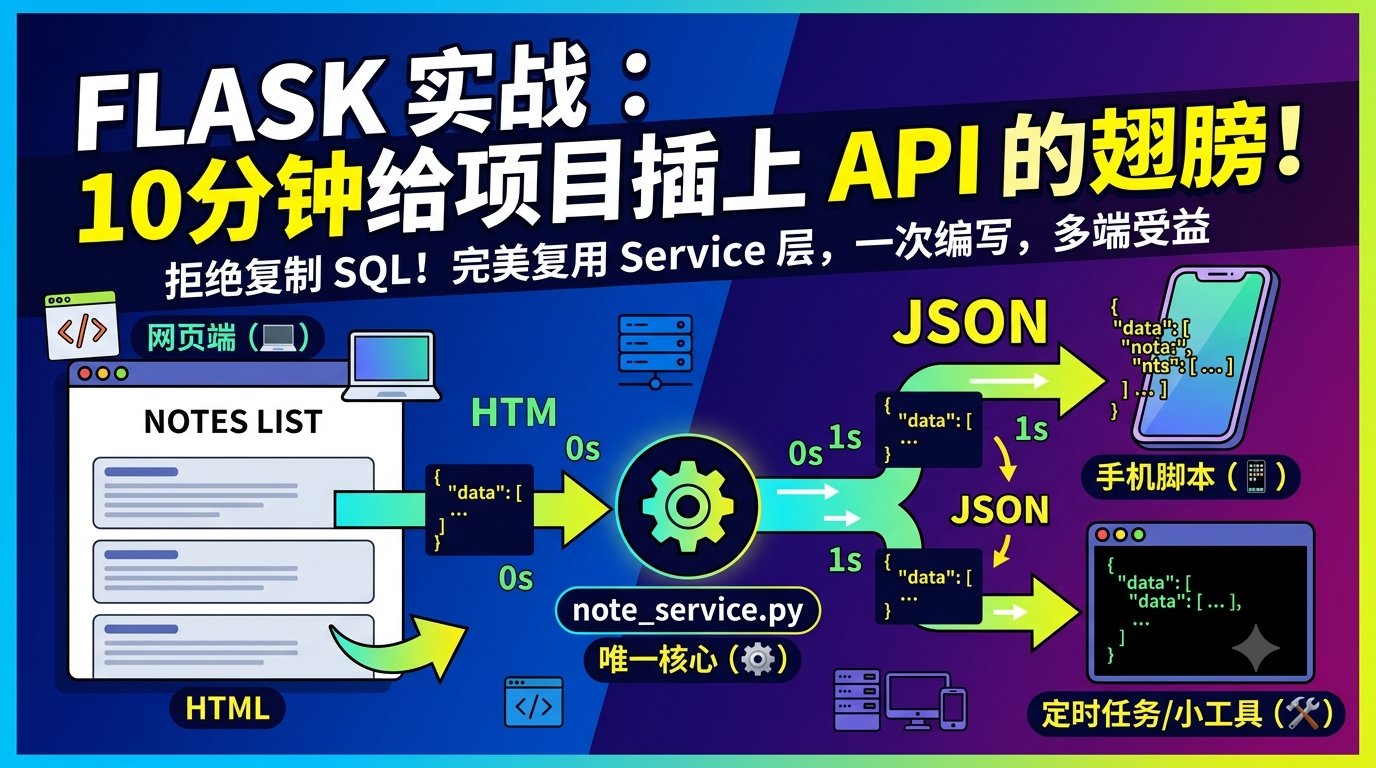
这一篇做一件事:在同一个项目里加第三个 Blueprint api,返回 JSON,并且 复用第十篇的 note_service,不复制 SQL。
例子仍是通用的 Note 备忘录,不涉及任何真实业务。
1. 学完后你能做什么
- 新建
apiBlueprint,URL 统一带/api/前缀 - 用
jsonify返回 JSON - 正确设置 HTTP 状态码(200 / 400 / 401 / 404)
- 列表接口 共用
list_notes_for_user - 知道入门阶段 要不要做 Token 鉴权
2. HTML 页面和 JSON 接口,差在哪
| HTML 页面(home) | JSON 接口(api) | |
|---|---|---|
| 返回 | render_template(...) |
jsonify({...}) |
| 给谁用 | 浏览器直接打开 | 脚本、前端 JS、Postman |
| 错误提示 | flash + 跳转 |
{"ok": false, "msg": "..."} + 状态码 |
| 查询逻辑 | note_service |
同一个 note_service |
关键:视图层换输出格式,service 层不变。
3. 目录长什么样
在第十一、十二篇基础上加:
app/
├── init.py
├── home/
├── admin/
├── api/ # 新增
│ ├── init.py
│ └── views.py
├── note_service.py
├── auth_utils.py
└── templates/
三个 Blueprint 并列:
/notes/ → home(HTML 列表)
/admin/notes/ → admin(HTML 后台列表)
/api/notes/ → api(JSON 列表)
4. 创建 api Blueprint
app/api/__init__.py:
from flask import Blueprint
api = Blueprint("api", name)
import app.api.views
app/__init__.py 里注册:
from app.api import api as api_blueprint
app.register_blueprint(api_blueprint, url_prefix="/api")
之后 @api.route("/notes/") 的实际地址是 /api/notes/。
5. 第一个接口:备忘录列表 JSON
app/api/views.py:
from flask import jsonify, request, session
from app.api import api
from app.auth_utils import login_required
from app.note_service import list_notes_for_user
def _note_to_dict(row):
return {
"id": row.id,
"title": row.title,
"content": row.content or "",
"addtime": row.addtime.strftime("%Y-%m-%d %H:%M:%S") if row.addtime else "",
}
@api.route("/notes/", methods="GET")
@login_required
def notes_list():
q = (request.args.get("q") or "").strip()
page = request.args.get("page", 1, type=int)
per_page = request.args.get("per_page", 10, type=int)
per_page = min(max(per_page, 1), 50)
page_data = list_notes_for_user(
session"user_id",
q=q,
page=page,
per_page=per_page,
)
return jsonify({
"ok": True,
"items": _note_to_dict(n) for n in page_data.items,
"page": page_data.page,
"pages": page_data.pages,
"total": page_data.total,
"has_next": page_data.has_next,
"has_prev": page_data.has_prev,
})
测试:
curl -b cookies.txt "http://127.0.0.1:5000/api/notes/?q=会议\&page=1"
查询仍在 note_service;api 视图只做:读参数 → 调函数 → 转成 dict → jsonify。
6. 单条查询与 404
from app.note_service import get_note_for_user
@api.route("/notes/<int:note_id>/", methods="GET")
@login_required
def note_detail(note_id):
row = get_note_for_user(note_id, session"user_id")
if not row:
return jsonify({"ok": False, "msg": "记录不存在或无权访问"}), 404
return jsonify({"ok": True, "item": _note_to_dict(row)})
JSON API 里 404 用状态码表达,客户端靠状态码分支更简单。
7. POST 新增一条(JSON 请求体)
HTML 表单用 request.form;API 常用 JSON body:
from app import db
from app.models import Note
@api.route("/notes/", methods="POST")
@login_required
def note_create():
data = request.get_json(silent=True) or {}
title = (data.get("title") or "").strip()
content = (data.get("content") or "").strip()
if not title:
return jsonify({"ok": False, "msg": "标题不能为空"}), 400
note = Note(
title=title,
content=content,
user_id=session"user_id",
)
db.session.add(note)
db.session.commit()
return jsonify({"ok": True, "item": _note_to_dict(note)}), 201
| 状态码 | 含义 |
|---|---|
| 200 | 成功(GET) |
| 201 | 创建成功 |
| 400 | 参数错误 |
| 401 | 未登录 |
| 404 | 资源不存在 |
8. 未登录时:JSON 不要 redirect
HTML 登录失败会 redirect 到登录页。API 客户端 跟不上 302,应直接返回 JSON:
from functools import wraps
from flask import session, redirect, url_for, request, jsonify
def login_required(view):
@wraps(view)
def wrapped(*args, **kwargs):
if not session.get("user_id"):
if request.path.startswith("/api/"):
return jsonify({"ok": False, "msg": "请先登录"}), 401
return redirect(url_for("home.login", next=request.path))
return view(*args, **kwargs)
return wrapped
同一装饰器 既能保护 HTML 页,也能保护 API。
9. 前端页面怎么调自己的 API
<button type="button" id="btn-refresh-json">用 API 刷新</button>
<ul id="json-note-list"></ul>
<script>
document.getElementById("btn-refresh-json").addEventListener("click", function () {
fetch("/api/notes/?page=1")
.then(function (res) {
if (!res.ok) throw new Error("HTTP " + res.status);
return res.json();
})
.then(function (data) {
var ul = document.getElementById("json-note-list");
ul.innerHTML = "";
(data.items || \[\]).forEach(function (n) {
var li = document.createElement("li");
li.textContent = n.title + " --- " + n.addtime;
ul.appendChild(li);
});
})
.catch(function (err) {
alert("加载失败:" + err.message);
});
});
</script>
页面仍用 Jinja 渲染;数据可以服务端渲染,也可以 fetch API------查询规则都在 note_service,不会两套逻辑打架。
10. 入门阶段要不要 Token 鉴权?
| 场景 | 建议 |
|---|---|
浏览器里 JS 调 同站 /api/ |
Session Cookie 够用 |
| 手机 App、外部脚本 | 需要 API Key 或 JWT(后面专题) |
| 完全公开的只读数据 | 可不加登录,但要限流 |
入门阶段:先 Session + @login_required,把 JSON 格式和状态码写对。
11. 统一 JSON 形状
{"ok": true, "items": ..., "page": 1}
{"ok": false, "msg": "标题不能为空"}
- 成功:
ok: true+ 数据字段 - 失败:
ok: false+msg+ 合适的 HTTP 状态码
12. 流程示意
GET /api/notes/?q=会议
│
▼
@login_required → 未登录?401 JSON
│
▼
list_notes_for_user(user_id, q="会议", ...)
│
▼
jsonify({"ok": true, "items": ...})
home.note_list(HTML) ──┐
api.notes_list(JSON) ──┼── list_notes_for_user
export 脚本 ──┘
13. 新手常踩的 6 个坑
- API 里
render_template--- 应只返回jsonify - 错误也返回 200 --- 应
return jsonify(...), 401 - 忘记
Content-Type: application/json--- POST 用request.get_json() - API 里复制 SQL --- 都走
note_service - 跨域一头雾水 --- 同站调用不需要 CORS
datetime直接丢进 JSON --- 先转成字符串
14. 小结
记住五件事:
- 第三个 Blueprint
api---url_prefix="/api" jsonify+ 状态码 --- 错误用 4xx,成功 200/201- 复用
note_service--- 不复制查询 - 未登录返回 JSON 401 --- 不要 redirect
- 入门用 Session --- Token 留给外部调用需求时
十三篇连下来,你已经会:结构、数据库、WTForms CRUD、搜索、模板继承、Migrate、Flash、登录 Session、service 分层、admin Blueprint、环境变量、JSON API。