基本概念
图形光栅化:把图形转成片元
颜色
多 attribute 变量
多 attribute 变量 的概念
问题:如何一次性绘制三个不同颜色的点?
回顾: js 修改顶点颜色,下面这种方式只能给批量绘制的点设置为同一个颜色
javascript
// 片元着色器
<script id="fragmentShader" type="x-shader/x-fragment">
    precision mediump float;
    uniform vec4 u_FragColor;
    void main() {
        gl_FragColor = u_FragColor;
    }
</script>
javascript
// js
  let u_FragColor = gl.getUniformLocation(program, 'u_FragColor');
  gl.uniform4fv(u_FragColor, new Float32Array([1, 1, 0, 1]));
</script>
如果我们想过要给多点不同的颜色,就需要建立一个接收颜色数据的 attribute 变量
代码实现
1 在顶点着色器中,建立一个名为 a_Color 的 attribute 变量,并通过 varing 变量将其全局化,之后可以在片元着色器中拿到
javascript
// 顶点着色器
<script id="vertexShader" type="x-shader/x-vertex">
    // 一个属性值,将会从缓冲区中获取数据
    attribute vec4 a_Position;
    attribute float a_PointSize;
    attribute vec4 a_Color;
    varying vec4 v_Color;
    // 所有着色器都有一个 main 方法
    void main() {
        // gl_Position 是一个顶点着色器主要设置的变量
        gl_Position = a_Position;
        gl_PointSize = a_PointSize;
        v_Color = a_Color;
    }
</script>
2 在片元着色器中获取顶点着色器中全局化的 varing 变量,然后将其作为片元颜色
javascript
// 片元着色器
 <script id="fragmentShader" type="x-shader/x-fragment">
  precision mediump float;
  varying vec4 v_Color;
  void main() {
    gl_FragColor = v_Color;
  }
</script>
3 在js中,将顶点数据批量传递给顶点着色器
javascript
const vertices = [0.0, 0.1,0.2,0.3, 0.5, 1, ]
const vertexBuffer = gl.createBuffer();
const a_Position = gl.getAttribLocation(program, 'a_Position');
gl.bindBuffer(gl.ARRAY_BUFFER, vertexBuffer);
gl.bufferData(gl.ARRAY_BUFFER, new Float32Array(vertices), gl.STATIC_DRAW);
gl.vertexAttribPointer(a_Position, 1, gl.FLOAT, false, 0, 0);
gl.enableVertexAttribArray(a_Position);
4 用同样原理将颜色数据批量传递给顶点着色器
javascript
const colors = new Float32Array([
    1, 0, 0, 1, //一组4个值, 对应 rgba 的值
    0, 1, 0, 1,
    0, 0, 1, 1,
    1, 1, 0, 1
])
const colorBuffer = gl.createBuffer();
const a_Color = gl.getAttribLocation(program, 'a_Color');
gl.bindBuffer(gl.ARRAY_BUFFER, colorBuffer);
gl.bufferData(gl.ARRAY_BUFFER, colors, gl.STATIC_DRAW);
gl.vertexAttribPointer(a_Color, 4, gl.FLOAT, false, 0, 0); // 第二参数跟 一组颜色多少个值对应,比如我上面是 4个值为一个颜色,那么这里就写 4
gl.enableVertexAttribArray(a_Color);
在这个案例中,我们用 js 建立了两份 attribute 数据,一份是 顶点位置数据,一份是顶点颜色数据.
然后我们将两份 attribute 数据放进了两个缓冲区对象里,后面绘图的时候,顶点着色器就会从这里面找数据
但实际上,我们可以把数据合一下,把点数据和颜色数据放进一个集合里面,然后让 attribute变量按照某种规律从中找数据.
多 attribute 数据合一
合一的数据,前几个对应点位,后几个值对应颜色,如下:
javascript
const source = new Float32Array([
    0.0, 0.1, 0, 1, 0, 0, 1, //一组7个值, 前三个是点位,后四个对应 rgba 的值
    0.2, 0.3, 0, 0, 1, 0, 1,
    0.5, 1, 0,   0, 0, 1, 1,
    0.6, 0.7, 0, 1, 1, 0, 1
])
对应上面的数据,先有下面概念:
数据源: 整个合二为一的数据 source
元素字节数: 32位浮点集合中每个元素的字节数
类目: 一个顶点对应一个类目,也就是上面 source 中的每一行
系列: 一个类目中所包含的每一种数据,比如顶点位置数据,顶点颜色数据
系列尺寸: 一个系列所对应的向量的分量数目
类目尺寸: 一个类目中所有系列尺寸的总和
类目字节数: 一个类目的所有字节数量
系列元素索引位置: 一个系列在一个类目中,以集合元素为单位的索引位置
系列字节索引位置: 一个系列在一个类目中,以 字节为单位的索引位置
顶点总数: 数据源中的顶点总数
javascript
// 数据源
const source = new Float32Array([
    0.0, 0.1, 0, 1, 0, 0, 1, //一组7个值, 前三个是点位,后四个对应 rgba 的值
    0.2, 0.3, 0, 0, 1, 0, 1,
    0.5, 1, 0,   0, 0, 1, 1,
    0.6, 0.7, 0, 1, 1, 0, 1
])
// 元素字节数
const elementBytes = source.BYTES_PER_ELEMENT
// 系列尺寸
const verticeSize = 3
const colorSize = 4
// 类目尺寸
const categorySize = verticeSize + colorSize
// 类目字节数
const categoryBytes = categorySize * elementBytes
// 系列索引位置
const verticeByteIndex = 0
const colorByteIndex = verticeSize * elementBytes
// 顶点总数
const sourceSize = source.length / categorySize
用 vertexAttribPointer() 方法玩转数据源
这个方法是在告诉顶点着色器中的 attribute 变量以怎样的方式从顶点着色器中寻找它所需要的数据
比如我想让顶点着色器中,名叫 a_Position 的attribute 的变量从数据源中,寻找它所需要的数据
1 把数据源装进绑定在 webgl 上下文对象上的缓冲区中
javascript
// 缓冲对象
const sourceBuffer = gl.createBuffer();
// 绑定缓冲对象
gl.bindBuffer(gl.ARRAY_BUFFER, sourceBuffer);
// 写入数据
gl.bufferData(gl.ARRAY_BUFFER, source, gl.STATIC_DRAW);
2 告诉顶点着色器中,名叫 a_Position 的attribute 的变量 如何从数据源中找到它所需要的数据
javascript
// 获取 attribute 变量
const a_Position = gl.getAttribLocation(program, 'a_Position');
// 修改 attribute 变量
gl.vertexAttribPointer(a_Position, verticeSize, gl.FLOAT, false, categoryBytes, verticeByteIndex);
gl.enableVertexAttribArray(a_Position);
// 颜色的取值
const a_Color = gl.getAttribLocation(program, 'a_Color');
gl.vertexAttribPointer(a_Color, colorSize, gl.FLOAT, false, categoryBytes, colorByteIndex);
gl.enableVertexAttribArray(a_Color);
彩色三角形
代码实现
html
<!DOCTYPE html>
<html lang="en">
<head>
  <meta charset="UTF-8">
  <meta name="viewport" content="width=device-width, initial-scale=1.0">
  <title>绘制彩色三角形</title>
  <style>
    * {
      margin: 0;
      padding: 0;
      overflow: hidden;
    }
  </style>
</head>

<body>
  <canvas id="canvas"></canvas>

  <script id="vertexShader" type="x-shader/x-vertex">
    // 一个属性值,将会从缓冲区中获取数据
    attribute vec4 a_Position;
    attribute float a_PointSize;
    attribute vec4 a_Color;
    varying vec4 v_Color;
    // 所有着色器都有一个 main 方法
    void main() {
        // gl_Position 是一个顶点着色器主要设置的变量
        gl_Position = a_Position;
        gl_PointSize = a_PointSize;
        v_Color = a_Color;
    }
  </script>
 <script id="fragmentShader" type="x-shader/x-fragment">
  precision mediump float;
  varying vec4 v_Color;
  void main() {
    gl_FragColor = v_Color;
  }
</script>

  <script type="module">
    import { getPosByMouse, getInnerText, initShaderProgram } from "../utils/index.js"
    const canvas = document.querySelector('#canvas');
    canvas.width = window.innerWidth;
    canvas.height = window.innerHeight;
    const gl = canvas.getContext('webgl');
    gl.clearColor(0, 0, 0, 1);
    const vertexStr = getInnerText("vertexShader");
    const fragmentStr = getInnerText("fragmentShader");
    const program = initShaderProgram(gl, vertexStr, fragmentStr )

    const a_PointSize = gl.getAttribLocation(program, 'a_PointSize');

    gl.useProgram(program);

    const source = new Float32Array([
        0.0, 0.1, 0, 1, 0, 0, 1, //一组7个值, 前三个是点位,后四个对应 rgba 的值
        0.2, 0.3, 0, 0, 1, 0.5, 1,
        0.5, 0.2, 0,   0, 0, 1, 1,
    ])
    // 元素字节数
    const elementBytes = source.BYTES_PER_ELEMENT
    // 系列尺寸
    const verticeSize = 3
    const colorSize = 4
    // 类目尺寸
    const categorySize = verticeSize + colorSize
    // 类目字节数
    const categoryBytes = categorySize * elementBytes
    // 系字节列索引位置
    const verticeByteIndex = 0
    const colorByteIndex = verticeSize * elementBytes
    // 顶点总数
    const sourceSize = source.length / categorySize

    // 缓冲对象
    const sourceBuffer = gl.createBuffer();
    // 绑定缓冲对象
    gl.bindBuffer(gl.ARRAY_BUFFER, sourceBuffer);
    // 写入数据
    gl.bufferData(gl.ARRAY_BUFFER, source, gl.STATIC_DRAW);

    // 获取 attribute 变量
    const a_Position = gl.getAttribLocation(program, 'a_Position');
    // 修改 attribute 变量
    gl.vertexAttribPointer(a_Position, verticeSize, gl.FLOAT, false, categoryBytes, verticeByteIndex);
    gl.enableVertexAttribArray(a_Position);
    const a_Color = gl.getAttribLocation(program, 'a_Color');
    gl.vertexAttribPointer(a_Color, colorSize, gl.FLOAT, false, categoryBytes, colorByteIndex);
    gl.enableVertexAttribArray(a_Color);

    gl.clear(gl.COLOR_BUFFER_BIT);
    gl.vertexAttrib1f(a_PointSize, 30);
    gl.drawArrays(gl.TRIANGLES, 0, sourceSize);
 </script>
</body>
</html>
恰似一阵春风吹过水面
异色版本
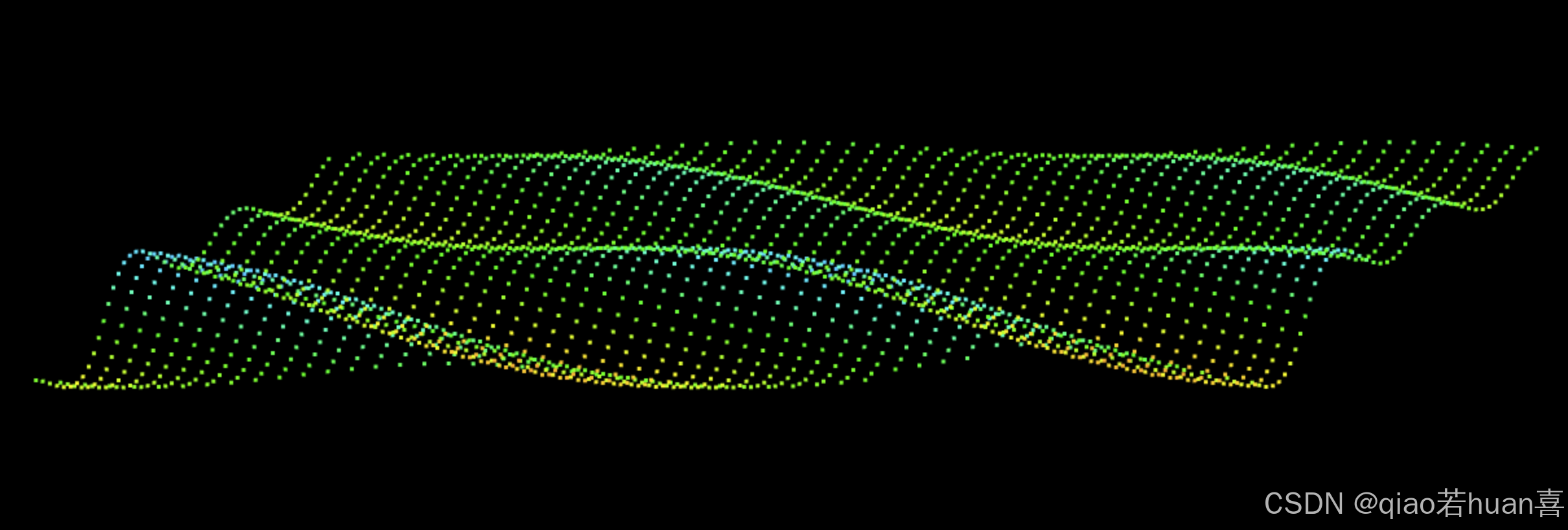
poly.js 文件
javascript
const defAttr = () => ({
  gl: null,
  types: ["POINTS"],
  source: [], // 数据源
  sourceSize: 0, // 数据源尺寸
  elementBytes: 4, // 元素字节数
  categorySize: 0, // 类目尺寸
  attributes: {}, // attribute属性集合
  uniforms: {},
});

export default class Poly {
  constructor(attr) {
    Object.assign(this, defAttr(), attr);
    this.init();
  }

  init() {
    if (!this.gl) {
      return;
    }
    this.calculateSize();
    this.updateAttribute();
    this.updateUniform();
  }
  calculateSize() {
    const { attributes, elementBytes, source } = this;
    let categorySize = 0;
    Object.values(attributes).forEach((ele) => {
      const { size, index } = ele;
      categorySize += size;
      ele.byteIndex = index * elementBytes;
    });
    this.categorySize = categorySize;
    this.categoryBytes = categorySize * elementBytes;
    this.sourceSize = source.length / categorySize;
  }
  updateAttribute() {
    const { gl, attributes, categoryBytes, source } = this;
    // 缓冲对象
    const sourceBuffer = gl.createBuffer();
    // 绑定缓冲对象
    gl.bindBuffer(gl.ARRAY_BUFFER, sourceBuffer);
    // 写入数据
    gl.bufferData(gl.ARRAY_BUFFER, new Float32Array(source), gl.STATIC_DRAW);

    for (const [key, { size, byteIndex }] of Object.entries(attributes)) {
      const a_Attribute = gl.getAttribLocation(gl.program, key);
      // 修改 attribute 变量
      gl.vertexAttribPointer(
        a_Attribute,
        size,
        gl.FLOAT,
        false,
        categoryBytes,
        byteIndex,
      );
      gl.enableVertexAttribArray(a_Attribute);
    }
  }

  updateUniform() {
    const { gl, uniforms } = this;
    for (let [key, val] of Object.entries(uniforms)) {
      let { type, value } = val;
      const u = gl.getUniformLocation(gl.program, key);
      if (type.includes("Matrix")) {
        gl[type](u, false, value);
      } else {
        gl[type](u, value);
      }
    }
  }

  draw(types = this.types) {
    const { gl, sourceSize } = this;
    for (let type of types) {
      gl.drawArrays(gl[type], 0, sourceSize);
    }
  }
}
html
<!DOCTYPE html>
<html lang="en">
<head>
  <meta charset="UTF-8">
  <meta name="viewport" content="width=device-width, initial-scale=1.0">
  <title>一池春水</title>
  <style>
    * {
      margin: 0;
      padding: 0;
      overflow: hidden;
    }
  </style>
</head>

<body>
  <canvas id="canvas"></canvas>

  <script id="vertexShader" type="x-shader/x-vertex">
    // 一个属性值,将会从缓冲区中获取数据
    attribute vec4 a_Position;
    uniform mat4 u_ViewMatrix;
    attribute vec4 a_Color;
    varying vec4 v_Color;
    void main() {
        gl_Position = u_ViewMatrix * a_Position;
        gl_PointSize = 3.0;
        v_Color = a_Color;
    }
  </script>
 <script id="fragmentShader" type="x-shader/x-fragment">
  precision mediump float;
  varying vec4 v_Color;
  void main() {
   gl_FragColor = v_Color;
  }
</script>

<script type="module">
    import { Matrix4, Vector3, Color} from "https://www.unpkg.com/three/build/three.module.js"
    import  Poly from "../utils/ColorfulPoly.js"
    import { getPosByMouse, getInnerText, initShaderProgram2, ScaleLinear } from "../utils/index.js"
    const canvas = document.querySelector('#canvas');
    canvas.width = window.innerWidth;
    canvas.height = window.innerHeight;
    const gl = canvas.getContext('webgl');
    const vertexStr = getInnerText("vertexShader");
    const fragmentStr = getInnerText("fragmentShader");
    initShaderProgram2(gl, vertexStr, fragmentStr )
    gl.clearColor(0, 0, 0, 1);

    // 视图矩阵
    const viewMatrix = new Matrix4().lookAt(
      new Vector3(0.2, 0.3, 1),
      new Vector3(),
      new Vector3(0, 1, 0)
    )
   /* x,z 方向的空间坐标极值 */
    const [minPosX, maxPosX, minPosZ, maxPosZ] = [
      -0.7, 0.8, -1, 1
    ]
    /* x,z 方向的弧度极值 */
    const [minAngX, maxAngX, minAngZ, maxAngZ] = [
      0, Math.PI * 4, 0, Math.PI * 2
    ]

    /* 比例尺:将空间坐标和弧度相映射 */
    const scalerX = ScaleLinear(minPosX, minAngX, maxPosX, maxAngX)
    const scalerZ = ScaleLinear(minPosZ, minAngZ, maxPosZ, maxAngZ)
    // y方向的坐标极值
    const [a1, a2] = [0.1, 0.03]
    const a12 = a1 + a2;
    const [minY, maxY] = [-a12, a12]
    // 色相极值
    const [minH, maxH] = [0.1, 0.55]
    // 比例尺:将y坐标和色相相映射
    const scalerC = ScaleLinear(minY, minH, maxY, maxH)
    // 颜色对象,可通过 HSL 获取颜色
    const color = new Color(0x00acec)
    // 波浪对象的行数和列数
    const [rows, cols] = [50, 50]
    // 波浪对象的两个 attribute 变量,分别是位置和颜色
    const a_Position = {size: 3, index: 0}
    const a_Color = {size: 4, index: 3}
    // 类目尺寸
    const categorySize = a_Position.size + a_Color.size


    // 创建波浪对象
    const wave = new Poly({
      gl,
      source: createSource(
        cols, rows,
        minPosX, maxPosX, minPosZ, maxPosZ
      ),
      uniforms: {
        u_ViewMatrix: {
          type: 'uniformMatrix4fv',
          value: viewMatrix.elements
        },
      },
      attributes: {
        a_Position,
        a_Color
      },
    })

    // 建立顶点集合
    function createSource(cols, rows,
        minPosX, maxPosX, minPosZ, maxPosZ) {
      const source = [];
      const spaceZ = (maxPosZ - minPosZ) / rows
      const spaceX = (maxPosX - minPosX) / cols

      for(let z = 0; z < rows; z++) {
        for(let x = 0; x < cols; x++) {
          const px = x * spaceX + minPosX
          const pz = z * spaceZ + minPosZ
          source.push(px, 0, pz, 1, 1, 1, 1)
        }
      }
      return source
    }
    // 更新顶点高度
    function updateSource(offset = 0) {
      let {source, categorySize} = wave;
      for(let i = 0; i < source.length; i += categorySize) {
        const [posX, posZ] = [source[i], source[i + 2]];
        const angZ = scalerZ(posZ),
            Omega = 2,
            a = Math.sin(angZ) * a1 + a2,
            phi = scalerX(posX) + offset,
            y= SinFn(a, Omega, phi)(angZ);// i+2去赋值导致点消失,所以需要i+1赋值
            source[i + 1] = y;

            const h = scalerC(y),
             {r, g, b} = color.setHSL(h, 1, 0.6)
             source[i + 3] = r
             source[i + 4] = g
             source[i + 5] = b
          }
    }
    // 正弦函数
    function SinFn(a, Omega, phi) {
      return function(x) {
        return a * Math.sin(Omega * x + phi);
      };
    }
    // 动画: 偏移phi
    let offset = 0;
    !(function ani() {
      offset += 0.08;
      updateSource(offset);
      wave.updateAttribute();
      gl.clear(gl.COLOR_BUFFER_BIT);
      wave.draw();
      requestAnimationFrame(ani);
    })()
 </script>
</body>
</html>
将春水的点换成线条以及三角形连接
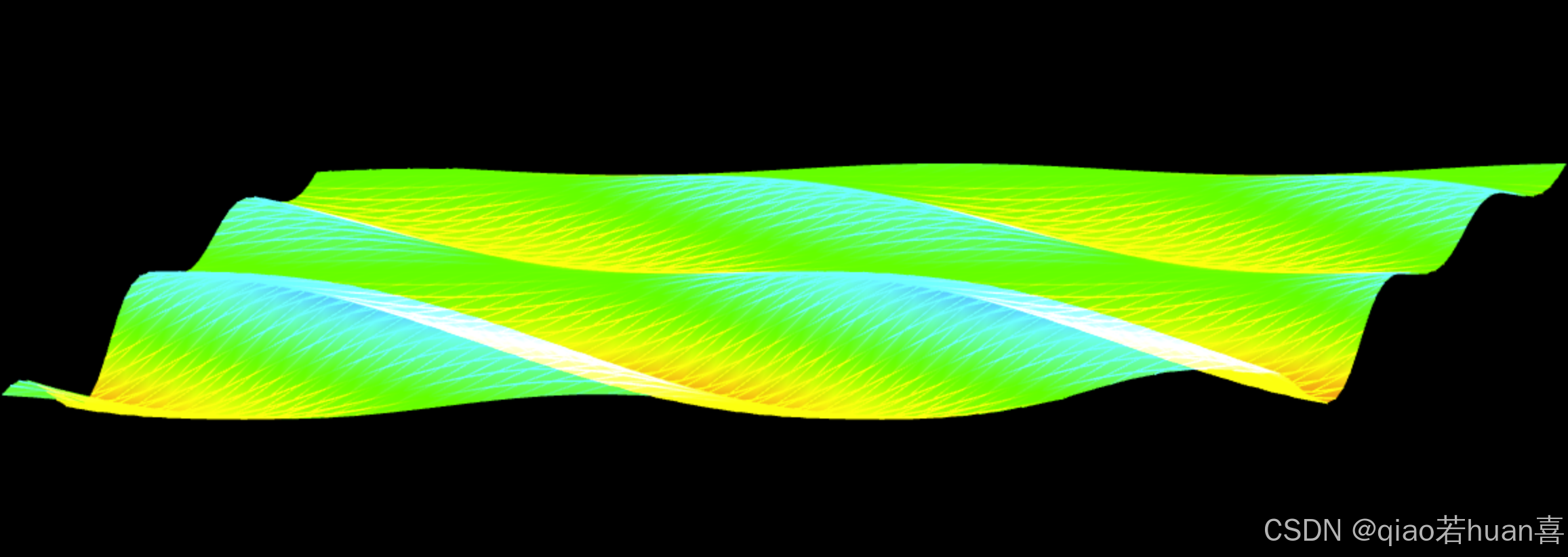
html
<!DOCTYPE html>
<html lang="en">
<head>
  <meta charset="UTF-8">
  <meta name="viewport" content="width=device-width, initial-scale=1.0">
  <title>一池春水</title>
  <style>
    * {
      margin: 0;
      padding: 0;
      overflow: hidden;
    }
  </style>
</head>

<body>
  <canvas id="canvas"></canvas>

  <script id="vertexShader" type="x-shader/x-vertex">
    // 一个属性值,将会从缓冲区中获取数据
    attribute vec4 a_Position;
    uniform mat4 u_ViewMatrix;
    attribute vec4 a_Color;
    varying vec4 v_Color;
    void main() {
        gl_Position = u_ViewMatrix * a_Position;
        gl_PointSize = 3.0;
        v_Color = a_Color;
    }
  </script>
 <script id="fragmentShader" type="x-shader/x-fragment">
  precision mediump float;
  varying vec4 v_Color;
  void main() {
   gl_FragColor = v_Color;
  }
</script>

<script type="module">
    import { Matrix4, Vector3, Color} from "https://www.unpkg.com/three/build/three.module.js"
    import  Poly from "../utils/ColorfulPoly.js"
    import { getPosByMouse, getInnerText, initShaderProgram2, ScaleLinear } from "../utils/index.js"
    const canvas = document.querySelector('#canvas');
    canvas.width = window.innerWidth;
    canvas.height = window.innerHeight;
    const gl = canvas.getContext('webgl');
    const vertexStr = getInnerText("vertexShader");
    const fragmentStr = getInnerText("fragmentShader");
    initShaderProgram2(gl, vertexStr, fragmentStr )
    gl.clearColor(0, 0, 0, 1);
       // 开启透明度混合
    gl.enable(gl.BLEND);
    // 设置混合公式(正常透明模式)
    gl.blendFunc(gl.SRC_ALPHA, gl.ONE);

    // 视图矩阵
    const viewMatrix = new Matrix4().lookAt(
      new Vector3(0.2, 0.3, 1),
      new Vector3(),
      new Vector3(0, 1, 0)
    )
   /* x,z 方向的空间坐标极值 */
    const [minPosX, maxPosX, minPosZ, maxPosZ] = [
      -0.7, 0.8, -1, 1
    ]
    /* x,z 方向的弧度极值 */
    const [minAngX, maxAngX, minAngZ, maxAngZ] = [
      0, Math.PI * 4, 0, Math.PI * 2
    ]

    /* 比例尺:将空间坐标和弧度相映射 */
    const scalerX = ScaleLinear(minPosX, minAngX, maxPosX, maxAngX)
    const scalerZ = ScaleLinear(minPosZ, minAngZ, maxPosZ, maxAngZ)
    // y方向的坐标极值
    const [a1, a2] = [0.1, 0.03]
    const a12 = a1 + a2;
    const [minY, maxY] = [-a12, a12]
    // 色相极值
    const [minH, maxH] = [0.1, 0.55]
    // 比例尺:将y坐标和色相相映射
    const scalerC = ScaleLinear(minY, minH, maxY, maxH)
    // 颜色对象,可通过 HSL 获取颜色
    const color = new Color(0x00acec)
    // 波浪对象的行数和列数
    const [rows, cols] = [40, 40]
    // 波浪对象的两个 attribute 变量,分别是位置和颜色
    const a_Position = {size: 3, index: 0}
    const a_Color = {size: 4, index: 3}
    // 类目尺寸
    const categorySize = a_Position.size + a_Color.size
    // 建立基于行列获取顶点索引的方法
    const getInd = GetIndexInGrid(cols, categorySize)
    function  GetIndexInGrid(w, size) {
      return function(x, y) {
        return (y * w + x) * size;
      }
    }

    // 获取顶点阵列和三角形的顶点索引集合
    const {vertices, indexes} = createBaseData(cols, rows, minPosX, maxPosX, minPosZ, maxPosZ)

    function createBaseData(cols, rows, minPosX, maxPosX, minPosZ, maxPosZ)  {
      const vertices = []
      const indexes = []
        const spaceZ = (maxPosZ - minPosZ) / rows
      const spaceX = (maxPosX - minPosX) / cols

      for(let z = 0; z < rows; z++) {
        for(let x = 0; x < cols; x++) {
          const px = x * spaceX + minPosX
          const pz = z * spaceZ + minPosZ
          vertices.push(px, 0, pz, 1, 1, 1, 1)
          if(z && x) {
            const [x0, z0] = [x - 1, z - 1]
            indexes.push(
              getInd(x0, z0),
              getInd(x, z0),
              getInd(x, z),
              getInd(x0, z0),
              getInd(x, z),
              getInd(x0, z),
            )
          }
        }
      }

      return {
        vertices,
        indexes
      }
    }


    // 创建波浪对象
    const wave = new Poly({
      gl,
      source: createSource(indexes, vertices, categorySize),
      uniforms: {
        u_ViewMatrix: {
          type: 'uniformMatrix4fv',
          value: viewMatrix.elements
        },
      },
      attributes: {
        a_Position,
        a_Color
      },
    })

    // 建立顶点集合
    // function createSource(cols, rows,
    //     minPosX, maxPosX, minPosZ, maxPosZ) {
    //   const source = [];
    //   const spaceZ = (maxPosZ - minPosZ) / rows
    //   const spaceX = (maxPosX - minPosX) / cols

    //   for(let z = 0; z < rows; z++) {
    //     for(let x = 0; x < cols; x++) {
    //       const px = x * spaceX + minPosX
    //       const pz = z * spaceZ + minPosZ
    //       source.push(px, 0, pz, 1, 1, 1, 1)
    //     }
    //   }
    //   return source
    // }
     function createSource(indexes, vertices, categorySize) {
      const arr = []
      indexes.forEach(i => {
        arr.push(...vertices.slice(i, i + categorySize))
      })
      return arr
    }
    // 更新顶点高度
    function updateSource(offset = 0) {
      let {source, categorySize} = wave;
      for(let i = 0; i < source.length; i += categorySize) {
        const [posX, posZ] = [source[i], source[i + 2]];
        const angZ = scalerZ(posZ),
            Omega = 2,
            a = Math.sin(angZ) * a1 + a2,
            phi = scalerX(posX) + offset,
            y= SinFn(a, Omega, phi)(angZ);// i+2去赋值导致点消失,所以需要i+1赋值
            source[i + 1] = y;

            const h = scalerC(y),
             {r, g, b} = color.setHSL(h, 1, 0.5)
             source[i + 3] = r
             source[i + 4] = g
             source[i + 5] = b
          }
    }
    // 正弦函数
    function SinFn(a, Omega, phi) {
      return function(x) {
        return a * Math.sin(Omega * x + phi);
      };
    }
    const render = () =>{
      gl.clear(gl.COLOR_BUFFER_BIT);
      // wave.draw();
      wave.draw(['LINES', 'TRIANGLES']);
    }
    // 动画: 偏移phi
    let offset = 0;
    !(function ani() {
      offset += 0.01;
      updateSource(offset);
      wave.updateAttribute();
      render()
      requestAnimationFrame(ani);
    })()
 </script>
</body>
</html>