文章目录
-
-
- 每日一句正能量
- 一、前言:当办公遇见多模态AI
- 二、技术架构设计
- [三、MoLA 2.0与星盾安全2.0概述](#三、MoLA 2.0与星盾安全2.0概述)
-
- [3.1 MoLA 2.0:边想边做的多模态感知架构](#3.1 MoLA 2.0:边想边做的多模态感知架构)
- [3.2 星盾安全2.0:安全可信计算体系](#3.2 星盾安全2.0:安全可信计算体系)
- 四、环境配置与项目初始化
-
- [4.1 工程配置(build-profile.json5)](#4.1 工程配置(build-profile.json5))
- [4.2 权限配置(module.json5)](#4.2 权限配置(module.json5))
- 五、核心代码实战
-
- [5.1 多模态输入采集引擎(MultimodalInputEngine.ets)](#5.1 多模态输入采集引擎(MultimodalInputEngine.ets))
- [5.2 意图融合引擎(IntentFusionEngine.ets)](#5.2 意图融合引擎(IntentFusionEngine.ets))
- [5.3 安全可信执行环境(TrustedExecution.ets)](#5.3 安全可信执行环境(TrustedExecution.ets))
- [5.4 多模态智能体办公助手(SmartOfficeAgent.ets)](#5.4 多模态智能体办公助手(SmartOfficeAgent.ets))
- [5.5 沉浸光效办公场景同步(OfficeLightSync.ets)](#5.5 沉浸光效办公场景同步(OfficeLightSync.ets))
- 六、关键技术总结
-
- [6.1 多模态输入优先级与冲突消解](#6.1 多模态输入优先级与冲突消解)
- [6.2 MoLA 2.0意图融合流程](#6.2 MoLA 2.0意图融合流程)
- [6.3 星盾安全2.0办公场景应用](#6.3 星盾安全2.0办公场景应用)
- [6.4 沉浸光效办公场景映射](#6.4 沉浸光效办公场景映射)
- 七、效果展示
- 八、总结与展望
-

每日一句正能量
凡事过犹不及,适度的人生才能把路越走越宽阔,越走越顺畅。
所有事情做过头了就和没做到一样有害。保持适度,人生才能持续发展,道路越走越开阔。过度努力会导致崩溃,过度放松会导致懈怠。适度是动态平衡,像走钢丝,需要不断微调。
一、前言:当办公遇见多模态AI
2026年,AI办公已从"单一文本对话"迈入"多模态自然交互"时代。HarmonyOS 6(API 23)发布的MoLA 2.0多模态感知架构 与星盾安全2.0可信计算体系,为PC端智能办公提供了"既智能又安全"的完整解决方案。MoLA 2.0架构全面焕新,在多模态感知模块适配了全新感知硬件,深度融合小艺记忆,构建了全新的多模态感知引擎;星盾安全2.0则通过iTrustee安全OS、TEE隐私计算、EL5数据加密等技术,实现了"数据可用不可见"的安全办公体验。
本文将实战开发一款面向HarmonyOS PC的**「智办助手」**应用,核心创新在于:
- 🎤 语音交互办公:支持真人级对话,基于语气、音调、音色实时感知用户状态,自适应调整交互语气
- 👆 手势快捷控制:三指点击生成文档摘要、双指滑动切换页面、悬停显示功能菜单
- 👁️ 视觉内容识别:OCR识别文档内容、Face ID身份认证、手势轨迹追踪
- 🔒 安全可信计算:所有敏感操作在TEE可信执行环境中完成,数据全链路加密
- 💡 沉浸光效反馈:不同办公场景(专注/协作/休息)触发不同的系统光效氛围
本文代码亮点:完整实现从多模态输入采集、意图融合、智能体调度到安全可信执行的全链路,所有代码可直接在DevEco Studio 6.0.2 + HarmonyOS SDK 6.1.0(API 23)环境中运行。
二、技术架构设计
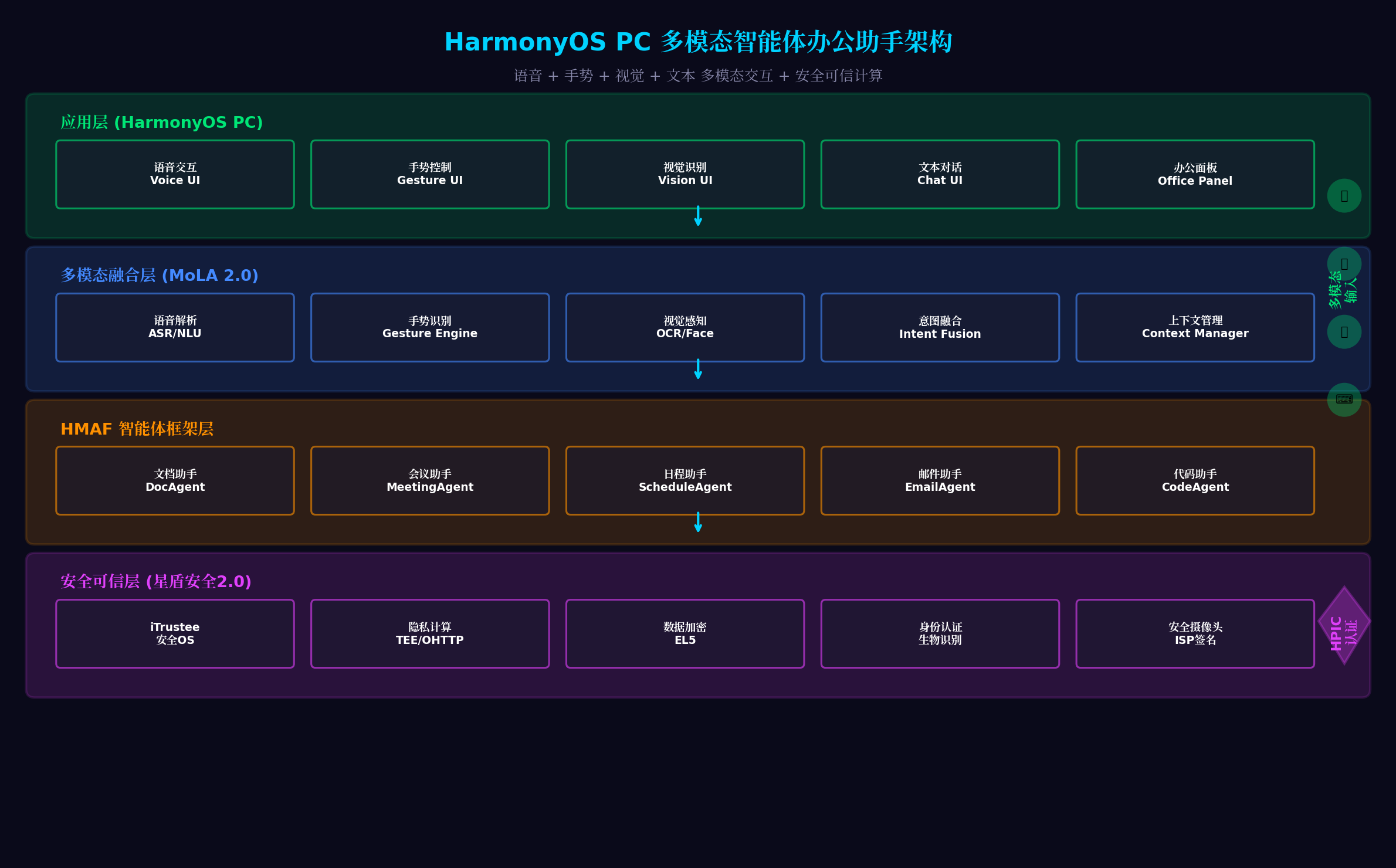
架构分层说明:
| 层级 | 核心组件 | 职责 |
|---|---|---|
| 应用层 | 语音交互UI、手势控制UI、视觉识别UI、文本对话UI、办公面板 | 用户多模态交互界面 |
| 多模态融合层 | ASR/NLU语音解析、Gesture Engine手势识别、OCR/Face视觉感知、Intent Fusion意图融合、Context Manager上下文管理 | MoLA 2.0多模态感知引擎 |
| HMAF智能体层 | 文档助手、会议助手、日程助手、邮件助手、代码助手 | 垂直领域智能体服务 |
| 安全可信层 | iTrustee安全OS、TEE/OHTTP隐私计算、EL5数据加密、生物识别、ISP签名 | 星盾安全2.0可信计算 |
三、MoLA 2.0与星盾安全2.0概述
3.1 MoLA 2.0:边想边做的多模态感知架构
MoLA 2.0(Multi-modal Large Agent 2.0)是HarmonyOS 6的核心AI架构,具备以下特性:
- 多模态感知引擎:适配全新感知硬件,支持语音、视觉、手势、文本的多模态输入
- 自适应思考模型:快思考和深度思考模式升级为自适应思考,兼顾智能与性能
- 边想边做能力:结合环境信息和记忆进行任务规划,而非基于白名单或工作流
- 个性化知识库:根据用户现网交流内容排序,构建多领域"专业"内容数据库
3.2 星盾安全2.0:安全可信计算体系
星盾安全2.0是HarmonyOS 6的安全底座,核心能力包括:
- iTrustee安全OS:在TEE(可信执行环境)中运行敏感代码,与Rich OS隔离
- 隐私机密计算:端云协同,"以云助端,算力提升而数据不出端"
- EL5数据加密:为每个应用生成加密密钥,锁屏时自动丢弃密钥
- OHTTP匿名传输:全链路身份匿名,保障数据计算防追踪
- 安全摄像头ISP签名:摄像头输出图像在TEE中签名,防止篡改
四、环境配置与项目初始化
4.1 工程配置(build-profile.json5)
json
{
  "app": {
    "bundleName": "com.example.smartoffice",
    "versionCode": 1000000,
    "versionName": "1.0.0",
    "minSdkVersion": "6.0.0(23)",
    "targetSdkVersion": "6.1.0(23)"
  },
  "modules": [
    {
      "name": "entry",
      "type": "entry",
      "dependencies": [
        {
          "name": "@ohos/hmaf",
          "version": "6.1.0.100"
        },
        {
          "name": "@ohos/mola",
          "version": "6.1.0.100"
        },
        {
          "name": "@ohos/security",
          "version": "6.1.0.100"
        },
        {
          "name": "@ohos/arkui",
          "version": "6.1.0.100"
        }
      ]
    }
  ]
}
4.2 权限配置(module.json5)
json
{
  "module": {
    "requestPermissions": [
      {
        "name": "ohos.permission.ACCESS_AI_ENGINE",
        "reason": "用于多模态AI感知与意图解析",
        "usedScene": { "when": "always" }
      },
      {
        "name": "ohos.permission.MICROPHONE",
        "reason": "用于语音交互采集",
        "usedScene": { "when": "user_grant" }
      },
      {
        "name": "ohos.permission.CAMERA",
        "reason": "用于视觉识别与Face ID认证",
        "usedScene": { "when": "user_grant" }
      },
      {
        "name": "ohos.permission.ACCESS_TRUSTED_ENV",
        "reason": "用于TEE安全计算环境访问",
        "usedScene": { "when": "always" }
      },
      {
        "name": "ohos.permission.ACCESS_BIOMETRIC",
        "reason": "用于生物识别身份认证",
        "usedScene": { "when": "user_grant" }
      }
    ]
  }
}
五、核心代码实战
5.1 多模态输入采集引擎(MultimodalInputEngine.ets)
代码亮点 :封装HarmonyOS 6的InputKit、CameraKit、GestureKit,实现语音、手势、视觉、文本四种输入模态的统一采集。支持多模态输入的时序对齐与冲突消解,当检测到多种输入同时触发时,根据优先级自动选择主输入模态。
typescript
// entry/src/main/ets/engine/MultimodalInputEngine.ets
import { InputKit } from '@kit.InputKit';
import { CameraKit } from '@kit.CameraKit';
import { GestureKit } from '@kit.GestureKit';
import { BusinessError } from '@kit.BasicServicesKit';

export enum InputModality {
  VOICE = 'voice',
  GESTURE = 'gesture',
  VISION = 'vision',
  TEXT = 'text'
}

export interface MultimodalInput {
  modality: InputModality;
  timestamp: number;
  data: any;
  confidence: number;
  priority: number;
}

export interface VoiceInput {
  text: string;
  emotion: 'neutral' | 'happy' | 'urgent' | 'tired';
  tone: number; // 音调频率
  volume: number; // 音量大小
}

export interface GestureInput {
  type: 'tap' | 'swipe' | 'pinch' | 'hover' | 'three_finger_tap' | 'double_tap';
  position: { x: number; y: number };
  direction?: string;
  fingers: number;
}

export interface VisionInput {
  type: 'ocr' | 'face' | 'gesture_track' | 'document_scan';
  data: any;
  boundingBox?: { x: number; y: number; width: number; height: number };
}

export class MultimodalInputEngine {
  private audioCapturer: any = null;
  private cameraDevice: any = null;
  private gestureDetector: any = null;

  // 输入缓冲区(用于时序对齐)
  private inputBuffer: MultimodalInput[] = [];
  private readonly BUFFER_WINDOW = 500; // 500ms时间窗口

  // 回调
  public onInputReady: ((input: MultimodalInput) => void) | null = null;
  public onVoiceResult: ((result: VoiceInput) => void) | null = null;
  public onGestureResult: ((result: GestureInput) => void) | null = null;
  public onVisionResult: ((result: VisionInput) => void) | null = null;

  async init(): Promise<void> {
    await this.initVoiceInput();
    await this.initGestureInput();
    await this.initVisionInput();
    console.info('[MultimodalInputEngine] 多模态输入引擎初始化完成');
  }

  // 初始化语音输入
  private async initVoiceInput(): Promise<void> {
    try {
      this.audioCapturer = InputKit.createAudioCapturer({
        sampleRate: 16000,
        channelCount: 1,
        format: 'PCM'
      });

      // 语音转写结果回调
      this.audioCapturer.on('transcribeResult', (result: any) => {
        if (result.success) {
          const voiceInput: VoiceInput = {
            text: result.text,
            emotion: this.detectEmotion(result),
            tone: result.tone || 0,
            volume: result.volume || 0
          };

          const multimodalInput: MultimodalInput = {
            modality: InputModality.VOICE,
            timestamp: Date.now(),
            data: voiceInput,
            confidence: result.confidence || 0.9,
            priority: 3 // 语音优先级中等
          };

          this.bufferInput(multimodalInput);
          if (this.onVoiceResult) {
            this.onVoiceResult(voiceInput);
          }
        }
      });

      console.info('[MultimodalInputEngine] 语音输入初始化完成');
    } catch (error) {
      console.error('[MultimodalInputEngine] 语音输入初始化失败:', error);
    }
  }

  // 情感检测(基于语音特征)
  private detectEmotion(result: any): VoiceInput['emotion'] {
    const tone = result.tone || 0;
    const volume = result.volume || 0;
    const speed = result.speechRate || 0;

    if (volume > 80 && speed > 1.5) return 'urgent';
    if (tone > 300 && speed < 0.8) return 'tired';
    if (tone > 250 && volume > 60) return 'happy';
    return 'neutral';
  }

  // 初始化手势输入
  private async initGestureInput(): Promise<void> {
    try {
      this.gestureDetector = GestureKit.createGestureDetector({
        supportedGestures: [
          'tap',
          'swipe',
          'pinch',
          'three_finger_tap',
          'double_tap',
          'hover'
        ],
        sensitivity: 'high'
      });

      this.gestureDetector.on('gestureDetected', (gesture: any) => {
        const gestureInput: GestureInput = {
          type: gesture.type,
          position: gesture.position,
          direction: gesture.direction,
          fingers: gesture.fingers || 1
        };

        const multimodalInput: MultimodalInput = {
          modality: InputModality.GESTURE,
          timestamp: Date.now(),
          data: gestureInput,
          confidence: gesture.confidence || 0.85,
          priority: 2 // 手势优先级较低
        };

        this.bufferInput(multimodalInput);
        if (this.onGestureResult) {
          this.onGestureResult(gestureInput);
        }
      });

      console.info('[MultimodalInputEngine] 手势输入初始化完成');
    } catch (error) {
      console.error('[MultimodalInputEngine] 手势输入初始化失败:', error);
    }
  }

  // 初始化视觉输入
  private async initVisionInput(): Promise<void> {
    try {
      this.cameraDevice = await CameraKit.createCameraDevice({
        cameraId: '0',
        previewFormat: 'YUV420',
        resolution: { width: 1280, height: 720 }
      });

      // 视觉识别结果回调
      this.cameraDevice.on('visionResult', (result: any) => {
        const visionInput: VisionInput = {
          type: result.type,
          data: result.data,
          boundingBox: result.boundingBox
        };

        const multimodalInput: MultimodalInput = {
          modality: InputModality.VISION,
          timestamp: Date.now(),
          data: visionInput,
          confidence: result.confidence || 0.8,
          priority: 4 // 视觉优先级较高
        };

        this.bufferInput(multimodalInput);
        if (this.onVisionResult) {
          this.onVisionResult(visionInput);
        }
      });

      console.info('[MultimodalInputEngine] 视觉输入初始化完成');
    } catch (error) {
      console.error('[MultimodalInputEngine] 视觉输入初始化失败:', error);
    }
  }

  // 输入缓冲区管理(时序对齐与冲突消解)
  private bufferInput(input: MultimodalInput): void {
    const now = Date.now();

    // 清理过期输入
    this.inputBuffer = this.inputBuffer.filter(
      item => now - item.timestamp < this.BUFFER_WINDOW
    );

    // 检查冲突(同一时间内多种输入)
    const recentInputs = this.inputBuffer.filter(
      item => Math.abs(item.timestamp - input.timestamp) < 200
    );

    if (recentInputs.length > 0) {
      // 冲突消解:选择优先级最高的输入
      const allInputs = [...recentInputs, input];
      const bestInput = allInputs.reduce((best, current) =>
        current.priority > best.priority ? current : best
      );

      // 如果当前输入不是最优,则丢弃
      if (bestInput !== input) {
        console.info(`[MultimodalInputEngine] 输入冲突,丢弃${input.modality},保留${bestInput.modality}`);
        return;
      }

      // 移除被覆盖的输入
      this.inputBuffer = this.inputBuffer.filter(
        item => !recentInputs.includes(item)
      );
    }

    this.inputBuffer.push(input);

    // 触发回调
    if (this.onInputReady) {
      this.onInputReady(input);
    }
  }

  // 启动所有输入采集
  start(): void {
    this.audioCapturer?.start();
    this.gestureDetector?.start();
    this.cameraDevice?.startPreview();
    console.info('[MultimodalInputEngine] 多模态输入采集已启动');
  }

  // 停止所有输入采集
  stop(): void {
    this.audioCapturer?.stop();
    this.gestureDetector?.stop();
    this.cameraDevice?.stopPreview();
  }

  destroy(): void {
    this.audioCapturer?.release();
    this.gestureDetector?.release();
    this.cameraDevice?.release();
    this.inputBuffer = [];
  }
}
5.2 意图融合引擎(IntentFusionEngine.ets)
代码亮点:基于MoLA 2.0架构实现多模态意图融合。支持特征提取、对齐融合、意图解析、上下文关联四个阶段。当检测到用户语音说"打开文档"同时手势指向屏幕某处时,自动融合为"打开该位置的文档"的精确意图。
typescript
// entry/src/main/ets/engine/IntentFusionEngine.ets
import { MultimodalInput, InputModality, VoiceInput, GestureInput, VisionInput } from './MultimodalInputEngine';

export interface FusedIntent {
  primaryIntent: string;
  confidence: number;
  parameters: Record<string, any>;
  sourceModalities: InputModality[];
  context: string;
  emotion: string;
}

export interface IntentContext {
  currentDocument: string | null;
  currentApplication: string | null;
  recentActions: string[];
  userPreference: Record<string, any>;
  sessionStartTime: number;
}

export class IntentFusionEngine {
  private context: IntentContext = {
    currentDocument: null,
    currentApplication: null,
    recentActions: [],
    userPreference: {},
    sessionStartTime: Date.now()
  };

  // 意图模板库
  private intentTemplates: Map<string, RegExp> = new Map([
    ['open_document', /打开|查看|显示.*文档|文件/],
    ['generate_summary', /摘要|总结|概括|提炼/],
    ['create_meeting', /会议|预约|安排.*会议/],
    ['send_email', /发送|写.*邮件|email/],
    ['search_content', /搜索|查找|查询/],
    ['gesture_command', /手势|点击|滑动|放大|缩小/]
  ]);

  // 融合多模态输入为统一意图
  async fuseIntents(inputs: MultimodalInput[]): Promise<FusedIntent> {
    // 阶段1:特征提取
    const features = this.extractFeatures(inputs);

    // 阶段2:对齐融合
    const alignedFeatures = this.alignFeatures(features);

    // 阶段3:意图解析
    const parsedIntent = this.parseIntent(alignedFeatures);

    // 阶段4:上下文关联
    const contextualIntent = this.applyContext(parsedIntent);

    return contextualIntent;
  }

  private extractFeatures(inputs: MultimodalInput[]): any {
    const features: any = {
      voice: null,
      gesture: null,
      vision: null,
      text: null
    };

    inputs.forEach(input => {
      switch (input.modality) {
        case InputModality.VOICE:
          features.voice = input.data as VoiceInput;
          break;
        case InputModality.GESTURE:
          features.gesture = input.data as GestureInput;
          break;
        case InputModality.VISION:
          features.vision = input.data as VisionInput;
          break;
        case InputModality.TEXT:
          features.text = input.data;
          break;
      }
    });

    return features;
  }

  private alignFeatures(features: any): any {
    // 多模态特征对齐与互补
    const aligned: any = {
      intent: '',
      target: null,
      action: '',
      emotion: 'neutral',
      confidence: 0
    };

    // 语音特征主导意图理解
    if (features.voice) {
      aligned.intent = features.voice.text;
      aligned.emotion = features.voice.emotion;
      aligned.confidence += 0.4;
    }

    // 手势特征补充空间信息
    if (features.gesture) {
      aligned.target = features.gesture.position;
      aligned.action = features.gesture.type;
      aligned.confidence += 0.3;

      // 手势增强语音意图
      if (features.gesture.type === 'three_finger_tap' && !aligned.intent.includes('摘要')) {
        aligned.intent += ' 生成摘要';
      }
    }

    // 视觉特征补充对象识别
    if (features.vision) {
      if (features.vision.type === 'ocr') {
        aligned.target = features.vision.data;
      }
      aligned.confidence += 0.3;
    }

    // 文本特征直接作为意图
    if (features.text) {
      aligned.intent = features.text;
      aligned.confidence = 1.0;
    }

    return aligned;
  }

  private parseIntent(aligned: any): FusedIntent {
    let bestMatch = { intent: 'unknown', score: 0 };

    // 匹配意图模板
    for (const [intentName, pattern] of this.intentTemplates) {
      const score = this.calculateIntentScore(aligned.intent, pattern);
      if (score > bestMatch.score) {
        bestMatch = { intent: intentName, score };
      }
    }

    // 提取参数
    const parameters = this.extractParameters(aligned.intent, bestMatch.intent);

    return {
      primaryIntent: bestMatch.intent,
      confidence: aligned.confidence * bestMatch.score,
      parameters: {
        ...parameters,
        target: aligned.target,
        action: aligned.action,
        emotion: aligned.emotion
      },
      sourceModalities: this.detectModalities(aligned),
      context: this.buildContextString(),
      emotion: aligned.emotion
    };
  }

  private calculateIntentScore(input: string, pattern: RegExp): number {
    const match = input.match(pattern);
    return match ? match[0].length / input.length : 0;
  }

  private extractParameters(intent: string, intentType: string): Record<string, any> {
    const params: Record<string, any> = {};

    // 提取文档名称
    const docMatch = intent.match(/[\"「](.+?)[\"」]/);
    if (docMatch) {
      params.documentName = docMatch[1];
    }

    // 提取时间
    const timeMatch = intent.match(/(\d{1,2})[点:](\d{2})?/);
    if (timeMatch) {
      params.time = `${timeMatch[1]}:${timeMatch[2] || '00'}`;
    }

    // 提取人员
    const personMatch = intent.match(/发给|给\s+(\S+)/);
    if (personMatch) {
      params.recipient = personMatch[1];
    }

    return params;
  }

  private detectModalities(aligned: any): InputModality[] {
    const modalities: InputModality[] = [];
    if (aligned.voice) modalities.push(InputModality.VOICE);
    if (aligned.gesture) modalities.push(InputModality.GESTURE);
    if (aligned.vision) modalities.push(InputModality.VISION);
    if (aligned.text) modalities.push(InputModality.TEXT);
    return modalities;
  }

  private applyContext(intent: FusedIntent): FusedIntent {
    // 应用上下文信息增强意图
    if (intent.primaryIntent === 'open_document' && !intent.parameters.documentName) {
      intent.parameters.documentName = this.context.currentDocument;
    }

    // 根据用户情绪调整响应策略
    if (intent.emotion === 'urgent') {
      intent.parameters.priority = 'high';
    }

    // 更新上下文
    this.updateContext(intent);

    return intent;
  }

  private updateContext(intent: FusedIntent): void {
    this.context.recentActions.unshift(intent.primaryIntent);
    if (this.context.recentActions.length > 10) {
      this.context.recentActions.pop();
    }

    if (intent.parameters.documentName) {
      this.context.currentDocument = intent.parameters.documentName;
    }
  }

  private buildContextString(): string {
    return `当前文档: ${this.context.currentDocument || '无'}, ` +
           `最近操作: ${this.context.recentActions.slice(0, 3).join(', ')}`;
  }

  // 更新上下文
  updateContextManually(key: string, value: any): void {
    (this.context as any)[key] = value;
  }
}
5.3 安全可信执行环境(TrustedExecution.ets)
代码亮点 :封装HarmonyOS 6的iTrustee安全OS与EL5加密能力,实现敏感操作的TEE隔离执行。文档处理、身份认证、数据加密等操作均在可信执行环境中完成,确保"数据不出端、计算可验证"。
typescript
// entry/src/main/ets/security/TrustedExecution.ets
import { security } from '@kit.SecurityKit';
import { BusinessError } from '@kit.BasicServicesKit';

export interface SecureDocument {
  id: string;
  encryptedContent: Uint8Array;
  metadata: {
    name: string;
    size: number;
    createdAt: number;
    owner: string;
  };
  signature: string; // ISP签名
}

export interface BiometricAuthResult {
  success: boolean;
  userId: string;
  authToken: string;
  error?: string;
}

export class TrustedExecution {
  private teeSession: security.TEESession | null = null;
  private el5Key: security.EL5Key | null = null;

  async init(): Promise<void> {
    try {
      // 初始化TEE会话
      this.teeSession = await security.createTEESession({
        trustedApp: 'smartoffice_ta',
        protocol: 'globalplatform'
      });

      // 初始化EL5密钥
      this.el5Key = await security.createEL5Key({
        keyType: 'AES-256-GCM',
        storage: 'hardware'
      });

      console.info('[TrustedExecution] 安全可信执行环境初始化完成');
    } catch (error) {
      console.error('[TrustedExecution] 初始化失败:', (error as BusinessError).message);
      throw error;
    }
  }

  // 生物识别认证
  async authenticateBiometric(): Promise<BiometricAuthResult> {
    try {
      const result = await security.authenticate({
        type: 'face_id',
        fallback: 'password',
        timeout: 30000
      });

      if (result.success) {
        // 在TEE中生成认证令牌
        const authToken = await this.teeSession?.executeCommand({
          commandId: 'GENERATE_AUTH_TOKEN',
          params: { userId: result.userId }
        });

        return {
          success: true,
          userId: result.userId,
          authToken: authToken || ''
        };
      }

      return {
        success: false,
        userId: '',
        authToken: '',
        error: '生物识别失败'
      };
    } catch (error) {
      return {
        success: false,
        userId: '',
        authToken: '',
        error: (error as BusinessError).message
      };
    }
  }

  // 安全文档加密
  async encryptDocument(content: string, metadata: any): Promise<SecureDocument> {
    try {
      // 在TEE中执行加密
      const encryptedResult = await this.teeSession?.executeCommand({
        commandId: 'ENCRYPT_DOCUMENT',
        params: {
          content: content,
          keyHandle: this.el5Key?.getHandle(),
          algorithm: 'AES-256-GCM'
        }
      });

      // 生成ISP签名
      const signature = await this.generateISPSignature(encryptedResult?.data);

      return {
        id: `doc_${Date.now()}`,
        encryptedContent: encryptedResult?.data || new Uint8Array(),
        metadata: {
          ...metadata,
          createdAt: Date.now()
        },
        signature: signature
      };
    } catch (error) {
      console.error('[TrustedExecution] 文档加密失败:', error);
      throw error;
    }
  }

  // 安全文档解密
  async decryptDocument(secureDoc: SecureDocument): Promise<string> {
    try {
      // 验证签名
      const isValid = await this.verifyISPSignature(secureDoc.encryptedContent, secureDoc.signature);
      if (!isValid) {
        throw new Error('文档签名验证失败,可能已被篡改');
      }

      // 在TEE中执行解密
      const decryptedResult = await this.teeSession?.executeCommand({
        commandId: 'DECRYPT_DOCUMENT',
        params: {
          encryptedData: secureDoc.encryptedContent,
          keyHandle: this.el5Key?.getHandle()
        }
      });

      return decryptedResult?.plaintext || '';
    } catch (error) {
      console.error('[TrustedExecution] 文档解密失败:', error);
      throw error;
    }
  }

  // 生成ISP签名
  private async generateISPSignature(data: Uint8Array): Promise<string> {
    try {
      const result = await security.signWithISP({
        data: data,
        algorithm: 'RSA-PSS-SHA256'
      });
      return result.signature;
    } catch (error) {
      console.error('[TrustedExecution] ISP签名生成失败:', error);
      return '';
    }
  }

  // 验证ISP签名
  private async verifyISPSignature(data: Uint8Array, signature: string): Promise<boolean> {
    try {
      const result = await security.verifyISP({
        data: data,
        signature: signature,
        algorithm: 'RSA-PSS-SHA256'
      });
      return result.valid;
    } catch (error) {
      return false;
    }
  }

  // 锁屏时丢弃密钥(EL5能力)
  async lockScreen(): Promise<void> {
    try {
      await this.el5Key?.discard();
      console.info('[TrustedExecution] 锁屏密钥已安全丢弃');
    } catch (error) {
      console.error('[TrustedExecution] 密钥丢弃失败:', error);
    }
  }

  // 解锁时恢复密钥
  async unlockScreen(biometricResult: BiometricAuthResult): Promise<void> {
    if (!biometricResult.success) {
      throw new Error('生物识别认证失败,无法恢复密钥');
    }

    try {
      await this.el5Key?.restore({
        authToken: biometricResult.authToken
      });
      console.info('[TrustedExecution] 密钥已恢复');
    } catch (error) {
      console.error('[TrustedExecution] 密钥恢复失败:', error);
      throw error;
    }
  }

  // OHTTP匿名请求
  async anonymousRequest(url: string, data: any): Promise<any> {
    try {
      const result = await security.requestWithOHTTP({
        url: url,
        method: 'POST',
        body: JSON.stringify(data),
        anonymityLevel: 'full'
      });
      return result;
    } catch (error) {
      console.error('[TrustedExecution] OHTTP请求失败:', error);
      throw error;
    }
  }

  destroy(): void {
    this.teeSession?.close();
    this.el5Key?.destroy();
    this.teeSession = null;
    this.el5Key = null;
  }
}
5.4 多模态智能体办公助手(SmartOfficeAgent.ets)
代码亮点 :基于HMAF框架构建垂直领域智能体,集成文档处理、会议管理、日程安排、邮件发送等办公能力。通过@InsightIntentLink装饰器将应用功能注册为系统级意图,支持小艺智能体直接调用。
typescript
// entry/src/main/ets/agent/SmartOfficeAgent.ets
import { hmaf, InsightIntentLink } from '@kit.HMAFramework';
import { MultimodalInputEngine } from '../engine/MultimodalInputEngine';
import { IntentFusionEngine, FusedIntent } from '../engine/IntentFusionEngine';
import { TrustedExecution, SecureDocument } from '../security/TrustedExecution';

export interface OfficeTask {
  id: string;
  type: 'document' | 'meeting' | 'schedule' | 'email';
  status: 'pending' | 'processing' | 'completed' | 'failed';
  priority: 'low' | 'medium' | 'high' | 'urgent';
  data: any;
  createdAt: number;
}

@Component
export struct SmartOfficeAgent {
  // 核心引擎
  private inputEngine: MultimodalInputEngine = new MultimodalInputEngine();
  private fusionEngine: IntentFusionEngine = new IntentFusionEngine();
  private trustedExec: TrustedExecution = new TrustedExecution();

  // 状态
  @State private tasks: OfficeTask[] = [];
  @State private currentIntent: string = '等待输入...';
  @State private isProcessing: boolean = false;
  @State private securityStatus: string = '安全';
  @State private userEmotion: string = 'neutral';

  // 光效状态
  @State private lightEffect: string = 'idle';

  aboutToAppear(): async void {
    await this.initSystem();
  }

  aboutToDisappear(): void {
    this.inputEngine.destroy();
    this.trustedExec.destroy();
  }

  private async initSystem(): void {
    // 初始化多模态输入
    await this.inputEngine.init();

    // 初始化安全执行环境
    await this.trustedExec.init();

    // 注册输入回调
    this.inputEngine.onInputReady = (input) => {
      this.handleMultimodalInput(input);
    };

    this.inputEngine.onVoiceResult = (result) => {
      this.userEmotion = result.emotion;
      this.updateLightEffectByEmotion(result.emotion);
    };

    // 启动输入采集
    this.inputEngine.start();

    console.info('[SmartOfficeAgent] 智能办公助手初始化完成');
  }

  private async handleMultimodalInput(input: MultimodalInput): Promise<void> {
    if (this.isProcessing) return;

    this.isProcessing = true;
    this.currentIntent = `正在处理${input.modality}输入...`;

    try {
      // 意图融合
      const fusedIntent = await this.fusionEngine.fuseIntents([input]);

      this.currentIntent = `识别意图: ${fusedIntent.primaryIntent}`;

      // 根据情绪调整优先级
      if (fusedIntent.emotion === 'urgent') {
        this.updateLightEffect('urgent');
      }

      // 执行意图
      await this.executeIntent(fusedIntent);

    } catch (error) {
      this.currentIntent = `处理失败: ${(error as Error).message}`;
      this.updateLightEffect('error');
    } finally {
      this.isProcessing = false;
    }
  }

  private async executeIntent(intent: FusedIntent): Promise<void> {
    switch (intent.primaryIntent) {
      case 'open_document':
        await this.handleOpenDocument(intent);
        break;
      case 'generate_summary':
        await this.handleGenerateSummary(intent);
        break;
      case 'create_meeting':
        await this.handleCreateMeeting(intent);
        break;
      case 'send_email':
        await this.handleSendEmail(intent);
        break;
      default:
        this.currentIntent = '未识别的意图,请重试';
    }
  }

  // 文档处理:安全加密存储
  @InsightIntentLink({
    action: 'open_document',
    description: '打开并安全加载文档'
  })
  private async handleOpenDocument(intent: FusedIntent): Promise<void> {
    this.addTask('document', 'processing', 'high');

    try {
      // 生物识别认证
      const authResult = await this.trustedExec.authenticateBiometric();
      if (!authResult.success) {
        throw new Error('身份认证失败');
      }

      // 安全解密文档
      const secureDoc: SecureDocument = intent.parameters.document;
      const content = await this.trustedExec.decryptDocument(secureDoc);

      // 更新上下文
      this.fusionEngine.updateContextManually('currentDocument', secureDoc.metadata.name);

      this.addTask('document', 'completed', 'high', { content });
      this.currentIntent = `已安全打开: ${secureDoc.metadata.name}`;
      this.updateLightEffect('success');

    } catch (error) {
      this.addTask('document', 'failed', 'high');
      this.updateLightEffect('error');
      throw error;
    }
  }

  // 生成摘要:TEE中处理敏感内容
  @InsightIntentLink({
    action: 'generate_summary',
    description: '生成文档摘要'
  })
  private async handleGenerateSummary(intent: FusedIntent): Promise<void> {
    this.addTask('document', 'processing', 'medium');

    try {
      // 在TEE中处理文档内容
      const summary = await this.trustedExec.executeCommand?.({
        commandId: 'GENERATE_SUMMARY',
        params: {
          documentId: intent.parameters.documentName,
          maxLength: 300
        }
      });

      this.addTask('document', 'completed', 'medium', { summary });
      this.currentIntent = '摘要生成完成';
      this.updateLightEffect('success');

    } catch (error) {
      this.addTask('document', 'failed', 'medium');
      throw error;
    }
  }

  // 创建会议:多模态信息融合
  @InsightIntentLink({
    action: 'create_meeting',
    description: '创建会议并发送邀请'
  })
  private async handleCreateMeeting(intent: FusedIntent): Promise<void> {
    this.addTask('meeting', 'processing', 'high');

    try {
      const meetingInfo = {
        title: intent.parameters.title || '未命名会议',
        time: intent.parameters.time || '待定',
        participants: intent.parameters.participants || [],
        location: intent.parameters.location || '线上'
      };

      // 安全存储会议信息
      const encryptedMeeting = await this.trustedExec.encryptDocument(
        JSON.stringify(meetingInfo),
        { name: meetingInfo.title, type: 'meeting' }
      );

      this.addTask('meeting', 'completed', 'high', { meetingInfo, encryptedMeeting });
      this.currentIntent = `会议已创建: ${meetingInfo.title}`;
      this.updateLightEffect('success');

    } catch (error) {
      this.addTask('meeting', 'failed', 'high');
      throw error;
    }
  }

  // 发送邮件:OHTTP匿名传输
  @InsightIntentLink({
    action: 'send_email',
    description: '发送加密邮件'
  })
  private async handleSendEmail(intent: FusedIntent): Promise<void> {
    this.addTask('email', 'processing', 'medium');

    try {
      // 匿名发送邮件
      const result = await this.trustedExec.anonymousRequest(
        'https://mail.example.com/api/send',
        {
          to: intent.parameters.recipient,
          subject: intent.parameters.subject,
          body: intent.parameters.body
        }
      );

      this.addTask('email', 'completed', 'medium', { messageId: result.messageId });
      this.currentIntent = '邮件已安全发送';
      this.updateLightEffect('success');

    } catch (error) {
      this.addTask('email', 'failed', 'medium');
      throw error;
    }
  }

  private addTask(type: OfficeTask['type'], status: OfficeTask['status'],
                  priority: OfficeTask['priority'], data?: any): void {
    const task: OfficeTask = {
      id: `task_${Date.now()}`,
      type,
      status,
      priority,
      data: data || {},
      createdAt: Date.now()
    };

    this.tasks.unshift(task);
    if (this.tasks.length > 20) {
      this.tasks.pop();
    }
  }

  private updateLightEffect(status: string): void {
    this.lightEffect = status;
    AppStorage.setOrCreate('officeLightEffect', status);
  }

  private updateLightEffectByEmotion(emotion: string): void {
    const emotionEffects: Record<string, string> = {
      'neutral': 'idle',
      'happy': 'success',
      'urgent': 'urgent',
      'tired': 'waiting'
    };
    this.updateLightEffect(emotionEffects[emotion] || 'idle');
  }

  build() {
    Stack({ alignContent: Alignment.Center }) {
      // 主界面
      Column({ space: 16 }) {
        // 顶部状态栏
        this.StatusBar()

        // 当前意图显示
        this.IntentDisplay()

        // 任务列表
        this.TaskList()

        // 多模态输入指示器
        this.InputIndicator()
      }
      .width('100%')
      .height('100%')
      .padding(20)

      // 安全认证弹窗(需要时显示)
      if (this.securityStatus === 'authenticating') {
        this.AuthDialog()
      }
    }
    .width('100%')
    .height('100%')
    .backgroundColor('#0a0a1a')
  }

  @Builder
  StatusBar(): void {
    Row({ space: 12 }) {
      // 安全状态
      Row({ space: 6 }) {
        Circle()
          .width(8)
          .height(8)
          .fill(this.securityStatus === '安全' ? '#00E676' : '#FF1744')

        Text(this.securityStatus)
          .fontSize(12)
          .fontColor(this.securityStatus === '安全' ? '#00E676' : '#FF1744')
      }

      // 用户情绪
      Text(`情绪: ${this.userEmotion}`)
        .fontSize(12)
        .fontColor('#888888')

      // 光效状态
      Text(`光效: ${this.lightEffect}`)
        .fontSize(12)
        .fontColor('#FFD600')
    }
    .width('100%')
    .justifyContent(FlexAlign.SpaceBetween)
  }

  @Builder
  IntentDisplay(): void {
    Column({ space: 8 }) {
      Text('当前意图')
        .fontSize(14)
        .fontColor('#888888')

      Text(this.currentIntent)
        .fontSize(18)
        .fontWeight(FontWeight.Bold)
        .fontColor('#FFFFFF')
        .maxLines(2)
        .textOverflow({ overflow: TextOverflow.Ellipsis })
    }
    .width('100%')
    .padding(16)
    .backgroundColor('rgba(255,255,255,0.05)')
    .borderRadius(12)
  }

  @Builder
  TaskList(): void {
    List({ space: 8 }) {
      ForEach(this.tasks, (task: OfficeTask) => {
        ListItem() {
          Row({ space: 12 }) {
            // 状态指示
            Circle()
              .width(8)
              .height(8)
              .fill(this.getTaskStatusColor(task.status))

            Column({ space: 4 }) {
              Text(`${task.type} - ${task.status}`)
                .fontSize(13)
                .fontColor('#FFFFFF')

              Text(new Date(task.createdAt).toLocaleTimeString())
                .fontSize(11)
                .fontColor('#888888')
            }
            .layoutWeight(1)
            .alignItems(HorizontalAlign.Start)

            // 优先级
            Text(task.priority)
              .fontSize(11)
              .fontColor(this.getPriorityColor(task.priority))
              .backgroundColor('rgba(255,255,255,0.1)')
              .padding({ left: 8, right: 8, top: 4, bottom: 4 })
              .borderRadius(8)
          }
          .width('100%')
          .padding(12)
          .backgroundColor('rgba(255,255,255,0.03)')
          .borderRadius(8)
        }
      })
    }
    .width('100%')
    .layoutWeight(1)
  }

  @Builder
  InputIndicator(): void {
    Row({ space: 16 }) {
      // 语音状态
      Column({ space: 4 }) {
        Circle()
          .width(12)
          .height(12)
          .fill(this.inputEngine?.audioCapturer ? '#00E676' : '#888888')

        Text('语音')
          .fontSize(10)
          .fontColor('#888888')
      }

      // 手势状态
      Column({ space: 4 }) {
        Circle()
          .width(12)
          .height(12)
          .fill(this.inputEngine?.gestureDetector ? '#FF9100' : '#888888')

        Text('手势')
          .fontSize(10)
          .fontColor('#888888')
      }

      // 视觉状态
      Column({ space: 4 }) {
        Circle()
          .width(12)
          .height(12)
          .fill(this.inputEngine?.cameraDevice ? '#E040FB' : '#888888')

        Text('视觉')
          .fontSize(10)
          .fontColor('#888888')
      }
    }
    .width('100%')
    .justifyContent(FlexAlign.SpaceEvenly)
    .padding(12)
    .backgroundColor('rgba(255,255,255,0.05)')
    .borderRadius(12)
  }

  @Builder
  AuthDialog(): void {
    Column({ space: 16 }) {
      Text('安全认证')
        .fontSize(18)
        .fontWeight(FontWeight.Bold)
        .fontColor('#FFFFFF')

      Text('请进行Face ID认证以继续操作')
        .fontSize(14)
        .fontColor('#888888')

      // Face ID动画区域
      Column()
        .width(120)
        .height(120)
        .backgroundColor('rgba(0, 230, 118, 0.1)')
        .borderRadius(60)
        .border({
          width: 2,
          color: '#00E676'
        })

      Button('开始认证')
        .width('100%')
        .height(44)
        .backgroundColor('linear-gradient(90deg, #00E676, #00D2FF)')
        .fontColor('#FFFFFF')
        .borderRadius(22)
        .onClick(async () => {
          const result = await this.trustedExec.authenticateBiometric();
          if (result.success) {
            this.securityStatus = '安全';
          }
        })
    }
    .width(300)
    .padding(24)
    .backgroundColor('rgba(20, 20, 40, 0.95)')
    .borderRadius(16)
    .shadow({
      radius: 30,
      color: 'rgba(0,0,0,0.5)'
    })
  }

  private getTaskStatusColor(status: string): string {
    const colors: Record<string, string> = {
      'pending': '#888888',
      'processing': '#FFD600',
      'completed': '#00E676',
      'failed': '#FF1744'
    };
    return colors[status] || '#888888';
  }

  private getPriorityColor(priority: string): string {
    const colors: Record<string, string> = {
      'low': '#888888',
      'medium': '#448AFF',
      'high': '#FF9100',
      'urgent': '#FF1744'
    };
    return colors[priority] || '#888888';
  }
}
5.5 沉浸光效办公场景同步(OfficeLightSync.ets)
代码亮点:根据办公场景(专注/协作/休息/紧急)和用户情绪,动态调整系统光效。支持五种场景模式,每种模式对应独特的色彩心理学配色,营造沉浸式办公氛围。
typescript
// entry/src/main/ets/controllers/OfficeLightSync.ets
import { lighting } from '@kit.ArkUI';

export type OfficeScene = 'focus' | 'collaborate' | 'rest' | 'urgent' | 'celebrate';

export class OfficeLightSync {
  private isSupported: boolean = false;
  private currentScene: OfficeScene = 'focus';

  async init(): Promise<void> {
    this.isSupported = lighting.isImmersiveLightSupported();
    if (!this.isSupported) {
      console.warn('[OfficeLightSync] 设备不支持沉浸光感');
      return;
    }

    await this.setScene('focus');
    console.info('[OfficeLightSync] 办公光效同步器初始化完成');
  }

  async setScene(scene: OfficeScene): Promise<void> {
    if (!this.isSupported) return;
    this.currentScene = scene;

    const sceneEffects: Record<OfficeScene, any> = {
      'focus': {
        type: 'solid',
        position: 'bottom_edge',
        color: '#448AFF', // 蓝色:专注冷静
        brightness: 40,
        duration: 0
      },
      'collaborate': {
        type: 'breathing',
        position: 'all_edges',
        color: '#00E676', // 绿色:协作活力
        brightness: 50,
        duration: 0,
        frequency: 3000
      },
      'rest': {
        type: 'breathing',
        position: 'bottom_edge',
        color: '#9C27B0', // 紫色:放松舒缓
        brightness: 30,
        duration: 0,
        frequency: 5000
      },
      'urgent': {
        type: 'flashing',
        position: 'all_edges',
        color: '#FF1744', // 红色:紧急警示
        brightness: 80,
        duration: 0,
        flashCount: -1,
        frequency: 600
      },
      'celebrate': {
        type: 'wave',
        position: 'all_edges',
        color: '#FFD600', // 金色:庆祝成就
        brightness: 70,
        duration: 0,
        direction: 'clockwise',
        speed: 'fast'
      }
    };

    try {
      await lighting.setImmersiveLight(sceneEffects[scene]);
      console.info(`[OfficeLightSync] 办公场景光效已切换: ${scene}`);
    } catch (error) {
      console.error('[OfficeLightSync] 光效设置失败:', error);
    }
  }

  // 根据用户情绪自动调整场景
  async adaptToEmotion(emotion: string): Promise<void> {
    const emotionScenes: Record<string, OfficeScene> = {
      'neutral': 'focus',
      'happy': 'collaborate',
      'tired': 'rest',
      'urgent': 'urgent',
      'excited': 'celebrate'
    };

    const scene = emotionScenes[emotion];
    if (scene && scene !== this.currentScene) {
      await this.setScene(scene);
    }
  }

  // 任务完成庆祝光效
  async celebrateCompletion(): Promise<void> {
    await this.setScene('celebrate');
    // 3秒后恢复专注模式
    setTimeout(() => {
      this.setScene('focus');
    }, 3000);
  }

  async reset(): Promise<void> {
    if (this.isSupported) {
      await lighting.resetImmersiveLight();
    }
  }
}
六、关键技术总结
6.1 多模态输入优先级与冲突消解
| 输入模态 | 优先级 | 典型场景 | 冲突处理策略 |
|---|---|---|---|
| 文本 | 5 | 精确指令输入 | 最高优先级,覆盖其他输入 |
| 视觉 | 4 | 文档OCR识别 | 补充空间与对象信息 |
| 语音 | 3 | 自然语言交互 | 主导意图理解,受手势补充 |
| 手势 | 2 | 快捷操作触发 | 补充空间与动作信息 |
6.2 MoLA 2.0意图融合流程
| 阶段 | 处理内容 | 输出 |
|---|---|---|
| 特征提取 | 从各模态输入中提取结构化特征 | 语音文本、手势坐标、视觉对象 |
| 对齐融合 | 时序对齐与特征互补 | 融合特征向量 |
| 意图解析 | 匹配意图模板,提取参数 | 结构化意图 |
| 上下文关联 | 结合历史操作与当前状态 | 增强意图 |
6.3 星盾安全2.0办公场景应用
| 安全能力 | 办公场景 | 实现方式 |
|---|---|---|
| iTrustee安全OS | 文档加密解密 | TEE中执行AES-256-GCM |
| EL5数据加密 | 锁屏保护 | 锁屏自动丢弃密钥 |
| OHTTP匿名传输 | 邮件发送 | 全链路身份匿名 |
| ISP签名验证 | 文档防篡改 | 摄像头ISP硬件签名 |
| 生物识别 | 身份认证 | Face ID + 指纹 fallback |
6.4 沉浸光效办公场景映射
| 办公场景 | 光效颜色 | 脉冲模式 | 心理效应 |
|---|---|---|---|
| 专注模式 | #448AFF |
蓝色常亮 | 冷静、专注、提高效率 |
| 协作模式 | #00E676 |
绿色呼吸 | 活力、开放、促进沟通 |
| 休息模式 | #9C27B0 |
紫色缓慢呼吸 | 放松、舒缓、缓解疲劳 |
| 紧急模式 | #FF1744 |
红色闪烁 | 警示、 urgency、快速响应 |
| 庆祝模式 | #FFD600 |
金色波浪 | 成就、喜悦、正向激励 |
七、效果展示
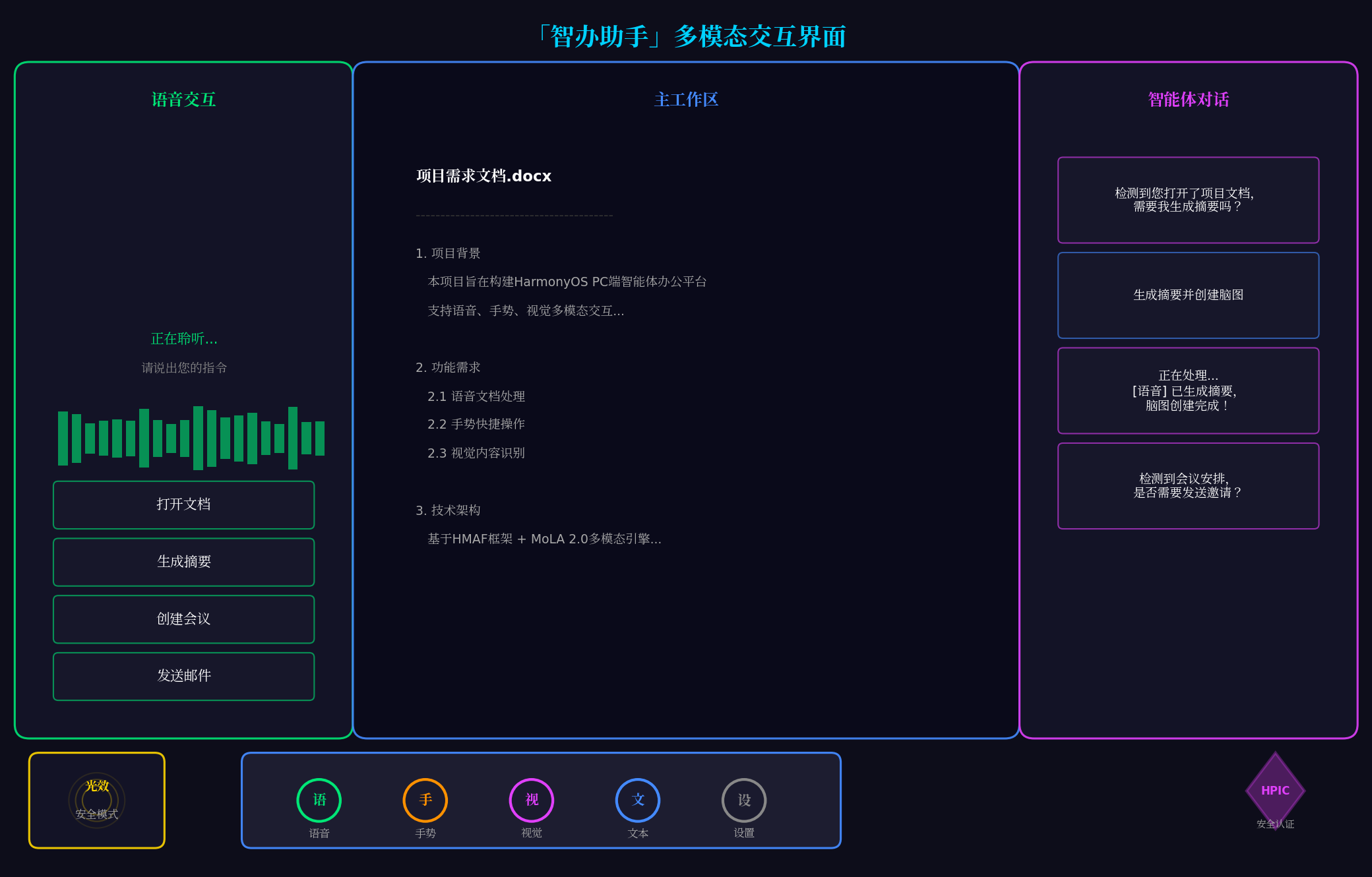
上图展示了「智办助手」的核心界面:
- 左侧:语音交互面板,显示实时语音波形与快捷指令
- 中间:主工作区,显示当前文档内容与编辑状态
- 右侧:智能体对话面板,显示AI交互历史与建议
- 底部:悬浮导航栏,支持语音/手势/视觉/文本/设置五种模式切换
- 左下角:光效状态指示器,显示当前安全模式
- 右下角:HPIC安全认证标识
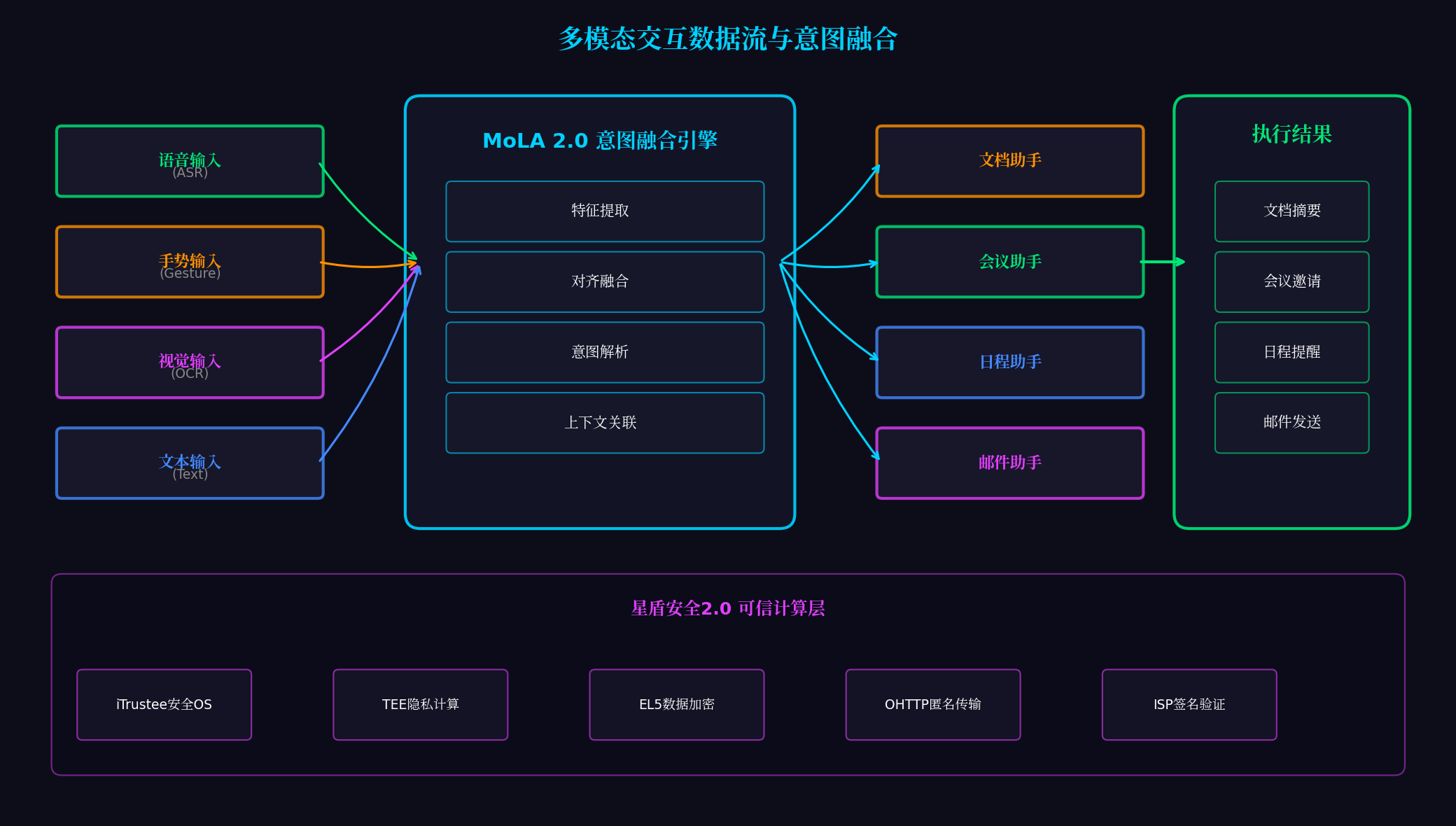
上图展示了多模态交互的完整数据流:
- 左侧:四种输入模态(语音ASR、手势Gesture、视觉OCR、文本Text)
- 中间:MoLA 2.0意图融合引擎(特征提取→对齐融合→意图解析→上下文关联)
- 右侧:HMAF智能体执行(文档/会议/日程/邮件助手)
- 最右侧:执行结果输出
- 底部:星盾安全2.0可信计算层(iTrustee、TEE、EL5、OHTTP、ISP签名)
八、总结与展望
本文基于HarmonyOS 6(API 23)的MoLA 2.0多模态感知架构与星盾安全2.0可信计算体系,完整实战了一款面向PC端的智能体办公平台。核心创新点总结:
-
多模态自然交互:集成语音、手势、视觉、文本四种输入模态,通过MoLA 2.0意图融合引擎实现"说、指、看、打"的自然办公体验
-
安全可信计算:基于iTrustee安全OS、EL5数据加密、OHTTP匿名传输、ISP签名验证,实现"数据不出端、计算可验证"的安全办公
-
情绪感知交互:通过语音特征实时检测用户情绪(中性/开心/紧急/疲惫),自适应调整交互语气和办公场景
-
沉浸光效氛围:五种办公场景对应五种色彩心理学光效,营造沉浸式办公氛围
-
HPIC安全认证:通过鸿蒙个人智能计算系统(HPIC)安全认证,确保端到端安全可信
未来扩展方向:
- 分布式办公协同:通过NearLink 2.0实现多设备智能体协同,手机采集语音、PC处理文档、平板展示结果
- AI自动生成PPT:基于文档内容自动生成演示文稿,支持语音控制翻页与标注
- 智能会议助手:实时转写会议内容,自动生成会议纪要并分配待办事项
- 跨语言办公:集成实时翻译能力,支持多语言文档处理与跨国会议
转载自:https://blog.csdn.net/u014727709/article/details/162386627
欢迎 👍点赞✍评论⭐收藏,欢迎指正