大家好我是鸿蒙Jack,本期以我的《时光旅记》APP为例,讲一下我是怎么在"发现页我的时光"里接入瀑布流的。
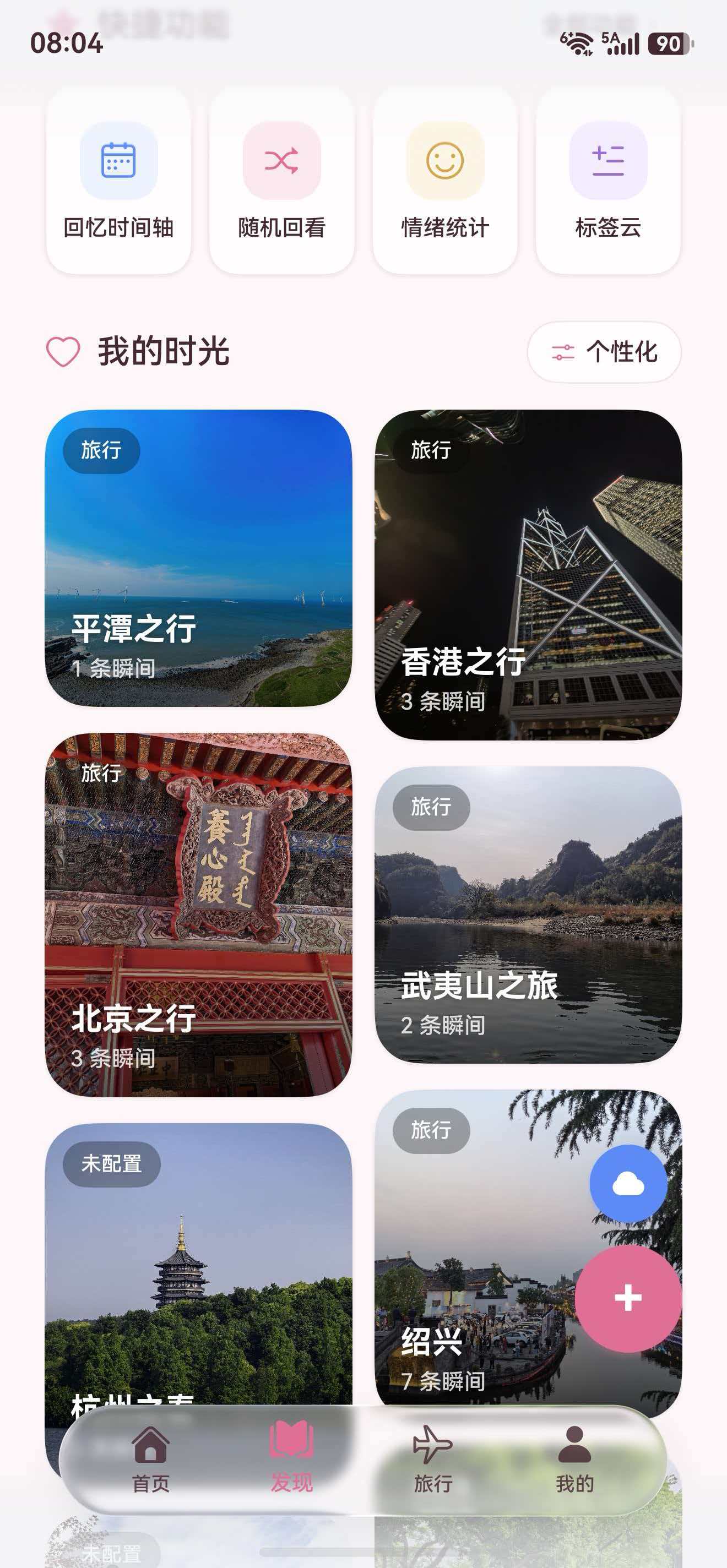
这个功能不是单纯把两列卡片换个容器。《时光旅记》的"小本"会有封面、简介、瞬间数量、场景标签、隐私保护状态,还支持长按整理、拖拽排序、删除、滚动位置恢复和设置页切换布局。用户的小本越多,普通双列卡片就越像一个固定网格,照片感不够强,所以我在发现页加了一套 WaterFlow + FlowItem 的瀑布流模式,让不同小本根据封面、简介和内容数量拉开高度,整体更像照片墙。
这里放一张效果图:
用到的技术栈
用到的是 HarmonyOS Stage 模型下的 ArkTS 和 ArkUI。
页面层主要用 WaterFlow、FlowItem、Flex、Column、Stack、Image、Text、Button、Toggle、SymbolGlyph。WaterFlow 是 ArkUI 原生瀑布流容器,负责把不同高度的 FlowItem 分配到多列里。columnsTemplate('1fr 1fr') 决定两列等宽,columnsGap 和 rowsGap 控制列距、行距,Scroller 用来绑定滚动控制器。
状态层用的是 ArkUI 装饰器。@Prop 接收 MainPage 传进来的布局配置,@Link 保存发现页滚动偏移,@State 保存拖拽、整理模式、渲染版本这些页面内部状态。设置页里修改 store 后调用 persistTimeImprintStore() 和 publishTimeImprintStoreChange(this.store),让页面拿到最新配置。
整体架构
#mermaid-svg-L92VhgSD7SIBholc{font-family:"trebuchet ms",verdana,arial,sans-serif;font-size:16px;fill:#333;}@keyframes edge-animation-frame{from{stroke-dashoffset:0;}}@keyframes dash{to{stroke-dashoffset:0;}}#mermaid-svg-L92VhgSD7SIBholc .edge-animation-slow{stroke-dasharray:9,5!important;stroke-dashoffset:900;animation:dash 50s linear infinite;stroke-linecap:round;}#mermaid-svg-L92VhgSD7SIBholc .edge-animation-fast{stroke-dasharray:9,5!important;stroke-dashoffset:900;animation:dash 20s linear infinite;stroke-linecap:round;}#mermaid-svg-L92VhgSD7SIBholc .error-icon{fill:#552222;}#mermaid-svg-L92VhgSD7SIBholc .error-text{fill:#552222;stroke:#552222;}#mermaid-svg-L92VhgSD7SIBholc .edge-thickness-normal{stroke-width:1px;}#mermaid-svg-L92VhgSD7SIBholc .edge-thickness-thick{stroke-width:3.5px;}#mermaid-svg-L92VhgSD7SIBholc .edge-pattern-solid{stroke-dasharray:0;}#mermaid-svg-L92VhgSD7SIBholc .edge-thickness-invisible{stroke-width:0;fill:none;}#mermaid-svg-L92VhgSD7SIBholc .edge-pattern-dashed{stroke-dasharray:3;}#mermaid-svg-L92VhgSD7SIBholc .edge-pattern-dotted{stroke-dasharray:2;}#mermaid-svg-L92VhgSD7SIBholc .marker{fill:#333333;stroke:#333333;}#mermaid-svg-L92VhgSD7SIBholc .marker.cross{stroke:#333333;}#mermaid-svg-L92VhgSD7SIBholc svg{font-family:"trebuchet ms",verdana,arial,sans-serif;font-size:16px;}#mermaid-svg-L92VhgSD7SIBholc p{margin:0;}#mermaid-svg-L92VhgSD7SIBholc .label{font-family:"trebuchet ms",verdana,arial,sans-serif;color:#333;}#mermaid-svg-L92VhgSD7SIBholc .cluster-label text{fill:#333;}#mermaid-svg-L92VhgSD7SIBholc .cluster-label span{color:#333;}#mermaid-svg-L92VhgSD7SIBholc .cluster-label span p{background-color:transparent;}#mermaid-svg-L92VhgSD7SIBholc .label text,#mermaid-svg-L92VhgSD7SIBholc span{fill:#333;color:#333;}#mermaid-svg-L92VhgSD7SIBholc .node rect,#mermaid-svg-L92VhgSD7SIBholc .node circle,#mermaid-svg-L92VhgSD7SIBholc .node ellipse,#mermaid-svg-L92VhgSD7SIBholc .node polygon,#mermaid-svg-L92VhgSD7SIBholc .node path{fill:#ECECFF;stroke:#9370DB;stroke-width:1px;}#mermaid-svg-L92VhgSD7SIBholc .rough-node .label text,#mermaid-svg-L92VhgSD7SIBholc .node .label text,#mermaid-svg-L92VhgSD7SIBholc .image-shape .label,#mermaid-svg-L92VhgSD7SIBholc .icon-shape .label{text-anchor:middle;}#mermaid-svg-L92VhgSD7SIBholc .node .katex path{fill:#000;stroke:#000;stroke-width:1px;}#mermaid-svg-L92VhgSD7SIBholc .rough-node .label,#mermaid-svg-L92VhgSD7SIBholc .node .label,#mermaid-svg-L92VhgSD7SIBholc .image-shape .label,#mermaid-svg-L92VhgSD7SIBholc .icon-shape .label{text-align:center;}#mermaid-svg-L92VhgSD7SIBholc .node.clickable{cursor:pointer;}#mermaid-svg-L92VhgSD7SIBholc .root .anchor path{fill:#333333!important;stroke-width:0;stroke:#333333;}#mermaid-svg-L92VhgSD7SIBholc .arrowheadPath{fill:#333333;}#mermaid-svg-L92VhgSD7SIBholc .edgePath .path{stroke:#333333;stroke-width:2.0px;}#mermaid-svg-L92VhgSD7SIBholc .flowchart-link{stroke:#333333;fill:none;}#mermaid-svg-L92VhgSD7SIBholc .edgeLabel{background-color:rgba(232,232,232, 0.8);text-align:center;}#mermaid-svg-L92VhgSD7SIBholc .edgeLabel p{background-color:rgba(232,232,232, 0.8);}#mermaid-svg-L92VhgSD7SIBholc .edgeLabel rect{opacity:0.5;background-color:rgba(232,232,232, 0.8);fill:rgba(232,232,232, 0.8);}#mermaid-svg-L92VhgSD7SIBholc .labelBkg{background-color:rgba(232, 232, 232, 0.5);}#mermaid-svg-L92VhgSD7SIBholc .cluster rect{fill:#ffffde;stroke:#aaaa33;stroke-width:1px;}#mermaid-svg-L92VhgSD7SIBholc .cluster text{fill:#333;}#mermaid-svg-L92VhgSD7SIBholc .cluster span{color:#333;}#mermaid-svg-L92VhgSD7SIBholc div.mermaidTooltip{position:absolute;text-align:center;max-width:200px;padding:2px;font-family:"trebuchet ms",verdana,arial,sans-serif;font-size:12px;background:hsl(80, 100%, 96.2745098039%);border:1px solid #aaaa33;border-radius:2px;pointer-events:none;z-index:100;}#mermaid-svg-L92VhgSD7SIBholc .flowchartTitleText{text-anchor:middle;font-size:18px;fill:#333;}#mermaid-svg-L92VhgSD7SIBholc rect.text{fill:none;stroke-width:0;}#mermaid-svg-L92VhgSD7SIBholc .icon-shape,#mermaid-svg-L92VhgSD7SIBholc .image-shape{background-color:rgba(232,232,232, 0.8);text-align:center;}#mermaid-svg-L92VhgSD7SIBholc .icon-shape p,#mermaid-svg-L92VhgSD7SIBholc .image-shape p{background-color:rgba(232,232,232, 0.8);padding:2px;}#mermaid-svg-L92VhgSD7SIBholc .icon-shape .label rect,#mermaid-svg-L92VhgSD7SIBholc .image-shape .label rect{opacity:0.5;background-color:rgba(232,232,232, 0.8);fill:rgba(232,232,232, 0.8);}#mermaid-svg-L92VhgSD7SIBholc .label-icon{display:inline-block;height:1em;overflow:visible;vertical-align:-0.125em;}#mermaid-svg-L92VhgSD7SIBholc .node .label-icon path{fill:currentColor;stroke:revert;stroke-width:revert;}#mermaid-svg-L92VhgSD7SIBholc :root{--mermaid-font-family:"trebuchet ms",verdana,arial,sans-serif;} GRID
WATERFALL
SettingsPage 设置页
TimeImprintStore
TimeImprintPersistence Preferences
MainPage
NotebookTab
notebookDiscoveryLayoutMode
Flex 双列卡片
WaterFlow 两列瀑布流
FlowItem
buildNotebookDiscoveryTile
buildManagedImage / PlaceholderCover
底部文字或封面蒙层文字
长按整理和拖拽排序
这个结构里,WaterFlow 只负责排列。小本卡片本身不拆两套组件,还是同一个 buildNotebookDiscoveryTile()。我只把宽度和封面高度作为参数传进去:普通双列模式传 48% + 140,瀑布流模式传 100% + getNotebookWaterfallCoverHeight()。这样后面维护卡片点击、长按、拖拽、删除时,不需要在两个布局里改两份。
切换布局的时序
WaterFlow NotebookTab MainPage Preferences TimeImprintStore SettingsPage 用户 WaterFlow NotebookTab MainPage Preferences TimeImprintStore SettingsPage 用户 #mermaid-svg-IThwS5KKOelXIdqz{font-family:"trebuchet ms",verdana,arial,sans-serif;font-size:16px;fill:#333;}@keyframes edge-animation-frame{from{stroke-dashoffset:0;}}@keyframes dash{to{stroke-dashoffset:0;}}#mermaid-svg-IThwS5KKOelXIdqz .edge-animation-slow{stroke-dasharray:9,5!important;stroke-dashoffset:900;animation:dash 50s linear infinite;stroke-linecap:round;}#mermaid-svg-IThwS5KKOelXIdqz .edge-animation-fast{stroke-dasharray:9,5!important;stroke-dashoffset:900;animation:dash 20s linear infinite;stroke-linecap:round;}#mermaid-svg-IThwS5KKOelXIdqz .error-icon{fill:#552222;}#mermaid-svg-IThwS5KKOelXIdqz .error-text{fill:#552222;stroke:#552222;}#mermaid-svg-IThwS5KKOelXIdqz .edge-thickness-normal{stroke-width:1px;}#mermaid-svg-IThwS5KKOelXIdqz .edge-thickness-thick{stroke-width:3.5px;}#mermaid-svg-IThwS5KKOelXIdqz .edge-pattern-solid{stroke-dasharray:0;}#mermaid-svg-IThwS5KKOelXIdqz .edge-thickness-invisible{stroke-width:0;fill:none;}#mermaid-svg-IThwS5KKOelXIdqz .edge-pattern-dashed{stroke-dasharray:3;}#mermaid-svg-IThwS5KKOelXIdqz .edge-pattern-dotted{stroke-dasharray:2;}#mermaid-svg-IThwS5KKOelXIdqz .marker{fill:#333333;stroke:#333333;}#mermaid-svg-IThwS5KKOelXIdqz .marker.cross{stroke:#333333;}#mermaid-svg-IThwS5KKOelXIdqz svg{font-family:"trebuchet ms",verdana,arial,sans-serif;font-size:16px;}#mermaid-svg-IThwS5KKOelXIdqz p{margin:0;}#mermaid-svg-IThwS5KKOelXIdqz .actor{stroke:hsl(259.6261682243, 59.7765363128%, 87.9019607843%);fill:#ECECFF;}#mermaid-svg-IThwS5KKOelXIdqz text.actor>tspan{fill:black;stroke:none;}#mermaid-svg-IThwS5KKOelXIdqz .actor-line{stroke:hsl(259.6261682243, 59.7765363128%, 87.9019607843%);}#mermaid-svg-IThwS5KKOelXIdqz .innerArc{stroke-width:1.5;stroke-dasharray:none;}#mermaid-svg-IThwS5KKOelXIdqz .messageLine0{stroke-width:1.5;stroke-dasharray:none;stroke:#333;}#mermaid-svg-IThwS5KKOelXIdqz .messageLine1{stroke-width:1.5;stroke-dasharray:2,2;stroke:#333;}#mermaid-svg-IThwS5KKOelXIdqz #arrowhead path{fill:#333;stroke:#333;}#mermaid-svg-IThwS5KKOelXIdqz .sequenceNumber{fill:white;}#mermaid-svg-IThwS5KKOelXIdqz #sequencenumber{fill:#333;}#mermaid-svg-IThwS5KKOelXIdqz #crosshead path{fill:#333;stroke:#333;}#mermaid-svg-IThwS5KKOelXIdqz .messageText{fill:#333;stroke:none;}#mermaid-svg-IThwS5KKOelXIdqz .labelBox{stroke:hsl(259.6261682243, 59.7765363128%, 87.9019607843%);fill:#ECECFF;}#mermaid-svg-IThwS5KKOelXIdqz .labelText,#mermaid-svg-IThwS5KKOelXIdqz .labelText>tspan{fill:black;stroke:none;}#mermaid-svg-IThwS5KKOelXIdqz .loopText,#mermaid-svg-IThwS5KKOelXIdqz .loopText>tspan{fill:black;stroke:none;}#mermaid-svg-IThwS5KKOelXIdqz .loopLine{stroke-width:2px;stroke-dasharray:2,2;stroke:hsl(259.6261682243, 59.7765363128%, 87.9019607843%);fill:hsl(259.6261682243, 59.7765363128%, 87.9019607843%);}#mermaid-svg-IThwS5KKOelXIdqz .note{stroke:#aaaa33;fill:#fff5ad;}#mermaid-svg-IThwS5KKOelXIdqz .noteText,#mermaid-svg-IThwS5KKOelXIdqz .noteText>tspan{fill:black;stroke:none;}#mermaid-svg-IThwS5KKOelXIdqz .activation0{fill:#f4f4f4;stroke:#666;}#mermaid-svg-IThwS5KKOelXIdqz .activation1{fill:#f4f4f4;stroke:#666;}#mermaid-svg-IThwS5KKOelXIdqz .activation2{fill:#f4f4f4;stroke:#666;}#mermaid-svg-IThwS5KKOelXIdqz .actorPopupMenu{position:absolute;}#mermaid-svg-IThwS5KKOelXIdqz .actorPopupMenuPanel{position:absolute;fill:#ECECFF;box-shadow:0px 8px 16px 0px rgba(0,0,0,0.2);filter:drop-shadow(3px 5px 2px rgb(0 0 0 / 0.4));}#mermaid-svg-IThwS5KKOelXIdqz .actor-man line{stroke:hsl(259.6261682243, 59.7765363128%, 87.9019607843%);fill:#ECECFF;}#mermaid-svg-IThwS5KKOelXIdqz .actor-man circle,#mermaid-svg-IThwS5KKOelXIdqz line{stroke:hsl(259.6261682243, 59.7765363128%, 87.9019607843%);fill:#ECECFF;stroke-width:2px;}#mermaid-svg-IThwS5KKOelXIdqz :root{--mermaid-font-family:"trebuchet ms",verdana,arial,sans-serif;} 点击"瀑布流" applyNotebookDiscoveryLayoutModePreference(WATERFALL) store.notebookDiscoveryLayoutMode = WATERFALL persistTimeImprintStore() publishTimeImprintStoreChange(store) 传入 notebookDiscoveryLayoutMode shouldUseNotebookWaterfallLayout() 构建 FlowItem 列表 按两列和不同 item 高度排布
我这里没有把瀑布流配置做成页面内临时状态,因为这是用户偏好。用户这次选择瀑布流,下次打开 APP 也应该还是瀑布流,所以必须进 store 和 Preferences。
关键实现
瀑布流的入口在 buildNotebookDiscoverySection()。如果没有小本,显示空状态;如果开启瀑布流,使用 WaterFlow;否则使用旧的 Flex 双列卡片。
这里有一个细节:WaterFlow 外层在《时光旅记》发现页里处于一个更大的滚动页面内,所以我给 WaterFlow 设置了明确高度,并关闭了内部滚动交互:
arkts
.height(this.getNotebookWaterfallHeight())
.enableScrollInteraction(false)
这样滚动还是交给外层发现页,瀑布流只负责把自己的内容完整排出来。高度由 getNotebookWaterfallHeight() 估算两列排布后的最大列高,避免嵌套滚动抢事件,也避免内容被裁掉。
高度计算不是随便写几个随机数。我用了小本的真实业务信息参与计算:有没有封面、有没有简介、瞬间数量是否较多,再叠加 index 的轻微差异,最后限制在 132 到 230 之间。这样既有错落感,又不会出现某个卡片高得失控。
#mermaid-svg-KrPuR9WyN5CyrIHN{font-family:"trebuchet ms",verdana,arial,sans-serif;font-size:16px;fill:#333;}@keyframes edge-animation-frame{from{stroke-dashoffset:0;}}@keyframes dash{to{stroke-dashoffset:0;}}#mermaid-svg-KrPuR9WyN5CyrIHN .edge-animation-slow{stroke-dasharray:9,5!important;stroke-dashoffset:900;animation:dash 50s linear infinite;stroke-linecap:round;}#mermaid-svg-KrPuR9WyN5CyrIHN .edge-animation-fast{stroke-dasharray:9,5!important;stroke-dashoffset:900;animation:dash 20s linear infinite;stroke-linecap:round;}#mermaid-svg-KrPuR9WyN5CyrIHN .error-icon{fill:#552222;}#mermaid-svg-KrPuR9WyN5CyrIHN .error-text{fill:#552222;stroke:#552222;}#mermaid-svg-KrPuR9WyN5CyrIHN .edge-thickness-normal{stroke-width:1px;}#mermaid-svg-KrPuR9WyN5CyrIHN .edge-thickness-thick{stroke-width:3.5px;}#mermaid-svg-KrPuR9WyN5CyrIHN .edge-pattern-solid{stroke-dasharray:0;}#mermaid-svg-KrPuR9WyN5CyrIHN .edge-thickness-invisible{stroke-width:0;fill:none;}#mermaid-svg-KrPuR9WyN5CyrIHN .edge-pattern-dashed{stroke-dasharray:3;}#mermaid-svg-KrPuR9WyN5CyrIHN .edge-pattern-dotted{stroke-dasharray:2;}#mermaid-svg-KrPuR9WyN5CyrIHN .marker{fill:#333333;stroke:#333333;}#mermaid-svg-KrPuR9WyN5CyrIHN .marker.cross{stroke:#333333;}#mermaid-svg-KrPuR9WyN5CyrIHN svg{font-family:"trebuchet ms",verdana,arial,sans-serif;font-size:16px;}#mermaid-svg-KrPuR9WyN5CyrIHN p{margin:0;}#mermaid-svg-KrPuR9WyN5CyrIHN .label{font-family:"trebuchet ms",verdana,arial,sans-serif;color:#333;}#mermaid-svg-KrPuR9WyN5CyrIHN .cluster-label text{fill:#333;}#mermaid-svg-KrPuR9WyN5CyrIHN .cluster-label span{color:#333;}#mermaid-svg-KrPuR9WyN5CyrIHN .cluster-label span p{background-color:transparent;}#mermaid-svg-KrPuR9WyN5CyrIHN .label text,#mermaid-svg-KrPuR9WyN5CyrIHN span{fill:#333;color:#333;}#mermaid-svg-KrPuR9WyN5CyrIHN .node rect,#mermaid-svg-KrPuR9WyN5CyrIHN .node circle,#mermaid-svg-KrPuR9WyN5CyrIHN .node ellipse,#mermaid-svg-KrPuR9WyN5CyrIHN .node polygon,#mermaid-svg-KrPuR9WyN5CyrIHN .node path{fill:#ECECFF;stroke:#9370DB;stroke-width:1px;}#mermaid-svg-KrPuR9WyN5CyrIHN .rough-node .label text,#mermaid-svg-KrPuR9WyN5CyrIHN .node .label text,#mermaid-svg-KrPuR9WyN5CyrIHN .image-shape .label,#mermaid-svg-KrPuR9WyN5CyrIHN .icon-shape .label{text-anchor:middle;}#mermaid-svg-KrPuR9WyN5CyrIHN .node .katex path{fill:#000;stroke:#000;stroke-width:1px;}#mermaid-svg-KrPuR9WyN5CyrIHN .rough-node .label,#mermaid-svg-KrPuR9WyN5CyrIHN .node .label,#mermaid-svg-KrPuR9WyN5CyrIHN .image-shape .label,#mermaid-svg-KrPuR9WyN5CyrIHN .icon-shape .label{text-align:center;}#mermaid-svg-KrPuR9WyN5CyrIHN .node.clickable{cursor:pointer;}#mermaid-svg-KrPuR9WyN5CyrIHN .root .anchor path{fill:#333333!important;stroke-width:0;stroke:#333333;}#mermaid-svg-KrPuR9WyN5CyrIHN .arrowheadPath{fill:#333333;}#mermaid-svg-KrPuR9WyN5CyrIHN .edgePath .path{stroke:#333333;stroke-width:2.0px;}#mermaid-svg-KrPuR9WyN5CyrIHN .flowchart-link{stroke:#333333;fill:none;}#mermaid-svg-KrPuR9WyN5CyrIHN .edgeLabel{background-color:rgba(232,232,232, 0.8);text-align:center;}#mermaid-svg-KrPuR9WyN5CyrIHN .edgeLabel p{background-color:rgba(232,232,232, 0.8);}#mermaid-svg-KrPuR9WyN5CyrIHN .edgeLabel rect{opacity:0.5;background-color:rgba(232,232,232, 0.8);fill:rgba(232,232,232, 0.8);}#mermaid-svg-KrPuR9WyN5CyrIHN .labelBkg{background-color:rgba(232, 232, 232, 0.5);}#mermaid-svg-KrPuR9WyN5CyrIHN .cluster rect{fill:#ffffde;stroke:#aaaa33;stroke-width:1px;}#mermaid-svg-KrPuR9WyN5CyrIHN .cluster text{fill:#333;}#mermaid-svg-KrPuR9WyN5CyrIHN .cluster span{color:#333;}#mermaid-svg-KrPuR9WyN5CyrIHN div.mermaidTooltip{position:absolute;text-align:center;max-width:200px;padding:2px;font-family:"trebuchet ms",verdana,arial,sans-serif;font-size:12px;background:hsl(80, 100%, 96.2745098039%);border:1px solid #aaaa33;border-radius:2px;pointer-events:none;z-index:100;}#mermaid-svg-KrPuR9WyN5CyrIHN .flowchartTitleText{text-anchor:middle;font-size:18px;fill:#333;}#mermaid-svg-KrPuR9WyN5CyrIHN rect.text{fill:none;stroke-width:0;}#mermaid-svg-KrPuR9WyN5CyrIHN .icon-shape,#mermaid-svg-KrPuR9WyN5CyrIHN .image-shape{background-color:rgba(232,232,232, 0.8);text-align:center;}#mermaid-svg-KrPuR9WyN5CyrIHN .icon-shape p,#mermaid-svg-KrPuR9WyN5CyrIHN .image-shape p{background-color:rgba(232,232,232, 0.8);padding:2px;}#mermaid-svg-KrPuR9WyN5CyrIHN .icon-shape .label rect,#mermaid-svg-KrPuR9WyN5CyrIHN .image-shape .label rect{opacity:0.5;background-color:rgba(232,232,232, 0.8);fill:rgba(232,232,232, 0.8);}#mermaid-svg-KrPuR9WyN5CyrIHN .label-icon{display:inline-block;height:1em;overflow:visible;vertical-align:-0.125em;}#mermaid-svg-KrPuR9WyN5CyrIHN .node .label-icon path{fill:currentColor;stroke:revert;stroke-width:revert;}#mermaid-svg-KrPuR9WyN5CyrIHN :root{--mermaid-font-family:"trebuchet ms",verdana,arial,sans-serif;} NotebookRecord
有封面
有简介
瞬间数 >= 8
封面高度
限制 132 到 230
卡片总高度
估算左右列高度
WaterFlow 容器高度
完整代码
下面这套代码是从《时光旅记》当前实现整理出来的完整接入版本。真实项目里这些代码分散在模型、设置页、主页面、发现页和持久化工具里,文章里我按接入顺序放出来。
1. 模型里增加布局枚举和 store 字段
文件:entry/src/main/ets/model/TimeImprintModels.ets
arkts
export enum NotebookDiscoveryLayoutMode {
  GRID = 0,
  WATERFALL = 1
}

export class TimeImprintStore {
  // 这里只展示和本能力相关的字段,其他业务字段保持原样。
  notebookDiscoveryLayoutMode: number = NotebookDiscoveryLayoutMode.GRID;
  notebookDiscoveryTextOverlayEnabled: boolean = false;
}
2. 设置页提供"双列卡片 / 瀑布流"切换
文件:entry/src/main/ets/pages/settings/SettingsPage.ets
arkts
@State notebookDiscoveryLayoutMode: NotebookDiscoveryLayoutMode = NotebookDiscoveryLayoutMode.GRID;
@State notebookDiscoveryTextOverlayEnabled: boolean = false;
@State settingsRefreshVersion: number = 0;

private getSavedNotebookDiscoveryLayoutMode(): NotebookDiscoveryLayoutMode {
  if (this.store.notebookDiscoveryLayoutMode === NotebookDiscoveryLayoutMode.WATERFALL) {
    return NotebookDiscoveryLayoutMode.WATERFALL;
  }
  return NotebookDiscoveryLayoutMode.GRID;
}

private getNotebookDiscoveryLayoutModeLabel(): string {
  if (this.notebookDiscoveryLayoutMode === NotebookDiscoveryLayoutMode.WATERFALL) {
    return '瀑布流';
  }
  return '双列卡片';
}

@Builder
private buildNotebookDiscoverySettingCard(): void {
  Column({ space: 14 }) {
    Row({ space: 12 }) {
      Column() {
        SymbolGlyph($r('sys.symbol.rectangle_grid_2x2_fill'))
          .fontSize(20)
          .fontColor([$r('app.color.text_inverse')])
      }
      .width(40)
      .height(40)
      .borderRadius(14)
      .justifyContent(FlexAlign.Center)
      .linearGradient({
        angle: 135,
        colors: [[ThemePalette.accentPrimary(), 0.0], [ThemePalette.accentGradientEnd(), 1.0]]
      })

      Column({ space: 2 }) {
        Text('发现页我的时光')
          .fontSize(18)
          .fontWeight(500)
          .fontColor(ThemePalette.textPrimary())
        Text(this.getNotebookDiscoveryLayoutModeLabel())
          .fontSize(12)
          .fontColor(ThemePalette.textTertiary())
      }
      .layoutWeight(1)
      .alignItems(HorizontalAlign.Start)
    }
    .width('100%')
    .alignItems(VerticalAlign.Center)

    Row({ space: 6 }) {
      this.buildNotebookDiscoveryLayoutButton(NotebookDiscoveryLayoutMode.GRID, '双列卡片')
      this.buildNotebookDiscoveryLayoutButton(NotebookDiscoveryLayoutMode.WATERFALL, '瀑布流')
    }
    .width('100%')

    Row({ space: 12 }) {
      Column({ space: 2 }) {
        Text('文字叠放到封面')
          .fontSize(15)
          .fontWeight(FontWeight.Medium)
          .fontColor(ThemePalette.textPrimary())
        Text(this.notebookDiscoveryTextOverlayEnabled ? '标题和摘要显示在图片左下角' : '标题和摘要显示在卡片底部')
          .fontSize(12)
          .fontColor(ThemePalette.textTertiary())
          .maxLines(1)
          .textOverflow({ overflow: TextOverflow.Ellipsis })
      }
      .layoutWeight(1)
      .alignItems(HorizontalAlign.Start)

      Toggle({ isOn: this.notebookDiscoveryTextOverlayEnabled, type: ToggleType.Switch })
        .onChange((value: boolean) => {
          this.handleNotebookDiscoveryTextOverlayToggle(value);
        })
    }
    .width('100%')
    .padding(14)
    .backgroundColor(ThemePalette.surfaceSecondary())
    .borderRadius(18)
    .alignItems(VerticalAlign.Center)

    Text('瀑布流会按每个时光的封面、简介和瞬间数量自动拉开卡片高度;开启叠放后,文字会进入封面左下角蒙层,整体更像照片流。长按仍可进入整理模式。')
      .fontSize(13)
      .lineHeight(20)
      .fontColor(ThemePalette.textSecondary())
  }
  .width('100%')
  .padding(18)
  .backgroundColor(ThemePalette.surfacePrimary())
  .borderRadius(24)
  .border({ width: 1, color: ThemePalette.dividerSubtle() })
  .shadow({ radius: 3, color: $r('app.color.shadow_medium'), offsetY: 1 })
}

@Builder
private buildNotebookDiscoveryLayoutButton(mode: NotebookDiscoveryLayoutMode, title: string): void {
  Button(title, { type: ButtonType.Normal })
    .layoutWeight(1)
    .height(42)
    .fontSize(14)
    .fontWeight(500)
    .fontColor(this.notebookDiscoveryLayoutMode === mode ? $r('app.color.text_inverse') : ThemePalette.textSecondary())
    .backgroundColor(this.notebookDiscoveryLayoutMode === mode ? Color.Transparent : ThemePalette.surfaceTertiary())
    .borderRadius(14)
    .linearGradient(this.notebookDiscoveryLayoutMode === mode ? {
      angle: 90,
      colors: [[ThemePalette.accentPrimary(), 0.0], [ThemePalette.accentGradientEnd(), 1.0]]
    } : null)
    .shadow(this.notebookDiscoveryLayoutMode === mode ? { radius: 6, color: $r('app.color.shadow_medium'), offsetY: 4 } : null)
    .scale({
      x: this.notebookDiscoveryLayoutMode === mode ? 1 : 0.97,
      y: this.notebookDiscoveryLayoutMode === mode ? 1 : 0.97
    })
    .animation({ duration: 320, curve: Curve.FastOutSlowIn })
    .onClick(() => {
      this.applyNotebookDiscoveryLayoutModePreference(mode);
    })
}

private applyNotebookDiscoveryLayoutModePreference(mode: NotebookDiscoveryLayoutMode): void {
  const nextMode: NotebookDiscoveryLayoutMode = mode === NotebookDiscoveryLayoutMode.WATERFALL
    ? NotebookDiscoveryLayoutMode.WATERFALL
    : NotebookDiscoveryLayoutMode.GRID;
  this.notebookDiscoveryLayoutMode = nextMode;
  this.store.notebookDiscoveryLayoutMode = nextMode;
  this.settingsRefreshVersion += 1;
  persistTimeImprintStore();
  publishTimeImprintStoreChange(this.store);
  promptAction.showToast({
    message: nextMode === NotebookDiscoveryLayoutMode.WATERFALL
      ? '我的时光将使用瀑布流'
      : '我的时光将使用双列卡片',
    duration: 1500
  });
}

private handleNotebookDiscoveryTextOverlayToggle(value: boolean): void {
  this.notebookDiscoveryTextOverlayEnabled = value;
  this.store.notebookDiscoveryTextOverlayEnabled = value;
  this.settingsRefreshVersion += 1;
  persistTimeImprintStore();
  publishTimeImprintStoreChange(this.store);
}
3. 主页面把配置传给发现页
文件:entry/src/main/ets/pages/shell/MainPage.ets
arkts
NotebookTab({
  tabScroller: this.notebookTabScroller,
  selectedTabIndexes: $notebookTabSelectedIndexes,
  notebookSearchInput: $notebookSearchInput,
  notebookSceneFilterInput: $notebookSceneFilterInput,
  notebookTabScrollY: $notebookTabScrollY,
  floatingActionOnLeft: this.floatingActionOnLeft,
  floatingActionSwapDirection: this.floatingActionSwapDirection,
  showNotebookTypeChooser: this.showNotebookTypeChooser,
  refreshVersion: this.refreshVersion,
  currentColorModeSignal: this.currentColorMode,
  notebookDiscoveryLayoutMode: this.store.notebookDiscoveryLayoutMode,
  notebookDiscoveryTextOverlayEnabled: this.store.notebookDiscoveryTextOverlayEnabled,
  insightOrderIds: this.store.allToolsInsightOrderIds,
  onGetTabContentBottomPadding: () => this.getTabContentBottomPadding(),
  onGetNotebookDiscoveryNotebooks: (limit: number) => this.getNotebookDiscoveryNotebooks(limit),
  onOpenNotebook: (notebookId: string) => this.openNotebook(notebookId),
  onMoveNotebook: (draggedNotebookId: string, targetNotebookId: string) => this.moveNotebook(draggedNotebookId, targetNotebookId),
  onConfirmDeleteNotebook: (notebookId: string) => this.confirmDeleteNotebook(notebookId)
})
上面只列出和瀑布流最相关的参数。真实项目里 NotebookTab 还接了搜索、场景筛选、功能中心、同步入口等回调,不影响瀑布流能力本身。
4. 发现页用 WaterFlow 渲染小本卡片
文件:entry/src/main/ets/pages/shell/tabs/NotebookTab.ets
arkts
import { LengthMetrics, curves, display, router } from '@kit.ArkUI';
import { formatMomentTime, getNotebookSceneLabel, isNotebookPrivacyProtected, normalizeNotebookScene } from '../../../utils/TimeImprintService';
import {
  MomentRecord,
  NotebookDiscoveryLayoutMode,
  NotebookKind,
  NotebookRecord
} from '../../../model/TimeImprintModels';
import { ThemePalette } from '../../../utils/ThemePalette';

@Component
export struct NotebookTab {
  tabScroller: Scroller = new Scroller();
  @Link selectedTabIndexes: number[];
  @Link notebookSearchInput: string;
  @Link notebookSceneFilterInput: string;
  @Link notebookTabScrollY: number;
  @Prop notebookDiscoveryLayoutMode: number = NotebookDiscoveryLayoutMode.GRID;
  @Prop notebookDiscoveryTextOverlayEnabled: boolean = false;
  @State draggingNotebookId: string = '';
  @State dragTargetNotebookId: string = '';
  @State notebookEditMode: boolean = false;
  @State notebookEditShakePhase: boolean = false;
  @State visibleNotebookOrderIds: Array<string> = [];
  @State notebookOrderRenderVersion: number = 0;
  @State notebookFilterRenderVersion: number = 0;
  @State isVisible: boolean = false;
  private notebookWaterfallScroller: Scroller = new Scroller();
  private notebookEditShakeTimer: number = -1;

  onGetNotebookDiscoveryNotebooks: (limit: number) => Array<NotebookRecord> = () => [];
  onOpenNotebook: (notebookId: string) => void = () => {};
  onMoveNotebook: (draggedNotebookId: string, targetNotebookId: string) => void = () => {};
  onConfirmDeleteNotebook: (notebookId: string) => void = () => {};

  @BuilderParam buildManagedImage: (
    uri: string,
    width: Length,
    height: Length,
    radius: number,
    fit: ImageFit,
    opacity: number
  ) => void = this.buildEmptyManagedImage;

  @Builder
  private buildEmptyManagedImage(uri: string, width: Length, height: Length, radius: number, fit: ImageFit, opacity: number): void {
    Image(uri)
      .width(width)
      .height(height)
      .borderRadius(radius)
      .objectFit(fit)
      .opacity(opacity)
  }

  @Builder
  private buildNotebookDiscoverySection(): void {
    if (this.getVisibleNotebooks().length === 0) {
      this.buildNotebookEmptyState()
    } else if (this.shouldUseNotebookWaterfallLayout()) {
      WaterFlow({ scroller: this.notebookWaterfallScroller }) {
        ForEach(this.getVisibleNotebooks(), (notebook: NotebookRecord, index: number) => {
          FlowItem() {
            this.buildNotebookDiscoveryTile(notebook, index, '100%', this.getNotebookWaterfallCoverHeight(notebook, index))
          }
          .width('100%')
        }, (notebook: NotebookRecord) => notebook.id)
      }
      .key('notebook-waterfall-' + this.notebookDiscoveryLayoutMode.toString() + '-' +
        this.notebookOrderRenderVersion.toString() + '-' + this.notebookFilterRenderVersion.toString())
      .columnsTemplate('1fr 1fr')
      .columnsGap(12)
      .rowsGap(14)
      .width('100%')
      .height(this.getNotebookWaterfallHeight())
      .scrollBar(BarState.Off)
      .enableScrollInteraction(false)
      .edgeEffect(EdgeEffect.Spring, { alwaysEnabled: false })
    } else {
      Flex({ wrap: FlexWrap.Wrap, justifyContent: FlexAlign.SpaceBetween, alignItems: ItemAlign.Start }) {
        ForEach(this.getVisibleNotebooks(), (notebook: NotebookRecord, index: number) => {
          this.buildNotebookDiscoveryTile(notebook, index, '48%', 140)
        }, (notebook: NotebookRecord) => notebook.id)
        if (this.getVisibleNotebooks().length === 1) {
          Column().width('48%')
        }
      }
      .width('100%')
    }
  }

  @Builder
  private buildNotebookEmptyState(): void {
    Column({ space: 12 }) {
      Text('暂无时光')
        .fontSize(16)
        .fontColor(ThemePalette.textTertiary())
    }
    .width('100%')
    .padding({ top: 40 })
    .alignItems(HorizontalAlign.Center)
  }

  @Builder
  private buildNotebookDiscoveryTile(notebook: NotebookRecord, index: number, tileWidth: Length, coverHeight: number): void {
    Column() {
      Stack({ alignContent: Alignment.TopStart }) {
        if (!this.isMaskedNotebook(notebook) && notebook.coverUri && notebook.coverUri.length > 0) {
          this.buildManagedImage(notebook.coverUri, '100%', coverHeight, 0, ImageFit.Cover, 1)
        } else {
          this.buildNotebookPlaceholderCover(notebook, coverHeight, !this.shouldOverlayNotebookText())
        }

        if (this.shouldOverlayNotebookText()) {
          this.buildNotebookCoverTextOverlay(notebook)
        }

        Text(this.getNotebookTypeLabel(notebook))
          .fontSize(11)
          .fontWeight(FontWeight.Medium)
          .fontColor(this.shouldOverlayNotebookText() ? $r('app.color.text_inverse') : ThemePalette.accentPrimary())
          .padding({ left: 10, right: 10, top: 6, bottom: 6 })
          .backgroundColor(this.shouldOverlayNotebookText() ? 'rgba(0,0,0,0.30)' : $r('app.color.home_glass'))
          .borderRadius(14)
          .margin({ left: 10, top: 10 })
          .zIndex(2)

        if (this.notebookEditMode) {
          Button() {
            SymbolGlyph($r('sys.symbol.xmark'))
              .fontSize(15)
              .fontColor([$r('app.color.text_inverse')])
          }
          .width(32)
          .height(32)
          .position({ right: 8, top: 8 })
          .backgroundColor('#C93C32')
          .borderRadius(16)
          .shadow({ radius: 8, color: 'rgba(201,60,50,0.28)', offsetY: 3 })
          .zIndex(3)
          .accessibilityText('删除时光')
          .accessibilityDescription('双击确认删除或移入回收站')
          .onClick(() => {
            this.onConfirmDeleteNotebook(notebook.id)
          })
        }
      }
      .width('100%')
      .height(coverHeight)

      if (!this.shouldOverlayNotebookText()) {
        this.buildNotebookBottomTextBlock(notebook)
      }
    }
    .width(tileWidth)
    .margin({ bottom: this.shouldUseNotebookWaterfallLayout() ? 0 : 16 })
    .opacity(this.draggingNotebookId === notebook.id ? 0.72 : 1)
    .translate({ x: this.getNotebookEditJitterOffset(index), y: this.isVisible ? 0 : 28 })
    .scale({ x: this.isVisible ? 1 : 0.95, y: this.isVisible ? 1 : 0.95 })
    .rotate({ angle: this.getNotebookEditRotationAngle(index) })
    .borderRadius(24)
    .border({
      width: this.dragTargetNotebookId === notebook.id ? 2 : 0,
      color: this.dragTargetNotebookId === notebook.id ? ThemePalette.accentPrimary() : 'rgba(0,0,0,0)'
    })
    .clip(true)
    .shadow({ radius: 8, color: $r('app.color.shadow_soft'), offsetY: 2 })
    .animation({
      duration: this.notebookEditMode ? 120 : 440,
      delay: this.notebookEditMode ? 0 : Math.min(index, 5) * 70,
      curve: this.notebookEditMode ? Curve.EaseInOut : curves.springMotion()
    })
    .gesture(
      LongPressGesture({ fingers: 1, repeat: false, duration: this.getNotebookLongPressDuration() })
        .onAction(() => {
          this.enterNotebookEditMode()
        })
    )
    .draggable(this.canStartNotebookDrag())
    .onDragStart(() => {
      if (!this.canStartNotebookDrag()) {
        return;
      }
      if (!this.notebookEditMode) {
        this.enterNotebookEditMode();
      }
      this.draggingNotebookId = notebook.id
      this.dragTargetNotebookId = ''
      return { extraInfo: notebook.id }
    })
    .onDragEnter(() => {
      if (this.draggingNotebookId.length === 0 || this.draggingNotebookId === notebook.id) {
        return;
      }
      this.dragTargetNotebookId = notebook.id
    })
    .onDragMove((event?: DragEvent) => {
      if (event === undefined) {
        return;
      }
      if (this.draggingNotebookId.length === 0 || this.draggingNotebookId === notebook.id) {
        event.setResult(DragResult.DROP_DISABLED)
        return;
      }
      this.dragTargetNotebookId = notebook.id
      event.setResult(DragResult.DROP_ENABLED)
      event.dragBehavior = DragBehavior.MOVE
    })
    .onDragLeave(() => {
      if (this.dragTargetNotebookId === notebook.id) {
        this.dragTargetNotebookId = ''
      }
    })
    .onDrop((event?: DragEvent) => {
      if (event !== undefined) {
        if (this.draggingNotebookId.length > 0 && this.draggingNotebookId !== notebook.id) {
          this.applyLocalNotebookDropOrder(this.draggingNotebookId, notebook.id);
          this.onMoveNotebook(this.draggingNotebookId, notebook.id)
          event.setResult(DragResult.DRAG_SUCCESSFUL)
        } else {
          event.setResult(DragResult.DRAG_CANCELED)
        }
      }
      this.clearNotebookDragState()
    })
    .onDragEnd(() => {
      this.clearNotebookDragState()
    })
    .onClick(() => {
      if (this.notebookEditMode) {
        return;
      }
      this.persistNotebookTabScrollOffset();
      this.onOpenNotebook(notebook.id)
    })
  }

  @Builder
  private buildNotebookBottomTextBlock(notebook: NotebookRecord): void {
    Column({ space: 4 }) {
      Text(notebook.name || '未命名时光')
        .fontSize(18)
        .fontWeight(FontWeight.Medium)
        .fontColor(ThemePalette.textPrimary())
        .maxLines(1)
        .textOverflow({ overflow: TextOverflow.Ellipsis })

      Text(this.getNotebookSummaryLabel(notebook))
        .fontSize(12)
        .fontColor(ThemePalette.textTertiary())

      if (this.shouldUseNotebookWaterfallLayout() && this.getNotebookWaterfallIntro(notebook).length > 0) {
        Text(this.getNotebookWaterfallIntro(notebook))
          .fontSize(12)
          .lineHeight(18)
          .fontColor(ThemePalette.textSecondary())
          .maxLines(2)
          .textOverflow({ overflow: TextOverflow.Ellipsis })
      }
    }
    .width('100%')
    .padding({ left: 16, right: 16, top: 16, bottom: 20 })
    .alignItems(HorizontalAlign.Start)
    .backgroundColor(ThemePalette.surfacePrimary())
  }

  @Builder
  private buildNotebookCoverTextOverlay(notebook: NotebookRecord): void {
    Stack({ alignContent: Alignment.BottomStart }) {
      Column()
        .width('100%')
        .height('100%')
        .linearGradient({
          angle: 180,
          colors: [
            ['rgba(0,0,0,0.00)', 0.0],
            ['rgba(0,0,0,0.18)', 0.45],
            ['rgba(0,0,0,0.66)', 1.0]
          ]
        })

      Column({ space: 4 }) {
        Text(notebook.name || '未命名时光')
          .fontSize(this.shouldUseNotebookWaterfallLayout() ? 17 : 16)
          .fontWeight(FontWeight.Bold)
          .fontColor($r('app.color.text_inverse'))
          .maxLines(2)
          .textOverflow({ overflow: TextOverflow.Ellipsis })
          .textShadow({ radius: 6, color: 'rgba(0,0,0,0.36)', offsetX: 0, offsetY: 2 })

        Text(this.getNotebookSummaryLabel(notebook))
          .fontSize(12)
          .fontWeight(FontWeight.Medium)
          .fontColor('rgba(255,255,255,0.82)')
          .maxLines(1)
          .textOverflow({ overflow: TextOverflow.Ellipsis })

        if (this.shouldUseNotebookWaterfallLayout() && this.getNotebookWaterfallIntro(notebook).length > 0) {
          Text(this.getNotebookWaterfallIntro(notebook))
            .fontSize(11)
            .lineHeight(16)
            .fontColor('rgba(255,255,255,0.76)')
            .maxLines(2)
            .textOverflow({ overflow: TextOverflow.Ellipsis })
        }
      }
      .width('100%')
      .padding({ left: 14, right: 14, bottom: 14 })
      .alignItems(HorizontalAlign.Start)
    }
    .width('100%')
    .height('100%')
    .hitTestBehavior(HitTestMode.None)
  }

  @Builder
  private buildNotebookPlaceholderCover(notebook: NotebookRecord, height: number, showText: boolean = true): void {
    Column({ space: 8 }) {
      if (showText) {
        Text(notebook.name || '未命名时光')
          .fontSize(20)
          .fontWeight(FontWeight.Bold)
          .fontColor(ThemePalette.textPrimary())
          .maxLines(2)
          .textOverflow({ overflow: TextOverflow.Ellipsis })

        Text(this.getNotebookPlaceholderDescription(notebook))
          .fontSize(12)
          .lineHeight(18)
          .fontColor(ThemePalette.textSecondary())
          .maxLines(2)
          .textOverflow({ overflow: TextOverflow.Ellipsis })
      }
    }
    .width('100%')
    .height(height)
    .padding(16)
    .alignItems(HorizontalAlign.Start)
    .justifyContent(FlexAlign.End)
    .linearGradient({
      angle: 135,
      colors: [[ThemePalette.accentSurface(), 0.0], [$r('app.color.warning_surface'), 1.0]]
    })
  }

  private getVisibleNotebooks(): Array<NotebookRecord> {
    const notebooks: Array<NotebookRecord> = this.onGetNotebookDiscoveryNotebooks(0);
    if (this.visibleNotebookOrderIds.length === 0) {
      return notebooks;
    }
    let ordered: Array<NotebookRecord> = [];
    for (let i: number = 0; i < this.visibleNotebookOrderIds.length; i++) {
      const id: string = this.visibleNotebookOrderIds[i];
      const matched: NotebookRecord | undefined = notebooks.find((notebook: NotebookRecord) => notebook.id === id);
      if (matched !== undefined) {
        ordered.push(matched);
      }
    }
    for (let i: number = 0; i < notebooks.length; i++) {
      if (this.visibleNotebookOrderIds.indexOf(notebooks[i].id) < 0) {
        ordered.push(notebooks[i]);
      }
    }
    return ordered;
  }

  private persistNotebookTabScrollOffset(): void {
    const yOffset: number = this.tabScroller.currentOffset().yOffset;
    this.notebookTabScrollY = Math.max(0, yOffset);
  }

  private shouldUseNotebookWaterfallLayout(): boolean {
    return this.notebookDiscoveryLayoutMode === NotebookDiscoveryLayoutMode.WATERFALL;
  }

  private shouldOverlayNotebookText(): boolean {
    return this.notebookDiscoveryTextOverlayEnabled === true;
  }

  private getNotebookWaterfallHeight(): number {
    const notebooks: Array<NotebookRecord> = this.getVisibleNotebooks();
    if (notebooks.length <= 2) {
      return 300;
    }
    let leftColumnHeight: number = 0;
    let rightColumnHeight: number = 0;
    for (let i: number = 0; i < notebooks.length; i++) {
      const tileHeight: number = this.getNotebookWaterfallTileHeight(notebooks[i], i) + 14;
      if (leftColumnHeight <= rightColumnHeight) {
        leftColumnHeight += tileHeight;
      } else {
        rightColumnHeight += tileHeight;
      }
    }
    return Math.max(420, Math.max(leftColumnHeight, rightColumnHeight) + 4);
  }

  private getNotebookWaterfallCoverHeight(notebook: NotebookRecord, index: number): number {
    let height: number = 132 + (index % 3) * 18;
    if (!this.isMaskedNotebook(notebook) && notebook.coverUri.length > 0) {
      height += 28;
    }
    if (this.getNotebookWaterfallIntro(notebook).length > 0) {
      height += 18;
    }
    if (notebook.moments.length >= 8) {
      height += 20;
    }
    return Math.min(230, Math.max(132, height));
  }

  private getNotebookWaterfallTileHeight(notebook: NotebookRecord, index: number): number {
    if (this.shouldOverlayNotebookText()) {
      return this.getNotebookWaterfallCoverHeight(notebook, index);
    }
    const introHeight: number = this.getNotebookWaterfallIntro(notebook).length > 0 ? 42 : 0;
    return this.getNotebookWaterfallCoverHeight(notebook, index) + 76 + introHeight;
  }

  private getNotebookWaterfallIntro(notebook: NotebookRecord): string {
    if (this.isMaskedNotebook(notebook)) {
      return '';
    }
    return notebook.intro.trim();
  }

  private isMaskedNotebook(notebook: NotebookRecord): boolean {
    return isNotebookPrivacyProtected(notebook) && notebook.intro === '__protected_masked__';
  }

  private getNotebookTypeLabel(notebook: NotebookRecord): string {
    let sceneLabel: string = getNotebookSceneLabel(notebook.scene);
    if (isNotebookPrivacyProtected(notebook)) {
      return sceneLabel + ' · 已保护';
    }
    return sceneLabel;
  }

  private getNotebookSummaryLabel(notebook: NotebookRecord): string {
    if (this.isMaskedNotebook(notebook)) {
      return '需要验证后查看内容';
    }
    return `${notebook.moments.length} 条瞬间`;
  }

  private getNotebookPlaceholderDescription(notebook: NotebookRecord): string {
    if (this.isMaskedNotebook(notebook)) {
      return '已开启隐私保护,验证后查看封面和内容。';
    }
    if (notebook.intro.length > 0) {
      return notebook.intro;
    }
    return '默认从照片生成封面';
  }

  private canStartNotebookDrag(): boolean {
    return this.getVisibleNotebooks().length > 1;
  }

  private applyLocalNotebookDropOrder(draggedNotebookId: string, targetNotebookId: string): void {
    let ids: Array<string> = this.visibleNotebookOrderIds.length > 0
      ? this.visibleNotebookOrderIds.slice(0)
      : this.getVisibleNotebooks().map((notebook: NotebookRecord): string => notebook.id);
    let sourceIndex: number = ids.indexOf(draggedNotebookId);
    let targetIndex: number = ids.indexOf(targetNotebookId);
    if (sourceIndex < 0 || targetIndex < 0 || sourceIndex === targetIndex) {
      return;
    }
    ids.splice(sourceIndex, 1);
    ids.splice(targetIndex, 0, draggedNotebookId);
    this.visibleNotebookOrderIds = ids;
    this.notebookOrderRenderVersion = this.notebookOrderRenderVersion + 1;
  }

  private getNotebookLongPressDuration(): number {
    return this.notebookEditMode ? 700 : 360;
  }

  private clearNotebookDragState(): void {
    this.draggingNotebookId = ''
    this.dragTargetNotebookId = ''
  }

  private getNotebookEditRotationAngle(index: number): number {
    if (!this.notebookEditMode || this.draggingNotebookId.length > 0) {
      return 0;
    }
    let direction: number = index % 2 === 0 ? 1 : -1;
    return direction * (this.notebookEditShakePhase ? 1.2 : -1.2);
  }

  private getNotebookEditJitterOffset(index: number): number {
    if (!this.notebookEditMode || this.draggingNotebookId.length > 0) {
      return 0;
    }
    let direction: number = index % 2 === 0 ? 1 : -1;
    return direction * (this.notebookEditShakePhase ? 1.5 : -1.5);
  }

  private enterNotebookEditMode(): void {
    if (this.notebookEditMode || this.getVisibleNotebooks().length === 0) {
      return;
    }
    this.notebookEditMode = true;
    this.clearNotebookDragState();
    this.startNotebookEditShake();
  }

  private startNotebookEditShake(): void {
    this.stopNotebookEditShake();
    this.notebookEditShakePhase = false;
    this.notebookEditShakeTimer = setInterval(() => {
      this.notebookEditShakePhase = !this.notebookEditShakePhase;
    }, 140);
  }

  private stopNotebookEditShake(): void {
    if (this.notebookEditShakeTimer >= 0) {
      clearInterval(this.notebookEditShakeTimer);
      this.notebookEditShakeTimer = -1;
    }
    this.notebookEditShakePhase = false;
  }
}
5. 持久化读写布局偏好
文件:entry/src/main/ets/utils/TimeImprintPersistence.ets
arkts
function sanitizeNotebookDiscoveryLayoutMode(value: number | undefined): number {
  return value === NotebookDiscoveryLayoutMode.WATERFALL
    ? NotebookDiscoveryLayoutMode.WATERFALL
    : NotebookDiscoveryLayoutMode.GRID;
}

function readTimeImprintSnapshotFromPreferences(prefs: preferences.Preferences, defaults: TimeImprintStore): TimeImprintStore {
  let snapshot: TimeImprintStore = new TimeImprintStore();
  snapshot.notebookDiscoveryLayoutMode = sanitizeNotebookDiscoveryLayoutMode(readPreferenceNumber(
    prefs,
    'notebookDiscoveryLayoutMode',
    defaults.notebookDiscoveryLayoutMode
  ));
  snapshot.notebookDiscoveryTextOverlayEnabled = readPreferenceBoolean(
    prefs,
    'notebookDiscoveryTextOverlayEnabled',
    defaults.notebookDiscoveryTextOverlayEnabled
  );
  return snapshot;
}

function writeTimeImprintSnapshotToPreferences(prefs: preferences.Preferences, snapshot: TimeImprintStore): void {
  prefs.putSync('notebookDiscoveryLayoutMode', sanitizeNotebookDiscoveryLayoutMode(snapshot.notebookDiscoveryLayoutMode));
  prefs.putSync('notebookDiscoveryTextOverlayEnabled', snapshot.notebookDiscoveryTextOverlayEnabled);
}
真实项目的持久化函数里还有大量其他字段,这里只抽出和瀑布流相关的读写。关键点是读写都走 sanitizeNotebookDiscoveryLayoutMode(),外部存了非法值也会回到 GRID,不会让页面进入未知布局。
我在项目里踩过的几个点
第一个点是 WaterFlow 的高度。这个页面不是单独一个全屏瀑布流,而是发现页里的一个区域。如果让 WaterFlow 自己滚,用户会遇到内外两层滚动。所以我让外层页面滚动,WaterFlow 只铺开内容,内部关闭滚动交互。
第二个点是卡片复用。瀑布流和双列模式不要写两套卡片 UI,否则后面加隐私保护、整理模式、拖拽排序时很容易漏一边。《时光旅记》里只保留一个 buildNotebookDiscoveryTile(),通过参数控制宽度和封面高度。
第三个点是刷新 key。拖拽排序、本地筛选、布局切换都会改变排列结果,所以 WaterFlow 上的 .key() 拼了布局模式、排序版本、筛选版本。这个做法比较直接,但在这种区域列表里很稳。
第四个点是高度不要完全随机。瀑布流需要错落感,但随机高度会导致用户每次进入页面看到的排列都变,体验不稳定。我这里用 index 和小本真实内容共同决定高度,同一批数据的视觉结构是稳定的。
什么时候该用 LazyForEach
当前发现页小本数量通常不会像时间轴那样增长到特别大,所以项目里这里还是 ForEach + WaterFlow。如果你的瀑布流是公开广场、图片流、商品流,数据会分页增长,那就应该把 ForEach 换成 LazyForEach + IDataSource,因为 WaterFlow 本身支持作为懒加载容器。
《时光旅记》里时间轴已经用了 LazyForEach + IDataSource,实现思路可以迁移过来:把小本数组转成数据源,实现 totalCount()、getData()、registerDataChangeListener()、unregisterDataChangeListener(),数据变化后通知 onDataReloaded()。但不要为了"看起来高级"提前上复杂数据源,小数据量下普通 ForEach 更容易维护。
参考资料
华为官方文档:
https://developer.huawei.com/consumer/cn/doc/harmonyos-references/ts-container-waterflow
最后总结一下:这次接入的重点不是 WaterFlow 这一行 API,而是把它放进真实 APP 的状态、设置、持久化、主题、图片加载和交互链路里。对《时光旅记》这种以照片和回忆为核心的应用来说,瀑布流让"小本"更像一本本被翻开的相册,而不是一组固定高度的功能卡片。