FPGA PS侧或软核 的 EXFAT文件系统
1. 项目简介
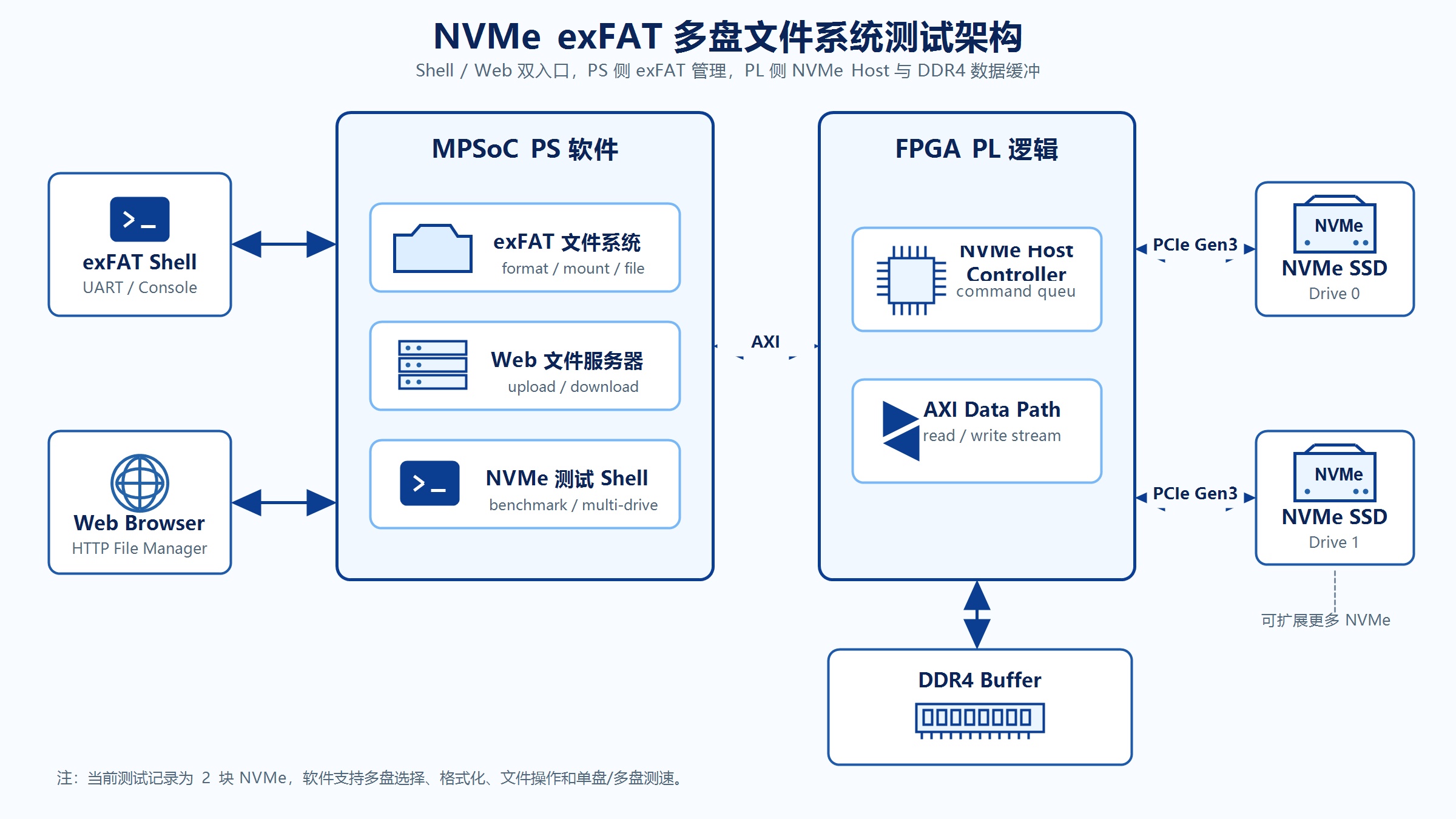
本项目基于 Xilinx Zynq UltraScale+ MPSoC 平台,实现 FPGA 对多路 NVMe SSD 的访问,并在软件侧提供 exFAT 文件系统能力。系统支持串口交互式 exFAT shell,用于完成多盘选择、挂载、格式化、容量查询、目录查看、文件读写、删除和性能测试;同时也支持 exFAT shell web 版本,上电后同时启动 Web 文件服务器和串口 shell,可通过浏览器访问 http://192.168.4.10 对 NVMe exFAT 分区进行文件浏览、上传、下载和删除。
从系统框图看,用户可通过串口 shell 或 Web 页面进入 PS 侧应用程序,PS 侧软件完成 exFAT 文件系统管理,并通过 PL 侧 NVMe 相关逻辑、DDR4 缓冲和 PCIe 通道访问多块 NVMe SSD。当前测试记录中系统识别到 2 块 NVMe,后续设计可扩展到更多 NVMe 盘。
2. 测试素材
- ZU19EG 双盘挂载 exfatshell 例程(裸机)
- ZU19EG 双盘挂载 exfatshell + web 管理例程(FreeRTOS)
3. 测试环境
| 项目 | 说明 |
|---|---|
| FPGA/SoC 平台 | Zynq UltraScale+ MPSoC |
| 工程类型 | 裸机/FreeRTOS 应用,NVMe exFAT 文件系统测试 |
| NVMe 数量 | 当前测试为 2 块 |
| Sector Size | 512 bytes |
| Drive 0 最大传输 | 262144 bytes |
| Drive 1 最大传输 | 524288 bytes |
| Web IP | 192.168.4.10 |
| Web 端口 | 80 |
启动时识别到的 NVMe 信息如下:
text
Expecting 2 drives...
Connected to 2 drives!

Drive 0 Info:
Drive capacity is: 0x03b9e12b0 sectors
Sector size is: 512 bytes
Max Data Transfer size is: 262144 bytes
Maximum Sector count is: 511 sectors

Drive 1 Info:
Drive capacity is: 0x03b9e12b0 sectors
Sector size is: 512 bytes
Max Data Transfer size is: 524288 bytes
Maximum Sector count is: 1023 sectors
4. 启动报文区分
4.1 不带 Web 的 exFAT shell 启动报文
不带 Web 的程序完成 NVMe 初始化后,会先打印功能选择提示,需要用户输入 x 后才进入 exFAT shell。
text
Initialization complete

Select x for exFAT shell, or d for original NVMe Host Demo: x

Drive 0: mount failed: -3
Drive 0: no exFAT filesystem was found.
Drive 1: mount failed: -3
Drive 1: no exFAT filesystem was found.

exFAT shell mounted 0/2 detected drives. Current drive: 1.
该报文说明:
Select x...是不带 Web 版本的入口选择提示。- 用户输入
x后进入 exFAT shell。 - 当 NVMe 未格式化为 exFAT 时,首次挂载会失败并提示
no exFAT filesystem was found。 - 后续可通过
f命令格式化当前盘,再重新挂载。
4.2 带 Web 的 exFAT shell web 启动报文
带 Web 的程序完成 NVMe 初始化后,不再等待 x/d 选择,而是直接启动 Web 文件服务器和 exFAT shell。
text
Initialization complete

Starting Web file server and exFAT shell...
Starting exFAT web server for 2/2 detected drives
Drive 0: exFAT mounted
Drive 1: exFAT mounted
Start PHY autonegotiation
autonegotiation complete
link speed for phy address 7: 1000
Board IP: 192.168.4.10
Netmask : 255.255.255.0
Gateway : 192.168.4.1
Open http://192.168.4.10
HTTP socket server started on port 80

exFAT shell mounted 2/2 detected drives. Current drive: 1.
该报文说明:
Starting Web file server and exFAT shell...是带 Web 版本的启动标志。- Web server 与串口 exFAT shell 同时运行。
- 网口协商为 1000 Mbps。
- 浏览器访问地址为
http://192.168.4.10。 - 当前记录中 Drive 0 和 Drive 1 均已成功挂载。
5. exFAT Shell 命令说明
串口 shell 启动后会打印命令列表:
text
Commands: s=select drive, m=mount/status, f=format current, i=info/capacity,
l=list, c=cat, w=write text file, d=delete, b=benchmark menu, q=quit| 命令 | 功能 | 说明 |
|---|---|---|
s |
选择磁盘 | 在多个 NVMe 之间切换当前操作盘 |
m |
挂载/状态 | 显示或重新挂载磁盘状态 |
f |
格式化当前盘 | 创建 MBR + exFAT 分区,会清空目标盘 |
i |
信息/容量 | 显示 NVMe 和 exFAT 卷容量、簇大小、空闲空间 |
l |
列目录 | 显示当前盘根目录文件 |
c |
读取文本文件 | 输入文件名后打印文件前若干字节 |
w |
写文本文件 | 创建一个短文本文件 |
d |
删除文件 | 删除当前盘指定文件 |
b |
性能测试菜单 | 支持单盘写、单盘读、写读校验、多盘并行写、多盘并行读 |
q |
退出 | 退出 shell |
6. Shell 功能测试
6.1 多盘选择测试
测试步骤:
- 启动不带 Web 的 exFAT shell 程序。
- 输入
x进入 shell。 - 执行
s查看磁盘状态。 - 输入目标磁盘编号,例如
0或1。
期望结果:
text
Drive status:
  drive 0: not mounted, sector=512, max_lba=0x000000003b9e12b0
* drive 1: not mounted, sector=512, max_lba=0x000000003b9e12b0
Select drive index (Enter keeps 1): 0
Current drive set to 0 (not mounted).
判定标准:当前 shell 提示符切换为目标盘,例如 exfat[0]> 或 exfat[1]>。
6.2 未挂载状态目录查看测试
测试步骤:
- 在未格式化或未挂载的磁盘上执行
l。
期望结果:
text
exfat[0]> l
Current drive 0 is not mounted. Use f to format, m to remount, or s to switch.
判定标准:程序应提示当前盘未挂载,不应发生异常退出。
6.3 格式化测试
测试步骤:
- 选择待格式化磁盘,例如 Drive 0。
- 输入
f。 - 按提示输入
FORMAT确认。
期望结果:
text
WARNING: this will erase drive 0 and create a new MBR + exFAT partition.
Type FORMAT to continue: FORMAT
Formatting selected NVMe drive as MBR + exFAT...
Partition start LBA: 2048
Partition sectors: 0x000000003b9e0ab1
Cluster size: 262144 bytes
Format complete.
Drive 0: mounted exFAT volume.
Mounted formatted volume on drive 0.
判定标准:
- 格式化完成后打印
Format complete.。 - 当前盘自动挂载成功。
- 执行
l可以正常列目录。
注意:f 命令会擦除目标磁盘已有数据,执行前必须确认目标盘编号。
6.4 容量信息测试
测试步骤:
- 在已挂载磁盘上执行
i。
期望结果:
text
NVMe drive capacity: 476.94 GiB
exFAT volume capacity: 476.94 GiB
exFAT used clusters: 3, free clusters: 1953507
exFAT volume start LBA: 0x0000000000000800
Sector bytes: 512
Sectors per cluster: 512
Cluster count: 1953510
Root cluster: 4
Bitmap cluster: 2
判定标准:容量、扇区大小、每簇扇区数、簇数量和根目录簇号能正常显示。
6.5 文本文件写入和读取测试
测试步骤:
- 在 Drive 1 上执行
w。 - 输入文件名
1.txt。 - 输入文本
Hello SSD1!。 - 执行
l查看文件列表。 - 执行
c并输入1.txt读取文件内容。
期望结果:
text
exfat[1]> w
New file name (max 15 ASCII chars): 1.txt
One-line text: Hello SSD1!
Created 1.txt on drive 1

exfat[1]> c
File name: 1.txt
First 11 bytes:
Hello SSD1!
判定标准:文件创建成功,读取内容与写入内容一致。
6.6 删除文件测试
测试步骤:
- 在 Drive 1 上执行
d。 - 输入
1.TXT。 - 执行
l确认文件不存在。
期望结果:
text
exfat[1]> D
Delete file name: 1.TXT
Deleted 1.TXT from drive 1
判定标准:删除命令返回成功,目录列表中不再显示被删除文件。
7. Benchmark 测试
7.1 Benchmark 菜单
执行 b 后进入性能测试菜单:
text
Benchmark mode: 1=Write, 2=Read, 3=WriteReadVerify, 4=ParallelWrite, 5=ParallelRead (Enter=3):| 模式 | 名称 | 测试内容 |
|---|---|---|
1 |
Write | 在当前盘创建测试文件并写入指定大小数据 |
2 |
Read | 读取指定测试文件,可重复多次 |
3 |
WriteReadVerify | 写入、读取并进行完整校验 |
4 |
ParallelWrite | 多盘并行写入 |
5 |
ParallelRead | 多盘并行读取 |
7.2 单盘写测试记录
Drive 1,测试条件为 256 MiB,重复 10 次:
text
Benchmark drive 1 file: B000.BIN, mode=Write, test=1/10, size=256 MiB, qd=8, cmd=128 KiB
Write tests completed: 10/10
Total: 2560 MiB, bytes=0x00000000a0000000, 20480 commands, 799116 us, avg 39019 ns/cmd, 3203.53 MiB/s
Drive 0,测试条件为 128 MiB,重复 5 次:
text
Write tests completed: 5/5
Total: 640 MiB, bytes=0x0000000028000000, 5120 commands, 186772 us, avg 36478 ns/cmd, 3426.63 MiB/s
判定标准:每次写入均生成对应 Bxxx.BIN 文件,最终输出 Write tests completed 和 Total 汇总。
7.3 单盘读测试记录
Drive 1,读取 B000.BIN,重复 10 次:
text
Read tests completed: 10/10
Total: 2560 MiB, bytes=0x00000000a0000000, 20480 commands, 760128 us, avg 37115 ns/cmd, 3367.85 MiB/s
Drive 0,读取 B000.BIN,重复 5 次:
text
Read tests completed: 5/5
Total: 640 MiB, bytes=0x0000000028000000, 5120 commands, 183157 us, avg 35772 ns/cmd, 3494.26 MiB/s
判定标准:每次读取无错误,最终输出 Read tests completed 和 Total 汇总。
7.4 写读校验测试记录
Drive 1,测试条件为 128 MiB:
text
Benchmark drive 1 file: B010.BIN, mode=WriteReadVerify, size=128 MiB, qd=8, cmd=128 KiB
Write: 134217728 bytes, 1024 commands, 42927 us, avg 41919 ns/cmd, 2981.87 MiB/s
Read: 134217728 bytes, 1024 commands, 38117 us, avg 37223 ns/cmd, 3358.08 MiB/s
Verify: 134217728 bytes, 1024 commands, 61938120 us, avg 60486444 ns/cmd, 2.06 MiB/s
Total: 402653184 bytes, 3072 commands, 62062755 us, avg 20202719 ns/cmd, 0.51 MiB/s
判定标准:
- Write 和 Read 阶段完成且无错误。
- Verify 阶段完成且未报校验失败。
- Verify 为完整数据校验,速度明显低于纯读写属于预期现象。
7.5 多盘并行写测试记录
测试条件为 2 块盘并行,每盘 64 MiB,重复 5 次:
text
ParallelWrite drives: 0 1
ParallelWrite test 1/5, drives=2, per-drive=64 MiB, qd=8, cmd=128 KiB
ParallelWrite tests completed: 5/5
Total: 640 MiB, bytes=0x0000000028000000, 5120 commands, 132662 us, avg 25910 ns/cmd, 4824.29 MiB/s
判定标准:所有已挂载盘均参与并行写入,最终输出 ParallelWrite tests completed 和 Total 汇总。
7.6 多盘并行读测试记录
测试条件为 2 块盘并行读取 B000.BIN,重复 5 次:
text
ParallelRead drives: 0:B000.BIN 1:B000.BIN
ParallelRead test 1/5, drives=2, qd=8, cmd=128 KiB
ParallelRead tests completed: 5/5
Total: 1920 MiB, bytes=0x0000000078000000, 15360 commands, 488476 us, avg 31801 ns/cmd, 3930.59 MiB/s
判定标准:所有已挂载盘读取完成,无文件不存在、读失败或校验错误。
7.7 Benchmark 汇总
| 测试项 | 条件 | 结果 |
|---|---|---|
| Drive 1 Write | 256 MiB x 10 | 3203.53 MiB/s |
| Drive 1 Read | 256 MiB x 10 | 3367.85 MiB/s |
| Drive 1 WriteReadVerify | 128 MiB x 1 | Write 2981.87 MiB/s,Read 3358.08 MiB/s,Verify 2.06 MiB/s |
| Drive 0 Write | 128 MiB x 5 | 3426.63 MiB/s |
| Drive 0 Read | 128 MiB x 5 | 3494.26 MiB/s |
| ParallelWrite | 2 drives,每盘 64 MiB x 5 | 4824.29 MiB/s |
| ParallelRead | 2 drives,读取 B000.BIN x 5 | 3930.59 MiB/s |
以上速度来自串口测试记录中的软件计时输出,复测时应以当前固件版本、NVMe 型号、PCIe 链路状态和缓存策略下的实测结果为准。
8. Web 功能测试
8.1 Web 启动检查
测试步骤:
- 下载带 Web 的程序。
- 观察串口启动报文。
- 确认打印
Open http://192.168.4.10。 - PC 网口设置到同一网段后,浏览器访问
http://192.168.4.10。
期望结果:
text
Starting Web file server and exFAT shell...
Starting exFAT web server for 2/2 detected drives
Board IP: 192.168.4.10
Open http://192.168.4.10
HTTP socket server started on port 80
判定标准:
- 串口 shell 可继续输入命令。
- Web 页面可打开。
- Web 页面顶部显示已配置磁盘数量和已检测磁盘数量。
8.2 Web 页面 Drive 0 测试
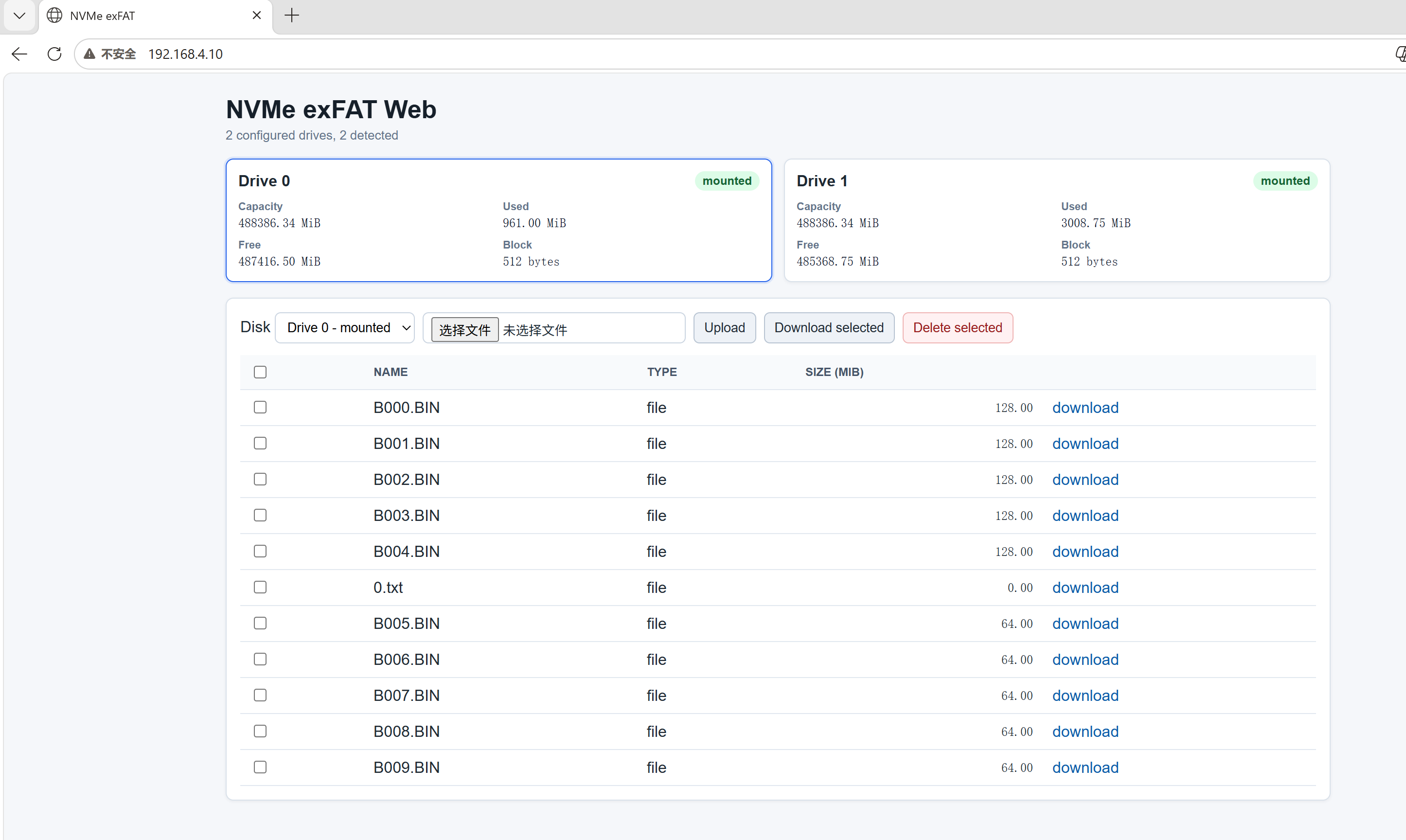
测试内容:
- 浏览器打开
http://192.168.4.10。 - 页面顶部显示
NVMe exFAT Web。 - 页面显示
2 configured drives, 2 detected。 - Drive 0 和 Drive 1 均显示
mounted。 - 下拉框选择
Drive 0 - mounted。 - 文件列表刷新为 Drive 0 的文件。
截图中 Drive 0 显示:
| 字段 | 示例值 |
|---|---|
| Capacity | 488386.34 MiB |
| Used | 961.00 MiB |
| Free | 487416.50 MiB |
| Block | 512 bytes |
判定标准:Drive 0 卡片高亮,文件列表显示 Drive 0 下的 B000.BIN、B001.BIN、0.txt 等文件。
8.3 Web 页面 Drive 1 测试
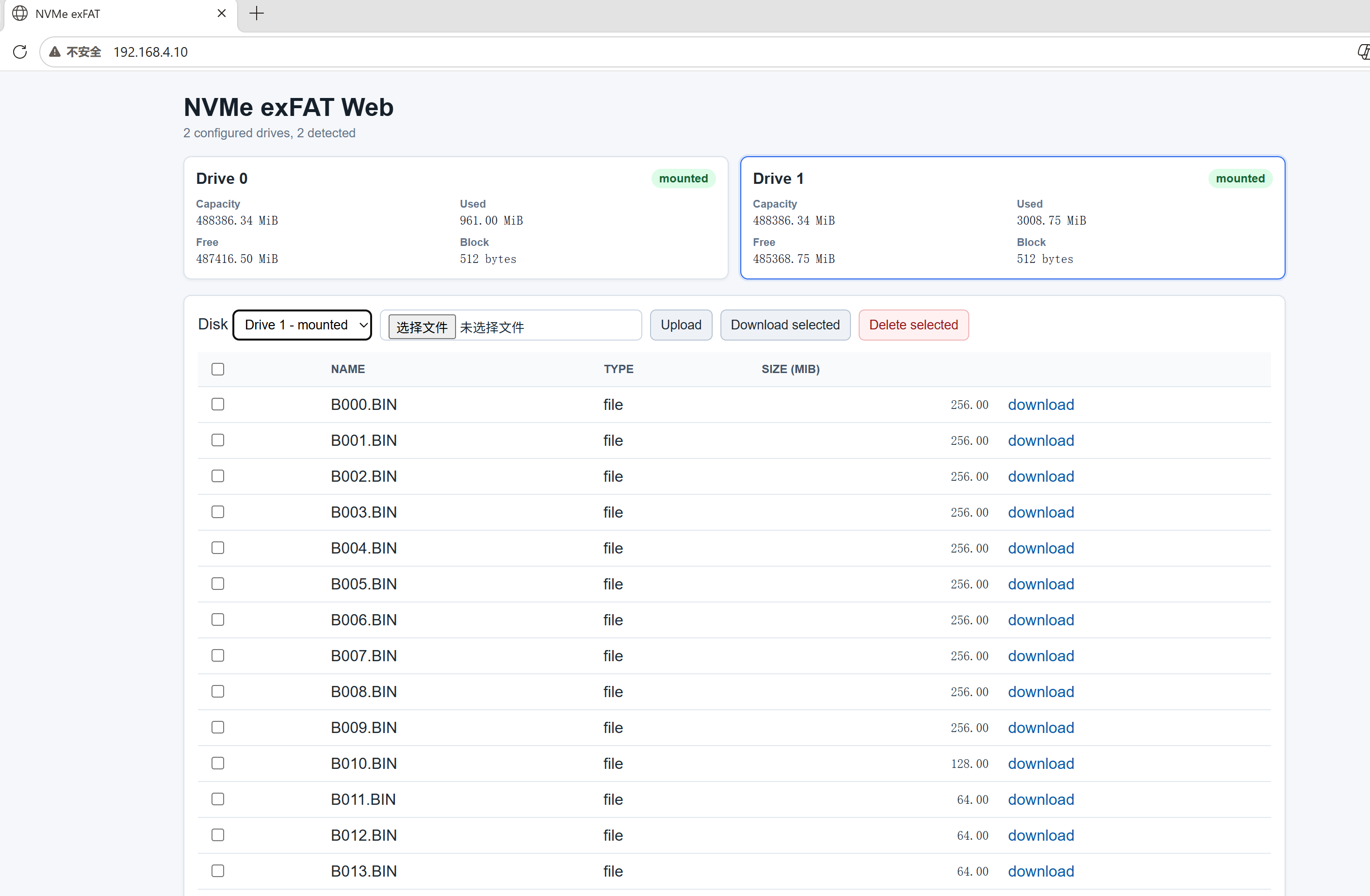
测试内容:
- 在同一页面下拉框选择
Drive 1 - mounted。 - 页面不跳转,文件列表切换为 Drive 1 的文件。
- Drive 1 卡片高亮。
- 可对 Drive 1 文件执行下载、上传和删除操作。
截图中 Drive 1 显示:
| 字段 | 示例值 |
|---|---|
| Capacity | 488386.34 MiB |
| Used | 3008.75 MiB |
| Free | 485368.75 MiB |
| Block | 512 bytes |
判定标准:Drive 1 文件列表显示 B000.BIN 至 B013.BIN 等文件,且 Size 列以 MiB 显示。
8.4 Web 文件操作测试
| 功能 | 操作步骤 | 期望结果 |
|---|---|---|
| 切换磁盘 | 使用 Disk 下拉框选择 Drive 0 或 Drive 1 |
当前磁盘卡片高亮,文件列表刷新为对应磁盘 |
| 上传文件 | 选择文件后点击 Upload |
文件上传到当前选择磁盘,完成后刷新列表 |
| 单文件下载 | 点击文件行右侧 download |
浏览器开始下载该文件 |
| 批量下载 | 勾选多个文件后点击 Download selected |
浏览器依次触发多个文件下载 |
| 批量删除 | 勾选多个文件后点击 Delete selected 并确认 |
选中文件从当前磁盘删除,页面刷新 |
注意:Web 页面中的批量删除会直接删除当前选择磁盘上的目标文件,测试前应确认磁盘选择框是否指向正确 Drive。
9. 测试结论
根据现有测试记录,本次 exFAT shell 和 exFAT shell web 功能验证结果如下:
| 测试项 | 结论 |
|---|---|
| NVMe 链路初始化 | 通过,2 块 NVMe 均识别成功 |
| 多盘状态显示 | 通过,可显示 Drive 0/Drive 1 状态 |
| 多盘切换 | 通过,s 命令可切换当前操作盘 |
| exFAT 格式化 | 通过,Drive 0/Drive 1 均可格式化并挂载 |
| 容量查询 | 通过,可显示 NVMe 容量和 exFAT 卷信息 |
| 目录查看 | 通过,l 命令可列出根目录文件 |
| 文本写入/读取 | 通过,w 和 c 命令验证成功 |
| 文件删除 | 通过,d 命令可删除指定文件 |
| 单盘写测速 | 通过,Drive 0/Drive 1 均完成测试 |
| 单盘读测速 | 通过,Drive 0/Drive 1 均完成测试 |
| 写读校验 | 通过,完整校验完成 |
| 多盘并行写 | 通过,2 块盘并行写完成 |
| 多盘并行读 | 通过,2 块盘并行读完成 |
| Web server 启动 | 通过,可打开 http://192.168.4.10 |
| Web 多盘文件列表 | 通过,可通过下拉框切换 Drive 0/Drive 1 |
| Web 文件上传/下载/删除 | 通过,页面提供对应操作入口 |
综合判断:当前工程已具备多 NVMe exFAT 文件系统的基础管理能力、串口交互测试能力、Web 文件管理能力和单盘/多盘读写性能测试能力,可作为后续多盘扩展和 Web 文件服务优化的测试基线。
10. 复测注意事项
- 执行
f格式化前必须确认当前提示符中的磁盘编号,例如exfat[0]>或exfat[1]>。 - Web 页面文件操作依赖当前下拉框选择的 Drive,删除和上传前应确认目标盘。
- 性能测试前应确认磁盘剩余容量足够,避免写入中途失败。
- 多盘并行测试要求参与测试的磁盘均已挂载。
- Web 访问前需确认 PC 与开发板处于同一网段,开发板 IP 为
192.168.4.10。 - Benchmark 结果会受 NVMe 型号、PCIe 链路、DDR 缓冲、缓存策略和当前固件版本影响。