即时做APP开发实战(十五) - 专注历史记录功能实现
本文将介绍如何实现专注历史记录功能,包括按日期分组显示和数据统计等。
一、功能需求
1.1 需求分析
【图1:历史记录弹窗界面】
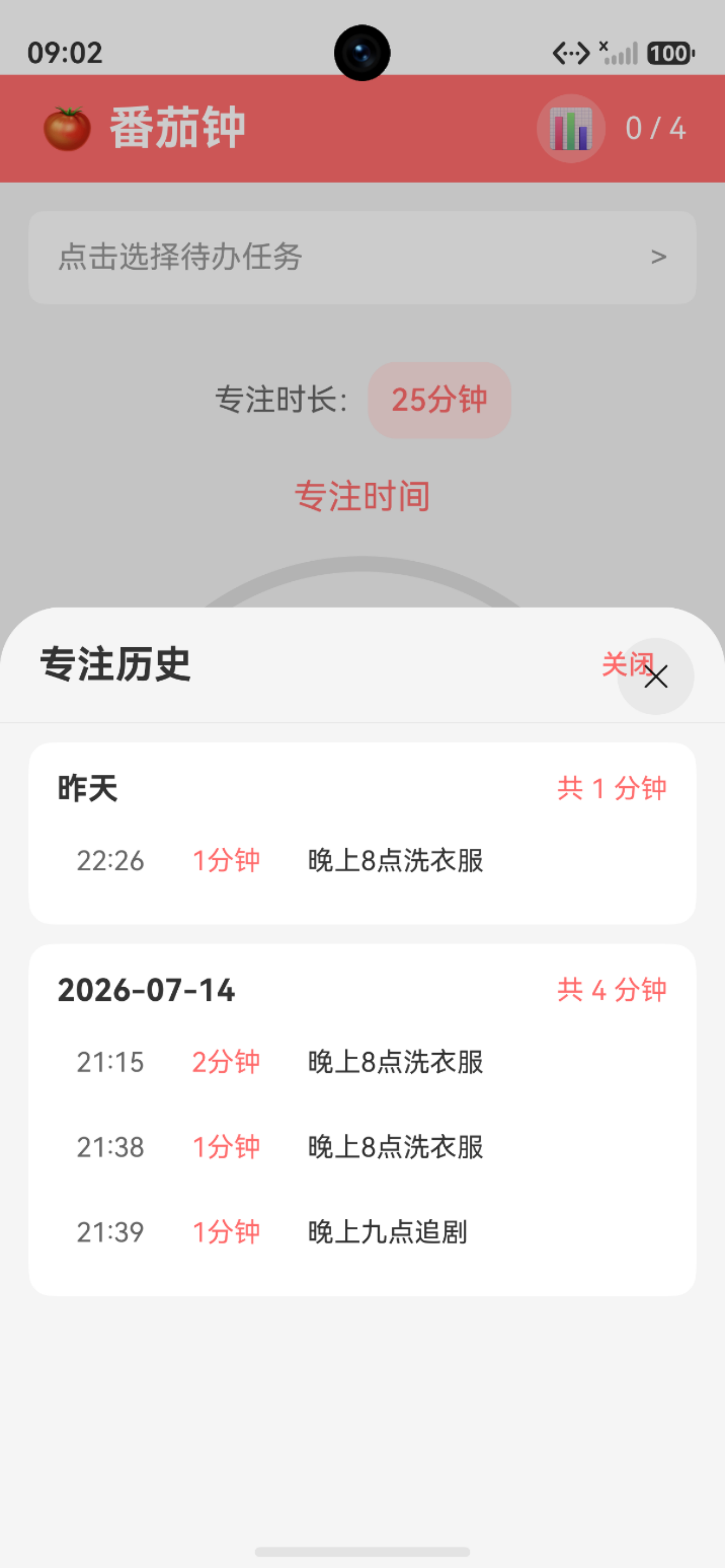
┌─────────────────────────────────────┐
│          专注历史记录              关闭  │
├─────────────────────────────────────┤
│  ┌─────────────────────────────┐   │
│  │ 今天          共 50 分钟    │   │
│  │  ┌─────────────────────┐   │   │
│  │  │ 09:30  25分钟  学习ArkTS │   │   │
│  │  │ 10:00  25分钟  开发 App  │   │   │
│  │  └─────────────────────┘   │   │
│  └─────────────────────────────┘   │
│                                     │
│  ┌─────────────────────────────┐   │
│  │ 昨天          共 75 分钟    │   │
│  │  ┌─────────────────────┐   │   │
│  │  │ 14:00  25分钟  撰写博客   │   │   │
│  │  │ 15:00  25分钟  代码优化 │   │   │
│  │  │ 16:00  25分钟  功能测试 │   │   │
│  │  └─────────────────────────────┘   │   │
│  └─────────────────────────────┘   │
└─────────────────────────────────────┘
1.2 功能点
| 功能 | 说明 |
|---|---|
| 历史记录显示 | 显示最近7天的专注记录 |
| 按日期分组 | 今日、昨日、具体日期 |
| 统计总时长 | 每天的总专注时长 |
| 记录详情 | 时间、时长、任务名称 |
二、数据模型设计
2.1 PomodoroRecord模型
【图2:历史记录详情界面】
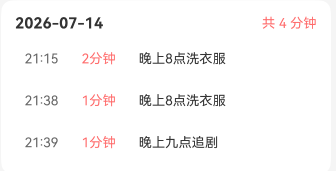
typescript
export interface PomodoroRecord {
  id: number;           // 记录ID
  todoId: number;       // 关联的待办ID
  duration: number;     // 专注时长(分钟)
  completedAt: number;  // 完成时间戳
}

export function createPomodoroRecord(
  todoId: number,
  duration: number
): PomodoroRecord {
  return {
    id: Date.now(),
    todoId: todoId,
    duration: duration,
    completedAt: Date.now()
  };
}
2.2 数据存储结构
┌─────────────────────────────────────┐
│          数据存储结构                │
├─────────────────────────────────────┤
│  Preferences 存储:                   │
│  {                                  │
│    "pomodoroRecords": [             │
│      {                              │
│        "id": 1703001600000,         │
│        "todoId": 1,                 │
│        "duration": 25,              │
│        "completedAt": 1703001600000 │
│      },                             │
│      {                              │
│        "id": 1703003100000,         │
│        "todoId": 2,                 │
│        "duration": 25,              │
│        "completedAt": 1703003100000 │
│      }                              │
│    ]                                │
│  }                                  │
└─────────────────────────────────────┘
三、ViewModel 实现
3.1 获取指定日期记录
typescript
/**
 * 获取指定日期的番茄钟记录
 */
getRecordsByDate(date: Date): PomodoroRecord[] {
  const startOfDay = new Date(date);
  startOfDay.setHours(0, 0, 0, 0);

  const endOfDay = new Date(date);
  endOfDay.setHours(23, 59, 59, 999);

  return this.records.filter(record =>
    record.completedAt >= startOfDay.getTime() &&
    record.completedAt <= endOfDay.getTime()
  );
}
3.2 获取最近 N 天历史记录
typescript
/**
 * 获取最近 N 天的历史记录(按日期分组)
 */
getRecentHistory(days: number = 7): Map<string, PomodoroRecord[]> {
  const history = new Map<string, PomodoroRecord[]>();
  const today = new Date();

  for (let i = 0; i < days; i++) {
    const date = new Date(today);
    date.setDate(date.getDate() - i);

    const dateStr = this.formatDate(date);
    const records = this.getRecordsByDate(date);

    if (records.length > 0) {
      history.set(dateStr, records);
    }
  }

  return history;
}
3.3 日期显示文本
typescript
/**
 * 获取日期的显示文本
 */
getDateDisplayText(dateStr: string): string {
  const today = new Date();
  const todayStr = this.formatDate(today);

  const yesterday = new Date(today);
  yesterday.setDate(yesterday.getDate() - 1);
  const yesterdayStr = this.formatDate(yesterday);

  if (dateStr === todayStr) {
    return '今天';
  } else if (dateStr === yesterdayStr) {
    return '昨天';
  } else {
    return dateStr;
  }
}
四、UI 实现
4.1 历史记录弹窗
typescript
@Builder
HistorySheet() {
  Column() {
    // 标题栏
    Row() {
      Text('专注历史')
        .fontSize(20)
        .fontWeight(FontWeight.Bold)

      Blank()

      Button('关闭')
        .onClick(() => {
          this.showHistory = false;
        })
    }
    .width('100%')
    .padding(20)

    Divider()

    // 历史记录列表
    if (this.pomodoroViewModel.getRecords().length === 0) {
      this.EmptyState()
    } else {
      List({ space: 10 }) {
        ForEach(
          Array.from(this.pomodoroViewModel.getRecentHistory(7).entries()),
          (entry: [string, PomodoroRecord[]]) => {
            ListItem() {
              this.HistoryDateItem(entry[0], entry[1])
            }
          },
          (entry: [string, PomodoroRecord[]]) => entry[0]
        )
      }
      .width('100%')
      .layoutWeight(1)
      .padding(15)
    }
  }
  .width('100%')
  .height('100%')
}
4.2 日期分组项
typescript
@Builder
HistoryDateItem(dateStr: string, records: PomodoroRecord[]) {
  Column() {
    // 日期标题
    Row() {
      Text(this.pomodoroViewModel.getDateDisplayText(dateStr))
        .fontSize(16)
        .fontWeight(FontWeight.Bold)

      Blank()

      // 计算总时长
      Text(`总计 ${this.getTotalMinutes(records)} 分钟`)
        .fontSize(14)
        .fontColor(this.themeColors.primary)
    }
    .width('100%')
    .margin({ bottom: 10 })

    // 记录列表
    Column({ space: 8 }) {
      ForEach(records, (record: PomodoroRecord) => {
        this.RecordItem(record)
      })
    }
    .width('100%')
  }
  .width('100%')
  .padding(15)
  .backgroundColor('#FFFFFF')
  .borderRadius(12)
}
4.3 单条记录项
typescript
@Builder
RecordItem(record: PomodoroRecord) {
  Row() {
    // 时间
    Text(this.formatRecordTime(record.completedAt))
      .fontSize(14)
      .fontColor('#666666')
      .width(60)

    // 时长
    Text(`${record.duration}分钟`)
      .fontSize(14)
      .fontColor(this.themeColors.primary)
      .width(60)

    // 待办事项名称
    Text(this.getTodoName(record.todoId))
      .fontSize(14)
      .fontColor('#333333')
      .layoutWeight(1)
      .maxLines(1)
      .textOverflow({ overflow: TextOverflow.Ellipsis })
  }
  .width('100%')
  .padding(10)
  .backgroundColor('#F5F5F5')
  .borderRadius(8)
}
4.4 辅助方法
typescript
// 将时间戳格式化为时间字符串
private formatRecordTime(timestamp: number): string {
  const date = new Date(timestamp);
  const hours = date.getHours().toString().padStart(2, '0');
  const minutes = date.getMinutes().toString().padStart(2, '0');
  return `${hours}:${minutes}`;
}

// 获取待办事项名称
private getTodoName(todoId: number): string {
  const todo = this.todoList.find(item => item.id === todoId);
  return todo ? todo.text : '未知事项';
}

// 计算总时长
private getTotalMinutes(records: PomodoroRecord[]): number {
  return records.reduce((sum, r) => sum + r.duration, 0);
}
五、入口按钮
5.1 顶部导航栏按钮添加
typescript
@Builder
TopBar() {
  Row() {
    Text('🍅 番茄钟')
      .fontSize(24)
      .fontWeight(FontWeight.Bold)
      .fontColor('#FFFFFF')

    Blank()

    // 历史记录按钮
    Button({ type: ButtonType.Circle }) {
      Text('📊')
        .fontSize(20)
    }
    .width(36)
    .height(36)
    .backgroundColor('rgba(255, 255, 255, 0.2)')
    .onClick(() => {
      this.showHistory = true;
    })

    Text(`${this.pomodoroCount} / 4`)
      .fontSize(16)
      .fontColor('#FFFFFF')
      .margin({ left: 10 })
  }
  .width('100%')
  .height(56)
  .padding({ left: 20, right: 20 })
  .backgroundColor(this.themeColors.primary)
}
5.绑定模态弹窗弹窗
typescript
build() {
  Column() {
    // 页面内容...
  }
  .bindSheet($$this.showHistory, this.HistorySheet(), {
    height: 500,
    backgroundColor: Color.White,
    dragBar: true,
    onWillDismiss: () => {
      this.showHistory = false;
    }
  })
}
六、数据流程图
┌─────────────────────────────────────┐
│          数据流程                    │
├─────────────────────────────────────│  1. 用户完成一个番茄钟               │ │
│      ↓                              │
│  2. 调用completePomodoro()          │
│      ↓                              │
│  3. 创建PomodoroRecord              │
│      ↓                              │
│  4. 保存到Preferences               │
│      ↓                              │  5. 用户点击历史记录按钮             │ │
│      ↓                              │
│  6. 调用getRecentHistory(7)         │
│      ↓                              │
│  7. 按日期分组返回数据               │
│      ↓                              │  8. UI 渲染历史记录列表              │ │
└─────────────────────────────────────┘
七、总结本文实现了专注历史记录功能,其核心要点如下:点:
- 数据存储 :使用Preferences持久化番茄钟记2. 按日期分组 :通过时间戳进行过滤和分组分3. 友好显示:以"今天"、"昨天"及具体日期等形式呈现日期
- 统计功能:每天总专注时长