当了解了ffmpeg的 解码 操作后,现可以结合ffmpeg的解复用,将封装好的视频通过sdl播放出来。
解复用流程:
bash
					打开视频文件 (avformat_open_input)
						↓
					查找流信息 (avformat_find_stream_info)
						↓
					获得流索引 (for)
						↓
					读取数据包 (av_read_frame)
网图: 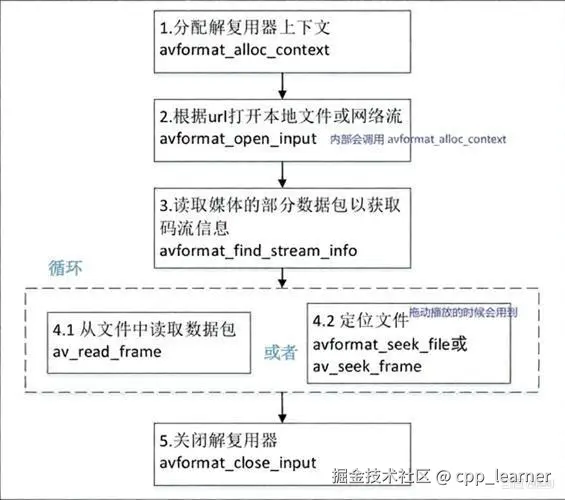
编码整体流程:
bash
					开始(begin)
						↓
					1. 打开视频文件 (avformat_open_input)⭐️
						↓
					2. 查找流信息 (avformat_find_stream_info)⭐️
						↓
					3. 获得流索引 (for)⭐️
						↓
					4. 查找视频解码器 (avcodec_find_decoder)
						↓
					5. 创建解码器上下文 (avcodec_alloc_context3)
						↓
					6. 将流参数复制到解码器上下文 (avcodec_parameters_to_context)
						↓
					7. 打开解码器 (avcodec_open2)
						↓
					8. 初始化SDL
						↓
					9. 读取数据包 (av_read_frame)⭐️
						↓
					10. 发送数据包到解码器 (avcodec_send_packet)
						↓
					11. 接收解码帧 (avcodec_receive_frame)
						↓
					12. SDL更新、渲染
						↓
					13. 冲刷解码器
						↓
					14. 释放所有资源
						↓
					结束(end)
包含头文件:
cpp
#include <iostream>
#include <fstream>
#include <chrono>

extern "C" {
#include "libavcodec/avcodec.h"
#include "libavutil/avutil.h"
#include "libavformat/avformat.h"
}

#include "SDL.h"
1. 解复用函数
1.1 avformat_open_input
avformat_open_input 是 FFmpeg 库中用于打开媒体文件或流的核心函数,它的主要任务是读取媒体文件的头部信息,识别其封装格式,并构建一个包含所有必要信息的上下文结构体,为后续的解码操作做准备。
①函数原型
cpp
int avformat_open_input(
    AVFormatContext **ps,
    const char *url,
    const AVInputFormat *fmt,
    AVDictionary **options
);
②参数说明
| 参数 | 类型 | 说明 |
|---|---|---|
| ps | AVFormatContext ** | 输出参数,指向创建好的格式上下文。调用前可传 NULL,函数内部自动分配内存 |
| url | const char * | 媒体源地址,支持本地文件路径、RTSP/RTMP 流地址、HTTP 视频链接等 |
| fmt | const AVInputFormat * | 强制指定输入格式,传 NULL 时 FFmpeg 自动探测格式 |
| options | AVDictionary ** | 可选参数字典,用于设置超时、缓存、协议参数等,不需要可传 NULL |
③返回值
成功:返回 0 失败:返回一个负值的错误码(AVERROR 枚举)
④使用示例
cpp
AVFormatContext *demux_ctx = nullptr;
int re = avformat_open_input(&demux_ctx, "video1.mp4", NULL, NULL);
if (0 != re) {
    std::cout << "avformat_open_input failed!" << std::endl;
    PrintErr(re);
    goto FAILED;
}
1.2 avformat_find_stream_info
avformat_find_stream_info 是 FFmpeg 中用于获取媒体文件完整流信息的关键函数。它通过读取并分析文件的部分数据包,来填充 AVFormatContext 中关于视频流、音频流等更精确的参数。
①函数原型
cpp
int avformat_find_stream_info(AVFormatContext *ic, AVDictionary **options);②参数说明
| 参数 | 类型 | 说明 |
|---|---|---|
| ic | AVFormatContext * | 已通过 avformat_open_input() 打开的格式上下文 |
| options | AVDictionary ** | 可选参数字典(可传 NULL),用于控制探测行为 |
③返回值
成功:返回 0 失败:返回一个负值的错误码(AVERROR 枚举)
④使用示例
cpp
re = avformat_find_stream_info(demux_ctx, NULL);
if (0 != re){
    std::cout << "avformat_find_stream_info failed!" << std::endl;
    PrintErr(re);
    goto FAILED;
}
1.3 avcodec_parameters_to_context
avcodec_parameters_to_context 是一个用于将流参数(AVCodecParameters) 拷贝到编解码器上下文(AVCodecContext) 中的函数。
①函数原型
cpp
int avcodec_parameters_to_context(AVCodecContext *codec, const AVCodecParameters *par);②参数说明
| 参数 | 类型 | 说明 |
|---|---|---|
| codec | AVCodecContext * | 目标解码器上下文,必须已通过 avcodec_alloc_context3() 分配好 |
| par | const AVCodecParameters * | 源参数,通常来自 fmt_ctx->streamsi->codecpar |
③返回值
成功:返回 0 失败:返回一个负值的错误码(AVERROR 枚举)
④使用示例
cpp
re = avcodec_parameters_to_context(codec_ctx, demux_ctx->streams[video_index]->codecpar);
if (re < 0) {
    std::cout << "avcodec_parameters_to_context failed!" << std::endl;
    PrintErr(re);
    goto FAILED;
}
1.4 av_read_frame
av_read_frame 是 FFmpeg 中用于从媒体文件中读取压缩数据包的核心函数。它处于解封装(Demuxing)流程的最后一环,负责将封装格式(如 MP4、FLV)中的音视频数据,以一个个独立的压缩数据包(AVPacket)的形式提取出来,为后续的解码操作做准备。。
①函数原型
cpp
int av_read_frame(AVFormatContext *s, AVPacket *pkt);②参数说明
| 参数 | 类型 | 说明 |
|---|---|---|
| s | AVFormatContext * | 已通过 avformat_open_input() 打开的格式上下文 |
| pkt | AVPacket * | 输出参数,用于存储读取到的压缩数据包。不能传 NULL,必须提前分配空间 |
③返回值
成功:返回 0,表示成功读取一个数据包 失败:返回一个负值的错误码(AVERROR 枚举)
④使用示例
cpp
while (1) {
    // 读取数据包
    re = av_read_frame(demux_ctx, pkt);
    if (re == AVERROR_EOF) break;      // 正常读完
    if (0 != re) {
        std::cout << "av_read_frame failed!" << std::endl;
        PrintErr(re);
        goto FAILED;
    }

    if (video_index == pkt->stream_index) {
        // 视频处理
    } else if (audio_index == pkt->stream_index) {
        // 音频处理
    } else {
        // other index
    }
}
2. 编码流程
2.1 打开视频文件 avformat_open_input ⭐️
cpp
AVFormatContext *demux_ctx = nullptr;

int re = avformat_open_input(&demux_ctx, "video1.mp4", NULL, NULL);
if (0 != re) {
    std::cout << "avformat_open_input failed!" << std::endl;
    PrintErr(re);
    goto FAILED;
}
2.2 查找流信息 avformat_find_stream_info ⭐️
cpp
re = avformat_find_stream_info(demux_ctx, NULL);
if (0 != re){
    std::cout << "avformat_find_stream_info failed!" << std::endl;
    PrintErr(re);
    goto FAILED;
}
2.3 获得流索引 ⭐️
cpp
int video_index = -1, audio_index = -1;
// 遍历所有流
for (unsigned int i = 0; i < demux_ctx->nb_streams; ++i) {
    if (AVMEDIA_TYPE_VIDEO == demux_ctx->streams[i]->codecpar->codec_type) {
        video_index = i;
        std::cout << "video stream index : " << video_index << std::endl;

    } else if (AVMEDIA_TYPE_AUDIO == demux_ctx->streams[i]->codecpar->codec_type) {
        audio_index = i;
        std::cout << "audio stream index : " << audio_index << std::endl;
    } else {
        std::cout << "other stream index : " << i << std::endl;
    }
}
新版本可以使用新API获取:
cpp
// 新版本可以使用新API获取
int video_index = av_find_best_stream(demux_ctx, AVMEDIA_TYPE_VIDEO, -1, -1, NULL, 0);
int audio_index = av_find_best_stream(demux_ctx, AVMEDIA_TYPE_AUDIO, -1, -1, NULL, 0);
2.4 查找视频解码器 avcodec_find_decoder
cpp
AVCodecID codec_id = AV_CODEC_ID_NONE;
const AVCodec *codec = nullptr;

codec_id = demux_ctx->streams[video_index]->codecpar->codec_id;
codec = avcodec_find_decoder(codec_id);
if (!codec) {
    std::cout << "avcodec_find_decoder failed!" << std::endl;
    goto FAILED;
}
2.5 创建解码器上下文 avcodec_alloc_context3
cpp
AVCodecContext *codec_ctx = nullptr;

codec_ctx = avcodec_alloc_context3(codec);
if (!codec_ctx) {
    std::cout << "avcodec_alloc_context3 failed!" << std::endl;
    goto FAILED;
}
2.6 将流参数复制到解码器上下文 avcodec_parameters_to_context
cpp
re = avcodec_parameters_to_context(codec_ctx, demux_ctx->streams[video_index]->codecpar);
if (re < 0) {
    std::cout << "avcodec_parameters_to_context failed!" << std::endl;
    PrintErr(re);
    goto FAILED;
}
2.7 打开解码器 avcodec_open2
cpp
re = avcodec_open2(codec_ctx, codec, NULL);
if (0 != re) {
    std::cout << "avcodec_open2 failed!" << std::endl;
    PrintErr(re);
    goto FAILED;
}
2.8 初始化SDL部分
cpp
SDL_Init(SDL_INIT_VIDEO);
SDL_Window *sdl_win = nullptr;
SDL_Renderer *renderer = nullptr;
SDL_Texture *texture = nullptr;

// 创建窗口
sdl_win = SDL_CreateWindow("标题", SDL_WINDOWPOS_UNDEFINED, SDL_WINDOWPOS_UNDEFINED,
                            winW, winH, 0);
if (!sdl_win) {
    std::cout << "SDL_CreateWindow failed!" << std::endl;
    goto FAILED;
}

// 创建渲染器
renderer = SDL_CreateRenderer(sdl_win, -1, SDL_RENDERER_ACCELERATED);
if (!renderer) {
    std::cout << "SDL_CreateRenderer failed!" << std::endl;
    goto FAILED;
}

// 创建 纹理|材质
texture = SDL_CreateTexture(renderer, SDL_PIXELFORMAT_IYUV, SDL_TEXTUREACCESS_STREAMING,
                            winW,
                            winH);
if (!texture) {
    std::cout << "SDL_CreateTexture failed!" << std::endl;
    goto FAILED;
}
2.9 读取数据包 av_read_frame ⭐️
cpp
while (1) {
    // 9.读取数据包
    re = av_read_frame(demux_ctx, pkt);
    if (re == AVERROR_EOF) break;      // 正常读完
    if (0 != re) {
        std::cout << "av_read_frame failed!" << std::endl;
        PrintErr(re);
        goto FAILED;
    }

	// other code ...
}
2.10 发送数据包到解码器 avcodec_send_packet
cpp
AVPacket *pkt = av_packet_alloc();

re = avcodec_send_packet(codec_ctx, pkt);
av_packet_unref(pkt);
if (0 != re) {
    std::cout << "avcodec_send_packet failed!" << std::endl;
    PrintErr(re);
    goto FAILED;
}
2.11 接收解码帧 avcodec_receive_frame
cpp
AVFrame *frame = av_frame_alloc();

while (0 <= re) {
    // 11.接收解码帧
    re = avcodec_receive_frame(codec_ctx, frame);
    if (AVERROR(EAGAIN) == re || AVERROR_EOF == re) {
        // 还没有完整的数据 || 已经读完了
        break;
    }
    if (0 > re) {
        std::cout << "avcodec_receive_frame failed!" << std::endl;
        PrintErr(re);
        goto FAILED;
    }

	// other code ...
}
2.12 SDL更新、渲染
cpp
SDL_UpdateYUVTexture(texture, NULL, frame->data[0], frame->linesize[0],
        frame->data[1], frame->linesize[1],frame->data[2], frame->linesize[2]);
SDL_RenderClear(renderer);
SDL_RenderCopy(renderer, texture, NULL, &rect);
SDL_RenderPresent(renderer);
2.13 冲刷解码器
cpp
re = avcodec_send_packet(codec_ctx, NULL);		// 发送NULL
if (0 != re) {
    std::cout << "avcodec_send_packet failed!" << std::endl;
    PrintErr(re);
    goto FAILED;
}

while (0 <= re) {
    re = avcodec_receive_frame(codec_ctx, frame);
    if (AVERROR(EAGAIN) == re) {
        // 还没有完整的数据
        continue;
    }
    if (AVERROR_EOF == re) {
        // 已经读完了
        break;
    }
    // 读取失败
    if (0 > re) {
        std::cout << "avcodec_receive_frame failed!" << std::endl;
        PrintErr(re);
        goto FAILED;
    }

    std::cout << "- ";


    // SDL更新、渲染
    SDL_UpdateYUVTexture(texture, NULL, frame->data[0], frame->linesize[0],
            frame->data[1], frame->linesize[1],frame->data[2], frame->linesize[2]);
    SDL_RenderClear(renderer);
    SDL_RenderCopy(renderer, texture, NULL, &rect);
    SDL_RenderPresent(renderer);
}
2.14 释放所有资源
cpp
avformat_close_input(&demux_ctx);
avcodec_free_context(&codec_ctx);
av_packet_free(&pkt);
av_frame_free(&frame);

if (texture) {
    SDL_DestroyTexture(texture);
}
if (renderer) {
    SDL_DestroyRenderer(renderer);
}
if (sdl_win) {
    SDL_DestroyWindow(sdl_win);
}
SDL_Quit();
2.15 其它
① 假设播放的视频宽高大于屏幕,如果不做调整,显示将会超出屏幕,显示不全;可以根据屏幕和视频宽高计算出实际需要显示的宽高;
cpp
int winW = 0, winH = 0;
SDL_Rect rect;		// 用于sdl

// 如果视频宽高大于屏幕宽高,则已屏幕宽高为准
{
    int screen_width = 1920;
    int screen_height = 1080;

    // 获得屏幕宽高
    SDL_DisplayMode mode;
    if (0 == SDL_GetCurrentDisplayMode(0, &mode)) {
        screen_width = mode.w;
        screen_height = mode.h;
    }

    int video_width = demux_ctx->streams[video_index]->codecpar->width;
    int video_height = demux_ctx->streams[video_index]->codecpar->height;
    winW = video_width;
    winH = video_height;

    // 宽高比
    double rate = (double)video_width / video_height;

    // 视频宽 > 屏幕宽
    if (winW > screen_width) {
        winW = screen_width;
        winH = (int)(screen_width / rate + 0.5);
    }

    // 视频高 > 屏幕高
    if (winH > screen_height) {
        winH = screen_height;
        winW = (int)(screen_height * rate + 0.5);
    }

    rect.h = winH;
    rect.w = winW;
    rect.x = 0;
    rect.y = 0;

    std::cout << "video: " << video_width << "x" << video_height << std::endl;
    std::cout << "play: " << winW << "x" << winH << std::endl;
}
② 计算播放时每秒的帧率
cpp
int fps = 0;
std::chrono::steady_clock::time_point fpsStart;             // 每秒统计起点

fpsStart = std::chrono::steady_clock::now();
// ...

// -------------- 帧率统计 --------------
++fps;
auto fpsEnd = std::chrono::steady_clock::now();
auto elapsedSinceFps = std::chrono::duration_cast<std::chrono::milliseconds>(fpsEnd - fpsStart).count();
if (1000 <= elapsedSinceFps) {
    std::cout << "fps = " << fps << std::endl;
    fps = 0;
    fpsStart = std::chrono::steady_clock::now();     // 重置统计起点
}
③ 计算每帧需要的延时
cpp
std::chrono::steady_clock::time_point frameStart;           // 每帧起始时间点

frameStart = std::chrono::steady_clock::now();
// ...

// -------------- 帧间隔控制(维持目标帧率) --------------  不是很准确,但看不出
auto frameEnd = std::chrono::steady_clock::now();
auto elapsedFrame = std::chrono::duration_cast<std::chrono::milliseconds>(frameEnd - frameStart).count();
int delay = sleep_time - static_cast<int>(elapsedFrame);
if (0 < delay) {
    SDL_Delay(delay);
}

frameStart = std::chrono::steady_clock::now();
3. 代码合集
读取本地.mp4文件,解复用、解码,使用sdl渲染显示;
cpp
#include <iostream>
#include <fstream>
#include <chrono>

extern "C" {
#include "libavcodec/avcodec.h"
#include "libavutil/avutil.h"
#include "libavformat/avformat.h"
}

#include "SDL.h"

//using namespace std::chrono;

static void PrintErr(int ret) {
    char buf[1024] = { 0 };
    av_strerror(ret, buf, sizeof(buf));
    std::cout << buf << std::endl;
}

#undef main
int main(void)
{
    std::cout << av_version_info() << std::endl;


    // 解复用
    AVFormatContext *demux_ctx = nullptr;
    int video_index = -1, audio_index = -1;


    // 解码
    AVCodecID codec_id = AV_CODEC_ID_NONE;
    const AVCodec *codec = nullptr;
    AVCodecContext *codec_ctx = nullptr;


    AVPacket *pkt = av_packet_alloc();
    AVFrame *frame = av_frame_alloc();


    // SDL
    SDL_Init(SDL_INIT_VIDEO);
    SDL_Window *sdl_win = nullptr;
    SDL_Renderer *renderer = nullptr;
    SDL_Texture *texture = nullptr;
    int winW = 0, winH = 0;
    SDL_Rect rect;


    // 计算帧率
    double speed = 1.0;         // 播放速度倍率
    int rate = 25;              // 视频原始帧率
    int sleep_time = (int)(1000 / (speed * rate) + 0.5);        // 每帧间隔(毫秒)

    int fps = 0;
    std::chrono::steady_clock::time_point fpsStart;             // 每秒统计起点
    std::chrono::steady_clock::time_point frameStart;           // 每帧起始时间点


    ///////////////////////////////////////////////////////////////////////////////////////////////////////////////
    /// 解复用初始化


    // 1.打开视频文件
    int re = avformat_open_input(&demux_ctx, "video1.mp4", NULL, NULL);
    if (0 != re) {
        std::cout << "avformat_open_input failed!" << std::endl;
        PrintErr(re);
        goto FAILED;
    }

    // 2.查找流信息
    re = avformat_find_stream_info(demux_ctx, NULL);
    if (0 != re){
        std::cout << "avformat_find_stream_info failed!" << std::endl;
        PrintErr(re);
        goto FAILED;
    }


    // 3.获得流索引
    for (unsigned int i = 0; i < demux_ctx->nb_streams; ++i) {      // 遍历所有流
        if (AVMEDIA_TYPE_VIDEO == demux_ctx->streams[i]->codecpar->codec_type) {
            video_index = i;
            std::cout << "video stream index : " << video_index << std::endl;

        } else if (AVMEDIA_TYPE_AUDIO == demux_ctx->streams[i]->codecpar->codec_type) {
            audio_index = i;
            std::cout << "audio stream index : " << audio_index << std::endl;
        } else {
            std::cout << "other stream index : " << i << std::endl;
        }
    }

    if (-1 == video_index) {
        std::cout << "video stream can't find!" << std::endl;
        goto FAILED;
    }

    // 新版本可以使用新API获取
    //int video_index = av_find_best_stream(demux_ctx, AVMEDIA_TYPE_VIDEO, -1, -1, NULL, 0);
    //int audio_index = av_find_best_stream(demux_ctx, AVMEDIA_TYPE_AUDIO, -1, -1, NULL, 0);

    ///////////////////////////////////////////////////////////////////////////////////////////////////////////////


    ///////////////////////////////////////////////////////////////////////////////////////////////////////////////
    /// 解码初始化

    // 4.查找视频解码器
    codec_id = demux_ctx->streams[video_index]->codecpar->codec_id;
    codec = avcodec_find_decoder(codec_id);
    if (!codec) {
        std::cout << "avcodec_find_decoder failed!" << std::endl;
        goto FAILED;
    }


    // 5.创建解码器上下文
    codec_ctx = avcodec_alloc_context3(codec);
    if (!codec_ctx) {
        std::cout << "avcodec_alloc_context3 failed!" << std::endl;
        goto FAILED;
    }

    // 6.将流参数复制到解码器上下文
    re = avcodec_parameters_to_context(codec_ctx, demux_ctx->streams[video_index]->codecpar);
    if (re < 0) {
        std::cout << "avcodec_parameters_to_context failed!" << std::endl;
        PrintErr(re);
        goto FAILED;
    }

    // 7.打开解码器
    re = avcodec_open2(codec_ctx, codec, NULL);
    if (0 != re) {
        std::cout << "avcodec_open2 failed!" << std::endl;
        PrintErr(re);
        goto FAILED;
    }

    ///////////////////////////////////////////////////////////////////////////////////////////////////////////////


    // 如果视频宽高大于屏幕宽高,则已屏幕宽高为准
    {
        int screen_width = 1920;
        int screen_height = 1080;

        // 获得屏幕宽高
        SDL_DisplayMode mode;
        if (0 == SDL_GetCurrentDisplayMode(0, &mode)) {
            screen_width = mode.w;
            screen_height = mode.h;
        }

        int video_width = demux_ctx->streams[video_index]->codecpar->width;
        int video_height = demux_ctx->streams[video_index]->codecpar->height;
        winW = video_width;
        winH = video_height;

        // 宽高比
        double rate = (double)video_width / video_height;

        // 视频宽 > 屏幕宽
        if (winW > screen_width) {
            winW = screen_width;
            winH = (int)(screen_width / rate + 0.5);
        }

        // 视频高 > 屏幕高
        if (winH > screen_height) {
            winH = screen_height;
            winW = (int)(screen_height * rate + 0.5);
        }

        rect.h = winH;
        rect.w = winW;
        rect.x = 0;
        rect.y = 0;

        std::cout << "video: " << video_width << "x" << video_height << std::endl;
        std::cout << "play: " << winW << "x" << winH << std::endl;
    }

    ///////////////////////////////////////////////////////////////////////////////////////////////////////////////
    /// SDL初始化

    // 8.初始化SDL部分

    // 创建窗口
    sdl_win = SDL_CreateWindow("标题", SDL_WINDOWPOS_UNDEFINED, SDL_WINDOWPOS_UNDEFINED,
                                winW, winH, 0);
    if (!sdl_win) {
        std::cout << "SDL_CreateWindow failed!" << std::endl;
        goto FAILED;
    }

    // 创建渲染器
    renderer = SDL_CreateRenderer(sdl_win, -1, SDL_RENDERER_ACCELERATED);
    if (!renderer) {
        std::cout << "SDL_CreateRenderer failed!" << std::endl;
        goto FAILED;
    }

    // 创建 纹理|材质
    texture = SDL_CreateTexture(renderer, SDL_PIXELFORMAT_IYUV, SDL_TEXTUREACCESS_STREAMING,
                                winW,
                                winH);
    if (!texture) {
        std::cout << "SDL_CreateTexture failed!" << std::endl;
        goto FAILED;
    }

    ///////////////////////////////////////////////////////////////////////////////////////////////////////////////


    {
        // 获得视频实际帧率
        AVRational framerate = demux_ctx->streams[video_index]->avg_frame_rate;                // 平均帧率,通常由容器格式提供,是推荐的帧率来源
        if (0 >= framerate.num || 0 >= framerate.den) {
            framerate = demux_ctx->streams[video_index]->r_frame_rate;              // 真实帧率,有些格式会提供,但可能不如 avg_frame_rate 稳定
        }
        if (0 >= framerate.num || 0 >= framerate.den) {
            // 保底,默认25帧
            framerate = { 25, 1 };
        }
        rate = av_q2d(framerate);                                   // 获得视频实际帧率
        sleep_time = (int)(1000 / (speed * rate) + 0.5);            // 计算每帧需要睡眠的时间
        std::cout << "rate: " << rate << std::endl;
        std::cout << "sleep_time: " << sleep_time << std::endl;
    }


    fpsStart = std::chrono::steady_clock::now();
    frameStart = std::chrono::steady_clock::now();
    while (1) {
        // 9.读取数据包
        re = av_read_frame(demux_ctx, pkt);
        if (re == AVERROR_EOF) break;      // 正常读完
        if (0 != re) {
            std::cout << "av_read_frame failed!" << std::endl;
            PrintErr(re);
            goto FAILED;
        }


        // 判断如果当前读取的帧不是视频,则跳过处理;这里只处理视频
        if (video_index != pkt->stream_index) {
            av_packet_unref(pkt);
            continue;
        }

        // 10.发送数据包到解码器
        re = avcodec_send_packet(codec_ctx, pkt);
        av_packet_unref(pkt);
        if (0 != re) {
            std::cout << "avcodec_send_packet failed!" << std::endl;
            PrintErr(re);
            goto FAILED;
        }

        while (0 <= re) {
            // 11.接收解码帧
            re = avcodec_receive_frame(codec_ctx, frame);
            if (AVERROR(EAGAIN) == re || AVERROR_EOF == re) {
                // 还没有完整的数据 || 已经读完了
                break;
            }
            if (0 > re) {
                std::cout << "avcodec_receive_frame failed!" << std::endl;
                PrintErr(re);
                goto FAILED;
            }

            std::cout << ". ";

            // 12.SDL更新、渲染
            SDL_UpdateYUVTexture(texture, NULL, frame->data[0], frame->linesize[0],
                    frame->data[1], frame->linesize[1],frame->data[2], frame->linesize[2]);
            SDL_RenderClear(renderer);
            SDL_RenderCopy(renderer, texture, NULL, &rect);
            SDL_RenderPresent(renderer);


            // -------------- 帧率统计 --------------
            ++fps;
            auto fpsEnd = std::chrono::steady_clock::now();
            auto elapsedSinceFps = std::chrono::duration_cast<std::chrono::milliseconds>(fpsEnd - fpsStart).count();
            if (1000 <= elapsedSinceFps) {
                std::cout << "fps = " << fps << std::endl;
                fps = 0;
                fpsStart = std::chrono::steady_clock::now();     // 重置统计起点
            }


            // -------------- 帧间隔控制(维持目标帧率) --------------  不是很准确,但看不出
            auto frameEnd = std::chrono::steady_clock::now();
            auto elapsedFrame = std::chrono::duration_cast<std::chrono::milliseconds>(frameEnd - frameStart).count();
            int delay = sleep_time - static_cast<int>(elapsedFrame);
            if (0 < delay) {
                SDL_Delay(delay);
            }

            frameStart = std::chrono::steady_clock::now();
        }
    }


    // 13.冲刷解码器
    re = avcodec_send_packet(codec_ctx, NULL);
    if (0 != re) {
        std::cout << "avcodec_send_packet failed!" << std::endl;
        PrintErr(re);
        goto FAILED;
    }

    while (0 <= re) {
        re = avcodec_receive_frame(codec_ctx, frame);
        if (AVERROR(EAGAIN) == re) {
            // 还没有完整的数据
            continue;
        }
        if (AVERROR_EOF == re) {
            // 已经读完了
            break;
        }
        // 读取失败
        if (0 > re) {
            std::cout << "avcodec_receive_frame failed!" << std::endl;
            PrintErr(re);
            goto FAILED;
        }

        std::cout << "- ";


        // SDL更新、渲染
        SDL_UpdateYUVTexture(texture, NULL, frame->data[0], frame->linesize[0],
                frame->data[1], frame->linesize[1],frame->data[2], frame->linesize[2]);
        SDL_RenderClear(renderer);
        SDL_RenderCopy(renderer, texture, NULL, &rect);
        SDL_RenderPresent(renderer);
    }


FAILED:
    // 14.释放所有资源
    avformat_close_input(&demux_ctx);
    avcodec_free_context(&codec_ctx);
    av_packet_free(&pkt);
    av_frame_free(&frame);

    if (texture) {
        SDL_DestroyTexture(texture);
    }
    if (renderer) {
        SDL_DestroyRenderer(renderer);
    }
    if (sdl_win) {
        SDL_DestroyWindow(sdl_win);
    }
    SDL_Quit();

    return 0;
}
4. 视频效果截图
 到此,解复用、解码全流程结束!