用 ASP.NET Core 10 Minimal API + Npgsql.EntityFrameworkCore.PostgreSQL + Serilog + Aspire + OTEL + GreptimeDB 搭一套"日志可观测性管道"
不写一行运维脚本,日志自己飞进时序库,查询还能用你最熟的
SQL。
技术栈:
ASP.NET Core 10 (Minimal API)Serilog.Sinks.OpenTelemetry 4.2.0Npgsql.EntityFrameworkCore.PostgreSQL 10.0.3GreptimeDB Standalone v1.1.4Aspire 13.5.3
- 使用
Aspire.AppHost托管服务,一键梭哈
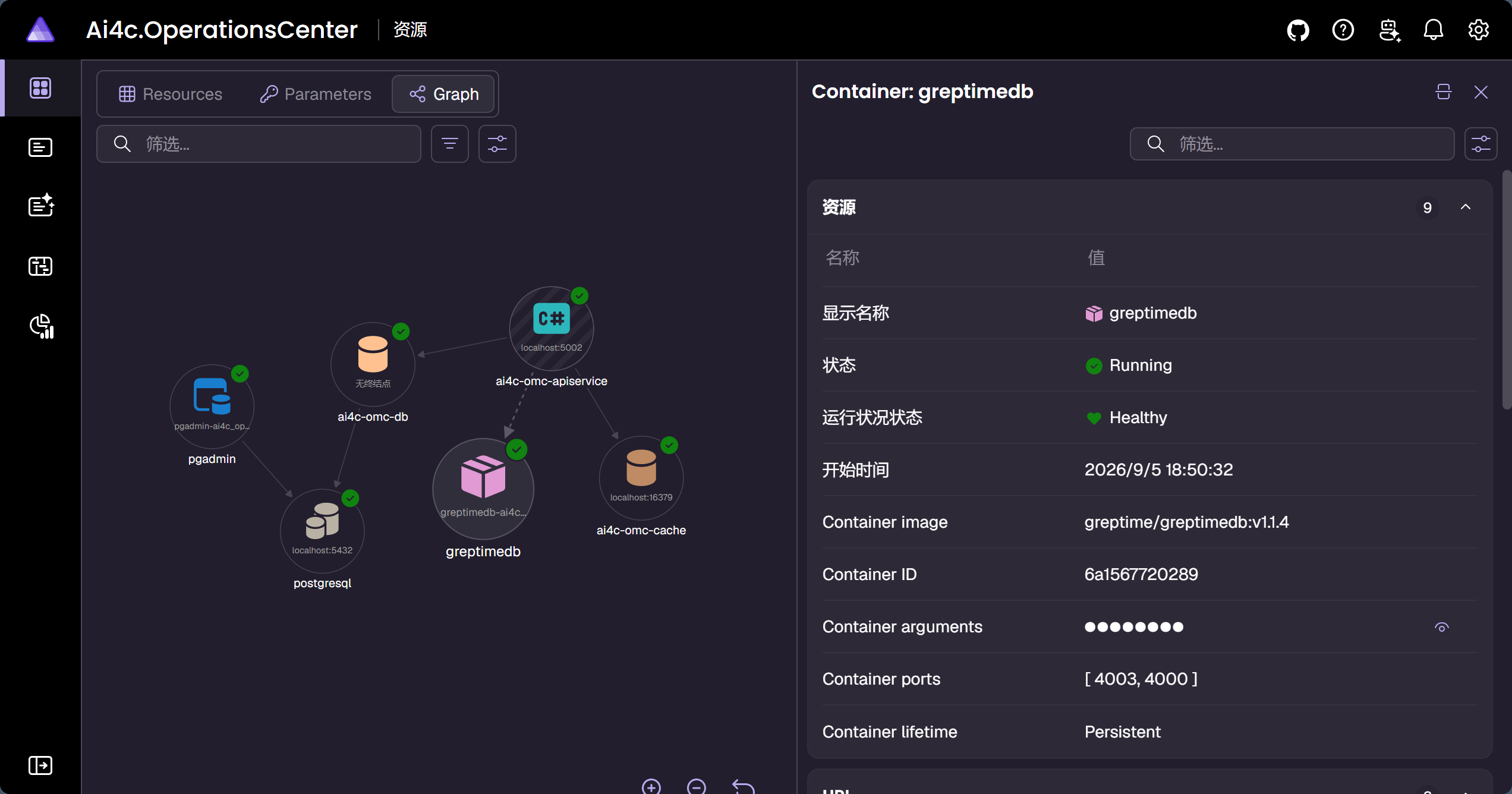
GreptimeDB容器服务启动后会显示
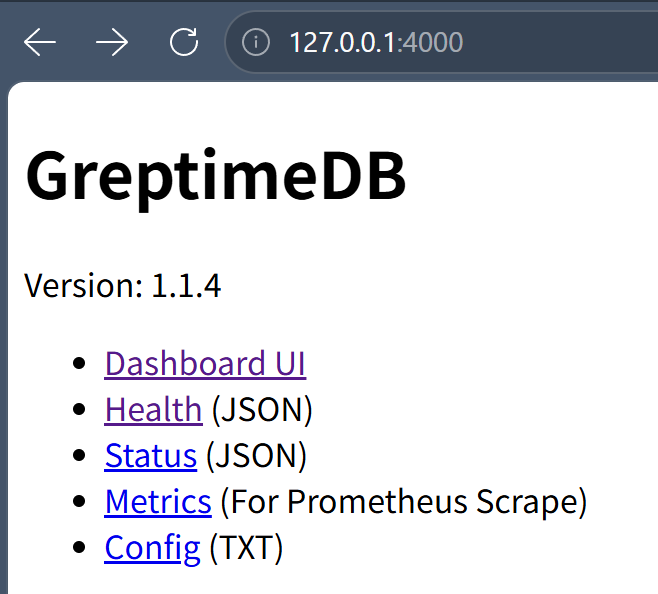
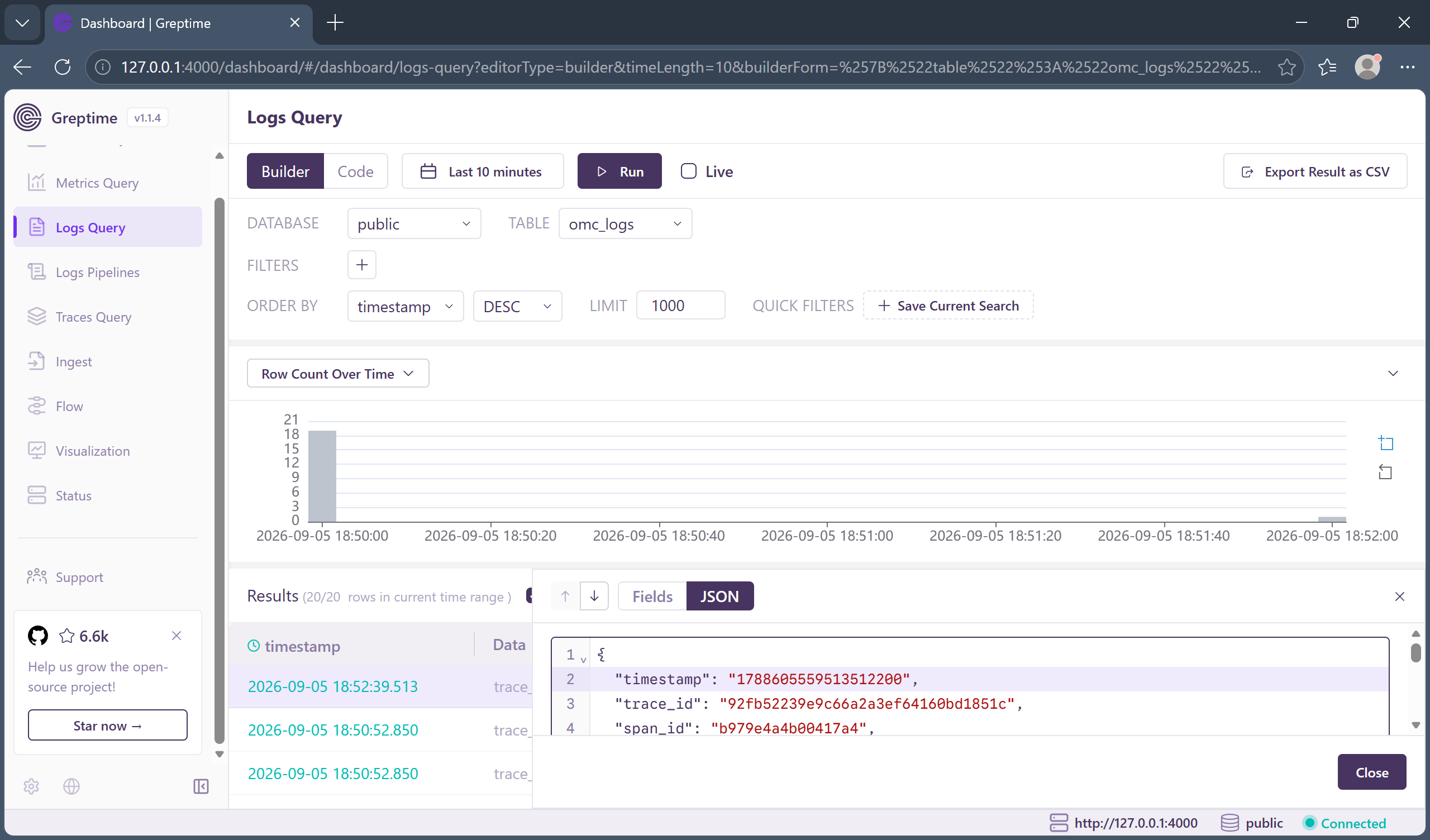
- 预览
GreptimeDB Dashboard看板启动效果
关于 greptimedb,请查看:
0. 引子:你的日志,到底去哪儿了?
每个程序员都经历过这样的深夜:生产环境炸了,你 SSH 上服务器,cat /var/log/xxx | grep ERROR,翻到第 800 行,发现日志被 logrotate 切走了。你心里一万头羊驼跑过。
于是你决定上"正经"方案。ELK?内存吃得比你的开发机还狠。Loki?还行,但 Grafana 查询语法又得学一遍。有没有一种可能:日志直接落进一个时序数据库,写入用 OTLP 标准协议,读取用你写了十年的 SQL?
有。这就是本文要讲的组合拳。我们顺手把容器编排也交给 Aspire,做到 dotnet run 一把梭,连 docker compose 都懒得写。
1. 为什么是这套组合
| 角色 | 选型 | 它解决了什么"痛点" |
|---|---|---|
| Web 框架 | ASP.NET Core 10 Minimal API |
路由即代码,没有 Controller 样板,日志埋点离业务最近 |
| 可观测写入 | Serilog.AspNetCore 10.0.0 + Serilog.Sinks.OpenTelemetry 4.2.0 |
Serilog 是 .NET日志界的事实标准;Sink 直接吐 OTLP,未来换后端不掉头发 |
| 存储 | GreptimeDB Standalone |
时序库原生吃 OTLP,默认 append-only,还能用 PostgreSQL 协议 读------是的,你没看错,SQL 查日志 |
| 读取 | Npgsql.EntityFrameworkCore.PostgreSQL 10.0.3 |
EF Core 10 + Npgsql 10,零改造复用 PostgreSQL 驱动直连 GreptimeDB 的 4003 端口 |
| 编排 | Aspire 13.5.3 |
AddContainer 起 GreptimeDB,本地local/K8s 一套代码,端口、卷、生命周期全托管 |
一句话总结:写用标准协议,读用标准 SQL,编排用标准 Aspire 。没有私有 Agent,没有私有查询语言,没有私有运维脚本。
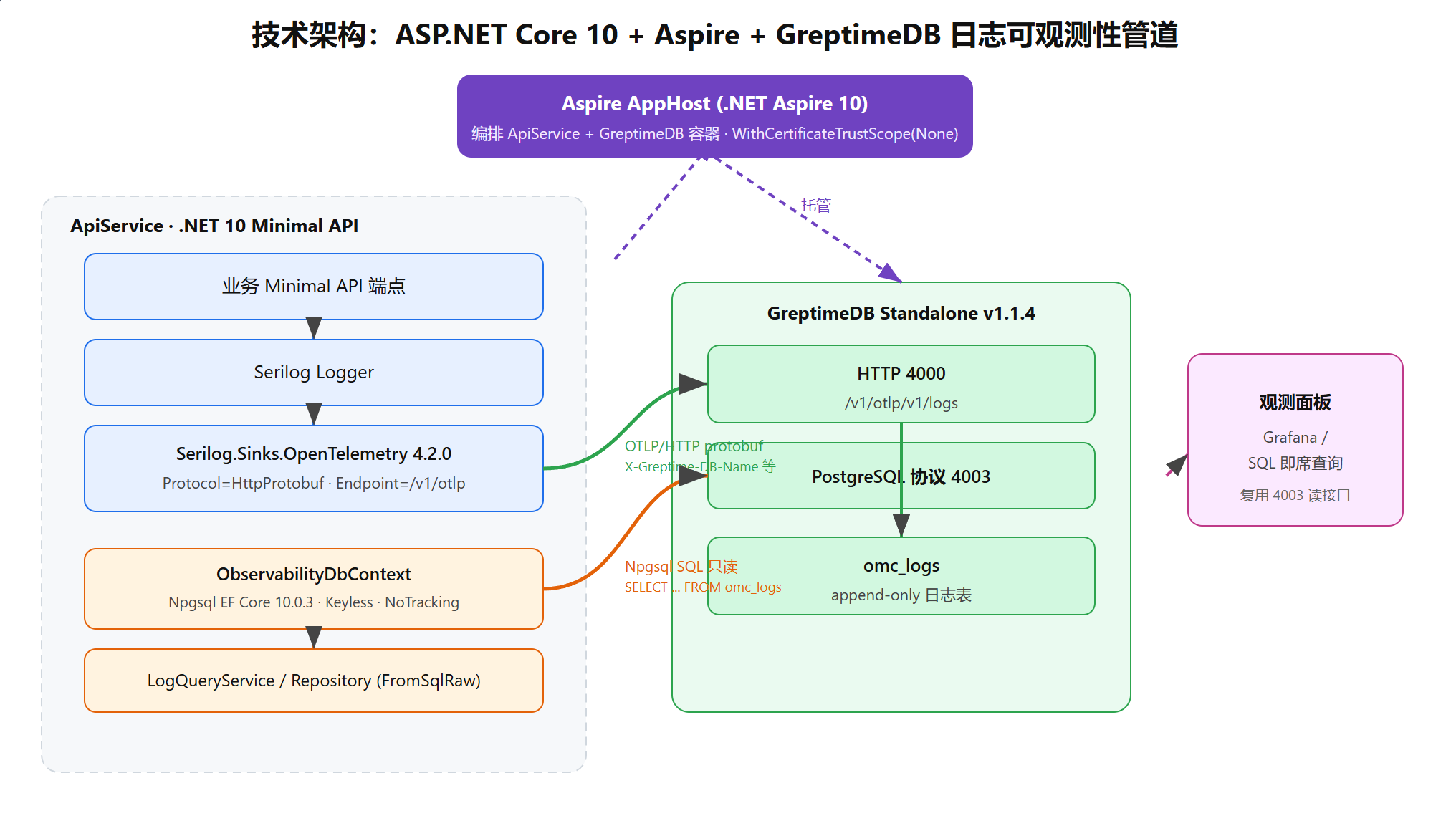
2. 架构一览
#mermaid-svg-GxUlW1fYFKZEl0Bx{font-family:"trebuchet ms",verdana,arial,sans-serif;font-size:16px;fill:#333;}@keyframes edge-animation-frame{from{stroke-dashoffset:0;}}@keyframes dash{to{stroke-dashoffset:0;}}#mermaid-svg-GxUlW1fYFKZEl0Bx .edge-animation-slow{stroke-dasharray:9,5!important;stroke-dashoffset:900;animation:dash 50s linear infinite;stroke-linecap:round;}#mermaid-svg-GxUlW1fYFKZEl0Bx .edge-animation-fast{stroke-dasharray:9,5!important;stroke-dashoffset:900;animation:dash 20s linear infinite;stroke-linecap:round;}#mermaid-svg-GxUlW1fYFKZEl0Bx .error-icon{fill:#552222;}#mermaid-svg-GxUlW1fYFKZEl0Bx .error-text{fill:#552222;stroke:#552222;}#mermaid-svg-GxUlW1fYFKZEl0Bx .edge-thickness-normal{stroke-width:1px;}#mermaid-svg-GxUlW1fYFKZEl0Bx .edge-thickness-thick{stroke-width:3.5px;}#mermaid-svg-GxUlW1fYFKZEl0Bx .edge-pattern-solid{stroke-dasharray:0;}#mermaid-svg-GxUlW1fYFKZEl0Bx .edge-thickness-invisible{stroke-width:0;fill:none;}#mermaid-svg-GxUlW1fYFKZEl0Bx .edge-pattern-dashed{stroke-dasharray:3;}#mermaid-svg-GxUlW1fYFKZEl0Bx .edge-pattern-dotted{stroke-dasharray:2;}#mermaid-svg-GxUlW1fYFKZEl0Bx .marker{fill:#333333;stroke:#333333;}#mermaid-svg-GxUlW1fYFKZEl0Bx .marker.cross{stroke:#333333;}#mermaid-svg-GxUlW1fYFKZEl0Bx svg{font-family:"trebuchet ms",verdana,arial,sans-serif;font-size:16px;}#mermaid-svg-GxUlW1fYFKZEl0Bx p{margin:0;}#mermaid-svg-GxUlW1fYFKZEl0Bx .label{font-family:"trebuchet ms",verdana,arial,sans-serif;color:#333;}#mermaid-svg-GxUlW1fYFKZEl0Bx .cluster-label text{fill:#333;}#mermaid-svg-GxUlW1fYFKZEl0Bx .cluster-label span{color:#333;}#mermaid-svg-GxUlW1fYFKZEl0Bx .cluster-label span p{background-color:transparent;}#mermaid-svg-GxUlW1fYFKZEl0Bx .label text,#mermaid-svg-GxUlW1fYFKZEl0Bx span{fill:#333;color:#333;}#mermaid-svg-GxUlW1fYFKZEl0Bx .node rect,#mermaid-svg-GxUlW1fYFKZEl0Bx .node circle,#mermaid-svg-GxUlW1fYFKZEl0Bx .node ellipse,#mermaid-svg-GxUlW1fYFKZEl0Bx .node polygon,#mermaid-svg-GxUlW1fYFKZEl0Bx .node path{fill:#ECECFF;stroke:#9370DB;stroke-width:1px;}#mermaid-svg-GxUlW1fYFKZEl0Bx .rough-node .label text,#mermaid-svg-GxUlW1fYFKZEl0Bx .node .label text,#mermaid-svg-GxUlW1fYFKZEl0Bx .image-shape .label,#mermaid-svg-GxUlW1fYFKZEl0Bx .icon-shape .label{text-anchor:middle;}#mermaid-svg-GxUlW1fYFKZEl0Bx .node .katex path{fill:#000;stroke:#000;stroke-width:1px;}#mermaid-svg-GxUlW1fYFKZEl0Bx .rough-node .label,#mermaid-svg-GxUlW1fYFKZEl0Bx .node .label,#mermaid-svg-GxUlW1fYFKZEl0Bx .image-shape .label,#mermaid-svg-GxUlW1fYFKZEl0Bx .icon-shape .label{text-align:center;}#mermaid-svg-GxUlW1fYFKZEl0Bx .node.clickable{cursor:pointer;}#mermaid-svg-GxUlW1fYFKZEl0Bx .root .anchor path{fill:#333333!important;stroke-width:0;stroke:#333333;}#mermaid-svg-GxUlW1fYFKZEl0Bx .arrowheadPath{fill:#333333;}#mermaid-svg-GxUlW1fYFKZEl0Bx .edgePath .path{stroke:#333333;stroke-width:2.0px;}#mermaid-svg-GxUlW1fYFKZEl0Bx .flowchart-link{stroke:#333333;fill:none;}#mermaid-svg-GxUlW1fYFKZEl0Bx .edgeLabel{background-color:rgba(232,232,232, 0.8);text-align:center;}#mermaid-svg-GxUlW1fYFKZEl0Bx .edgeLabel p{background-color:rgba(232,232,232, 0.8);}#mermaid-svg-GxUlW1fYFKZEl0Bx .edgeLabel rect{opacity:0.5;background-color:rgba(232,232,232, 0.8);fill:rgba(232,232,232, 0.8);}#mermaid-svg-GxUlW1fYFKZEl0Bx .labelBkg{background-color:rgba(232, 232, 232, 0.5);}#mermaid-svg-GxUlW1fYFKZEl0Bx .cluster rect{fill:#ffffde;stroke:#aaaa33;stroke-width:1px;}#mermaid-svg-GxUlW1fYFKZEl0Bx .cluster text{fill:#333;}#mermaid-svg-GxUlW1fYFKZEl0Bx .cluster span{color:#333;}#mermaid-svg-GxUlW1fYFKZEl0Bx div.mermaidTooltip{position:absolute;text-align:center;max-width:200px;padding:2px;font-family:"trebuchet ms",verdana,arial,sans-serif;font-size:12px;background:hsl(80, 100%, 96.2745098039%);border:1px solid #aaaa33;border-radius:2px;pointer-events:none;z-index:100;}#mermaid-svg-GxUlW1fYFKZEl0Bx .flowchartTitleText{text-anchor:middle;font-size:18px;fill:#333;}#mermaid-svg-GxUlW1fYFKZEl0Bx rect.text{fill:none;stroke-width:0;}#mermaid-svg-GxUlW1fYFKZEl0Bx .icon-shape,#mermaid-svg-GxUlW1fYFKZEl0Bx .image-shape{background-color:rgba(232,232,232, 0.8);text-align:center;}#mermaid-svg-GxUlW1fYFKZEl0Bx .icon-shape p,#mermaid-svg-GxUlW1fYFKZEl0Bx .image-shape p{background-color:rgba(232,232,232, 0.8);padding:2px;}#mermaid-svg-GxUlW1fYFKZEl0Bx .icon-shape .label rect,#mermaid-svg-GxUlW1fYFKZEl0Bx .image-shape .label rect{opacity:0.5;background-color:rgba(232,232,232, 0.8);fill:rgba(232,232,232, 0.8);}#mermaid-svg-GxUlW1fYFKZEl0Bx .label-icon{display:inline-block;height:1em;overflow:visible;vertical-align:-0.125em;}#mermaid-svg-GxUlW1fYFKZEl0Bx .node .label-icon path{fill:currentColor;stroke:revert;stroke-width:revert;}#mermaid-svg-GxUlW1fYFKZEl0Bx :root{--mermaid-font-family:"trebuchet ms",verdana,arial,sans-serif;} GreptimeDB Standalone v1.1.4
ApiService · .NET 10 Minimal API
OTLP/HTTP protobuf
X-Greptime-DB-Name 等
Npgsql SQL 只读
SELECT ... FROM omc_logs
托管
托管
Aspire AppHost (.NET Aspire 13.5.3)
编排 ApiService + GreptimeDB 容器
WithCertificateTrustScope(None) 修复 SSL_CERT_DIR
业务 Minimal API 端点
Serilog Logger
Serilog.Sinks.OpenTelemetry 4.2.0
Protocol=HttpProtobuf · Endpoint=/v1/otlp
LogQueryService / ObservabilityRepository
ObservabilityDbContext
Npgsql.EntityFrameworkCore.PostgreSQL 10.0.3
Keyless · NoTracking · FromSqlRaw
HTTP 4000
/v1/otlp/v1/logs
PostgreSQL 4003
omc_logs
append-only 表
两条主链路,请刻进 DNA:
- 写入链路(绿色) :业务端点/
Endpoints→Serilog→Serilog.Sinks.OpenTelemetry→GreptimeDB 4000(/v1/otlp/v1/logs)→omc_logs。 - 读取链路(橙色) :
LogQueryService→ObservabilityRepository→ObservabilityDbContext(Npgsql)→GreptimeDB 4003(PostgreSQL协议)→omc_logs。
同一个表,两种协议,互不打架。写入走 OTLP 的"高速批量通道",读取走你最擅长的 SQL。
3. 写入侧:Serilog.Sinks.OpenTelemetry 4.2.0 的"默认坑"
3.1 第一个坑:默认协议是 gRPC,不是 HTTP
Serilog.Sinks.OpenTelemetry 4.2.0 的 OpenTelemetrySinkOptions 默认 Protocol = OtlpProtocol.Grpc ,默认端点 http://localhost:4317。而 GreptimeDB 的 OTLP 接收端是 HTTP + 二进制 protobuf ,路径 /v1/otlp。所以你不改协议,日志会一头撞在 gRPC 端口上,GreptimeDB 表示"你谁啊"。
正确姿势:显式指定 HttpProtobuf 并给到 /v1/otlp 这个基址。
csharp
.WriteTo.OpenTelemetry(options =>
{
    // 必须显式覆盖默认 gRPC,否则 GreptimeDB 收不到
    options.Protocol = Serilog.Sinks.OpenTelemetry.OtlpProtocol.HttpProtobuf;
    // 只填基址 /v1/otlp,Sink 会自动追加 /v1/logs(logs 信号)
    options.Endpoint = "http://localhost:4000/v1/otlp";
    options.ResourceAttributes = new Dictionary<string, object>
    {
        ["service.name"] = "ai4c-omc-apiservice",
    };
});
⚠️ 路径拼接验证点(V1) :OTLP/HTTP exporter 会按信号类型自动在
Endpoint后追加/v1/logs。所以填http://localhost:4000/v1/otlp最终命中http://localhost:4000/v1/otlp/v1/logs------恰好是 GreptimeDB 的 Logs 专用路径。别手贱填成.../v1/otlp/v1/logs,否则会变成.../v1/logs/v1/logs,GreptimeDB 一脸懵。
3.2 第二个坑:GreptimeDB 要靠 Header 认库认表
GreptimeDB 不像 OTel Collector 那样靠配置认库。它通过 HTTP 头 区分"写进哪个库、哪张表、抽哪些字段"。核心几个(以官方文档为准):
| Header | 必要性 | 作用 |
|---|---|---|
X-Greptime-DB-Name |
推荐 | 目标数据库名 |
X-Greptime-Log-Table-Name |
可选 | 日志表名,不填默认 opentelemetry_logs;我们起名 omc_logs |
X-Greptime-Log-Extract-Keys |
可选 | 把日志属性(如 trace_id,span_id,level)提升为表的顶级标签列,查询更快 |
Authorization |
生产必选 | Basic + Base64(user:pass);本地单机无鉴权可省 |
Serilog.Sinks.OpenTelemetry 4.2.0 的 Headers 是 IDictionary<string,string>,正好接上:
csharp
options.Headers = new Dictionary<string, string>
{
    ["X-Greptime-DB-Name"]        = "greptime",
    ["X-Greptime-Log-Table-Name"] = "omc_logs",
    ["X-Greptime-Log-Extract-Keys"] = "trace_id,span_id,level",
};
🔎 Headers API 验证点(V2) :若编译期报
Headers不存在,说明该版本把配置挪了位置,退路是前置一个OTel Collector或直接用gRPC网关。4.2.0实测Headers存在,可放心用。
写入侧默认表结构含 timestamp(时间索引)、body、severity_text、log_attributes(JSON)、resource_attributes(JSON)等约 14 列,且默认 append-only ,body 还带全文索引。也就是说:你什么建表语句都不用写,日志自己长成一张表。
4. 读取侧:Npgsql EF Core 10.0.3 只读接入
4.1 为什么是 Keyless + NoTracking
GreptimeDB 的日志表是"只追加视图",没有主键、不该被 EF Core 跟踪变更。所以我们用:
- Keyless 实体 :
HasNoKey(),告诉EF Core这不是可被增删改的普通表。 - NoTracking:只读查询,省去变更跟踪开销,更符合"日志是不可变事实"的语义。
- FromSqlRaw 直查 :
GreptimeDB的SQL方言和PostgreSQL高度兼容,但毕竟不是100% PG,复杂LINQ可能被翻译成它不支持的算子;用FromSqlRaw把SQL控制权握在自己手里最稳。
csharp
// 配置类:sealed class(Options 绑定需无参构造 + 可变属性,不用 record)
public sealed class ObservabilityOptions
{
    public string ConnectionString { get; set; } = string.Empty;
    public string TableName { get; set; } = "omc_logs";
}

// 实体:只读投影用 sealed record,值相等语义刚好适合 DTO
public sealed record OtelLogEntry(
    DateTimeOffset Timestamp,
    string SeverityText,
    string Body,
    string? ServiceName,
    string? LogAttributes);

public sealed class ObservabilityDbContext : DbContext
{
    private readonly string _connectionString;
    public ObservabilityDbContext(string connectionString) => _connectionString = connectionString;

    public DbSet<OtelLogEntry> Logs => Set<OtelLogEntry>();

    protected override void OnConfiguring(DbContextOptionsBuilder optionsBuilder)
        => optionsBuilder
            .UseNpgsql(_connectionString)
            .UseQueryTrackingBehavior(QueryTrackingBehavior.NoTracking);

    protected override void OnModelCreating(ModelBuilder modelBuilder)
        => modelBuilder.Entity<OtelLogEntry>()
            .HasNoKey()
            .ToTable("omc_logs");
}
🧠 时间戳类型验证点(V5) :GreptimeDB 的
timestamp列映射DateTime还是DateTimeOffset,取决于它建的是timestamp还是timestamptz。Npgsql 10 默认timestamp→DateTime、timestamptz→DateTimeOffset。先按DateTimeOffset试,若抛"kind/range"异常就退回DateTime。这是实战里最容易卡你的点,别硬刚。
📌 关于recordvssealed class:DTO/查询出参用public sealed record(项目里已 26 处实践);配置绑定类用public sealed class({ get; set; },需要无参构造);EF 实体同理必须是sealed class。record 的值相等语义会破坏 EF Core 的 identity map,所以配置项实体绝不用 record。
4.2 查询就是一行 SQL 的事
csharp
public sealed class ObservabilityRepository(OtelLogEntry context)
{
    public async Task<IReadOnlyList<OtelLogEntry>> SearchAsync(
        string keyword, int pageSize, CancellationToken ct = default)
    {
        // FromSqlRaw:把 SQL 控制权握在手里,规避方言差异
        return await context.Logs
            .FromSqlRaw(
                "SELECT timestamp, severity_text, body, service_name, log_attributes " +
                "FROM omc_logs WHERE body ILIKE {0} ORDER BY timestamp DESC LIMIT {1}",
                $"%{keyword}%", pageSize)
            .ToListAsync(ct);
    }
}
读完你可能会愣一下:这就是查日志?对,这就是查日志。你甚至能在 Grafana 里直接 SELECT * FROM omc_logs WHERE severity_text = 'ERROR',把日志当业务表分析。
5. 编排:Aspire 托管 GreptimeDB(含世纪大坑)
5.1 AddContainer 起一个单机版
当前时段 Aspire 没有 GreptimeDB 官方集成包,但 AddContainer 足以应付。端口规划照搬官方单机模式:4000 / HTTP(OTLP)、4001 / gRPC、4002 / MySQL、4003 / PostgreSQL。
csharp
var greptimedb = builder.AddContainer("greptimedb", "greptime/greptimedb", "v1.1.4")
    .WithArgs("standalone", "start",
        "--http-addr", "0.0.0.0:4000",
        "--rpc-bind-addr", "0.0.0.0:4001",
        "--mysql-addr", "0.0.0.0:4002",
        "--postgres-addr", "0.0.0.0:4003")
    .WithHttpEndpoint(port: 4000, targetPort: 4000, name: "http")
    .WithEndpoint(port: 4003, targetPort: 4003, name: "pg")
    .WithVolume("omc_greptimedb_data", "/greptimedb_data")
    .WithLifetime(ContainerLifetime.Persistent)
    .WithCertificateTrustScope(CertificateTrustScope.None)   // ← 救命的一行,见下文
    .PublishAsKubernetesService(resource =>
    {
        if (resource.Workload is Deployment deployment)
            deployment.Spec.Replicas = 1;
    });
宿主端口刻意固定(4000/4003),与 Garnet 16379、PostgreSQL 5432 的既有约定一致------
appsettings.json里的连接串写死端口,交给 Aspire 随机分配本地就连不上了。--*-addr必须绑0.0.0.0,否则容器里只监听127.0.0.1,宿主够不着。
5.2 世纪大坑:Aspire 注入的 SSL_CERT_DIR,把 GreptimeDB 整崩溃了
这是整篇文章最值钱的一节。
现象 :dotnet run 后 GreptimeDB 容器启动即 panic,报错核心一句------
No CA certificates were loaded from the system根因 :Aspire 会"贴心"地给每个容器注入 SSL_CERT_DIR,值是 冒号分隔的多目录串:
/usr/lib/ssl/aspire/certs:/etc/ssl/certs:/usr/local/share/ca-certificates:/etc/pki/tls/certsOpenSSL 笑纳冒号分隔的多目录。但 GreptimeDB 内部用的是 rustls (经由 reqwest/opendal),它在启动时 new reqwest::Client() 会无条件加载 CA,而 rustls 把这一整串当成单个目录路径 去 open------目录当然不存在 → 一个 CA 都没加载 → panic,容器当场去世。
用大白话讲:Aspire 给 GreptimeDB 塞了一张"冒号分隔的通讯录",
OpenSSL能翻,rustls直接把整本通讯录当成一个文件名去打开,打不开,气绝。
修复 :Aspire 官方其实留了后门------WithCertificateTrustScope(CertificateTrustScope.None)。它告诉 Aspire:"这个容器自己管证书,别往里塞你的 SSL_CERT_DIR"。GreptimeDB 于是回落到镜像自身(ubuntu 基镜像)的系统 CA 探测 /etc/ssl/certs,rustls 正常加载,启动丝滑。
csharp
.WithCertificateTrustScope(CertificateTrustScope.None)⚠️ 顺带提醒:同族的
WithoutHttpsCertificate()在部分 Aspire 版本是预览期 API (ASPIRECERTIFICATES001编译错误),非必需就别加,核心修复一行WithCertificateTrustScope(None)足矣。💡 若极端情况下镜像精简到连系统 CA 都没有(仍 panic),退路是显式把单目录塞回去(因注入已关,单目录值会真正生效):
.WithEnvironment("SSL_CERT_DIR", "/etc/ssl/certs")与.WithEnvironment("SSL_CERT_FILE", "/etc/ssl/certs/ca-certificates.crt")。
6. 端到端跑通 Checklist(验证项 V1--V5)
照着这张表逐项打勾,能省一下午调试:
| # | 验证项 | 判定方式 | 不通过的退路 |
|---|---|---|---|
| V1 | Sink 在 HttpProtobuf 下是否自动追加 /v1/logs |
Endpoint 填 http://localhost:4000/v1/otlp,看 4000 是否 200 |
改填完整 /v1/otlp/v1/logs |
| V2 | OpenTelemetrySinkOptions.Headers 是否存在 |
编译期即可判定 | 走 gRPC 或前置 OTel Collector |
| V3 | Npgsql 10 能否连 GreptimeDB 4003(含 No Reset On Close=true) |
最小控制台 SELECT 1 |
改用 GreptimeDB HTTP API 读 |
| V4 | FromSqlRaw<OtelLogEntry> 能否绑定到 positional record |
构造参数命中列名 | 退化为 sealed class + 无参 + { get; set; } |
| V5 | timestamp 映射 DateTimeOffset 还是 DateTime |
Npgsql 读取是否抛异常 | 改用 DateTime 重试 |
7. 一句话总结
写日志用 OTLP 标准协议,存进 GreptimeDB 时序库,读日志用你写了十年的 SQL------编排交给 Aspire,连证书坑都帮你踩平了。
这套组合的甜点区很明确:
- 中小团队想上"正经可观测"又不想养一整套
ELK/Loki运维; - 已经吃
ASP.NET Core + EF Core技术栈,希望查询日志和查询业务表用同一套肌肉记忆; - 本地
dotnet run即拉起全栈,上K8s同一份PublishAsKubernetesService不变。
唯一要牢记的两句咒语:Sink 记得切 HttpProtobuf ,GreptimeDB 容器记得加 WithCertificateTrustScope(None)。念错任何一句,日志都会用最优雅的方式教你做人。
本文代码示例为方案说明,涉及路径、头字段、实体映射等均已标注实战验证点(V1--V5),落地时以 GreptimeDB / Serilog / Npgsql 官方文档与本地实测为准。