📚 正文内容大纲与核心提炼
arduino
一、业务背景与系统架构全景
二、核心知识点深度剖析(The Core Know-How)
   2.1 DAG 有向无环图的高级拓扑排序与多层嵌套容器展开
   2.2 SSE 流式传输与异步状态轮询的双模混合架构
   2.3 Human-in-the-loop(人机协同)断点挂起与恢复设计
   2.4 微内核插件化:自定义 AI 节点扩展机制
   2.5 现代 Vue 3 组合式 API 与工程化最佳实践
三、核心疑难点与踩坑避坑指南(Pain Points & Pitfalls)
四、关键架构关注点(Architecture Concerns)
五、可直接借鉴与复用的工程模式(Best Practices)
一、业务背景与系统架构全景
在当前大模型(LLM)落地企业级应用的场景中,单一 Prompt 已无法满足复杂的多步骤业务需求。AI 工作流(Workflow) 平台通过将 LLM、知识库检索(RAG)、SQL 查询、模板渲染、代码执行等原子能力抽象为节点,并借助有向无环图(DAG)编排串联,实现复杂业务流水线的可视化搭建。
本系统的代码架构呈现出清晰的三层分工:
- 资产管理与调度中心:分类树、工作流卡片瀑布流、导入/导出/复制/删除、执行记录入口;
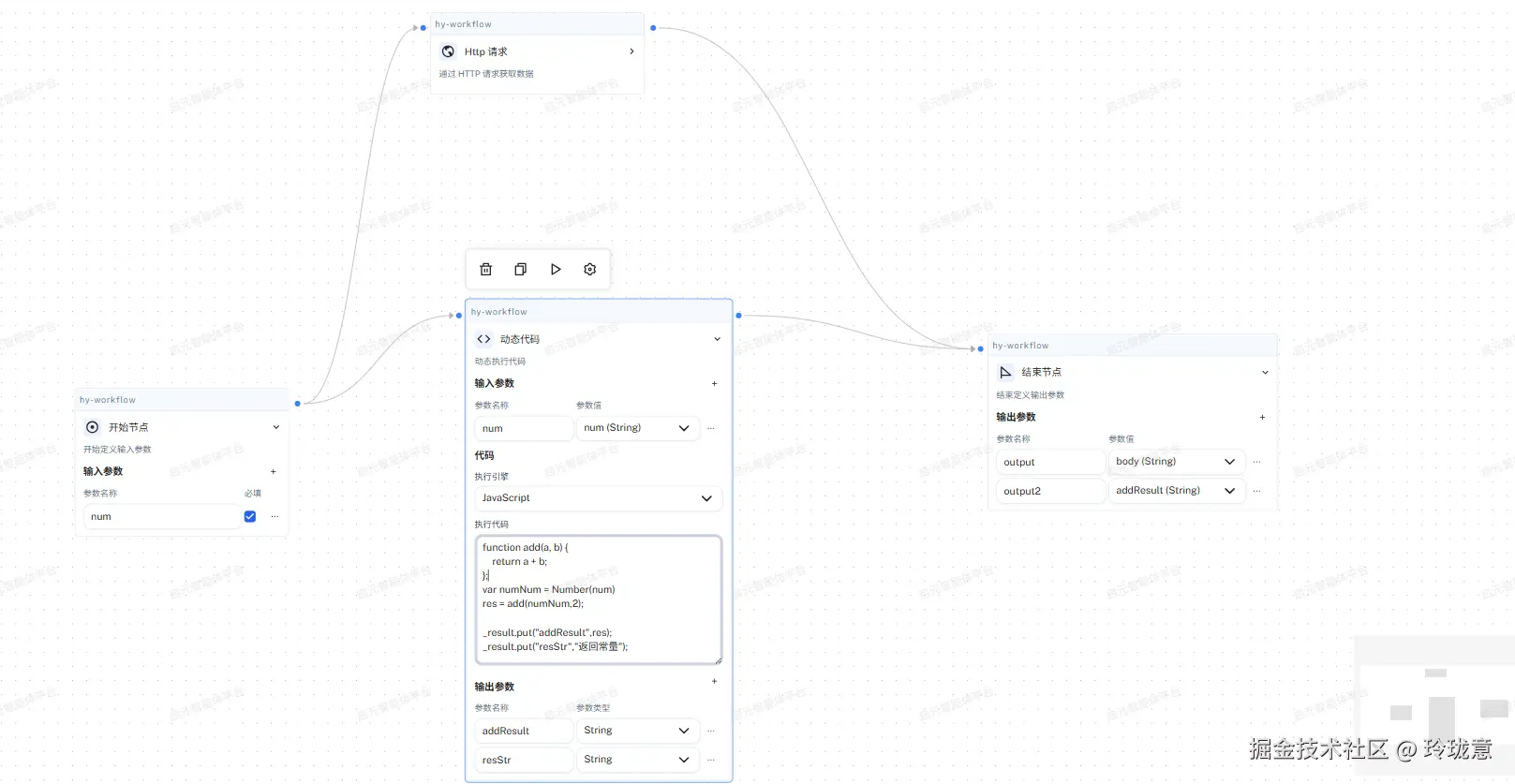
- 可视化编排设计器 :集成
@tinyflow-ai/vue画布,负责 Provider 注入(模型/知识库)、自定义节点扩展、Ctrl+S 快捷保存、单节点调试与抽屉试运行;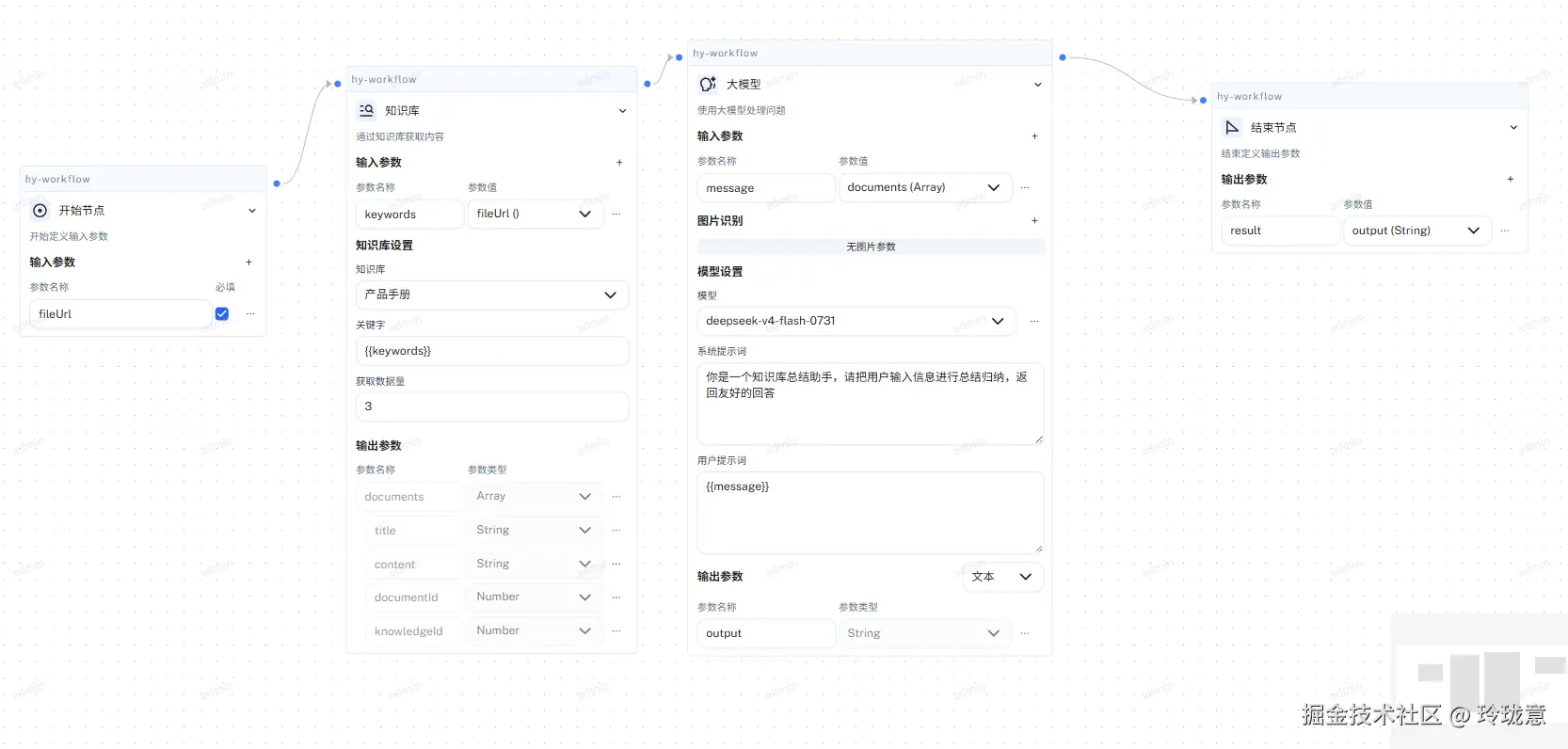
- 执行与人机协同交付中心 :参数输入表单、执行步骤流水线追踪与最终结果交互展示。
二、核心知识点深度剖析
1. DAG 拓扑排序算法与多层嵌套容器展开(sortNodes)
在前端呈现线性步骤列表(Steps)或判定节点执行顺序时,必须将画布上的图结构(Nodes + Edges)转化为拓扑序列。
- 双重依赖计算 :
- 控制流依赖 :显式的连线边(
Edge: source -> target); - 数据流依赖 :参数引用关系(如参数配置了
ref: "nodeA.output",即使未连显式线,也自动隐式建立依赖)。
- 控制流依赖 :显式的连线边(
- 多层嵌套容器递归解构(Kahn 算法增强) : 当父节点为循环/条件容器时,容器外部的目标节点必须等待该容器内的所有深层后代节点 执行完毕。代码通过
getAllDescendants递归收集所有子孙节点,并将入度依赖统一指向外部 Target 节点,解决了复杂嵌套图排序错乱的问题。 - 死锁与环形依赖兜底 : 若检测到
sortedNodes.length !== nodes.length,给出控制台报警并进行未排序节点安全追加,避免前端渲染直接崩溃卡死。
ini
//utils.ts
/**
 * 获取选项
 * @param labelKey
 * @param valueKey
 * @param options
 */
export function getOptions(labelKey: string, valueKey: string, options: any[]) {
	if (options && options.length > 0) {
		return options.map((item: any) => {
			return {
				label: item[labelKey],
				value: item[valueKey],
			};
		});
	}
	return [];
}
/**
 * 工作流节点排序(支持多层嵌套)
 * @param nodesJson
 */
export function sortNodes(nodesJson: any): any[] {
	const { nodes, edges } = nodesJson;

	// 创建数据结构
	const nodeMap: any = {};
	const graph: any = {}; // 邻接表
	const inDegree: any = {}; // 入度表
	const parentChildrenMap: Record<string, string[]> = {}; // 记录直接父子关系 { parentId: [childId, ...] }

	// 1. 预处理:建立节点映射并统计直接父子关系
	nodes.forEach((node: any) => {
		const nodeId = node.id;
		nodeMap[nodeId] = {
			key: nodeId,
			label: node.data?.title || nodeId,
			original: node,
			children: '',
			extra: '',
		};
		graph[nodeId] = [];
		inDegree[nodeId] = 0;

		// 收集直接子节点信息
		if (node.parentId) {
			if (!parentChildrenMap[node.parentId]) {
				parentChildrenMap[node.parentId] = [];
			}
			parentChildrenMap[node.parentId]?.push(nodeId);
		}
	});

	// --- 辅助函数:递归获取某个节点的所有后代 ID (包括子节点、孙子节点等) ---
	const getAllDescendants = (parentId: string): string[] => {
		let descendants: string[] = [];
		const children = parentChildrenMap[parentId];
		if (children && children.length > 0) {
			children.forEach((childId) => {
				descendants.push(childId);
				// 递归收集子节点的后代
				descendants = [...descendants, ...getAllDescendants(childId)];
			});
		}
		return descendants;
	};
	// -------------------------------------------------------------

	// 2. 处理参数依赖 (保持不变)
	nodes.forEach((node: any) => {
		const parameters = node.data?.parameters || [];
		parameters.forEach((param: any) => {
			if (param.ref) {
				// 解析引用,例如 "someNodeId.output"
				const [sourceNodeId] = param.ref.split('.');
				// 确保 source 存在且不是指向自己(避免死锁)
				if (
					nodeMap[sourceNodeId] &&
					sourceNodeId !== node.id && // 这里通常不需要处理父子层级,因为参数引用是数据流,
					// 如果数据来自父容器,通常父容器已经 ready。
					// 但为了保险,也可以考虑加入 graph,这里暂保持原逻辑。
					!graph[sourceNodeId].includes(node.id)
				) {
					graph[sourceNodeId].push(node.id);
					inDegree[node.id]++;
				}
			}
		});
	});

	// 3. 处理边依赖 (修改核心逻辑,支持递归嵌套)
	edges.forEach((edge: any) => {
		const { source, target } = edge;

		// 基础校验
		if (!nodeMap[source] || !nodeMap[target]) return;

		// A. 建立显式的 Source -> Target 依赖
		graph[source].push(target);
		inDegree[target]++;

		// B. 处理父子节点的隐含依赖 (递归版)
		// 如果 Source 是一个容器(有后代),且 Target 在容器外部,
		// 那么 Target 必须等待 Source 的 **所有后代**(包括深层嵌套)执行完毕。

		// 获取 Source 的所有层级后代
		const sourceDescendants = getAllDescendants(source);

		if (sourceDescendants.length > 0) {
			// 判断 Target 是否是 Source 的后代(即边是在容器内部连接的)
			const isTargetInsideSource = sourceDescendants.includes(target);

			if (!isTargetInsideSource) {
				// 如果 Target 在 Source 外部,则 Source 的所有后代都要指向 Target
				// 这样可以确保 Target 排在整个 Source 容器及其内部所有节点之后
				sourceDescendants.forEach((descendantId) => {
					// 防止重复添加边
					// 注意:这里可能会导致 graph 边很多,但对拓扑排序是必要的
					// 如果数据量巨大,可以用 Set 优化,这里用数组演示
					graph[descendantId].push(target);
					inDegree[target]++;
				});
			}
		}
	});

	// 4. 拓扑排序 (Kahn算法)
	const queue = nodes.filter((node: any) => inDegree[node.id] === 0).map((node: any) => node.id);

	const sortedNodes = [];

	while (queue.length > 0) {
		const nodeId = queue.shift();
		sortedNodes.push(nodeMap[nodeId]);

		if (graph[nodeId]) {
			graph[nodeId].forEach((neighborId: any) => {
				inDegree[neighborId]--;
				if (inDegree[neighborId] === 0) {
					queue.push(neighborId);
				}
			});
		}
	}

	// 检查循环依赖
	if (sortedNodes.length !== nodes.length) {
		console.warn('Topological Sort: Circular dependency detected or nodes isolated.', {
			total: nodes.length,
			sorted: sortedNodes.length,
		});
		// 兜底策略:将未排序的节点按原始顺序追加到末尾(可选)
		const sortedIds = new Set(sortedNodes.map((n) => n.key));
		const unsorted = nodes.filter((n: any) => !sortedIds.has(n.id)).map((n: any) => nodeMap[n.id]);
		sortedNodes.push(...unsorted);
	}

	// 返回结果
	return sortedNodes.map((node) => ({
		key: node.key,
		label: node.label,
		original: node.original,
		children: node.children,
		extra: node.extra,
	}));
}
2. SSE 流式响应与异步状态机轮询的双模混合架构
AI 执行通常既包含大模型 Token 的实时流式生成 ,又包含耗时较长的后台异步链式任务。
-
ReadableStream 流式解码与粘包切包 : 通过原生
fetch结合ReadableStream(reader.read()) 与TextDecoder,按\n\n分隔符切分事件块(Event Block),实时捕获run-start、message、error等状态。 -
流式切入轮询的平滑衔接 : 在
run-start拿到全局runId / executeId,并在特定流式信号后无缝激活startPolling,定期拉取后端状态机快照,完美结合了"实时感"与"后端任务持久化追踪"。ini//WorkflowForm.vue function resume(data: any) { data.executeId = executeId.value; submitLoading.value = true; resumeWorkflow(data).then((res: any) => { if (res.errorCode === 0) { startPolling(executeId.value); } }); } function submitV2() { runForm.value?.validate((valid: any) => { if (valid) { const formData = new FormData(); formData.append('workflowId', props.workflowId); formData.append('variables', JSON.stringify(runParams.value)); props.onSubmit?.(runParams.value); submitLoading.value = true; // 新增:message消息计数器,只在第二个message触发轮询 let messageCount = 0; runWorkflow(formData, { onEvent: (type, data) => { if (type === 'run-start') { executeId.value = data.runId; } else if (type === 'message') { messageCount += 1; // 只有第2条message才开启轮询 if (messageCount % 2 === 0) { startPolling(executeId.value); } } else { console.log(type, data); } }, onError: (data) => { ElMessage.error(data.message || data.error); submitLoading.value = false; }, onClose: () => { submitLoading.value = false; }, }); } }); } const runWorkflow = async ( payload: any, { onEvent, onError, onClose }: { onEvent: (event: string, data: any) => void; onError: (data: any) => void; onClose: () => void } ) => { const resp: any = await fetch(env.VITE_API_URL + '/flows/run', { method: 'POST', headers: { Authorization: `Bearer ${Session.get('token')}`, }, body: payload, }); const reader = resp.body.getReader(); const decoder = new TextDecoder('utf-8'); let buffer = ''; while (true) { const { value, done } = await reader.read(); if (done) break; buffer += decoder.decode(value, { stream: true }); // SSE 事件块以 \n\n 分隔 let idx; while ((idx = buffer.indexOf('\n\n')) !== -1) { const chunk = buffer.slice(0, idx); buffer = buffer.slice(idx + 2); parseEventBlock(chunk, onEvent, onError); } } // 处理末尾残留 if (buffer.trim()) parseEventBlock(buffer, onEvent, onError); onClose?.(); }; const parseEventBlock = (block: string, onEvent: (event: string, data: any) => void, onError: (data: any) => void) => { const lines = block.split('\n'); let event = 'message'; // 默认事件名 const dataLines = []; for (const line of lines) { if (line.startsWith('event:')) { event = line.slice(6).trim(); } else if (line.startsWith('data:')) { dataLines.push(line.slice(5).trim()); } // 注释行(: 开头)忽略 } if (dataLines.length === 0) return; const raw = dataLines.join('\n'); let data; try { data = JSON.parse(raw); } catch { data = raw; // 非 JSON 纯文本 } if (event === 'error') { onError?.(data); } else { onEvent?.(event, data); } }; const timer = ref(); // 轮询执行结果 function startPolling(executeId: any) { executePolling(executeId); } function executePolling(executeId: any) { getChainStatus({ runId: executeId, }).then((res: any) => { props.onAsyncExecute?.(res); }); } function stopPolling() { submitLoading.value = false; if (timer.value) { clearInterval(timer.value); timer.value = null; } }
3. Human-in-the-loop(人机协同)断点挂起与恢复设计
AI 工作流中经常需要人工介入确认(如合规审核、敏感操作确认、动态表单补充)。
-
状态驱动的 UI 自聚焦 : 当某个节点执行状态变更为
status === 5(等待人工介入)时,折叠面板自动展开该节点(activeName.value = nodeId)。iniwatch( () => props.pollingData, (newVal: any) => { const nodes = newVal; for (const nodeId in nodes) { nodeStatusMap.value[nodeId] = nodes[nodeId]; if (nodes[nodeId].status === 5) { activeName.value = nodeId; } } }, { deep: true } ); -
动态表单实例字典与恢复触发 : 通过
setFormRef(el, key)动态收集每个步骤内部独立的表单实例,校验通过后调用resumeWorkflow(confirmParams)将确认值提交后端,唤醒挂起的工作流继续向下执行。scss// 动态设置 Ref 的辅助函数 const setFormRef = (el: any, key: string) => { if (el) { formRefs.value[key] = el as FormInstance; } }; resumeWorkflow(data).then((res: any) => {//👆代码有补充 if (res.errorCode === 0) { startPolling(executeId.value); } });
4. 微内核插件化自定义节点系统(customNode/)
-
解耦与动态装载 :设计器不硬编码所有节点类型,而是抽象出
getCustomNode({ handleChosen })规范。ini// index.ts export const getCustomNode = async (options: CustomNodeOptions) => { const searchDatacenterNode = SearchDatacenterNode(); const saveToDatacenterNode = SaveToDatacenterNode(); const sqlDataNode = await sqlNode(); const templateNode = TemplateNode(); const agentNode = await AgentNode(); return { ...docNode, ...makeFileNode, ...downloadNode, [nodeNames.templateNode]: templateNode, [nodeNames.sqlNode]: sqlDataNode, [nodeNames.agentNode]: agentNode, [nodeNames.searchDatacenterNode]: searchDatacenterNode, [nodeNames.saveToDatacenterNode]: saveToDatacenterNode, }; }; //design.vue const loadCustomNode = async () => { customNode.value = await getCustomNode({ handleChosen: (nodeName: string, updateNodeData: any, value: string) => { const v = []; if (value) { v.push(value); } if (nodeName === nodeNames.workflowNode) { workflowSelectRef.value.openDialog(v); updateWorkflowNode.value = updateNodeData; } if (nodeName === nodeNames.pluginNode) { pluginSelectRef.value.openDialog(v); updatePluginNode.value = updateNodeData; } }, }); }; onMounted(async () => { document.addEventListener('keydown', handleKeydown); await Promise.all([loadCustomNode(),...); }); -
业务联动弹窗 :当节点内部需要选择业务数据(如关联具体的数据中台、知识库或子工作流)时,通过回调唤起父主页面的
CommonSelectDataModal,选择完成后异步拉取 Schema 并回填更新节点配置。ini<CommonSelectDataModal ref="workflowSelectRef" page-url="/workflow/page" @get-data="(v: any) => handleChoose(nodeNames.workflowNode, v)" /> <CommonSelectDataModal title="插件" width="730" ref="pluginSelectRef" page-url="/api/v1/plugin/page" :has-parent="true" single-select @get-data="(v: any) => handleChoose(nodeNames.pluginNode, v)" />
5. 现代 Vue 3 组合式 API 与工程化实践
-
计算属性的双向绑定(Getter/Setter) : 在
workflowModal.vue中,通过计算属性jsonFileModel的 get/set 巧妙将uploadFileList单文件状态与表单校验规则双向挂钩,代码极致精简。iniconst uploadFileList = ref<any[]>([]); const jsonFileModel = computed({ get: () => (uploadFileList.value.length > 0 ? uploadFileList.value[0] : null), set: (value: any) => { if (!value) { uploadFileList.value = []; } }, }); <ElForm label-width="120px" ref="saveForm" :model="isImport ? { ...entity, jsonFile: jsonFileModel } : entity" status-icon :rules="rules"> <ElFormItem v-if="isImport" prop="jsonFile" label="JSON文件" required> <ElUpload class="w-full" ref="uploadRef" v-model:file-list="uploadFileList" :limit="1" :auto-upload="false" :on-change="handleChange" :before-upload="beforeUpload" :on-remove="handleRemove" accept=".json" drag > <div class="el-upload__text w-full">将 json 文件拖到此处,或<em>点击上传</em></div> </ElUpload> </ElFormItem> -
快捷键防抖与生命周期清理 : 在
design.vue中全局监听Ctrl+S/Cmd+S阻止浏览器默认行为并自动触发画布数据持久化,在onUnmounted中精准移除事件监听器,避免内存泄漏。javascriptonUnmounted(() => { document.removeEventListener('keydown', handleKeydown); }); -
响应式 Grid 自适应布局 :
grid-template-columns: repeat(auto-fill, minmax(300px, 1fr))配合clamp()响应式字体,使得卡片列表在各类分辨率下自动流式排版。
三、核心疑难点与避坑指南
| 场景 / 问题 | 产生原因 | 优雅解决思路 |
|---|---|---|
| SSE 粘包与截断 | 网络分包传输导致一个 chunk 内部可能包含半个事件块或多个事件块。 | 采用缓冲区 buffer 累加解码文本,循环查找 \n\n 消费完整块,循环结束后保留剩余未完结文本待下一个 chunk 拼接。 |
| 动态列表内的 Form 引用校验 | 步骤列表是 v-for 渲染的,无法直接写固定的 ref="formRef"。 |
定义 formRefs = ref<Record<string, FormInstance>>({}),在模板中通过 :ref="el => setFormRef(el, node.key)" 按 Key 动态映射存储。 |
| 画布数据双向污染 | Vue 的响应式 Proxy 对象直接传给第三方图引擎可能导致内部原型链异常或意外触发响应。 | 传入图引擎时使用深拷贝断开响应式引用(JSON.parse(JSON.stringify(tinyFlowData))),保存时主动调用 tinyFlowRef.value.getData() 提取。 |
| 拓扑排序死循环 | 编排时用户可能连出回路(环),导致入度无法清零,队列卡死。 | Kahn 算法中判定最终输出节点数是否等于总节点数,若不等则发出警告并采用安全兜底合并。 |
四、关键架构关注点(代码重构与演进建议)
若要进一步提升系统的工业级健壮性,以下几点是持续优化的重点:
-
类型安全与
any收敛 : 目前部分接口和节点数据(如tinyFlowData、runParams)存在较多any,建议抽离出@/types/workflow.ts定义严谨的WorkflowNode、WorkflowEdge、ExecutionTrace等 Interface。 -
SSE 统一封装为可复用 Composable : 将
runWorkflow中的流式读取逻辑提取为useSSEStream或基于fetchEventSource的通用 Hook,便于在单节点运行(SingleRun)、全流程试运行、批量任务中复用。ini//singleRun.vue <script setup lang="ts"> interface Props { workflowId: any; node: any; } const props = defineProps<Props>(); const singleRunForm = ref<FormInstance>(); const runParams = ref<any>({}); const submitLoading = ref(false); const result = ref<any>(''); function submit() { singleRunForm.value?.validate((valid: boolean) => { if (valid) { const formData = new FormData(); formData.append('workflowId', props.workflowId); formData.append('nodeId', props.node.id); formData.append('variables', JSON.stringify(runParams.value)); submitLoading.value = true; singleRun(formData) .then((res: any) => { submitLoading.value = false; const fullText = res as string; const finalResult = parseSseGetFinal(fullText); if (finalResult) { console.log('✅final结果:', finalResult); result.value = { output: finalResult.output }; // 你的业务逻辑 } else { console.warn('未找到final事件'); } }) .catch(() => { submitLoading.value = false; }); } }); } const parseSseGetFinal = (sseText: string) => { // SSE 多条消息使用 \n\n 分隔 const eventBlocks = sseText.split('\n\n'); for (const block of eventBlocks) { if (!block.trim()) continue; let eventName = ''; let dataStr = ''; const lines = block.split('\n'); for (const line of lines) { if (line.startsWith('event:')) { eventName = line.replace('event:', '').trim(); } else if (line.startsWith('data:')) { dataStr = line.replace('data:', '').trim(); } } if (eventName === 'final' && dataStr) { try { return JSON.parse(dataStr); } catch (e) { console.error('final json解析失败', e); } } } return null; }; </script> <template> <div> <ElForm label-position="top" ref="singleRunForm" :model="runParams"> <ElFormItem v-for="(item, idx) in node?.data.parameters" :prop="item.name" :key="idx" :label="item.description || item.name" :rules="[{ required: true, message: '该项为必填项' }]" > <ElInput v-if="item.formType === 'input' || !item.formType" v-model="runParams[item.name]" :placeholder="item.formPlaceholder" /> </ElFormItem> <ElFormItem> <ElButton type="primary" @click="submit" :loading="submitLoading" :icon="Position"> 运行 </ElButton> </ElFormItem> </ElForm> <div class="mb-2.5 mt-2.5 font-semibold">执行结果:</div> <ShowJson :value="result" /> </div> </template> -
轮询机制的资源释放与超时熔断 : 组件销毁(
onBeforeUnmount)或用户手动中止执行时,必须确保清除正在运行的定时器(clearInterval/clearTimeout)并调用AbortController.abort()释放连接。
五、可直接借鉴学习的亮点(Takeaways)
- "设计-调试-运行"一体化闭环 : 不仅有全局画布,还提供了单节点独立调试 、设计器内抽屉试运行 以及面向最终用户的全屏交付页 ,三者复用了同一套核心组件,复用率极高。
- 动态表单与数据引用解析: 基于 JSON Schema 动态生成参数输入表单,支持节点间变量级联引用,是低代码与 AI 编排的标准范式。
- 沉浸式人机交互体验 : 集成了
Ctrl+S静默保存、执行异常即时标红、人工介入自动聚焦展开等细节体验。