基于 Vue 3 技术栈,无论是 UI 框架,还是低代码平台,很少有能将校验的功能做到既非常简单又方便灵活扩展的。这不,小卷拍着胸脯骄傲的说,咱们 vue-juan-form 做到了!废话不多说,上例子!
整合 vue-juan-form
先确保工程里安装 Vue 3 和 Element Plus,因为目前该框架初版还仅支持 Element Plus,内置的组件均为按需显式引入其相关的 UI 组件。先安装依赖:
shell
npm i vue-juan-form入口 main.ts 引入样式:
ts
...
import 'vue-juan-form/style.css'
...
vue 页面引入组件很简单:
html
<script setup lang="ts">
import JuanForm from 'vue-juan-form'
import { schema } from '@/schemas/validation/test-01.ts'
</script>

<template>
  <JuanForm :schema="schema" />
</template>
各示例页面结构都同上,区别只是各个 schema 不同。先看基本的校验。
基础校验
页面的展示效果如下,必填字段的标签上会有星号。
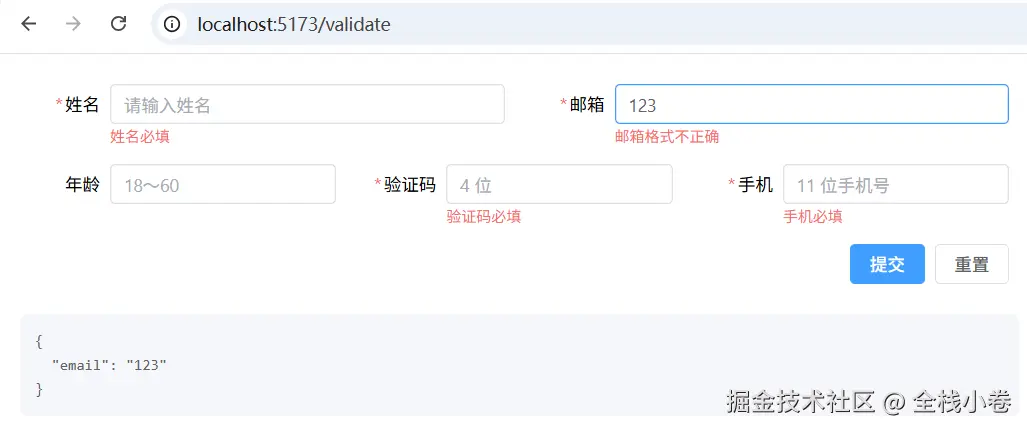
初始化不会显示错误提示。编辑字段时只校验当前字段,提交时校验整份表单。重置会清空数据,并清除错误提示。
字段上写 validation。多种规则用 | 分隔,规则名和参数用 : 分隔,多个参数用 , 分隔。
提交按钮写 nativeType: 'submit',检查整份表单。重置注入 form,调用 reset()。
schema 如下:
ts
import type { FormApi, FormSchema, ScopeState } from 'vue-juan-form'

export const schema: FormSchema = {
  children: [
    {
      items: [
        {
          prop: 'name',
          label: '姓名',
          type: 'Input',
          props: { placeholder: '请输入姓名' },
          validation: 'required',
        },
        {
          prop: 'email',
          label: '邮箱',
          type: 'Input',
          props: { placeholder: '请输入邮箱' },
          validation: 'required|email',
        },
      ],
    },
    {
      items: [
        {
          prop: 'age',
          label: '年龄',
          type: 'Input',
          props: { type: 'number', placeholder: '18~60' },
          validation: 'min:18|max:60',
        },
        {
          prop: 'code',
          label: '验证码',
          type: 'Input',
          props: { placeholder: '4 位' },
          validation: 'required|length:4,4',
        },
        {
          prop: 'mobile',
          label: '手机',
          type: 'Input',
          props: { placeholder: '11 位手机号' },
          validation: 'required|matches:/^1[3-9]\d{9}$/',
        },
      ],
    },
    {
      items: [
        {
          type: 'Html',
          col: 'auto',
          plain: true,
          attrs: { style: { justifyContent: 'flex-end', gap: '8px' } },
          children: [
            {
              items: [
                {
                  label: '提交',
                  type: 'Button',
                  props: { type: 'primary', nativeType: 'submit' },
                },
                {
                  label: '重置',
                  type: 'Button',
                  props: {
                    nativeType: 'button',
                    onClick: {
                      inject: ['form'],
                      handle: (_scope: ScopeState, form: FormApi) => {
                        form.reset()
                      },
                    },
                  },
                },
              ],
            },
          ],
        },
      ],
    },
  ],
}
栅格 :children 是一层,其中每一项是一行,items 是这一行的字段。行上 cols 默认 16;字段 col 默认 auto,平均分配。提交和重置放在同一个 Html 里,写 plain: true、col: 'auto',两个按钮并排靠右。
自定义校验
内置规则不够时,在字段上写 validationRules,失败就抛 RuleError。
确认密码
先看要实现的场景:
关键配置:确认密码写 validation: 'required|same',validationRules.same 里比较两个字段,失败抛 RuleError。两个值都不为空才比较。规则写在一个字段上,改密码或确认密码都会执行。
schema 如下:
ts
import { RuleError, type FormSchema, type ScopeState } from 'vue-juan-form'

export const schema: FormSchema = {
  children: [
    {
      items: [
        {
          prop: 'password',
          label: '密码',
          labelWidth: '5em',
          type: 'Input',
          props: { type: 'password', placeholder: '请输入密码' },
          validation: 'required',
        },
        {
          prop: 'confirm',
          label: '确认密码',
          labelWidth: '5em',
          type: 'Input',
          props: { type: 'password', placeholder: '请再输入一次' },
          validation: 'required|same',
          validationRules: {
            same(scope: ScopeState) {
              if (!scope.password || !scope.confirm) return
              if (scope.password !== scope.confirm) throw new RuleError('两次输入的密码不一致')
            },
          },
        },
      ],
    },
    // 提交、重置:Html 写 plain: true、col: 'auto',两个按钮放在里面靠右。与基础校验的按钮行相同,所以省略
  ],
}
上面是写在这一张表里的内联规则。多处复用时用 defineRule 登记一次。handle 第一个参数仍是作用域;当前值和 validation 里 : 后面的参数,注入 validationContext 读取。本层直接读作用域,跨层用 $parent、$root。validation 写成 same:password,表示和密码字段比较。
ts
import { defineRule, RuleError, type FormSchema, type ScopeState, type ValidationContext } from 'vue-juan-form'

defineRule('same', {
  inject: ['validationContext'],
  handle: (scope: ScopeState, v: ValidationContext) => {
    const other = scope[v.args[0]!]
    if (!v.value || !other) return
    if (v.value !== other) throw new RuleError('两次输入的密码不一致')
  },
})

export const schema: FormSchema = {
  children: [
    {
      items: [
        // 密码字段:prop 为 password,validation 为 required。与上面内联规则那一段相同,所以省略
        {
          prop: 'confirm',
          label: '确认密码',
          labelWidth: '5em',
          type: 'Input',
          props: { type: 'password', placeholder: '请再输入一次' },
          validation: 'required|same:password',
        },
      ],
    },
    // 提交、重置:Html 写 plain: true、col: 'auto',两个按钮放在里面靠右。与上面内联规则那一段相同,所以省略
  ],
}
校验不都为空
用户名、邮箱、手机号不能全部为空。先看要实现的场景:
关键配置:规则写在用户名上,validation 写成 length:2,16|+notAllEmpty。+ 表示当前值为空时仍然执行。邮箱、手机号只在有值时校验 email、matches。
schema 如下:
ts
import { RuleError, type FormSchema, type ScopeState } from 'vue-juan-form'

export const schema: FormSchema = {
  children: [
    {
      items: [
        {
          prop: 'username',
          label: '用户名',
          type: 'Input',
          props: { placeholder: '请输入用户名' },
          validation: 'length:2,16|+notAllEmpty',
          validationRules: {
            notAllEmpty(scope: ScopeState) {
              if (!scope.username && !scope.email && !scope.phone) {
                throw new RuleError('用户名、邮箱、手机号不能都为空')
              }
            },
          },
        },
        {
          prop: 'email',
          label: '邮箱',
          type: 'Input',
          props: { placeholder: '请输入邮箱' },
          validation: 'email',
        },
        {
          prop: 'phone',
          label: '手机号',
          type: 'Input',
          props: { placeholder: '请输入手机号' },
          validation: 'matches:/^1[3-9]\d{9}$/',
        },
      ],
    },
    // 提交、重置:Html 写 plain: true、col: 'auto',两个按钮放在里面靠右。与基础校验的按钮行相同,所以省略
  ],
}
多处复用同样用 defineRule。validation 写成 +notAllEmpty:email,phone,参数名从作用域上取邮箱和手机号。
ts
import { defineRule, RuleError, type FormSchema, type ScopeState, type ValidationContext } from 'vue-juan-form'

defineRule('notAllEmpty', {
  inject: ['validationContext'],
  handle: (scope: ScopeState, v: ValidationContext) => {
    if (!v.value && v.args.every((name) => !scope[name])) {
      throw new RuleError('用户名、邮箱、手机号不能都为空')
    }
  },
})

export const schema: FormSchema = {
  children: [
    {
      items: [
        {
          prop: 'username',
          label: '用户名',
          type: 'Input',
          props: { placeholder: '请输入用户名' },
          validation: 'length:2,16|+notAllEmpty:email,phone',
        },
        // 邮箱、手机号:validation 分别为 email、matches。与上面内联规则那一段相同,所以省略
      ],
    },
    // 提交、重置:Html 写 plain: true、col: 'auto',两个按钮放在里面靠右。与上面内联规则那一段相同,所以省略
  ],
}
分层校验
整份表单的提交前面已经写过:按钮 nativeType: 'submit' 会检查整个 JuanForm。这一节换成各层自己提交,注入 layer,调用 check(),只检查当前这一层。
投保人、被保人各是一组,组里各有一个提交。受益人在列表里点击修改,弹框里再提交一次。三次提交分别检查各自所在的层。
先看要实现的场景:
关键配置:组里的按钮写 nativeType: 'button',onClick 注入 layer,调用 layer.check()。不要写成 submit,否则会检查整份表单。弹框确定按钮检查的是弹框这一层。
schema 如下:
ts
import type { DialogApi, FormSchema, LayerApi, ScopeState } from 'vue-juan-form'

const relations = [
  { label: '配偶', value: 'spouse' },
  { label: '子女', value: 'child' },
  { label: '父母', value: 'parent' },
]

export const schema: FormSchema = {
  children: [
    {
      items: [
        {
          prop: 'applicant',
          label: '投保人',
          type: 'Group',
          children: [
            {
              items: [
                {
                  prop: 'name',
                  label: '姓名',
                  type: 'Input',
                  props: { placeholder: '请输入投保人姓名' },
                  validation: 'required',
                },
              ],
            },
            {
              items: [
                {
                  label: '提交',
                  type: 'Button',
                  props: {
                    type: 'primary',
                    nativeType: 'button',
                    style: { textAlign: 'right' },
                    onClick: {
                      inject: ['layer'],
                      handle: (scope: ScopeState, layer: LayerApi) => {
                        if (layer.check()) console.log('投保人通过', scope.name)
                      },
                    },
                  },
                },
              ],
            },
          ],
        },
      ],
    },
    {
      items: [
        {
          prop: 'insured',
          label: '被保人',
          type: 'Group',
          children: [
            {
              items: [
                {
                  prop: 'name',
                  label: '姓名',
                  type: 'Input',
                  props: { placeholder: '请输入被保人姓名' },
                  validation: 'required',
                },
              ],
            },
            {
              items: [
                {
                  label: '提交',
                  type: 'Button',
                  props: {
                    type: 'primary',
                    nativeType: 'button',
                    style: { textAlign: 'right' },
                    onClick: {
                      inject: ['layer'],
                      handle: (scope: ScopeState, layer: LayerApi) => {
                        if (layer.check()) console.log('被保人通过', scope.name)
                      },
                    },
                  },
                },
              ],
            },
          ],
        },
      ],
    },
    {
      items: [
        {
          prop: 'beneficiaries',
          label: '受益人',
          type: 'List',
          col: 'auto',
          key: 'id',
          children: [
            {
              items: [
                {
                  prop: 'name',
                  label: '姓名',
                  type: 'Input',
                  col: 6,
                  props: { placeholder: '受益人姓名' },
                },
                {
                  prop: 'relation',
                  label: '关系',
                  type: 'Select',
                  col: 6,
                  props: {
                    placeholder: '请选择关系',
                    clearable: true,
                    options: relations,
                  },
                },
                {
                  label: '修改',
                  type: 'Button',
                  col: 4,
                  props: {
                    nativeType: 'button',
                    onClick: {
                      inject: ['dialog'],
                      handle: (_scope: ScopeState, dialog: DialogApi) => {
                        dialog.open('editBeneficiary')
                      },
                    },
                  },
                },
              ],
            },
          ],
        },
        {
          name: 'editBeneficiary',
          type: 'Dialog',
          label: '修改受益人',
          children: [
            {
              items: [
                {
                  prop: 'name',
                  label: '姓名',
                  type: 'Input',
                  props: { placeholder: '受益人姓名' },
                  validation: 'required',
                },
                {
                  prop: 'relation',
                  label: '关系',
                  type: 'Select',
                  props: {
                    placeholder: '请选择关系',
                    clearable: true,
                    options: relations,
                  },
                  validation: 'required',
                },
              ],
            },
          ],
        },
      ],
    },
    {
      items: [
        {
          label: '添加受益人',
          type: 'Button',
          props: {
            nativeType: 'button',
            onClick: {
              handle: (scope: ScopeState) => {
                const list = scope.beneficiaries as Record<string, unknown>[]
                list.push({})
              },
            },
          },
        },
      ],
    },
  ],
}
行内校验
列表、表格的行内编辑,校验仍写在字段的 validation 上:姓名 required,电话 matches。错误提示由引擎自己展示。行上的检查按钮注入 layer,调用 check(),只检查这一行。表格的添加按钮写在表格上面。
先看要实现的场景:

schema 如下:
ts
import type { FormSchema, LayerApi, ScopeState } from 'vue-juan-form'

const phone = 'matches:/^1[3-9]\d{9}$/'

function checkRow(_scope: ScopeState, layer: LayerApi) {
  layer.check()
}

function addRow(scope: ScopeState, prop: string) {
  const list = scope[prop] as Record<string, unknown>[]
  list.push({})
}

export const schema: FormSchema = {
  children: [
    {
      items: [
        {
          prop: 'listContacts',
          label: '列表',
          type: 'List',
          col: 'auto',
          key: 'id',
          children: [
            {
              items: [
                {
                  prop: 'name',
                  label: '姓名',
                  type: 'Input',
                  col: 6,
                  props: { placeholder: '请输入姓名' },
                  validation: 'required',
                },
                {
                  prop: 'phone',
                  label: '电话',
                  type: 'Input',
                  col: 6,
                  props: { placeholder: '11 位手机号' },
                  validation: phone,
                },
                {
                  label: '检查',
                  type: 'Button',
                  col: 4,
                  props: {
                    nativeType: 'button',
                    onClick: { inject: ['layer'], handle: checkRow },
                  },
                },
              ],
            },
          ],
        },
      ],
    },
    {
      items: [
        {
          label: '添加一行',
          type: 'Button',
          props: {
            nativeType: 'button',
            onClick: {
              handle: (scope: ScopeState) => addRow(scope, 'listContacts'),
            },
          },
        },
      ],
    },
    {
      items: [
        {
          label: '添加一行',
          type: 'Button',
          props: {
            nativeType: 'button',
            onClick: {
              handle: (scope: ScopeState) => addRow(scope, 'tableContacts'),
            },
          },
        },
      ],
    },
    {
      items: [
        {
          prop: 'tableContacts',
          label: '表格',
          type: 'Table',
          col: 'auto',
          key: 'id',
          props: { border: true, style: { width: '100%' } },
          columns: [
            {
              prop: 'name',
              label: '姓名',
              type: 'Input',
              minWidth: 160,
              props: { placeholder: '请输入姓名' },
              validation: 'required',
            },
            {
              prop: 'phone',
              label: '电话',
              type: 'Input',
              minWidth: 180,
              props: { placeholder: '11 位手机号' },
              validation: phone,
            },
            {
              label: '检查',
              width: 100,
              custom: {
                items: [
                  {
                    label: '检查',
                    type: 'Button',
                    props: {
                      nativeType: 'button',
                      onClick: { inject: ['layer'], handle: checkRow },
                    },
                  },
                ],
              },
            },
          ],
        },
      ],
    },
  ],
}
带嵌套的外层校验
组和行各自检查前面已经写过。最外层的提交仍然注入 layer,调用 check() ,和分层校验相同。按钮写在最外层,当前层就是整份表单。
先看要实现的场景:
schema 如下:
ts
import type { FormApi, FormSchema, LayerApi, ScopeState } from 'vue-juan-form'

const phone = 'matches:/^1[3-9]\d{9}$/'

function checkRow(_scope: ScopeState, layer: LayerApi) {
  layer.check()
}

export const schema: FormSchema = {
  children: [
    {
      items: [
        {
          prop: 'applicant',
          label: '投保人',
          type: 'Group',
          children: [
            {
              items: [
                {
                  prop: 'name',
                  label: '姓名',
                  type: 'Input',
                  props: { placeholder: '请输入投保人姓名' },
                  validation: 'required',
                },
              ],
            },
            {
              items: [
                {
                  type: 'Html',
                  col: 'auto',
                  plain: true,
                  attrs: { style: { justifyContent: 'flex-end', gap: '8px' } },
                  children: [
                    {
                      items: [
                        {
                          label: '提交',
                          type: 'Button',
                          props: {
                            type: 'primary',
                            nativeType: 'button',
                            onClick: {
                              inject: ['layer'],
                              handle: (scope: ScopeState, layer: LayerApi) => {
                                if (layer.check()) console.log('投保人通过', scope.name)
                              },
                            },
                          },
                        },
                        {
                          label: '重置',
                          type: 'Button',
                          props: {
                            nativeType: 'button',
                            onClick: {
                              inject: ['form'],
                              handle: (_scope: ScopeState, form: FormApi) => {
                                form.reset()
                              },
                            },
                          },
                        },
                      ],
                    },
                  ],
                },
              ],
            },
          ],
        },
      ],
    },
    {
      items: [
        {
          label: '添加一行',
          type: 'Button',
          props: {
            nativeType: 'button',
            onClick: {
              handle: (scope: ScopeState) => {
                const list = scope.contacts as Record<string, unknown>[]
                list.push({})
              },
            },
          },
        },
      ],
    },
    {
      items: [
        {
          prop: 'contacts',
          label: '表格',
          type: 'Table',
          col: 'auto',
          key: 'id',
          props: { border: true, style: { width: '100%' } },
          columns: [
            {
              prop: 'name',
              label: '姓名',
              type: 'Input',
              minWidth: 160,
              props: { placeholder: '请输入姓名' },
              validation: 'required',
            },
            {
              prop: 'phone',
              label: '电话',
              type: 'Input',
              minWidth: 180,
              props: { placeholder: '11 位手机号' },
              validation: phone,
            },
            {
              label: '检查',
              width: 100,
              custom: {
                items: [
                  {
                    label: '检查',
                    type: 'Button',
                    props: {
                      nativeType: 'button',
                      onClick: { inject: ['layer'], handle: checkRow },
                    },
                  },
                ],
              },
            },
          ],
        },
      ],
    },
    {
      items: [
        {
          label: '提交',
          type: 'Button',
          props: {
            type: 'primary',
            nativeType: 'button',
            style: { textAlign: 'right' },
            onClick: {
              inject: ['layer'],
              handle: (_scope: ScopeState, layer: LayerApi) => {
                if (layer.check()) console.log('总提交通过')
              },
            },
          },
        },
      ],
    },
  ],
}
行间校验定制需求
表格里的姓名不能重复。姓名为空时不判断重复。规则仍写在姓名的 validation 上。
先看要实现的场景:
关键配置:姓名写 validation: '+unique'。规则注入 node,find 取出同名单元格,设置背景色,并抛 RuleError。+ 表示值为空时仍然执行,用来清除背景色。添加按钮写在表格上面。
schema 如下:
ts
import { RuleError, type FormSchema, type NodeApi, type ScopeState } from 'vue-juan-form'

export const schema: FormSchema = {
  children: [
    {
      items: [
        {
          label: '添加一行',
          type: 'Button',
          props: {
            nativeType: 'button',
            onClick: {
              handle: (scope: ScopeState) => {
                const list = scope.beneficiaries as Record<string, unknown>[]
                list.push({})
              },
            },
          },
        },
      ],
    },
    {
      items: [
        {
          prop: 'beneficiaries',
          label: '受益人',
          type: 'Table',
          col: 'auto',
          key: 'id',
          props: { border: true, style: { width: '100%' } },
          columns: [
            {
              prop: 'name',
              label: '姓名',
              type: 'Input',
              minWidth: 200,
              props: { placeholder: '请输入姓名' },
              validation: '+unique',
              validationRules: {
                unique: {
                  inject: ['node'],
                  handle(scope: ScopeState, node: NodeApi) {
                    const cells = node.find('$parent.beneficiaries', { name: scope.name }, 'name')
                    if (!scope.name || cells.length < 2) {
                      for (const cell of cells) cell.props.style = undefined
                      return
                    }
                    let n = 0
                    for (const ch of String(scope.name)) n = n * 31 + ch.charCodeAt(0)
                    for (const cell of cells) cell.props.style = { background: `hsl(${(n * 137) % 360} 70% 90%)` }
                    throw new RuleError('受益人重复')
                  },
                },
              },
            },
            {
              prop: 'share',
              label: '份额',
              type: 'Input',
              minWidth: 120,
              props: { type: 'number', min: 1, max: 10, placeholder: '份额' },
              defaultValue: 1,
            },
          ],
        },
      ],
    },
  ],
}
表级校验
各行份额合计不能超过 10。校验写在表格的 validation 上,和字段相同,不另放输入框。合计超过 10 时,添加按钮不再加行。
先看要实现的场景:
关键配置:表格写 validation: 'cap',validationRules.cap 里对数组求和,超过 10 抛 RuleError。添加按钮写在表格上面,handle 读同一项合计,超过 10 就返回。
schema 如下:
ts
import { RuleError, type FormSchema, type ScopeState } from 'vue-juan-form'

export const schema: FormSchema = {
  children: [
    {
      items: [
        {
          label: '添加一行',
          type: 'Button',
          props: {
            nativeType: 'button',
            onClick: {
              handle: (scope: ScopeState) => {
                const list = scope.beneficiaries as Record<string, unknown>[]
                if (list.reduce((n, row) => n + Number(row.share || 0), 0) > 10) return
                list.push({})
              },
            },
          },
        },
      ],
    },
    {
      items: [
        {
          prop: 'beneficiaries',
          label: '受益人',
          type: 'Table',
          col: 'auto',
          key: 'id',
          props: { border: true, style: { width: '100%' } },
          validation: 'cap',
          validationRules: {
            cap(scope: ScopeState) {
              const list = scope.beneficiaries as Record<string, unknown>[]
              if (list.reduce((n, row) => n + Number(row.share || 0), 0) > 10) {
                throw new RuleError('总份额不能超过10')
              }
            },
          },
          columns: [
            {
              prop: 'name',
              label: '姓名',
              type: 'Input',
              minWidth: 160,
              props: { placeholder: '请输入姓名' },
            },
            {
              prop: 'share',
              label: '份额',
              type: 'Input',
              minWidth: 120,
              props: { type: 'number', min: 1, max: 10, placeholder: '份额' },
              defaultValue: 1,
            },
          ],
        },
      ],
    },
  ],
}
自动定位错误
提交检查没有通过时,自动滚动到第一个出错的字段,并让输入框获得焦点 。没有新配置,表单默认提交和层上的 check() 都是这样。
先看要实现的场景:
schema 如下:
ts
import type { FormSchema } from 'vue-juan-form'

export const schema: FormSchema = {
  children: [
    // 外层 Html 限制高度、字段之间拉开距离,只为演示滚动,与定位无关,所以省略
    {
      items: [
        {
          prop: 'name',
          label: '姓名',
          type: 'Input',
          props: { placeholder: '请输入姓名' },
          validation: 'required',
        },
      ],
    },
    {
      items: [
        {
          prop: 'email',
          label: '邮箱',
          type: 'Input',
          props: { placeholder: '请输入邮箱' },
          validation: 'required|email',
        },
      ],
    },
    {
      items: [
        {
          prop: 'phone',
          label: '手机',
          type: 'Input',
          props: { placeholder: '11 位手机号' },
          validation: 'required',
        },
      ],
    },
    {
      items: [
        {
          label: '提交',
          type: 'Button',
          props: { type: 'primary', nativeType: 'submit', style: { textAlign: 'right' } },
        },
      ],
    },
  ],
}
到这里,校验各场景都覆盖完了。欢迎小伙伴自己试。有新的校验需求搞不定,评论区找我。你的建议和意见,会写进咱们 vue-juan-form 后面的版本里。