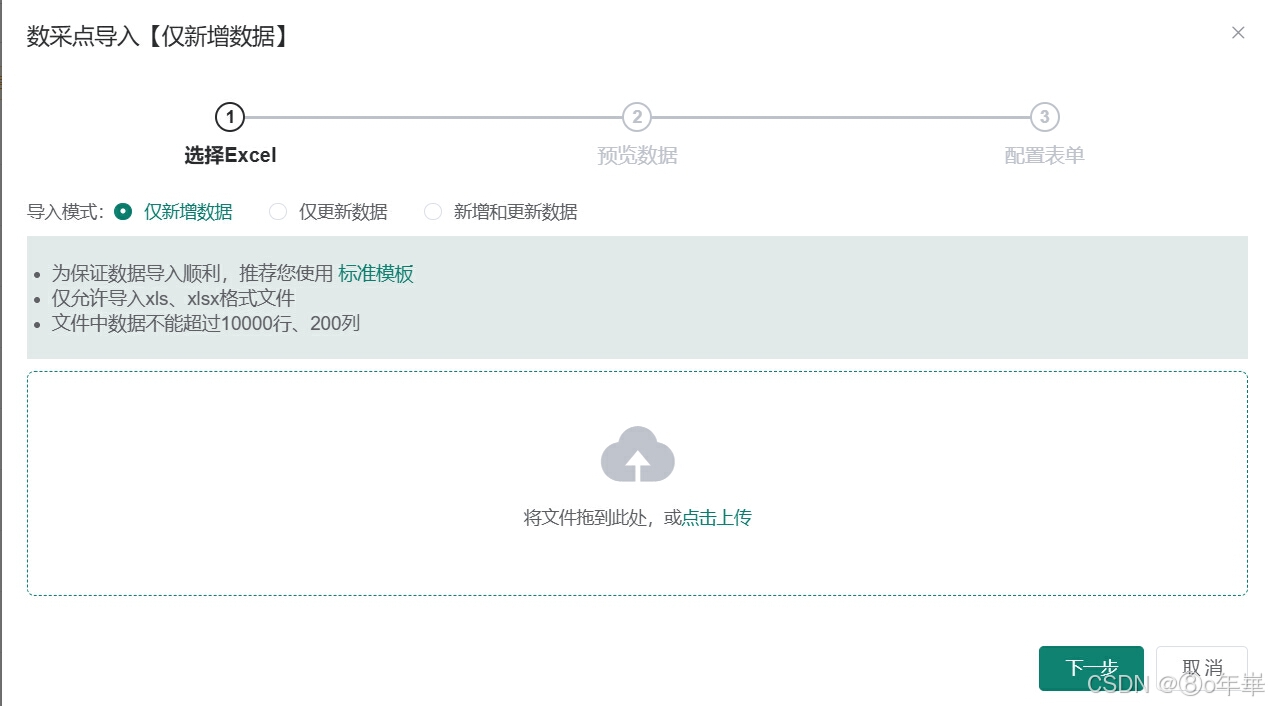
bash
<template>
  <el-dialog :title="getTitle" :visible.sync="isOpen" width="50%" append-to-body :close-on-click-modal="false" @close="cancel">

    <el-steps :active="stepActive" :align-center="true" style="margin-bottom: 20px">
      <el-step title="选择Excel" />
      <el-step title="预览数据" />
      <el-step title="配置表单" />
    </el-steps>
    <div v-show="stepActive===0">
      <div class="upload-model">
        <span>导入模式:</span>
        <el-radio-group v-model="importMode">
          <el-radio :label="1">仅新增数据</el-radio>
          <el-radio :label="2">仅更新数据</el-radio>
          <el-radio :label="3">新增和更新数据</el-radio>
        </el-radio-group>
      </div>
      <div class="upload-tip">
        <ul>
          <li>为保证数据导入顺利,推荐您使用 <el-link type="primary" :underline="false" @click="importTemplate"> 标准模板 </el-link></li>
          <li>仅允许导入xls、xlsx格式文件</li>
          <li>文件中数据不能超过10000行、200列</li>
        </ul>
      </div>
      <el-upload
        ref="upload"
        class="full-width-upload"
        :limit="1"
        accept=".xlsx, .xls"
        :headers="headers"
        action="#"
        :disabled="isUploading"
        :on-exceed="handleExceed"
        :on-error="handleError"
        :before-upload="beforeUpload"
        :on-change="handleChange"
        :auto-upload="false"
        drag
      >
        <i class="el-icon-upload" />
        <div class="el-upload__text">将文件拖到此处,或<em>点击上传</em></div>
      </el-upload>
    </div>
    <div v-show="stepActive===1">
      <div style="margin-bottom: 5px">
        <span>工作表:</span>
        <el-select v-model="sheetActive">
          <el-option v-for="dict in sheetNames" :key="dict" :label="dict" :value="dict" />
        </el-select>
        <span style="margin-left: 10px;color: red">选中任意一行可将其设置为标题行,标题行之前的数据不导入。</span>
      </div>
      <el-table v-if="excelList[sheetActive]" ref="table1" :data="excelList[sheetActive].list" :height="tableHeight" highlight-current-row @current-change="handleCurrentChange">
        <el-table-column type="index" width="50" />
        <el-table-column v-for="(col,index) in excelList[sheetActive].header" :key="index" :prop="col" :label="col" min-width="120" show-overflow-tooltip />
      </el-table>
    </div>
    <div v-show="stepActive===2">
      <div style="margin-bottom: 15px;text-align: right">
        <el-alert style="width: 200px;display: initial" :title="`导入${getConfigCol.length}列/共${excelList[sheetActive]?excelList[sheetActive].header.length:0}列`" type="warning" show-icon :closable="false" />
      </div>
      <el-table v-if="excelList[sheetActive]" ref="table2" :data="configList" :height="tableHeight">
        <el-table-column align="center" width="100">
          <template slot-scope="scope">
            <span v-if="scope.$index === 0">表单字段</span>
            <span v-else>{{ scope.$index }}</span>
          </template>
        </el-table-column>
        <el-table-column v-for="(col,index) in excelList[sheetActive].header" :key="index" :property="col" :label="col" min-width="150" show-overflow-tooltip>
          <template slot-scope="scope">
            <el-select v-if="scope.$index === 0" v-model="scope.row[col]" class="width100">
              <el-option v-for="dict in fieldList" :key="dict.key" :label="dict.value" :value="dict.key" :disabled="getFieldDisabled(dict.key)" />
            </el-select>
            <span v-else>{{ scope.row[col] }}</span>
          </template>
        </el-table-column>
      </el-table>
    </div>

    <div slot="footer" class="dialog-footer">
      <el-button v-if="stepActive>0" type="primary" @click="stepActive--"> 上一步 </el-button>
      <el-button v-if="stepActive<2" type="primary" @click="stepActive++"> 下一步 </el-button>
      <el-button v-if="stepActive===2" type="primary" @click="submitFileForm"> 导 入 </el-button>
      <el-button @click="cancel"> 取 消 </el-button>
    </div>
  </el-dialog>
</template>

<script>
import { getToken } from '@/utils/auth'
import request from '@/utils/request'
import * as XLSX from 'xlsx'

export default {
  props: {
    // 是否打开
    value: {
      type: Boolean,
      default: false
    },
    // 导入地址
    url: {
      type: String,
      default: ''
    },
    // 导入字段地址
    fieldUrl: {
      type: String,
      default: ''
    },
    // 模板下载地址
    templateUrl: {
      type: String,
      default: ''
    },
    // 模板下载参数
    templateParams: {
      type: Object,
      default: () => { return {} }
    },
    // 标题
    title: {
      type: String,
      default: ''
    }
  },
  data() {
    return {
      // 步骤
      stepActive: 0,
      // 工作簿
      sheetActive: null,
      // 设置上传的请求头部
      headers: { Authorization: 'Bearer ' + getToken() },
      // 导入模型 1仅新增数据 2仅更新数据 3新增和更新数据
      importMode: 1,
      // 是否打开
      isOpen: this.open,
      // 是否禁用上传
      isUploading: false,
      // 列集合
      fieldList: [],
      // excel数据集
      excelList: {},
      // excel表集合
      sheetNames: [],
      // 当前选中行
      currentRow: null,
      // 配置数据
      configList: [],
      // 表格高度
      tableHeight: 280
    }
  },
  computed: {
    getConfigCol: function() {
      const t = this.configList.length > 0 ? this.configList[0] : []
      const list = []
      Object.keys(t).forEach(key => {
        if (t[key] !== '0') {
          list.push(t[key])
        }
      })
      return list
    },
    getFieldDisabled() {
      return function(key) {
        return this.getConfigCol.find((t) => t === key) !== undefined
      }
    },
    getTitle() {
      switch (this.importMode) {
        case 1:
          return `${this.title}导入【仅新增数据】`
        case 2:
          return `${this.title}导入【仅更新数据】`
        case 3:
          return `${this.title}导入【新增和更新数据】`
      }
      return `${this.title}导入`
    }
  },
  watch: {
    value: {
      handler(val) {
        this.isOpen = val
      },
      deep: true,
      immediate: true
    },
    dialogFullScreen: {
      handler(val) {
        if (val) {
          const height = window.innerHeight
          if (this.$refs.table1) {
            const rect = this.$refs.table1.$el.getBoundingClientRect()
            if (rect.y > 0) this.tableHeight = height - rect.y + 90
          }
          if (this.$refs.table2) {
            const rect = this.$refs.table2.$el.getBoundingClientRect()
            if (rect.y > 0) this.tableHeight = height - rect.y + 90
          }
        } else {
          this.tableHeight = 270
        }
      },
      deep: true,
      immediate: true
    },
    fieldUrl: {
      handler(val) {
        if (val) {
          request({ url: val, method: 'get' }).then((resp) => {
            this.fieldList = resp.data
          })
        } else {
          this.fieldList = []
        }
      },
      deep: true,
      immediate: true
    },
    sheetActive: {
      handler(val) {
        this.currentRow = null
      },
      deep: true,
      immediate: true
    },
    stepActive: {
      handler(val) {
        if (val === 1 && this.sheetNames.length === 0) {
          this.$modal.msgError('请先选择要导入的excel文件')
          this.stepActive--
        }
        if (val === 1 && this.sheetActive && this.currentRow) {
          this.$nextTick(() => {
            this.$refs.table1.setCurrentRow(this.currentRow)
            this.configList = []
          })
        }
        if (val === 2 && this.currentRow === null) {
          this.$modal.msgError('请先选中任意一行可将其设置为标题行')
          this.stepActive--
        }
        if (val === 2 && this.currentRow) {
          const sliceIndex = this.excelList[this.sheetActive].list.indexOf(this.currentRow)
          this.configList = this.excelList[this.sheetActive].list.slice(sliceIndex + 1)
          const topRow = this.excelList[this.sheetActive].header.reduce((obj, key) => {
            obj[key] = '0'
            return obj
          }, {})
          this.configList.unshift(topRow)
        }
      },
      deep: true,
      immediate: true
    }
  },
  methods: {
    /** 下载模板操作 */
    importTemplate() {
      this.download(this.templateUrl, this.templateParams, `${this.title}_模板_${new Date().getTime()}.xlsx`)
    },
    /** 文件上传检测*/
    beforeUpload(file) {
      const isExcel = /\.(xlsx|xls)$/.test(file.name)
      if (!isExcel) {
        this.$modal.msgError('只能上传.xlsx、.xls 文件!')
        return false
      }
      return true
    },
    /** 文件改变 */
    handleChange(file, fileList) {
      this.$modal.loading('正在解析数据中,请稍等......')
      this.excelList = []
      this.sheetActive = ''
      const reader = new FileReader()
      reader.onload = (e) => {
        const data = new Uint8Array(e.target.result)
        const workbook = XLSX.read(data, { type: 'array' })
        this.sheetNames = workbook.Workbook.Sheets.filter((t) => t.Hidden === 0).map((t) => { return t.name })
        this.sheetNames.forEach((t, sindex) => {
          const sheet = { list: [], header: [] }
          const worksheet = workbook.Sheets[t]
          if (sindex === 0) {
            this.sheetActive = t
          }
          const json = XLSX.utils.sheet_to_json(worksheet, { header: 1, blankrows: false })
          json.forEach((t, index) => {
            if (index === 0) {
              sheet.header = t
              const obj = t.reduce((obj, key) => {
                obj[key] = key
                return obj
              }, {})
              sheet.list.push(obj)
            } else {
              const obj = sheet.header.reduce((obj, key, index) => {
                obj[key] = t[index]
                return obj
              }, {})
              sheet.list.push(obj)
            }
          })
          this.excelList[t] = sheet
        })
        this.stepActive++
        this.$modal.closeLoading()
      }
      reader.readAsArrayBuffer(file.raw)
    },
    /** 文件上传失败处理*/
    handleError() {
      this.$modal.closeLoading()
    },
    /** 文件个数超出*/
    handleExceed() {
      this.$modal.msgError(`上传文件数量不能超过1个!`)
    },
    /** 提交上传文件*/
    submitFileForm() {
      const colKeyValue = {}
      const newList = []
      const colOne = this.configList[0]
      let importCols = 0
      Object.keys(colOne).forEach(key => {
        if (colOne[key] !== '0') {
          colKeyValue[key] = colOne[key]
          importCols++
        }
      })
      if (importCols === 0) {
        this.$modal.msgError('请先配置要导入列的表单字段')
        return
      }
      this.$modal.loading('正在导入数据中,请稍候...')
      this.configList.forEach((t, index) => {
        if (index !== 0) {
          const obj = {}
          Object.keys(t).forEach(key => {
            if (colKeyValue[key]) {
              obj[colKeyValue[key]] = t[key]
            }
          })
          newList.push(obj)
        }
      })
      request({
        url: this.url + '/' + this.importMode,
        method: 'post',
        headers: {
          repeatSubmit: true
        },
        data: newList
      }).then((resp) => {
        this.$modal.closeLoading()
        this.isUploading = false
        this.$refs.upload.clearFiles()
        this.cancel()
        this.$modal.closeLoading()
        this.$emit('importComple')
        this.$modal.alert("<div style='overflow: auto;overflow-x: hidden;max-height: 70vh;padding: 10px 20px 0;'>" + resp.data + '</div>', '导入结果', { dangerouslyUseHTMLString: true })
      }).catch(() => {
        this.cancel()
        this.$modal.closeLoading()
      })
    },
    /** 取消 */
    cancel() {
      // 步骤
      this.stepActive = 0
      // 工作簿
      this.sheetActive = null
      // 导入模型 1仅新增数据 2仅更新数据 3新增和更新数据
      this.importMode = 1
      // 是否打开
      this.isOpen = false
      // excel数据集
      this.excelList = {}
      // excel表集合
      this.sheetNames = []
      // 当前选中行
      this.currentRow = null
      // 配置数据
      this.configList = []
      this.$refs.upload.clearFiles()
      this.$emit('input', this.isOpen)
    },
    /** 当前选中行 */
    handleCurrentChange(val) {
      this.currentRow = val
    }
  }
}
</script>

<style scoped lang="scss">
.full-width-upload {
  width: 100%;
  display: grid;
  ::v-deep{
    .el-upload-dragger {
      width: 100%;
    }
  }

}
.full-screen{
  float: right;
  margin: 0 35px 0 0;
  cursor: pointer;
  i{
    border-radius: 50px 25px 50px 0;
    background: linear-gradient(50deg, #3A71A8, #83D483);
    color: #E2FFFE;
    font-style: italic;
    font-weight: bold;
  }
}
.upload-model{}
.upload-tip{
  background: #e1e9e9;
  margin: 10px 0;
  padding: 5px;;
  ul{
    padding-inline-start: 15px;
    li{
      font-size: 15px;
      .el-link{
        font-size: 15px;
        vertical-align: baseline
      }
    }
  }
}
</style>
使用
bash
  <el-button   @click="handleImport" >导入</el-button>
   <ExcelImport
      v-model="upload.open"
      :title="upload.title"
      :url="upload.url"
      :template-url="upload.templateUrl"
      :field-url="upload.fieldUrl"
      @importComple="importComple"
    />
     // 导入参数
      upload: {
        // 标题
        title: '',
        // 是否显示弹出层
        open: false,
        // 上传的地址
        url: 'a',
        // 模板下载地址
        templateUrl: '',
        // 字段地址
        fieldUrl: '',
        // 其它参数
        params: {}
      }
    /** 导入按钮操作 */
    handleImport() {
      // 标题
      this.upload.title = '数采点'
      // 导入的地址
      this.upload.url = '/importData'
      // 模板下载地址
      this.upload.templateUrl = '/importTemplate'
      // 导入字段地址
      this.upload.fieldUrl = '/imporField'
      // 其它参数
      this.upload.params = {}
      this.upload.open = true
    },