Word 与 PDF 文件转换工具
这是一个简单的 Web 应用程序,允许用户将 Word 文档转换为 PDF 文件,或将 PDF 文件转换为 Word 文档。
功能特点
-
Word (.docx) 转换为 PDF
-
PDF 转换为 Word (.docx)
-
简单易用的 Web 界面
-
即时转换和下载
-
详细的错误处理和日志记录
安装要求
-
Python 3.7 或更高版本
-
依赖库(见 requirements.txt)
-
对于 Word 到 PDF 的转换,建议安装 LibreOffice 或 OpenOffice(可选但推荐)
安装 LibreOffice(推荐)
为了确保 Word 到 PDF 的转换更加可靠,建议安装 LibreOffice:
-
**Windows**: 从 LibreOffice 官网(https://www.libreoffice.org/download/download/) 下载并安装
-
**macOS**: 从 LibreOffice 官网(https://www.libreoffice.org/download/download/) 下载并安装,或使用 Homebrew 安装:`brew install --cask libreoffice`
-
**Linux**: 使用包管理器安装,例如 Ubuntu:`sudo apt-get install libreoffice`
- 安装依赖:
```
pip install -r requirements.txt
```
- 运行应用:
```
python app.py
```
- 在浏览器中访问:
```
```
使用说明
-
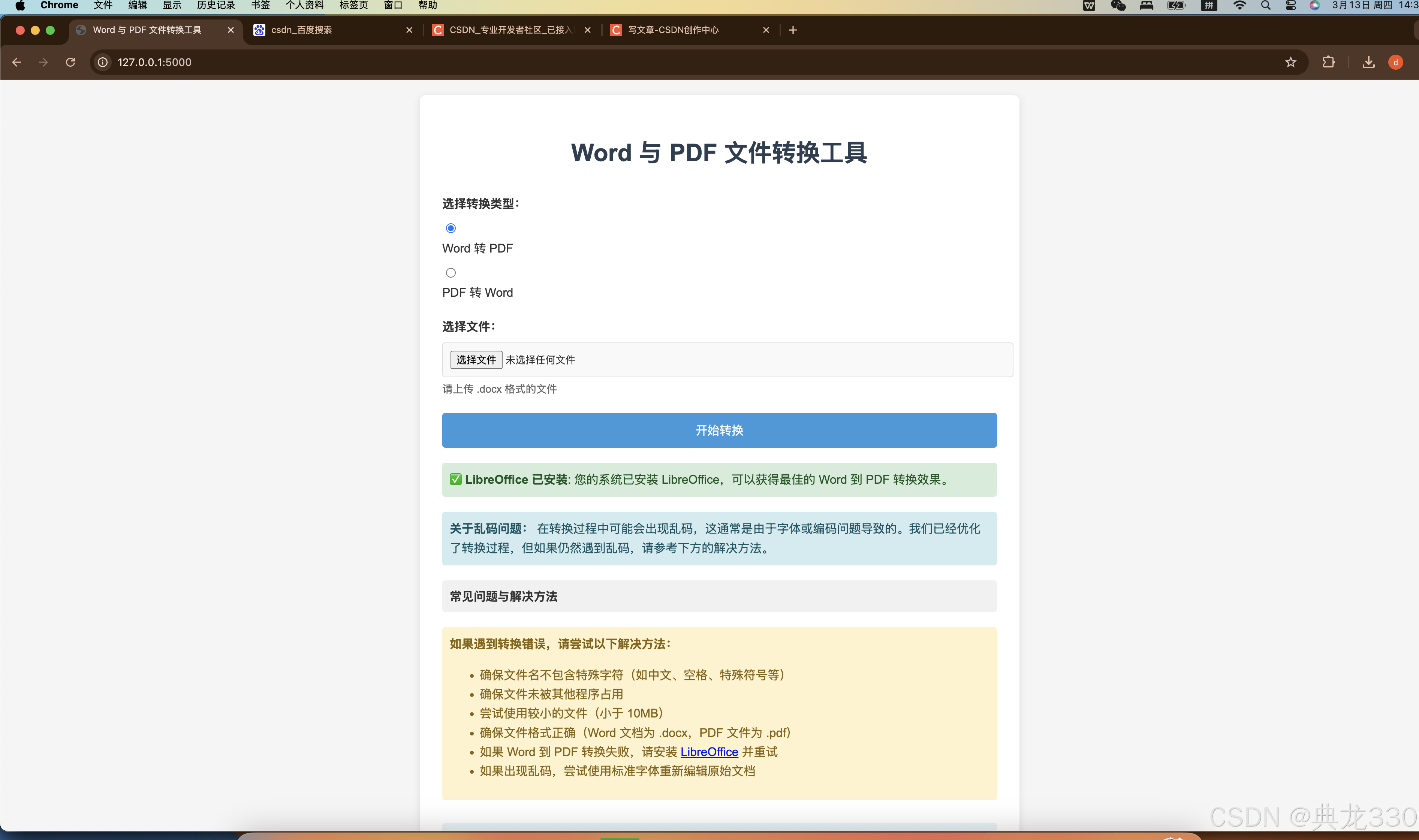
在 Web 界面上选择转换类型(Word 转 PDF 或 PDF 转 Word)
-
点击"选择文件"按钮并上传您的文件
-
点击"开始转换"按钮
-
转换完成后,文件将自动下载
效果演示
python
import os
import tempfile
import logging
import subprocess
import platform
import time
import shutil
from flask import Flask, render_template, request, redirect, url_for, flash, send_file, jsonify
from werkzeug.utils import secure_filename
from docx2pdf import convert as docx_to_pdf
from pdf2docx import Converter as pdf_to_docx
import check_libreoffice

# 创建日志目录
log_dir = os.path.join(os.getcwd(), 'logs')
os.makedirs(log_dir, exist_ok=True)

# 配置日志
logging.basicConfig(
    level=logging.DEBUG,
    format='%(asctime)s - %(name)s - %(levelname)s - %(message)s',
    handlers=[
        logging.FileHandler(os.path.join(log_dir, 'app.log'), encoding='utf-8'),
        logging.StreamHandler()
    ]
)
logger = logging.getLogger(__name__)

# 检查是否安装了LibreOffice
libreoffice_installed, libreoffice_path = check_libreoffice.check_libreoffice()
if libreoffice_installed:
    logger.info(f"LibreOffice 已安装: {libreoffice_path}")
else:
    logger.warning("LibreOffice 未安装,Word 到 PDF 转换可能不可靠")

app = Flask(__name__)
app.config['SECRET_KEY'] = 'your-secret-key'
app.config['UPLOAD_FOLDER'] = os.path.join(os.getcwd(), 'uploads')
app.config['MAX_CONTENT_LENGTH'] = 16 * 1024 * 1024  # 16MB max upload size

# 确保上传目录存在
os.makedirs(app.config['UPLOAD_FOLDER'], exist_ok=True)
logger.info(f"上传目录: {app.config['UPLOAD_FOLDER']}")

# 确保上传目录有正确的权限
try:
    os.chmod(app.config['UPLOAD_FOLDER'], 0o777)
    logger.info("已设置上传目录权限")
except Exception as e:
    logger.warning(f"无法设置上传目录权限: {str(e)}")

ALLOWED_EXTENSIONS = {'docx', 'pdf'}

def allowed_file(filename):
    return '.' in filename and filename.rsplit('.', 1)[1].lower() in ALLOWED_EXTENSIONS

# 使用LibreOffice/OpenOffice转换Word到PDF
def convert_word_to_pdf_with_libreoffice(input_file, output_file):
    """使用LibreOffice/OpenOffice转换Word到PDF"""
    system = platform.system()

    try:
        if system == 'Darwin':  # macOS
            # 检查是否安装了LibreOffice
            libreoffice_paths = [
                '/Applications/LibreOffice.app/Contents/MacOS/soffice',
                '/Applications/OpenOffice.app/Contents/MacOS/soffice'
            ]

            soffice_path = None
            for path in libreoffice_paths:
                if os.path.exists(path):
                    soffice_path = path
                    break

            if soffice_path is None:
                logger.error("在macOS上未找到LibreOffice或OpenOffice")
                return False

            # 添加字体嵌入和编码参数
            cmd = [
                soffice_path,
                '--headless',
                '--convert-to', 'pdf:writer_pdf_Export:EmbedStandardFonts=true',
                '--outdir', os.path.dirname(output_file),
                input_file
            ]
        elif system == 'Windows':
            # Windows上的LibreOffice路径
            libreoffice_paths = [
                r'C:\Program Files\LibreOffice\program\soffice.exe',
                r'C:\Program Files (x86)\LibreOffice\program\soffice.exe',
            ]

            soffice_path = None
            for path in libreoffice_paths:
                if os.path.exists(path):
                    soffice_path = path
                    break

            if soffice_path is None:
                logger.error("在Windows上未找到LibreOffice")
                return False

            # 添加字体嵌入和编码参数
            cmd = [
                soffice_path,
                '--headless',
                '--convert-to', 'pdf:writer_pdf_Export:EmbedStandardFonts=true',
                '--outdir', os.path.dirname(output_file),
                input_file
            ]
        else:  # Linux
            # 添加字体嵌入和编码参数
            cmd = [
                'libreoffice',
                '--headless',
                '--convert-to', 'pdf:writer_pdf_Export:EmbedStandardFonts=true',
                '--outdir', os.path.dirname(output_file),
                input_file
            ]

        logger.info(f"执行命令: {' '.join(cmd)}")
        process = subprocess.Popen(cmd, stdout=subprocess.PIPE, stderr=subprocess.PIPE)
        stdout, stderr = process.communicate()

        if process.returncode != 0:
            logger.error(f"LibreOffice转换失败: {stderr.decode('utf-8', errors='ignore')}")
            return False

        # LibreOffice生成的PDF文件名可能与我们期望的不同
        # 它通常使用输入文件名,但扩展名改为.pdf
        input_filename = os.path.basename(input_file)
        expected_output_filename = os.path.splitext(input_filename)[0] + '.pdf'
        expected_output_path = os.path.join(os.path.dirname(output_file), expected_output_filename)

        # 如果生成的文件名与期望的不同,重命名它
        if expected_output_path != output_file and os.path.exists(expected_output_path):
            os.rename(expected_output_path, output_file)

        return os.path.exists(output_file)
    except Exception as e:
        logger.exception(f"使用LibreOffice转换时出错: {str(e)}")
        return False

# 使用pdf2docx转换PDF到Word,添加更好的字体处理
def convert_pdf_to_word(input_file, output_file):
    """使用pdf2docx转换PDF到Word,添加更好的字体处理"""
    try:
        logger.info(f"开始转换PDF到Word: {input_file} -> {output_file}")

        # 使用pdf2docx库进行转换
        converter = pdf_to_docx(input_file)

        # 设置转换参数,提高字体处理能力
        converter.convert(output_file, start=0, end=None, pages=None,
                         kwargs={
                             'debug': False,
                             'min_section_height': 20,
                             'connected_border': False,
                             'line_overlap_threshold': 0.9,
                             'line_break_width_threshold': 2.0,
                             'line_break_free_space_ratio': 0.3,
                             'line_separate_threshold': 5.0,
                             'new_paragraph_free_space_ratio': 0.85,
                             'float_image_ignorable_gap': 5.0,
                             'page_margin_factor': 0.1
                         })
        converter.close()

        # 检查输出文件是否存在
        if not os.path.exists(output_file) or os.path.getsize(output_file) == 0:
            logger.error(f"转换后的文件不存在或为空: {output_file}")
            return False

        logger.info(f"PDF到Word转换成功: {output_file}, 大小: {os.path.getsize(output_file)} 字节")
        return True
    except Exception as e:
        logger.exception(f"PDF到Word转换失败: {str(e)}")
        return False

@app.route('/')
def index():
    return render_template('index.html', libreoffice_installed=libreoffice_installed)

@app.route('/convert', methods=['POST'])
def convert_file():
    # 检查是否有文件上传
    if 'file' not in request.files:
        flash('没有文件部分')
        logger.error('没有文件部分')
        return redirect(url_for('index'))

    file = request.files['file']

    # 如果用户没有选择文件,浏览器也会
    # 提交一个没有文件名的空部分
    if file.filename == '':
        flash('没有选择文件')
        logger.error('没有选择文件')
        return redirect(url_for('index'))

    if file and allowed_file(file.filename):
        # 安全地处理文件名
        original_filename = file.filename
        filename = secure_filename(original_filename)
        logger.info(f"原始文件名: {original_filename}, 安全文件名: {filename}")

        # 确保文件名不包含可能导致问题的字符
        filename = filename.replace('__', '_')

        # 创建完整的文件路径
        file_path = os.path.join(app.config['UPLOAD_FOLDER'], filename)
        logger.info(f"保存文件到: {file_path}")

        try:
            # 保存上传的文件
            file.save(file_path)

            # 检查文件是否成功保存
            if not os.path.exists(file_path):
                raise FileNotFoundError(f"文件保存失败: {file_path}")

            logger.info(f"文件成功保存: {file_path}, 大小: {os.path.getsize(file_path)} 字节")

            conversion_type = request.form.get('conversion_type')
            logger.info(f"转换类型: {conversion_type}")

            if conversion_type == 'word_to_pdf' and filename.lower().endswith('.docx'):
                # 转换 Word 到 PDF
                output_filename = filename.rsplit('.', 1)[0] + '.pdf'
                output_path = os.path.join(app.config['UPLOAD_FOLDER'], output_filename)
                logger.info(f"开始转换 Word 到 PDF: {file_path} -> {output_path}")

                # 确保输出路径可写
                output_dir = os.path.dirname(output_path)
                if not os.access(output_dir, os.W_OK):
                    logger.warning(f"输出目录不可写: {output_dir}")
                    try:
                        os.chmod(output_dir, 0o777)
                        logger.info(f"已修改输出目录权限: {output_dir}")
                    except Exception as e:
                        logger.error(f"无法修改输出目录权限: {str(e)}")

                # 尝试使用多种方法转换
                conversion_success = False

                # 如果安装了LibreOffice,优先使用它
                if libreoffice_installed:
                    logger.info("尝试使用LibreOffice转换...")
                    conversion_success = convert_word_to_pdf_with_libreoffice(file_path, output_path)
                    if conversion_success:
                        logger.info("使用LibreOffice转换成功")

                # 如果LibreOffice转换失败或未安装,尝试使用docx2pdf
                if not conversion_success:
                    try:
                        logger.info("尝试使用docx2pdf转换...")
                        docx_to_pdf(file_path, output_path)
                        # 等待一段时间,确保文件已经写入
                        time.sleep(2)
                        if os.path.exists(output_path) and os.path.getsize(output_path) > 0:
                            conversion_success = True
                            logger.info("使用docx2pdf转换成功")
                    except Exception as e:
                        logger.warning(f"使用docx2pdf转换失败: {str(e)}")

                # 检查转换是否成功
                if not conversion_success or not os.path.exists(output_path) or os.path.getsize(output_path) == 0:
                    # 尝试列出目录内容,看看文件是否在其他位置
                    logger.info(f"列出目录 {output_dir} 的内容:")
                    for f in os.listdir(output_dir):
                        logger.info(f"  - {f} ({os.path.getsize(os.path.join(output_dir, f))} 字节)")

                    if not libreoffice_installed:
                        error_msg = "转换失败: 建议安装 LibreOffice 以获得更可靠的转换"
                        flash(error_msg)
                        logger.error(error_msg)
                    else:
                        error_msg = f"转换后的文件不存在或为空: {output_path}"
                        flash(error_msg)
                        logger.error(error_msg)

                    return redirect(url_for('index'))

                logger.info(f"转换成功: {output_path}, 大小: {os.path.getsize(output_path)} 字节")

                # 使用临时文件复制一份,以防send_file后被删除
                with tempfile.NamedTemporaryFile(delete=False, suffix='.pdf') as temp_file:
                    temp_path = temp_file.name
                    with open(output_path, 'rb') as f:
                        temp_file.write(f.read())

                logger.info(f"已创建临时文件: {temp_path}")

                # 设置响应头,确保浏览器知道这是一个下载
                response = send_file(
                    temp_path,
                    as_attachment=True,
                    download_name=output_filename,
                    mimetype='application/pdf'
                )

                # 添加自定义头,防止缓存
                response.headers["Cache-Control"] = "no-cache, no-store, must-revalidate"
                response.headers["Pragma"] = "no-cache"
                response.headers["Expires"] = "0"
                response.headers["X-Conversion-Success"] = "true"

                return response

            elif conversion_type == 'pdf_to_word' and filename.lower().endswith('.pdf'):
                # 转换 PDF 到 Word
                output_filename = filename.rsplit('.', 1)[0] + '.docx'
                output_path = os.path.join(app.config['UPLOAD_FOLDER'], output_filename)
                logger.info(f"开始转换 PDF 到 Word: {file_path} -> {output_path}")

                # 确保输出路径可写
                output_dir = os.path.dirname(output_path)
                if not os.access(output_dir, os.W_OK):
                    logger.warning(f"输出目录不可写: {output_dir}")
                    try:
                        os.chmod(output_dir, 0o777)
                        logger.info(f"已修改输出目录权限: {output_dir}")
                    except Exception as e:
                        logger.error(f"无法修改输出目录权限: {str(e)}")

                # 使用改进的PDF到Word转换函数
                conversion_success = convert_pdf_to_word(file_path, output_path)

                # 检查转换是否成功
                if not conversion_success or not os.path.exists(output_path) or os.path.getsize(output_path) == 0:
                    # 尝试列出目录内容,看看文件是否在其他位置
                    logger.info(f"列出目录 {output_dir} 的内容:")
                    for f in os.listdir(output_dir):
                        logger.info(f"  - {f} ({os.path.getsize(os.path.join(output_dir, f))} 字节)")

                    error_msg = f"转换后的文件不存在或为空: {output_path}"
                    flash(error_msg)
                    logger.error(error_msg)
                    return redirect(url_for('index'))

                logger.info(f"转换成功: {output_path}, 大小: {os.path.getsize(output_path)} 字节")

                # 使用临时文件复制一份,以防send_file后被删除
                with tempfile.NamedTemporaryFile(delete=False, suffix='.docx') as temp_file:
                    temp_path = temp_file.name
                    with open(output_path, 'rb') as f:
                        temp_file.write(f.read())

                logger.info(f"已创建临时文件: {temp_path}")

                # 设置响应头,确保浏览器知道这是一个下载
                response = send_file(
                    temp_path,
                    as_attachment=True,
                    download_name=output_filename,
                    mimetype='application/vnd.openxmlformats-officedocument.wordprocessingml.document'
                )

                # 添加自定义头,防止缓存
                response.headers["Cache-Control"] = "no-cache, no-store, must-revalidate"
                response.headers["Pragma"] = "no-cache"
                response.headers["Expires"] = "0"
                response.headers["X-Conversion-Success"] = "true"

                return response

            else:
                flash('无效的转换类型或文件格式')
                logger.error(f"无效的转换类型或文件格式: {conversion_type}, 文件名: {filename}")
                return redirect(url_for('index'))

        except Exception as e:
            error_msg = f'转换过程中出错: {str(e)}'
            flash(error_msg)
            logger.exception(error_msg)
            return redirect(url_for('index'))
        finally:
            # 清理上传的文件
            try:
                if os.path.exists(file_path):
                    os.remove(file_path)
                    logger.info(f"已删除上传的文件: {file_path}")

                # 清理输出文件(如果存在)
                output_filename = filename.rsplit('.', 1)[0]
                pdf_output = os.path.join(app.config['UPLOAD_FOLDER'], output_filename + '.pdf')
                docx_output = os.path.join(app.config['UPLOAD_FOLDER'], output_filename + '.docx')

                if os.path.exists(pdf_output):
                    os.remove(pdf_output)
                    logger.info(f"已删除输出文件: {pdf_output}")

                if os.path.exists(docx_output):
                    os.remove(docx_output)
                    logger.info(f"已删除输出文件: {docx_output}")
            except Exception as e:
                logger.error(f"清理文件时出错: {str(e)}")

    flash('无效的文件类型。请上传 DOCX 或 PDF 文件。')
    logger.error(f"无效的文件类型: {file.filename if file else 'None'}")
    return redirect(url_for('index'))

# 添加一个路由来检查转换状态
@app.route('/check_conversion_status')
def check_conversion_status():
    return jsonify({"status": "success"})

if __name__ == '__main__':
    # 在启动应用程序之前检查LibreOffice
    check_libreoffice.main()
    app.run(debug=True)