文章目录
前言
AI和网上都是跑不起来或者版本过低的,还有各种BUG的。本文都是查阅官方文档得出的。如果你能跑起来请给个大大的赞!
OpenHTMLToPDF 简介
OpenHTMLToPDF 是一个纯 Java 库,基于 Flying Saucer 和 Apache PDFBox 2,支持将格式良好的 XML/XHTML(甚至一些 HTML5)文档渲染为 PDF 文件。它支持 CSS 2.1 及其后续标准进行布局和格式化,并能够处理 SVG 图像。
maven配置依赖
xml
<!-- OpenHTMLToPDF 核心库 -->
        <dependency>
            <groupId>at.datenwort.openhtmltopdf</groupId>
            <artifactId>openhtmltopdf-core</artifactId>
            <version>1.1.4</version>
        </dependency>
        <!-- PDFBox 渲染器 -->
        <dependency>
            <groupId>at.datenwort.openhtmltopdf</groupId>
            <artifactId>openhtmltopdf-pdfbox</artifactId>
            <version>1.1.4</version>
        </dependency>
        <dependency>
            <groupId>at.datenwort.openhtmltopdf</groupId>
            <artifactId>openhtmltopdf-svg-support</artifactId>
            <version>1.1.4</version>
        </dependency>
        <!-- Batik 核心库 -->
        <dependency>
            <groupId>org.apache.xmlgraphics</groupId>
            <artifactId>batik-dom</artifactId>
            <version>1.14</version> <!-- 与 OpenHTMLToPDF 兼容的版本 -->
        </dependency>

        <!-- Batik 常量库 -->
        <dependency>
            <groupId>org.apache.xmlgraphics</groupId>
            <artifactId>batik-constants</artifactId>
            <version>1.14</version> <!-- 与 OpenHTMLToPDF 兼容的版本 -->
        </dependency>

        <!-- Batik SVG 生成器 -->
        <dependency>
            <groupId>org.apache.xmlgraphics</groupId>
            <artifactId>batik-svggen</artifactId>
            <version>1.14</version> <!-- 与 OpenHTMLToPDF 兼容的版本 -->
        </dependency>
字体文件
HTML使用字体文件
html
<body style=\"font-family: 'PuHuiTi'\">demo代码
java
public class SvgHtmlToPdfConverter {
    //分页 <div style='page-break-before: always;'></div>
    public static void convertHtmlToPdf(String htmlContent, String pdfPath) throws IOException {
        try (FileOutputStream fos = new FileOutputStream(pdfPath)) {
            PdfRendererBuilder builder = new PdfRendererBuilder();
            // 正确写法:类路径绝对路径(需以 "/" 开头)
            // 1. 获取资源 URL
            builder.useFont(
                    () -> SvgHtmlToPdfConverter.class.getResourceAsStream("/fonts/Alibaba-PuHuiTi-Regular.ttf"),
                    "PuHuiTi", 12, PdfRendererBuilder.FontStyle.NORMAL, true
            );
            builder.toStream(fos);
            builder.useFastMode();
            builder.withHtmlContent(
                    htmlContent,
                    null);
            builder.useSVGDrawer(new BatikSVGDrawer());
            // 4. 输出到 PDF
            builder.run();

        }

    }
    public static void main(String[] args) {
        try {
            convertHtmlToPdf("html代码.........", "D:\\output.pdf");
        } catch (IOException e) {
            e.printStackTrace();
        }
    }
 }
其他
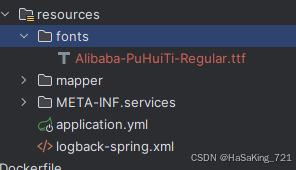
资源放置截图
防止maven编译字体文件
xml
<resources>
			<resource>
				<directory>src/main/resources</directory>
				<filtering>true</filtering>
				<excludes>
					<exclude>**/*.ttf</exclude>
				</excludes>
			</resource>
			<resource>
				<directory>src/main/resources</directory>
				<filtering>false</filtering>
				<includes>
					<include>**/*.ttf</include>
				</includes>
			</resource>
		</resources>