一般来说大模型基本是上知天文、下知地理无所不能的。但让大模型发个邮件试试,
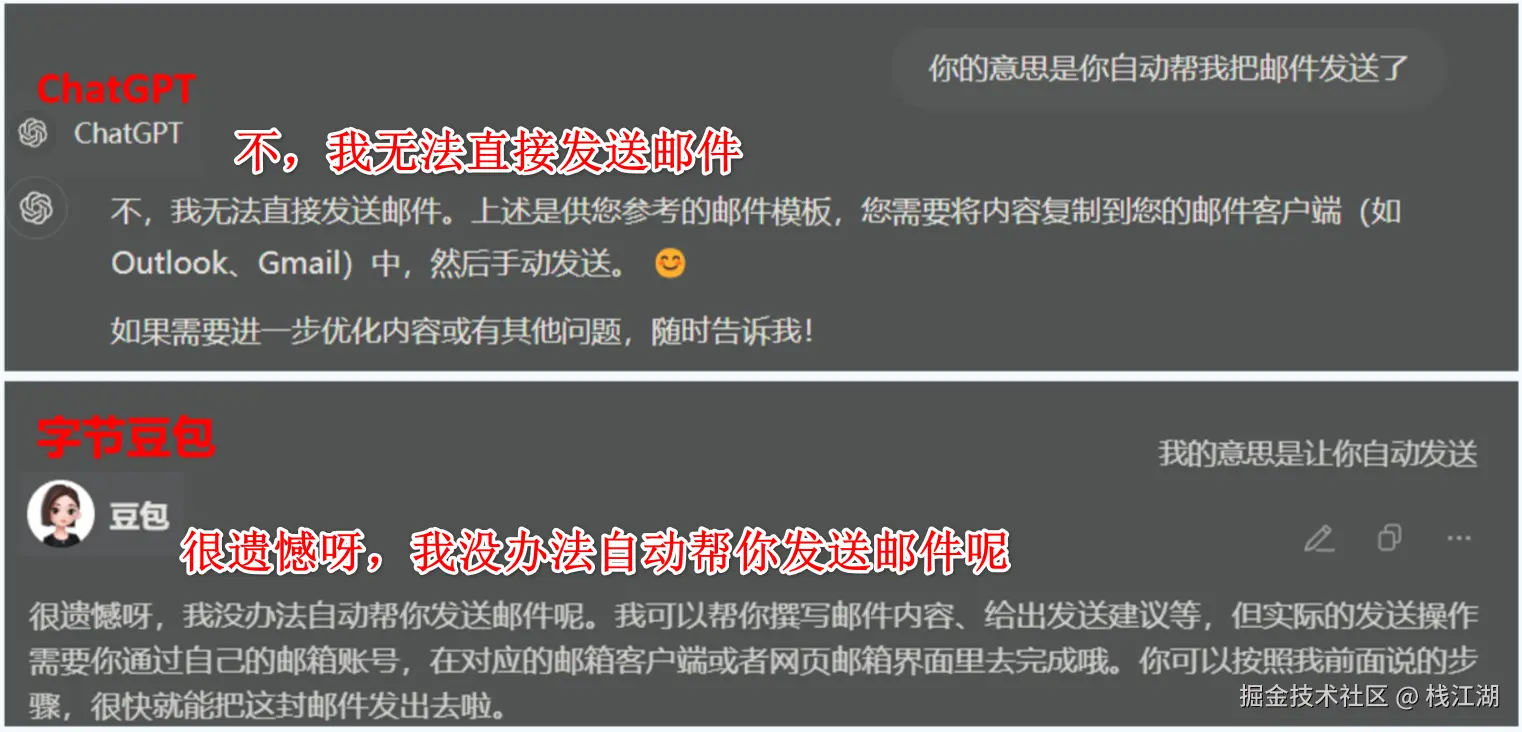
那么在大模型发展到第二阶段也就是 Agent 阶段时,大模型需要调用第三方应用的场景就越来越多,发个邮件,问个天气等等。
目前来说实现的方案就是 OpenAI 的 Function Calling 和 Claude 的 MCP。
而 Function Calling是openai自身模型能力的工具,适合需要快速接入OpenAI生态的场景。当然其核心思想(让大模型调用外部函数/API)也被多家厂商借鉴或实现类似功能。但没有统一的标准,所以 MCP 因应而生。
这里先来介绍一下 Function Calling,
一、Function Calling 介绍
那么在 2023 年的 6 月,由OpenAI 推出了"Function Calling"。Function Calling 就是为了解决此问题。通过 Function Calling,大模型能够通过结构化输入连接到外部系统,比如通过 API 进行交互,从而实现与外部世界的连接。
通过Function Calling AI 可以与外部工具和服务连接起来,这样 AI 的能力就非常的广阔。这样可以打造更智能、更强大的人工智能。
Function Calling 技术的不断发展,我们相信它将在未来的 AI 应用中发挥越来越重要的作用。
以下是官方对整个过程的描述:
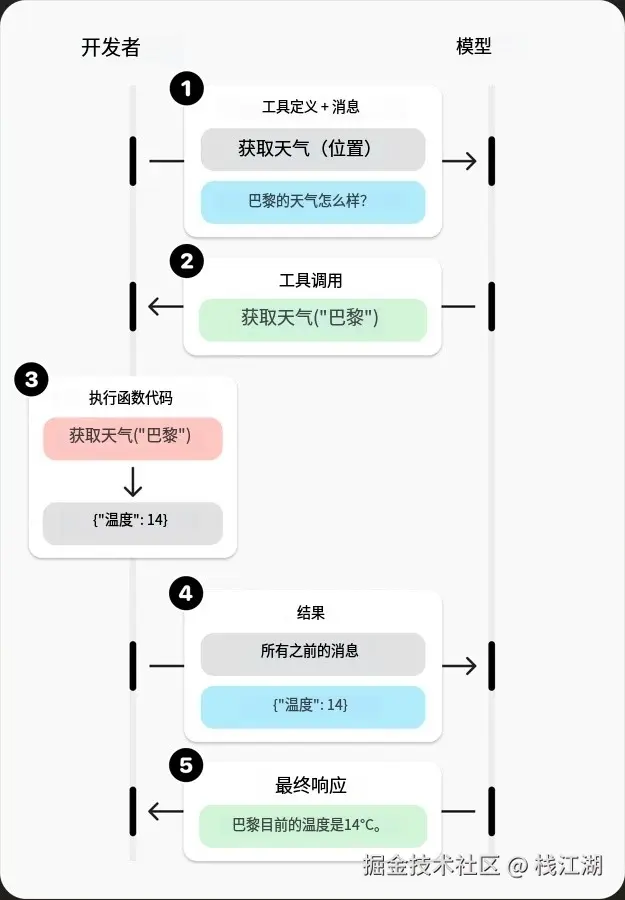
那么具体来看看在大模型中实现函数调用的具体步骤:
二、Function Calling 实现
这是我模型的一个 Python 项目,
bash
function_calling_project/
│── src/
│   │── main.py         			# 主程序入口
│   │── ai_client.py   			  # OpenAI API 客户端
│   │── function_tools.py     # 定义可供模型调用的函数
│   │── handlers.py     			# 处理模型返回的函数调用
Step1:编写主程序
示例代码: main.py(主程序入口)
python
from api_client import call_model
from handlers import handle_function_call
from tools import TOOLS

def main():
    input_messages = [{
        "role": "user",
        "content": "巴黎今天的天气如何?"
    }]

    response_output = call_model(input_messages, TOOLS)
    function_result = handle_function_call(response_output)

    if isinstance(function_result, dict):
        input_messages.append({
            "type": "function_call_output",
            "call_id": function_result["call_id"],
            "output": function_result["output"]
        })
        final_response = call_model(input_messages, TOOLS)
        print("最终响应:", final_response.output_text)
    else:
        print("处理失败:", function_result)

if __name__ == "__main__":
    main()
Step2:定义函数
首先,需要定义要调用的函数,它告诉模型它可以做什么以及期望什么样的输入参数。
📌 示例代码: function_tools.py(可提供给模型调用的函数)
python
import requests
def get_weather(latitude, longitude):
"""获取指定坐标的天气数据"""
response = requests.get(f"https://api.open-meteo.com/v1/forecast?latitude={latitude}&longitude={longitude}¤t=temperature_2m")
data = response.json()
return data['current']['temperature_2m']
TOOLS = [{
"type": "function",
"name": "get_weather",
"description": "获取指定经纬度的当前气温(摄氏)。",
"parameters": {
"type": "object",
"properties": {
"latitude": {"type": "number"},
"longitude": {"type": "number"}
},
"required": ["latitude", "longitude"],
"additionalProperties": False
},
"strict": True
}]Step3:函数定义传递给模型
调用模型时,需要将函数定义传递给模型。
📌 示例代码: ai_client.py(调用模型客户端程序)
ini
from openai import OpenAI
client = OpenAI()

input_messages = [{
    "role": "user",
    "content": "巴黎今天的天气如何?"
}]

response = client.responses.create(
    model="gpt-4.1",
    input=input_messages,
    tools=tools
)
Step3:模型决定调用函数
让模型来决定是否需要触发调用函数,如果模型认为需要调用函数,它会返回相应的函数名称和函数需要输入参数。
📌 示例返回结果:
css
[ { "type": "function_call", "id": "fc_12345xyz", "call_id": "call_12345xyz", "name": "get_weather", "arguments": "{"latitude":48.8566,"longitude":2.3522}" }]📌 示例代码: handlers.py(处理函数调用逻辑)
python
import json
from tools import get_weather

def handle_function_call(response_output):
    """解析模型的函数调用请求并执行"""
    if not response_output:
        return "未返回可用数据。"

    tool_call = response_output[0]  # 这里只处理第一个函数调用
    args = json.loads(tool_call['arguments'])

    if tool_call["name"] == "get_weather":
        result = get_weather(args["latitude"], args["longitude"])
        return {"call_id": tool_call["call_id"], "output": str(result)}

    return "无法识别的函数调用。"
Step4:执行函数
执行用户自己开发的函数或第三方函数,程序解析模型的响应并执行对应的函数代码。
📌 示例代码:handlers.py(处理函数调用逻辑)
css
result = get_weather(args["latitude"], args["longitude"])
return {"call_id": tool_call["call_id"], "output": str(result)}
Step5:返回函数执行结果
将结果提供给模型,以便它可以将信息整合到最终响应中。
📌 示例代码:
scss
final_response = call_model(input_messages, TOOLS)
print("最终响应:", final_response.output_text)
📌 示例最终输出:
"巴黎当前的气温是 14°C。"这就是在大模型中实现函数调用的完整过程!
三、总结
那我们来总结一下,就是用户把自己的函数定义给到模型,用户提问题后,模型看看要不要调用函数,当模型决定要调用函数时就生成函数需要的参数及格式,再调用函数并把结果合并,最终返回给用户。
那么这里有个比较关键的东西就是函数定义:
json
{
    "type": "function",
    "name": "get_weather",
    "description": "获取指定经纬度的当前气温(摄氏)。",
    "parameters": {
        "type": "object",
        "properties": {
            "latitude": {"type": "number"},
            "longitude": {"type": "number"}
        }
    }
}
它会最模型决定是否要调用函数的关键, 每个函数都带有一个 description,用来告诉模型它的用途。 如果 description 明确提到天气查询,且匹配用户请求的意图,模型就可能决定调用这个函数。当然description 并不是唯一判断的依据,它还会结合其他因素。
虽然 Function Calling 实现了调取外部函数,但 Function Calling是OpenAI为自家模型设计的工具,最适合需要快速接入OpenAI生态的场景。虽然其核心思想(让大模型调用外部函数/API)被其他厂商借鉴,但各家实现方式不同,缺乏统一标准,这也正是 Claude 推出 MCP的原因。
我是栈江湖,如果你喜欢此文章,不要忘记点赞+关注!