1.Upload上传组件功能:
文件校验 :
文件格式校验/文件大小校验/上传文件总个数校验
相关功能 :
拖拽功能/上传到远程(七牛)/文件删除及下载
2.组件效果展示:
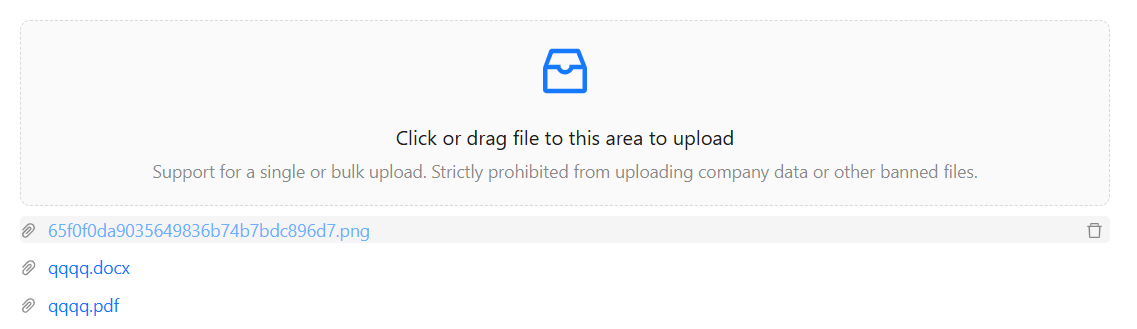
3.疑难点及解决方案:
Promise.all多文件并行上传到远程(七牛云):
(1)在beforeUpload钩子函数中获取token
(2)循环fileList文件列表,使用fetch将所有文件上传到七牛,并将结果包装成Promise return出去
(3)待所有文件上传成功后,通过Promise.all获取并存储结果,并通过useEffect及时将七牛返回的结果添加到fileList文件列表中。
(4)注:由于一次上传多个文件时,beforeUpload钩子函数会执行多次,需要使用debounce进行防抖。
const [promiseAllResult, setPromiseAllResult] = useState<UploadFile[]>([]);

const beforeUpload: UploadProps["beforeUpload"] = (file, fileList) => {
		debouncedBeforeUpload(fileList);
		return false;
};

const debouncedBeforeUpload = debounce(async fileList => {
		...
		const res = await getQiniuTokenApi();
		const uploadPromises = fileList.map(async (file: any) => {
				return new Promise((resolve, reject) => {
					const formData = new FormData();
					formData.append("file", file);
					formData.append("token", res.data?.upToken || "");

					fetch("https://upload.qiniup.com/", {
						method: "POST",
						body: formData
					})
						.then(response => {
							if (response.status === 200) {
								return response
									.json()
									.then(data => {
										// 返回包含文件信息和响应数据的对象
										resolve({
											uid: file.uid,
											url: "https://" + res.data?.domain + "/" + data.key + "?attname=" + file.name,
											filePreviewUrl: "https://" + res.data?.domain + "/" + data.key
										});
									})
									.catch(() => {
										reject(new Error("Upload failed"));
									});
							} else {
								reject(new Error("Upload failed"));
							}
						})
						.catch(error => reject(error));
				});
		});
		Promise.all(uploadPromises)
				.then(res => {
					setPromiseAllResult(res);
					message.success("文件上传成功");
				})
				.catch(() => message.error("文件上传失败"));
});

useEffect(() => {
		if (promiseAllResult && promiseAllResult.length > 0 && fileList && fileList.length > 0) {
				fileList.forEach(item => {
					const findResult = promiseAllResult.find(file => file.uid === item.uid);
					if (findResult) {
						// @ts-ignore
						item.filePreviewUrl = findResult.filePreviewUrl;
						item.url = findResult.url;
					}
				});
		}
}, [promiseAllResult]);
4.完整代码:
封装文件上传组件:
src/component/Upload/index.tsx:
import { forwardRef, useImperativeHandle, useState, useEffect } from "react";
import { Upload, message } from "antd";
import { InboxOutlined } from "@ant-design/icons";
import type { UploadFile, UploadProps } from "antd";
import { getQiniuTokenApi } from "@/api/modules/assetManagement";
import { debounce } from "lodash";
const { Dragger } = Upload;
interface UploadComType {
	maxCount?: number;
	accept?: string[];
	size?: number;
	multiple?: boolean;
}
const UploadCom = forwardRef(
	(
		{
			maxCount = 3,
			accept = [
				".doc",
				".docx",
				".xml",
				"application/msword",
				"application/vnd.openxmlformats-officedocument.wordprocessingml.document",
				"application/pdf",
				"image/png",
				"image/jpeg"
			],
			size = 2,
			multiple = true
		}: UploadComType,
		ref: any
	) => {
		const [fileList, setFileList] = useState<UploadFile[]>([]);
		const [promiseAllResult, setPromiseAllResult] = useState<UploadFile[]>([]);
		useEffect(() => {
			if (promiseAllResult && promiseAllResult.length > 0 && fileList && fileList.length > 0) {
				fileList.forEach(item => {
					const findResult = promiseAllResult.find(file => file.uid === item.uid);
					if (findResult) {
						// @ts-ignore
						item.filePreviewUrl = findResult.filePreviewUrl;
						item.url = findResult.url;
					}
				});
			}
		}, [promiseAllResult]);
		useImperativeHandle(ref, () => ({
			getFileList: () => {
				return fileList;
			},
			parentSetList: (list: UploadFile[]) => {
				setFileList(list);
			}
		}));
		const onRemove = (file: UploadFile) => {
			const list = fileList.filter(item => item.uid !== file.uid);
			setFileList(list);
		};
		const beforeUpload: UploadProps["beforeUpload"] = (file, fileList) => {
			debouncedBeforeUpload(fileList);
			return false;
		};
		const debouncedBeforeUpload = debounce(async fileList => {
			let newFileList = fileList.filter((file: any) => {
				// 上传中的文件不进行校验
				if (file.status === "uploading") return true;

				// 校验文件类型
				const isFileTypeValid = accept.includes(file.type || "");
				if (!isFileTypeValid) {
					message.error(`${file.name} 不是允许的文件类型`);
					return false;
				}
				// 校验文件大小
				const isFileSizeValid = (file.size || 0) <= size * 1024 * 1024;
				if (!isFileSizeValid) {
					message.error(`${file.name} 超过最大文件大小限制 (${size}MB)`);
					return false;
				}
				return true;
			});
			if (newFileList.length === 0) {
				message.warning("没有符合要求的文件可上传");
				return false;
			}

			const res = await getQiniuTokenApi();
			const uploadPromises = newFileList.map(async (file: any) => {
				return new Promise((resolve, reject) => {
					const formData = new FormData();
					formData.append("file", file);
					formData.append("token", res.data?.upToken || "");

					fetch("https://upload.qiniup.com/", {
						method: "POST",
						body: formData
					})
						.then(response => {
							if (response.status === 200) {
								return response
									.json()
									.then(data => {
										// 返回包含文件信息和响应数据的对象
										resolve({
											name: file.name,
											size: file.size,
											uid: file.uid,
											type: file.type,
											status: file.status,
											url: "https://" + res.data?.domain + "/" + data.key + "?attname=" + file.name,
											filePreviewUrl: "https://" + res.data?.domain + "/" + data.key
										});
									})
									.catch(() => {
										reject(new Error("Upload failed"));
									});
							} else {
								reject(new Error("Upload failed"));
							}
						})
						.catch(error => reject(error));
				});
			});
			Promise.all(uploadPromises)
				.then(res => {
					setPromiseAllResult(res);
					message.success("文件上传成功");
				})
				.catch(() => message.error("文件上传失败"));
		});
		const handleChange: UploadProps["onChange"] = ({ fileList }) => {
			let newFileList = fileList;
			if (newFileList.length > maxCount) {
				message.warning(`最多可上传${maxCount}个文件`);
				newFileList = newFileList.slice(-maxCount);
			}
			setFileList(newFileList);
		};

		const uploadProps: UploadProps = {
			name: "file",
			onRemove,
			beforeUpload: beforeUpload,
			multiple: multiple,
			onChange: handleChange,
			accept: accept.join(",")
		};

		return (
			<div>
				<Dragger {...uploadProps} fileList={fileList}>
					<p className="ant-upload-drag-icon">
						<InboxOutlined />
					</p>
					<p className="ant-upload-text">Click or drag file to this area to upload</p>
					<p className="ant-upload-hint">
						Support for a single or bulk upload. Strictly prohibited from uploading company data or other banned files.
					</p>
				</Dragger>
			</div>
		);
	}
);
export default UploadCom;
使用文件上传组件:
import UploadCom from "@/components/Upload/index";

const uploadComRef = useRef<any>(null);

<UploadCom ref={uploadComRef} />

//获取组件中的文件
const file = uploadComRef.current?.getFileList();

//给组件中的文件赋初始值
uploadComRef.current?.parentSetList(files);