在 React 内部实现中,将 render 函数分为两个阶段:
- 渲染阶段
- 提交阶段
其中渲染阶段可以分为 beginWork 和 completeWork 两个阶段,而提交阶段对应着 commitWork。
在之前的root.render过程中,渲染过程无论是并发模式执行还是同步模式执行,都是执行到函数performUnitOfWork,所以,这次,具体看看performUnitOfWork函数的执行过程。
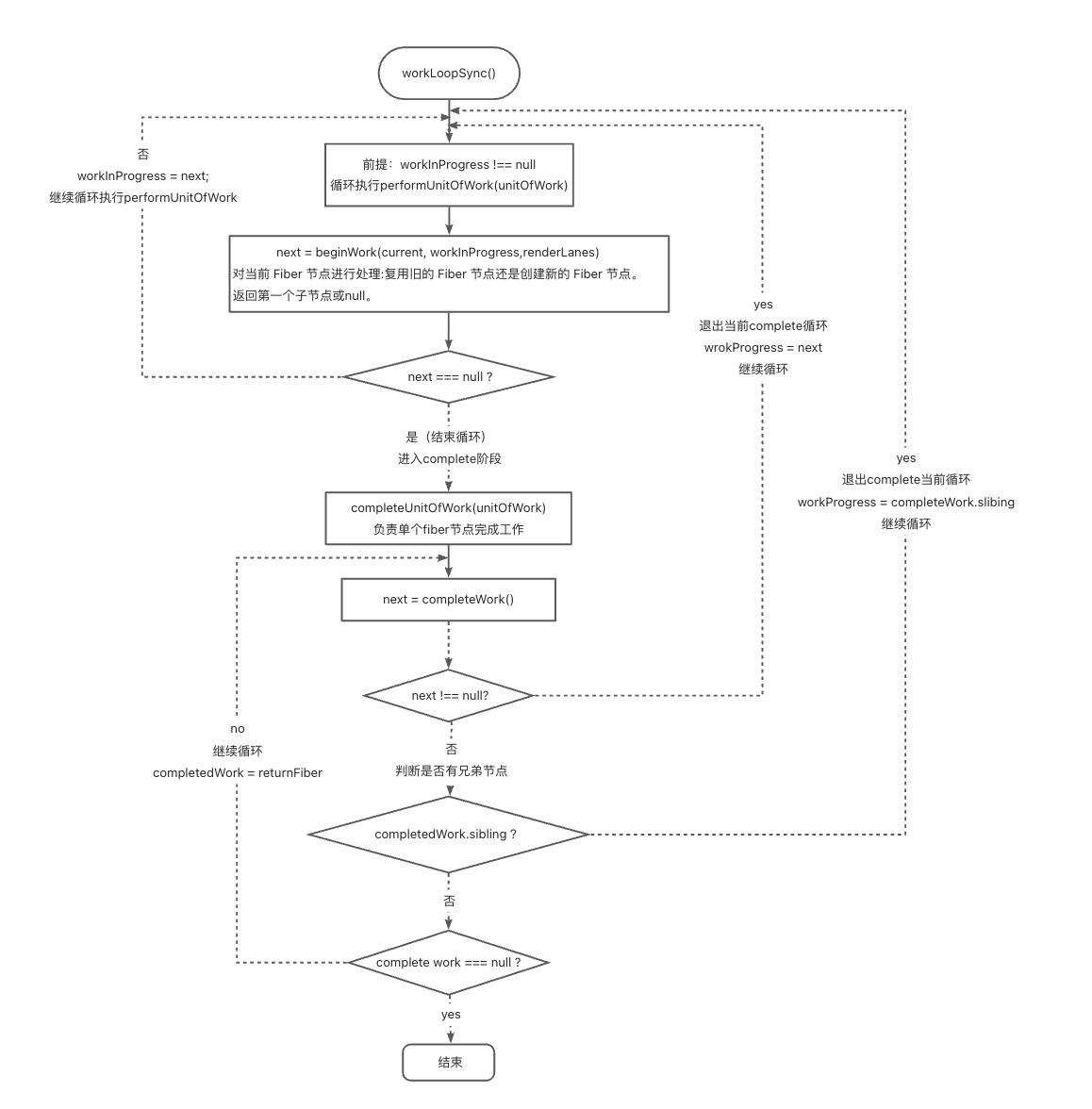
workLoopSync
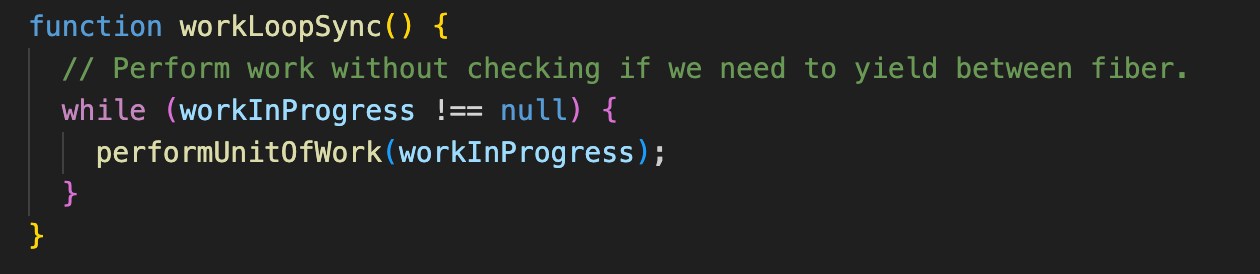
performUnitOfWork
performUnitOfWork 函数的主要作用是执行单个 Fiber 节点的工作单元。该函数会根据当前 Fiber 节点的状态,调用 beginWork 函数开始处理这个 Fiber 节点,并根据处理结果决定是继续处理下一个 Fiber 节点,还是完成当前 Fiber 节点的工作。
函数参数含义
- unitOfWork:类型为
Fiber,表示当前要处理的Fiber节点,也就是当前的工作单元。
javascript
function performUnitOfWork(unitOfWork: Fiber): void {
  // unitOfWork.alternate 指向当前 Fiber 节点的替代节点。在 React 的协调过程中,每个 Fiber 节点都有一个对应的替代节点,用于在双缓冲机制中存储旧的状态。这里将其赋值给 current。
  const current = unitOfWork.alternate;

  // next:用于存储 beginWork 函数返回的下一个要处理的 Fiber 节点。
  let next;


// 调用 beginWork 函数开始处理当前 Fiber 节点,传入当前 Fiber 节点的替代节点 current、当前 Fiber 节点 unitOfWork 以及相关的渲染车道 entangledRenderLanes。beginWork 函数会根据 Fiber 节点的类型和状态,执行相应的工作,如创建新的 Fiber 节点、更新已有 Fiber 节点等,并返回下一个要处理的 Fiber 节点。
  next = beginWork(current, unitOfWork, entangledRenderLanes);


  // 将 unitOfWork 的 pendingProps(待处理的属性)赋值给 memoizedProps(记忆化的属性)。这意味着当前 Fiber 节点的属性已经被处理并确定下来。
  unitOfWork.memoizedProps = unitOfWork.pendingProps;

  // 如果 next 为 null,说明 beginWork 函数没有返回下一个要处理的 Fiber 节点,即当前 Fiber 节点的工作没有产生新的工作。
  if (next === null) {
    // If this doesn't spawn new work, complete the current work.
    // 调用 completeUnitOfWork 函数完成当前 Fiber 节点的工作,可能会进行一些清理和提交操作。
    completeUnitOfWork(unitOfWork);
  } else {
    // 如果 next 不为 null,将 next 赋值给 workInProgress,表示下一个要处理的 Fiber 节点成为当前的工作进行中的节点,后续将继续处理这个节点。
    workInProgress = next;
  }
}
渲染阶段一beginWork
beginWork 函数的主要任务是根据不同的 Fiber 节点类型和更新情况,对当前 Fiber 节点进行处理,决定是复用旧的 Fiber 节点,还是创建新的子 Fiber 节点。该函数会根据 Fiber 节点的 tag 属性(表示节点类型),调用不同的处理函数来更新或挂载节点。
beginWork函数接收三个参数:
current:旧的 Fiber 节点,若为null则表示没有旧节点。workInProgress:新的 Fiber 节点,也就是要进行处理的节点。renderLanes:渲染优先级车道,用于标识当前渲染任务的优先级。
javascript
function beginWork(
  current: Fiber | null,
  workInProgress: Fiber,
  renderLanes: Lanes,
): Fiber | null {

  // 有旧节点,非首次渲染
  if (current !== null) {
    // current.memoizedProps 存储了旧 Fiber 节点上一次渲染时使用的属性。
    const oldProps = current.memoizedProps;

    // workInProgress.pendingProps 存储了新 Fiber 节点即将使用的属性。
    const newProps = workInProgress.pendingProps;

    if (
      oldProps !== newProps ||
      hasLegacyContextChanged() )
    ) {

      didReceiveUpdate = true;

    } else {

      const hasScheduledUpdateOrContext = checkScheduledUpdateOrContext(
        current,
        renderLanes,
      );

      // 尝试提前退出渲染流程
      if (
        !hasScheduledUpdateOrContext &&
        (workInProgress.flags & DidCapture) === NoFlags
      ) {
        // No pending updates or context. Bail out now.
        didReceiveUpdate = false;
        return attemptEarlyBailoutIfNoScheduledUpdate(
          current,
          workInProgress,
          renderLanes,
        );
      }

      if ((current.flags & ForceUpdateForLegacySuspense) !== NoFlags) {
        didReceiveUpdate = true;
      } else {
        didReceiveUpdate = false;
      }
    }

  } else {

    // 首次渲染时,将 didReceiveUpdate 标记为 false。
    didReceiveUpdate = false;
  }

  // 将 workInProgress.lanes 设置为 NoLanes 时,意味着当前 Fiber 节点没有需要处理的更新任务,或者更新任务已经处理完毕。
  // 会清除当前 workInProgress Fiber 节点上的所有更新标记。
  workInProgress.lanes = NoLanes;

  switch (workInProgress.tag) {
      // 省略代码。。。

    case Throw: {
      // This represents a Component that threw in the reconciliation phase.
      // So we'll rethrow here. This might be a Thenable.
      throw workInProgress.pendingProps;
    }
  }


}
<Tag>FunctionComponent(常量为0)
负责解析函数组件的 props,并调用 updateFunctionComponent 执行组件的实际渲染。主要工作包括:
- 获取组件类型和待处理的 props。
- 解析默认 props(针对非类组件)。
- 调用函数组件的更新逻辑。
javascript
case FunctionComponent: {
  // fiber的组件类型
  const Component = workInProgress.type;
  // 待处理props
  const unresolvedProps = workInProgress.pendingProps;

  const resolvedProps =
    disableDefaultPropsExceptForClasses ||
    workInProgress.elementType === Component
      ? unresolvedProps
      : resolveDefaultPropsOnNonClassComponent(Component, unresolvedProps);

  return updateFunctionComponent(
    current,// 表示当前的 Fiber 节点
    workInProgress,// 正在处理的fiber
    Component,// 函数组件
    resolvedProps,// 解析后的属性props
    renderLanes,// 渲染优先级车道
  );
}
updateFunctionComponent
updateFunctionComponent 函数负责执行函数组件,处理 Hooks,并根据返回的 JSX 内容生成新的子 Fiber 节点。该函数实现了函数组件的渲染逻辑、状态管理以及性能优化(如 bailout 机制)。
javascript
function updateFunctionComponent(
  current: null | Fiber,
  workInProgress: Fiber,
  Component: any,
  nextProps: any,
  renderLanes: Lanes,
) {

  let context;
  if (!disableLegacyContext && !disableLegacyContextForFunctionComponents) {
  //   // 未屏蔽的上下文
    const unmaskedContext = getUnmaskedContext(workInProgress, Component, true);
    // 经过屏蔽的上下文
    context = getMaskedContext(workInProgress, unmaskedContext);
  }

  let nextChildren;
  let hasId;

  prepareToReadContext(workInProgress, renderLanes);

  // 执行hooks
  nextChildren = renderWithHooks(
    current,
    workInProgress,
    Component,
    nextProps,
    context,
    renderLanes,
  );

  // 表示组件没有接收到新的更新。
  if (current !== null && !didReceiveUpdate) {
    // bailoutHooks 会跳过 Hooks 的更新
    bailoutHooks(current, workInProgress, renderLanes);
    // 直接复用之前的结果。
    return bailoutOnAlreadyFinishedWork(current, workInProgress, renderLanes);
  }

  // React DevTools reads this flag.
  // 标记已完成
  workInProgress.flags |= PerformedWork;

  //reconcileChildren 函数用于对比新旧子节点,生成新的 Fiber 树结构。
  reconcileChildren(current, workInProgress, nextChildren, renderLanes);

  return workInProgress.child;
}
工具函数之 resolveDefaultPropsOnNonClassComponent
resolveDefaultPropsOnNonClassComponent 是 React 中用于处理非类组件(如函数组件)默认 props 的函数。它会将组件定义的 defaultProps 对象与实际传入的 props 合并,确保未显式提供的 props 使用默认值。
函数参数含义:
Component:组件本身(函数或类)。baseProps:实际传入的 props 对象。
javascript
function resolveDefaultPropsOnNonClassComponent(
  Component: any,
  baseProps: Object,
): Object {
  // 若启用则仅对类组件保留默认 props 支持,函数组件将完全忽略 defaultProps。
  if (disableDefaultPropsExceptForClasses) {
    // Support for defaultProps is removed in React 19 for all types
    // except classes.
    return baseProps;
  }
  // 合并默认 props
  if (Component && Component.defaultProps) {
    // Resolve default props. Taken from ReactElement
    const props = assign({}, baseProps);
    const defaultProps = Component.defaultProps;
    for (const propName in defaultProps) {
      if (props[propName] === undefined) {
        props[propName] = defaultProps[propName];
      }
    }
    return props;
  }
  return baseProps;
}
工具函数之 bailoutHooks
bailoutHooks 函数用于在组件无需重新渲染时跳过 Hooks 的更新。当组件的 props、context 或状态没有变化时,React 会触发 bailout 逻辑,直接复用之前的渲染结果,从而避免不必要的计算和副作用执行。
TypeScript
 function bailoutHooks(
  current: Fiber,
  workInProgress: Fiber,
  lanes: Lanes,
): void {
   // 复用 Hooks 更新队列
  workInProgress.updateQueue = current.updateQueue;

   // 清除副作用
   // PassiveEffect:表示存在需要异步执行的副作用(如 useEffect)。
// UpdateEffect:表示存在需要同步执行的副作用(如 useLayoutEffect)。
  workInProgress.flags &= ~(PassiveEffect | UpdateEffect);

   // 从当前 Fiber 的 lanes 中移除本次渲染的优先级,表示该优先级的更新已处理完毕。
  current.lanes = removeLanes(current.lanes, lanes);
}
bailout 机制通常在以下情况触发:
- props 未变化 :前后 props 对象通过浅比较(
Object.is)相等。 - context 未变化:组件依赖的上下文值没有更新。
- 被 React.memo 包裹 :函数组件被
React.memo高阶组件包裹,且 props 未变化。 - 无状态更新:组件内部状态没有变化。
工具函数之 bailoutOnAlreadyFinishedWork
bailoutOnAlreadyFinishedWork 函数用于在组件无需重新渲染时直接复用现有 Fiber 树结构。当组件的 props、状态或上下文没有变化时,React 会触发 bailout 逻辑,跳过该组件及其子树的协调过程,直接复用之前的渲染结果,从而显著提升性能。
TypeScript
function bailoutOnAlreadyFinishedWork(
  current: Fiber | null,
  workInProgress: Fiber,
  renderLanes: Lanes,
): Fiber | null {
  if (current !== null) {
    // 直接将当前 Fiber 的依赖信息复制到新 Fiber,避免重新收集依赖。
    workInProgress.dependencies = current.dependencies;
  }

  // 标记跳过的更新优先级
  markSkippedUpdateLanes(workInProgress.lanes);

  // Check if the children have any pending work.
  if (!includesSomeLane(renderLanes, workInProgress.childLanes)) {

    // 启用延迟上下文传播的
    if (enableLazyContextPropagation && current !== null) {

      lazilyPropagateParentContextChanges(current, workInProgress, renderLanes);
      if (!includesSomeLane(renderLanes, workInProgress.childLanes)) {
        return null;
      }
    } else {
      return null;
    }
  }

// 克隆子节点
  cloneChildFibers(current, workInProgress);
  return workInProgress.child;
}
工具函数之 markSkippedUpdateLanes
markSkippedUpdateLanes 是 React 性能监控系统中的关键函数,用于记录被跳过的更新优先级。当组件由于 bailout 机制(如 props 未变化)而跳过渲染时,React 使用该函数标记这些被跳过的优先级
javascript
function markSkippedUpdateLanes(lane: Lane | Lanes): void {
  workInProgressRootSkippedLanes = mergeLanes(
    lane,
    workInProgressRootSkippedLanes,
  );
}

let workInProgressRootSkippedLanes: Lanes = NoLanes;
工具函数之 includesSomeLane
includesSomeLane 函数用于判断两个优先级集合(Lanes)是否存在交集。
TypeScript
function includesSomeLane(a: Lanes | Lane, b: Lanes | Lane): boolean {
  return (a & b) !== NoLanes;
}
工具函数之 cloneChildFibers
cloneChildFibers 函数用于在组件 bailout(跳过渲染)时浅克隆子 Fiber 节点。当父组件因 props 未变化而无需重新渲染时,React 会复用子 Fiber 结构,通过克隆操作创建新的 workInProgress 树,避免重新协调整个子树,从而显著提升性能。
javascript
function cloneChildFibers(
  current: Fiber | null,
  workInProgress: Fiber,
): void {
  // 若 current 存在且子节点已变化,抛出错误
  if (current !== null && workInProgress.child !== current.child) {
    throw new Error('Resuming work not yet implemented.');
  }

  if (workInProgress.child === null) {
    return;
  }

  // 克隆首个子节点
  let currentChild = workInProgress.child;
  let newChild = createWorkInProgress(currentChild, currentChild.pendingProps);
  workInProgress.child = newChild;

  newChild.return = workInProgress;
  // 循环克隆所有兄弟节点
  while (currentChild.sibling !== null) {
    currentChild = currentChild.sibling;
    newChild = newChild.sibling = createWorkInProgress(
      currentChild,
      currentChild.pendingProps,
    );
    newChild.return = workInProgress;
  }
  // 最后一个节点的 sibling 设为 null,确保链表正确结束。
  newChild.sibling = null;
}
工具函数之 prepareToReadContext
prepareToReadContext 函数是 React 渲染流程中的关键环节,用于为当前 Fiber 节点准备上下文读取环境。它主要完成以下工作:
- 设置当前渲染的 Fiber 节点。
- 重置上下文依赖链表。
- 处理上下文更新标记,确保依赖的上下文变化能触发组件重新渲染。
javascript
function prepareToReadContext(
  workInProgress: Fiber,
  renderLanes: Lanes,
): void {
  // currentlyRenderingFiber:全局变量,指向当前正在渲染的 Fiber 节点。
// lastContextDependency:全局变量,用于构建上下文依赖链表,初始化为 null。
  currentlyRenderingFiber = workInProgress;
  lastContextDependency = null;

  const dependencies = workInProgress.dependencies;
  if (dependencies !== null) {
    if (enableLazyContextPropagation) {
      // Reset the work-in-progress list
      // 重置依赖链表(延迟传播模式)
      dependencies.firstContext = null;
    } else {
      const firstContext = dependencies.firstContext;
      if (firstContext !== null) {
        if (includesSomeLane(dependencies.lanes, renderLanes)) {
          // Context list has a pending update. Mark that this fiber performed work.
              // 上下文有更新,标记当前 Fiber 执行了工作
          markWorkInProgressReceivedUpdate();
        }
        // Reset the work-in-progress list
        dependencies.firstContext = null;
      }
    }
  }
}
<Tag>HostRoot
javascript
case HostRoot:
  return updateHostRoot(current, workInProgress, renderLanes);
工具函数之 updateHostRoot
updateHostRoot 是 React 渲染流程中处理根组件(HostRoot Fiber)的核心函数,负责协调根组件的更新逻辑,包括状态处理、子节点 reconciliation、服务端渲染水合(Hydration)等。
javascript
function updateHostRoot(
  current: null | Fiber,
  workInProgress: Fiber,
  renderLanes: Lanes,
) {
  // 推入根组件的上下文,确保子组件能访问正确的根状态。
  // pushHostRootContext(workInProgress);

  if (current === null) {
    throw new Error('Should have a current fiber. This is a bug in React.');
  }

  // 获取新 props 和旧状态
  const nextProps = workInProgress.pendingProps;
  const prevState = workInProgress.memoizedState;
  const prevChildren = prevState.element;

  // 复制当前更新队列到新的 workInProgress Fiber,确保更新操作的不可变性。
  cloneUpdateQueue(current, workInProgress);
  // 计算新的根状态(nextState),处理状态更新(如 setState)和副作用。
  processUpdateQueue(workInProgress, nextProps, null, renderLanes);

  const nextState: RootState = workInProgress.memoizedState;
  const root: FiberRoot = workInProgress.stateNode;
  // pushRootTransition(workInProgress, root, renderLanes);


  // suspendIfUpdateReadFromEntangledAsyncAction();

  const nextChildren = nextState.element;

  if (supportsHydration && prevState.isDehydrated) {


  } else {

    // resetHydrationState();

    // 若新子节点与旧子节点相同,通过 bailout 跳过调和过程,直接复用现有 Fiber。
    if (nextChildren === prevChildren) {
      return bailoutOnAlreadyFinishedWork(current, workInProgress, renderLanes);
    }

    // 当子节点变化时,通过 reconcileChildren 生成新的子 Fiber 树,进入 diff 流程。
    reconcileChildren(current, workInProgress, nextChildren, renderLanes);
  }
  return workInProgress.child;
}
工具函数之 cloneUpdateQueue
cloneUpdateQueue 是 React 内部用于克隆更新队列(Update Queue)的核心函数,主要作用是在调和(Reconciliation)阶段为 workInProgress Fiber 创建当前 Fiber(current)的更新队列副本。
javascript
function cloneUpdateQueue<State>(
  current: Fiber,
  workInProgress: Fiber,
): void {
  // Clone the update queue from current. Unless it's already a clone.
  const queue: UpdateQueue<State> = (workInProgress.updateQueue: any);
  const currentQueue: UpdateQueue<State> = (current.updateQueue: any);

   // 仅当新旧队列引用相同时才执行克隆(避免重复克隆)
  if (queue === currentQueue) {
    const clone: UpdateQueue<State> = {
      baseState: currentQueue.baseState,
      firstBaseUpdate: currentQueue.firstBaseUpdate,
      lastBaseUpdate: currentQueue.lastBaseUpdate,
      shared: currentQueue.shared,
      callbacks: null, // 重置回调,避免旧回调影响新 Fiber
    };
    workInProgress.updateQueue = clone;
  }
}
javascript
interface UpdateQueue<State> {
  baseState: State;                // 基础状态(未处理更新的状态)
  firstBaseUpdate: Update<State>;  // 第一个未处理的更新
  lastBaseUpdate: Update<State>;   // 最后一个未处理的更新
  shared: { [key: string]: mixed }; // 共享状态(如上下文)
  callbacks: Callback | null;      // 更新回调函数
}
工具函数之 processUpdateQueue
processUpdateQueue函数的核心作用是将组件的状态更新队列(queue)中的更新合并到当前状态(inst.state),确保状态按顺序更新,并处理函数式更新和对象合并逻辑。
javascript
function processUpdateQueue(
  internalInstance: InternalInstance,
  inst: any,
  props: any,
  maskedLegacyContext: any,
): void {
  if (internalInstance.queue !== null && internalInstance.queue.length > 0) {
    // 处理更新队列

    const oldQueue = internalInstance.queue;
    // oldReplace:表示是否用新状态完全替换旧状态(而非合并)。
    const oldReplace = internalInstance.replace;
    // 重置队列为 null,避免重复处理
    internalInstance.queue = null;
    // 重置替换标志
    internalInstance.replace = false;

    // 仅一个更新项,直接替换状态。
    if (oldReplace && oldQueue.length === 1) {
      inst.state = oldQueue[0];

    } else {
      // 初始化 nextState
      let nextState = oldReplace ? oldQueue[0] : inst.state;
      // 是否需要创建新对象(避免直接修改旧状态)
      let dontMutate = true;

      // 遍历更新队列(从第一个有效更新开始)
      for (let i = oldReplace ? 1 : 0; i < oldQueue.length; i++) {
         // 获取当前更新项
        const partial = oldQueue[i];

        const partialState =
          typeof partial === 'function'
          // 处理函数式更新(如 setState((state) => ({ ...state, count: state.count + 1 })))
            ? partial.call(inst, nextState, props, maskedLegacyContext)
          // 非函数式更新直接使用值
            : partial;

        if (partialState != null) {
          if (dontMutate) {
            // 首次修改,创建新对象以保持不可变性
            dontMutate = false;
            nextState = assign({}, nextState, partialState);
          } else {
            // 后续修改直接合并(已创建新对象,可安全修改)
            assign(nextState, partialState);
          }
        }
      }

      // 最终状态赋值
      inst.state = nextState;
    }

  } else {
    // 清空空队列
    internalInstance.queue = null;
  }
}
<Tag>HostHoistable
React 渲染流程中处理 可提升资源节点(HostHoistable) 。当浏览器支持资源优化(supportsResources 为 true)时,会调用 updateHostHoistable 函数对这类节点进行特殊处理,以优化关键资源(如 CSS、JavaScript)的加载顺序和优先级,从而提升应用性能。
javascript
case HostHoistable:
  if (supportsResources) {
    return updateHostHoistable(current, workInProgress, renderLanes);
  }
updateHostHoistable
updateHostHoistable 是 React 渲染流程中处理 可提升资源节点(如 CSS、JS 等) 的核心函数。
优化关键资源的加载执行流程:
- 标记 ref 相关副作用
- 初始化或更新资源对象(通过
getResource) - 管理资源状态(存储在
memoizedState中) - 决定是否创建 DOM 实例(非资源节点或非水合模式下)
javascript
function updateHostHoistable(
  current: null | Fiber,
  workInProgress: Fiber,
  renderLanes: Lanes,
) {
  // 标记出来ref相关副作用
  markRef(current, workInProgress);

  // 首次渲染
  if (current === null) {
    // 通过 getResource 获取资源对象(如 CSS、JS 资源)
    const resource = getResource(
      workInProgress.type,
      null,
      workInProgress.pendingProps,
      null,
    );

    if (resource) {
      // 将资源对象存储在 memoizedState 中
      workInProgress.memoizedState = resource;
    } else {
      if (!getIsHydrating()) {
        // This is not a Resource Hoistable and we aren't hydrating so we construct the instance.
        // 创建非资源类型的可提升节点(如普通 DOM 元素)
        workInProgress.stateNode = createHoistableInstance(
          workInProgress.type,
          workInProgress.pendingProps,
          getRootHostContainer(),
          workInProgress,
        );
      }
    }
  } else {
    // Get Resource may or may not return a resource. either way we stash the result
    // on memoized state.
    // 对比新旧 props,决定是否需要更新资源
    // 复用或创建新资源对象,更新到 memoizedState
    workInProgress.memoizedState = getResource(
      workInProgress.type,
      current.memoizedProps,
      workInProgress.pendingProps,
      current.memoizedState,
    );
  }

  return null;
}
工具函数之 markRef
markRef 函数主要作用是标记 workInProgress Fiber 是否需要执行 ref 相关的副作用(Effect)。
javascript
function markRef(current: Fiber | null, workInProgress: Fiber) {

  const ref = workInProgress.ref;
  if (ref === null) {
    if (current !== null && current.ref !== null) {
      // Schedule a Ref effect
      workInProgress.flags |= Ref | RefStatic;
    }
  } else {
    if (typeof ref !== 'function' && typeof ref !== 'object') {
      throw new Error(
        'Expected ref to be a function, an object returned by React.createRef(), or undefined/null.',
      );
    }
    if (current === null || current.ref !== ref) {
      // Schedule a Ref effect
      workInProgress.flags |= Ref | RefStatic;
    }
  }
}
createHoistableInstance
创建可提升实例
javascript
function createHoistableInstance(
  type: string,
  props: Props,
  rootContainerInstance: Container,
  internalInstanceHandle: Object,
): Instance {
  //n获取document对象
  const ownerDocument = getOwnerDocumentFromRootContainer(
    rootContainerInstance,
  );

  // 创建element
  const domElement: Instance = ownerDocument.createElement(type);

  // 用于建立 DOM 节点与 Fiber 节点双向映射
  precacheFiberNode(internalInstanceHandle, domElement);

  // 将 JSX 中的 props 信息存储到对应 DOM 节点上
  updateFiberProps(domElement, props);


  setInitialProperties(domElement, type, props);

  // 标记 DOM 节点为 可提升(Hoistable)
  markNodeAsHoistable(domElement);
  return domElement;
}
工具函数之 precacheFiberNode
precacheFiberNode 是 React 内部用于建立 DOM 节点与 Fiber 节点双向映射的核心函数。
javascript
function precacheFiberNode(
  hostInst: Fiber,
  node: Instance | TextInstance | SuspenseInstance | ReactScopeInstance,
): void {
  (node: any)[internalInstanceKey] = hostInst;
}

const internalInstanceKey = '__reactFiber$' + randomKey;
工具函数之 updateFiberProps
updateFiberProps 是 React 内部用于将 JSX 中的 props 信息存储到对应 DOM 节点上的工具函数。
javascript
function updateFiberProps(
  node: Instance | TextInstance | SuspenseInstance,
  props: Props,
): void {
  (node: any)[internalPropsKey] = props;
}

const internalPropsKey = '__reactProps$' + randomKey;
工具函数之 markNodeAsHoistable
markNodeAsHoistable 是 React 内部用于标记 DOM 节点为 可提升(Hoistable) 的工具函数。
javascript
function markNodeAsHoistable(node: Node) {
  (node: any)[internalHoistableMarker] = true;
}

const internalHoistableMarker = '__reactMarker$' + randomKey;
getResource
getResource 是 React 内部用于管理和复用关键资源(如 CSS、JavaScript 文件)的核心函数。它通过资源根节点(resourceRoot)追踪已加载的资源,实现资源共享、预加载和避免重复加载,从而优化应用性能。
javascript
 function getResource(
  type: string,
  currentProps: any,
  pendingProps: any,
  currentResource: null | Resource,
): null | Resource {
   // 获取资源根节点
  const resourceRoot = getCurrentResourceRoot();
  if (!resourceRoot) {
    throw new Error(
      '"resourceRoot" was expected to exist. This is a bug in React.',
    );
  }
  switch (type) {
    case 'meta':
    case 'title': {
      return null;
    }
      // 处理资源类型style
    case 'style': {
      if (
        // precedence:样式优先级(如 'high'、'low'),用于控制加载顺序。
        typeof pendingProps.precedence === 'string' &&
        // href:外部样式表的 URL。
        typeof pendingProps.href === 'string'
      ) {
         // 资源键生成。getStyleKey:生成 URL 的唯一哈希值,确保相同 URL 的资源被复用。
        const key = getStyleKey(pendingProps.href);
        // 查找资源。hoistableStyles:Map 对象,键为资源 URL 哈希值,值为资源对象。
        const styles = getResourcesFromRoot(resourceRoot).hoistableStyles;

        let resource = styles.get(key);
        if (!resource) {
          // 资源对象结构

          resource = {
            type: 'style', // 资源类型
            instance: null, // DOM 实例(加载后填充)
            count: 0, // 引用计数(用于垃圾回收)
            state: null, // 资源状态(如加载中、已完成)
          };

          // 将新资源存入缓存
          styles.set(key, resource);
        }
        return resource;
      }

      // 无效资源处理
      return {
        type: 'void', // 特殊类型,表示无效资源
        instance: null,
        count: 0,
        state: null,
      };

    }

      // 处理资源类型link
    case 'link': {
      if (
        // rel="stylesheet":确认是样式表资源
        pendingProps.rel === 'stylesheet' &&
        // href 和 precedence 存在且类型正确
        typeof pendingProps.href === 'string' &&
        typeof pendingProps.precedence === 'string'
      ) {
        const qualifiedProps: StylesheetQualifyingProps = pendingProps;
        // 生成唯一key
        const key = getStyleKey(qualifiedProps.href);

        // 查找资源
        const styles = getResourcesFromRoot(resourceRoot).hoistableStyles;

        let resource = styles.get(key);

        if (!resource) {

          const ownerDocument = getDocumentFromRoot(resourceRoot);

          // 定义资源结构
          resource = ({
            type: 'stylesheet',
            instance: null, // 对应 DOM 元素
            count: 0, // 引用计数
            state: {
              loading: NotLoaded, // 加载状态
              preload: null, // 预加载 Promise
            },
          }: StylesheetResource);

          // 存入缓存
          styles.set(key, resource);

          // 通过 CSS 选择器查找已存在的 <link> 标签
          const instance = ownerDocument.querySelector(
            getStylesheetSelectorFromKey(key),
          );
          if (instance) {
            // 使用内部属性 _p 判断加载状态
            const loadingState: ?Promise<mixed> = (instance: any)._p;
            if (loadingState) {
              // This instance is inserted as part of a boundary reveal and is not yet
              // loaded
              // 正在加载中
            } else {
              // 实例已经加载完成
              // This instance is already loaded
              resource.instance = instance;
              resource.state.loading = Loaded | Inserted;
            }
          }

          // 预加载机制流程:
            // 生成预加载配置(如 as="style")
            // 创建 <link rel="preload"> 标签
            // 监听加载完成事件,更新资源状态
          if (!preloadPropsMap.has(key)) {
            const preloadProps = preloadPropsFromStylesheet(qualifiedProps);
            preloadPropsMap.set(key, preloadProps);
            if (!instance) {
              preloadStylesheet(
                ownerDocument,
                key,
                preloadProps,
                resource.state,
              );
            }
          }
        }

        // if (currentProps && currentResource === null) {
        //   let diff = '';
        // }
        return resource;

      } else {
        // if (currentProps && currentResource !== null) {
        //   let diff = '';
        // }
        return null;
      }
    }
    case 'script': {
      const async = pendingProps.async;
      const src = pendingProps.src;
      if (
        typeof src === 'string' &&
        async &&
        typeof async !== 'function' &&
        typeof async !== 'symbol'
      ) {
        const key = getScriptKey(src);
        const scripts = getResourcesFromRoot(resourceRoot).hoistableScripts;

        let resource = scripts.get(key);
        if (!resource) {

          resource = {
            type: 'script',
            instance: null,
            count: 0,
            state: null,
          };

          scripts.set(key, resource);
        }
        return resource;
      }
      return  {
        type: 'void',
        instance: null,
        count: 0,
        state: null,
      };

    }
    default: {
      throw new Error(
        `getResource encountered a type it did not expect: "${type}". this is a bug in React.`,
      );
    }
  }
}
1、处理style类型的资源
处理 外部样式表资源( **