1、环境
|--------------------------------|---------------|
| 名称 | 版本 |
| nacos | 3.0.1 |
| spring.boot.version | 3.4.1 |
| spring-boot-admin.version | 3.2.1 |
| spring.cloud.version | 2024.0.0 |
| <spring.cloud.alibaba.version | 2023.0.3.2 |
| java.version | 17 |
| netty.version | 4.1.108.Final |
| elasticsearch.version | 7.17.26 |
2、部署nacos3.0.1三节点环境,参考
同时编辑cluster.conf文件

3、spring-boot-admin
3.1、application.yaml
spring:
application:
name: spring-boot-admin # 应用名称,用于 Spring Boot Admin 的标识
boot:
admin:
client:
Spring Boot Admin 服务的地址,客户端将向这个地址注册
username: admin # 服务端需要的用户名
password: admin # 服务端需要的密码
instance:
可根据需要配置更多服务实例信息
service-host-type: IP # 服务主机类型,使用 IP 进行注册
启用自动注册功能,将自动注册到 Spring Boot Admin 服务
auto-registration: true
enabled: true # 启用客户端功能
设置连接超时时间与读取超时时间
connect-timeout: 6000ms
read-timeout: 6000ms
register-once: true # 只注册一次,防止多次重复注册
period: 12000ms # 注册周期,12秒重新进行一次注册
auto-deregistration: true # 启用自动注销功能
Spring Boot Admin 服务的上下文路径
context-path: /
security:
配置用于 Spring Boot Admin 的基本认证用户
user:
name: admin
password: admin
配置 Spring Profiles,可以根据不同环境加载不同配置
profiles:
active: local
main:
allow-circular-references: true # 允许循环依赖
allow-bean-definition-overriding: true # 允许覆盖 Bean 定义
config:
import:
optional:classpath:application-${spring.profiles.active}.yaml
optional:nacos:{spring.application.name}-{spring.profiles.active}.yaml # 从 Nacos 拉取配置
server:
port: 8080 # 服务器端口
servlet:
context-path: /
logging:
level:
root: DEBUG # 设置日志级别为调试
file:
name: {user.home}/logs/{spring.application.name}.log # 日志文件路径
management:
endpoints:
web:
exposure:
include: '*' # 暴露所有管理端点
base-path: /actuator # 设置管理端点的基础路径
health:
show-details: always # 始终显示健康检查详情
3.2、application-local.yaml
spring:
cloud:
nacos:
server-addr: ip:8848
username: nacos
password: nacos
discovery: # 【配置中心】配置项
namespace: public # 命名空间。这里使用 dev 开发环境
group: DEFAULT_GROUP # 使用的 Nacos 配置分组,默认为 DEFAULT_GROUP
config: # 【注册中心】配置项
namespace: public # 命名空间。这里使用 dev 开发环境
group: DEFAULT_GROUP # 使用的 Nacos 配置分组,默认为 DEFAULT_GROUP
日志文件配置
logging:
level:
org.springframework.context.support.PostProcessorRegistrationDelegate: ERROR
3.3、pom.xml
<?xml version="1.0" encoding="UTF-8"?>
<project xmlns="http://maven.apache.org/POM/4.0.0"
xmlns:xsi="http://www.w3.org/2001/XMLSchema-instance"
xsi:schemaLocation="http://maven.apache.org/POM/4.0.0 http://maven.apache.org/xsd/maven-4.0.0.xsd">
<modelVersion>4.0.0</modelVersion>
<groupId>com.example.cloud</groupId>
<parent>
<groupId>org.springframework.boot</groupId>
<artifactId>spring-boot-starter-parent</artifactId>
<version>3.4.1</version>
<relativePath/>
</parent>
<artifactId>spring-boot-admin</artifactId>
<name>spring-boot-admin</name>
<packaging>jar</packaging>
<properties>
<java.version>17</java.version>
<project.build.sourceEncoding>UTF-8</project.build.sourceEncoding>
<project.reporting.outputEncoding>UTF-8</project.reporting.outputEncoding>
<spring.boot.version>3.4.1</spring.boot.version>
<spring.cloud.version>2024.0.0</spring.cloud.version>
<spring.cloud.alibaba.version>2023.0.3.2</spring.cloud.alibaba.version>
<spring-boot-admin.version>3.2.1</spring-boot-admin.version>
</properties>
<dependencyManagement>
<dependencies>
<dependency>
<groupId>org.springframework.boot</groupId>
<artifactId>spring-boot-dependencies</artifactId>
<version>${spring.boot.version}</version>
<type>pom</type>
<scope>import</scope>
</dependency>
<dependency>
<groupId>org.springframework.cloud</groupId>
<artifactId>spring-cloud-dependencies</artifactId>
<version>${spring.cloud.version}</version>
<type>pom</type>
<scope>import</scope>
</dependency>
<dependency>
<groupId>com.alibaba.cloud</groupId>
<artifactId>spring-cloud-alibaba-dependencies</artifactId>
<version>${spring.cloud.alibaba.version}</version>
<type>pom</type>
<scope>import</scope>
</dependency>
</dependencies>
</dependencyManagement>
<dependencies>
<!--既作为服务端,也作为客户端-->
<dependency>
<groupId>de.codecentric</groupId>
<artifactId>spring-boot-admin-starter-server</artifactId>
<version>${spring-boot-admin.version}</version>
</dependency>
<dependency>
<groupId>de.codecentric</groupId>
<artifactId>spring-boot-admin-starter-client</artifactId>
<version>${spring-boot-admin.version}</version>
</dependency>
<dependency>
<groupId>org.springframework.boot</groupId>
<artifactId>spring-boot-starter-actuator</artifactId>
</dependency>
<!-- Spring 核心 -->
<dependency>
<groupId>org.springframework.boot</groupId>
<artifactId>spring-boot-starter-aop</artifactId>
</dependency>
<!-- Web 相关 -->
<dependency>
<groupId>org.springframework.boot</groupId>
<artifactId>spring-boot-starter-web</artifactId>
</dependency>
<dependency>
<groupId>org.springframework.boot</groupId>
<artifactId>spring-boot-starter-security</artifactId>
</dependency>
<!-- spring boot 配置所需依赖 -->
<dependency>
<groupId>org.springframework.boot</groupId>
<artifactId>spring-boot-configuration-processor</artifactId>
</dependency>
<!-- RPC 远程调用相关 -->
<dependency>
<groupId>org.springframework.cloud</groupId>
<artifactId>spring-cloud-starter-loadbalancer</artifactId>
</dependency>
<!-- Registry 注册中心相关 -->
<dependency>
<groupId>com.alibaba.cloud</groupId>
<artifactId>spring-cloud-starter-alibaba-nacos-discovery</artifactId>
</dependency>
<!-- Config 配置中心相关 -->
<dependency>
<groupId>com.alibaba.cloud</groupId>
<artifactId>spring-cloud-starter-alibaba-nacos-config</artifactId>
</dependency>
</dependencies>
<build>
<finalName>${project.artifactId}</finalName>
<resources>
<resource>
<directory>src/main/resources</directory>
<filtering>false</filtering>
</resource>
</resources>
<plugins>
<plugin>
<groupId>org.springframework.boot</groupId>
<artifactId>spring-boot-maven-plugin</artifactId>
<version>${spring.boot.version}</version>
<configuration>
<layout>ZIP</layout>
<includes>
<include>
<groupId>nothing</groupId>
<artifactId>nothing</artifactId>
</include>
</includes>
</configuration>
<executions>
<execution>
<goals>
<goal>repackage</goal>
</goals>
</execution>
</executions>
</plugin>
<plugin>
<groupId>org.apache.maven.plugins</groupId>
<artifactId>maven-compiler-plugin</artifactId>
<version>3.8.1</version>
<configuration>
<source>17</source>
<target>17</target>
</configuration>
</plugin>
<plugin>
<groupId>org.apache.maven.plugins</groupId>
<artifactId>maven-dependency-plugin</artifactId>
<version>3.6.1</version>
<executions>
<execution>
<phase>prepare-package</phase>
<goals>
<goal>copy-dependencies</goal>
</goals>
<configuration>
<outputDirectory>${project.build.directory}/lib</outputDirectory>
<excludeTransitive>false</excludeTransitive>
<stripVersion>false</stripVersion>
<includeScope>runtime</includeScope>
</configuration>
</execution>
</executions>
</plugin>
<plugin>
<groupId>org.apache.maven.plugins</groupId>
<artifactId>maven-resources-plugin</artifactId>
<executions>
<execution>
<id>copy-resources</id>
<phase>package</phase>
<goals>
<goal>copy-resources</goal>
</goals>
<configuration>
<encoding>UTF-8</encoding>
<outputDirectory>
${project.build.directory}/config
</outputDirectory>
<resources>
<resource>
<directory>src/main/resources/</directory>
</resource>
</resources>
</configuration>
</execution>
<execution>
<id>copy-sh</id>
<phase>package</phase>
<goals>
<goal>copy-resources</goal>
</goals>
<configuration>
<encoding>UTF-8</encoding>
<outputDirectory>
${project.build.directory}
</outputDirectory>
<resources>
<resource>
<directory>bin/</directory>
</resource>
</resources>
</configuration>
</execution>
</executions>
</plugin>
</plugins>
</build>
</project>
3.4、代码
import org.springframework.context.annotation.Bean;
import org.springframework.context.annotation.Configuration;
import org.springframework.security.config.annotation.web.builders.HttpSecurity;
import org.springframework.security.config.annotation.web.configuration.EnableWebSecurity;
import org.springframework.security.config.annotation.web.configurers.AbstractHttpConfigurer;
import org.springframework.security.web.SecurityFilterChain;
import org.springframework.security.web.util.matcher.AntPathRequestMatcher;

@Configuration
@EnableWebSecurity
public class SecurityConfig {

    @Bean
    public SecurityFilterChain filterChain(HttpSecurity http) throws Exception {
        // 配置Spring Security的安全策略
        http.csrf(AbstractHttpConfigurer::disable)  // Disable CSRF protection
                // 禁用CSRF保护(如果不需要)
               /* .csrf(csrf -> csrf
                        .csrfTokenRepository(CookieCsrfTokenRepository.withHttpOnlyFalse())  // 设置CSRF Token存储方式为cookie,支持JavaScript访问
                )*/
                .authorizeHttpRequests(authz -> authz
                        // 允许访问登录页和错误页面
                        .requestMatchers("/**", "/**").permitAll()
                        // 其他请求需要ADMIN角色
                        .requestMatchers("/**").hasAuthority("ROLE_ADMIN")
                );
                /*.formLogin(formLogin -> formLogin
                        .loginPage("/login")  // 自定义登录页面
                        .loginProcessingUrl("/login")  // 处理登录请求的URL(默认为 "/login")
                        .permitAll()  // 允许所有人访问登录页面
                )
                .logout(logout -> logout
                        .logoutRequestMatcher(new AntPathRequestMatcher("/logout")) // 配置注销的请求路径
                        .logoutSuccessUrl("/login?logout=true") // 注销后跳转到登录页面
                        .invalidateHttpSession(true) // 注销时使session失效
                        .clearAuthentication(true) // 清除认证信息
                        .permitAll()
                );*/

        return http.build();
    }
}
import de.codecentric.boot.admin.server.config.EnableAdminServer;
import org.apache.tomcat.util.http.Rfc6265CookieProcessor;
import org.slf4j.Logger;
import org.slf4j.LoggerFactory;
import org.springframework.boot.SpringApplication;
import org.springframework.boot.autoconfigure.SpringBootApplication;
import org.springframework.boot.web.embedded.tomcat.TomcatServletWebServerFactory;
import org.springframework.boot.web.server.WebServerFactoryCustomizer;
import org.springframework.context.annotation.Bean;

@SpringBootApplication
@EnableAdminServer
public class BootAdminServerApplication {

    private static final Logger log = LoggerFactory.getLogger(BootAdminServerApplication.class);

    public static void main(String[] args) {
        SpringApplication.run(BootAdminServerApplication.class, args);
        log.info("starting spring boot admin 启动成功");
    }

    @Bean
    public WebServerFactoryCustomizer<TomcatServletWebServerFactory> cookieProcessorCustomizer() {
        return (TomcatServletWebServerFactory factory) -> {
            // 创建一个符合 RFC 6265 标准的 Cookie 处理器
            Rfc6265CookieProcessor cookieProcessor = new Rfc6265CookieProcessor();
            // 可以根据需要进行一些自定义设置,例如设置宽松的 Cookie 处理
            // cookieProcessor.setAllowEqualsInValue(true); // 允许在 Cookie 的值中出现等号
            // 其他自定义设置可以在这里添加

            // 将 Cookie 处理器设置到 Tomcat 的配置中
            factory.addContextCustomizers(context -> context.setCookieProcessor(cookieProcessor));
        };
        }


}
4 、spring-config-nacos-example
4.1、application.yaml
server:
设置应用的上下文路径,默认为"/"表示根路径
servlet:
context-path: /
设置服务器端口为 8082
port: 8082
tomcat:
设置最大表单上传大小,200MB,可根据需求调整
max-http-form-post-size: 200MB
spring:
application:
name: spring-config-nacos-example
profiles:
active: dev # 设置当前激活的 profile,根据不同的环境可以切换不同的配置,如 dev、test、prod 等
main:
允许循环引用和重写 Bean 定义,确保系统正常启动
allow-circular-references: true
allow-bean-definition-overriding: true
config:
import:
根据不同的 profiles 加载不同的配置文件,使用 classpath 或 nacos 进行配置导入
以下导入是可选的,当配置文件不存在时不会导致应用启动失败
optional:classpath:application-${spring.profiles.active}.yml
optional:nacos:{spring.application.name}-{spring.profiles.active}.yaml
optional:nacos:cloud.extension-elasticsearch.yml
optional:nacos:cloud.extension-actuator.yml
optional:nacos:cloud.shared-activemq.yml
cloud:
nacos:
server-addr: 127.0.0.1:8848
username: nacos # 设置 Nacos 的用户名
password: nacos # 设置 Nacos 的密码
配置 Nacos 的配置中心
config:
server-addr: ${spring.cloud.nacos.server-addr}
username: ${spring.cloud.nacos.username:''}
password: ${spring.cloud.nacos.password:''}
file-extension: yaml # 配置文件的扩展名,可以是 yaml 或 properties
namespace: public # 设置命名空间,用于隔离不同的环境或项目的配置
enable-remote-sync-config: true # 启用远程同步配置,使得配置在远程服务器和本地之间同步
encode: UTF-8 # 设置编码格式
group: DEFAULT_GROUP # 配置的默认分组,方便对配置进行逻辑分组管理
timeout: 60000 # 请求超时时间,单位毫秒,用于设置从 Nacos 获取配置的超时时间
enabled: true # 启用配置功能,确保应用从 Nacos 拉取配置
refresh-behavior: all_beans # 配置刷新行为,刷新所有 bean,当配置更新时会刷新所有的 Spring Bean
prefix: ${spring.application.name} # 配置前缀,使用应用名称作为前缀,方便查找和管理配置
max-retry: 10 # 最大重试次数,在从 Nacos 获取配置失败时的最大重试次数
config-long-poll-timeout: 10000 # 长轮询超时,单位毫秒,用于从 Nacos 拉取配置时的长轮询超时设置
refresh-enabled: true # 启用配置刷新,当 Nacos 中的配置发生变化时,自动刷新应用的配置
config-retry-time: 1 # 配置重试次数,每次配置更新失败时的重试次数
context-path: /nacos
import-check:
enabled: true # 启用配置导入检查,确保配置导入的正确性
配置服务发现相关的选项
discovery:
watch:
enabled: true # 启用服务发现的监听功能,实时监听服务的变化
fail-fast: true # 启用快速失败模式,在服务发现出现问题时快速失败
配置服务发现的其他选项
group: DEFAULT_GROUP # 服务发现的分组,方便对服务进行分组管理
namespace: public # 服务发现的命名空间,用于隔离不同环境或项目的服务
heart-beat:
enabled: true # 启用心跳检测,服务实例会定时发送心跳信息给 Nacos 服务器,需要开启,本机启动,服务器不能联通localhost,可以设置成false
failure-tolerance-enabled: true # 启用故障容忍机制,允许一定程度的故障而不影响服务的正常使用
instance-enabled: true # 启用实例注册,将服务实例注册到 Nacos 服务器
weight: 1 # 服务实例的权重,可用于负载均衡时的权重分配
ephemeral: false # 设置是否为临时实例,临时实例会在一段时间不发送心跳时自动注销
register-enabled: true # 启用注册功能,允许服务注册到 Nacos 服务器
server-addr: ${spring.cloud.nacos.server-addr} # 服务器地址从上面的配置中获取
username: ${spring.cloud.nacos.username:''}
password: ${spring.cloud.nacos.password:''}
service: ${spring.application.name} # 服务名称使用应用名称,将该服务名称注册到 Nacos 服务器
naming-load-cache-at-start: true # 启动时加载服务名缓存,提高服务发现的性能
ip-delete-timeout: 120000 # IP 删除超时,单位毫秒,用于设置服务实例 IP 信息的删除超时时间
heart-beat-interval: 100000 # 心跳检测间隔,单位毫秒,设置服务实例发送心跳的时间间隔
ip-type: IPV4 # 设置 IP 类型,这里指定为 IPv4
watch-delay: 30000 # 监听延迟时间,单位毫秒,服务发现监听的延迟时间
heart-beat-timeout: 3000000 # 心跳超时,单位毫秒,若超过该时间未收到心跳则认为服务实例异常
secure: false # 是否启用安全协议,设置服务发现是否使用安全通信
#ip: ${spring.application.name}
port: ${server.port}
配置覆盖选项
#config:
#override-none: true # 禁用配置覆盖,即不允许从配置中心覆盖应用本地配置,防止本地配置被远程配置覆盖
logging:
level:
ROOT: INFO # 设置日志的根级别为 INFO
com.example: INFO # 设置 com.example 包下的日志级别为 INFO
pattern:
console: '%d{yyyy-MM-dd HH:mm:ss} - %msg%n' # 设置控制台输出日志格式,按照该格式输出日志到控制台
4.2、application-dev.yaml
server:
设置应用的上下文路径,默认为"/"表示根路径
servlet:
context-path: /
设置服务器端口为 8082
port: 8082
tomcat:
设置最大表单上传大小,200MB,可根据需求调整
max-http-form-post-size: 200MB
spring:
application:
name: spring-config-nacos-example
profiles:
active: dev # 设置当前激活的 profile,根据不同的环境可以切换不同的配置,如 dev、test、prod 等
main:
允许循环引用和重写 Bean 定义,确保系统正常启动
allow-circular-references: true
allow-bean-definition-overriding: true
config:
import:
根据不同的 profiles 加载不同的配置文件,使用 classpath 或 nacos 进行配置导入
以下导入是可选的,当配置文件不存在时不会导致应用启动失败
optional:classpath:application-${spring.profiles.active}.yml
optional:nacos:{spring.application.name}-{spring.profiles.active}.yaml
optional:nacos:cloud.extension-elasticsearch.yml
optional:nacos:cloud.extension-actuator.yml
optional:nacos:cloud.shared-activemq.yml
cloud:
nacos:
server-addr: 127.0.0.1:8848
#username:
#password:
username: nacos # 设置 Nacos 的用户名
password: nacos # 设置 Nacos 的密码
配置 Nacos 的配置中心
config:
server-addr: ${spring.cloud.nacos.server-addr}
username: ${spring.cloud.nacos.username:''}
password: ${spring.cloud.nacos.password:''}
file-extension: yaml # 配置文件的扩展名,可以是 yaml 或 properties
namespace: public # 设置命名空间,用于隔离不同的环境或项目的配置
enable-remote-sync-config: true # 启用远程同步配置,使得配置在远程服务器和本地之间同步
encode: UTF-8 # 设置编码格式
group: DEFAULT_GROUP # 配置的默认分组,方便对配置进行逻辑分组管理
timeout: 60000 # 请求超时时间,单位毫秒,用于设置从 Nacos 获取配置的超时时间
enabled: true # 启用配置功能,确保应用从 Nacos 拉取配置
refresh-behavior: all_beans # 配置刷新行为,刷新所有 bean,当配置更新时会刷新所有的 Spring Bean
prefix: ${spring.application.name} # 配置前缀,使用应用名称作为前缀,方便查找和管理配置
max-retry: 10 # 最大重试次数,在从 Nacos 获取配置失败时的最大重试次数
config-long-poll-timeout: 10000 # 长轮询超时,单位毫秒,用于从 Nacos 拉取配置时的长轮询超时设置
refresh-enabled: true # 启用配置刷新,当 Nacos 中的配置发生变化时,自动刷新应用的配置
config-retry-time: 1 # 配置重试次数,每次配置更新失败时的重试次数
context-path: /nacos
import-check:
enabled: true # 启用配置导入检查,确保配置导入的正确性
配置服务发现相关的选项
discovery:
watch:
enabled: true # 启用服务发现的监听功能,实时监听服务的变化
fail-fast: true # 启用快速失败模式,在服务发现出现问题时快速失败
配置服务发现的其他选项
group: DEFAULT_GROUP # 服务发现的分组,方便对服务进行分组管理
namespace: public # 服务发现的命名空间,用于隔离不同环境或项目的服务
heart-beat:
enabled: true # 启用心跳检测,服务实例会定时发送心跳信息给 Nacos 服务器,需要开启,本机启动,服务器不能联通localhost,可以设置成false
failure-tolerance-enabled: true # 启用故障容忍机制,允许一定程度的故障而不影响服务的正常使用
instance-enabled: true # 启用实例注册,将服务实例注册到 Nacos 服务器
weight: 1 # 服务实例的权重,可用于负载均衡时的权重分配
ephemeral: false # 设置是否为临时实例,临时实例会在一段时间不发送心跳时自动注销
register-enabled: true # 启用注册功能,允许服务注册到 Nacos 服务器
server-addr: ${spring.cloud.nacos.server-addr} # 服务器地址从上面的配置中获取
username: ${spring.cloud.nacos.username:''}
password: ${spring.cloud.nacos.password:''}
service: ${spring.application.name} # 服务名称使用应用名称,将该服务名称注册到 Nacos 服务器
naming-load-cache-at-start: true # 启动时加载服务名缓存,提高服务发现的性能
ip-delete-timeout: 120000 # IP 删除超时,单位毫秒,用于设置服务实例 IP 信息的删除超时时间
heart-beat-interval: 100000 # 心跳检测间隔,单位毫秒,设置服务实例发送心跳的时间间隔
ip-type: IPV4 # 设置 IP 类型,这里指定为 IPv4
watch-delay: 30000 # 监听延迟时间,单位毫秒,服务发现监听的延迟时间
heart-beat-timeout: 3000000 # 心跳超时,单位毫秒,若超过该时间未收到心跳则认为服务实例异常
secure: false # 是否启用安全协议,设置服务发现是否使用安全通信
#ip: ${spring.application.name}
port: ${server.port}
配置覆盖选项
#config:
#override-none: true # 禁用配置覆盖,即不允许从配置中心覆盖应用本地配置,防止本地配置被远程配置覆盖
logging:
level:
ROOT: INFO # 设置日志的根级别为 INFO
com.example: INFO # 设置 com.example 包下的日志级别为 INFO
pattern:
console: '%d{yyyy-MM-dd HH:mm:ss} - %msg%n' # 设置控制台输出日志格式,按照该格式输出日志到控制台
4.3 、pom.xml
<?xml version="1.0" encoding="UTF-8"?>
<project xmlns="http://maven.apache.org/POM/4.0.0" xmlns:xsi="http://www.w3.org/2001/XMLSchema-instance"
xsi:schemaLocation="http://maven.apache.org/POM/4.0.0 http://maven.apache.org/xsd/maven-4.0.0.xsd">
<modelVersion>4.0.0</modelVersion>
<groupId>com.example.cloud</groupId>
<parent>
<groupId>org.springframework.boot</groupId>
<artifactId>spring-boot-starter-parent</artifactId>
<version>3.4.1</version>
<relativePath/>
</parent>
<artifactId>spring-config-nacos-example</artifactId>
<name>spring-config-nacos-example</name>
<properties>
<java.version>17</java.version>
<hutool.version>5.8.35</hutool.version>
<project.build.sourceEncoding>UTF-8</project.build.sourceEncoding>
<project.reporting.outputEncoding>UTF-8</project.reporting.outputEncoding>
<spring.cloud.version>2024.0.0</spring.cloud.version>
<spring.boot.version>3.4.1</spring.boot.version>
<netty.version>4.1.108.Final</netty.version>
<bouncycastle.version>1.69</bouncycastle.version>
<elasticsearch.version>7.17.26</elasticsearch.version>
<spring-boot-admin.version>3.2.1</spring-boot-admin.version>
<spring.cloud.alibaba.version>2023.0.3.2</spring.cloud.alibaba.version>
</properties>
<dependencyManagement>
<dependencies>
<dependency>
<groupId>org.springframework.boot</groupId>
<artifactId>spring-boot-dependencies</artifactId>
<version>${spring.boot.version}</version>
<type>pom</type>
<scope>import</scope>
</dependency>
<dependency>
<groupId>org.springframework.cloud</groupId>
<artifactId>spring-cloud-dependencies</artifactId>
<version>${spring.cloud.version}</version>
<type>pom</type>
<scope>import</scope>
</dependency>
<dependency>
<groupId>com.alibaba.cloud</groupId>
<artifactId>spring-cloud-alibaba-dependencies</artifactId>
<version>${spring.cloud.alibaba.version}</version>
<type>pom</type>
<scope>import</scope>
</dependency>
</dependencies>
</dependencyManagement>
<dependencies>
<dependency>
<groupId>org.elasticsearch.client</groupId>
<artifactId>elasticsearch-rest-high-level-client</artifactId>
<version>${elasticsearch.version}</version>
<exclusions>
<exclusion>
<artifactId>commons-codec</artifactId>
<groupId>commons-codec</groupId>
</exclusion>
</exclusions>
</dependency>
<dependency>
<groupId>de.codecentric</groupId>
<artifactId>spring-boot-admin-starter-client</artifactId>
<version>${spring-boot-admin.version}</version>
</dependency>
<dependency>
<groupId>org.springframework.boot</groupId>
<artifactId>spring-boot-starter-actuator</artifactId>
<exclusions>
<exclusion>
<artifactId>HdrHistogram</artifactId>
<groupId>org.hdrhistogram</groupId>
</exclusion>
</exclusions>
</dependency>
<dependency>
<groupId>org.springframework.boot</groupId>
<artifactId>spring-boot-configuration-processor</artifactId>
</dependency>
<dependency>
<groupId>org.springframework.cloud</groupId>
<artifactId>spring-cloud-starter-loadbalancer</artifactId>
</dependency>
<!-- <dependency>
<groupId>org.springframework.cloud</groupId>
<artifactId>spring-cloud-starter-bootstrap</artifactId>
</dependency>-->
<dependency>
<groupId>com.alibaba.cloud</groupId>
<artifactId>spring-cloud-starter-alibaba-nacos-discovery</artifactId>
</dependency>
<dependency>
<groupId>com.alibaba.cloud</groupId>
<artifactId>spring-cloud-starter-alibaba-nacos-config</artifactId>
</dependency>
<dependency>
<groupId>org.springframework.boot</groupId>
<artifactId>spring-boot-starter-web</artifactId>
</dependency>
<dependency>
<groupId>org.springframework.boot</groupId>
<artifactId>spring-boot-starter-activemq</artifactId>
</dependency>
<dependency>
<groupId>org.openjsse</groupId>
<artifactId>openjsse</artifactId>
<version>1.1.10</version>
</dependency>
<dependency>
<groupId>com.alibaba</groupId>
<artifactId>fastjson</artifactId>
<version>2.0.53</version>
</dependency>
<dependency>
<groupId>com.zhy</groupId>
<artifactId>okhttputils</artifactId>
<version>2.6.2</version>
</dependency>
<dependency>
<groupId>com.squareup.okhttp3</groupId>
<artifactId>okhttp</artifactId>
<version>3.12.12</version>
</dependency>
<dependency>
<groupId>org.bouncycastle</groupId>
<artifactId>bcprov-jdk15on</artifactId>
<version>${bouncycastle.version}</version>
</dependency>
<dependency>
<groupId>org.bouncycastle</groupId>
<artifactId>bcpkix-jdk15on</artifactId>
<version>${bouncycastle.version}</version>
</dependency>
<dependency>
<groupId>org.hibernate</groupId>
<artifactId>hibernate-core</artifactId>
<version>5.5.7.Final</version>
</dependency>
<dependency>
<groupId>org.hibernate</groupId>
<artifactId>hibernate-annotations</artifactId>
<version>3.5.6-Final</version>
<exclusions>
<exclusion>
<artifactId>hibernate-core</artifactId>
<groupId>org.hibernate</groupId>
</exclusion>
</exclusions>
</dependency>
<dependency>
<groupId>com.jcraft</groupId>
<artifactId>jsch</artifactId>
<version>0.1.55</version>
</dependency>
<dependency>
<groupId>com.antherd</groupId>
<artifactId>sm-crypto</artifactId>
<version>0.3.2</version>
</dependency>
<dependency>
<groupId>io.netty</groupId>
<artifactId>netty-all</artifactId>
<version>${netty.version}</version>
</dependency>
<dependency>
<groupId>commons-fileupload</groupId>
<artifactId>commons-fileupload</artifactId>
<version>1.3.3</version>
<exclusions>
<exclusion>
<artifactId>commons-io</artifactId>
<groupId>commons-io</groupId>
</exclusion>
</exclusions>
</dependency>
<dependency>
<groupId>com.squareup.okhttp3</groupId>
<artifactId>okhttp</artifactId>
<version>4.12.0</version>
</dependency>
<dependency>
<groupId>cn.hutool</groupId>
<artifactId>hutool-all</artifactId>
<version>${hutool.version}</version>
</dependency>
<dependency>
<groupId>commons-codec</groupId>
<artifactId>commons-codec</artifactId>
<version>1.15</version>
</dependency>
<dependency>
<groupId>commons-beanutils</groupId>
<artifactId>commons-beanutils</artifactId>
<version>1.9.4</version>
</dependency>
<dependency>
<groupId>org.apache.commons</groupId>
<artifactId>commons-compress</artifactId>
<version>1.21</version>
</dependency>
<dependency>
<groupId>commons-net</groupId>
<artifactId>commons-net</artifactId>
<version>3.8.0</version>
</dependency>
<dependency>
<groupId>org.apache.commons</groupId>
<artifactId>commons-lang3</artifactId>
</dependency>
<dependency>
<groupId>org.apache.commons</groupId>
<artifactId>commons-pool2</artifactId>
<version>2.11.1</version>
</dependency>
<dependency>
<groupId>commons-io</groupId>
<artifactId>commons-io</artifactId>
<version>2.11.0</version>
</dependency>
<dependency>
<groupId>org.apache.commons</groupId>
<artifactId>commons-collections4</artifactId>
<version>4.4</version>
</dependency>
<dependency>
<groupId>org.apache.commons</groupId>
<artifactId>commons-exec</artifactId>
<version>1.4.0</version>
</dependency>
<dependency>
<groupId>org.projectlombok</groupId>
<artifactId>lombok</artifactId>
</dependency>
<dependency>
<groupId>org.springframework.boot</groupId>
<artifactId>spring-boot-test</artifactId>
</dependency>
<dependency>
<groupId>org.junit.jupiter</groupId>
<artifactId>junit-jupiter-api</artifactId>
</dependency>
<dependency>
<groupId>com.alibaba</groupId>
<artifactId>easyexcel</artifactId>
<version>3.2.0</version>
</dependency>
<dependency>
<groupId>com.alibaba</groupId>
<artifactId>easyexcel-core</artifactId>
<version>3.2.0</version>
<exclusions>
<exclusion>
<artifactId>commons-codec</artifactId>
<groupId>commons-codec</groupId>
</exclusion>
<exclusion>
<artifactId>commons-compress</artifactId>
<groupId>org.apache.commons</groupId>
</exclusion>
</exclusions>
</dependency>
<dependency>
<groupId>com.alibaba</groupId>
<artifactId>easyexcel-core</artifactId>
<version>3.2.0</version>
<exclusions>
<exclusion>
<artifactId>commons-codec</artifactId>
<groupId>commons-codec</groupId>
</exclusion>
<exclusion>
<artifactId>commons-compress</artifactId>
<groupId>org.apache.commons</groupId>
</exclusion>
</exclusions>
</dependency>
<dependency>
<groupId>com.google.code.gson</groupId>
<artifactId>gson</artifactId>
<version>2.11.0</version>
</dependency>
<dependency>
<groupId>org.apache.httpcomponents</groupId>
<artifactId>httpclient</artifactId>
<version>4.5.14</version>
<exclusions>
<exclusion>
<artifactId>commons-codec</artifactId>
<groupId>commons-codec</groupId>
</exclusion>
</exclusions>
</dependency>
</dependencies>
<build>
<finalName>${project.artifactId}</finalName>
<resources>
<resource>
<directory>src/main/resources</directory>
<filtering>false</filtering>
</resource>
</resources>
<plugins>
<plugin>
<groupId>org.springframework.boot</groupId>
<artifactId>spring-boot-maven-plugin</artifactId>
<version>${spring.boot.version}</version>
<configuration>
<layout>ZIP</layout>
<includes>
<include>
<groupId>nothing</groupId>
<artifactId>nothing</artifactId>
</include>
</includes>
</configuration>
<executions>
<execution>
<goals>
<goal>repackage</goal>
</goals>
</execution>
</executions>
</plugin>
<plugin>
<groupId>org.apache.maven.plugins</groupId>
<artifactId>maven-compiler-plugin</artifactId>
<version>3.8.1</version>
<configuration>
<source>17</source>
<target>17</target>
</configuration>
</plugin>
<plugin>
<groupId>org.apache.maven.plugins</groupId>
<artifactId>maven-dependency-plugin</artifactId>
<version>3.6.1</version>
<executions>
<execution>
<phase>prepare-package</phase>
<goals>
<goal>copy-dependencies</goal>
</goals>
<configuration>
<outputDirectory>${project.build.directory}/lib</outputDirectory>
<excludeTransitive>false</excludeTransitive>
<stripVersion>false</stripVersion>
<includeScope>runtime</includeScope>
</configuration>
</execution>
</executions>
</plugin>
<plugin>
<groupId>org.apache.maven.plugins</groupId>
<artifactId>maven-resources-plugin</artifactId>
<executions>
<execution>
<id>copy-resources</id>
<phase>package</phase>
<goals>
<goal>copy-resources</goal>
</goals>
<configuration>
<encoding>UTF-8</encoding>
<outputDirectory>
${project.build.directory}/config
</outputDirectory>
<resources>
<resource>
<directory>src/main/resources/</directory>
</resource>
</resources>
</configuration>
</execution>
<execution>
<id>copy-sh</id>
<phase>package</phase>
<goals>
<goal>copy-resources</goal>
</goals>
<configuration>
<encoding>UTF-8</encoding>
<outputDirectory>
${project.build.directory}
</outputDirectory>
<resources>
<resource>
<directory>bin/</directory>
</resource>
</resources>
</configuration>
</execution>
</executions>
</plugin>
</plugins>
</build>
</project>
4.4、代码
package com.example.cloud;

import org.slf4j.Logger;
import org.slf4j.LoggerFactory;
import org.springframework.boot.autoconfigure.SpringBootApplication;
import org.springframework.boot.autoconfigure.jdbc.DataSourceAutoConfiguration;
import org.springframework.boot.builder.SpringApplicationBuilder;
import org.springframework.cloud.client.discovery.EnableDiscoveryClient;
import org.springframework.scheduling.annotation.EnableScheduling;


@SpringBootApplication(exclude = DataSourceAutoConfiguration.class)
@EnableScheduling
@EnableDiscoveryClient
public class SpringConfigNacExampleApp {

    private static final Logger LOG = LoggerFactory.getLogger(SpringConfigNacExampleApp.class);

    public static void main(String[] args) {
        LOG.info("spring-config-nacos-example 启动成功");

        new SpringApplicationBuilder(SpringConfigNacExampleApp.class).run(args);
    }
}

package com.example.cloud.module.server;

import cn.hutool.core.io.resource.InputStreamResource;
import cn.hutool.core.io.resource.MultiResource;
import cn.hutool.core.io.resource.Resource;
import cn.hutool.http.HttpRequest;
import cn.hutool.http.HttpUtil;
import cn.hutool.json.JSONUtil;
import com.example.cloud.utils.Result;
import io.netty.buffer.ByteBuf;
import io.netty.buffer.Unpooled;
import io.netty.channel.ChannelHandlerContext;
import io.netty.channel.SimpleChannelInboundHandler;
import io.netty.handler.codec.http.DefaultFullHttpResponse;
import io.netty.handler.codec.http.FullHttpRequest;
import io.netty.handler.codec.http.FullHttpResponse;
import io.netty.handler.codec.http.HttpHeaderNames;
import io.netty.handler.codec.http.HttpHeaderValues;
import io.netty.handler.codec.http.HttpHeaders;
import io.netty.handler.codec.http.HttpMethod;
import io.netty.handler.codec.http.HttpResponseStatus;
import io.netty.handler.codec.http.HttpVersion;
import io.netty.handler.codec.http.QueryStringDecoder;
import io.netty.handler.codec.http.multipart.DefaultHttpDataFactory;
import io.netty.handler.codec.http.multipart.FileUpload;
import io.netty.handler.codec.http.multipart.HttpPostRequestDecoder;
import io.netty.handler.codec.http.multipart.InterfaceHttpData;
import io.netty.handler.codec.http.multipart.MemoryAttribute;
import io.netty.handler.timeout.IdleStateEvent;
import io.netty.util.CharsetUtil;
import org.apache.commons.io.FileUtils;
import org.slf4j.Logger;
import org.slf4j.LoggerFactory;
import org.springframework.util.CollectionUtils;
import org.springframework.util.StringUtils;

import java.io.ByteArrayInputStream;
import java.io.ByteArrayOutputStream;
import java.io.File;
import java.io.IOException;
import java.io.ObjectInputStream;
import java.io.ObjectOutputStream;
import java.io.PrintWriter;
import java.io.StringWriter;
import java.net.URI;
import java.net.URISyntaxException;
import java.nio.ByteBuffer;
import java.nio.CharBuffer;
import java.nio.charset.Charset;
import java.nio.charset.CharsetDecoder;
import java.nio.charset.StandardCharsets;
import java.nio.file.Files;
import java.nio.file.StandardOpenOption;
import java.util.ArrayList;
import java.util.Arrays;
import java.util.HashMap;
import java.util.List;
import java.util.Map;
import java.util.concurrent.ThreadPoolExecutor;
import java.util.stream.Collectors;

public class SimpleHttpServerHandler extends SimpleChannelInboundHandler<FullHttpRequest> {
    private static final Logger LOG = LoggerFactory.getLogger(SimpleHttpServerHandler.class);

    private ThreadPoolExecutor bizThreadPool;

    public SimpleHttpServerHandler( ThreadPoolExecutor bizThreadPool) {
        this.bizThreadPool = bizThreadPool;
    }

    @Override
    protected void channelRead0(final ChannelHandlerContext ctx, FullHttpRequest msg) {
        Object requestParam;
        String uriStr = msg.uri();
        HttpMethod httpMethod = msg.method();
        HttpHeaders headers = msg.headers();
        LOG.info("获取请求 URI>>>>>>>>>>>{},获取请求方法>>>>>>>>>>>{}", uriStr, httpMethod);
        URI uri;
        try {
            uri = new URI(uriStr);
            boolean isAsteriskForm = io.netty.handler.codec.http.HttpUtil.isAsteriskForm(uri);
            if (isAsteriskForm && !httpMethod.equals(HttpMethod.OPTIONS)) {
                LOG.warn("星号形式主要用于 OPTIONS 方法,它请求获取服务器的通信选项,而不指定任何特定资源。");
            }
        } catch (URISyntaxException e) {
            throw new RuntimeException(e);
        }

        String CONTENT_TYPE = headers.get(HttpHeaderNames.CONTENT_TYPE);

        boolean isPostRequestParams = false;

        if (StringUtils.hasLength(CONTENT_TYPE)) {
            isPostRequestParams = CONTENT_TYPE.startsWith(HttpHeaderValues.APPLICATION_X_WWW_FORM_URLENCODED.toString())
                    || CONTENT_TYPE.startsWith(HttpHeaderValues.MULTIPART_FORM_DATA.toString());
        }

        if (httpMethod == HttpMethod.POST && isPostRequestParams) {
            Map<String, Object> param = postRequestParams(msg);
            requestParam = param;
        }
        else if (httpMethod == HttpMethod.GET) {
            Map<String, Object> param = getRequestParams(msg, headers);
            requestParam = param;
        }
        else {
            requestParam = msg.content().toString(CharsetUtil.UTF_8);
        }
        final boolean keepAlive = io.netty.handler.codec.http.HttpUtil.isKeepAlive(msg);
        bizThreadPool.execute(() -> {
            Object responseObj = process(httpMethod, uriStr, requestParam, headers);
            String result = JSONUtil.toJsonStr(responseObj);
            LOG.info("channelRead0 response = {}", result);
            writeResponse(ctx, keepAlive, responseObj);
        });
    }


    private Map<String, Object> getRequestParams(FullHttpRequest get, HttpHeaders headers) {
        Map<String, Object> param = new HashMap<>();
        if (get.method() == HttpMethod.GET) {
            String uriStr = get.uri();
            LOG.info("Request URI: " + uriStr);
            QueryStringDecoder queryStringDecoder = new QueryStringDecoder(uriStr);
            Map<String, List<String>> parameters = queryStringDecoder.parameters();
            for (Map.Entry<String, List<String>> entry : parameters.entrySet()) {
                String key = entry.getKey();
                List<String> values = entry.getValue();
                for (String value : values) {
                    param.put(key, value);
                    LOG.info("Parameter: " + key + " = " + value);
                }
            }
            if (param.isEmpty()) {
                List<Map.Entry<String, String>> entryList = headers.entries();
                for (Map.Entry<String, String> me : entryList) {
                    param.put(me.getKey(), me.getValue());
                }
            }
        }
        return param;
    }


    /**
     * 对于文件的需要后面特殊处理
     */
    private Map<String, Object> postRequestParams(FullHttpRequest post) {
        HttpPostRequestDecoder decoder = new HttpPostRequestDecoder(new DefaultHttpDataFactory(false), post);
        List<InterfaceHttpData> httpPostData = decoder.getBodyHttpDatas();
        Map<String, Object> params = new HashMap<>();
        for (InterfaceHttpData data : httpPostData) {
            if (data.getHttpDataType() == InterfaceHttpData.HttpDataType.Attribute) {
                MemoryAttribute attribute = (MemoryAttribute) data;
                params.put(attribute.getName(), attribute.getValue());
            }
            else if (data.getHttpDataType() == InterfaceHttpData.HttpDataType.FileUpload) {
                FileUpload fileUpload = (FileUpload) data;
                if (fileUpload.isCompleted()) {
                    String fileName = fileUpload.getFilename();
                    String path = System.getProperty("user.dir");
                    File file = new File(path, fileName);
                    try {
                        fileUpload.renameTo(file);
                    } catch (IOException e) {
                        throw new RuntimeException(e);
                    }
                    try {
                        List<File> files;
                        if (params.containsKey(fileUpload.getName())) {
                            files = (List<File>) params.get(fileUpload.getName());
                        } else {
                            files = new ArrayList<>();
                        }
                        files.add(new File(path, fileName));
                        params.put(fileUpload.getName(), files);
                    } catch (Exception e) {
                        throw new RuntimeException(e);
                    }
                    LOG.info("File uploaded: " + file.getAbsolutePath());
                }
            }
        }
        return params;
    }


    private void saveFile(FileUpload fileUpload) throws IOException {
        String fileName = fileUpload.getFilename();
        File file = new File("/path/to/save/" + fileName);

        ByteBuf byteBuf = fileUpload.content();
        byte[] bytes = new byte[byteBuf.readableBytes()];
        byteBuf.readBytes(bytes);

        Files.write(file.toPath(), bytes, StandardOpenOption.CREATE);

        System.out.println("File uploaded: " + file.getAbsolutePath());
    }


    /**
     * @param httpMethod  执行方法
     * @param uri         请求uri
     * @param requestData 请求数据
     * @param headers     头信息,自定义处理
     * @return 处理结果
     */
    private Object process(HttpMethod httpMethod, String uri, Object requestData, HttpHeaders headers) {
        if (uri == null || uri.trim().isEmpty()) {
            return Result.failure("invalid request, uri-mapping empty.");
        }
        try {
            LOG.info("请求参数 ==== {}", requestData);
            LOG.info("请求头 ==== {}", headers);
            List<String> configUriList = new ArrayList<>();
            //这个地方匹配执行Bean或者执行Http
            String callUri = matchUri(uri, configUriList);
            if (StringUtils.hasLength(callUri)) {
                if (callUri.equalsIgnoreCase("/test/v1")) {
                    return HttpUtil.get("http://localhost:8082/test/v1");
                }
                if (callUri.equalsIgnoreCase("/test/v2")) {
                    LOG.info("下发的接口地址是 = {},请求参数数 = {}","http://localhost:8082/test/v2",JSONUtil.toJsonStr(requestData));
                    String result =  HttpUtil.post("http://localhost:8082/test/v2", JSONUtil.toJsonStr(requestData));
                    LOG.info("下发的响应结果是 = {}",result);
                    return result;
                }
                if (callUri.equalsIgnoreCase("/test/v3")) {
                    Map<String, Object> paramMap = (Map<String, Object>) requestData;
                    HttpUtil.post("http://localhost:8082/test/v3", paramMap);
                }
                if (callUri.equalsIgnoreCase("/test/v4")) {
                    Map<String, Object> paramMap = (Map<String, Object>) requestData;
                    HttpRequest httpRequest = HttpRequest.post("http://localhost:8082/test/v4");
                    for (Map.Entry<String, Object> entry : paramMap.entrySet()) {
                        String key = entry.getKey();
                        Object value = entry.getValue();
                        if (isFile(value)) {
                            List<Resource> resources = fileSource(value);
                            if (!CollectionUtils.isEmpty(resources)) {
                                httpRequest.form(key, new MultiResource(resources));
                            }
                        } else {
                            httpRequest.form(key, value);
                        }
                    }
                    return httpRequest.execute().body();
                }
                return null;//executorCommandReceiveBiz.run(callUri,"参数");
            } else {
                return Result.failure("invalid request, uri-mapping(" + uri + ") not found.");
            }
        } catch (Exception e) {
            LOG.error(e.getMessage(), e);
            return Result.failure(printException(e));
        }
    }


    private List<Resource> fileSource(Object object) {
        List<File> fileList = new ArrayList<>();
        if (object instanceof File) {
            File file = (File) object;
            fileList.add(file);
        } else {
            List<File> fs = (List<File>) object;
            fileList.addAll(fs);
        }
        if (!CollectionUtils.isEmpty(fileList)) {
            return Arrays.stream(fileList.toArray(new File[0])).map(file -> {
                try {
                    return new InputStreamResource(FileUtils.openInputStream(file), file.getName());
                } catch (IOException e) {
                    throw new RuntimeException(e);
                }
            }).collect(Collectors.toList());
        }
        return null;
    }

    private boolean isFile(Object object) {
        if (object == null) {
            return false;
        }
        if (object instanceof File) {
            return true;
        }
        if (object instanceof List) {
            List<?> list = (List<?>) object;
            if (!list.isEmpty() && list.get(0) instanceof File) {
                return true;
            }
        }
        return false;
    }


    /**
     * 返回匹配上的uri
     *
     * @param url
     * @param configUriList
     * @return
     */
    private String matchUri(String url, List<String> configUriList) {
        LOG.info(">>>>>>>>>>> request uri ==== {}", url);
        return url;
    }

    private String printException(Exception e) {
        StringWriter stringWriter = new StringWriter();
        e.printStackTrace(new PrintWriter(stringWriter));
        return stringWriter.toString();
    }


    private void writeResponse(ChannelHandlerContext ctx, boolean keepAlive, Object responseObject) {
        FullHttpResponse response;
        if (responseObject instanceof String) {
            response = new DefaultFullHttpResponse(HttpVersion.HTTP_1_1, HttpResponseStatus.OK, Unpooled.copiedBuffer(responseObject.toString(), StandardCharsets.UTF_8));
        } else {
            String json;
            try{
                json  = JSONUtil.toJsonStr(responseObject);
                if (json == null) {
                    json = JSONUtil.toJsonStr(new HashMap<>());
                }
            }catch (Exception e){
                LOG.error("响应结果不是标准JSON格式 ====== {}",responseObject);
                if (responseObject == null) {
                    json = "系统未知错误";
                }
                else {
                    json = responseObject.toString();
                }
            }
            response = new DefaultFullHttpResponse(HttpVersion.HTTP_1_1, HttpResponseStatus.OK, Unpooled.copiedBuffer(json, StandardCharsets.UTF_8));
        }
        response.headers().set(HttpHeaderNames.CONTENT_TYPE, "application/json; charset=UTF-8");
        response.headers().set(HttpHeaderNames.CONTENT_LENGTH, response.content().readableBytes());
        if (keepAlive) {
            response.headers().set(HttpHeaderNames.CONNECTION, HttpHeaderValues.KEEP_ALIVE);
        }
        ctx.writeAndFlush(response);
    }

    @Override
    public void channelReadComplete(ChannelHandlerContext ctx) throws Exception {
        ctx.flush();
    }


    @Override
    public void exceptionCaught(ChannelHandlerContext ctx, Throwable cause) {
        LOG.error(">>>>>>>>>>> netty_http server caught exception", cause);
        ctx.close();
    }

    @Override
    public void userEventTriggered(ChannelHandlerContext ctx, Object evt) throws Exception {
        if (evt instanceof IdleStateEvent) {
            ctx.channel().close();
            LOG.debug(">>>>>>>>>>> netty_http server close an idle channel.");
        } else {
            super.userEventTriggered(ctx, evt);
        }
    }

    public static CharBuffer bytesToCharBuffer(byte[] bytes, Charset charset) {
        ByteBuffer byteBuffer = ByteBuffer.wrap(bytes);
        CharsetDecoder decoder = charset.newDecoder();
        try {
            return decoder.decode(byteBuffer);
        } catch (Exception e) {
            throw new RuntimeException(e);
        }
    }

    public static byte[] serializable(Object object) {
        try (ByteArrayOutputStream bos = new ByteArrayOutputStream(); ObjectOutputStream oos = new ObjectOutputStream(bos)) {
            oos.writeObject(object);
            oos.flush();
            return bos.toByteArray();
        } catch (Exception e) {
            throw new RuntimeException(e);
        }
    }

    public static Object deserialization(byte[] bytes) {
        try (ByteArrayInputStream bis = new ByteArrayInputStream(bytes); ObjectInputStream ois = new ObjectInputStream(bis)) {
            return ois.readObject();
        } catch (Exception e) {
            throw new RuntimeException(e);
        }
    }
}
5、nacos配置中心


6、启动spring-boot-admin


7、启动spring-config-nacos-example
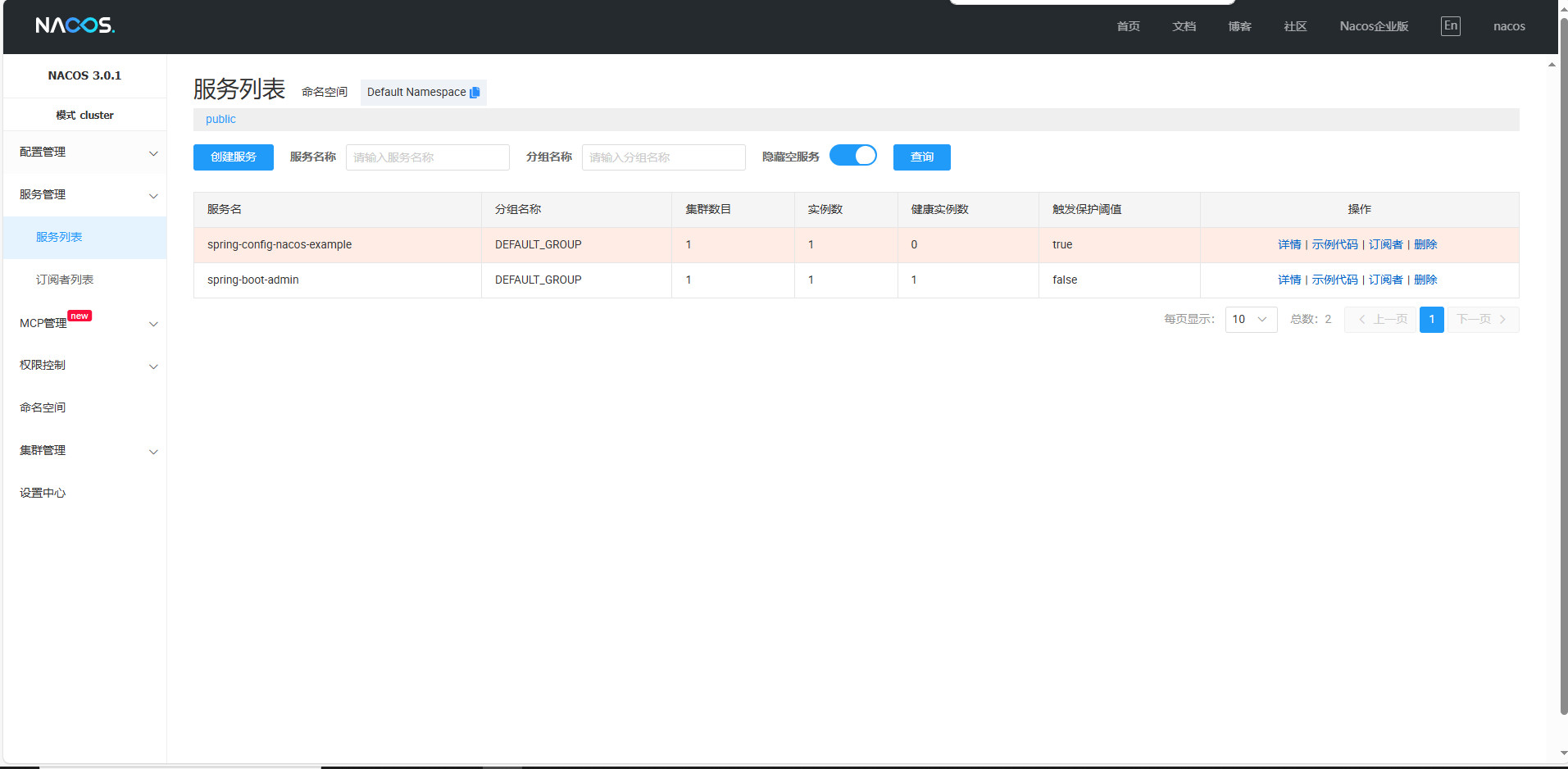

8、nacos服务注册中心

9、docker启动额外服务
启动activemq
docker run --privileged -d --restart=unless-stopped \
--name activemq \
-p 61616:61616 \
-p 8161:8161 \
-e ACTIVEMQ_ADMIN_USER=admin \
-e ACTIVEMQ_ADMIN_PASSWORD=admin \
webcenter/activemq:latest
启动minio
docker run --privileged -d --restart=unless-stopped \
--name minio \
-p 9000:9000 \
-p 9001:9001 \
-e "MINIO_ROOT_USER=admin" \
-e "MINIO_ROOT_PASSWORD=admin" \
-e "MINIO_DEFAULT_BUCKETS=images,videos,backup" \
minio/minio server /data --console-address ":9001"
启动sudo docker run --privileged -d --restart=unless-stopped -p 80:80 -p 443:443 rancher/rancher:stable
