最近在研究QT如何导出.docx文件,然后再将.docx文件转为.pdf文件;需要是跨平台的;
然而,在这方面,QT没有自带的库支持处理,第三方库也支持的比较少;
网上介绍的库有:OpenOffice、Liboffice、DuckX、docx和minidocx等,有兴趣的可以自行去了解一下;
在这里,我们不是通过代码去生成.docx文件,而是提前准备模板,通过替换模板中的文本,再导出.docx文件的方式去处理;然后如果需要,可以通过libreoffice库的命令将.docx转为.pdf。
简单介绍处理流程:
- 准备.docx模板,在模板上填写上需要替换的占位字符串;
- 通过QuaZIP将.docx文件解压缩;
- 修改解压缩出来的.xml文件,替换文本、图片等;
- 将解压出来的全部内容压缩为.docx;
- 通过LibreOffice库的命令将.docx转为.pdf。
(.docx 等于 .xml + zip) 我们熟悉的.docx文档,其实就是一个一个.xml文档,然后将其压缩后,就形成了。
1 准备工作
1.1 介绍使用到的工具
1.1.1 Word模板
模板就是你期望导出什么样.docx文件,先提前自己编写好,然后在还不确定填写文本的地方,使用占位字符串填写上,后面就可以通过替换占位字符串将目标文本替换上去,从而达到预期效果;
1.1.2 QuaZIP
QuaZIP 是一个基于 zlib 的跨平台 C++ 库,专为 Qt 框架设计,提供 ZIP 文件的读写功能。
这里将在项目中导入QuaZIP和ZLIB的源码,不编译成库使用,方便项目跨平台切换;
博主之前也学习QuaZIP库时,使用其简单做了一个加密压缩和解压缩zip的小案例,有兴趣的可以去看看:QT 引入Quazip和Zlib源码工程到项目中,无需编译成库,跨平台,加密压缩,带有压缩进度
1.1.3 LibreOffice
LibreOffice 是一款功能强大的办公软件,默认使用开放文档格式 (OpenDocument Format , ODF), 并支持 *.docx, *.xlsx, *.pptx 等其他格式。
它包含了 Writer, Calc, Impress, Draw, Base 以及 Math 等组件,可用于处理文本文档、电子表格、演示文稿、绘图以及公式编辑。
它可以运行于 Windows, GNU/Linux 以及 macOS 等操作系统上,并具有一致的用户体验。
对,没错,LibreOffice是一款办公软件,与Microsoft Office 和 WPS 一样,都可以处理Wrod、Excel文档等;
最最最重要的是,LibreOffice是免费的、开源的、跨平台的,并且提供了命令!所以在项目中,我们就可以使用LibreOffice的命令将.docx转为.pdf了。
当然也支持其他更多格式的转换。
1.2 项目依赖准备
1.2.1 Word模板
自己手动新建一个.docx文件,定义自己的模板;
例如,本教程将使用如下模板:
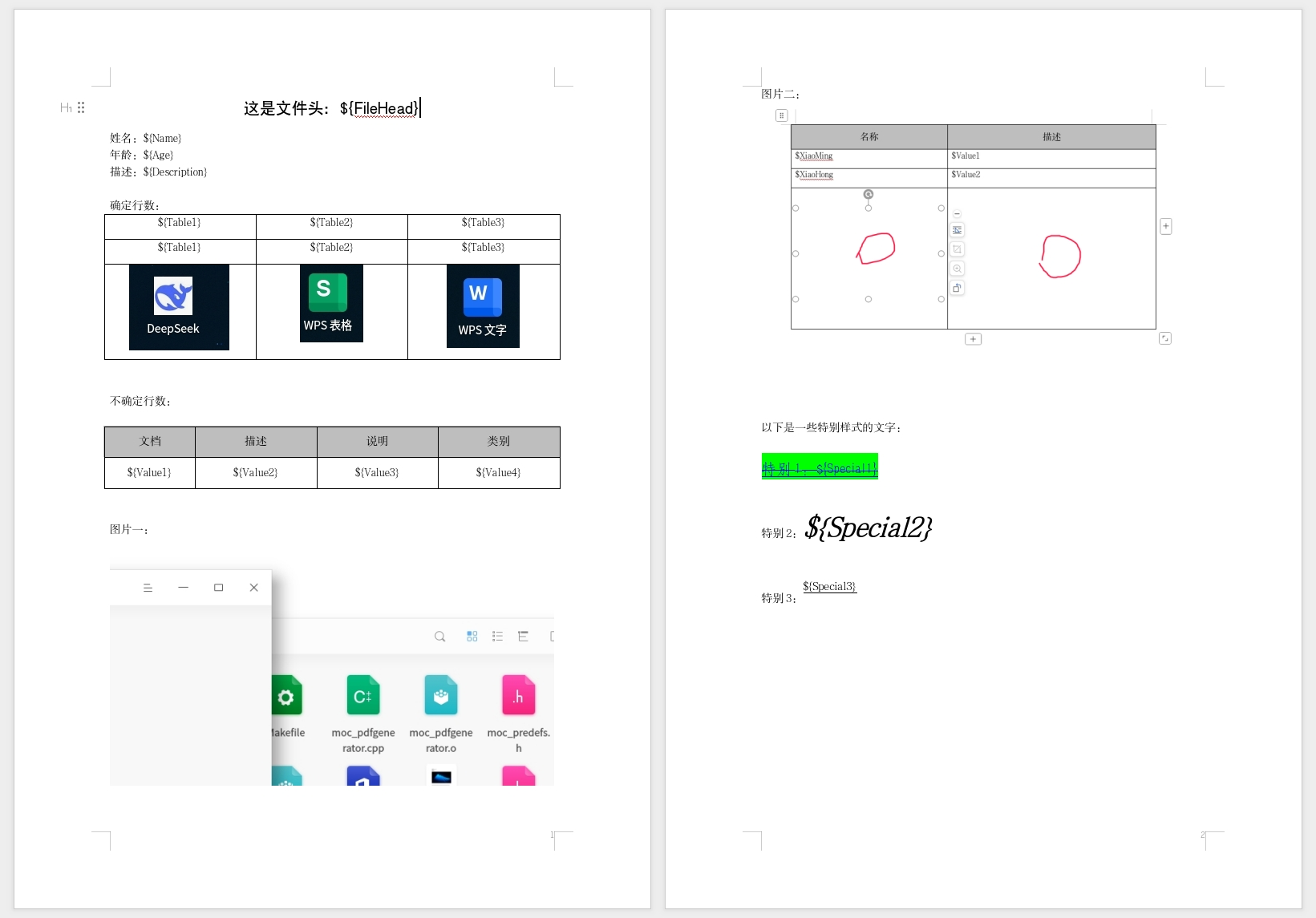
说明:
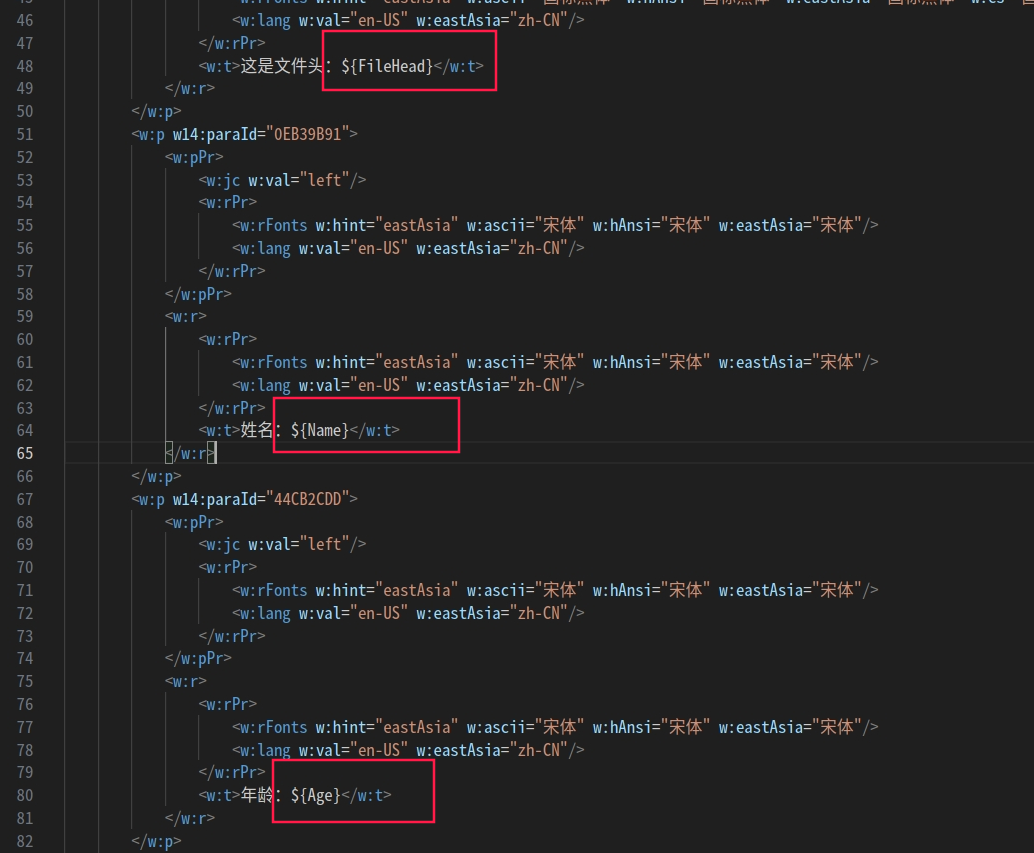
模板中,占位字符串用到了:
${FileHead}、${Name}、${Age}、${Description} ...等等
后面将会在代码中,将这些占位字符串替换为我们自己的字符串;
图片也可以插入然后替换,但是,文档内的图片建议(必须)是统一后缀的,例如都是.png格式,才在代码中更加方便的替换;
文档中对文本的加粗、斜体、设置颜色、背景颜色、设置字体等,替换字符串后,均使用原来设置好的样式;
对于表格,有固定行数的,也有不固定行数的(表格数据是动态的),本博客也有讲解如何处理不固定行数的表格新增问题;
1.2.2 QuaZIP
上面提到了,项目中将使用QuaZIP的源码,这里也会提供;是一个文件夹,内部包含了所有的代码;

将其放在项目的根路径下,即与mian.cpp文件同级路径下,然后在.pro文件中包含进来:
cpp
# 源码方式使用需要设置为静态库
DEFINES +=   QUAZIP_STATIC
include($$PWD/quazip/3rdparty/zlib.pri)
include($$PWD/quazip/quazip.pri)
1.2.3 LibreOffice 安装教程
LibreOffice非常庞大,如果使用源码安装的话,会出现各种依赖库的问题,非常麻烦,所以这里将使用官方编译好的程序进行安装。
点击链接进入到官网:主页| LibreOffice 简体中文官方网站 - 自由免费的办公套件
然后点击下载进入到下载页面:
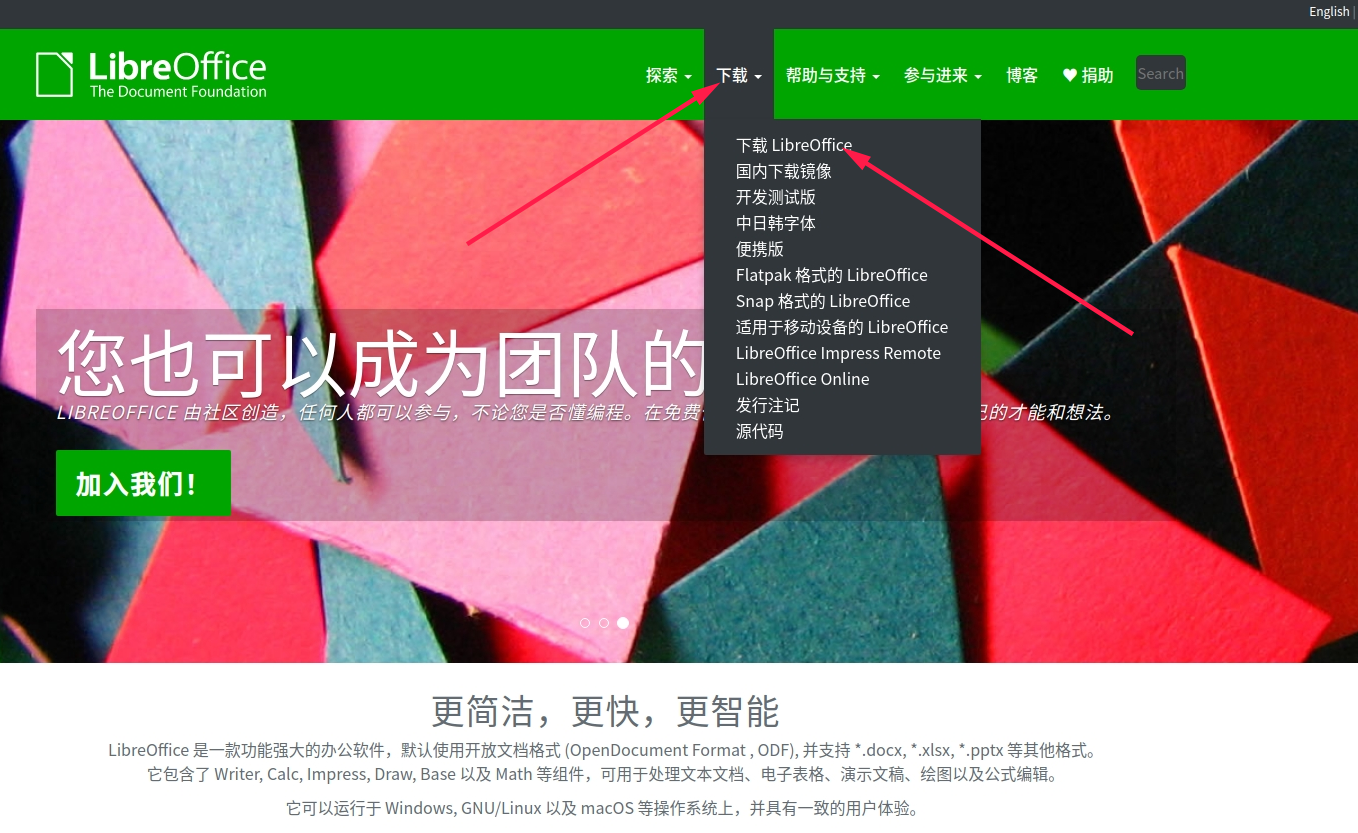
有两个选项,下载LibreOffice和国内下载镜像,如果你是Windows和Linux用户,那么可以点击国内下载镜像去下载,下载速度会很快;
因为我用的是统信UOS系统ARM架构,只能点击下载LibreOffice项去下载,下载速度会很慢;
然后点击downloadarchive
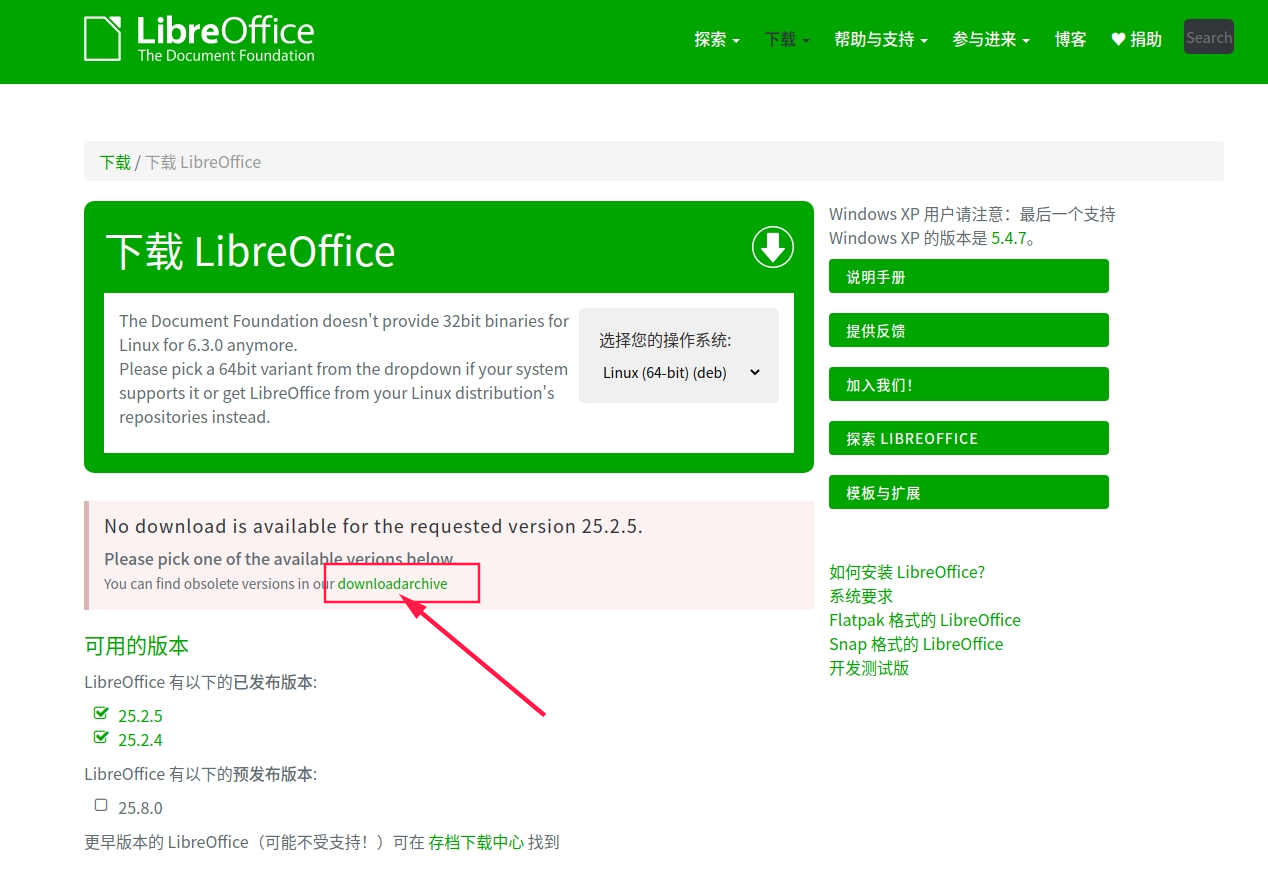
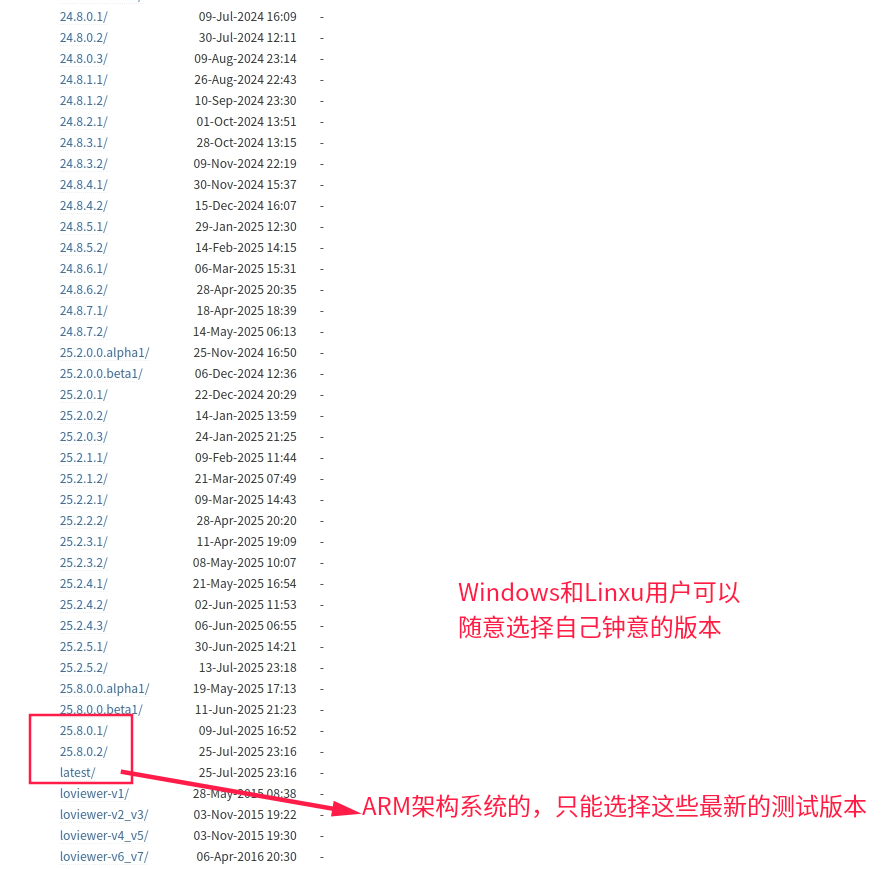
然后会进入到很多旧版本下载的页面,Windows用户和Linux用户可以根据自己情况下载相应版本;
但是,ARM架构的用户,只能选择最新的测试版本,因为只有最新的测试版本才提供了ARM架构的安装文件,其他正式版本都没有,我不知道为什么,这里的版本我几乎都点来看过了,都没有;有知道的朋友请告知一下,谢谢。
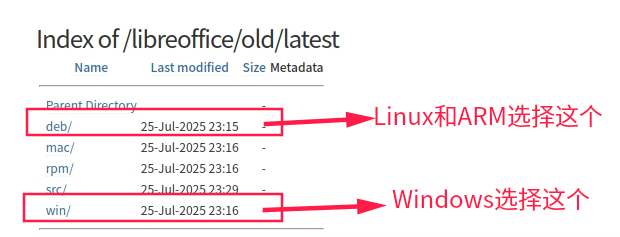
点击进来后,如果你是Linux用户和ARM架构用户,点击deb包下载,也方便安装;
如果你是Windows用户,点击win下载.msi安装文件;
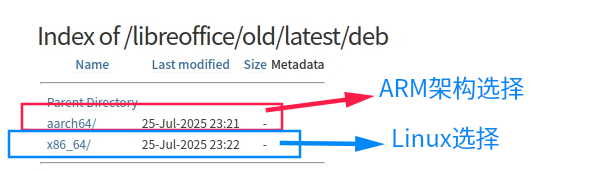
点击进来后,如果你是Linux用户,点击x86_64;如果你是ARM架构用户,点击aarch64;
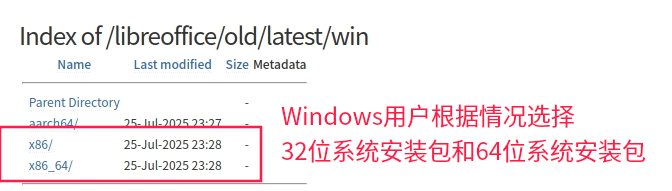
Windows用户根据情况选择32位系统安装包和64位系统安装包;
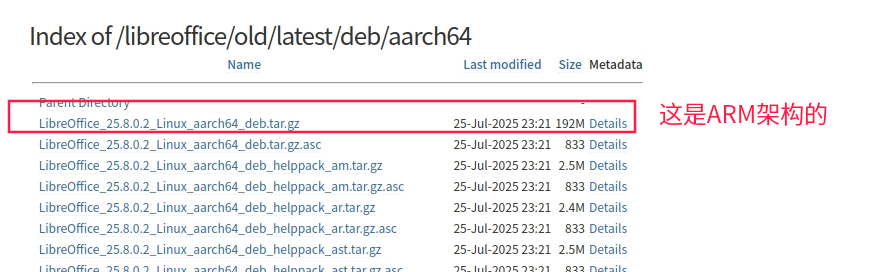
然后,不管你是点击了 aarch64 还是 x86_64 还是 x86 ,在进入的下载页面中,都点击第一个包进行下载:
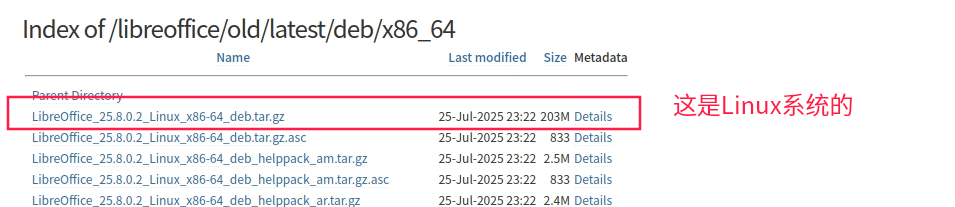
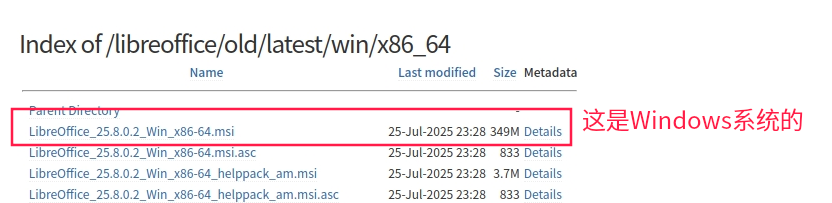
之后就是漫长的等待下载的过程了...
1.2.3.1 Linux和ARM
下载完成后,Linux和ARM架构用户,将压缩包解压出来,进入到全是.deb包的文件路径,打开终端,输入命令:sudo dpkg -i *.deb 开始安装;
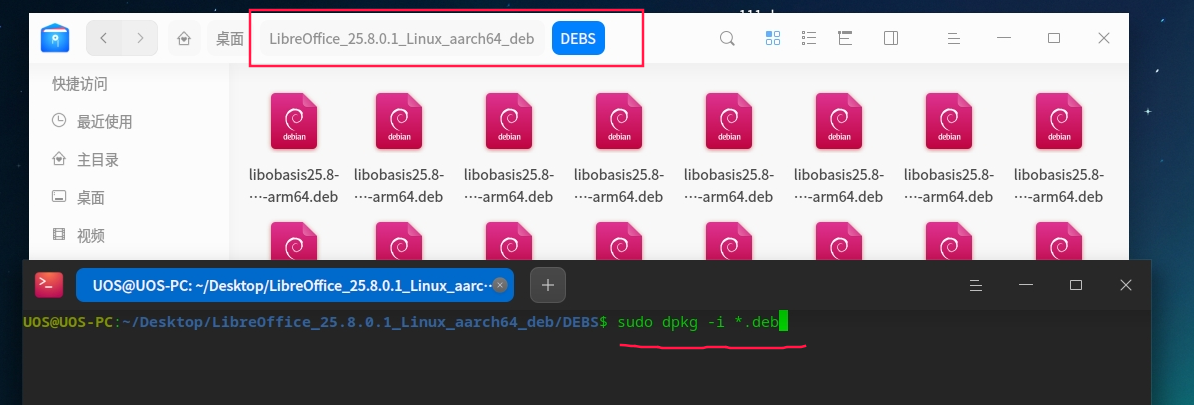
程序一般安装在 /opt 文件夹下,里面会有一个libreoffice25.8的文件夹,因为我安装的是25.8版本的,所以文件夹名字是libreoffice25.8;
libreoffice25.8文件夹内,还会有一个 program/ 文件夹,这个文件夹里面就有我们要用到的程序 soffice ;

通过命令: /opt/libreoffice25.8/program/soffice --version 就可以查看安装的版本了;

然后,请记住这个这个路径,例如我的是:/opt/libreoffice25.8/program/soffice ; 在代码中需要用到!
注意,我安装的最新测试版本,soffice 是一个.sh脚本,不知道其他正式版本是不是;
1.2.3.2 Windows
双击 .msi 文件进行安装;
选择自定义安装,才可以选择安装路径;
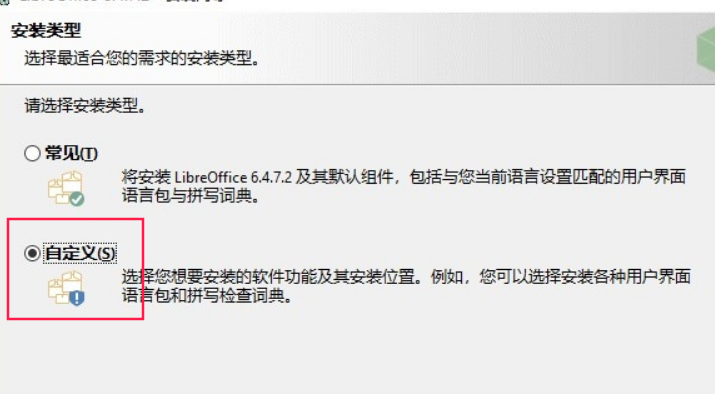
然后修改安装路径,不介安装在系统盘符的,可以不用改;
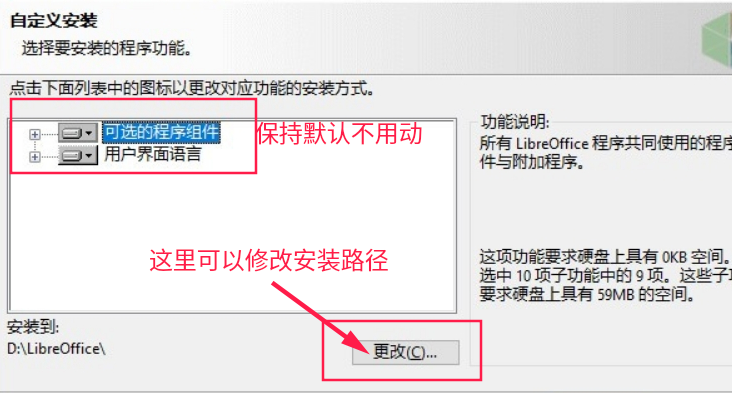
然后继续点击下一步,直到装成功就可以了!
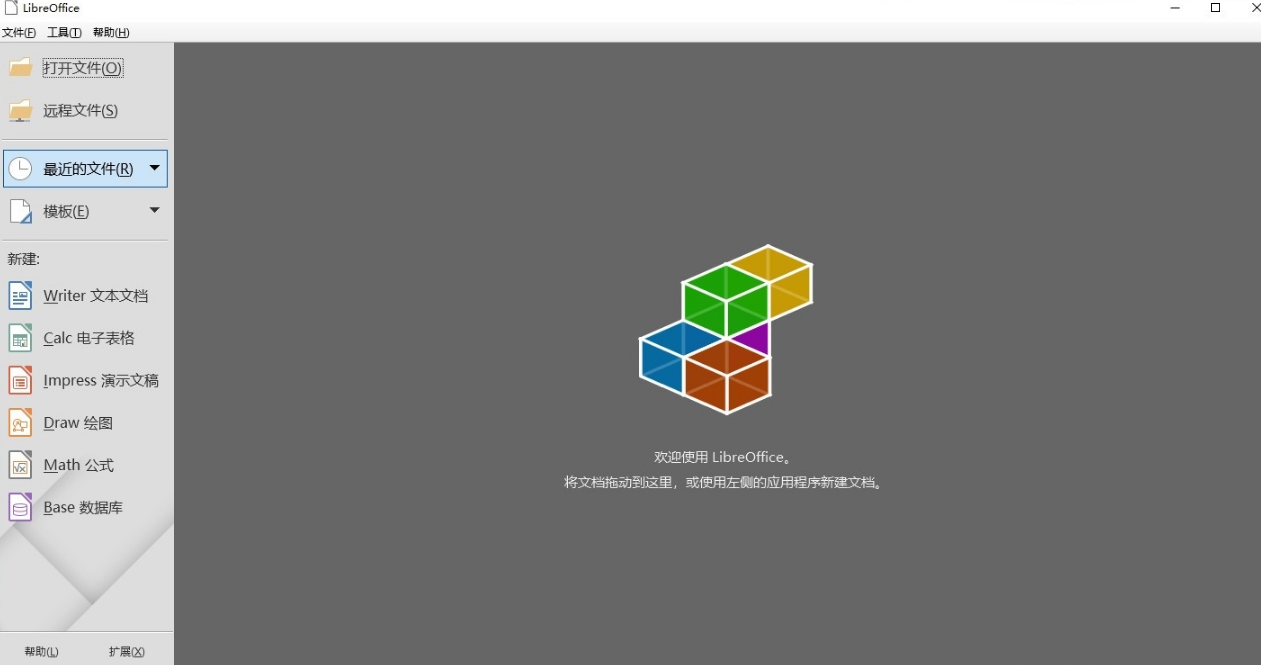
最后在系统菜单栏里,就可以看到相应的菜单项了,点击后就可以打开wrod或者excel文档了;
不过,请记住自己的安装路径,在安装路径下的 program/ 文件夹内,有一个 soffice.exe 可执行程序,双击后也可以打开;请记住这个路径,例如我的是:D:\libreoffice\program\soffice.exe ; 在代码中需要用到!
2 解压docx文档后的文件介绍
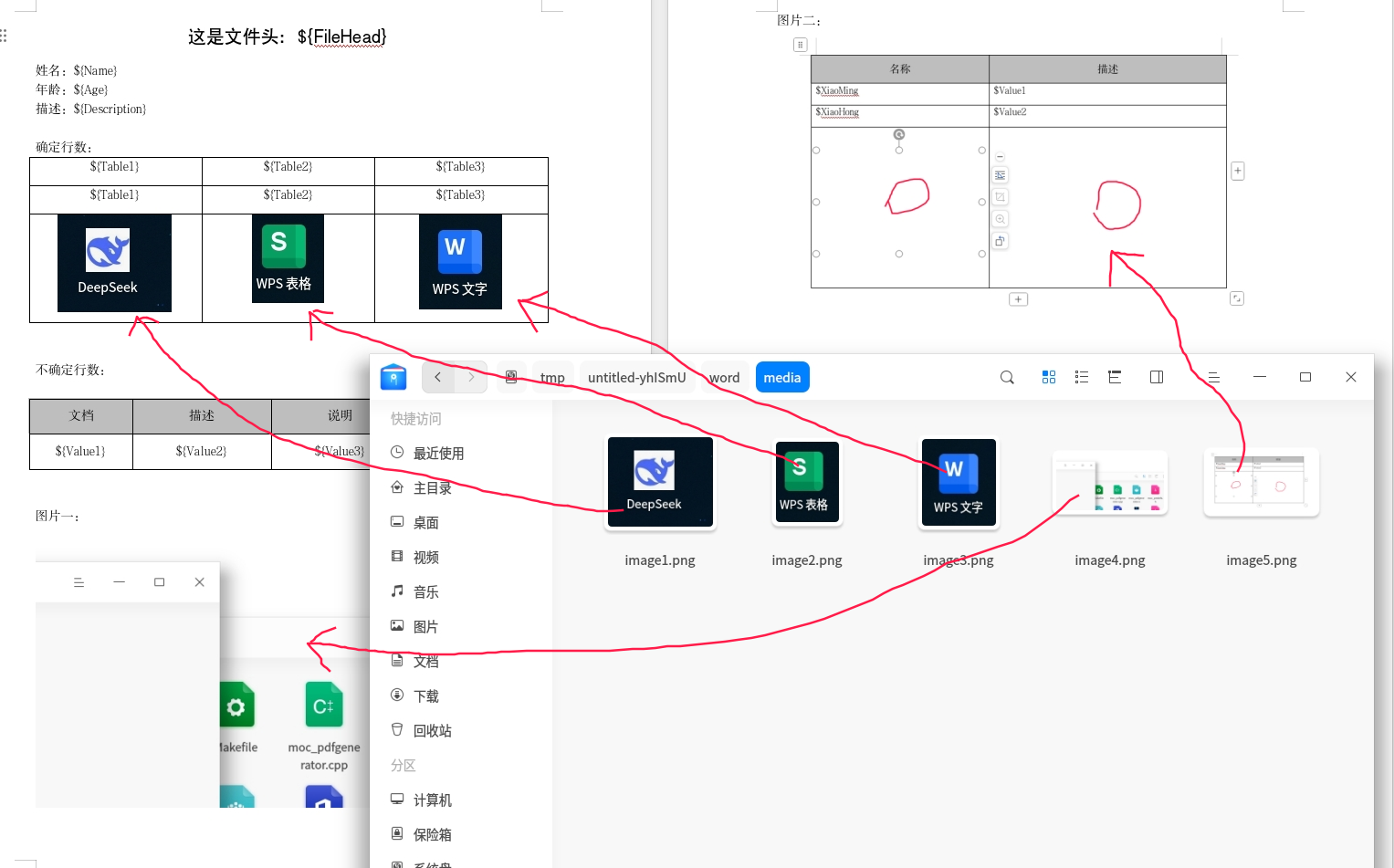
将.docx解压后,会得到一个文件夹,文件夹内部全都是.xml文件;
其中,在wrod文件夹下的document.xml文件,这个文件就相当主页面了,我们操作替换的文件也是它;
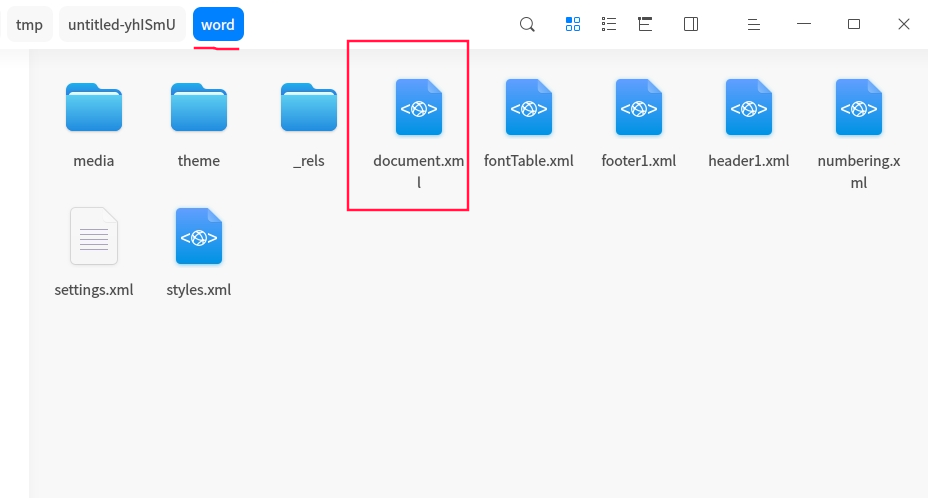
如下图所示:
在media/ 文件中,存储着Word文件插入的图片;
细心观察,图片名字为image1.png ~ image5.png;而且图片名字的序号与文档中的图片位置是一致的;
如果将文档中第三张图片删除掉,再解压出来,那么顺序就变成了image1.png ~ image4.png;文档会自动对文件进行排序命名的;
所以,根据此原理,只需要替换掉文件夹中的图片,即可实现文档的图片替换了!
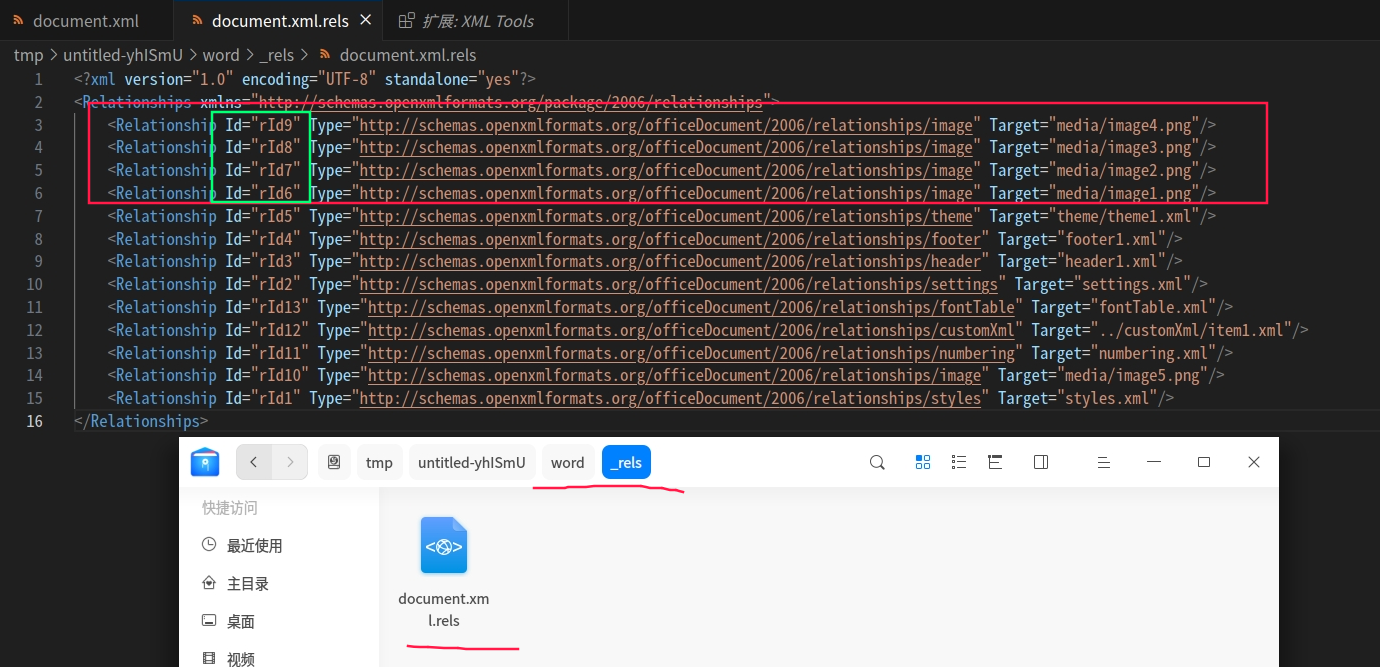
那么图片是如何与主页面的.xml文档关联上的呢?
在 word/_rels/ 文件夹中,有一个document.xml.rels文件,文件内会有标识图片的Id值,通过这个Id值,在主页面的.xml文件中是可以搜索得到的,有兴趣的可以去搜一下!
就是这样就可以关联上了。
其他的我也不太懂了,就不介绍了。有兴趣的可自行了解。
3 编码
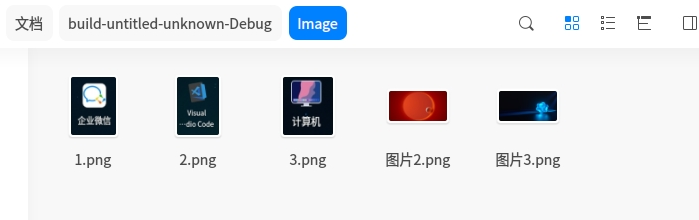
提前准备好需要替换的图片,命名可随意,但必须要与文档中的图片后缀一样!!!
例如我准备的模板文档中插入的5张图片都是.png格式,这里我也准备了5张不同内容的.png格式照片用于替换;
包含头文件:
cpp
#include <QFile>
#include <QDomDocument>
#include <QProcess>
#include <QDir>
#include <QDebug>
#include <QTemporaryDir>
#include <QMap>
#include <QDesktopServices>
#include <QDirIterator>
#include <QUrl>

#include "quazipfile.h"


// 存储表格数据的
struct TableValue {
    QString document;       // 文档
    QString description;    // 描述
    QString explain;        // 说明
    QString kind;           // 种类、类别
};


// 使用 RAII 包装器确保资源清理
class QuaZipRAII {
public:
    QuaZipRAII(QuaZip* zip) : m_zip(zip) {}
    ~QuaZipRAII() {
        if(m_zip && m_zip->isOpen()) {
            m_zip->close();
        }
        delete m_zip;
    }
    operator QuaZip*() { return m_zip; }
    QuaZip* operator->() { return m_zip; }
    QuaZip* get() { return m_zip; }
private:
    QuaZip* m_zip;
    Q_DISABLE_COPY(QuaZipRAII)
};
3.1 解压缩
这里使用的是QuaZIP去处理解压缩,并没有使用JlCompress去处理,使用JlCompress去解压缩会出问题;
cpp
// zipPath 参数传.docx文档路径	targetDir 参数传解压路径
bool Widget::extractFile(const QString &zipPath, const QString &targetDir)
{
    QuaZipRAII zip(new QuaZip(zipPath));
    if (!zip->open(QuaZip::mdUnzip)) {
        qWarning() << "Failed to open ZIP file:" << zipPath
                   << "Error:" << zip->getZipError();
        return false;
    }

    QDir targetDirObj(targetDir);
    if (!targetDirObj.exists() && !targetDirObj.mkpath(".")) {
        qWarning() << "Failed to create target directory:" << targetDir;
        return false;
    }

    const int blockSize = 65536;  // 64KB 块大小
    QuaZipFileInfo fileInfo;
    QuaZipFile file(zip);

    for (bool more = zip->goToFirstFile(); more; more = zip->goToNextFile()) {
        if (!zip->getCurrentFileInfo(&fileInfo)) {
            qWarning() << "Failed to get file info, skipping. Error:" << zip->getZipError();
            continue;
        }

        QString absPath = targetDirObj.absoluteFilePath(fileInfo.name);
        QFileInfo fi(absPath);

        // 创建目录结构
        if (!QDir().mkpath(fi.path())) {
            qWarning() << "Failed to create path:" << fi.path();
            continue;
        }

        // 处理目录
        if (fileInfo.name.endsWith('/')) {
            QDir dir(absPath);
            if (!dir.exists() && !dir.mkpath(".")) {
                qWarning() << "Failed to create directory:" << absPath;
            }
            continue;
        }

        // 打开文件
        if (!file.open(QIODevice::ReadOnly)) {
            qWarning() << "Failed to open ZIP entry:" << fileInfo.name
                       << "Error:" << file.getZipError();
            continue;
        }

        // 创建目标文件
        QFile outFile(absPath);
        if (!outFile.open(QIODevice::WriteOnly | QIODevice::Truncate)) {
            qWarning() << "Failed to open output file:" << absPath;
            file.close();
            continue;
        }

        // 分块读写
        char buffer[blockSize];
        qint64 totalBytes = 0;
        while (!file.atEnd()) {
            qint64 bytesRead = file.read(buffer, blockSize);
            if (bytesRead <= 0) break;

            qint64 bytesWritten = outFile.write(buffer, bytesRead);
            if (bytesWritten != bytesRead) {
                qWarning() << "Write error for:" << absPath
                           << "Expected:" << bytesRead << "Actual:" << bytesWritten;
                break;
            }
            totalBytes += bytesWritten;
        }

        outFile.close();
        file.close();

        // 设置文件权限
//        if (fileInfo.externalAttr != 0) {
//            QFile::setPermissions(absPath,
//                static_cast<QFile::Permissions>(fileInfo.externalAttr >> 16));
//        }

        // 设置文件时间戳
        QDateTime dt;
        dt.setDate(QDate(fileInfo.dateTime.date().year() + 1900,
                         fileInfo.dateTime.date().month() + 1,
                         fileInfo.dateTime.date().day()));
        dt.setTime(QTime(fileInfo.dateTime.time().hour(),
                         fileInfo.dateTime.time().minute(),
                         fileInfo.dateTime.time().second()));
        QFile(absPath).setFileTime(dt, QFileDevice::FileModificationTime);

        if (totalBytes != fileInfo.uncompressedSize) {
            qWarning() << "Size mismatch for:" << absPath
                       << "Expected:" << fileInfo.uncompressedSize
                       << "Actual:" << totalBytes;
        }
    }

    return zip->getZipError() == UNZ_OK;
}
3.2 压缩
这里使用的是QuaZIP去处理解压缩,并没有使用JlCompress去处理,使用JlCompress去解压缩会出问题;
cpp
// zipPath 参数传目标 .docx全路径		sourceDir 参数传需要压缩的文件夹路径
bool Widget::compressFile(const QString &zipPath, const QString &sourceDir)
{
    // 使用 RAII 管理资源
    QuaZipRAII newZip(new QuaZip(zipPath));

    if (!newZip->open(QuaZip::mdCreate)) {
        qWarning() << "Failed to create ZIP file:" << zipPath
                   << "Error:" << newZip->getZipError();
        return false;
    }

    QDir sourceDirObj(sourceDir);

    QSet<QString> addedDirs;
    const int blockSize = 65536;  // 64KB 块大小

    // 递归处理目录
    QDirIterator it(sourceDir, QDir::AllEntries | QDir::Hidden | QDir::System | QDir::NoDotAndDotDot,
                    QDirIterator::Subdirectories);

    while (it.hasNext()) {
        QString filePath = it.next();
        QFileInfo fi(filePath);
        QString relativePath = sourceDirObj.relativeFilePath(filePath);

        // 处理目录
        if (fi.isDir()) {
            QString zipDirPath = relativePath + '/';
            if (!addedDirs.contains(zipDirPath)) {
                QuaZipFile zipFile(newZip);
                QuaZipNewInfo newInfo(zipDirPath);
//                newInfo.externalAttr = (fi.permissions() | 0x10) << 16; // 保留权限+目录标志

                if (!zipFile.open(QIODevice::WriteOnly, newInfo)) {
                    qWarning() << "Failed to create directory entry:" << zipDirPath
                               << "Error:" << zipFile.getZipError();
                    continue;
                }
                zipFile.close();
                addedDirs.insert(zipDirPath);
            }
            continue;
        }

        // 处理文件
        QFile sourceFile(filePath);
        if (!sourceFile.open(QIODevice::ReadOnly)) {
            qWarning() << "Failed to open source file:" << filePath;
            continue;
        }

        QuaZipFile zipFile(newZip);
        QuaZipNewInfo newInfo(relativePath, filePath);
//        newInfo.externalAttr = fi.permissions() << 16; // 保留文件权限

        if (!zipFile.open(QIODevice::WriteOnly, newInfo)) {
            qWarning() << "Failed to open ZIP entry:" << relativePath
                       << "Error:" << zipFile.getZipError();
            sourceFile.close();
            continue;
        }

        // 分块读写提高大文件处理效率
        qint64 totalBytes = 0;
        char buffer[blockSize];
        while (!sourceFile.atEnd()) {
            qint64 bytesRead = sourceFile.read(buffer, blockSize);
            if (bytesRead <= 0) break;

            qint64 bytesWritten = zipFile.write(buffer, bytesRead);
            if (bytesWritten != bytesRead) {
                qWarning() << "Write error for:" << relativePath
                           << "Expected:" << bytesRead << "Actual:" << bytesWritten;
                break;
            }
            totalBytes += bytesWritten;
        }

        zipFile.close();
        sourceFile.close();

        if (totalBytes != fi.size()) {
            qWarning() << "File size mismatch:" << relativePath
                       << "Original:" << fi.size() << "Compressed:" << totalBytes;
        }
    }

    return newZip->getZipError() == UNZ_OK;
}
3.3 docx转pdf
转换时,使用安装好的libreoffice命令,将docx转为pdf文件;
cpp
bool Widget::convertDocxToPdf(const QString &docxPath, const QString &pdfOutputDir)
{
    QProcess process;
    QString libreOfficeCmd = "";

    // 根据自己的安装路径设置,一定要绝对路径,相对路径不行,会找不到soffice
#ifdef Q_OS_UNIX
    libreOfficeCmd = "/opt/libreoffice25.8/program/soffice"; // Linux路径
#else
    libreOfficeCmd = "D:/libreoffice/program/soffice.exe" // Windows路径
#endif

// 测试命令:
// /opt/libreoffice25.8/program/soffice  --headless  -convert-to  pdf  --outdir  pdf文件输出路径   xxx.docx输入路径
    QStringList args = {
        "--headless",
        "--convert-to", "pdf",
        "--outdir", pdfOutputDir,
        docxPath
    };

    process.start(libreOfficeCmd, args);
    if (!process.waitForFinished(15000)) {
        qWarning() << "PDF转换超时:" << process.errorString();
        return false;
    }
    return process.exitCode() == 0;
}
3.4 替换占位符内容 和 图片
起始就是读取文件的内容后,通过QString::replace函数实现内容替换即可!
cpp
bool Widget::replaceInDocx(const QString &templatePath,
                          const QString &outputPath,
                          const QMap<QString, QString> &textReplacements,
                          const QMap<QString, QString> &imageReplacements)
{
    QTemporaryDir tempDir;
    if (!tempDir.isValid()) {
        qWarning() << "无法创建临时目录";
        return false;
    }


    // 1 解压 docx
    QString unzipPath = tempDir.path();
    if (!extractFile(templatePath, unzipPath)) {
        qWarning() << "解压失败!";
        return false;
    }

    qWarning() << unzipPath;
    // 2 替换文本内容
    QString docXmlPath = unzipPath + "/word/document.xml";
    QFile file(docXmlPath);
    if (!file.open(QIODevice::ReadOnly)) {
        qWarning() << "无法打开document.xml";
        return false;
    }

    QDomDocument doc;
    if (!doc.setContent(&file)) {
        file.close();
        qWarning() << "解析XML失败";
        return false;
    }
    file.close();

    // 文本替换
    QString xml = doc.toString();
    for (auto it = textReplacements.begin(); it != textReplacements.end(); ++it) {
        QString key = QString("${%1}").arg(it.key());
        QString value = it.value();
        xml.replace(key, value);
    }
    // 不想使用循环,也可以一个一个的替换
    xml.replace("${FileHead}", "我是表头");

    if (!file.open(QIODevice::WriteOnly | QIODevice::Truncate)) {
        qWarning() << "无法写入document.xml";
        return false;
    }
    file.write(xml.toUtf8());
    file.close();

    // 3 替换图片
    if (!imageReplacements.isEmpty()) {
        QString mediaPath = unzipPath + "/word/media/";
        QDir mediaDir(mediaPath);

        // 确保media目录存在
        if (!mediaDir.exists()) {
            mediaDir.mkpath(".");
        }

        // 处理图片替换
        for (auto it = imageReplacements.constBegin(); it != imageReplacements.constEnd(); ++it) {
            QString placeholder = it.key();       // 占位符名称,如 "logo"
            QString imagePath = it.value();       // 新图片路径
            // 目标图片路径
            QString destPath = mediaPath + placeholder;

            // 复制图片到media目录
            if (!copyWithOverwrite(imagePath, destPath)) {
                qWarning() << "图片复制失败:" << imagePath << "->" << destPath;
                continue;
            }
        }
    }

    // 准备表格数据
    QList<TableValue> tableValueList = {
        { "文档1", "描述1", "说明1", "种类1" },
        { "文档2", "描述2", "说明1", "种类2" },
        { "文档3", "描述3", "说明1", "种类3" },
        { "文档4", "描述4", "说明1", "种类4" },
        { "文档5", "描述5", "说明1", "种类5" },
        { "文档6", "描述6", "说明1", "种类6" },
        { "末尾1", "末尾2", "末尾3", "末尾4" },
    };
    // 4 动态新增替换表格
    if (!replayTableIndex(docXmlPath, tableValueList)) {
        qWarning() << "表格数据替换失败!";
        return false;
    }

    // 5 压缩回 docx
    if (!compressFile(outputPath, unzipPath)) {
        qWarning() << "压缩失败!";
        return false;
    }

    return true;
}
3.5 动态往表格插入数据
动态往表格中插入数据,就不能使用固定好写好占位符内容了,因为不知道需要插入多少行数据;
即使知道如果是要插入512行数据,那么是不是就要定义好512个占位符内容呢?这显然不现实;
因为我们操作的对象是.xml文档,所以其实是可以通过复制一行表格内容再粘贴,即可实现插入效果的;
如果复制的是占位符内容,那么就可以先复制,再替换内容,再粘贴的方式,实现动态插入的效果;
知识点:
- <w:tbl> 表示整个表格。
- <w:tr> 表示表格的一行(table row)。
- <w:tc> 是表格的一个单元格(table cell)。
- <w:t> 是里面的文本内容。
操作流程:
在 Word 中插入一个表格(比如 4 列),写一行示例数据:
${Value1} | ${Value2} | ${Value3} | ${Value4}
在代码里找到这段表格所在的 XML,然后:
- 复制这一整行(<w:tr> 标签)
- 替换占位符
- 重复插入你需要的行数
表格 XML 示例(简化后的):
javascript
<w:tbl>
  <w:tr>
    <w:tc><w:p><w:r><w:t>${Value1}</w:t></w:r></w:p></w:tc>
    <w:tc><w:p><w:r><w:t>${Value2}</w:t></w:r></w:p></w:tc>
    <w:tc><w:p><w:r><w:t>${Value3}</w:t></w:r></w:p></w:tc>
    <w:tc><w:p><w:r><w:t>${Value4}</w:t></w:r></w:p></w:tc>
  </w:tr>
</w:tbl>
只需要:
- 在 XML 中找到相应的表格 <w:tbl>
- 在<w:tbl> 表格内找到占位符内容的行 <w:tr>
- 在代码里复制这个 <w:tr>节点
- 在<w:tr>一行节点内,循环遍历内部的所有子节点,即循环遍历一行内的所有单元格 然后在逐步替换单元格内的文本即可
注意,一个文档内可能会有多个表格,所以在定位表格的时候,可以获取当前表格内的所有文本,然后通过字符串判断方式是否包含指定的替换文本,从而得知当前表格是不是需要操作的表格;
例如通过明确定位 ${Value1} 即可知道表格,因为文档中的占位符唯一;
cpp
bool Widget::replayTableIndex(const QString &templatePath, QList<Widget::TableValue> TableData)
{
    QString docXmlPath = templatePath;
    QFile file(docXmlPath);
    if (!file.open(QIODevice::ReadOnly | QIODevice::Text)) return false;


    QDomDocument doc;
    if (!doc.setContent(&file)) {
        file.close();
        return false;
    }
    file.close();

    // 查找所有表格
    QDomNodeList tables = doc.elementsByTagName("w:tbl");
    if (tables.isEmpty()) return false;


    QDomElement table = { };
    for (int j = 0; j < tables.count(); j++) {
        table = tables.at(j).toElement();   // 获取表格
        QString str = table.text();         // 获取表格内的所有文本
        // 通过判断字符串内是否包含占位字符串,从而得知当前表格是否是需要替换文本的表格
        if (str.contains("${Value1}")) {    // 可以判断是占位字符串里面任意,因为他们理论上都是唯一的
            break;
        } else {
            table = { };
        }
    }

    // 判断是否找到了匹配的表格
    if (table.isNull()) {
        qWarning() << "没有找到匹配的表格!";
        return false;
    }

    // 查找表格内的所有行
    QDomNodeList rows = table.elementsByTagName("w:tr");
    if (rows.size() < 2) return false;


    QDomNode templateRow = { }; // 占位模板行
    for (int j = 0; j < rows.count(); ++j) {
        templateRow = rows.at(j);           // 获得占位模板行
        QString str = templateRow.toElement().text();         // 获取一行表格内的所有文本
        // 通过判断字符串内是否包含占位字符串,从而得知当前行是否是占位模板行
        if (str.contains("${Value1}")) {    // 可以判断是占位字符串里面任意,因为他们理论上都是唯一的
            break;
        } else {
            templateRow = { };
        }
    }

    // 判断是否找到了 占位模板行
    if (table.isNull()) {
        qWarning() << "没有找到 占位模板行!";
        return false;
    }


    // 表格动态插入行和文本替换
    for (int i = 0; i < TableData.size(); ++i) {
        // 克隆一个新的占位模板行,相当于插入了一行占位模板行
        QDomNode newRow = templateRow.cloneNode(true);
        // 替换文本
        //QString xmlString = newRow.toElement().ownerDocument().toString();

        // 临时存储站位模板行,用于动态插入
        newRow = newRow.toElement();
        // 查找一行表格内的所有单元格
        QDomNodeList cells = newRow.toElement().elementsByTagName("w:t");
        for (int j = 0; j < cells.count(); ++j) {
            QDomElement cell = cells.at(j).toElement();
            QString text = cell.text(); // 获得单元格内的文本

            if (text.contains("${Value1}")) {			// text == "${Value1}"
                text = TableData[i].document;

            } else if (text.contains("${Value2}")) {	// text == "${Value2}"
                text = TableData[i].description;

            } else if (text.contains("${Value3}")) {	// text == "${Value3}"
                text = TableData[i].explain;

            } else if (text.contains("${Value4}")) {	// text == "${Value4}"
                text = TableData[i].kind;
            }

            // 重新设置单元格里面的文本,相当于替换
            cell.firstChild().setNodeValue(text);
        }

        // 在末尾插入新的一行 占位模板行
//        table.appendChild(newRow);
        table.insertAfter(newRow, table.lastChild());
    }

    table.removeChild(templateRow); // 删除原始模板行

    // 保存 document.xml
    if (!file.open(QIODevice::WriteOnly | QIODevice::Text | QIODevice::Truncate)) return false;
    QTextStream out(&file);
    doc.save(out, 2);
    file.close();

    return true;
}
3.6 使用示例
cpp
void Widget::generateReport()
{
    // 文本替换数据
    QMap<QString, QString> textData {
        {"Name", "Jtom"},
        {"Age", "111"},
        {"Description", "这是一段描述信息ABCdef123"},
        {"Table1", "固定表格的数据1"},
        {"Table2", "其他其他"},
        {"Table3", "啦啦啦"},
        {"Special1", "我很特别"},
        {"Special2", "俺也一样"},
        {"Special3", "我知道"}
    };

    // 图片替换数据 (Word中的图片名字 -> 图片路径)
    QMap<QString, QString> imageData {
        {"image1.png", "Image/1.png"},
        {"image2.png", "Image/2.png"},
        {"image3.png", "Image/3.png"},
        {"image4.png", "Image/图片2.png"},
        {"image5.png", "Image/图片3.png"}
    };

    QString currentPath = QCoreApplication::applicationDirPath();
    QString templatePath = currentPath + "/input.docx";		// 输入.docx路径
    QString outputDocx = currentPath + "/report.docx";		// 输出.docx路径
    QString outputPdf = currentPath + "/report.pdf";		// 输出.pdf路径

    if (replaceInDocx(templatePath, outputDocx, textData, imageData)) {
        qDebug() << "DOCX 创建成功: " << outputDocx;

        if (convertDocxToPdf(outputDocx, QFileInfo(outputPdf).absolutePath())) {
            qDebug() << "PDF 创建成功: " << outputPdf;
            // 打开生成的PDF
            QDesktopServices::openUrl(QUrl::fromLocalFile(outputPdf));
        } else {
            qWarning() << "PDF 生成失败";
        }
    } else {
        qWarning() << "报告生成失败";
    }
}
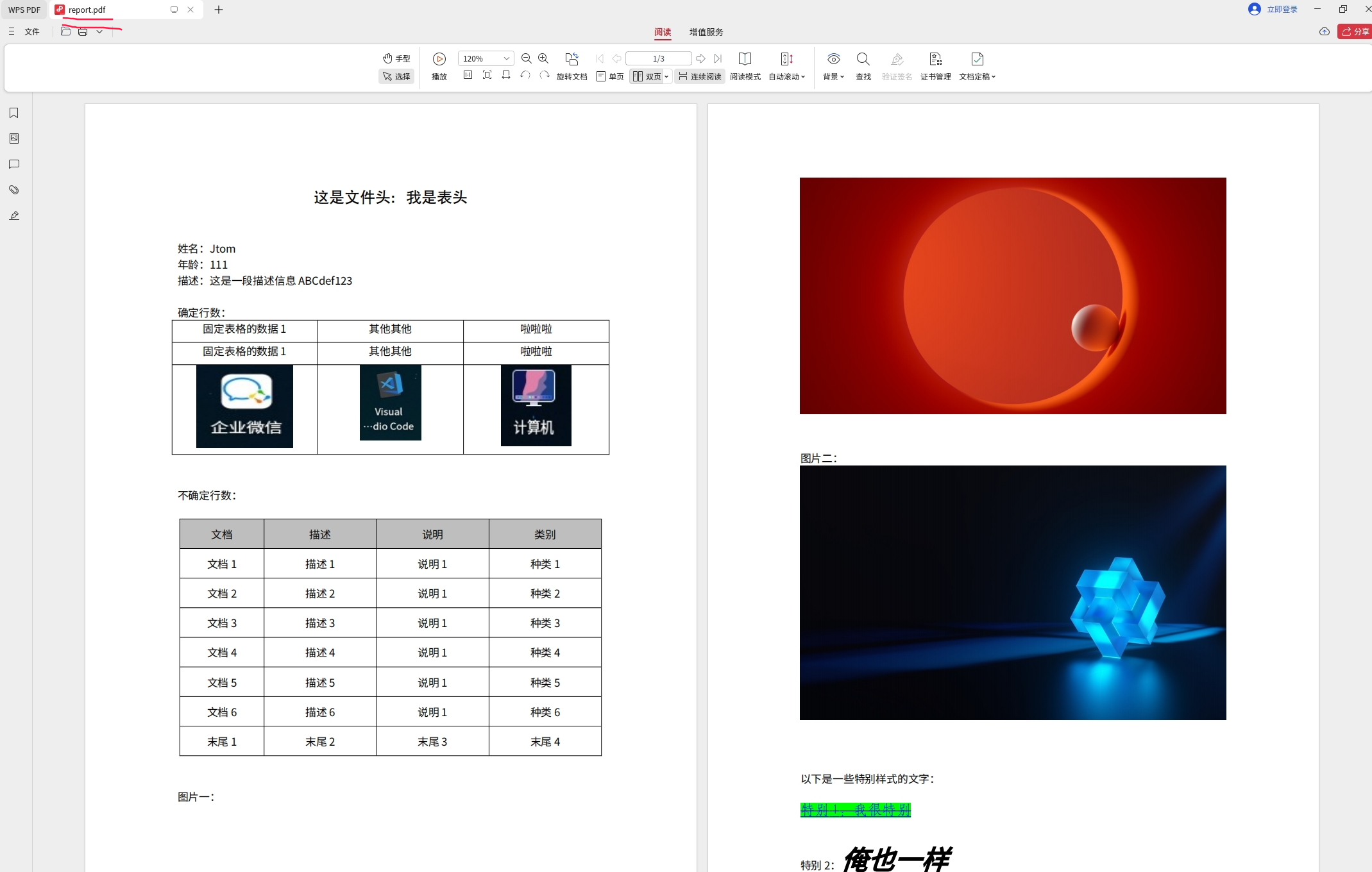
运行后的PDF如下图所示:
3.7 背景知识
.docx = ZIP 压缩包 + XML 文件
.docx 文件其实是 ZIP 压缩文件,里面的正文存在 word/document.xml 文件里。
表格结构(简化):
xml
<w:tbl>            ← 表格开始
  <w:tr>           ← 表格的一行(Table Row)
    <w:tc>         ← 单元格(Table Cell)
      <w:p><w:r><w:t>内容</w:t></w:r></w:p>
    </w:tc>
    ...
  </w:tr>
  <w:tr>...        ← 第二行
  </w:tr>
</w:tbl>-
<w:tr> 表示表格的 一整行(新增需要复制这一整段,删除也需要移除这一整段)。
-
<w:tc> 表示每个单元格。
-
<w:t> 是最终的文本内容,你的 ${} 占位符一定出现在 <w:t> 标签中。
Word中插入的图片,如果插入的图片后缀都是一样的,例如都是.png格式,那么Word会依据文档中的图片顺序,将图片重新命名为:image1.png,...,imagen.png;
即使将中间某一张图片删除掉了,Wrod也会重新排序命名的;
所以,只要确保插入的图片格式一样,就可以实现图片的简单替换!
4 总结
其实这种方案也算是取巧的一种,需要很多库的支持,并且处理起来也挺繁琐;
但是也是一种可行的方案,目前Qt、C++方面对Word的支持还是很少的!
按照教程,安装LibreOffice,准备好.docx模板,QuaZIP库源码在下面工程代码中提供了。
剩下的就是编码处理流程了,我提供的模板也只是测试模板,更加复杂的样式模板可以自行去测试一下,应该也是没有问题的!
项目源码:https://gitee.com/ygt777/Qt_Wrod_QuaZIP_LibreOffice.git
最后,学习参考:C++/Qt导出动态数据生成Word、PDF报表文件