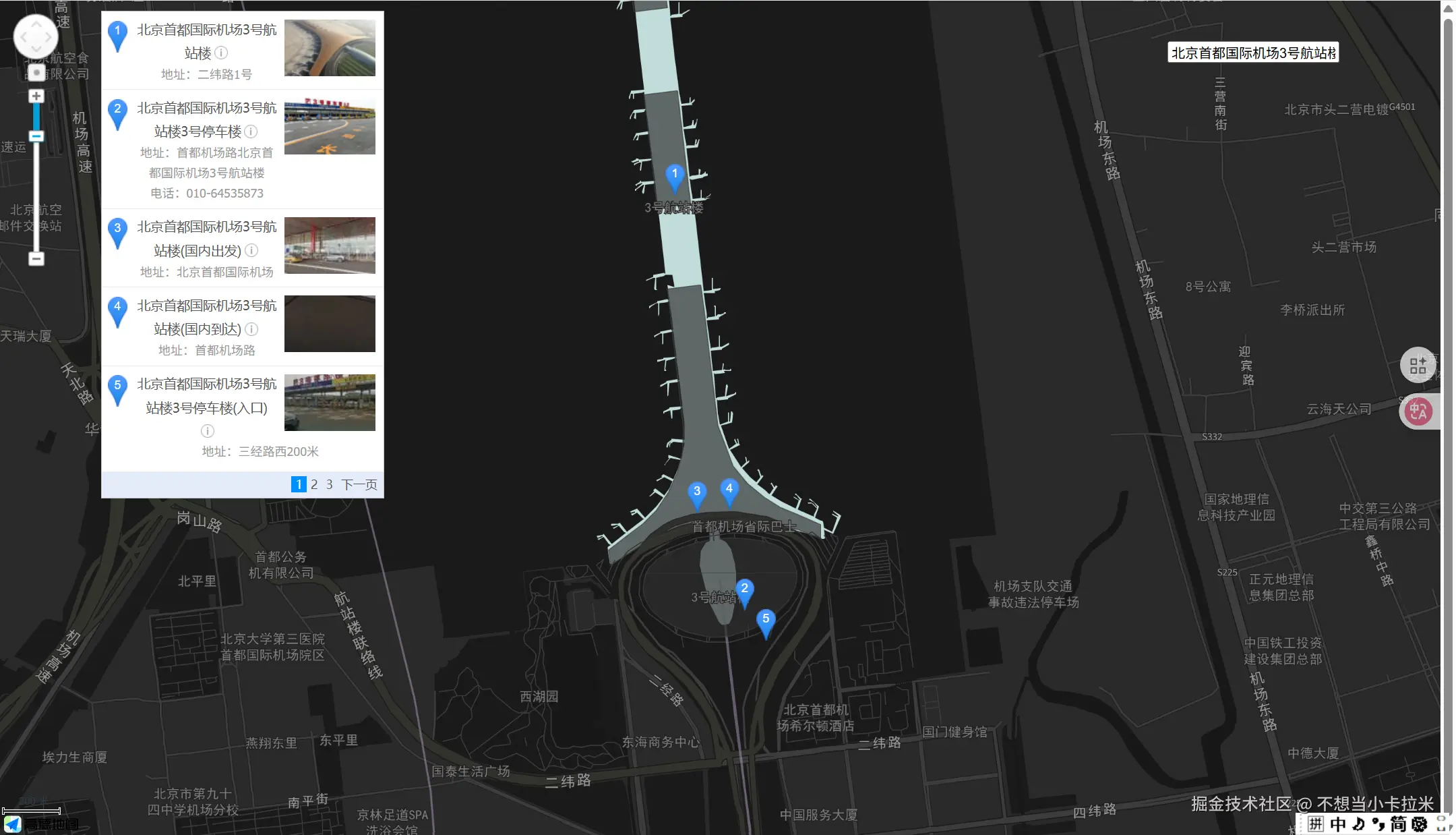
最近在接入高德地图1.4.15版本,其中有地图关键字查询 和输入提示后查询的功能,中间踩了很多坑,一度怀疑是高德的bug,最终发现是自己代码的问题,好在最终解决了,在此记录一下。
地图关键字查询
踩坑1:频繁的创建new AMap.PlaceSearch 实例。我一开始将创建new AMap.PlaceSearch 实例写在了handleSearchChange 事件中,这样会导致placeSearch.search的分页查询不准确,比如我一开始搜索北京,在panel中展示出来的是北京的列表;之后我又搜索济南,一开始在panel中展示的是济南的列表,点击分页页码后,在panel中展示出来的是北京的列表结果。
错误代码如下:
js
<script>
export default {
  data() {
    return {
      amap: null,
      apanel: null,
      searchValue: "",
    };
  },
  methods: {
    loadScript(url, callback) {
     //省略
    },
    initMap() {
      // 省略
    },
    handleSearchChange() {
      const placeSearch = new AMap.PlaceSearch({ // 这里这么写是错误的
        pageSize: 5, // 单页显示结果条数
        pageIndex: 1, // 页码
        map: this.amap,
        panel: "panel",
      }); //构造地点查询类
      this.placeSearch = placeSearch;
      this.placeSearch.search(this.searchValue, (status, result) => {
        console.log("status", status);
        console.log("result", result);
      });
    },
  },
  mounted() {
    this.loadScript(
      "https://webapi.amap.com/maps?v=1.4.15&key=你的key值&plugin=AMap.Scale,AMap.OverView,AMap.ToolBar,AMap.Autocomplete,AMap.PlaceSearch",
      this.initMap
    );
  },
};
</script>
错误截图
- 第一步:先搜索北京
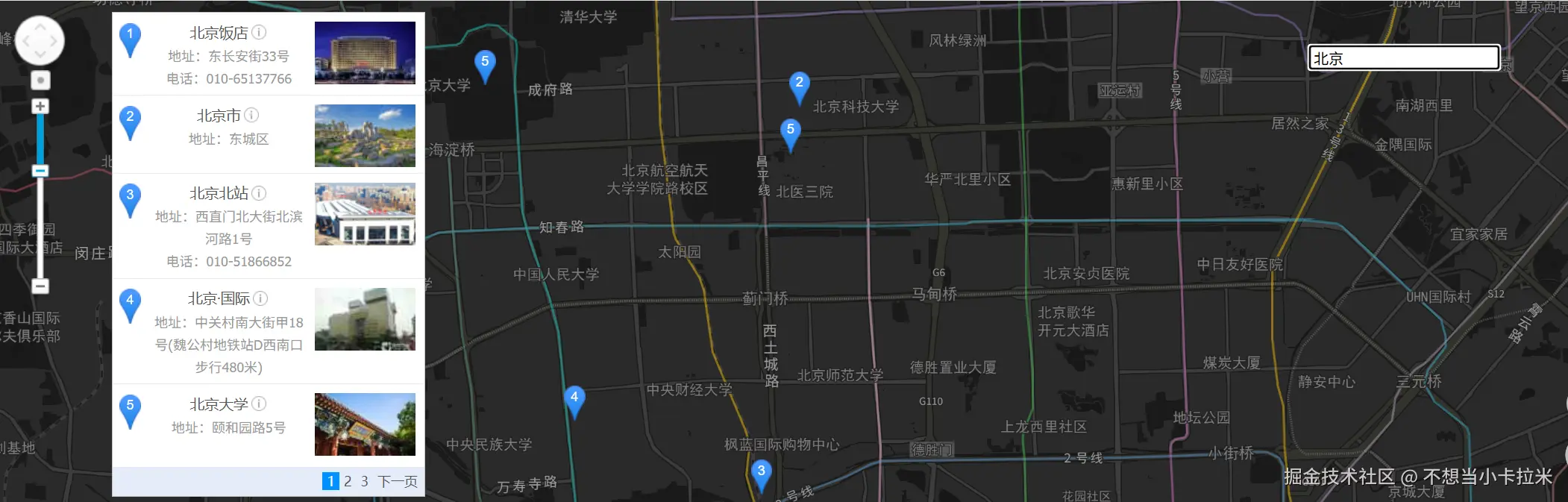
- 第二步:搜索其他地点,比如济南,出现搜索结果后点击分页
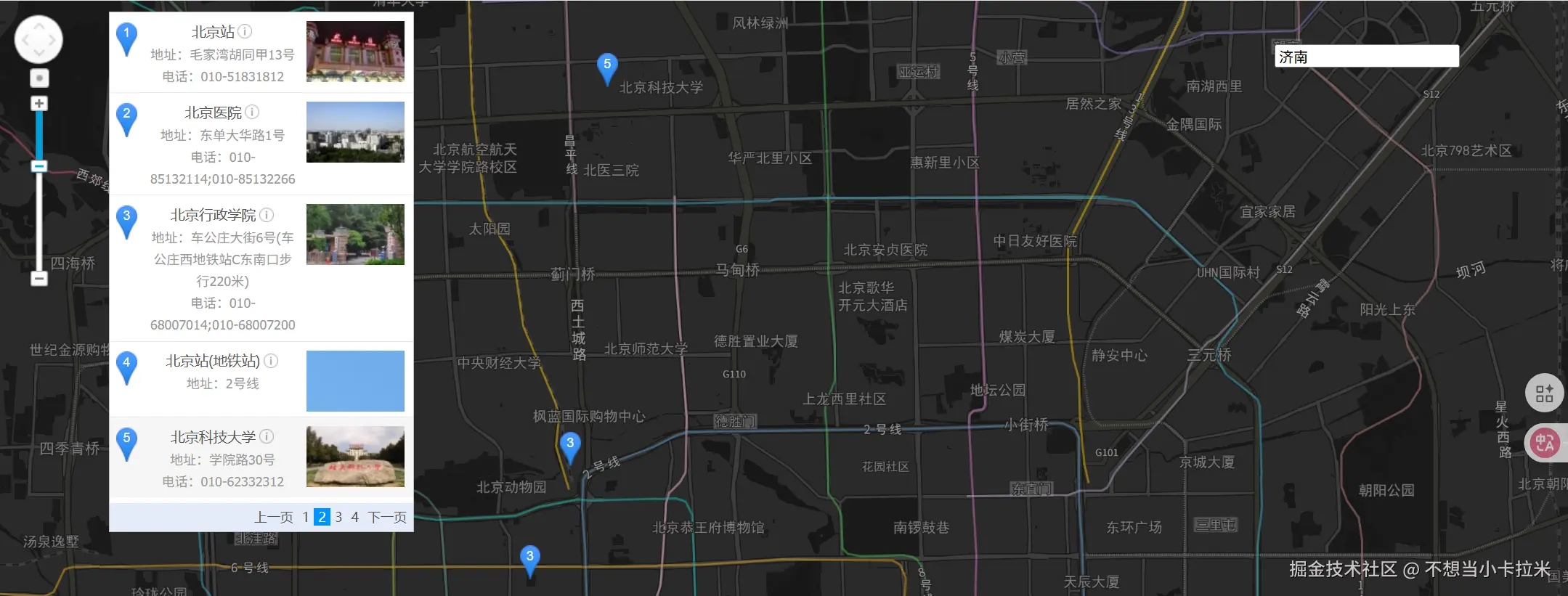 3.可以看到搜索结果是错误的!!!一切都是因为在input框的change事件里频繁的创建new AMap.PlaceSearch实例。
关键字查询的正确的实现代码如下:
在初始化中建立new AMap.PlaceSearch实例
js
<template>
  <div style="width: 100%; height: 100vh">
    <div ref="amap" id="container" style="height: 100%" />

    <div ref="apanel" id="panel" class="panel" />
    <div class="search-bar">
      <input
        placeholder="地图检索"
        prefix-icon="el-icon-search"
        v-model="searchValue"
        @change="handleSearchChange"
      />
    </div>
  </div>
</template>
<style>
.panel {
  position: absolute;
  background-color: white;
  max-height: 90%;
  overflow-y: auto;
  top: 10px;
  left: 100px;
  width: 280px;
}
.search-bar {
  position: fixed;
  width: 250px;
  padding: 20px 0;
  right: 20px;
  top: 20px;
  z-index: 10000;
  display: flex;
}

.search-bar .el-input {
  background: rgba(255, 255, 255, 0.2);
}
</style>
<script>
export default {
  data() {
    return {
      amap: null,
      apanel: null,
      searchValue: "",
    };
  },
  methods: {
    loadScript(url, callback) {
      // 加载高德地图js
      let script = document.createElement("script");

      script.type = "text/javascript";

      script.src = url;

      document.getElementsByTagName("head")[0].appendChild(script);

      script.onload = () => {
        callback();
      };
    },
    initMap() {
      let scale = new AMap.Scale({
        visible: true,
      });
      let toolBar = new AMap.ToolBar({
        visible: true,
      });
      let overView = new AMap.OverView({
        visible: true,
      });

      console.log([this.longitude, this.latitude]);
      this.amap = new AMap.Map("container", {
        //center: [longitude, latitude], //地图中心点
        zoom: 15, //地图级别
        mapStyle: "amap://styles/dark", //设置地图的显示样式
        viewMode: "2D", //设置地图模式
        lang: "zh_cn", //设置地图语言类型
        resizeEnable: true,
      });
      this.amap.addControl(scale);
      this.amap.addControl(toolBar);
      this.amap.addControl(overView);
      const placeSearch = new AMap.PlaceSearch({ //在初始化中建立new AMap.PlaceSearch实例
        pageSize: 5, // 单页显示结果条数
        pageIndex: 1, // 页码
        map: this.amap,
        panel: "panel",
      }); //构造地点查询类
      this.placeSearch = placeSearch;
    },
    handleSearchChange() {
      this.placeSearch.search(this.searchValue, (status, result) => {
        console.log("status", status);
        console.log("result", result);
      });
    },
  },
  mounted() {
    this.loadScript(
      "https://webapi.amap.com/maps?v=1.4.15&key=你的key值&plugin=AMap.Scale,AMap.OverView,AMap.ToolBar,AMap.Autocomplete,AMap.PlaceSearch",
      this.initMap
    );
  },
};
</script>
输入提示后查询
踩坑1:创建new AMap.PlaceSearch 实例时:
-
错误写法:将传入的map参数写为存放map的dom,即this.$refs.amap。
-
正确写法:这里的map参数应该写为创建的new AMap.Map实例。
输入提示后查询的正确的实现代码如下:
js
<template>
  <div style="width: 100%; height: 100vh">
    <div ref="amap" id="container" style="height: 100%" />

    <div ref="apanel" id="panel" class="panel" />
    <div class="search-bar">
      <input
        placeholder="地图检索"
        prefix-icon="el-icon-search"
        v-model="searchValue"
        @change="handleSearchChange"
        id="tipinput"
      />
    </div>
  </div>
</template>
<style>
.panel {
  position: absolute;
  background-color: white;
  max-height: 90%;
  overflow-y: auto;
  top: 10px;
  left: 100px;
  width: 280px;
}
.search-bar {
  position: fixed;
  width: 250px;
  padding: 20px 0;
  right: 20px;
  top: 20px;
  z-index: 10000;
  display: flex;
}

.search-bar .el-input {
  background: rgba(255, 255, 255, 0.2);
}
</style>
<script>
export default {
  data() {
    return {
      amap: null,
      apanel: null,
      searchValue: "",
    };
  },
  methods: {
    loadScript(url, callback) {
      // 加载高德地图js
      let script = document.createElement("script");
      script.type = "text/javascript";
      script.src = url;
      document.getElementsByTagName("head")[0].appendChild(script);
      script.onload = () => {
        callback();
      };
    },
    initMap() {
      let scale = new AMap.Scale({
        visible: true,
      });
      let toolBar = new AMap.ToolBar({
        visible: true,
      });
      let overView = new AMap.OverView({
        visible: true,
      });

      this.amap = new AMap.Map("container", {
        //center: [longitude, latitude], //地图中心点
        zoom: 15, //地图级别
        mapStyle: "amap://styles/dark", //设置地图的显示样式
        viewMode: "2D", //设置地图模式
        lang: "zh_cn", //设置地图语言类型
        resizeEnable: true,
      });
      this.amap.addControl(scale);
      this.amap.addControl(toolBar);
      this.amap.addControl(overView);
      const autoOptions = {
        input: "tipinput",
      };
      const auto = new AMap.Autocomplete(autoOptions);
      const placeSearch = new AMap.PlaceSearch({
        pageSize: 5, // 单页显示结果条数
        pageIndex: 1, // 页码
        map: this.amap, // 这里填写new AMap.Map的实例
        panel: "panel",
      }); //构造地点查询类
      AMap.event.addListener(auto, "select", select); //注册监听,当选中某条记录时会触发
      function select(e) {
        placeSearch.search(e.poi.name, (status, result) => {
          console.log("status", status);
          console.log("result", result);
        });
      }
      this.placeSearch = placeSearch;
    },
    handleSearchChange() {
      this.placeSearch.search(this.searchValue, (status, result) => {
        console.log("status", status);
        console.log("result", result);
      });
    },
  },
  mounted() {
    this.loadScript(
      "https://webapi.amap.com/maps?v=1.4.15&key=095f388e7a22189c7cb0095485e1ca59&plugin=AMap.Scale,AMap.OverView,AMap.ToolBar,AMap.Autocomplete,AMap.PlaceSearch",
      this.initMap
    );
  },
};
</script>
最终实现截图