前言
❝
叠加分析是地理信息系统(GIS)空间分析的核心功能之一。它通过两个或者两个以上的图层进行叠加,揭示要素间的空间关联与交互规律。提取出目标结果进行分析,在项目选址、土地占用方面特别有用。叠加分析不仅能够提取多源数据的复合信息,还可通过逻辑运算(如交集、并集)生成新的空间特征,为科学决策提供关键的空间关系支撑。
本篇教程在之前一系列文章的基础上讲解如何将使用GeoTools工具结合OpenLayers实现空间数据的空间缓冲区分析功能。
- GeoTools 开发环境搭建1
- 将 Shp 导入 PostGIS 空间数据的五种方式(全)2
- GeoTools 结合 OpenLayers 实现空间查询3
如果你还没有看过,建议从那里开始。
本文实现流程大致如下。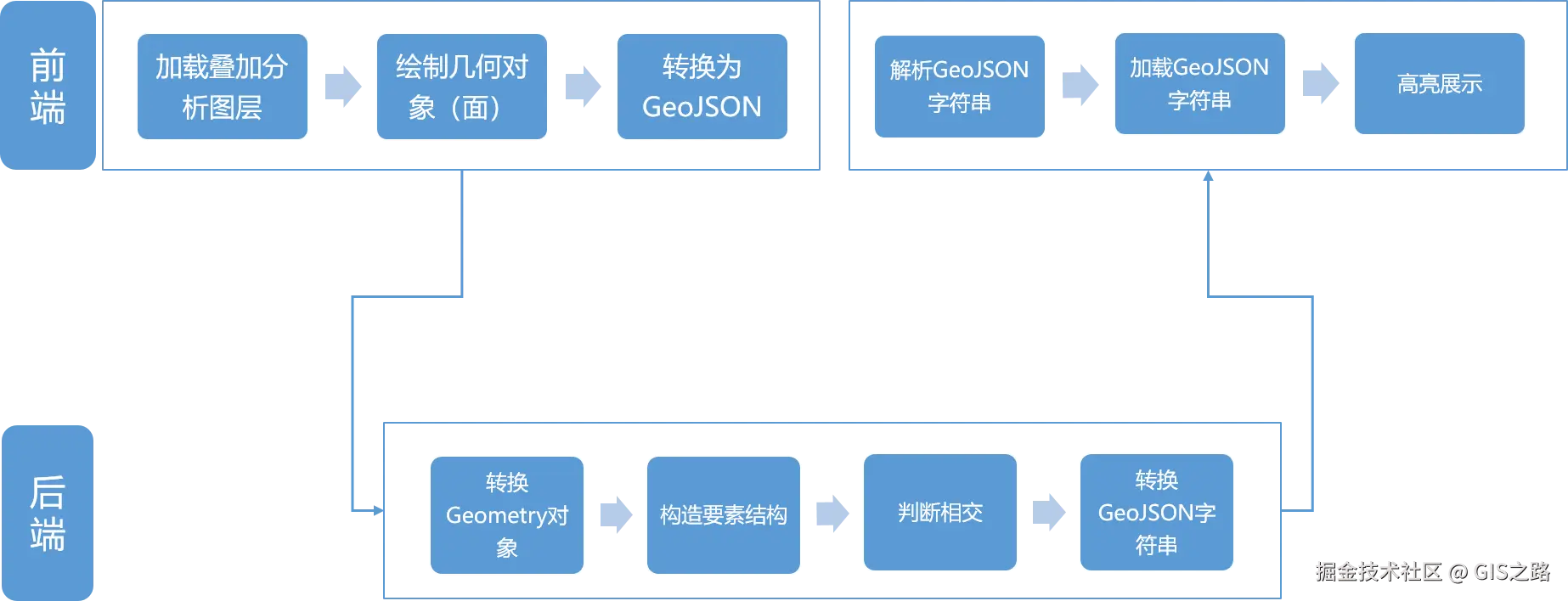
1. 开发环境
本文使用如下开发环境,以供参考。
时间:2025年
GeoTools:v34-SNAPSHOT
IDE:IDEA2025.1.2
JDK:v17
OpenLayers:v9.2.4
Layui:v2.9.14
2. 搭建后端服务
当前在GeoTools 结合 OpenLayers 实现缓冲区分析4的基础上进行改造,具体修改如下。
在项目控制层SpatialAnalyseController创建叠加分析方法overlapAnalyse,该方法接收一个GeoJSON字符串参数。
kotlin
package com.example.geotoolsboot.controller;

import com.example.geotoolsboot.service.ISpatialAnalyseService;
import org.springframework.beans.factory.annotation.Autowired;
import org.springframework.web.bind.annotation.CrossOrigin;
import org.springframework.web.bind.annotation.GetMapping;
import org.springframework.web.bind.annotation.RequestParam;
import org.springframework.web.bind.annotation.RestController;

import java.util.Map;

/**
 * @name: SpatialAnalyseController
 * @description: 空间分析控制器
 * @author: gis_road
 * @date: 2025-08-05
 */
@CrossOrigin(origins = "*") // 允许跨域
@RestController
public class SpatialAnalyseController {

    @Autowired
    private ISpatialAnalyseService spatialAnalyseService;

    @GetMapping("/overlapAnalyse")
    public Map<String,Object> overlapAnalyse(@RequestParam() String geoJSON) throws Exception {

        return spatialAnalyseService.overlapAnalyse(geoJSON);
    }
}在服务层创建ISpatialAnalyseService接口并定义缓冲分析方法。
typescript
package com.example.geotoolsboot.service;

import java.util.Map;

/**
 * @name: ISpatialAnalyseService
 * @description: 空间分析管理层
 * @author: gis_road
 * @date: 2025-08-05
 */
public interface ISpatialAnalyseService {
    Map<String,Object> overlapAnalyse(String geoJSON) throws Exception;
}在服务层中实现ISpatialAnalyseService接口。首先使用方法geoJsonToGeometry将前端传递过来Geomery类型的GeoJSON字符串对象转换为GeoTools中的Geometry对象,然后使用buildSchema方法构造返回要素数据结构。
需要注意 的是在判断数据相交时至少要得考虑几何对象类型为Polygon和MultiPolygon两种情况。在代码中sourceGeometry instanceof MultiPolygon使用instanceof关键字很容易判断出几何数据类型。
在分析完成之后,使用方法feature2JSON将结果数据转换为GeoJSON字符串返回给前端。
ini
package com.example.geotoolsboot.service.impl;

import com.example.geotoolsboot.service.ISpatialAnalyseService;
import org.geotools.api.data.SimpleFeatureSource;
import org.geotools.api.feature.simple.SimpleFeature;
import org.geotools.api.feature.simple.SimpleFeatureType;
import org.geotools.api.feature.type.AttributeDescriptor;
import org.geotools.api.feature.type.GeometryDescriptor;
import org.geotools.api.referencing.crs.CoordinateReferenceSystem;
import org.geotools.data.shapefile.ShapefileDataStore;
import org.geotools.data.simple.SimpleFeatureCollection;
import org.geotools.data.simple.SimpleFeatureIterator;
import org.geotools.feature.DefaultFeatureCollection;
import org.geotools.feature.simple.SimpleFeatureBuilder;
import org.geotools.feature.simple.SimpleFeatureTypeBuilder;
import org.geotools.geojson.feature.FeatureJSON;
import org.geotools.geojson.geom.GeometryJSON;
import org.locationtech.jts.geom.Geometry;
import org.locationtech.jts.geom.MultiPolygon;
import org.locationtech.jts.geom.Polygon;
import org.springframework.stereotype.Service;

import java.io.File;
import java.io.StringReader;
import java.io.StringWriter;
import java.nio.charset.Charset;
import java.util.*;

/**
 * @name: SpatialAnalyseServiceImpl
 * @description: 空间分析实现层
 * @author: gis_road
 * @date: 2025-08-05
 */

@Service
public class SpatialAnalyseServiceImpl implements ISpatialAnalyseService {
    /**叠加分析**/
    @Override
    public Map<String,Object>  overlapAnalyse(String geoJSON) throws Exception {

        // 保存输出结果
        List<Object> resultFeatures = new ArrayList<>();

        // 叠加分析数据
        String shpPath = "E:\data\scland_4326.shp";
        File shpFile = new File(shpPath);

        ShapefileDataStore shapefileDataStore = new ShapefileDataStore(shpFile.toURI().toURL());
        // 设置中文字符集,防止乱码
        shapefileDataStore.setCharset(Charset.forName("GBK"));

        // 获取分析数据结构
        String typeName = shapefileDataStore.getTypeNames()[0];
        SimpleFeatureType sourceSchema = shapefileDataStore.getSchema(typeName);

        SimpleFeatureSource featureSource = shapefileDataStore.getFeatureSource();

        // 目标数据
        SimpleFeatureCollection sourceFeatureCollection = featureSource.getFeatures();
        CoordinateReferenceSystem crs = sourceSchema.getCoordinateReferenceSystem();
        // 解析字符串分析参数为JSON对象
        Map<String,Object> resultMap = new HashMap<>();

        // 将GeoJSON数据转换为Geometry
        Geometry analyseGeometry = geoJsonToGeometry(geoJSON);

        // 创建结果要素类型
        SimpleFeatureType resultSchema = buildSchema(sourceSchema, crs);

        // 相交分析,获取两个图层的相交集合
        try(SimpleFeatureIterator iterator = sourceFeatureCollection.features()){
            while(iterator.hasNext()){
                SimpleFeature sourceFeature = iterator.next();
                Geometry sourceGeometry = (Geometry)sourceFeature.getDefaultGeometry();

                if(sourceGeometry instanceof Polygon){
                    // 执行相交操作
                    Geometry intersection = sourceGeometry.intersection(analyseGeometry);
                    if(!intersection.isEmpty()){
                        resultFeatures.add(intersection);
                    }
                } else if (sourceGeometry instanceof MultiPolygon) {
                    MultiPolygon multiPolygon = (MultiPolygon) sourceGeometry;
                    for (int i = 0; i < multiPolygon.getNumGeometries(); i++) {
                        Geometry subGeom = multiPolygon.getGeometryN(i);
                        if (subGeom instanceof Polygon) {
                            Geometry intersection = subGeom.intersection(analyseGeometry);
                            if (!intersection.isEmpty()) {
                                List<Object> attributes = new ArrayList<>();
                                attributes.add(null); // 预留几何位置
                                // 添加要素的属性
                                for(AttributeDescriptor attr:sourceSchema.getAttributeDescriptors()) {
                                    if (!(attr instanceof GeometryDescriptor)) {
                                        attributes.add(sourceFeature.getAttribute(attr.getName()));
                                    }
                                }
                                SimpleFeature resultFeature = SimpleFeatureBuilder.build(
                                        resultSchema,
                                        attributes,
                                        null
                                );
                                resultFeature.setDefaultGeometry(intersection);
                                String feature =  (String)feature2JSON(resultFeature);
                                resultFeatures.add(feature);
                            }
                        }
                    }
                }
            }

        }catch (Exception e){
            e.printStackTrace();
        }

        resultMap.put("data",resultFeatures);
        return resultMap;
    }

    /**
     * 创建要素结构
     * @param schema
     * @param crs
     * @return
     */
    private static SimpleFeatureType buildSchema(SimpleFeatureType schema,CoordinateReferenceSystem crs) {
        SimpleFeatureTypeBuilder typeBuilder = new SimpleFeatureTypeBuilder();
        typeBuilder.setName(schema.getName().getLocalPart());
        typeBuilder.setCRS(crs);

        // 添加几何字段(保留主图层的几何类型)
        GeometryDescriptor geomDescriptor = schema.getGeometryDescriptor();
        typeBuilder.add(geomDescriptor.getLocalName(), geomDescriptor.getType().getBinding(), crs);
        for (AttributeDescriptor attr : schema.getAttributeDescriptors()) {
            // 跳过几何字段(已单独添加)
            if (attr instanceof GeometryDescriptor) continue;

            String attrName = attr.getLocalName();

            // 添加属性(保留原始类型和约束)
            typeBuilder.add(attrName, attr.getType().getBinding());

            // 复制属性约束(如是否可为空、默认值等)
            if (!attr.isNillable()) {
                typeBuilder.nillable(false);
            }
            if (attr.getDefaultValue() != null) {
                typeBuilder.defaultValue(attr.getDefaultValue());
            }
        }
        return typeBuilder.buildFeatureType();
    }
    /**
     * 将GeoJSON字符串转换为Geometry对象
     * @param geoJson
     * @return
     */
    private static Geometry geoJsonToGeometry(String geoJson) throws Exception {
        GeometryJSON geometryJson = new GeometryJSON(6); // 保留6位小数
        try (StringReader reader = new StringReader(geoJson)) {
            return geometryJson.read(reader);
        }
    }

    /**
     * 将Feature转换为GeoJSON字符串
     * @param feature
     * @return
     */
    private Object feature2JSON(SimpleFeature feature) throws Exception {
        FeatureJSON featureJSON = new FeatureJSON();
        StringWriter writer = new StringWriter();
        featureJSON.writeFeature(feature,writer);
        return writer.toString();
    }

}
3. OpenLayers 加载叠加服务
前端实现逻辑首先加载叠加分析图层,然后绘制面对象,在绘制完成之后将面Geometry对象转换为GeoJSON数据,之后在点击提交按钮时,将几何数据传递到后端。
后端分析完成将叠加成果返回到前端之后,使用一个列表展示分析结果,点击当前行缩放到目标数据范围,图层高亮显示并打开信息弹窗。
前端CSS结构:
css
.query-wrap {
    position: absolute;
    padding: 10px;
    top: 80px;
    left: 90px;
    background: #ffffff;
    width: 250px;
    border-radius: 2.5px;
}

.table-div {
    position: absolute;
    padding: 10px;
    top: 250px;
    left: 90px;
    max-height: 350px;
    overflow-y: scroll;
    background: #ffffff;
    width: 350px;
    border-radius: 2.5px;
    display: none;
}
前端HTML结构:
xml
<body>
    <div id="top-content">
        <span>GeoTools 结合 OpenLayers 实现叠加分析</span>
    </div>
    <div id="map" title=""></div>
    <div class="query-wrap">
        <form class="layui-form layui-form-pane" action="">
            <div class="layui-form-item">
                <label class="layui-form-label">绘制对象</label>
                <div class="layui-input-block">
                    <select name="condition" lay-filter="draw-select-filter">
                        <option value="None">请选择绘制类型</option>
                        <option value="Point">点</option>
                        <option value="LineString">线</option>
                        <option value="Polygon">面</option>
                    </select>
                </div>
            </div>
            <div class="layui-form-item">
                <button lay-submit lay-filter="clearAll" class="layui-btn layui-btn-primary">清除</button>
                <button class="layui-btn" lay-submit lay-filter="spatialAnalyse">确认</button>
            </div>
        </form>
    </div>
    <div class="table-div">
        <table id="feature-data"></table>
    </div>
</body>前端JS实现,其他逻辑大体不变,这次主要使用了parseFeatureFromService方法统一将后端叠加成功数据转换为Feature数组对象进行展示。
less
layui.use(['form', 'table'], function () {
        const form = layui.form;
        const layer = layui.layer;
        const table = layui.table;

        // 绘制事件
        form.on('select(draw-select-filter)', function (data) {
            removeInteraction()
            const value = data.value; // 获得被选中的值
            drawShape(value)
        });

        // 清除事件
        form.on("submit(clearAll)", function (data) {
            // 清除绘制事件
            removeInteraction()
            document.querySelector(".table-div").style.display = "none"
            // 清除图形
            removeAllLayer(map)
            return false; // 阻止默认 form 跳转
        })

        let properties = []
        // 提交事件
        form.on('submit(spatialAnalyse)', function (data) {
            if (!geoJSON) {
                layer.msg("请绘制缓冲区域")
                return false
            }
            const queryParam = encodeURIComponent(geoJSON)
            // 后端服务地址
            const spatial = `http://127.0.0.1:8080/overlapAnalyse?geoJSON=${queryParam}`

            fetch(spatial).then(response => response.json()
                .then(result => {

                    const { resultFeatures: features, tabelData } = parseFeatureFromService(result.data)
                    properties = tabelData
                    const vectorSource = new ol.source.Vector({
                        features: features,
                        format: new ol.format.GeoJSON()
                    })

                    // 分析结果图层
                    const resultLayer = new ol.layer.Vector({
                        source: vectorSource,
                        style: new ol.style.Style({
                            fill: new ol.style.Fill({
                                color: "#e77b7e8f"
                            }),
                            stroke: new ol.style.Stroke({
                                color: "red",
                                width: 2.5,
                            }),
                        })
                    })
                    resultLayer.set("layerName", "resultLayer")
                    resultLayer.setZIndex(999)
                    map.addLayer(resultLayer)

                    if (properties.length) {
                        document.querySelector(".table-div").style.display = "block"

                        // 已知数据渲染
                        let inst = table.render({
                            elem: '#feature-data',
                            url: spatial,
                            cols: [[ //标题栏
                                { field: 'SICHUAN_ID', title: 'ID', width: 30 },
                                { field: 'dlbm', title: '地类编码', width: 100 },
                                { field: 'dlmc', title: '地类名称', width: 100 },
                                { field: 'AREA', title: '面积(平方米)', width: 80, sort: true }
                            ]],
                            parseData: (res) => {
                                const { tabelData } = parseFeatureFromService(res.data)
                                const newTable = tabelData.map(feature => {
                                    let table = {}
                                    table = feature.properties
                                    table.geometry = feature.geometry
                                    return table
                                })
                                return {
                                    "code": 0, // 解析接口状态
                                    "msg": "", // 解析提示文本
                                    "count": "", // 解析数据长度
                                    "data": newTable // 解析数据列表
                                }
                            }
                        })

                        // 行单击事件
                        table.on('row(feature-data)', function (obj) {
                            removeLayerByName("highlightLayer")
                            const data = obj.data; // 得到当前行数据
                            const geom = new ol.format.GeoJSON().readGeometry(data.geometry)
                            const source = new ol.source.Vector({
                                features: [
                                    new ol.Feature({
                                        geometry: geom,
                                        properties: data
                                    })
                                ],
                                format: new ol.format.GeoJSON()
                            })

                            const overLayer = new ol.layer.Vector({
                                source: source,
                                style: new ol.style.Style({
                                    stroke: new ol.style.Stroke({
                                        color: "#00bcd4",
                                        width: 2.5
                                    }),
                                    fill: new ol.style.Fill({
                                        color: "#ffffff00"
                                    })
                                })
                            })

                            overLayer.set("layerName", "highlightLayer")
                            overLayer.setZIndex(9999)
                            map.addLayer(overLayer)

                            const extent = geom.getExtent()
                            map.getView().fit(extent)

                            // Popup 模板
                            const popupColums = [
                                {
                                    name: "SICHUAN_ID",
                                    comment: "要素编号"
                                },
                                {
                                    name: "dlbm",
                                    comment: "地类编码"
                                },
                                {
                                    name: "dlmc",
                                    comment: "地类名称"
                                },
                                {
                                    name: "AREA",
                                    comment: "面积(平方米)"
                                }
                            ]

                            // 获取中心点
                            const center = ol.extent.getCenter(extent)
                            openPopupTable(data, popupColums, center)
                        });

                    }
                })

            )

            return false; // 阻止默认 form 跳转
        });
    });
    // 解析GeoJSON字符串
    const parseFeatureFromService = (result) => {
        const tabelData = []
        let features = []
        let resultFeatures = []
        if (!Array.isArray(result)) {
            features.push(result)
        } else {
            features = result
        }
        if (features.length) {
            resultFeatures = features.map(current => {
                const resultFeature = JSON.parse(current)
                tabelData.push(resultFeature)
                return new ol.format.GeoJSON().readFeature(resultFeature)
            })
        }
        return {
            resultFeatures,
            tabelData
        }
    }
4. 实现效果
参考资料
1GeoTools 开发环境搭建
2将 Shp 导入 PostGIS 空间数据的五种方式(全)
3GeoTools 结合 OpenLayers 实现空间查询
4GeoTools 结合 OpenLayers 实现缓冲区分析