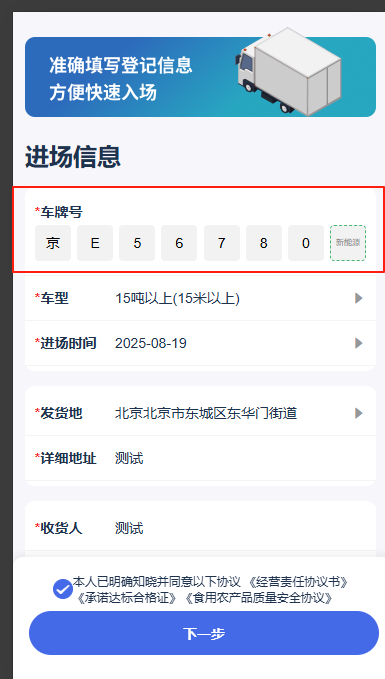
1.车牌展示div
bash
<div class="carDiv">
	<div class='carTitle'><span>*</span>车牌号</div>
	<div class="car-num-input">
		<div v-for="(item,index) in carNumList" :key="index" @click.stop="selectCarNum(index)"
			:class="(carIndex == index ? 'active' : '') + ' ' + (item ? 'status-key' : '')">
			{{ index == 0 && !item ? '省' : index == carNumList.length-1 && !item ? '新能源' : item }}
		</div>
	</div>
</div>
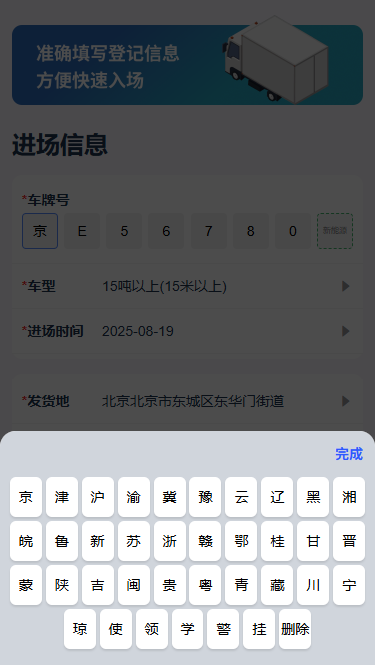
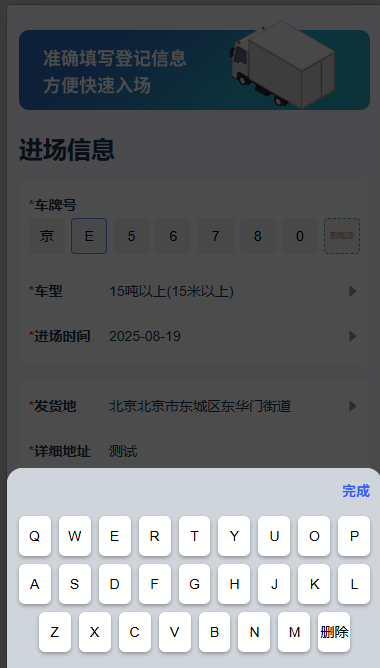
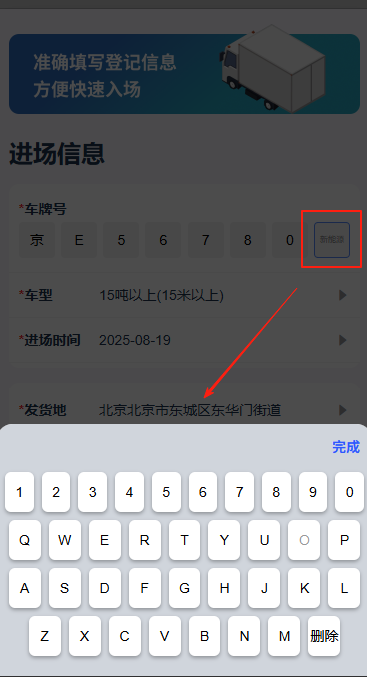
2.车牌弹框键盘
bash
<van-popup v-model="keyboardShow" position="bottom" round :overlay="true" :close-on-click-overlay="false">
	<div class="keyboard-layer">
		<div class="keyboard-header">
			<span @click="keyboardShow = false">完成</span>
		</div>
		<!-- 省份键盘 -->
		<div class="province-layer" v-if="carIndex == '0'">
			<span v-for="(item,index) in provinceList" :key="index" @click="keyboardBtn(item)"
				:class="activeKey == item ? 'active-hover' : ''">{{ item == 'del' ? '删除' : item }}</span>
		</div>
		<!-- 数字字母键盘 -->
		<div class="keyboard-item" v-if="carIndex != '0'">
			<div v-if="carIndex != '1'">
				<span v-for="(item,index) in keyboardList[0]" :key="index" @click="keyboardBtn(item)"
					:class="activeKey == item ? 'active-hover' : ''">{{ item }}</span>
			</div>
			<div>
				<span v-for="(item,index) in keyboardList[1]" :key="index" @click="keyboardBtn(item)"
					:class="((item == 'O' && carIndex != '1') ? 'no-btn' : '') + ' ' + (activeKey == item ? 'active-hover' : '')">{{ item }}</span>
			</div>
			<div>
				<span v-for="(item,index) in keyboardList[2]" :key="index" @click="keyboardBtn(item)"
					:class="activeKey == item ? 'active-hover' : ''">{{ item }}</span>
			</div>
			<div>
				<span v-for="(item,index) in keyboardList[3]" :key="index" @click="keyboardBtn(item)"
					:class="activeKey == item ? 'active-hover' : ''">{{ item == 'del' ? '删除' : item }}</span>
			</div>
			<div v-if="carIndex == carNumList.length-2">
				<span v-for="(item,index) in keyboardList[4]" :key="index" @click="keyboardBtn(item)"
					:class="activeKey == item ? 'active-hover' : ''">{{ item }}</span>
			</div>
		</div>
	</div>
</van-popup>
data
bash
addShow: false, // 添加车辆弹窗显示隐藏
number:'',
carNumList: ['', '', '', '', '', '', '', ''], // 车牌号数组
activeKey: '', // 键盘按键选中激活
timeoutId: null, // 定时器ID
carIndex: null, // 车牌号输入光标索引
keyboardShow: false, // 键盘显示/隐藏
provinceList: [
	'京', '津', '沪', '渝', '冀', '豫', '云', '辽', '黑', '湘',
	'皖', '鲁', '新', '苏', '浙', '赣', '鄂', '桂', '甘', '晋',
	'蒙', '陕', '吉', '闽', '贵', '粤', '青', '藏', '川', '宁',
	'琼', '使', '领', '学', '警', '挂', 'del'
],
keyboardList: [
	['1', '2', '3', '4', '5', '6', '7', '8', '9', '0'],
	['Q', 'W', 'E', 'R', 'T', 'Y', 'U', 'O', 'P'],
	['A', 'S', 'D', 'F', 'G', 'H', 'J', 'K', 'L'],
	['Z', 'X', 'C', 'V', 'B', 'N', 'M', 'del'],
	['学', '警', '港', '澳']
],
watch监听
bash
watch: {
	"addShow"() {
		// 关闭弹窗时重置
		if (!this.addShow) {
			this.number='';
			this.carIndex = ''; // 车牌号输入光标索引
			this.carNumList = ['', '', '', '', '', '', '', '']; // 车牌号数组
			this.keyboardShow = false; // 车牌键盘隐藏
		}
	},
}
methods方法
bash
methods:{
	// 点击车牌号输入
	selectCarNum(inx) {
		this.carIndex = inx;
		if (!this.keyboardShow) {
			this.keyboardShow = true;
		}
	},
	// 键盘输入
	keyboardBtn(val) {
		this.activeKey = val; // 键盘按键选中激活
		this.activeKeyBtn(); // 键盘按键激活定时器
		this.carNumList[this.carIndex] = val == 'del' ? '' : val;
		if (val == 'del' && this.carIndex > 0) {
			this.carIndex--;
		}
		if (val != 'del' && this.carIndex < this.carNumList.length - 1) {
			this.carIndex++;
		}
		// 判断前7个有没有值
	    let ifData = this.carNumList.length >= 7 && this.carNumList.slice(0, 7).every(value => value != null && value !== '');
		if(ifData == true){
			this.keyboardShow = false;
			this.checkCarInfo('write');//判断填写车牌是否绑定
		}
		this.$forceUpdate();
	},
	// 键盘按键激活定时器
	activeKeyBtn() {
		// 清除之前的定时器
		if (this.timeoutId) clearTimeout(this.timeoutId)
		// 1秒后重置状态
		this.timeoutId = setTimeout(() => {
			this.activeKey = '';
		}, 300)
	},
}
css
bash
.carDiv{
	padding: 10px 10px;
	border-bottom:0.5px solid #F4F4F4;
	.carTitle{
		font-size: 14px;
		color: #1f324e;
		font-weight: 700;
		span{
			color: #F81E1E;
		}
	}
}

.car-num-input {
	width: 100%;
	display: flex;
	align-items: center;
	justify-content: space-between;
	padding: 4px 0;
	box-sizing: border-box;

	div {
		width: 36px;
		height: 36px;
		background: rgba(0, 0, 0, .05);
		border-radius: 4px;
		border: 1px solid transparent;
		box-sizing: border-box;
		display: flex;
		align-items: center;
		justify-content: center;
		color: #000;
		font-size: 14px;
		line-height: 18px;

		&:first-child {
			color: rgba(0, 0, 0, .5);
		}

		&:last-child {
			border: 1px dashed rgba(27, 171, 80, 0.8);
			color: rgba(0, 0, 0, .5);
			font-size: 8px;
		}
	}

	.active {
		border: 1px solid rgba(48, 112, 255, 0.8) !important;
	}

	.status-key {
		color: #000 !important;
		font-size: 14px !important;
		line-height: 18px !important;
	}
}

// 车牌弹框
.keyboard-layer {
	width: 100%;
	background: #D0D5DC;
	padding: 8px 4px 16px;
	box-sizing: border-box;
	// position: absolute;
	// bottom: 0;
	// left: 0;

	.keyboard-header {
		width: 100%;
		display: flex;
		align-items: center;
		justify-content: flex-end;
		padding: 0 8px 8px;
		box-sizing: border-box;

		span {
			color: #2E59FD;
			font-family: "PingFang SC";
			font-size: 14px;
			font-weight: 700;
			line-height: 28px;
			cursor: pointer;
		}
	}

	.province-layer {
		width: 100%;
		display: flex;
		align-items: center;
		justify-content: center;
		flex-wrap: wrap;

		span {
			color: #000;
			font-size: 14px;
			line-height: 40px;
			background: #fff;
			border-radius: 6px;
			width:32px;
			height:40px;
			text-align: center;
			box-sizing: border-box;
			margin: 2px;
			box-shadow: 0px 2px 2px 0px rgba(0, 0, 0, 0.1);
		}
	}

	.keyboard-item {
		width: 100%;

		div {
			display: flex;
			align-items: center;
			justify-content: center;

			span {
				color: #000;
				font-size: 14px;
				line-height: 40px;
				background: #fff;
				border-radius: 6px;
				width:32px;
				height:40px;
				text-align: center;
				box-sizing: border-box;
				margin: 4px;
				box-shadow: 0px 2px 4px 0px rgba(0, 0, 0, 0.3);
			}
		}
	}

	.no-btn {
		color: rgba(0, 0, 0, .4) !important;
		pointer-events: none;
	}

	.active-hover {
		background: #B3BAC7 !important;
	}
}
效果图: