1.前言
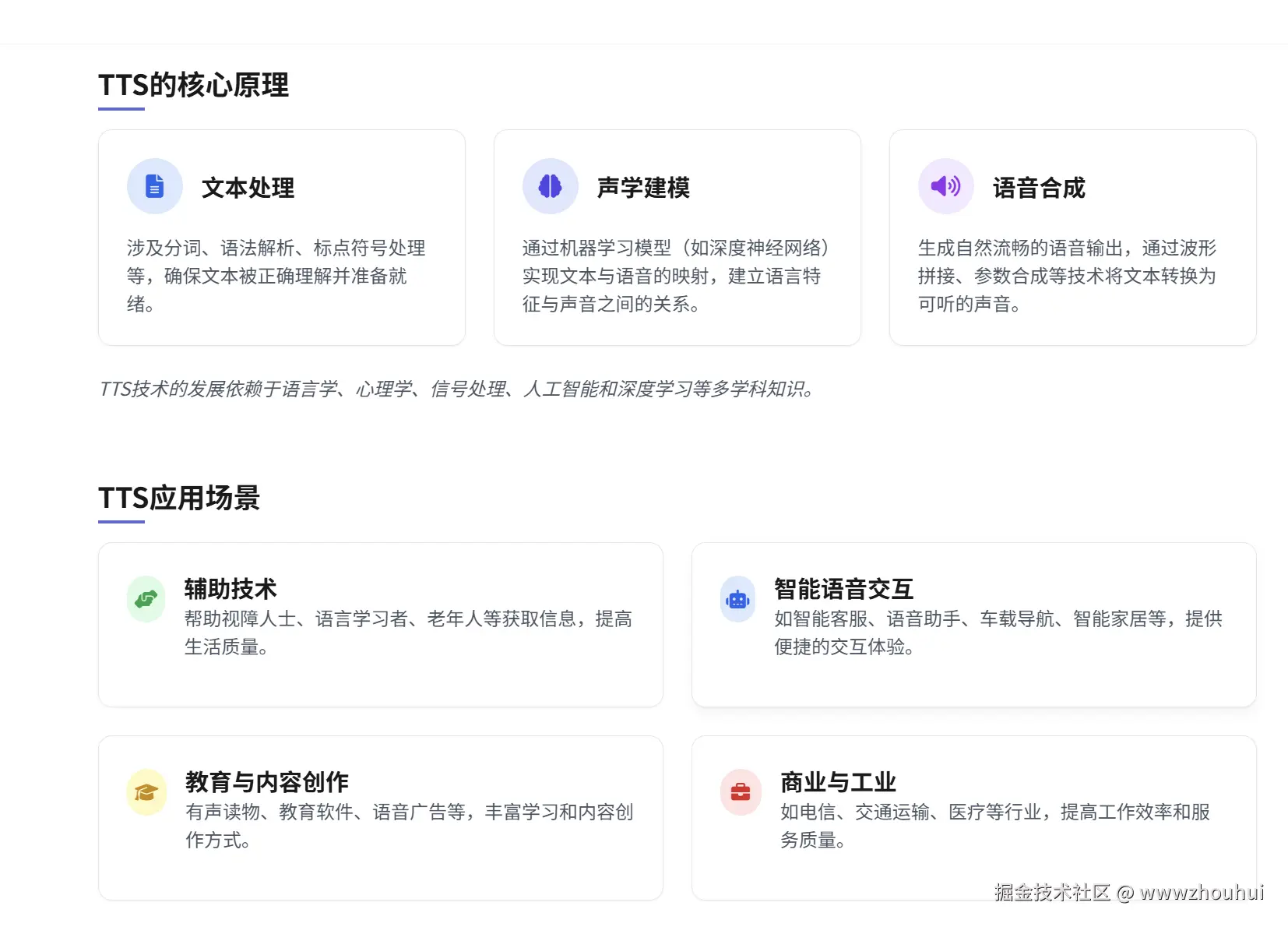
TTS(Text-to-Speech,文本转语音)是一种将书面文本转换为自然语音的技术,使计算机或设备能够"说话",将输入的文字信息转化为语音输出。TTS技术广泛应用于多种场景,如语音合成、辅助技术、智能语音交互、教育、导航、无障碍服务等。
TTS的核心原理包括文本处理、声学建模和语音合成。文本处理涉及分词、语法解析、标点符号处理等;声学建模通过机器学习模型(如深度神经网络)实现文本与语音的映射;语音合成则生成自然流畅的语音输出。TTS技术的发展依赖于语言学、心理学、信号处理、人工智能和深度学习等多学科知识。
收集了市面上一些开源的TTS
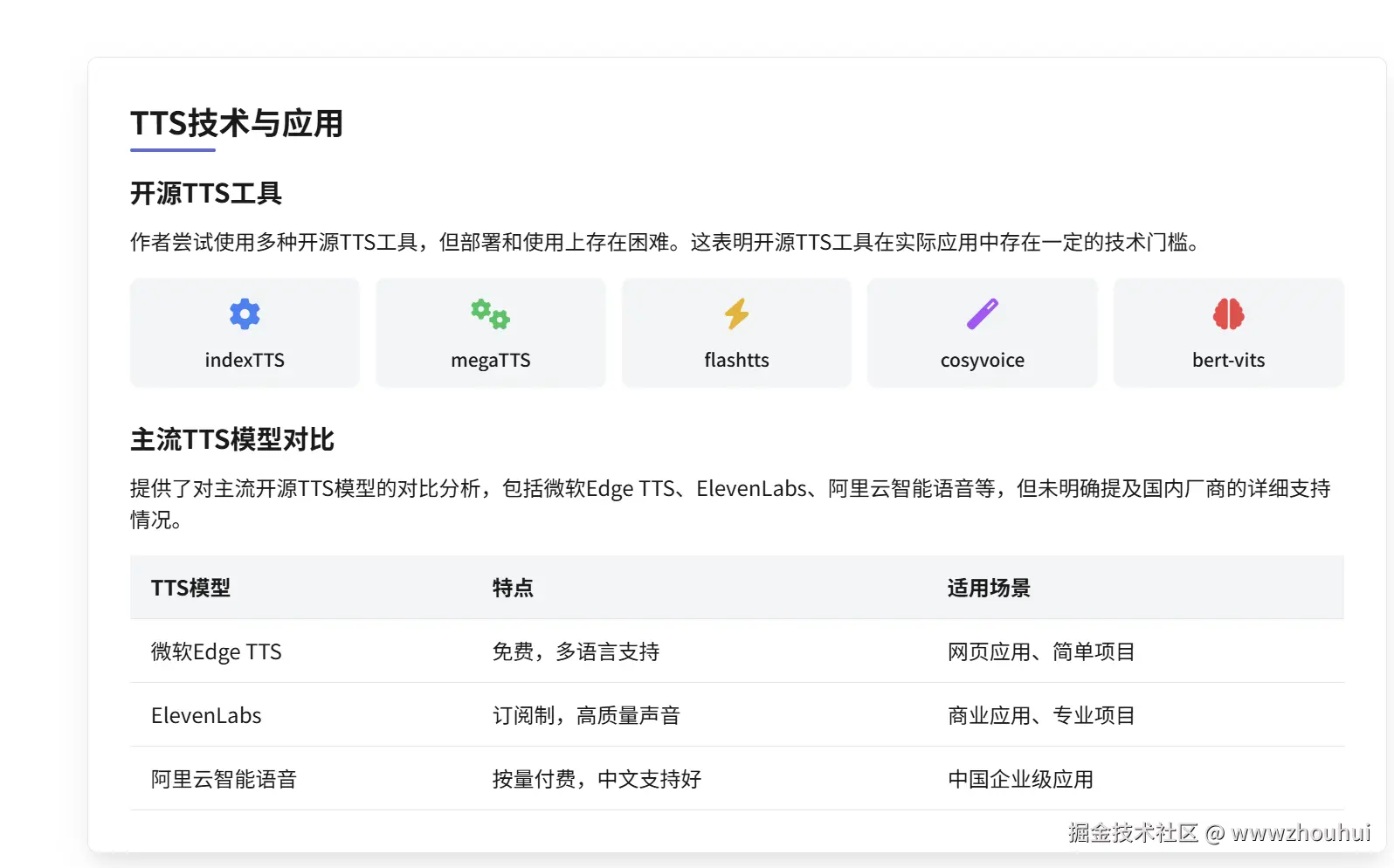
今天给大家带来一个基于微软Edge TTS,因为考虑国内网络环境基于Edge TTS做了一个dify插件。从而方便小伙伴免费在dify平台上免费使用这个TTS。那么这样TTS是如何制作呢?话不多说下面带大家一行代码不行实现这个dify插件。
2.开发过程分享
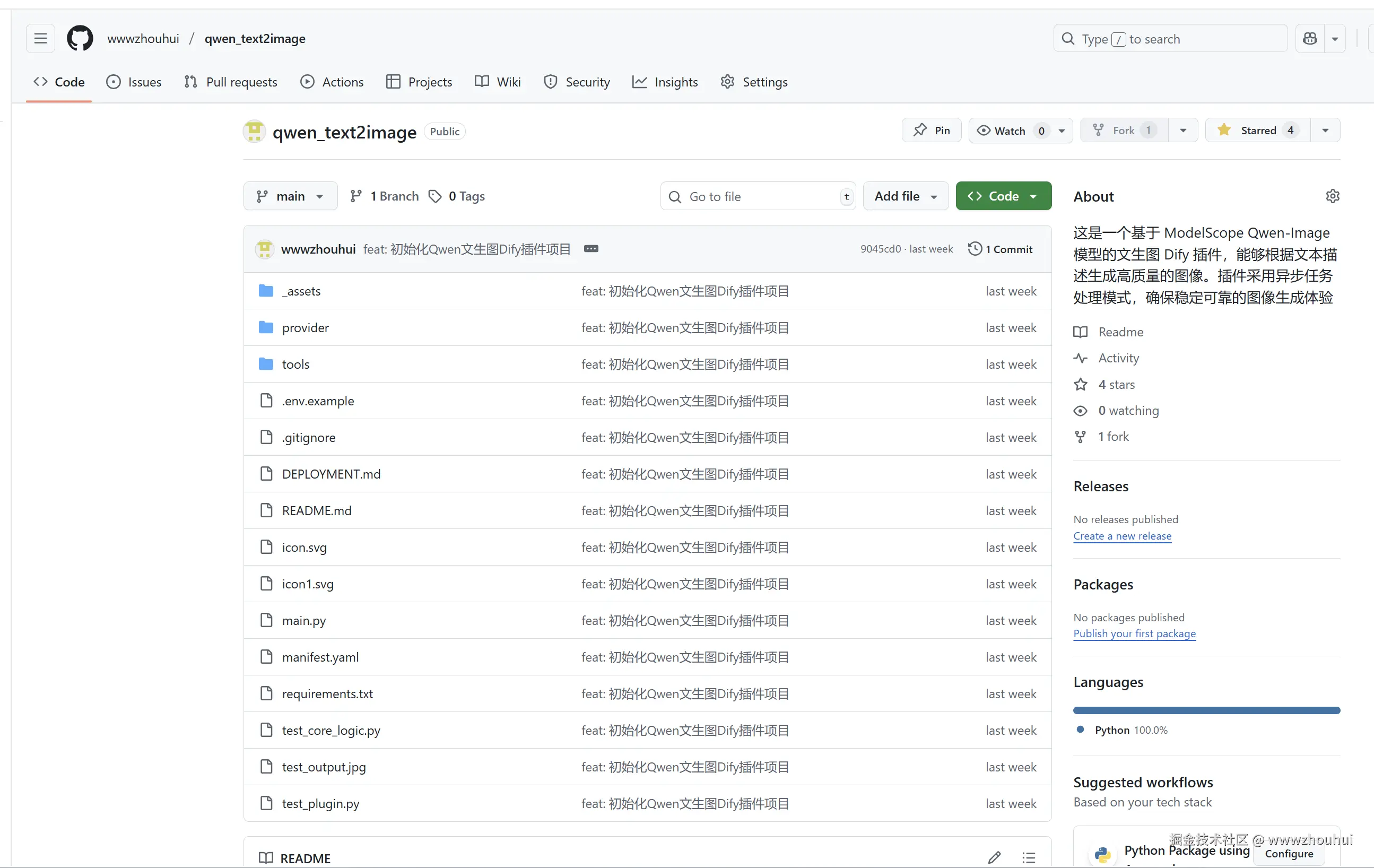
这个开发思路还是参考我上期文章《dify案例分享-零代码搞定 DIFY 插件开发:小白也能上手的文生图插件实战》,需要的准备材料如下:一个dify 插件代码qwen_text2image,4个edgetts_service.py 、testedgettsapi.py、config.ini、main.py 代码,一个CLAUDE.md文档。
其中dify 插件代码是我上期开发的一个基于qwen_text2image开源项目,项目地址github.com/wwwzhouhui/...
edgetts_service.py 、testedgettsapi.py 是我之前开源项目里面的代码github.com/wwwzhouhui/... DIFY 插件开发:小白也能上手的文生图插件实战](mp.weixin.qq.com/s/kWb_yj6jG...%25E3%2580%258B "https://mp.weixin.qq.com/s/kWb_yj6jGgIQ83gbdEmowg)%E3%80%8B")
插件开发
接下来我的问题。先不着急让它写代码,写把开发规范文档写出来,也就是让它先输出CLAUDE2.md
objectivec
qwen_text2image 文件里面是基于dify的一个插件,这里有关于dify开发相关规范。请认真阅读这个项目。

edgetts_service.py 、testedgettsapi.py、config.ini、main.py 是一个基于fastapi实现客户端和服务端TTS 代码,CLAUDE.md是基于腾讯的一个CloudBase AI 开发规则指南。

我希望你根据edgetts_service.py 、testedgettsapi.py、config.ini、main.py 文本生成语音TTS 功能基于qwen_text2image里面的代码逻辑生成一个类似CLAUDE2.md

开发规则指南,基于这个开发指南我后面就可以根据这个指南开发其他的dify插件了。请基于以上功能先生成一个dify开发相关规范的CLAUDE2.md文档。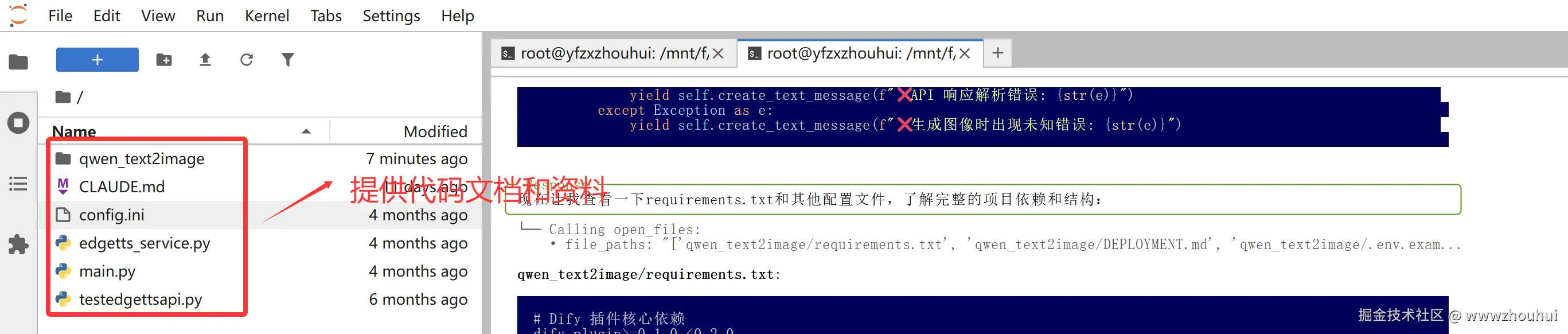
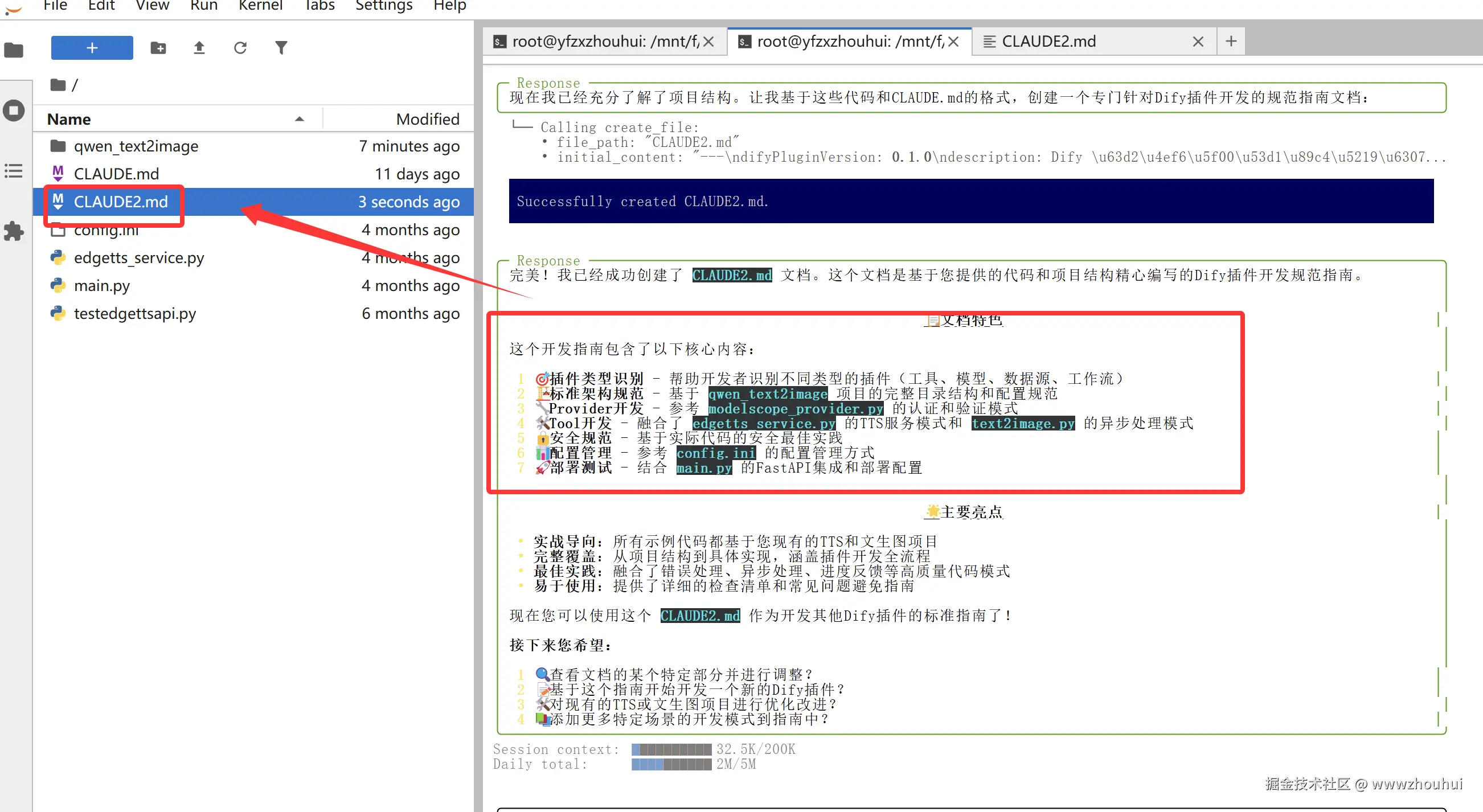
完美理解了我的需求制作了claude2.md文档,生成了 Dify 插件开发规则指南
python
---
difyPluginVersion: 0.1.0
description: Dify 插件开发规则指南 - 基于TTS服务和文生图插件的最佳实践
globs: *
alwaysApply: true
---

# 📋 Dify 插件开发规则指南

## 🎯 开发流程规范 - 插件类型识别与最佳实践

**重要:为确保插件开发质量,AI 需要在开始工作前完成以下步骤:**

### 1. 插件类型识别
首先需要识别当前的插件开发类型:
- **工具插件(Tool Plugin)**:提供特定功能的工具,如TTS、图像生成、文档处理等
- **模型插件(Model Plugin)**:集成外部AI模型服务
- **数据源插件(Data Source Plugin)**:连接外部数据源
- **工作流插件(Workflow Plugin)**:提供复杂的业务流程

### 2. 技术架构选择
根据识别的插件类型,需要参考对应的技术架构:

**📋 插件架构映射表(必须遵守):**
- **工具插件** → 参考:`edgetts_service.py` + `qwen_text2image/tools/` 架构
- **API服务集成** → 参考:`testedgettsapi.py` + `main.py` FastAPI 架构
- **第三方服务** → 参考:`qwen_text2image/provider/` 认证架构
- **配置管理** → 参考:`config.ini` + `manifest.yaml` 配置架构

### 3. 开发确认
在开始工作前建议向用户确认:
1. "我识别这是一个 [插件类型] 项目"
2. "我将严格遵循以下架构模式:[具体架构列表]"
3. "请确认我的理解是否正确"

## 🏗️ Dify 插件核心架构规范

### 📁 标准目录结构
```
plugin_name/
├── manifest.yaml          # 插件清单文件(必需)
├── main.py                # 插件入口文件(必需)
├── requirements.txt       # Python依赖(必需)
├── README.md              # 插件说明文档
├── DEPLOYMENT.md          # 部署指南
├── .env.example           # 环境变量示例
├── icon.svg               # 插件图标
├── provider/              # 服务提供者目录
│   ├── __init__.py
│   ├── provider_name.yaml # 提供者配置
│   └── provider_name_provider.py # 提供者实现
└── tools/                 # 工具目录
    ├── __init__.py
    ├── tool_name.yaml     # 工具配置
    └── tool_name.py       # 工具实现
```

### 📄 核心文件规范

#### 1. manifest.yaml 配置规范
```yaml
# 基础信息(必需)
author: your_name
created_at: '2025-01-01T00:00:00.000000000Z'
description:
  en_US: English description
  zh_CN: 中文描述
icon: icon.svg
label:
  en_US: Plugin Name
  zh_CN: 插件名称

# 元数据配置(必需)
meta:
  arch: [amd64, arm64]
  runner:
    entrypoint: main
    language: python
    version: '3.12'
  version: 0.0.1

# 插件配置(必需)
name: plugin_name
plugins:
  tools:
  - provider/provider_name.yaml

# 资源配置
resource:
  memory: 1048576
  permission:
    model:
      enabled: true
      llm: true
    tool:
      enabled: true

# 标签和类型
tags: [category]
type: plugin
version: 0.0.1
```

#### 2. main.py 入口文件规范
```python
from dify_plugin import Plugin, DifyPluginEnv

# 配置插件环境,根据需要设置超时时间
# TTS类服务:60秒,图像生成:300秒,文档处理:120秒
plugin = Plugin(DifyPluginEnv(MAX_REQUEST_TIMEOUT=300))

if __name__ == '__main__':
    plugin.run()
```

#### 3. requirements.txt 依赖规范
```text
# Dify 插件核心依赖(必需)
dify_plugin>=0.1.0,<0.2.0

# 根据功能添加特定依赖
# HTTP请求:requests>=2.31.0
# 图像处理:Pillow>=10.0.0
# 音频处理:pydub>=0.25.0
# 配置解析:configparser(内置)
```

## 🔧 Provider(服务提供者)开发规范

### 1. Provider YAML 配置
```yaml
# 认证配置
credentials_for_provider:
  api_key:
    help:
      en_US: Get your API key from service provider
      zh_CN: 从服务提供商获取您的 API Key
    label:
      en_US: API Key
      zh_CN: API Key
    placeholder:
      en_US: Please input your API Key
      zh_CN: 请输入您的 API Key
    required: true
    type: secret-input
    url: https://provider.com/api-keys

# 扩展配置
extra:
  python:
    source: provider/provider_name_provider.py

# 身份信息
identity:
  author: your_name
  description:
    en_US: Service provider integration
    zh_CN: 服务提供商集成
  icon: icon.svg
  label:
    en_US: Provider Name
    zh_CN: 提供商名称
  name: provider_name
  tags: [category]

# 工具列表
tools:
- tools/tool_name.yaml
```

### 2. Provider Python 实现
```python
from typing import Any
from dify_plugin.errors.tool import ToolProviderCredentialValidationError
from dify_plugin import ToolProvider

class ProviderNameProvider(ToolProvider):
    def _validate_credentials(self, credentials: dict[str, Any]) -> None:
        """
        验证服务提供商凭据有效性

        Args:
            credentials: 包含认证信息的字典

        Raises:
            ToolProviderCredentialValidationError: 当凭据验证失败时
        """
        try:
            # 1. 检查必需字段
            api_key = credentials.get("api_key")
            if not api_key:
                raise ToolProviderCredentialValidationError(
                    "API key 不能为空"
                )

            # 2. 检查格式(根据实际API要求)
            if not api_key.startswith("expected_prefix"):
                raise ToolProviderCredentialValidationError(
                    "无效的 API key 格式"
                )

            # 3. 可选:发送测试请求验证
            # self._test_api_connection(api_key)

        except ToolProviderCredentialValidationError:
            raise
        except Exception as e:
            raise ToolProviderCredentialValidationError(
                f"凭据验证失败: {str(e)}"
            )
```

## 🛠️ Tool(工具)开发规范

### 1. Tool YAML 配置
```yaml
# 工具描述
description:
  human:
    en_US: Tool description for humans
    zh_CN: 工具的人类可读描述
  llm: Tool description for LLM understanding

# 扩展配置
extra:
  python:
    source: tools/tool_name.py

# 身份信息
identity:
  author: your_name
  icon: icon.svg
  label:
    en_US: Tool Name
    zh_CN: 工具名称
  name: tool_name

# 参数配置
parameters:
- form: llm  # 或 form
  human_description:
    en_US: Parameter description for humans
    zh_CN: 参数的人类可读描述
  label:
    en_US: Parameter Label
    zh_CN: 参数标签
  llm_description: Parameter description for LLM
  name: parameter_name
  required: true
  type: string  # string, number, boolean, select

# 选择类型参数示例
- form: form
  label:
    en_US: Model
    zh_CN: 模型
  name: model
  type: select
  options:
  - label:
      en_US: Model A
      zh_CN: 模型 A
    value: "model_a"
  default: "model_a"
  required: false
```

### 2. Tool Python 实现规范

#### 基础工具类结构
```python
from collections.abc import Generator
from dify_plugin.entities.tool import ToolInvokeMessage
from dify_plugin import Tool

class ToolNameTool(Tool):
    def _invoke(
        self, tool_parameters: dict
    ) -> Generator[ToolInvokeMessage, None, None]:
        """
        工具执行逻辑

        Args:
            tool_parameters: 工具参数字典

        Yields:
            ToolInvokeMessage: 工具调用消息
        """
        try:
            # 1. 获取认证信息
            api_key = self.runtime.credentials.get("api_key")

            # 2. 参数验证
            required_param = tool_parameters.get("required_param")
            if not required_param:
                yield self.create_text_message("❌ 缺少必需参数")
                return

            # 3. 执行业务逻辑
            yield self.create_text_message("🚀 开始处理...")

            result = self._process_request(api_key, tool_parameters)

            # 4. 返回结果
            if isinstance(result, bytes):
                # 二进制数据(图像、音频等)
                yield self.create_blob_message(
                    blob=result,
                    meta={"mime_type": "image/png"}  # 或其他MIME类型
                )
            else:
                # 文本结果
                yield self.create_text_message(f"✅ 处理完成: {result}")

        except Exception as e:
            yield self.create_text_message(f"❌ 处理失败: {str(e)}")

    def _process_request(self, api_key: str, parameters: dict):
        """具体的业务处理逻辑"""
        pass
```

#### TTS服务工具实现模式
```python
import requests
from io import BytesIO

class TTSTool(Tool):
    def _invoke(self, tool_parameters: dict) -> Generator[ToolInvokeMessage, None, None]:
        # 参考 edgetts_service.py 的实现模式
        try:
            # 1. 获取配置
            api_key = self.runtime.credentials.get("api_key")
            base_url = "https://api.provider.com/v1"

            # 2. 构建请求
            data = {
                'model': tool_parameters.get('model', 'tts-1'),
                'input': tool_parameters.get('text'),
                'voice': tool_parameters.get('voice', 'default'),
                'response_format': 'mp3',
                'speed': tool_parameters.get('speed', 1.0),
            }

            # 3. 发送请求
            response = requests.post(
                f"{base_url}/audio/speech",
                headers={"Authorization": f"Bearer {api_key}"},
                json=data
            )
            response.raise_for_status()

            # 4. 返回音频
            yield self.create_blob_message(
                blob=response.content,
                meta={"mime_type": "audio/mpeg"}
            )

        except Exception as e:
            yield self.create_text_message(f"❌ TTS生成失败: {str(e)}")
```

#### 异步任务处理模式
```python
import time

class AsyncImageTool(Tool):
    def _invoke(self, tool_parameters: dict) -> Generator[ToolInvokeMessage, None, None]:
        # 参考 qwen_text2image 的异步处理模式
        try:
            # 1. 提交任务
            yield self.create_text_message("🚀 正在提交任务...")
            task_id = self._submit_task(tool_parameters)

            # 2. 轮询状态
            yield self.create_text_message(f"✅ 任务已创建,ID: {task_id}")

            max_retries = 60
            for i in range(max_retries):
                time.sleep(5)

                status, result = self._check_task_status(task_id)

                if status == "SUCCEED":
                    yield self.create_blob_message(
                        blob=result,
                        meta={"mime_type": "image/png"}
                    )
                    return
                elif status == "FAILED":
                    yield self.create_text_message("❌ 任务执行失败")
                    return

                yield self.create_text_message(f"⏳ 处理中,已等待 {(i+1)*5} 秒...")

            yield self.create_text_message("⏰ 任务超时")

        except Exception as e:
            yield self.create_text_message(f"❌ 处理失败: {str(e)}")
```

## 🔒 安全与错误处理规范

### 1. 认证安全
```python
# ✅ 正确的认证方式
api_key = self.runtime.credentials.get("api_key")
if not api_key:
    raise ToolProviderCredentialValidationError("API key 不能为空")

# ❌ 错误:硬编码密钥
api_key = "hardcoded_key"  # 绝对禁止
```

### 2. 错误处理模式
```python
try:
    # 业务逻辑
    pass
except requests.exceptions.HTTPError as e:
    if e.response.status_code == 401:
        yield self.create_text_message("❌ API Key 无效")
    elif e.response.status_code == 429:
        yield self.create_text_message("❌ API 调用频率过高")
    elif e.response.status_code == 500:
        yield self.create_text_message("❌ 服务器内部错误")
    else:
        yield self.create_text_message(f"❌ HTTP 错误: {e.response.status_code}")
except requests.exceptions.RequestException as e:
    yield self.create_text_message(f"❌ 网络请求错误: {str(e)}")
except Exception as e:
    yield self.create_text_message(f"❌ 未知错误: {str(e)}")
```

### 3. 参数验证
```python
def _validate_parameters(self, parameters: dict) -> bool:
    """参数验证"""
    required_fields = ["text", "model"]
    for field in required_fields:
        if not parameters.get(field):
            yield self.create_text_message(f"❌ 缺少必需参数: {field}")
            return False
    return True
```

## 📊 配置管理规范

### 1. 基于 config.ini 的配置模式
```python
import configparser
import os

def load_config():
    """加载配置文件"""
    config = configparser.ConfigParser()
    config_path = os.path.join(os.path.dirname(__file__), 'config.ini')
    config.read(config_path, encoding='utf-8')
    return config

# 使用示例
config = load_config()
api_key = config.get('service', 'api_key', fallback='default_value')
base_url = config.get('service', 'base_url')
```

### 2. 环境变量支持
```python
import os

# 优先使用环境变量,其次使用配置文件
api_key = os.getenv('API_KEY') or config.get('service', 'api_key')
```

## 🚀 部署与测试规范

### 1. 本地开发测试
```bash
# 安装依赖
pip install -r requirements.txt

# 运行插件
python main.py
```

### 2. 远程部署配置
```bash
# .env 文件配置
INSTALL_METHOD=remote
REMOTE_INSTALL_HOST=debug-plugin.dify.dev
REMOTE_INSTALL_PORT=5003
REMOTE_INSTALL_KEY=your-install-key
```

### 3. FastAPI 服务集成模式
```python
# 参考 main.py 的 FastAPI 集成
from fastapi import FastAPI
import uvicorn

app = FastAPI()

# 集成插件路由
from plugin_service import router as plugin_router
app.include_router(plugin_router)

if __name__ == "__main__":
    uvicorn.run(app, host="0.0.0.0", port=8080)
```

## 📝 文档规范

### 1. README.md 结构
```markdown
# 插件名称

## 功能描述
简要描述插件功能

## 安装配置
### 依赖要求
### API Key 获取
### 配置说明

## 使用方法
### 基本用法
### 参数说明
### 示例

## 故障排除
常见问题及解决方案

## 更新日志
版本更新记录
```

### 2. DEPLOYMENT.md 结构
```markdown
# 部署指南

## 环境要求
## 安装步骤
## 配置说明
## 测试验证
## 故障排除
```

## ⚡ 开发质量检查清单

### ✅ 开发前检查
1. **[ ] 插件类型识别**:明确是工具插件、模型插件还是其他类型
2. **[ ] 架构模式选择**:选择合适的参考架构(TTS、图像生成等)
3. **[ ] 依赖规划**:确定所需的Python包和版本
4. **[ ] 认证方式**:设计API Key或其他认证机制

### ✅ 开发中检查
1. **[ ] 目录结构**:遵循标准目录结构
2. **[ ] 配置文件**:正确配置manifest.yaml和工具配置
3. **[ ] 错误处理**:实现完整的异常处理机制
4. **[ ] 进度反馈**:提供用户友好的进度提示

### ✅ 开发后检查
1. **[ ] 功能测试**:验证核心功能正常工作
2. **[ ] 错误测试**:测试各种错误情况的处理
3. **[ ] 文档完整**:README和部署文档齐全
4. **[ ] 安全检查**:确保没有硬编码密钥等安全问题

### ⚠️ 常见问题避免
- 避免在代码中硬编码API密钥
- 避免忽略异常处理和用户反馈
- 避免不遵循Dify插件的标准目录结构
- 避免缺少必要的配置文件和文档

### 🔄 质量保障
如发现开发不符合规范,可以:
- 对照本指南检查各个环节
- 参考示例代码(edgetts_service.py、qwen_text2image)
- 重新执行质量检查清单
- 确保遵循Dify插件开发最佳实践

---

## 📚 参考资源

- **TTS服务参考**:`edgetts_service.py`、`testedgettsapi.py`
- **图像生成参考**:`qwen_text2image/tools/text2image.py`
- **FastAPI集成参考**:`main.py`
- **配置管理参考**:`config.ini`
- **插件架构参考**:`qwen_text2image/` 完整项目结构

本指南基于实际项目经验总结,旨在帮助开发者快速构建高质量的Dify插件。
和AI对话的问题
objectivec
CLAUDE2.md 是基于qwen_text2image 来实现的基于dify 插件的开发,我希望你在认真阅读edgetts_service.py 、testedgettsapi.py、config.ini、main.py功能代码逻辑把上面的文档CLAUDE2.md 内容修改一下,实现一个edgetts 这个dify插件功能,请修改。生成代码过程中使用中文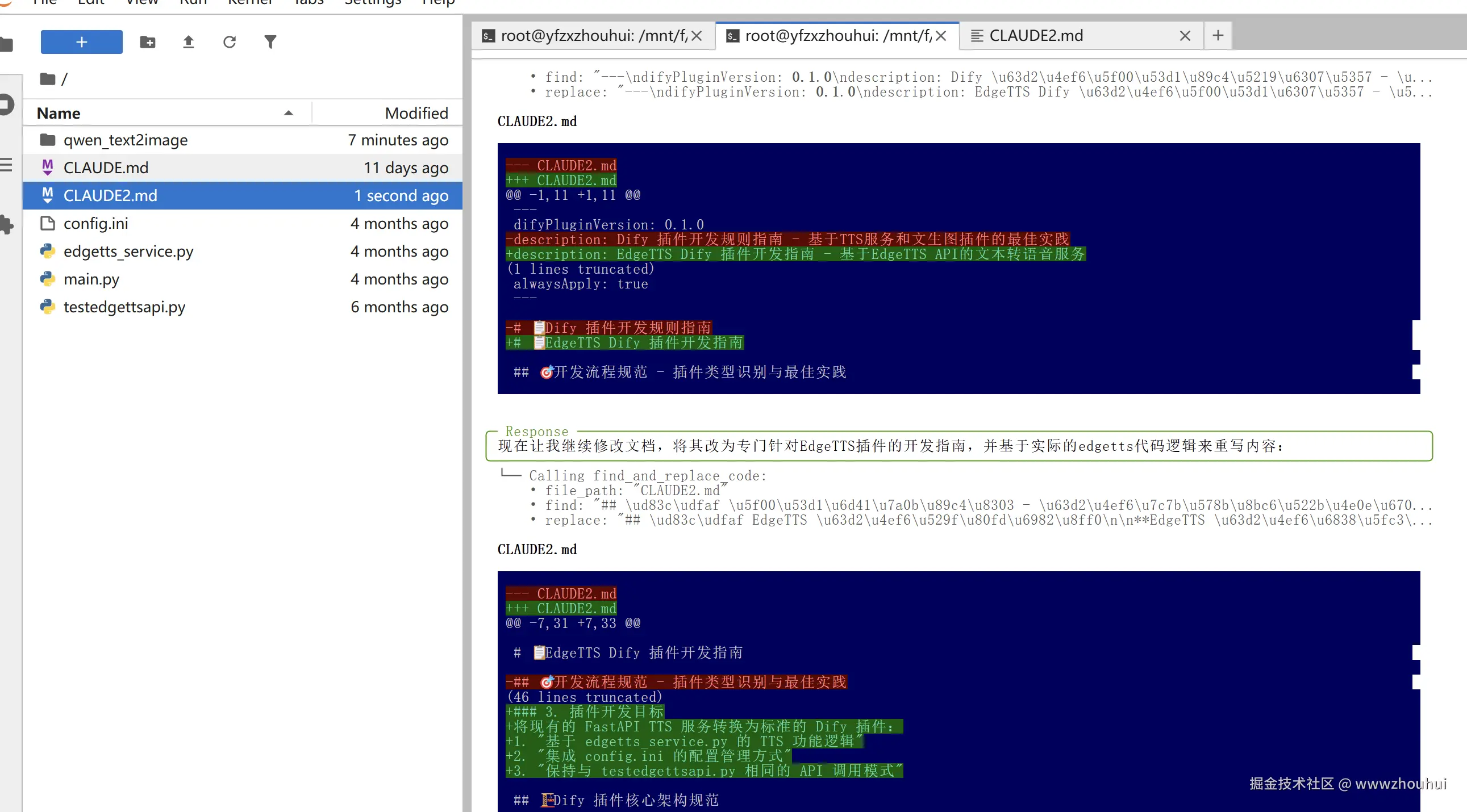
和AI对话的问题
objectivec
我希望生成的语音保存在本地不需要腾讯云COS,此外需要你创建一个项目edgetts_plugin,根据CLAUDE2.md文档的内容生成相应的代码,并给出测试代码,完成测试。
其中测试代码可以参考testedgettsapi.py,这代码里面有api_key、base_url。
请根据上面要求生成代码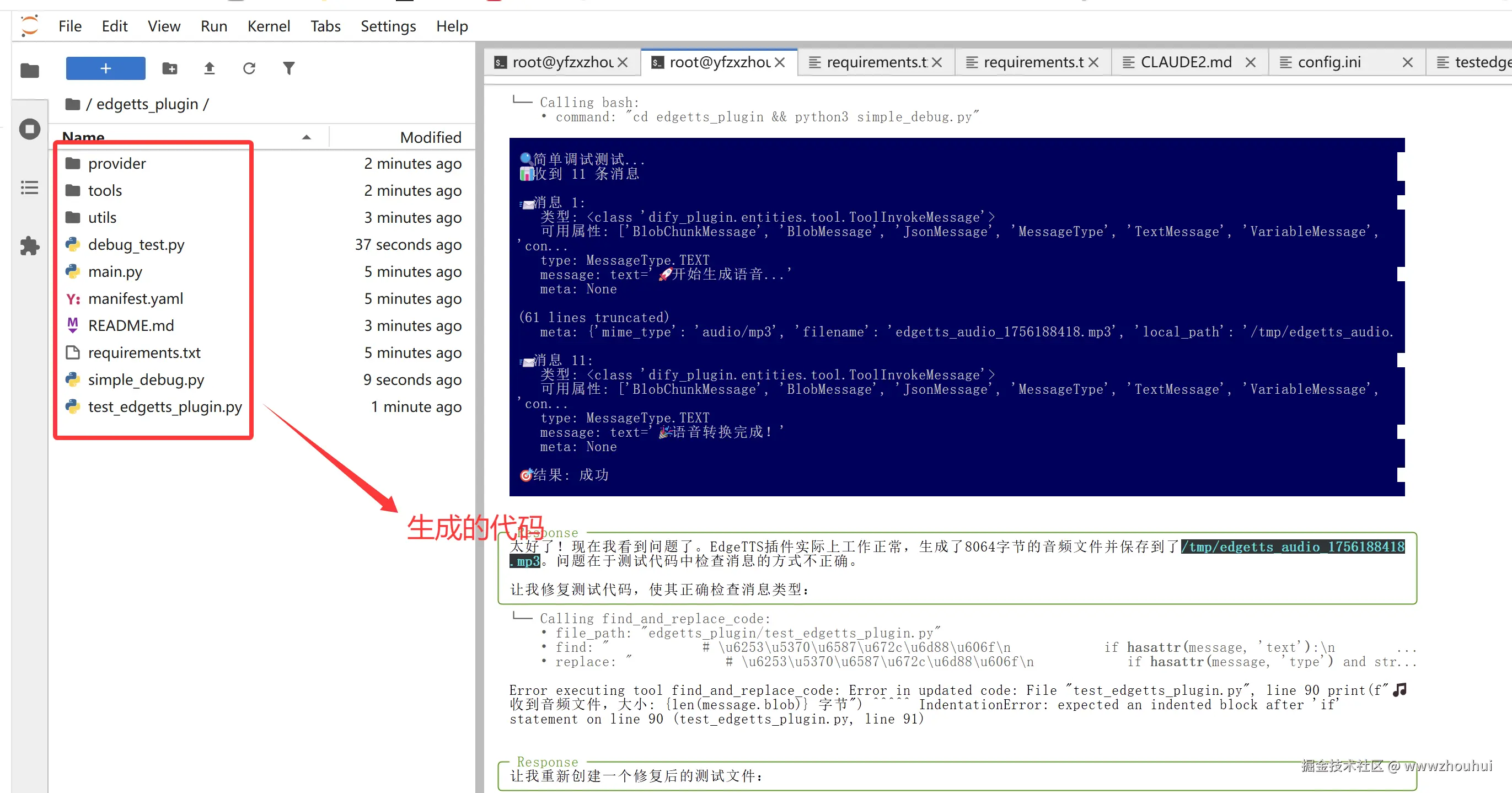
生成的代码同时还自己编写测试代码验证测试,测试不过的自己修改,自己测试。
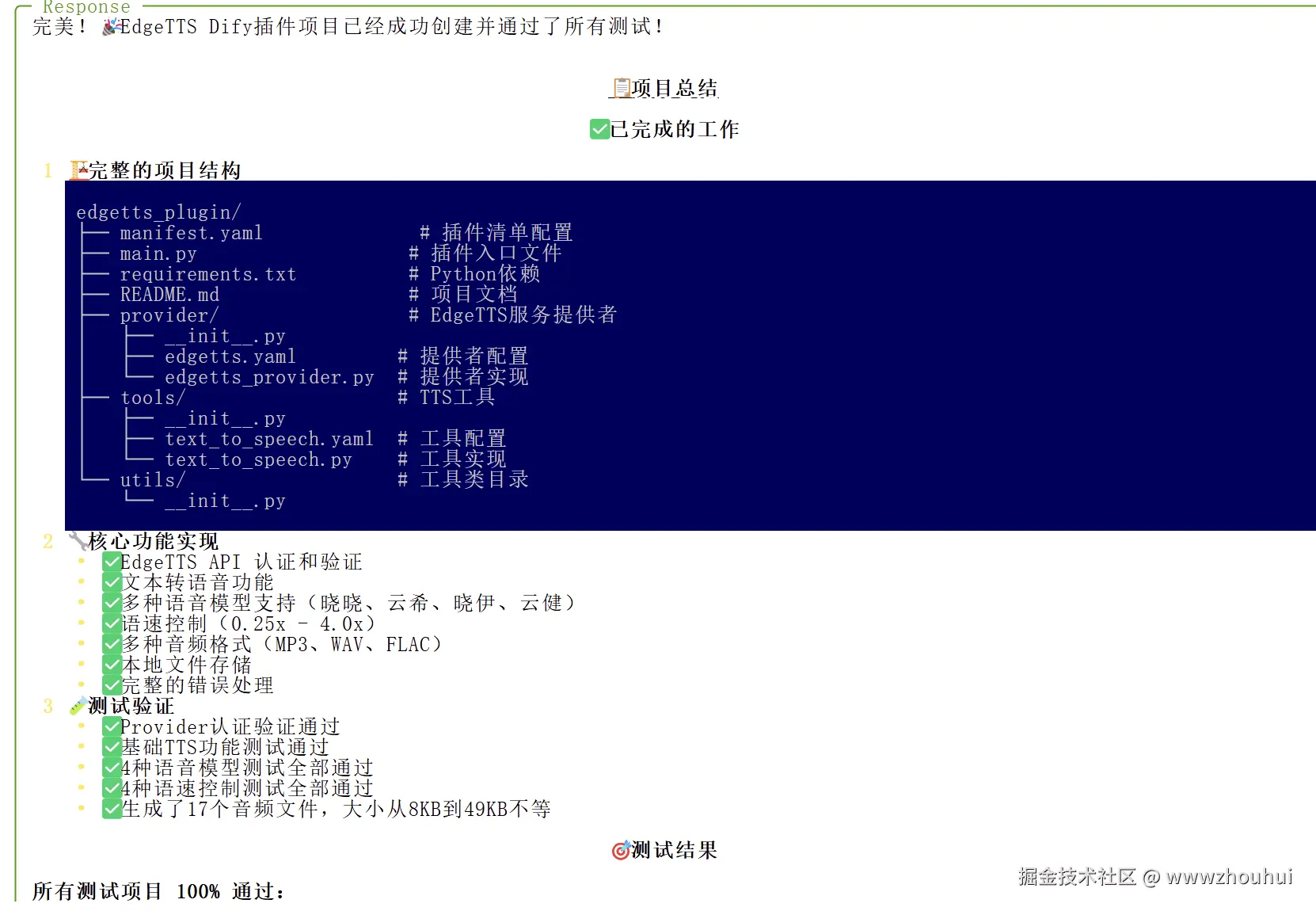
测试
我们先按照文档输出对生成的测试代码进行测试
bash
cd edgetts_plugin
pip install -r requirements.txt
python3 test_edgetts_fixed.py 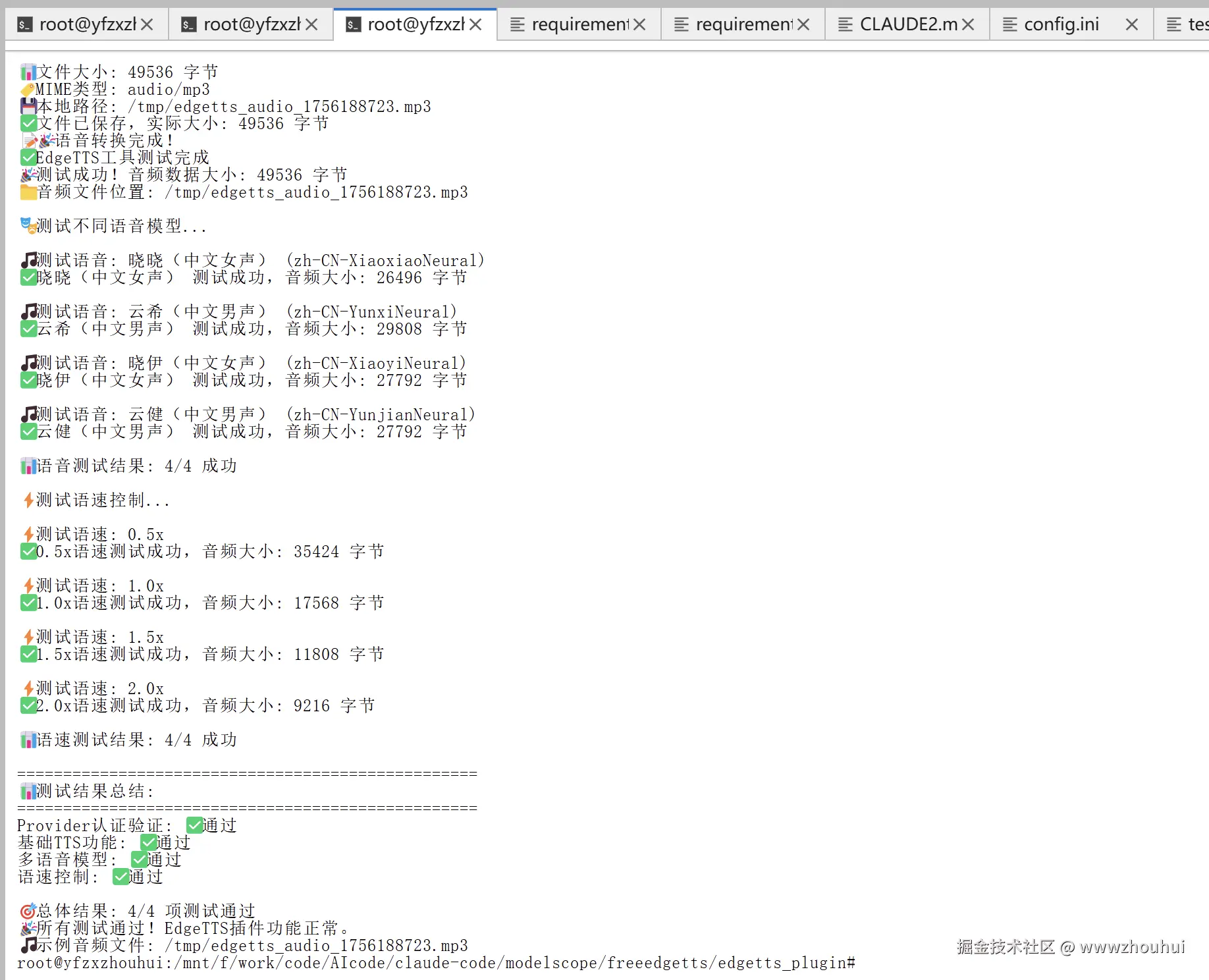
3.打包插件
dify-plugin安装
我们之前是基于AI 开发的没有使用Dify 插件 CLI 工具,打包是要用到的,所以我先安装一下这个插件工具
Dify 插件 CLI 工具可以通过 Homebrew(在 Linux 和 macOS 上)或独立的二进制可执行文件(在 Windows、Linux 和 macOS 上)进行安装。
通过二进制可执行文件安装,下载github.com/langgenius/...
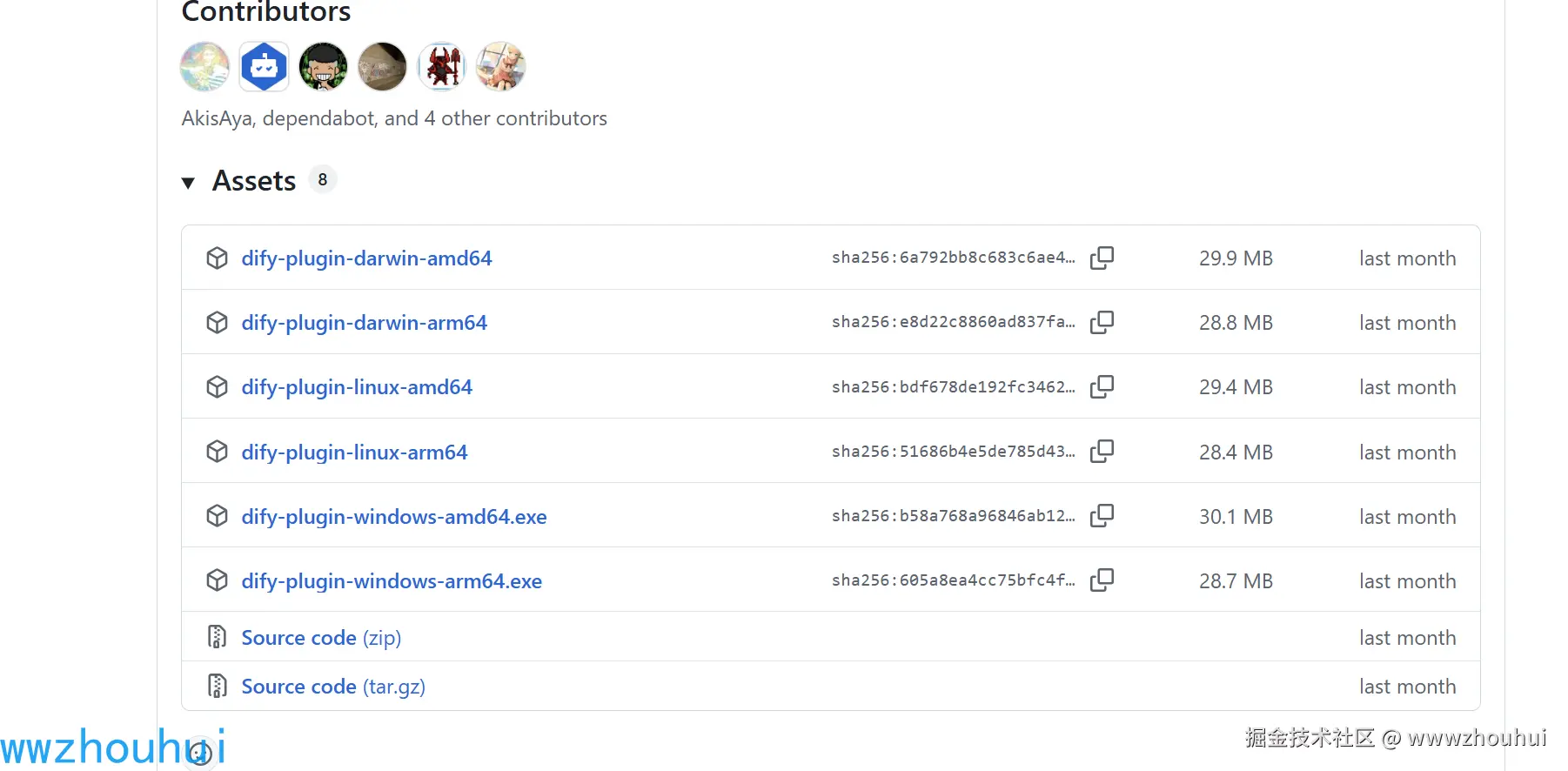
我这里就拿linux为案例,下载 `dify-plugin-linux-amd64 文件后,赋予其执行权限。
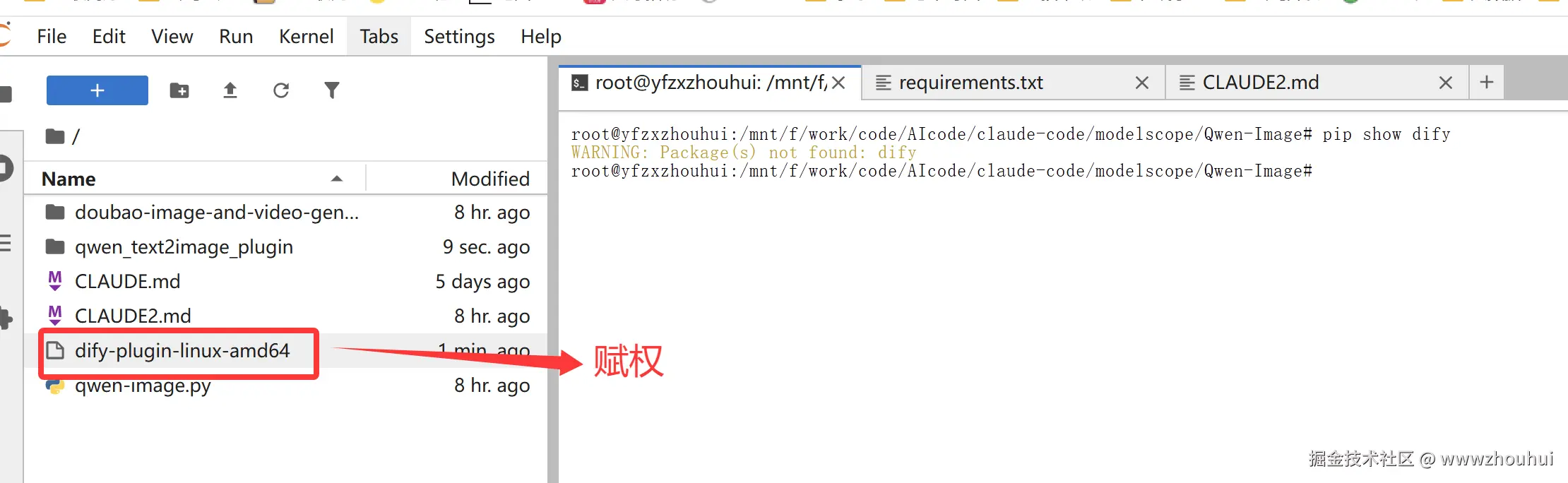
bash
chmod +x ./dify-plugin-linux-amd64
mv ./dify-plugin-linux-amd64 ./dify
要检查安装是否成功,请运行 ./dify version,应该会显示版本代码。
bash
./dify version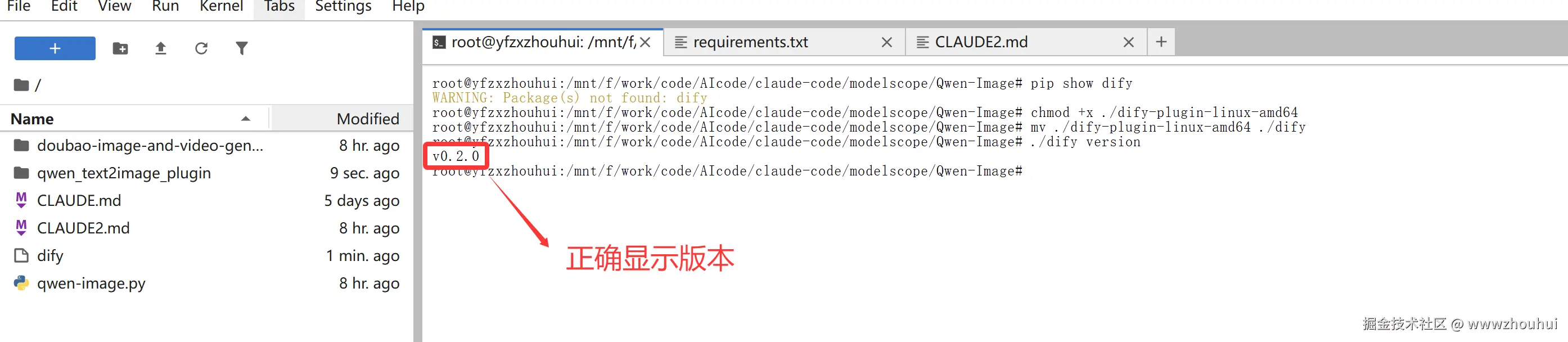
打包插件
当插件开发完成并通过本地测试后,您可以将其打包成一个 .difypkg 文件,用于分发或安装。
执行打包命令
bash
./dify plugin package ./free_edgetts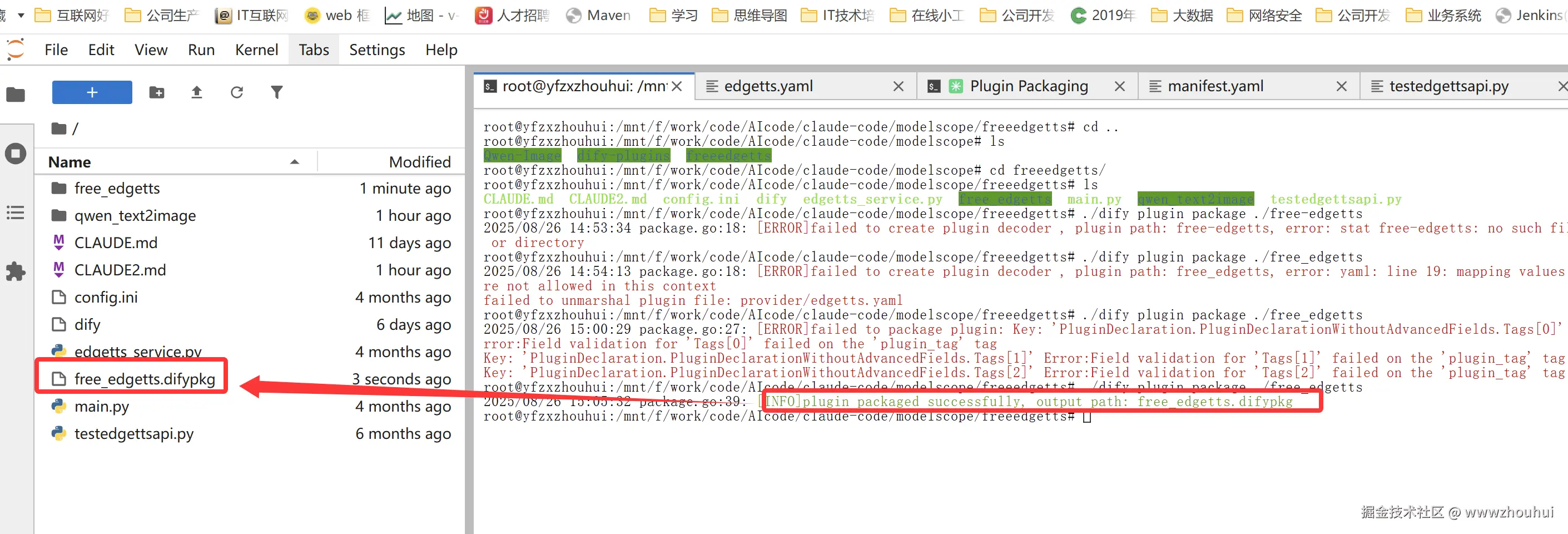
4.验证测试
插件包上传并安装
接下来我们把刚才打包好的插件包通过本地离线包的方式上传到dify平台对这个插件包进行验证性测试
打开我们本地或者私有化部署的dify平台,插件管理
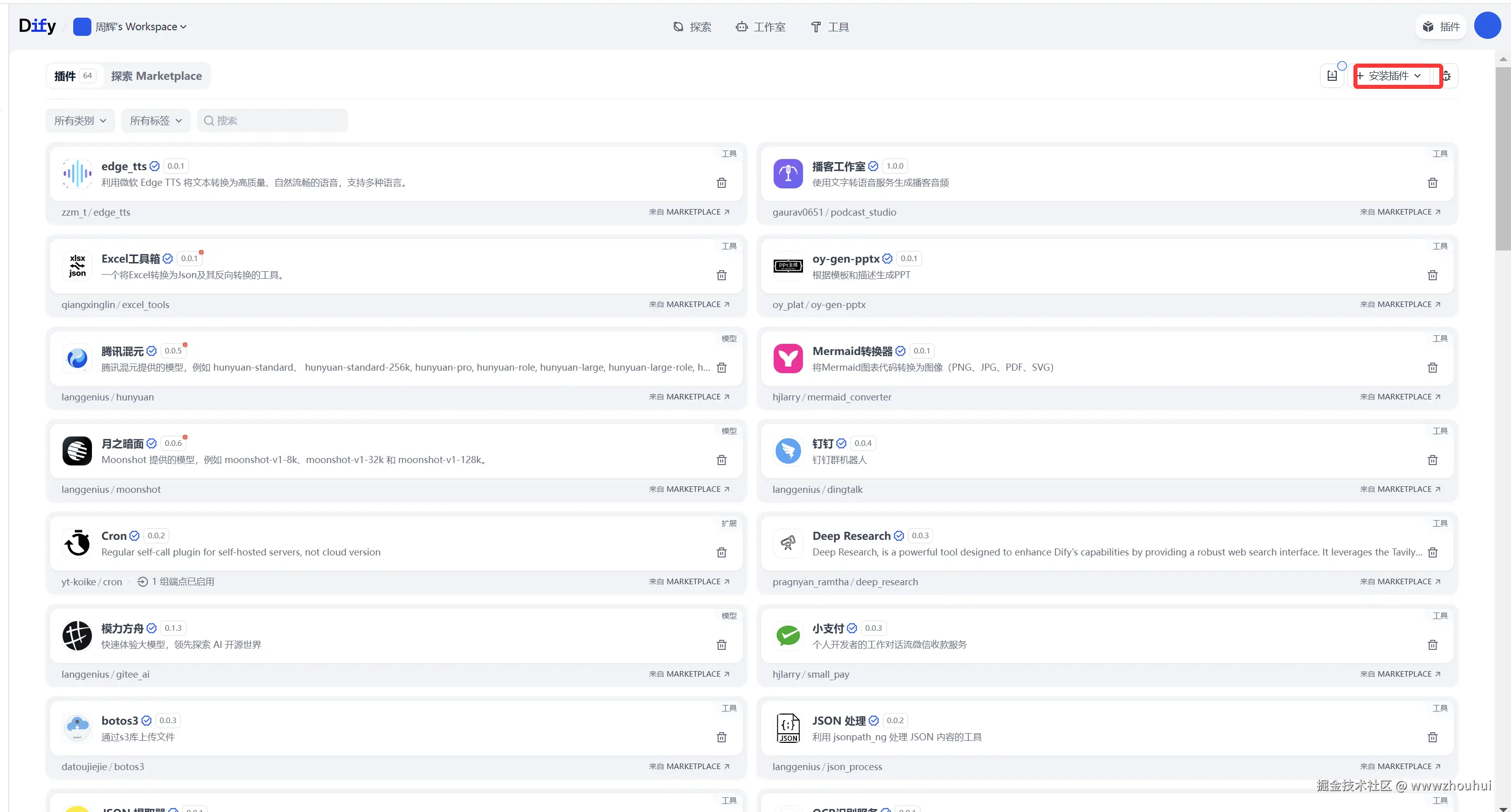
在下拉选项中选择本地插件
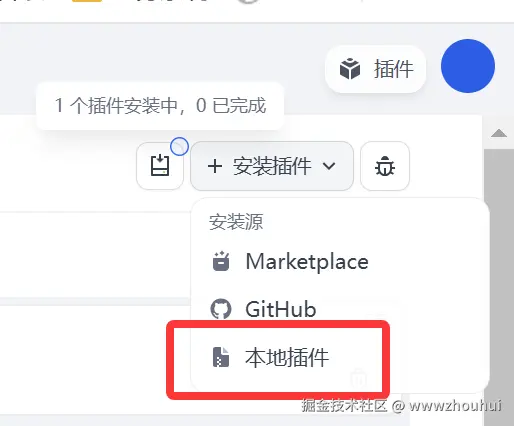
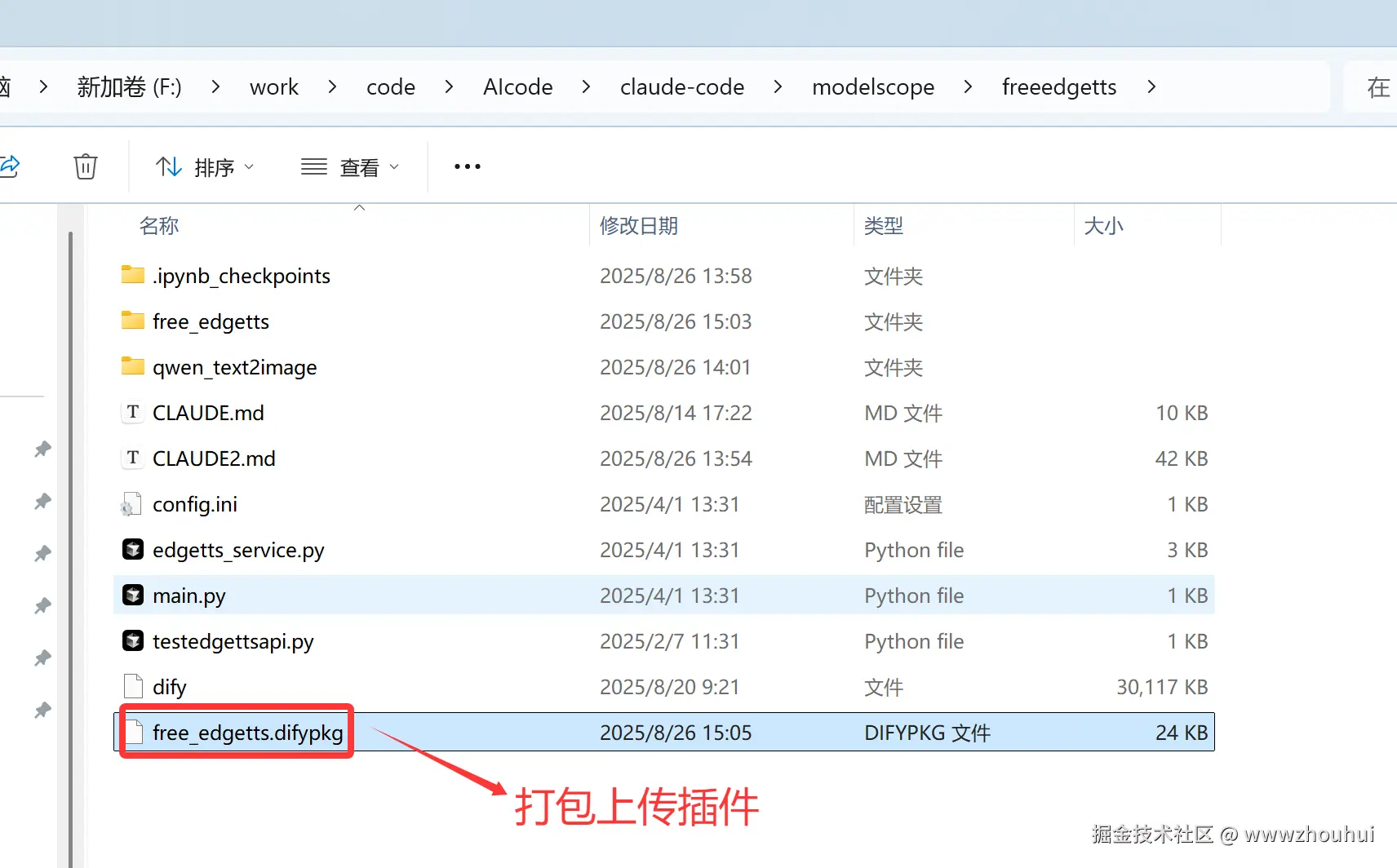
选择这个刚才打包好的dify插件包上传到dify平台
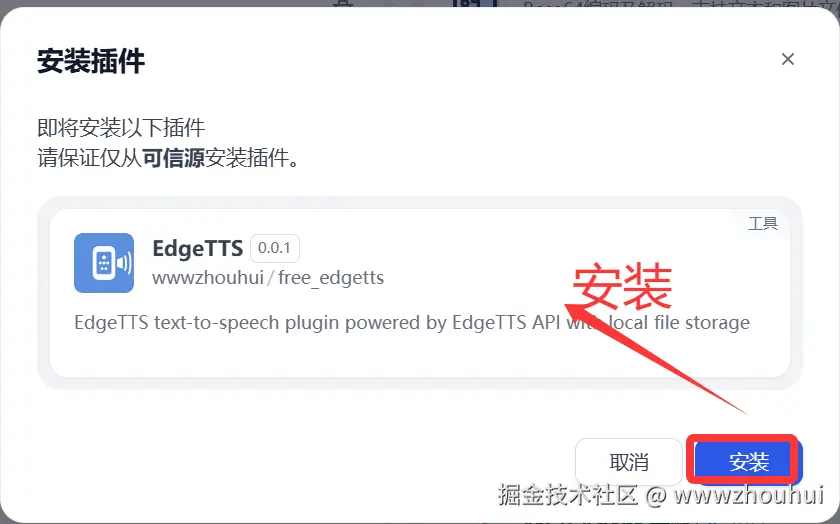
点击安装后 插件在dify平台上实现安装了,我们稍等片刻。
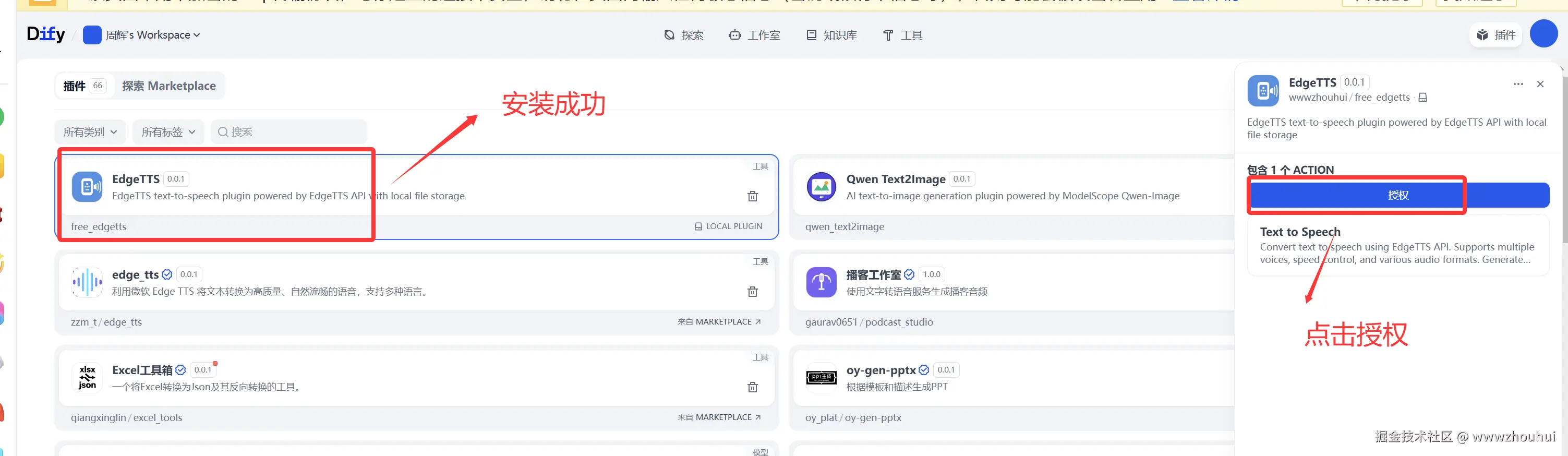
因为这个EdgeTTS是基于我之前写的testedgettsapi.py代码实现的。我们输入密码zhouhuizhou
testedgettsapi.py 代码如下
python
import logging
from openai import OpenAI
import json
import httpx

api_key = 'zhouhuizhou'  # 替换为你的实际 API key
base_url = 'https://edgettsapi.duckcloud.fun/v1' # 替换为你的自定义域,默认加 /v1


client = OpenAI(
    api_key=api_key,
    base_url=base_url
)


data = {
    'model': 'tts-1',
    'input': '灵活多样:参考下列模板和已有示例,但需根据具体需求生成多样化的提示词,避免固定化或过于依赖模板。',
    'voice': 'zh-CN-XiaoxiaoNeural',
    'response_format': 'mp3',
    'speed': 1.0,
}

try:
    response = client.audio.speech.create(
       **data
    )
    with open('D:\\工作临时\\2025\\2月\\2025年2月7日\\test_openai.mp3', 'wb') as f:
        f.write(response.content)
    print("MP3 file saved successfully to test_openai.mp3")

except Exception as e:
    print(f"An error occurred: {e}")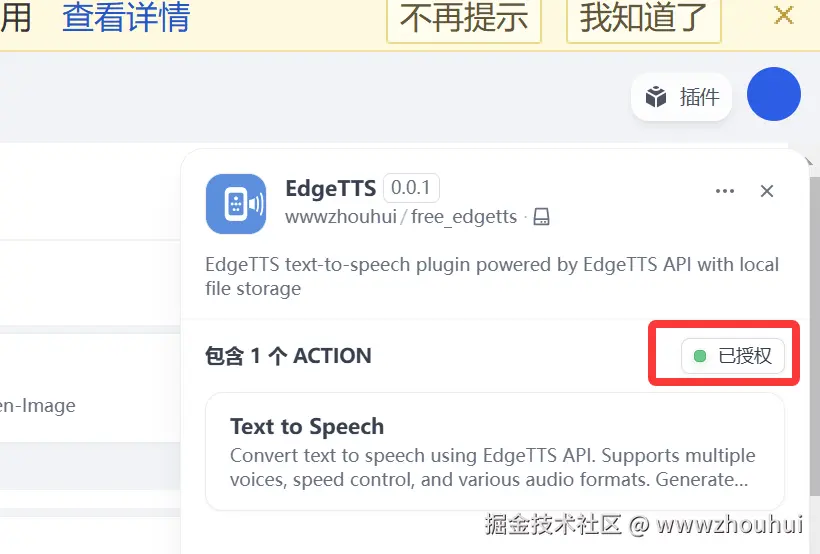
工作流验证
接下来我们配置一个最简单工作流并使用这个插件来验证测试一下文生图的效果。(工作流制作这里就不做展开了。)
工作流dsl
yaml
app:
  description: ''
  icon: 🤖
  icon_background: '#FFEAD5'
  mode: advanced-chat
  name: 78-dify案例分享-TTS
  use_icon_as_answer_icon: false
dependencies:
- current_identifier: null
  type: package
  value:
    plugin_unique_identifier: wwwzhouhui/free_edgetts:0.0.1@f91bd2b604bfb333e6f1b7630e0b7a7dac63bd63878d708d5fb6d469a3c58d5d
kind: app
version: 0.3.0
workflow:
  conversation_variables: []
  environment_variables: []
  features:
    file_upload:
      allowed_file_extensions:
      - .JPG
      - .JPEG
      - .PNG
      - .GIF
      - .WEBP
      - .SVG
      allowed_file_types:
      - image
      allowed_file_upload_methods:
      - local_file
      - remote_url
      enabled: false
      fileUploadConfig:
        audio_file_size_limit: 500
        batch_count_limit: 50
        file_size_limit: 100
        image_file_size_limit: 100
        video_file_size_limit: 500
        workflow_file_upload_limit: 50
      image:
        enabled: false
        number_limits: 3
        transfer_methods:
        - local_file
        - remote_url
      number_limits: 3
    opening_statement: ''
    retriever_resource:
      enabled: true
    sensitive_word_avoidance:
      enabled: false
    speech_to_text:
      enabled: false
    suggested_questions: []
    suggested_questions_after_answer:
      enabled: false
    text_to_speech:
      enabled: false
      language: ''
      voice: ''
  graph:
    edges:
    - data:
        isInIteration: false
        isInLoop: false
        sourceType: start
        targetType: tool
      id: 1755656337314-source-1756192986286-target
      source: '1755656337314'
      sourceHandle: source
      target: '1756192986286'
      targetHandle: target
      type: custom
      zIndex: 0
    - data:
        isInLoop: false
        sourceType: tool
        targetType: answer
      id: 1756192986286-source-answer-target
      source: '1756192986286'
      sourceHandle: source
      target: answer
      targetHandle: target
      type: custom
      zIndex: 0
    nodes:
    - data:
        desc: ''
        selected: false
        title: 开始
        type: start
        variables: []
      height: 53
      id: '1755656337314'
      position:
        x: 80
        y: 282
      positionAbsolute:
        x: 80
        y: 282
      selected: true
      sourcePosition: right
      targetPosition: left
      type: custom
      width: 244
    - data:
        answer: '{{#1756192986286.text#}}

          {{#1756192986286.files#}}

          '
        desc: ''
        selected: false
        title: 直接回复
        type: answer
        variables: []
      height: 123
      id: answer
      position:
        x: 740
        y: 282
      positionAbsolute:
        x: 740
        y: 282
      selected: false
      sourcePosition: right
      targetPosition: left
      type: custom
      width: 244
    - data:
        desc: ''
        is_team_authorization: true
        output_schema: null
        paramSchemas:
        - auto_generate: null
          default: null
          form: llm
          human_description:
            en_US: The text content to convert to speech. Can be any text in Chinese
              or other supported languages.
            ja_JP: The text content to convert to speech. Can be any text in Chinese
              or other supported languages.
            pt_BR: The text content to convert to speech. Can be any text in Chinese
              or other supported languages.
            zh_Hans: The text content to convert to speech. Can be any text in Chinese
              or other supported languages.
          label:
            en_US: Text Content
            ja_JP: Text Content
            pt_BR: Text Content
            zh_Hans: Text Content
          llm_description: The input text that will be converted to speech audio.
            Supports Chinese and other languages.
          max: null
          min: null
          name: input_text
          options: []
          placeholder: null
          precision: null
          required: true
          scope: null
          template: null
          type: string
        - auto_generate: null
          default: zh-CN-XiaoxiaoNeural
          form: form
          human_description:
            en_US: Select the voice model for speech synthesis. Different voices have
              different characteristics and languages.
            ja_JP: Select the voice model for speech synthesis. Different voices have
              different characteristics and languages.
            pt_BR: Select the voice model for speech synthesis. Different voices have
              different characteristics and languages.
            zh_Hans: Select the voice model for speech synthesis. Different voices
              have different characteristics and languages.
          label:
            en_US: Voice Model
            ja_JP: Voice Model
            pt_BR: Voice Model
            zh_Hans: Voice Model
          llm_description: ''
          max: null
          min: null
          name: voice
          options:
          - icon: ''
            label:
              en_US: Xiaoxiao (Chinese Female)
              ja_JP: Xiaoxiao (Chinese Female)
              pt_BR: Xiaoxiao (Chinese Female)
              zh_Hans: Xiaoxiao (Chinese Female)
            value: zh-CN-XiaoxiaoNeural
          - icon: ''
            label:
              en_US: Yunxi (Chinese Male)
              ja_JP: Yunxi (Chinese Male)
              pt_BR: Yunxi (Chinese Male)
              zh_Hans: Yunxi (Chinese Male)
            value: zh-CN-YunxiNeural
          - icon: ''
            label:
              en_US: Xiaoyi (Chinese Female)
              ja_JP: Xiaoyi (Chinese Female)
              pt_BR: Xiaoyi (Chinese Female)
              zh_Hans: Xiaoyi (Chinese Female)
            value: zh-CN-XiaoyiNeural
          - icon: ''
            label:
              en_US: Yunjian (Chinese Male)
              ja_JP: Yunjian (Chinese Male)
              pt_BR: Yunjian (Chinese Male)
              zh_Hans: Yunjian (Chinese Male)
            value: zh-CN-YunjianNeural
          placeholder: null
          precision: null
          required: false
          scope: null
          template: null
          type: select
        - auto_generate: null
          default: tts-1
          form: form
          human_description:
            en_US: Select the TTS model to use. tts-1 is the standard model with good
              quality and speed.
            ja_JP: Select the TTS model to use. tts-1 is the standard model with good
              quality and speed.
            pt_BR: Select the TTS model to use. tts-1 is the standard model with good
              quality and speed.
            zh_Hans: Select the TTS model to use. tts-1 is the standard model with
              good quality and speed.
          label:
            en_US: TTS Model
            ja_JP: TTS Model
            pt_BR: TTS Model
            zh_Hans: TTS Model
          llm_description: ''
          max: null
          min: null
          name: model
          options:
          - icon: ''
            label:
              en_US: TTS-1 (Standard)
              ja_JP: TTS-1 (Standard)
              pt_BR: TTS-1 (Standard)
              zh_Hans: TTS-1 (Standard)
            value: tts-1
          - icon: ''
            label:
              en_US: TTS-1-HD (High Quality)
              ja_JP: TTS-1-HD (High Quality)
              pt_BR: TTS-1-HD (High Quality)
              zh_Hans: TTS-1-HD (High Quality)
            value: tts-1-hd
          placeholder: null
          precision: null
          required: false
          scope: null
          template: null
          type: select
        - auto_generate: null
          default: 1
          form: form
          human_description:
            en_US: Adjust the speech speed. 1.0 is normal speed, 0.25 is slowest,
              4.0 is fastest.
            ja_JP: Adjust the speech speed. 1.0 is normal speed, 0.25 is slowest,
              4.0 is fastest.
            pt_BR: Adjust the speech speed. 1.0 is normal speed, 0.25 is slowest,
              4.0 is fastest.
            zh_Hans: Adjust the speech speed. 1.0 is normal speed, 0.25 is slowest,
              4.0 is fastest.
          label:
            en_US: Speech Speed
            ja_JP: Speech Speed
            pt_BR: Speech Speed
            zh_Hans: Speech Speed
          llm_description: ''
          max: 4
          min: 0.25
          name: speed
          options: []
          placeholder: null
          precision: null
          required: false
          scope: null
          template: null
          type: number
        - auto_generate: null
          default: mp3
          form: form
          human_description:
            en_US: Select the audio output format. MP3 is recommended for most use
              cases.
            ja_JP: Select the audio output format. MP3 is recommended for most use
              cases.
            pt_BR: Select the audio output format. MP3 is recommended for most use
              cases.
            zh_Hans: Select the audio output format. MP3 is recommended for most use
              cases.
          label:
            en_US: Audio Format
            ja_JP: Audio Format
            pt_BR: Audio Format
            zh_Hans: Audio Format
          llm_description: ''
          max: null
          min: null
          name: response_format
          options:
          - icon: ''
            label:
              en_US: MP3
              ja_JP: MP3
              pt_BR: MP3
              zh_Hans: MP3
            value: mp3
          - icon: ''
            label:
              en_US: WAV
              ja_JP: WAV
              pt_BR: WAV
              zh_Hans: WAV
            value: wav
          - icon: ''
            label:
              en_US: FLAC
              ja_JP: FLAC
              pt_BR: FLAC
              zh_Hans: FLAC
            value: flac
          placeholder: null
          precision: null
          required: false
          scope: null
          template: null
          type: select
        params:
          input_text: ''
          model: ''
          response_format: ''
          speed: ''
          voice: ''
        provider_id: wwwzhouhui/free_edgetts/edgetts
        provider_name: wwwzhouhui/free_edgetts/edgetts
        provider_type: builtin
        selected: false
        title: Text to Speech
        tool_configurations:
          model:
            type: constant
            value: tts-1-hd
          response_format:
            type: constant
            value: mp3
          speed:
            type: constant
            value: 1
          voice:
            type: constant
            value: zh-CN-XiaoxiaoNeural
        tool_description: Convert text to speech using EdgeTTS API. Supports multiple
          voices, speed control, and various audio formats. Generated audio files
          are saved locally.
        tool_label: Text to Speech
        tool_name: text_to_speech
        tool_parameters:
          input_text:
            type: mixed
            value: '{{#sys.query#}}'
        type: tool
        version: '2'
      height: 199
      id: '1756192986286'
      position:
        x: 384
        y: 282
      positionAbsolute:
        x: 384
        y: 282
      selected: false
      sourcePosition: right
      targetPosition: left
      type: custom
      width: 244
    viewport:
      x: -178
      y: 140.5
      zoom: 1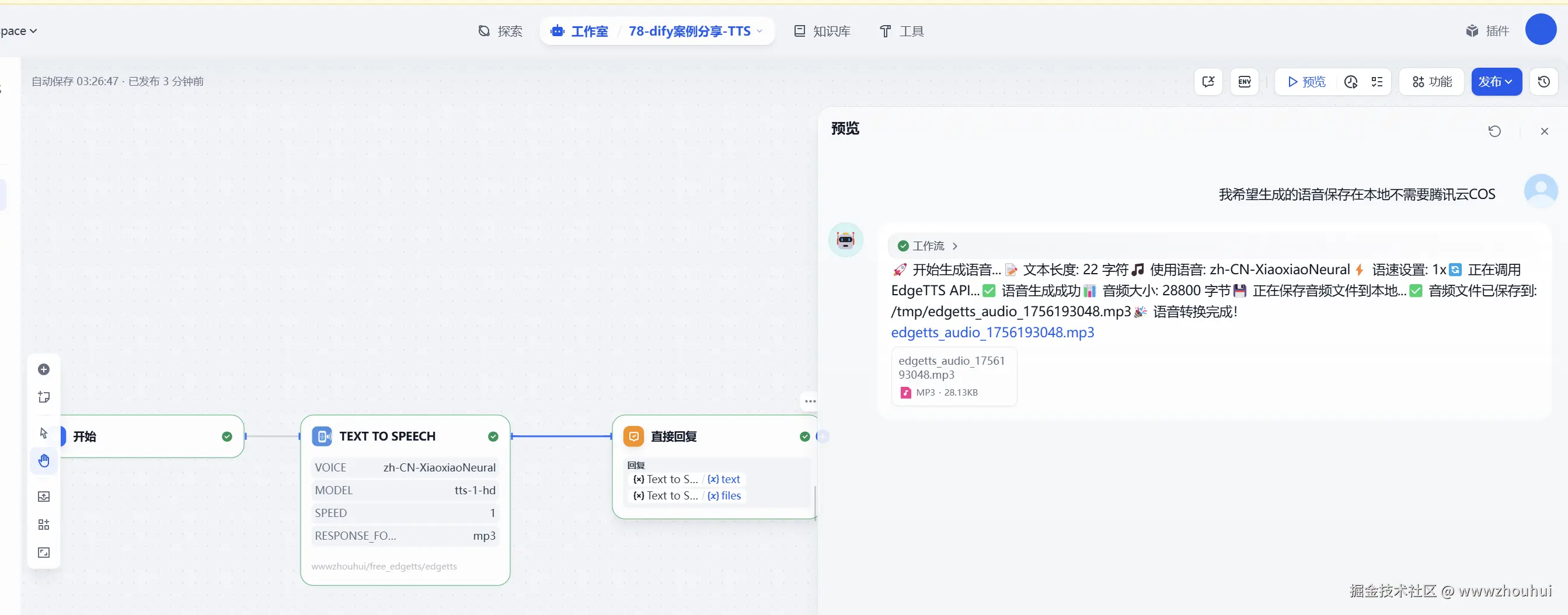
一个简单的基于dify的TTS插件就这么做完了。
说明:在实际AI生成代码中也不是一次性就能搞定的,中间也有一些错误,大家耐心和AI聊天就行了。有错误不担心就发给AI ,反正就和它聊,聊一聊这个插件就聊出来了。
dify工作流体验地址
工作流地址:dify.duckcloud.fun/chat/qQvWYT...
项目我已经放到github上面了,地址github.com/wwwzhouhui/... 觉得项目不错,麻烦点个赞。
5.总结
今天主要带大家了解并实现了基于 Dify 开发 Edge TTS 插件的完整流程,该过程以微软 Edge TTS 服务为核心,结合 Dify 插件开发规范,形成了一套可复用的 TTS 插件开发指南。这份实践涉及多个关键环节:开发规范制定(通过 CLAUDE2.md 明确插件类型识别、架构选择与核心文件规范)、项目结构搭建(标准化 manifest.yaml、provider、tools 等目录文件的组织方式)、TTS 功能实现(基于 FastAPI 对接 Edge TTS 服务,实现文本转语音与本地音频保存)、测试验证流程(编写测试代码验证核心功能,通过 Dify 平台完成插件安装与工作流验证)以及打包部署(使用 dify-plugin 工具将插件打包为 .difypkg 格式用于分发)。
通过这套实践方案,开发者能够快速搭建符合 Dify 平台标准的 TTS 插件,同时具备良好的扩展性 ------ 小伙伴们可以基于此框架扩展更多语音相关功能,如多语言语音合成、语音情感调节、长文本分段合成等,进一步丰富 Dify 的语音交互场景。在实际验证中,遵循该方案开发的插件能够稳定对接 Edge TTS 服务,适配国内网络环境,实现从文本输入到本地音频生成的完整流程,有效解决了插件开发中服务集成、音频处理、平台适配等常见问题。
感兴趣的小伙伴可以按照这份指南尝试开发自己的 Dify TTS 插件,甚至拓展更多创意语音功能。今天的分享就到这里结束了,我们下一篇文章见。