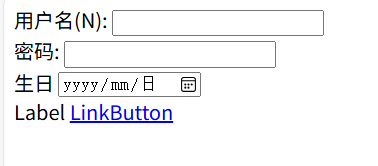
一、控件基础
文本框、按钮事件的使用
vbnet
<%@ Page Language="C#" AutoEventWireup="true" CodeFile="User_Login.aspx.cs" Inherits="User_Login" %>

<!DOCTYPE html>

<html xmlns="http://www.w3.org/1999/xhtml">
<head runat="server">
<meta http-equiv="Content-Type" content="text/html; charset=utf-8"/>
    <title></title>
</head>
<body>
    <form id="form1" runat="server">
        <div>
            用户名:<asp:TextBox ID="txtName" runat="server"></asp:TextBox><br />
            密码:<asp:TextBox ID="txtPwd" runat="server"></asp:TextBox><br />
            <asp:Button ID="btnSubmit" runat="server" Text="登录" OnClick="btnSubmit_Click" />
            <asp:Button ID="btnEnter" runat="server" Text="注册" OnClick="btnEnter_Click" />
        </div>
    </form>
</body>
</html>
后端代码略
表格控件使用
前端代码
vbnet
<%@ Page Language="C#" AutoEventWireup="true" CodeFile="tableControl.aspx.cs" Inherits="tableControl" %>

<!DOCTYPE html>

<html xmlns="http://www.w3.org/1999/xhtml">
<head runat="server">
<meta http-equiv="Content-Type" content="text/html; charset=utf-8"/>
    <title></title>
</head>
<body>
    <form id="form1" runat="server">
        <div>
            学生成绩表:<br />
            <asp:Table ID="tabScore" runat="server" GridLines="Both">
                <asp:TableHeaderRow  runat="server">
                    <asp:TableHeaderCell  runat="server">学号</asp:TableHeaderCell>
                    <asp:TableHeaderCell  runat="server">姓名</asp:TableHeaderCell>
                    <asp:TableHeaderCell  runat="server">专业</asp:TableHeaderCell>
                    <asp:TableHeaderCell  runat="server">成绩</asp:TableHeaderCell>
                </asp:TableHeaderRow>
            </asp:Table>
            <a href="tableControl.aspx">tableControl.aspx</a>
        </div>
    </form>
</body>
</html><asp:Table>:ASP.NET服务器端表格控件,GridLines="Both"表示显示表格的边框线。<asp:TableHeaderRow>:表格的表头行,包含 4 个表头单元格(<asp:TableHeaderCell>),分别对应 "学号""姓名""专业""成绩" 列。- 此时表格只有表头,具体数据行将通过后端代码动态生成。
<a href="tableControl.aspx">tableControl.aspx</a>:一个链接,点击后会重新加载当前页面。
后端代码
-
数据来源:用数组模拟从数据库获取的学生信息(学号、姓名、专业、成绩)。
-
动态生成行和单元格:
-
循环数组中的每条数据,创建一个
TableRow(表格行)。 -
为每行创建 4 个
TableCell(单元格),分别存放学号、姓名、专业和成绩。 -
成绩列特殊处理:不直接显示文本,而是添加一个
TextBox(文本框)控件,允许用户编辑成绩。 -
组装表格:将单元格添加到行,再将行添加到前端定义的
tabScore表格中。vbnetprotected void Page_Load(object sender, EventArgs e) { // 模拟从数据库获取的数据 string[] strId = { "231060250111", "231060250112", "231060250113" }; string[] strName = { "张三", "李四", "王五" }; string[] strMajor = { "网工", "网工", "网工" }; string[] stScore = { "97", "95", "92" }; // 循环生成表格数据行 for(int i = 1; i <= strName.Length; i++) { // 创建新行 TableRow row = new TableRow(); // 创建单元格并赋值 TableCell cellId = new TableCell(); cellId.Text = strId[i - 1]; // 学号 TableCell cellName = new TableCell(); cellName.Text = strName[i - 1]; // 姓名 TableCell cellMajor = new TableCell(); cellMajor.Text = strMajor[i - 1]; // 专业 // 成绩单元格:包含一个文本框(可编辑) TableCell cellScore = new TableCell(); TextBox txtScore = new TextBox(); txtScore.ID = "txtScore"; // 文本框ID cellScore.Controls.Add(txtScore); // 将文本框添加到单元格 // 将单元格添加到行 row.Cells.Add(cellId); row.Cells.Add(cellName); row.Cells.Add(cellMajor); row.Cells.Add(cellScore); // 将行添加到表格 tabScore.Rows.Add(row); } }单选按钮控件
前端代码
vbnet
<%@ Page Language="C#" AutoEventWireup="true" CodeFile="radioControl.aspx.cs" Inherits="radioControl" %>

<!DOCTYPE html>

<html xmlns="http://www.w3.org/1999/xhtml">
<head runat="server">
<meta http-equiv="Content-Type" content="text/html; charset=utf-8"/>
    <title></title>
</head>
<body>
    <form id="form1" runat="server">
        <div>
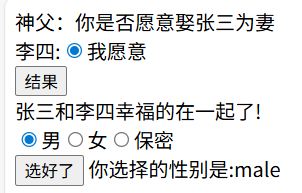
            神父:你是否愿意娶张三为妻<br />
            李四:<asp:RadioButton ID="rbAgree" runat="server" />我愿意<br />
            <asp:Button ID="btnRs" runat="server" Text="结果" OnClick="btnRs_Click" /><br />
            <asp:Label ID="lblRs" runat="server"></asp:Label>
        </div>
        <div>
            <asp:RadioButtonList ID="rbGrender" runat="server" RepeatDirection="Horizontal" RepeatLayout="Flow">
                <asp:ListItem Value="male">男</asp:ListItem>
                <asp:ListItem Value="female">女</asp:ListItem>
                <asp:ListItem Value="secret">保密</asp:ListItem>
            </asp:RadioButtonList><br />
            <asp:Button ID="btnSelected" runat="server" Text="选好了" OnClick="btnSelected_Click" />
            <asp:Label ID="lblMsg" runat="server"></asp:Label>
        </div>
    </form>
</body>
</html><asp:RadioButtonList>:单选按钮列表控件,用于创建一组互斥的单选按钮RepeatDirection="Horizontal":设置选项水平排列RepeatLayout="Flow":使选项以流式布局显示(不使用表格)
<asp:ListItem>:列表项,每个项代表一个单选按钮,Value是后端获取的值,标签文本是显示给用户的内容- 第二个按钮
btnSelected点击后触发btnSelected_Click事件 lblmsg标签用于显示性别选择结果
后端代码
vbnet
using System;
using System.Collections.Generic;
using System.Linq;
using System.Web;
using System.Web.UI;
using System.Web.UI.WebControls;

public partial class radioControl : System.Web.UI.Page
{
    protected void Page_Load(object sender, EventArgs e)
    {

    }

    protected void btnRs_Click(object sender, EventArgs e)
    {
        if (rbAgree.Checked)
        {
            lblRs.Text = "张三和李四幸福的在一起了!";
        }
        else
        {
            lblRs.Text = "李四自由了";
        }
    }

    protected void btnSelected_Click(object sender, EventArgs e)
    {
        lblMsg.Text = "你选择的性别是:" + rbGrender.SelectedValue;
    }
}
最终效果
PlaceHoder控件
前端代码
vbnet
<%@ Page Language="C#" AutoEventWireup="true" CodeFile="placeControl.aspx.cs" Inherits="placeControl" %>

<!DOCTYPE html>

<html xmlns="http://www.w3.org/1999/xhtml">
<head runat="server">
<meta http-equiv="Content-Type" content="text/html; charset=utf-8"/>
    <title></title>
</head>
<body>
    <form id="form1" runat="server">
        <div>
            <asp:PlaceHolder ID="PlaceHolder1" runat="server"></asp:PlaceHolder>
        </div>
    </form>
</body>
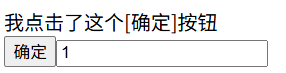
</html>PlaceHolder作为一个 "容器",允许在后端代码中动态创建控件并添加到页面。- 页面运行时,会自动在
PlaceHolder1的位置显示动态创建的 "确定" 按钮和文本框。 - 点击 "确定" 按钮后,会触发后端的事件处理方法,在页面上输出提示文本。
后端代码
vbnet
using System;
using System.Collections.Generic;
using System.Linq;
using System.Web;
using System.Web.UI;
using System.Web.UI.WebControls;

public partial class placeControl : System.Web.UI.Page
{
    protected void Page_Load(object sender, EventArgs e)
    {
        Button btnSubmit = new Button();
        btnSubmit.ID = "btnSubmit";
        btnSubmit.Text = "确定";
        btnSubmit.Click += new EventHandler(BtnSubmit_Click);
        TextBox txtInput = new TextBox();
        txtInput.ID = "txtInput";
        PlaceHolder1.Controls.Add(btnSubmit);
        PlaceHolder1.Controls.Add(txtInput);
    }
    protected void BtnSubmit_Click(object sender,EventHandler e)
    {
        Response.Write("我点击了这个[确定]按钮");
    }

}
效果展示
ListBox控件
前端代码
vbnet
<%@ Page Language="C#" AutoEventWireup="true" CodeFile="lstboxControl.aspx.cs" Inherits="lstboxControl" %>

<!DOCTYPE html>

<html xmlns="http://www.w3.org/1999/xhtml">
<head runat="server">
<meta http-equiv="Content-Type" content="text/html; charset=utf-8"/>
    <title></title>
</head>
<body>
    <form id="form1" runat="server">
        <div>
            <asp:ListBox ID="lstCourse" runat="server" Rows="5" SelectionMode="Multiple">
                <asp:ListItem>计算机网络</asp:ListItem>
                <asp:ListItem>C语言</asp:ListItem>
                <asp:ListItem>Web程序设计</asp:ListItem>
                <asp:ListItem>Python课程</asp:ListItem>
                <asp:ListItem>Java语言</asp:ListItem>
            </asp:ListBox>
            <asp:Button ID="btnToRight" runat="server" Text="== >" OnClick="btnToRight_Click" />
            <asp:Button ID="btnToLeft" runat="server" Text="< ==" OnClick="btnToLeft_Click" />
            <asp:ListBox ID="lstSelected" runat="server" Rows="5" SelectionMode="Multiple"></asp:ListBox>
            <asp:Button ID="btnSubmit" runat="server" Text="提交" OnClick="btnSubmit_Click" />
            <asp:Label ID="lblMsg" runat="server" Text="你选中的有:"></asp:Label>
        </div>
    </form>
</body>
</html>
后端代码
vbnet
using System;
using System.Collections.Generic;
using System.Linq;
using System.Web;
using System.Web.UI;
using System.Web.UI.WebControls;

public partial class lstboxControl : System.Web.UI.Page
{
    protected void Page_Load(object sender, EventArgs e)
    {
        if(lstSelected.Items.Count == 0)
        {
            btnToLeft.Enabled = false;
        }
    }
    private void Btn_state()
    {
        if(lstCourse.Items.Count == 0)
        {
            btnToRight.Enabled = false;
        }
        else
        {
            btnToRight.Enabled = true;
        }
        if(lstSelected.Items.Count == 0)
        {
            btnToLeft.Enabled = false;
        }
        else
        {
            btnToLeft.Enabled = true;
        }
    }

    protected void btnToRight_Click(object sender, EventArgs e)
    {
        for(int i = 0; i < lstCourse.Items.Count; i++)
        {
            if (lstCourse.Items[i].Selected == true)
            {
                lstCourse.Items.Remove(lstCourse.Items[i]);
                lstSelected.Items.Add(lstCourse.Items[i]);
                i--;
            }
        }
        Btn_state();
    }

    protected void btnToLeft_Click(object sender, EventArgs e)
    {
        for(int i = 0; i < lstSelected.Items.Count; i++)
        {
            if (lstSelected.Items[i].Selected == true)
            {
                lstSelected.Items.Remove(lstSelected.Items[i]);
                lstCourse.Items.Add(lstSelected.Items[i]);
                i--;
            }
        }
        Btn_state();
    }

    protected void btnSubmit_Click(object sender, EventArgs e)
    {
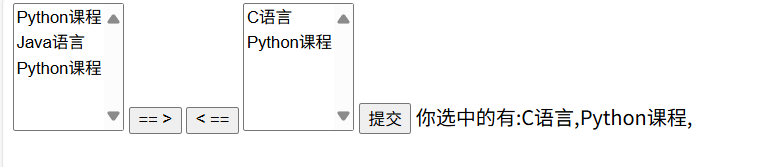
        lblMsg.Text = "你选中的有:";
        for (int i = 0; i < lstSelected.Items.Count; i++)
        {
            lblMsg.Text += lstSelected.Items[i].Text + ",";
        }
    }
}
最终效果
Panel控件
- 初始状态下面板(
pnlStep)是可见的(因为ASP.NET控件的Visible属性默认值为true) - 点击 "隐藏" 按钮后,面板会被隐藏(不在页面上显示)
- 点击 "显示" 按钮后,面板会重新显示
vbnet
<%@ Page Language="C#" AutoEventWireup="true" CodeFile="lblPanel.aspx.cs" Inherits="lblPanel" %>

<!DOCTYPE html>

<html xmlns="http://www.w3.org/1999/xhtml">
<head runat="server">
<meta http-equiv="Content-Type" content="text/html; charset=utf-8"/>
    <title></title>
</head>
<body>
    <form id="form1" runat="server">
        <div>
            <asp:Panel ID="pnlStep" runat="server">
            <asp:Button ID="btnShow" runat="server" Text="显示" OnClick="btnShow_Click"/>
            <asp:Button ID="btnHidden" runat="server" Text="隐藏" OnClick="btnHidden_Click" />
            </asp:Panel>
        </div>
    </form>
</body>
</html>
后端代码
vbnet
using System;
using System.Collections.Generic;
using System.Linq;
using System.Web;
using System.Web.UI;
using System.Web.UI.WebControls;

public partial class lblPanel : System.Web.UI.Page
{
    protected void Page_Load(object sender, EventArgs e)
    {

    }

    protected void btnShow_Click(object sender, EventArgs e)
    {
        pnlStep.Visible = true;
    }

    protected void btnHidden_Click(object sender, EventArgs e)
    {
        pnlStep.Visible = false;
    }
}
Image控件
前端代码
vbnet
<%@ Page Language="C#" AutoEventWireup="true" CodeFile="imgControl.aspx.cs" Inherits="imgControl" %>

<!DOCTYPE html>

<html xmlns="http://www.w3.org/1999/xhtml">
<head runat="server">
<meta http-equiv="Content-Type" content="text/html; charset=utf-8"/>
    <title></title>
</head>
<body>
    <form id="form1" runat="server">
        <div>
            <asp:RadioButtonList ID="rblGender" runat="server" AutoPostBack="true" OnSelectedIndexChanged="rblGender_SelectedIndexChanged">
                <asp:ListItem Value="male">男</asp:ListItem>
                <asp:ListItem Value="female">女</asp:ListItem>
                <asp:ListItem></asp:ListItem>
            </asp:RadioButtonList><br />
            <asp:Image ID="imgHouse" runat="server" ImageUrl="~/imgaes/imageHouse.png" Width="280px"/>
            <asp:ImageMap ID="ImageMap1" runat="server" ImageUrl="~/images/bd.png">
                <asp:CircleHotSpot X="205" Y="65" Radius="65" NavigateUrl="http://www.baidu.com/" />
            </asp:ImageMap>
            <asp:HyperLink ID="hylBaidu" runat="server" NavigateUrl="http://www.baidu.com/">百度</asp:HyperLink>
        </div>
    </form>
</body>
</html>
快捷键设置
vbnet
<%@ Page Language="C#" AutoEventWireup="true" CodeFile="Default.aspx.cs" Inherits="_Default" %>

<!DOCTYPE html>

<html xmlns="http://www.w3.org/1999/xhtml">
<head runat="server">
<meta http-equiv="Content-Type" content="text/html; charset=utf-8"/>
    <title></title>
</head>
<body>
    <form id="form1" runat="server">
        <div>
                       <asp:Label ID="lhlName" runat="server" Text="用户名(N): "
                AssociateControlID="textName" AccessKey="N"></asp:Label>
            <asp:TextBox ID="textName" runat="server"></asp:TextBox><br />
            <asp:Label ID="lblPwd" runat="server" Text="密码:"  AssociateControlID="txtPwd" AccessKey="M"></asp:Label>
            <asp:TextBox ID="txtPwd" TextMode="Password" runat="server"></asp:TextBox><br />
            <asp:Label ID="lblDate" runat="server" Text="生日" AssociatedControlID="txtDate" AccessKey="D"></asp:Label>
            <asp:TextBox ID="txtDate" runat="server" TextMode="Date"></asp:TextBox><br />
            <asp:Label ID="Label3" runat="server" Text="Label"></asp:Label>

            <asp:LinkButton ID="LinkButton1" runat="server">LinkButton</asp:LinkButton>
        </div>
    </form>
</body>
</html>
结果显示