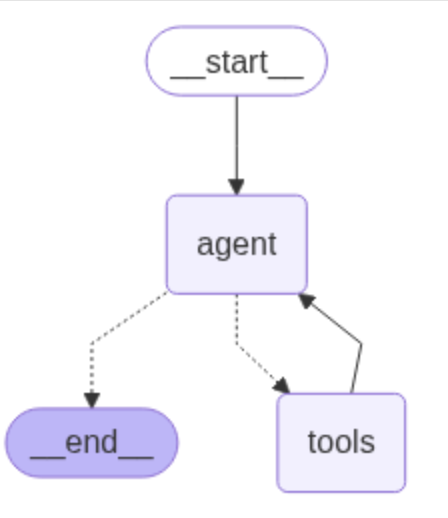
ReAct Agent应用由一个代理LLM和工具组成。与应用交互时,调用代理LLM决定是否使用工具。
这是一个循环过程,如果代理LLM要调用工具,将运行工具并将结果传回Agent,Agent添加工具现场后继续请求代理LLM是否使用工具;如果LLM没要求运行工具,将结束循环并响应用户。
这里尝试基于langgraph+ollama构建上述agent代理应用,示例agent代理架构的真实运行过程。
1 环境安装
openai api访问受限,所以使用本地ollama部署大模型,安装langchain-ollama
pip install -U langgraph
pip install -U langchain-ollama
假设ollama已安装,并且已pull大模型。ollama安装和模型pull可参考
在mac m1基于ollama运行deepseek r1_mac m1 ollama-CSDN博客
2 代理运行
1)工具定义
通过langchain_core内置tool自定义工具get_weather,返回nyc、sf预置天气数据。
示例如下,实现方式与mcp工具定义类似。
from langchain_ollama import ChatOllama

model = ChatOllama(model="qwen3:4b", temperature=0)

# 使用自定义工具,nyc、sf预置天气数据
from typing import Literal
from langchain_core.tools import tool

## 工具定义
@tool
def get_weather(city: Literal["nyc", "sf"]):
    """使用此工具获取天气信息。"""
    if city == "nyc":
        return "It might be cloudy in nyc"
    elif city == "sf":
        return "It's always sunny in sf"
    else:
        raise AssertionError("Unknown city")


tools = [get_weather]

## create LangGraph agent
from langgraph.prebuilt import create_react_agent
graph = create_react_agent(model, tools=tools)
2)工具可视化
get_graph()输出工具调用图。
from IPython.display import Image, display
display(Image(graph.get_graph().draw_mermaid_png()))
工具graph示例如下
-
工具运行示例
def print_stream(stream):
for s in stream:
message = s["messages"][-1]
if isinstance(message, tuple):
print(message)
else:
message.pretty_print()inputs = {"messages": [("user", "what is the weather in sf")]}
print_stream(graph.stream(inputs, stream_mode="values"))
运行结果
================================
Human Message
=================================
what is the weather in sf
==================================
Ai Message
==================================
<think>
Okay, the user is asking for the weather in SF. Let me check the tools available. There's a function called get_weather that takes a city parameter. The city has to be either "nyc" or "sf". Since the user mentioned SF, which is San Francisco, I should call that function with the city set to "sf". I need to make sure the arguments are correctly formatted as JSON. Alright, the tool call should be straightforward here. No need to ask for clarification since SF is one of the allowed options.
</think>
Tool Calls:
get_weather (31dae8d7-739e-491f-8c19-375001538329)
Call ID: 31dae8d7-739e-491f-8c19-375001538329
Args:
city: sf
=================================
Tool Message
=================================
Name: get_weather
It's always sunny in sf
==================================
Ai Message
==================================
<think>
Okay, the user asked for the weather in SF, and I used the get_weather function to get the info. The response came back saying it's always sunny in SF. Now I need to present that information in a friendly and clear way. Let me make sure to mention that the weather is sunny and maybe add a bit of a positive note about it. Also, since the function only provides the weather for SF, I should stick to that and not add any other details. Alright, time to craft a concise response.
</think>
The weather in SF is currently sunny! 🌞 Let me know if you need more details.
reference
LangGraph ReAct Agent: 经典案例(系列1)
https://zhuanlan.zhihu.com/p/717926365
ReAct框架学习
https://blog.csdn.net/liliang199/article/details/149513523
LLM中工具调用的完整指南:释放大模型潜能的关键
https://zhuanlan.zhihu.com/p/1909186977066128479
LangGraph quickstart
https://langchain-ai.github.io/langgraph/agents/agents/#2-create-an-agent
MCP-与本地大模型集成实现工具调用
1https://blog.csdn.net/liliang199/article/details/149865159
在mac m1基于ollama运行deepseek r1