目录
websocket协议
WebSocket是一种在单个TCP连接上进行全双工通信的应用协议,允许服务端和客户端实时双向数据传输。它通过HTTP/HTTPS的初始握手建立连接,之后转为独立的WebSocket协议通信,适用于需要低延迟和高频交互的场景(如在线游戏、实时聊天)。
websocket协议的出现就是为了解决http协议服务端无法主动向客户端推送信息的问题。
websocketpp库
websocket协议支持多种语言使用,而websocketpp就是C++语言使用的一套与websocket相关的一套API。
安装websocketpp
1.直接使用linux包管理器安装(Centos要使用yum)
bash
sudo apt-get install libwebsocketpp-dev2.使用源码安装
bash
git clone https://github.com/zaphoyd/websocketpp.git
cd websocketpp
mkdir build && cd build
cmake ..
make
sudo make install
安装好之后检查是否安装成功,查看该目录是否存在,如果存在说明安装成功了;
指令:ls /usr/include/websocketpp
websocketpp的用法
这里我写了个简单的demo来测试websocketpp的使用。
websocketpp服务器
cpp
#pragma once

#include <iostream>
#include <websocketpp/connection.hpp>
#include <websocketpp/server.hpp>
#include <websocketpp/close.hpp>
#include <websocketpp/config/asio.hpp>
#include <websocketpp/common/functional.hpp>
#include <functional>
#include <sstream>
#include <unordered_set>
#include <vector>
#include <memory>
#include <atomic>
#include <thread>
#include <unistd.h>

typedef websocketpp::server<websocketpp::config::asio> websocket_server; // 服务器别名
typedef websocket_server::message_ptr message_ptr;

using msg_callback = std::function<void(websocketpp::connection_hdl, websocket_server::message_ptr)>;

class Server
{
public:
    Server() : _count(0)
    {
        _server.init_asio();                                         // 初始化服务器
        _server.set_reuse_addr(true);                                // 设置地址重用
        _server.set_access_channels(websocketpp::log::alevel::none); // 关闭日志

        // 设置回调函数
        _server.set_open_handler(bind(&Server::on_open, this, std::placeholders::_1)); // 回调的时候会自动传递一个connection_hdl参数
        _server.set_close_handler(bind(&Server::on_close, this, std::placeholders::_1));
        _server.set_message_handler(bind(&Server::on_message, this, std::placeholders::_1, std::placeholders::_2)); // 两个参数(connection_hdl,message_ptr)
    }
    // 设置监听端口
    void set_listen(int port)
    {
        _server.listen(port); // 0.0.0.0
        std::cout << "开始监听端口..." << port << std::endl;
    }
    // 开始运行服务器
    void run()
    {
        _server.start_accept();
        _server.run();
    }
    void push_message()
    {
        std::thread push_thread([this]()
                                {
                                    while (true)
                                    {
                                        std::stringstream ss;
                                        ss << "服务端第" << _count++ << "次推送信息";
                                        if(_connections.size()==0)
                                        {
                                            continue;
                                        }
                                        // 每过5s推送一次信息
                                        for (auto &hdl : _connections)
                                        {
                                            std::string content = get_string();
                                            std::string push_message = ss.str() + content;                               // 读取缓冲区数据
                                            websocket_server::connection_ptr connection = _server.get_con_from_hdl(hdl); // 获取连接指针
                                            // 开始推送信息
                                            connection->send(push_message);
                                            std::cout << "服务端已经推送新信息: " << content << std::endl;
                                            sleep(5);
                                        }
                                    } });
        push_thread.detach();
    }

private:
    // 用于测试服务端主动测试的字符串
    std::string get_string()
    {
        std::string str = "acbakjvbaklbvabildhnakfna";
        // 使用随机数,随机获取区间,截取
        int start = rand() % str.size();
        int end = start + rand() % (str.size() - start);
        return str.substr(start, end);
    }
    // 注册连接回调函数
    void on_open(websocketpp::connection_hdl hdl)
    {
        std::cout << "有一个新连接到来..." << std::endl; // 提示信息
        _connections.insert(hdl);
    }
    // 注册关闭回调函数
    void on_close(websocketpp::connection_hdl hdl)
    {
        std::cout << "有一个连接关闭..." << std::endl;
        _connections.erase(hdl);
    }
    // 注册处理消息回调函数
    void on_message(websocketpp::connection_hdl hdl, message_ptr msg)
    {
        std::string message = msg->get_payload(); // 读取消息
        std::cout << "客户端消息:" << message << std::endl;
        // 下面是响应处理逻辑
        std::string echo_response = "服务端收到消息:";
        echo_response += message;

        // 将连接句柄转化为连接指针
        websocket_server::connection_ptr connection = _server.get_con_from_hdl(hdl);
        // 发送响应
        connection->send(echo_response);
        std::cout << "响应:" << echo_response << std::endl;
    }
    // 构建链接句柄哈希
    struct connection_hdl_hash
    {
        std::size_t operator()(const websocketpp::connection_hdl &hdl) const
        {
            return reinterpret_cast<std::size_t>(hdl.lock().get());
        }
    };

    struct connection_hdl_equal
    {
        bool operator()(const websocketpp::connection_hdl &a, const websocketpp::connection_hdl &b) const
        {
            return !a.owner_before(b) && !b.owner_before(a);
        }
    };
    std::unordered_set<
        websocketpp::connection_hdl,
        connection_hdl_hash,
        connection_hdl_equal>
        _connections;
    websocket_server _server;
    std::atomic<size_t> _count;
    // std::unordered_set<websocketpp::connection_hdl, connection_hdl_hash> _connections;
};

class ServerBuilder
{
public:
    std::shared_ptr<Server> build()
    {
        return std::make_shared<Server>();
    }
};
websocketpp客户端
cpp
#include <iostream>
#include <websocketpp/connection.hpp>
#include <websocketpp/client.hpp>
#include <websocketpp/close.hpp>
#include <websocketpp/config/asio.hpp>
#include <websocketpp/common/functional.hpp>
#include <functional>
#include <unordered_set>
#include <vector>

using namespace std;

using websocket_client = websocketpp::client<websocketpp::config::asio>;

// 客户端对象
websocket_client client;

// 连接句柄
websocket_client::connection_ptr con_ptr;

void on_message(websocketpp::connection_hdl, websocket_client::message_ptr msg)
{
    cout << "Received message: " << msg->get_payload() << endl;
}

void on_open(websocketpp::connection_hdl hdl)
{
    if (hdl.lock() != nullptr) // lock方法是获取连接句柄的智能指针
    {
        std::cout << "连接成功!" << std::endl;
        con_ptr = client.get_con_from_hdl(hdl);
        std::thread echo_thread([]() {
            if (con_ptr != nullptr)
            {
                while (true)
                {
                    std::cout << "请输入要发送的信息>";
                    std::string message;
                    std::cin >> message;
                    con_ptr->send(message);
                    std::cout << "消息发送成功!" << std::endl;
                }
            }
        });
        echo_thread.detach();
    }
    else
        std::cerr << "连接失败!" << std::endl;
}

// 连接关闭时调用的,只要调用了就是连接关闭了
void on_close(websocketpp::connection_hdl hdl)
{
    if (hdl.lock() != nullptr)
    {
        std::cout << "连接关闭!" << std::endl;
    }
}

int main()
{
    client.init_asio();                                         // 初始化
    client.set_access_channels(websocketpp::log::alevel::none); // 关闭日志
    client.set_open_handler(&on_open);
    client.set_message_handler(&on_message);
    client.set_close_handler(&on_close);

    websocketpp::lib::error_code ec;
    auto con = client.get_connection("ws://0.0.0.0:8005", ec);
    if (ec)
    {
        std::cout << "连接端口8005失败: " << ec.message() << std::endl;
        return 1;
    }
    client.connect(con);
    // 不再在 main 中创建输入线程,输入线程在 on_open 回调中启动

    // 运行客户端
    client.run();

    return 0;
}
makefile文件
cpp
all:server client

server:server.cc
	g++ -o server server.cc -std=c++11 -lboost_system -lssl -lcrypto
client:client.cc
	g++ -o $@ $^ -std=c++11 -lboost_system -lssl -lcrypto

.PHONY:clean
clean:
	rm -rf server client
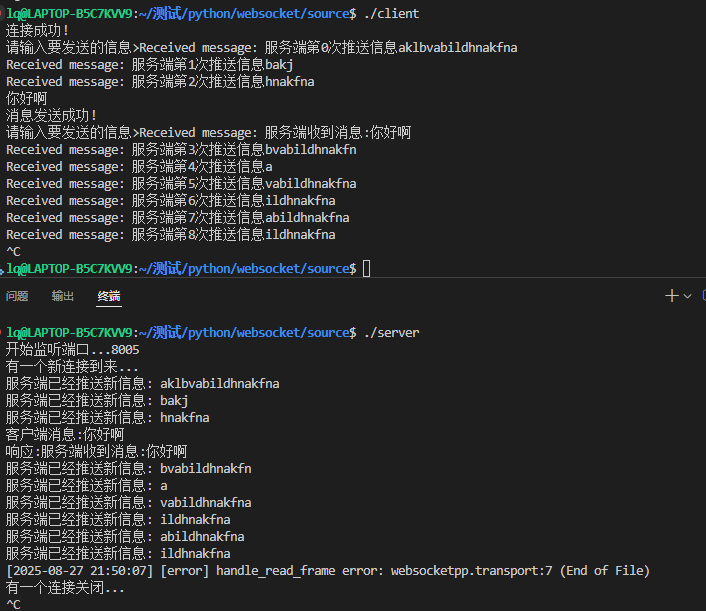
结果