【Chrome 扩展】chrome自动升级后 Switchomega扩展不支持了怎么办

报错提示

无法安装扩展程序,因为它使用了不受支持的清单版本。 无法加载清单。

解决办法

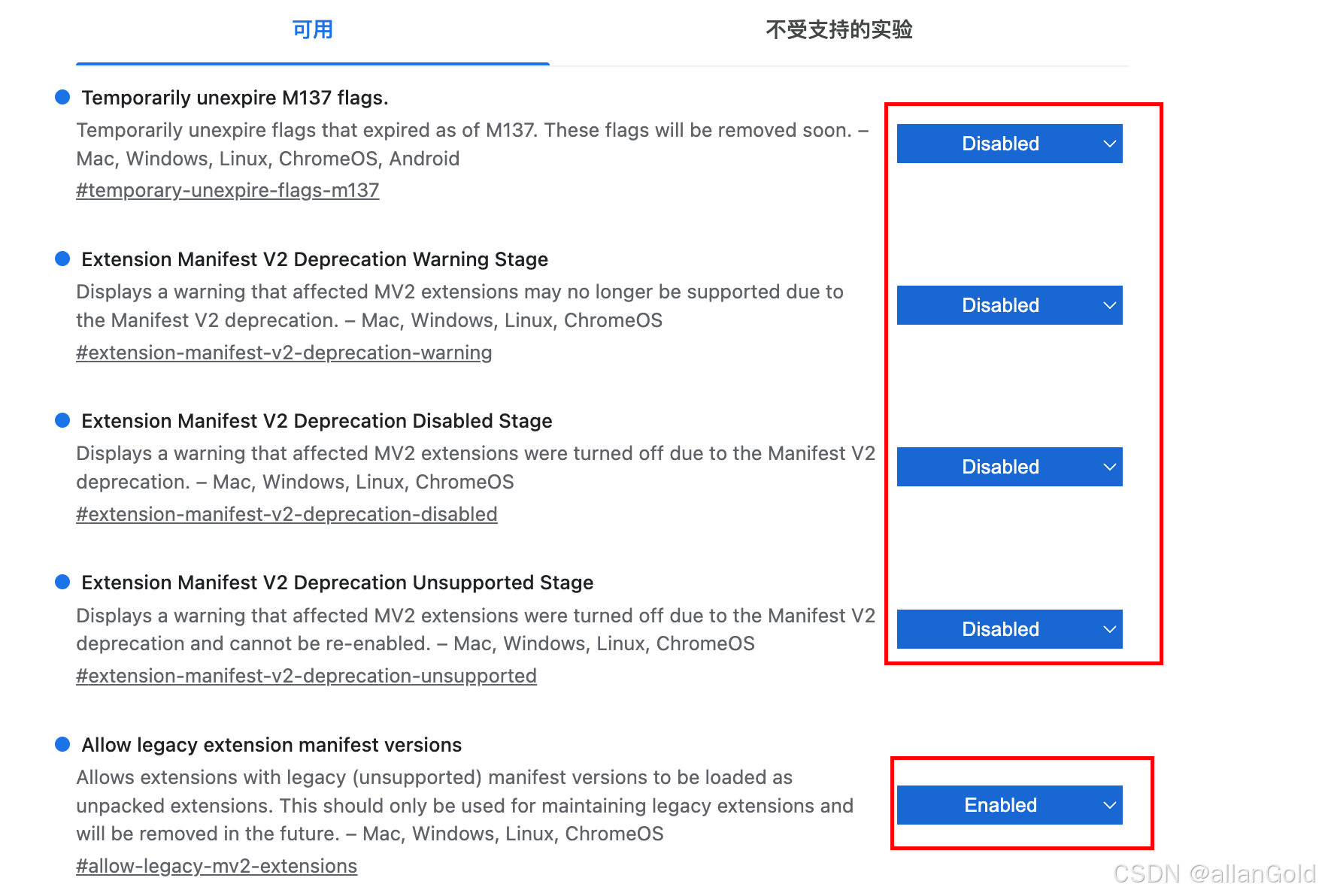
进入 chrome://flags 设置

chrome://flags/#temporary-unexpire-flags-m137 Enabled

重启浏览器,继续进入chrome://flags设置

chrome://flags/#extension-manifest-v2-deprecation-warning Disabled

chrome://flags/#extension-manifest-v2-deprecation-disabled Disabled

chrome://flags/#extension-manifest-v2-deprecation-unsupported Disabled

chrome://flags/#allow-legacy-mv2-extensions Enabled

如图
相关推荐
leoZ23115 小时前
记忆系统与 Agent 定制完全指南(四):自定义 Agent 开发(一)
前端·chrome
leoZ23116 小时前
记忆系统与 Agent 定制完全指南(三):记忆的检索与使用
前端·chrome
caimouse2 天前
Chrome V49 (49.0.2623.112) 在 ReactOS 上运行所需的系统依赖
chrome·reactos
MengMeng_10233 天前
soc平台告警分析思路及chrome插件
前端·chrome·安全威胁分析
caimouse3 天前
Chrome V49 SxS 加载问题分析与修复
chrome·reactos
hj2862514 天前
Shell 脚本完整学习笔记
chrome·笔记·学习
anod8 天前
Amazon反爬虫:一场从自动化到Chrome插件的折腾之旅
javascript·chrome·amazon·插件
李顿波9 天前
Chrome 扩展程序 MV3 架构组件概览
前端·chrome·浏览器插件
GHL2842710909 天前
安装chrome浏览器
前端·chrome
雁鸣零落9 天前
浏览器扩展 CaptionGo,在网页视频上显示双语字幕,支持 PC 和手机端使用
android·chrome·edge·firefox·安卓