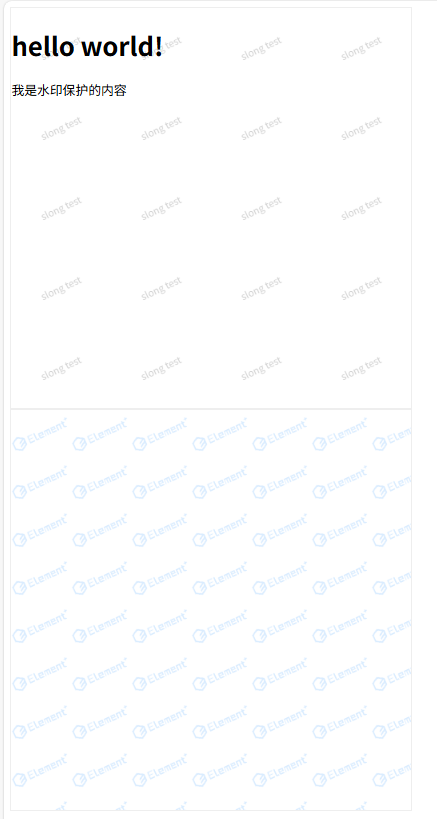
<!DOCTYPE html>
<html lang="en">
<head>
    <meta charset="UTF-8">
    <meta name="viewport" content="width=device-width, initial-scale=1.0">
    <title>水印案例</title>
    <style>
        .box {
            width: 500px;
            height: 500px;
            border: 1px solid #eee;
        }
    </style>
</head>
<body>
    <div class="box">
        <h1>hello world!</h1>
        <p onclick="console.log('123')">我是水印保护的内容</p>
    </div>
    <div class="box"></div>
<script type="text/javascript">
/**
 * 生成页面水印
 * 支持:文字数组、base64 图片、HTMLImageElement、图片 URL
 */
function createWatermark({
  texts = ["watermark", "By slongzhang"],
  fontSize = 12,
  opacity = 0.1,
  angle = -20,
  gapX = 125,
  gapY = 100,
  zIndex = 999,
  id = "slongzhang@126.com",
  mount = void 0
} = {}) {
  // ---- 文本模式 ----
  if (Array.isArray(texts) || typeof texts === "string" && !isImageLike(texts)) {
    if (typeof texts === "string") texts = [texts];

    const canvas = document.createElement("canvas");
    const ctx = canvas.getContext("2d");
    canvas.width = gapX;
    canvas.height = gapY;

    ctx.clearRect(0, 0, gapX, gapY);
    ctx.globalAlpha = opacity;
    ctx.font = `${fontSize}px sans-serif`;
    ctx.fillStyle = "black";
    ctx.textAlign = "center";
    ctx.textBaseline = "middle";
    ctx.translate(gapX / 2, gapY / 2);
    ctx.rotate((angle * Math.PI) / 180);

    texts.forEach((t, i) => {
      ctx.fillText(t, 0, i * (fontSize + 5));
    });

    appendWatermark(canvas.toDataURL());
    return;
  }

  // ---- 图片模式 ----
  loadImage(texts, (img) => {
    const canvas = document.createElement("canvas");
    canvas.width = gapX;
    canvas.height = gapY;
    const ctx = canvas.getContext("2d");
    ctx.clearRect(0, 0, gapX, gapY);

    ctx.globalAlpha = opacity;

    // 移动到中心再旋转
    ctx.translate(gapX / 2, gapY / 2);
    ctx.rotate((angle * Math.PI) / 180);

    // 缩放比例(保持等比)
    const scale = Math.min(gapX / img.width, gapY / img.height);
    const newWidth = img.width * scale;
    const newHeight = img.height * scale;

    ctx.drawImage(img, -newWidth / 2, -newHeight / 2, newWidth, newHeight);

    appendWatermark(canvas.toDataURL());
  });

  // ---- 内部函数:挂载水印 ----
  function appendWatermark(base64Url) {
    if (!base64Url) return;
    const div = document.createElement("div");
    div.style.pointerEvents = "none";
    div.style.top = "0";
    div.style.left = "0";
    div.style.width = "100%";
    div.style.height = "100%";
    div.style.position = "fixed";
    if (zIndex) div.style.zIndex = zIndex;
    div.style.backgroundImage = `url('${base64Url}')`;

    let mountType = typeof mount;
    if (mountType === "undefined") {
      mount = document.body;
    } else if (mountType === "string") {
      mount = document.querySelector(mount);
    }
    if (mount && mount instanceof Element) {
      id = typeof id === "string" ? encodeURI(id) : false;
      if (id) {
        const old = mount.querySelector(`div[data-watermark-id="${id}"]`);
        if (old) old.remove();
        div.setAttribute("data-watermark-id", id);
      }
      if (mount !== document.body) {
        positionS2T(mount);
        div.style.position = "absolute";
      }
      mount.appendChild(div);
    }
  }
}

/**
 * 判断是不是图片输入(base64 / URL / <img> 元素)
 */
function isImageLike(input) {
  if (input instanceof HTMLImageElement) return true;
  if (typeof input === "string") {
    return /^data:[a-z]+\/[0-9a-z\-\.\+]+;base64,/.test(input) || /^https?:\/\//.test(input);
  }
  return false;
}

/**
 * 加载图片(支持 base64 / URL / <img> 元素)
 */
function loadImage(source, callback) {
  if (source instanceof HTMLImageElement) {
    if (source.complete) {
      callback(source);
    } else {
      source.onload = () => callback(source);
    }
    return;
  }
  if (typeof source === "string") {
    const img = new Image();
    img.crossOrigin = "anonymous"; // 允许跨域图像
    img.onload = () => callback(img);
    img.src = source;
  }
}

/**
 * 修复父元素 static 定位
 */
function positionS2T(parentElement) {
  if (
    parentElement instanceof Element &&
    window.getComputedStyle(parentElement).position === "static"
  ) {
    parentElement.style.position = "relative";
  }
}

</script>

<script type="text/javascript">
var b64 = `base64的图片资源或图片超链接`;
</script>
<script type="text/javascript">

    createWatermark({
      texts: 'slong test', // ["slong watermark", "2025-08-30"],
      fontSize: 12,
      opacity: 0.2,
      angle: -25,
      gapX: 125,
      gapY: 100,
      mount: '.box'
    });
    var imgEl = document.createElement('img');
    imgEl.src = b64;
    var r = .6
    createWatermark({
      texts: imgEl, // b64
      fontSize: 12,
      opacity: 0.2,
      angle: -25,
      gapX: 125 * r,
      gapY: 100 * r,
      mount: document.querySelectorAll('.box')[1]
    });

</script>
</body>
</html>